uOSC is an OSC implementation for Unity.
- Unity Package
- Download the latest .unitypackage from Release page.
- Git URL (UPM)
- Add
https://github.com/hecomi/uOSC.git#upmto Package Manager.
- Add
- Scoped Registry (UPM)
- Add a scoped registry to your project.
- URL:
https://registry.npmjs.com - Scope:
com.hecomi
- URL:
- Install uOSC in Package Manager.
- Add a scoped registry to your project.
- Attach
uOscServercomponent to a GameObject. - Set the port you want to listen on.
- Register the
uOscServer.onDataReceivedevent (from code or inspector).
usingUnityEngine;usinguOSC;publicclassServerTest:MonoBehaviour{voidStart(){varserver=GetComponent<uOscServer>();server.onDataReceived.AddListener(OnDataReceived);}voidOnDataReceived(Messagemessage){// address (e.g. /uOSC/hoge)varmsg=message.address+": ";// arguments (object array)foreach(varvalueinmessage.values){if(valueisint)msg+=(int)value;elseif(valueisfloat)msg+=(float)value;elseif(valueisstring)msg+=(string)value;elseif(valueisbool)msg+=(bool)value;elseif(valueisbyte[])msg+="byte["+((byte[])value).Length+"]";}Debug.Log(msg);}}onDataReceived is called from the main Unity thread, so you can use the Unity APIs in it.
Since the OSC Bundle is automatically expanded and each message comes directly to the onDataReceived event handler, there is no need to check whether the value is an OSC Message or an OSC Bundle.
- Add
uOscClientcomponent to GameObject. - Send data (
int,float,string,bool, andbyte[], are supported now).
usingUnityEngine;usinguOSC;publicclassClientTest:MonoBehaviour{voidUpdate(){varclient=GetComponent<uOscClient>();client.Send("/uOSC/test",10,"hoge",1.234f,newbyte[]{1,2,3});}}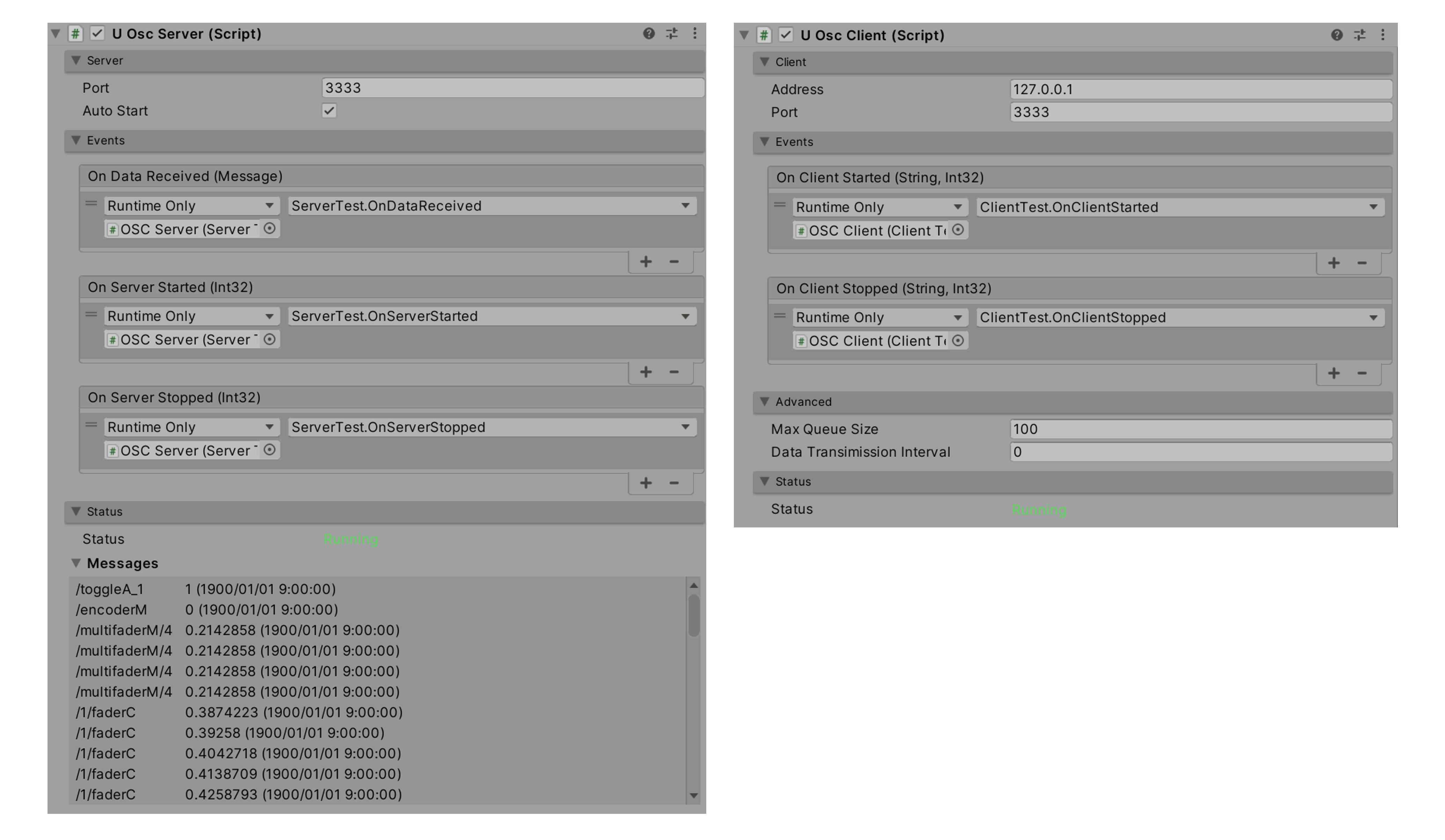
If autoStart of uOscServer is true, the server will start automatically at runtime. If you want to start it manually, you can set it to false and call StartServer(); calling StopServer() will stop the server. If you want to start and stop from the inspector, toggle the checkbox of the component.
If the port or address of uOscClient / uOscServer is changed, the server or client will be restarted automatically. If you want to detect when a server or client starts or stops, register listeners to uOscServer.onServerStarted / uOscServer.onServerStopped / uOscClient.onClientStarted / uOscClient.onClientStopped events.
uOscClient.Send() is not executed immediately, but is registered in a queue, and is retrieved from the queue and sent in a background thread. If a large number of Send() are called at the same time, messages that exceed uOscClient.maxQueueSize will be automatically discarded. In this case, you should change uOscClient.maxQueueSize to a larger value. The interval of the background thread processing is about 1 ms by default.
If you need to send multiple large byte[] data at the same time, there are cases where you will lose packets frequently if you do not allow an interval. In this case, set uOscClient.dataTransmissionInterval (milliseconds). The background thread waits for the interval between each time a message is sent.
The maximum packet size that can be sent is determined by the UDP spec, which is 65535 bytes minus the size of the UDP and OSC headers. If you want to divide packets to send larger data, please refer to uPacketDivision.
Please check your firewall settings.
Various features have been added since v2, but backward compatibility with v1 has been maintained.
This is an example to send texture data to a remote host.
usingUnityEngine;usinguOSC;publicclassClientBlobTest:MonoBehaviour{[SerializeField]Texture2Dtexture;byte[]byteTexture_;voidStart(){
#if UNITY_2017byteTexture_=ImageConversion.EncodeToPNG(texture);
#else
byteTexture_=texture.EncodeToPNG();
#endif
}voidUpdate(){varclient=GetComponent<uOscClient>();client.Send("/uOSC/blob",byteTexture_);}}usingUnityEngine;usinguOSC;namespaceuOSC{publicclassServerBlobTest:MonoBehaviour{Texture2Dtexture_;voidStart(){varserver=GetComponent<uOscServer>();server.onDataReceived.AddListener(OnDataReceived);texture_=newTexture2D(256,256,TextureFormat.ARGB32,true);varrenderer=GetComponent<Renderer>();renderer.material.mainTexture=texture_;}voidOnDataReceived(Messagemessage){if(message.address=="/uOSC/blob"){varbyteTexture=(byte[])message.values[0];
#if UNITY_2017ImageConversion.LoadImage(texture_,byteTexture,true);
#else
texture_.LoadImage(byteTexture);
#endif
}}}OSC Bundle has timestamp, and you can use it as DateTime as below:
usingUnityEngine;usinguOSC;publicclassServerTest:MonoBehaviour{
...voidOnDataReceived(Messagemessage){vardateTime=message.timestamp.ToLocalTime();}}You can merge multiple OSC messages into a bundle as below:
usingUnityEngine;usinguOSC;publicclassClientBundleTest:MonoBehaviour{voidUpdate(){varclient=GetComponent<uOscClient>();// Bundle (root)// - Bundle 1 -> Now// - Message 1-1// - Message 1-2// - Message 1-3// - Bundle 2 -> 10 sec after// - Message 2-1// - Message 2-2// - Message 2-3// - Message 3 -> Immediatevarbundle1=newBundle(Timestamp.Now);bundle1.Add(newMessage("/uOSC/root/bundle1/message1",123,"hoge",newbyte[]{1,2,3,4}));bundle1.Add(newMessage("/uOSC/root/bundle1/message2",1.2345f));bundle1.Add(newMessage("/uOSC/root/bundle1/message3","abcdefghijklmn"));vardate2=System.DateTime.UtcNow.AddSeconds(10);vartimestamp2=Timestamp.CreateFromDateTime(date2);varbundle2=newBundle(timestamp2);bundle2.Add(newMessage("/uOSC/root/bundle2/message1",234,"fuga",newbyte[]{2,3,4}));bundle2.Add(newMessage("/uOSC/root/bundle2/message2",2.3456f));bundle2.Add(newMessage("/uOSC/root/bundle2/message3","opqrstuvwxyz"));varroot=newBundle(Timestamp.Immediate);root.Add(bundle1);root.Add(bundle2);root.Add(newMessage("/uOSC/root/message3"));client.Send(root);// Then, client will get 7 messages in onDataReceived event.}}