
Automate your most boring and repetitive tasks.
Pipelight is a Rust based small(13Mb) cli tool to be used from inside a terminal.
- Define pipelines using typescript, toml, hcl and yaml.
- Trigger on events: git hooks, file changes...
Checkout the Documentation for a much friendly approach and a deeper understanding.

Fold your bash commands into an object Pipeline{ Step{ Command }} written in
Typescript.
As long as you know javascript, you are ready to go with your favorite syntax flavor.
Use a verbose and declarative syntax (Objects API).
constmy_pipeline={name: "build_my_website",steps: [{name: "clean directory",commands: ["rm -rf ./dist"],},{name: "build",commands: ["pnpm install","pnpm lint","pnpm build"],},],};Use the provided sweet shorthands (Helpers API).
constmy_pipeline=pipeline("build website",()=>[step("clean directory",()=>[`rm -rf ${build_dir}`]),step("build",()=>["pnpm install","pnpm lint","pnpm build"]),step("send to host",()=>[`scp -r ${build_dir}`]),step("do stuffs on host",()=>[ssh("host",()=>["systemctl restart nginx"]),]),]);For your most simple pipelines.
Toml
[[pipelines]]
name = "test"
[[pipelines.steps]]
name = "build"commands = ["pnpm install", "pnpm build"]
[[pipelines.triggers]]
branches = ["master","dev"]
actions= ["pre-push", "pre-commit"]
Hcl
# A pipelinepipelines=[{
name ="test"
steps = [{
name ="build"
commands = ["pnpm install", "pnpm build"]
}]
triggers = [{
branches = ["master","dev"]
actions = ["pre-push", "pre-commit"]
}]
}]
Yaml
pipelines:
- name: teststeps:
- name: buildcommands:
- pnpm install
- pnpm build
- triggers:
- branches:
- master
- devactions:
- pre-push
- pre-commitAdd automatic triggers to your pipeline.
If you want to run tests on file change or deploy to production on push to master.
# enable watcher and git hooks.
pipelight enable git-hooks
pipelight enable watcherpipeline.add_trigger({branch: ["master"],actions: ["pre-push"],});Get the pipeline most relevant informations or dive into the steps and commands standard outputs.
Get the pipeline status, event, execution time... and more.
pipelight logs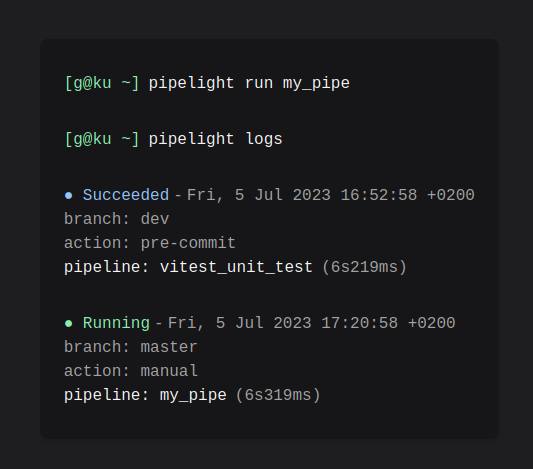
Get a tranparent outputs of every subprocesses.
pipelight logs -vvvv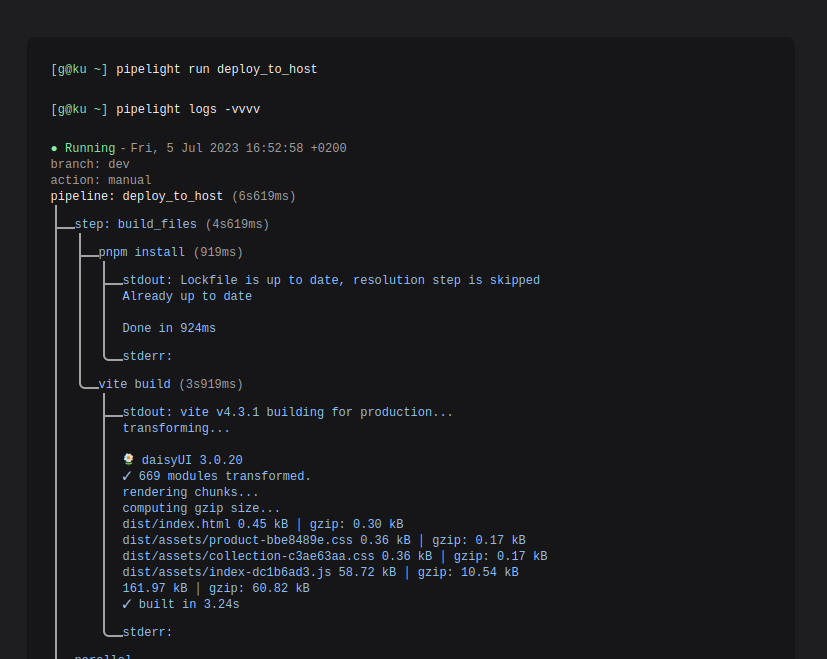
Important
Pipelight can now be installed under MacOs and Windows WSL
Checkout the instruction guide for your favorite package manager.
Create a default configuration file pipelight.ts in your project root
directory with:
pipelight initTry the harmless default pipeline:
pipelight runAnd explore logs:
pipelight logs -vvvvReach the community whenever you need support or software improvements. On discord or on telegram at @Areskul or send a mail at areskul@areskul.com.
Support other configuration languages:
Can't tell the difference between them, but Rustacean made crates for it.
- feat: add support for hashicorp hcl
- feat: add support for apple pkl
- feat: add support for CNCF kcl
Crate:
- doc: add example for pipelight_utils crate
Javascript helpers:
- feat: add helper for jucenit proxy
- refactor: rewrite docker helpers in rust wasm
Cli:
- feat: add a tui interface with ratatui
- feat: add a live view for processing pipelines
Community:
- feat: add a news page on Documentation website
- refactor: move out of discord
Licensed under GNU GPLv2 Copyright (C) 2023 Areskul