
Access nextcloud remotely from node.js applications with a rich and simple TypeScript / JavaScript API.








- upload and download files
- create files and folder structures
- all user management functions
- create shares
- tagging and commenting
The nextcloud node client is used to automate access to nextcloud servers from node.js apppliactions.
// typescriptimportClient,{File,Folder,Tag,Share}from"nextcloud-node-client";(async()=>{try{// create a new client using connectivity information from environment constclient=newClient();// create a folder structure if not availableconstfolder: Folder=awaitclient.createFolder("folder/subfolder");// create file within the folderconstfile: File=awaitfolder.createFile("myFile.txt",Buffer.from("My file content"));// add a tag to the file and create the tag if not existingawaitfile.addTag("MyTag");// add a comment to the fileawaitfile.addComment("myComment");// get the file contentconstcontent: Buffer=awaitfile.getContent();// share the file publicly with password and noteconstshare: Share=awaitclient.createShare({fileSystemElement: file});awaitshare.setPassword("some password");awaitshare.setNote("some note\nnew line");// use the url to access the share constshareLink:string=share.url;// delete the folder including the file and shareawaitfolder.delete();}catch(e){// some error handling console.log(e);}})();- Installation
- Upload files and folders
- Download files and folders
- Get files recursively
- User Management
- Tagging
- Security and access management
- Concepts and Philosophy
- API
- Architecture
- Examples
npm install nextcloud-node-client
The client requires the url of the nextcloud server and the credentials.
Use an app specific password generated in the security - devices & sessions section of the nextcloud settings.
Credentials can be specified in the environment:
NEXTCLOUD_USERNAME= "<your user name>"
NEXTCLOUD_PASSWORD = "<your password>"
NEXTCLOUD_URL= "https://<your nextcloud host>"
The cloud service configuration VCAP_SERVICES can be used alternativley (refer to the Cloud Foundry documentation for details).
The nextcloud credentials are stored in the section for user provided services user-provided.
The client is able to access the service credentials by providing the instance name.
{
"user-provided": [
{
"credentials": {
"password": "<your password>",
"url": "https://<your nextcloud host>",
"username": "<your user name>"
},
"name": "<your service instance name>"
}
]
}
Creating a nextcloud client
// uses the environment to initializeimportClientfrom"nextcloud-node-client";constclient=newClient();// uses explicite credentialsimportClient,{Server}from"nextcloud-node-client";constserver: Server=newServer({basicAuth:
{password: "<your password>",username: "<your user name>",},url: "https://<your nextcloud host>",});constclient=newClient(server);The nextcloud-node-client provids a object oriented API in TypeScript. The focus is to provide a simple access to the nextcloud resources rather than a full functional coverage.
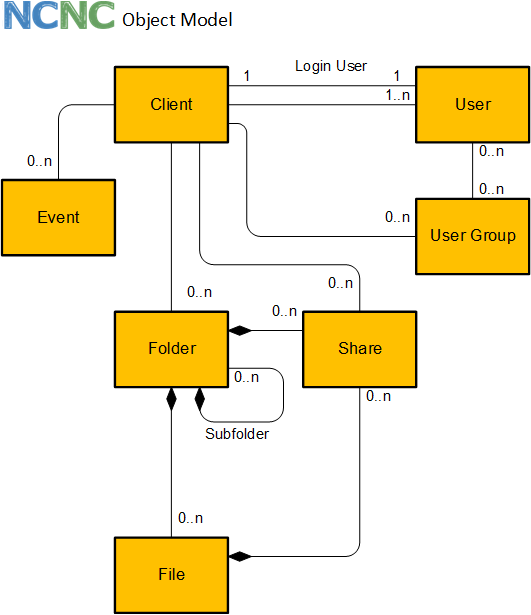
The client comes with an object oriented API to access the APIs of nextcloud. The following object types are supported:
The client is the root object and represents the connection to the nextcloud server. The client is used to get access to the root folder and the tag repository.
The folder is the representation of a nextcloud folder. It may contain many files. All files of a folder are deleted, if the folder is deleted.
The file is the representation of a nextcloud file. Every file is contained in a folder.
Tags are used to filter for file and folders. Tags can be created and assigned to files or folders.
Files and folders can be shared with user, user groups or publicly. The share can be password protected and an exiration date can be applied.
This is an overview of the client API. Details can be found in the API docs
- factory method for client
- create folder
- get folder, get root folder
- create file
- get file
- create tag*
- get tags, by name, by id
- get quota
- find users, get user by id
- create user
- mass creations and changes of users
- get user groups, by id
- create user group
- get name, id, base name, urls
- delete
- create sub folders
- get sub folder
- create file
- get files
- get tags, add tag, remove tag
- add comment
- get comments
- move/rename
- get name, id, base name, urls, content type
- get content
- delete
- get tags, add tag, remove tag
- add comment
- get comments
- get folder
- move/rename
- get name, id
- delete*
- create, update, delete
- delete
- get members, get subadmins
- delete
- get properties (display name, email, quota and usage, language, last login, ...)
- change properties (display name, email, quota, language, password, ...)
- send welcome email
- enable / disable
- promote to super admin / demote from super admin
- get member groups, get subadmin groups
- add to user group as member / remove from member user group
- promote as subadmin for user group / demote from subadmin user group
* admin permissions required
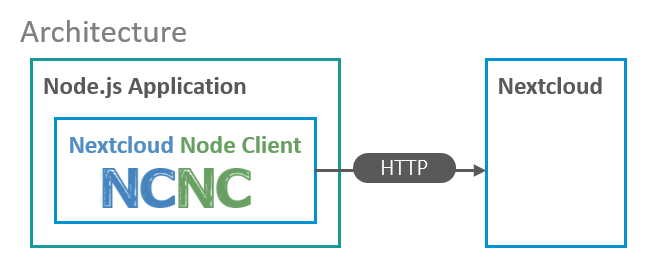
constq: IQuota=awaitclient.getQuota();// { used: 479244777, available: 10278950773 }constsi: ISystemInfo=awaitclient.getSystemInfo();// create folderconstfolder: Folder=awaitclient.createFolder("/products/brooms");// create subfolderconstsubfolder: Folder=awaitfolder.createSubFolder("soft brooms");// "/products/brooms/soft brooms"// get folderconstfolder: Folder=awaitclient.getFolder("/products");// get subfoldersconstsubfolders: Folder[]=awaitfolder.getSubFolders();// get folderconstfolder: Folder=awaitclient.getFolder("/products");awaitfolder.delete();constfolder=awaitclient.getFolder("/products");constfile=folder.createFile("MyFile.txt",newBuffer("My new file"));constfile=awaitclient.getFile("/products/MyFile.txt");// orconstfolder=awaitclient.getFolder("/products");constfile=awaitfolder.getFile("MyFile.txt");// file: name, baseName, lastmod, size, mimeconstfile=awaitclient.getFile("/products/MyFile.txt");constbuffer=awaitfile.getContent();constfile=awaitclient.getFile("/products/MyFile.txt");consturl=awaitfile.getUrl();constfile=awaitclient.getFile("/products/MyFile.txt");awaitfile.addTag("myTag");constfile=awaitclient.getFile("/products/MyFile.txt");awaitfile.delete();constfolder=awaitclient.getFolder("/products");constfiles=awaitfolder.getFiles();constfile=awaitclient.getFile("/products/MyFile.txt");awaitfile.move("/products/brooms/MyFileRenamed.txt");constfile=awaitclient.getFile("/products/MyFile.txt");// share the file (works also for folder)constcreateShare: ICreateShare={fileSystemElement: file};constshare: Share=awaitclient.createShare(createShare);// change share settingsawaitshare.setPassword("some password");awaitshare.setNote("some note\nnew line");awaitshare.setExpiration(newDate(2020,11,5));// use the url to access the share constshareLink:string=share.url;// delete share, if not required anymoreawaitshare.delete();The nextcloud node client can be used by node applications to extend the nextcloud functionality remotely. The client uses only HTTP apis of nextcloud for access.
// typescriptimportClient,{User,UserGroup}from"nextcloud-node-client";(async()=>{try{// create a new client using connectivity // information from environmentconstclient=newClient();// create a new user groupconstgroup: UserGroup=awaitclient.createUserGroup("MyGroup");// create a new user with a email or passwordconstuser: User=awaitclient.createUser({id: "MyUserId",email: "mail@example.com"});// set some properties // ... password, phone, website, twitter, address, email, localeawaituser.setDisplayName("My Display Name");awaituser.setQuota("5 GB");awaituser.setLanguage("en");// get properties // ... quota, user friendly quota, phone, website, twitter, address, localeconstemail=awaituser.getEmail();// disable userawaituser.disable();// enable userawaituser.enable();// promote to super administratorawaituser.promoteToSuperAdmin();// demote from super administratorawaituser.demoteFromSuperAdmin();// resend welcome email to userawaituser.resendWelcomeEmail();// add to user group as memberawaituser.addToMemberUserGroup(group);// get member user groupsconstmemberGroups: UserGroup[]=awaituser.getMemberUserGroups();// get user ids of memembersawaitgroup.getMemberUserIds();// remove user from member groupawaituser.removeFromMemberUserGroup(group);// promote user as subadmin for user groupawaituser.promoteToUserGroupSubadmin(group);// get user groups where the user is subadminconstsubadminGroups: UserGroup[]=awaituser.getSubadminUserGroups();// get user ids of subadminsawaitgroup.getSubadminUserIds();// demote user from being subadmin for user groupawaituser.demoteFromSubadminUserGroup(group);// delete the userawaituser.delete();// delete the user groupawaitgroup.delete();// mass creations / updates of users// groups are created on the flyawaitclient.upsertUsers([{id: "myUser1",email: "myUser1@example.com",enabled: false,memberGroups: ["group1","group2"]},{id: "myUser2",password: "mySecurePassword",displayName: "My Name",superAdmin: true,quota: "2 GB"},// ...]);}catch(e){// use specific exception *error classes // for error handling documented in @throws}})();// typescriptimportClient,{File,Folder,Share,Tag,FileSystemElement}from"nextcloud-node-client";(async()=>{try{// create a new client using connectivity information from environmentconstclient=newClient();// create a folder structure if not availableconstfolder: Folder=awaitclient.createFolder("folder/subfolder");// create file within the folderconstfile: File=awaitfolder.createFile("myFile.txt",Buffer.from("My file content"));// create two tagsconsttag1: Tag=awaitclient.createTag("tag 1");consttag2: Tag=awaitclient.createTag("tag 2");// assign tag to folderfolder.addTag(tag1.name);// assign tag to filesfile.addTag(tag1.name);file.addTag(tag2.name);// get list of file system elements with the tag1 assignedletfse: FileSystemElement[]=awaitclient.getFileSystemElementByTags([tag1]);// print names of folder and fileconsole.log(fse[0].name);console.log(fse[1].name);// get list of file system elements with the tag1 and tag2fse=awaitclient.getFileSystemElementByTags([tag1,tag2]);// print name of fileconsole.log(fse[0].name);// delete the tagsawaittag1.delete();awaittag2.delete();// delete the folder including the file and shareawaitfolder.delete();}catch(e){// some error handlingconsole.log(e);}})();Tested with nextcloud 17.0.1, 18.0.0
A code coverage of 100% is aspired
- remove vcap services support
- remove server object and replace with connection object
- connection object handles all http requets (new Connection, conn.connect() ...)
- refactor client - use connection instead of client in sub objects move client methods to sub objects
- Move exceptions to relevant objects, prefix all exceptions with "Error"
- Remove "I" from interface names
Share with
- user
- usergroup
- email-address
- Search for files api
- client in github actions - upload files
support also the nextcloud server url instead of the WebDAV url only
download folder contents exampledownload folder contents to disk recursively
upload local file on disk to nextcloudupload local folder on disk to nextcloud recursively
command get files recurivelyfilter get files recurivelyexample get files recurively
* Get files and folders by tags client.getFileSystemObjectByTags
User:
getgetIds limit, offset, searchcreateupdatedeletedeactivateadd/remove group memberadd/remove group subadminexample in readme- send notification
User group:
getcreatedelete
Create file and get file using streams
- create event objects
- start observer
- subscribe to events and register handler functions
- telegram support
basic methods are available since 1.2.0 without strong typing
- notification object
- Introduction of exception classes instead of error codes (breaking change)
Move from codecov to coveralls- move to eslint instead of using tslint
- remove "I" from all interfaces - (breaking change)
- Search for files api
- client in github actions - upload files
Apache