






Compass helps you setup a central navigation system for your application. This has many benefits, one of them being that controllers can now be decoupled, meaning that the list that presents the detail no longer knows about what its presenting. Controllers become agnostic and views stay stupid. The user experience stays the same but the logic and separation of concerns become clearer. The outcome is that your application will become more modular by default. Anything could potentially be presented from anywhere, but remember, with great power comes great responsibility.
Below are tutorials on how to use Compass
- URL Routing in iOS apps: Compass Beginner Guide: basic introduction to Compass, how to use Router and multiple use cases for deep linking, push notifications
First you need to register a URL scheme for your application.
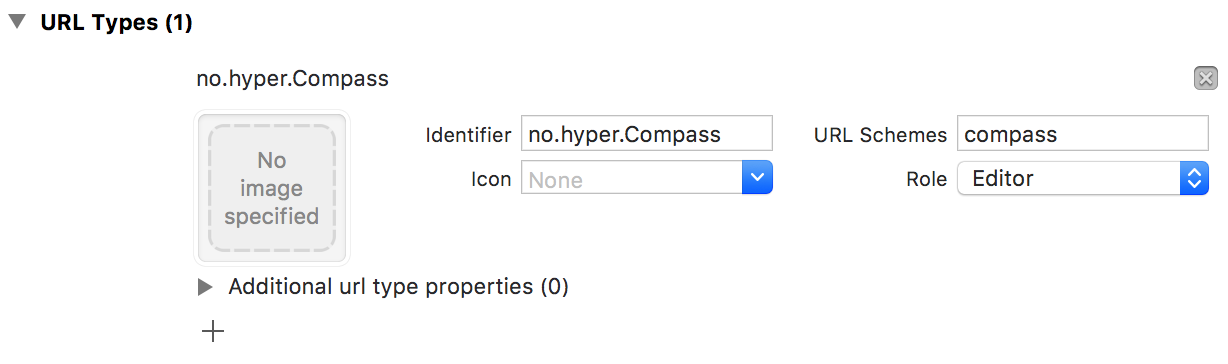
Now you need to configure Compass to use that URL scheme, a good place
to do this is in your AppDelegate. Then configure all the routes you wish you support.
func application(_ application:UIApplication,
didFinishLaunchingWithOptions launchOptions:[UIApplicationLaunchOptionsKey:Any]?)->Bool{Navigator.scheme ="compass"Navigator.routes =["profile:{username}","login:{username}","logout"]returntrue}Register your location request handler
Navigator.handle ={[weak self] location inletarguments= location.arguments
letrootController=self?.window.rootViewController as?UINavigationControllerswitch location.path {case"profile:{username}":letprofileController=ProfileController(title:arguments["username"])
rootController?.pushViewController(profileController, animated:true)case"login:{username}":letloginController=LoginController(title:arguments["username"])
rootController?.pushViewController(loginController, animated:true)case"logout":self?.clearLoginSession()self?.switchToLoginScreen()default:break}}Anywhere in your application, you can just use Navigator to navigate
@IBOutletfunc logoutButtonTouched(){Navigator.navigate(urn:"logout")}Optional. If you want to support deep linking, set up your application to respond to the URLs. Setting it up this way would mean that you could open any view from a push notification depending on the contents of the payload.
func application(_ app:UIApplication,
open url:URL,
options:[UIApplicationOpenURLOptionsKey:Any])->Bool{do{tryNavigator.navigate(url: url)}catch{
// Handle error
}returntrue}We also have some conventional tools for you that could be used to organize your
route handling code and avoid huge switch cases.
- Implement
Routableprotocol to keep your single route navigation code in one place:
structProfileRoute:Routable{func navigate(to location:Location, from currentController:CurrentController)throws{guardlet username = location.arguments["username"]else{return}letprofileController=ProfileController(title: username)
currentController.navigationController?.pushViewController(profileController, animated:true)}}- Create a
Routerinstance and register your routes. Think ofRouteras a compositeRoutable
letrouter=Router()
router.routes =["profile:{username}":ProfileRoute(),"logout":LogoutRoute()]- Parse URL with Compass and navigate to the route with a help of your
Routerinstance.
func application(_ app:UIApplication,
open url:URL,
options:[UIApplicationOpenURLOptionsKey:Any])->Bool{returnhandle(url)}func handle(_ url:URL)->Bool{guardlet location =Navigator.parse(url)else{returnfalse}
router.navigate(to: location, from: navigationController)returntrue}You could set up multiple routers depending on app states. For example, you could have 2 routers for pre and post login.
letpreLoginRouter=Router()
preLoginRouter.routes =["profile:{username}":ProfileRoute()]letpostLoginRouter=Router()
postLoginRouter.routes =["login:{username}":LoginRoute()]letrouter= hasLoggedIn ? postLoginRouter : preLoginRouter
router.navigate(to: location, from: navigationController)Compass is available through CocoaPods. To install it, simply add the following line to your Podfile:
pod'Compass'Compass is also available through Carthage. To install just write into your Cartfile:
github"hyperoslo/Compass"Hyper Interaktiv AS, ios@hyper.no
The idea behind Compass came from John Sundell's tech talk "Components & View Models in the Cloud - how Spotify builds native, dynamic UIs"
Compass is available under the MIT license. See the LICENSE file for more info.