A dynamic "mock + proxy" server and client mocker.
Please see the sample usage source code.
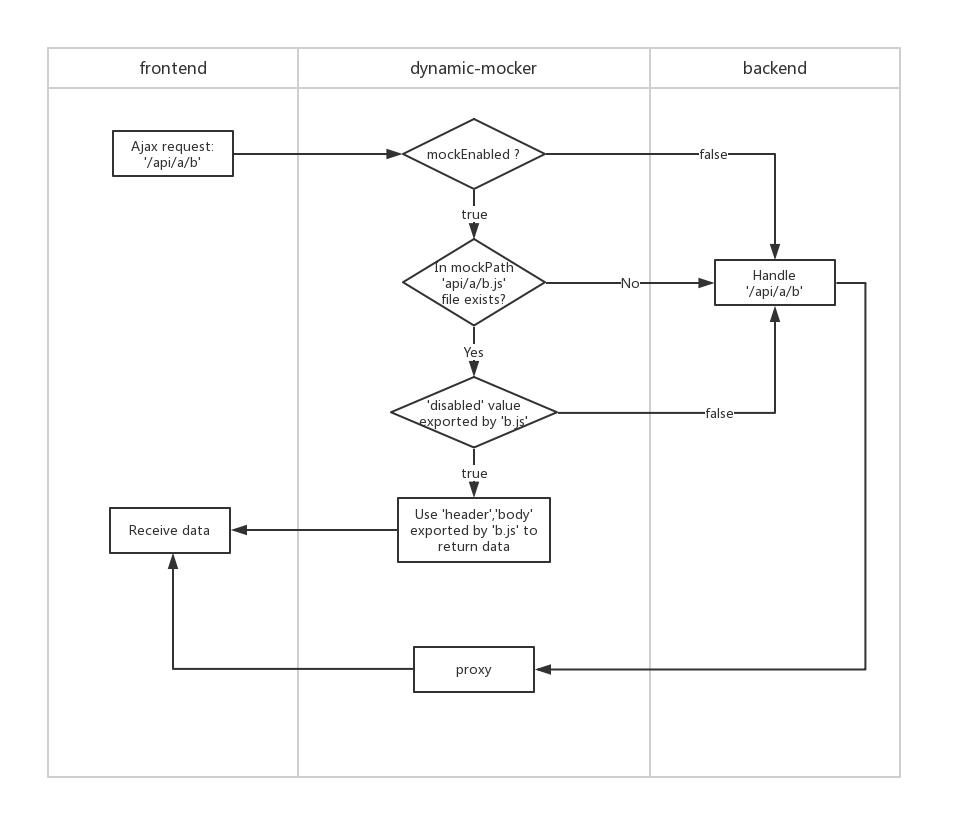
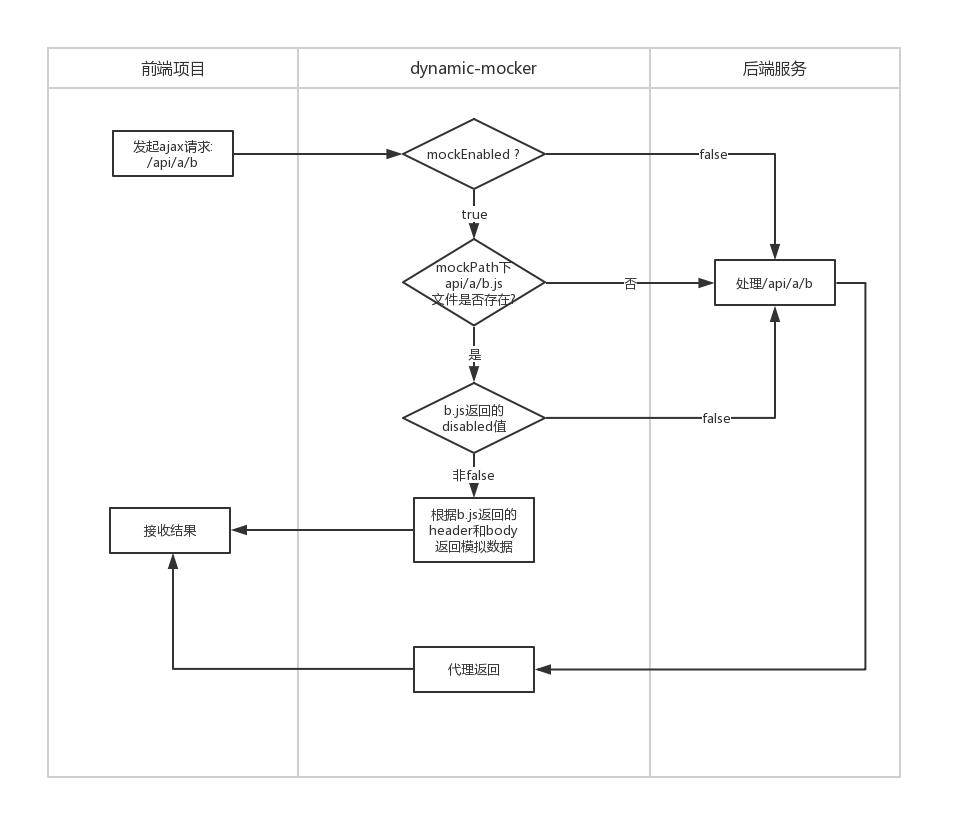
git clone https://github.com/hzsrc/dynamic-mocker.git
cd dynamic-mocker
npm install
# mock & proxy
npm run mock
#proxy: http://localhost:8037 => https://localhost
npm run proxy80
#static
npm run static
npm i dynamic-mocker -D
yarn add dynamic-mocker --dev
Make a mock directory, and copy the mock-config.js into it.
Make a root directory as the root of mock files.
--mock
----root
----mock-config.js
--package.json
const config = {
mockEnabled: true,
mockPath: ['mock/root', 'mock/root-old'], //模拟文件根目录
proxyTarget: 'http://your-backend-server.com', //后台接口服务地址(代理目标),为空表示不代理。可以是个函数:function(urlPart){} isHttps: false, //是否https
port: 8085, //端口
checkPath: function (urlPath) { //urlPath校验函数,返回true表示需要进行mock处理,为false直接走代理
return true
},
beforeResponse: function (respData, req) { //数据返回前的回调钩子,respData包含status、headers、body属性
respData.headers['access-control-allow-origin'] = req.headers['origin'] || req.headers['Origin'] || '';
respData.headers['access-control-allow-credentials'] = 'true';
respData.headers['access-control-allow-headers'] = req.headers['access-control-request-headers'] || req.headers['Access-Control-Request-Headers'] || '';
respData.headers['access-control-max-age'] = '6000';
respData.headers['access-control-allow-methods'] = 'PUT,POST,GET,DELETE,PATCH,OPTIONS';
respData.headers['P3P'] = 'CP="CAO PSA OUR"';
},
// samePreview: false,
logData: true,
// genClientJs: '../src/utils/mockClient.js',
title: 'App title'
}
module.exports = config;
Edit the mock-config.js options:
true - to enable all mocks
the root path[s] of mock files. String or array of string.
If there is no mock data file for a url request, the http pipe will be reversely proxied to this target server. If this is empty, then won't proxy. string or Function(urlPart). Sample:
proxyTarget(uri){if(uri.pathname.indexOf('/h5/')===0){uri.pathname=uri.pathname.slice(3);uri.setChanged();// if pathname changed, set thisreturn'http://localhost:9050'}return'http://localhost:10900'}true - for https
Port of the mock server
A function to check a url which needs to mock or not. eg:
function (urlPath) {
return urlPath.match(/\/api\//);
}
A function to do customized job before responding.respData contains [status、headers、body] properties. eg:
function (respData, req) {
respData.headers['access-control-allow-origin'] = req.headers['origin'] || req.headers['Origin'] || '';
respData.headers['access-control-allow-credentials'] = 'true';
respData.headers['access-control-allow-headers'] = req.headers['access-control-request-headers'] || req.headers['Access-Control-Request-Headers'] || '';
respData.headers['access-control-max-age'] = '6000';
respData.headers['access-control-allow-methods'] = 'PUT,POST,GET,DELETE,PATCH,OPTIONS';
respData.headers['P3P'] = 'CP="CAO PSA OUR"';
}
Object type. Options which will be transferred to http-proxy, like changeOrigin, for more info:
https://www.npmjs.com/package/http-proxy#options
String type. To generate a js file for client preview, like: '../client_preview/src/utils/mockClient.js'. Then you can import this js for client preview, which means run your webpages without backend apis, just with mock datas.
default: false, ignore all disabled and mockEnabled option while client preview. true - do not ignore
default: false. true - print mock data while client preview.
default: '/'. Set a path for ajax relative path which used for mock data in mockClient.js.
set console window title.
"scripts": {
...
"mock": node -e "require('dynamic-mocker').start('./mock/mock-config.js')"
}
npm run mock
// dynamic-mocker use json eval mode, but not JSON.parse
module.exports = {
disabled: 0,
delay: 1000, // delay ms to response
status: 200,
"headers": {
"server": "dynamic-mocker",
"set-cookie": "foo=bar; path=/",
"cache-control": "no-cache"
},
"body": {
"status": 0,
"obj": {
"cfg": {
"o": {
"buttons": [
{
"id": 1,
"title": "按钮1"
},
{
"id": 2,
"title": "按钮2"
}
]
}
}
},
"msg": ""
}
}
module.exports = {
disabled: 0,
body: function (query, post, header, request) {
//output log in the node console
console.log('post data: ' + post)
//use queryString in url
//use key word 'this', which point to the yaml root object
if (query.id == '1') return ok(this.case_1);
//use http postData
if (post && post.type == 'test') return ok(this.case_2);
//use http headers
if (header["content-type"] == "text/txt") return ok("Hello,txt")
//use request info
return ok({default: 'no data', url: request.url})
function ok(d) {
return {status: 0, data: d}
}
},
case_1: {
id: 1,
b: 2
},
case_2: {
a: 3,
b: "test"
}
}
module.exports = {
disabled: 0,
status: 200,
headers: function (query, post, header, request) {
var r = {}
if (post.rememberPwd && this.checkFn(post, header)) {
process._cookiev = 'a=b' + (+new Date);
r['set-cookie'] = process._cookiev + '; Max-Age=30000; path=/';
}
else {
process._cookiev = '';
r['set-cookie'] = process._cookiev + '; Max-Age=0; path=/';
}
return r;
},
body: function (query, post, header, request) {
return {
status: this.checkFn(post, header) ? 0 : 1,
data: '', returnValue: 'token-xxxxxxx',
msg: '用户名密码错误'
}
},
checkFn: function (post, header) {
if (post.password == '123456' || post.password == '') return true;
if (post.useRemembered && post.password == '_fakepwd') {
var cookie = header['Cookie'] || header['cookie'];
return cookie && cookie.indexOf(process._cookiev) > -1
}
}
}
Mock data to run app in browser, using the same mock-data files.
Once your run dynamic-mocker server in webpack or nodejs, you will get a mockClient.js in the same directory of the dynamic-mocker config file.
- mock
-- root
-- mock-config.js
-- mockClient.js
You only need to import this js file into your app.js entry file, then all the ajax request datas will be mocked if necessary.
(You can import this module with a condition such as a command argument, by js-conditional-compile-loader)
/* IFTRUE_isDemo */import'../../mock/mockClient'/* FITRUE_isDemo */And you can toggle the ajax mode, by mock data or real api data.
importdMockClientfrom'dynamic-mocker/lib/client.js'if(needMock){dMockClient.setup()}else{dMockClient.cancel()}