
Validate & parse UK postcodes



Utility methods for UK Postcodes, including validating the shape of a postcode, extracting postcode elements (like incodes, outcodes, areas and more).
Tested against ~1.7 million postcodes on ONSPD.
- Check whether a postcode conforms to the correct format
- Single purpose static methods
- Tested against a list of ~1.7 million postcodes listed on ONS Postcode Directory
- Extract useful elements of a postcode like incode, outcode, sector
- Tree-shakeable
- GitHub Repository
- API Documentation
- Try postcode.js on RunKit
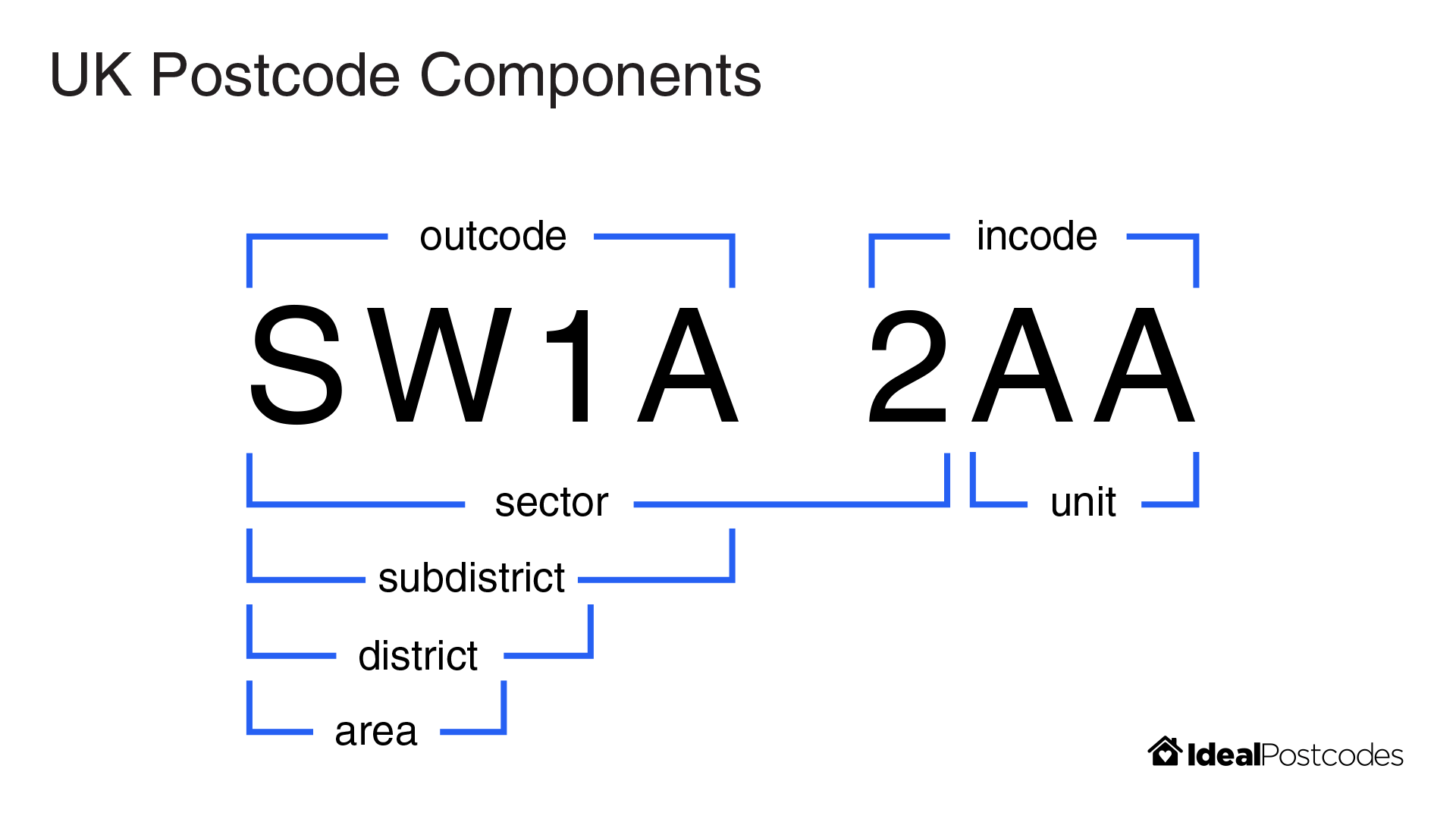
- Postcode element definitions
- Notes
- NPM Package
- UK Postcode Format. An overview of the UK postcode format and its constituent parts
- Postcode Validation. An overview of the many approaches to postcode validation and the tradeoffs
npm install postcodeimport{isValid}from"postcode";isValid("AA1 1AB");// => truePass a string to parse. This will return a valid or invalid postcode instance which can be easily destructured.
ValidPostcode type definition
import{parse}from"postcode";const{
postcode,// => "SW1A 2AA"
outcode,// => "SW1A"
incode,// => "2AA"
area,// => "SW"
district,// => "SW1"
unit,// => "AA"
sector,// => "SW1A 2"
subDistrict,// => "SW1A"
valid,// => true}=parse("Sw1A 2aa");InvalidPostcode type definition
const{
postcode,// => null
outcode,// => null
incode,// => null
area,// => null
district,// => null
unit,// => null
sector,// => null
subDistrict,// => null
valid,// => false}=parse(" Oh no, ): ");The TypeScript compiler can infer if you have a valid postcode type from parse by checking the valid attribute
import{parse}from"postcode";constpostcode=parse("SW1A 2AA");if(postcode.valid){// `postcode` adheres to the `ValidPostcode` interfaceprocessString(postcode.outcode.toLowerCase());// TypeScript compiler knows `outcode` to be a stringprocessString(postcode.subDistrict.toLowerCase());// And it will throw errors on common gotchas (e.g. subdistrict can be `null` on a valid postcode)}else{// `postcode` adheres to the `InvalidPostcode` interfaceprocessInvalidPostcode(postcode);}| Postcode | .outcode | .incode | .area | .district | .subDistrict | .sector | .unit |
|---|---|---|---|---|---|---|---|
| AA9A 9AA | AA9A | 9AA | AA | AA9 | AA9A | AA9A 9 | AA |
| A9A 9AA | A9A | 9AA | A | A9 | A9A | A9A 9 | AA |
| A9 9AA | A9 | 9AA | A | A9 | null | A9 9 | AA |
| A99 9AA | A99 | 9AA | A | A99 | null | A99 9 | AA |
| AA9 9AA | AA9 | 9AA | AA | AA9 | null | AA9 9 | AA |
| AA99 9AA | AA99 | 9AA | AA | AA99 | null | AA99 9 | AA |
If you're just after a single value, you can import a single method.
isValid("Sw1A 2aa");// => trueimport{toNormalised,toOutcode,toIncode,toArea,toDistrict,toSubDistrict,toSector,toUnit,}from"postcode";toNormalised("Sw1A 2aa");// => "SW1A 2AA"toOutcode("Sw1A 2aa");// => "SW1A"toIncode("Sw1A 2aa");// => "2AA"toArea("Sw1A 2aa");// => "SW"toDistrict("Sw1A 2aa");// => "SW1"toSubDistrict("Sw1A 2aa");// => "SW1A"toSector("Sw1A 2aa");// => "SW1A 2"toUnit("Sw1A 2aa");// => "AA"fix Attempts to correct and clean up a postcode without validating by replacing commonly misplaced characters (e.g. mixing up 0 and "O", 1 and "I"). This method will also uppercase and fix spacing. The original input is returned if it cannot be reliably fixed.
fix("SWIA 2AA")=>"SW1A 2AA"// Corrects I to 1fix("SW1A 21A")=>"SW1A 2IA"// Corrects 1 to Ifix("SW1A OAA")=>"SW1A 0AA"// Corrects O to 0fix("SW1A 20A")=>"SW1A 2OA"// Corrects 0 to O// Other effectsfix(" SW1A 2AO")=>"SW1A 2AO"// Properly spacesfix("sw1a 2aa")=>"SW1A 2AA"// UppercaseAims to be used in conjunction with parse to make postcode entry more forgiving:
const{ inward }=parse(fix("SW1A 2A0"));// inward = "2AO"If the input is not deemed fixable, the original string will be returned
fix("12a")=>"12a"match. Retrieve valid postcodes in a body of text
constmatches=match("The PM and her no.2 live at SW1A2aa and SW1A 2AB");// => ["SW1A2aa", "SW1A 2AB"]// Perform transformations like normalisation using `.map` and `toNormalised`matches.map(toNormalised);// => ["SW1A 2AA", "SW1A 2AB"]matches.map(toOutcode);// => ["SW1A", "SW1A"]// No matches yields empty arraymatch("Some London outward codes are SW1A, NW1 and E1");// => []replace. Replace postcodes in a body of text, returning the updated corpus and any matching postcodes
const{ match, result }=replace("The PM and her no.2 live at SW1A2AA and SW1A 2AB");// => match: ["SW1A2AA", "SW1A 2AB"]// => result: "The PM and her no.2 live at and "// Add custom replacementreplace("The PM lives at SW1A 2AA","Downing Street");// => { match: ["SW1A 2AA"], result: "The PM lives at Downing Street" };// No matchreplace("Some London outward codes are SW1A, NW1 and E1");// => { match: [], result: "Some London outward codes are SW1A, NW1 and E1" }5.0.0 brings changes which allows for better treeshaking and interopability with ES Modules. It also deprecates legacy class based APIs in favour of single purpose methods.
postcodeno longer exports a class. Legacynew Postcode()functionality has been removed. Methods attached toPostcodeare all available as named exports.postcodeno longer uses default exports. All exports are named. E.g.
// In <= 4.0.0importPostcodefrom"postcode";Postcode.parse("SW1A 2AA");// In >= 5.0.0import{parse}from"postcode";parse("SW1A 2AA");In many cases, migration can be achieved by changing import Postcode from "postcode" to import * as Postcode from "postcode", however this gives up treeshaking advantages.
postcodenow exports a ES Module build- Exports regular expressions
matchaccepts a string and returns all valid postcodesreplaceaccepts a string and replaces valid postcodes with an optional second argument. Default replacement text is empty string""
See the postcode format guide for a glossary of postcode component terms.
Postcodes cannot be validated just with a regular expression (however complex). True postcode validation requires having a full list of postcodes to check against. Relying on a regex will produce false postives/negatives.
See the postcode validation guide for an overview of the approaches and tradeoffs associated with postcode validation.
npm testMIT
Contains Ordnance Survey Data © Crown Copyright & Database Right