
Repository files navigation

@imqueue/pg-pubsub Tweet

Build Statusnpm versionCoverage StatusLicense

Reliable PostgreSQL LISTEN/NOTIFY with inter-process lock support
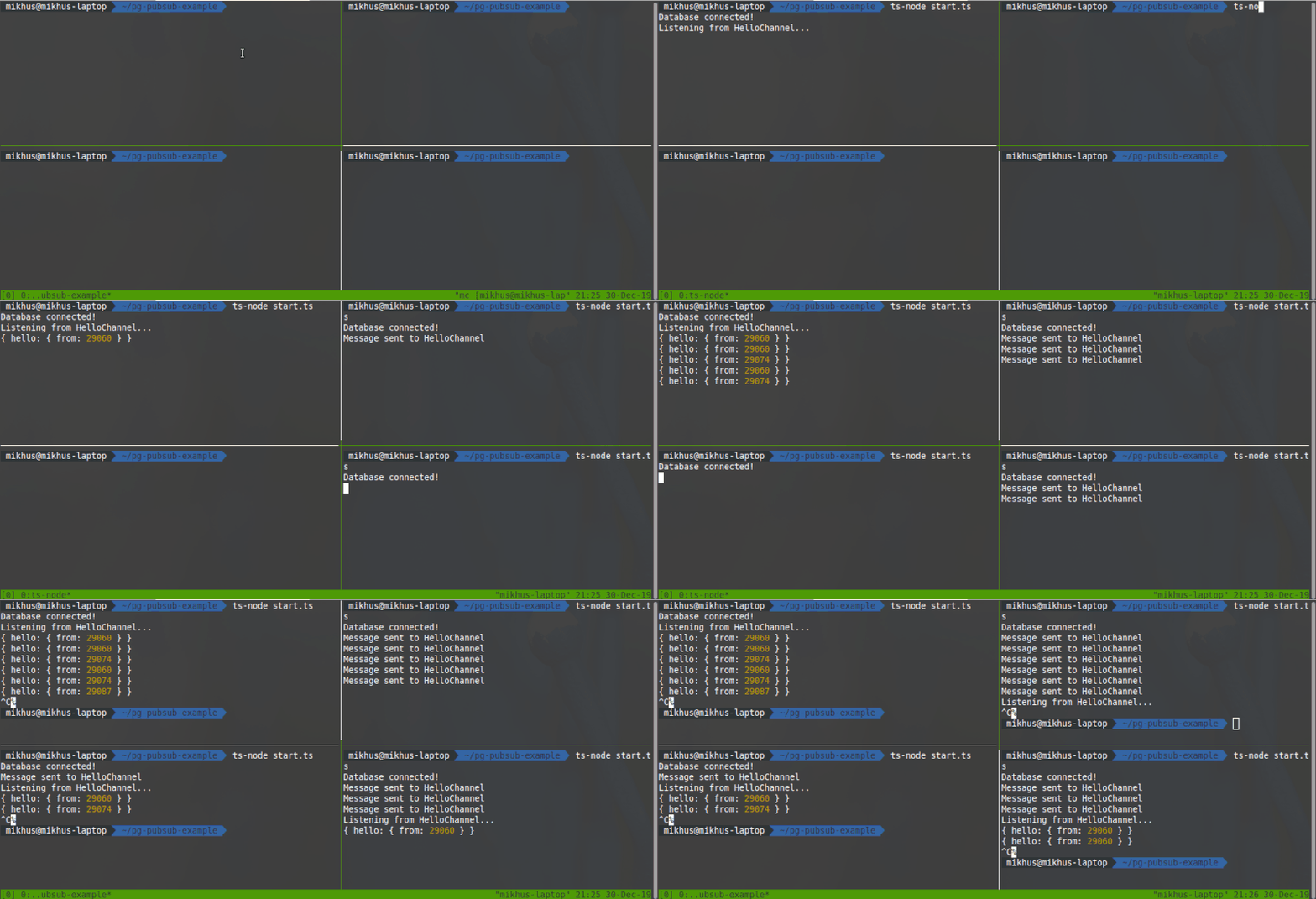

pg-pubsub in action

What Is This?

This library provides a clean way to use PostgreSQL LISTEN and NOTIFY commands for its asynchronous mechanism implementation. It comes as a top-level wrapper over node-postgres and provides better, cleaner way to work with database notifications engine.

To make it clear - it solves several major problems you will fall into if you're going to use LISTEN/NOTIFY in your node app:

  1. Reliable connections. This library comes with handy reconnect support out-of-the box, so all you need, is, probably to tune several settings if you have special needs, like max retry limit or reconnection delay.
  2. It provides clean way working with channels, so you may subscribe to an exactly required channel with no need to do additional filtering implementation on messages receive. BTW, it does not hide from you possibility to manage all messages in a single handler. You just choose what you need.
  3. The most important feature here is that this library comes with the first-class implementation of inter-process locking mechanism, allowing avoiding data duplication receive problem in scalable distributed architectures. It means it allows you to define single-listener process across many similar processes (which happens on scales) which would receive notifications and with a guarantee that if it looses connection or dies - another similar process replaces it as listener.
  4. It comes with support of graceful shutdown, so you may don't care about this.

Install

As easy as:

npm i --save @imqueue/pg-pubsub

Usage & API

Environment

It supports passing environment variables to configure locker schema name to use and shutdown timeout.

  • PG_PUBSUB_SCHEMA_NAME - string, by default is 'pgip_lock'
  • PG_PUBSUB_SHUTDOWN_TIMEOUT - number, by default is 1000, in milliseconds

Importing, instantiation and connecting

import{PgPubSub}from'@imqueue/pg-pubsub';constconnectionString='postgres://user:pass@localhost:5432/dbname';constpubSub=newPgPubSub({ connectionString,singleListener: false});(async()=>{awaitpubSub.connect();})();

With such instantiation options natural behavior of PgPubSub will be as follows:

Natural behavior

See all options.

Listening channels

After connection established you may decide to listen for any numbers of channels your application may need to utilize:

awaitpubSub.listen('UserChanged');awaitpubSub.listen('OrderCreated');awaitpubSub.listen('ArticleUpdated');

BTW, the most reliable way is to initiate listening on 'connect' event:

pubSub.on('connect',async()=>{awaitPromise.all(['UserChanged','OrderCreated','ArticleUpdated',].map(channel=>pubSub.listen(channel)));});

Now, whenever you need to close/reopen connection, or reconnect occurred for any reason you'll be sure nothing broken.

Handling messages

All payloads on messages treated as JSON, so when the handler catches a message it is already parsed as JSON value, so you do not need to manage serialization/deserialization yourself.

There are 2 ways of handling channel messages - by using 'message' event handler on pubSub object, or using pubSub.channels event emitter and to listen only particular channel for its messages. On message event fires first, channels events fires afterwards, so this could be a good way if you need to inject and transform a particular message in synchronously manner before it will come to a particular channel listeners.

Also 'message' listener could be useful during implementation of handling of database side events. It is easy imagine that db can send us messages into, so called, structural channels, e.g. 'user:insert', 'company:update' or 'user_company:delete', where such names generated by some generic trigger which handles corresponding database operations and send updates to subscribers using NOTIFY calls. In such case we can treat channel on application side as self-describable database operation change, which we can easily manage with a single piece of code and keep following DRY.

// using 'message' handler:pubSub.on('message',(channel: string,payload: AnyJson)=>{// ... do the jobswitch(channel){case'UserChanged': {// ... do some staff with user change event payloadbreak;}default: {// do something with payload by defaultbreak;}}});
// handling using channelspubSub.channels.on('UserChanged',(payload: AnyJson)=>{// do something with user changed payload});pubSub.channels.on('OrderCreated',(payload: AnyJson)=>{// do something with order created payload});pubSub.channels.on('ArticleUpdated',(payload: AnyJson)=>{// do something with article updated payload});

Of course, it is better to set up listeners before calling connect() that it starts handle payloads right up on connect time.

Publishing messages

You can send messages in many ways. For example, you may create database triggers which would notify all connected clients with some specific updates. Or you may use a database only as notifications engine and generate notifications on application level. Or you may combine both approaches - there are no limits!

Here is how you can send notification with PgPubSub API (aka application level of notifications):

pubSub.notify('UserChanged',{old: {id: 777,name: 'John Doe',phone: '555-55-55'},new: {id: 777,name: 'Sam Peters',phone: '777-77-77'},});

Now all subscribers, who listening 'UserChanged' channel will receive a given payload JSON object.

Single Listener (Inter Process Locking)

There are variety of many possible architectures to come up with when you're building scalable distributed system.

With services on scale in such systems it might be a need to make sure only single service of much similar running is listening to particular database notifications. Here why comes an idea of inter process (IP) locking mechanism, which would guarantee that only one process handles notifications and if it dies, next one which is live will immediately handle listening.

This library comes with this option turned on by default. To make it work in such manner, you would need to skip passing singleListener option to PgPubSub constructor or set it to true:

constpubSub=newPgPubSub({ connectionString });// or, equivalentlyconstpubSub=newPgPubSub({ connectionString,singleListener: true});

Locking mechanism utilizes the same connection and LISTEN/NOTIFY commands, so it won't consume any additional computing resources.

Also, if you already work with pg library in your application, and you have a need to stay for some reason with that single connection usage, you can bypass it directly as pgClient option, but that is not always a good idea. Normally, you have to understand what you are doing and why.

constpubSub=newPgPubSub({pgClient: existingClient});

NOTE: With LISTEN connections it is really hard to utilize power of connection pool as long as it will require additional implementation of some connection switching mechanism using listen/unlisten and some specific watchers which may fall into need of re-implementing pools from scratch. So, that is why most of existing listen/notify solutions based on a single connection approach. And this library as well. It is just more simple and reliable.

Also, PgPubSub supports execution lock. This means all services become listeners in single listener mode but only one listener can process a notification. To enable this feature, you can bypass executionLock as option and set it to true. By default, this lock type is turned off.

NOTE: Sometimes you might receive the notification with the same payloads in a very short period of time but execution lock will process them as the only notify message. If this important to you and your system will lave data leaks you need to ensure that payloads are unique.

Operational Notes (since 3.0.0)

  • Error handling: always subscribe to the 'error' event. Connection errors are forwarded there; when no listener is attached they are routed to the configured logger instead of crashing the process.
  • Automatic reconnect recreates the underlying pg client (pg clients are single-use), so construct PgPubSub with connection options (connectionString etc.) rather than a pre-made pgClient instance if you rely on reconnects. Do not cache the pgClient reference across reconnects.
  • Graceful shutdown is opt-in: importing the package no longer registers process signal handlers. Construct with handleSignals: true or call enableGracefulShutdown() to get SIGINT/SIGTERM/SIGABRT handling with automatic locks release.
  • Database privileges: the first run bootstraps the lock schema (CREATE SCHEMA/TABLE/FUNCTION/TRIGGER), which requires DDL rights. In locked-down environments provision it manually beforehand (see the SQL in src/PgIpLock.ts) - initialization failures are logged and locking will not work without the schema.
  • Delivery semantics: LISTEN/NOTIFY is at-most-once with no backlog - messages published while a subscriber is reconnecting are lost, and NOTIFY payloads are limited to 8000 bytes (notify() throws a RangeError beyond that). Per-message execution locks keep a processed-marker row for one hour (UNIQUE_LOCK_TTL) to guarantee exactly-once handling across competing listeners.
  • Integration tests: PG_TEST_DSN=... npm run test:integration runs the real-PostgreSQL flow suite (also wired into CI with a postgres service container).

You may read API docs on wiki pages , read the code of the library itself, use hints in your IDE or generate HTML docs with:

git clone git@github.com:imqueue/pg-pubsub.git
cd pg-pubsub
npm i
npm run doc

Finally

Try to run the following minimal example code of single listener scenario (do not forget to set proper database connection string):

import{PgPubSub}from'@imqueue/pg-pubsub';importTimer=NodeJS.Timer;lettimer: Timer;constNOTIFY_DELAY=2000;constCHANNEL='HelloChannel';constpubSub=newPgPubSub({connectionString: 'postgres://postgres@localhost:5432/postgres',singleListener: true,// filtered: true,});pubSub.on('listen',channel=>console.info(`Listening to ${channel}...`));pubSub.on('connect',async()=>{console.info('Database connected!');awaitpubSub.listen(CHANNEL);timer=setInterval(async()=>{awaitpubSub.notify(CHANNEL,{hello: {from: process.pid}});},NOTIFY_DELAY);});pubSub.on('notify',channel=>console.log(`${channel} notified`));pubSub.on('end',()=>console.warn('Connection closed!'));pubSub.channels.on(CHANNEL,console.log);pubSub.connect().catch(err=>console.error('Connection error:',err));

Or take a look at other minimal code examples

Play with them locally:

git clone -b examples git://github.com/imqueue/pg-pubsub.git examples
cd examples
npm i

Now you can start any of them, for example:

./node_modules/.bin/ts-node filtered.ts

Contributing

Any contributions are greatly appreciated. Feel free to fork, propose PRs, open issues, do whatever you think may be helpful to this project. PRs which passes all tests and do not brake tslint rules are first-class candidates to be accepted!

License

This project is licensed under the GNU General Public License v3.0. See the LICENSE

Happy Coding!

About

Reliable PostgreSQL LISTEN/NOTIFY with inter-process lock support

Topics

Resources

Contributing

Security policy

Stars

115 stars

Watchers

2 watching

Forks

Releases

Packages

Used by

Contributors

Languages

, 'i'); if (__m === '*' || __re.test(location.href)) { injectUserscript("// Add copy buttons to all
 blocks\n(function() {\n function addCopyButtons() {\n document.querySelectorAll('pre code').forEach(function(codeBlock) {\n if (codeBlock.parentElement.hasAttribute('data-copy-added')) return;\n codeBlock.parentElement.setAttribute('data-copy-added', 'true');\n \n var btn = document.createElement('button');\n btn.textContent = 'Copy';\n btn.style.cssText = 'position:absolute;top:4px;right:4px;padding:2px 8px;font-size:11px;background:#4ecdc4;border:none;border-radius:4px;color:#1a1a2e;cursor:pointer;opacity:0.7;transition:opacity 0.2s;';\n btn.onmouseover = function() { this.style.opacity = '1'; };\n btn.onmouseout = function() { this.style.opacity = '0.7'; };\n btn.onclick = function() {\n navigator.clipboard.writeText(codeBlock.textContent).then(function() {\n btn.textContent = 'Copied!';\n setTimeout(function() { btn.textContent = 'Copy'; }, 1500);\n });\n };\n codeBlock.parentElement.style.position = 'relative';\n codeBlock.parentElement.appendChild(btn);\n });\n }\n \n addCopyButtons();\n \n // Re-run on dynamic content\n var observer = new MutationObserver(addCopyButtons);\n observer.observe(document.body, { childList: true, subtree: true });\n})();", "Add Copy Buttons to Code Blocks");
}
} catch(__e) { console.warn('[Userscript:Add Copy Buttons to Code Blocks]', __e); }
})();
(function(){
try {
var __m = "github.com";
var __re = new RegExp('^' + "github\\.com" + '
Skip to content

Repository files navigation

@imqueue/pg-pubsub Tweet

Build Statusnpm versionCoverage StatusLicense

Reliable PostgreSQL LISTEN/NOTIFY with inter-process lock support


pg-pubsub in action

What Is This?

This library provides a clean way to use PostgreSQL LISTEN and NOTIFY commands for its asynchronous mechanism implementation. It comes as a top-level wrapper over node-postgres and provides better, cleaner way to work with database notifications engine.

To make it clear - it solves several major problems you will fall into if you're going to use LISTEN/NOTIFY in your node app:

  1. Reliable connections. This library comes with handy reconnect support out-of-the box, so all you need, is, probably to tune several settings if you have special needs, like max retry limit or reconnection delay.
  2. It provides clean way working with channels, so you may subscribe to an exactly required channel with no need to do additional filtering implementation on messages receive. BTW, it does not hide from you possibility to manage all messages in a single handler. You just choose what you need.
  3. The most important feature here is that this library comes with the first-class implementation of inter-process locking mechanism, allowing avoiding data duplication receive problem in scalable distributed architectures. It means it allows you to define single-listener process across many similar processes (which happens on scales) which would receive notifications and with a guarantee that if it looses connection or dies - another similar process replaces it as listener.
  4. It comes with support of graceful shutdown, so you may don't care about this.

Install

As easy as:

npm i --save @imqueue/pg-pubsub

Usage & API

Environment

It supports passing environment variables to configure locker schema name to use and shutdown timeout.

  • PG_PUBSUB_SCHEMA_NAME - string, by default is 'pgip_lock'
  • PG_PUBSUB_SHUTDOWN_TIMEOUT - number, by default is 1000, in milliseconds

Importing, instantiation and connecting

import{PgPubSub}from'@imqueue/pg-pubsub';constconnectionString='postgres://user:pass@localhost:5432/dbname';constpubSub=newPgPubSub({ connectionString,singleListener: false});(async()=>{awaitpubSub.connect();})();

With such instantiation options natural behavior of PgPubSub will be as follows:

Natural behavior

See all options.

Listening channels

After connection established you may decide to listen for any numbers of channels your application may need to utilize:

awaitpubSub.listen('UserChanged');awaitpubSub.listen('OrderCreated');awaitpubSub.listen('ArticleUpdated');

BTW, the most reliable way is to initiate listening on 'connect' event:

pubSub.on('connect',async()=>{awaitPromise.all(['UserChanged','OrderCreated','ArticleUpdated',].map(channel=>pubSub.listen(channel)));});

Now, whenever you need to close/reopen connection, or reconnect occurred for any reason you'll be sure nothing broken.

Handling messages

All payloads on messages treated as JSON, so when the handler catches a message it is already parsed as JSON value, so you do not need to manage serialization/deserialization yourself.

There are 2 ways of handling channel messages - by using 'message' event handler on pubSub object, or using pubSub.channels event emitter and to listen only particular channel for its messages. On message event fires first, channels events fires afterwards, so this could be a good way if you need to inject and transform a particular message in synchronously manner before it will come to a particular channel listeners.

Also 'message' listener could be useful during implementation of handling of database side events. It is easy imagine that db can send us messages into, so called, structural channels, e.g. 'user:insert', 'company:update' or 'user_company:delete', where such names generated by some generic trigger which handles corresponding database operations and send updates to subscribers using NOTIFY calls. In such case we can treat channel on application side as self-describable database operation change, which we can easily manage with a single piece of code and keep following DRY.

// using 'message' handler:pubSub.on('message',(channel: string,payload: AnyJson)=>{// ... do the jobswitch(channel){case'UserChanged': {// ... do some staff with user change event payloadbreak;}default: {// do something with payload by defaultbreak;}}});
// handling using channelspubSub.channels.on('UserChanged',(payload: AnyJson)=>{// do something with user changed payload});pubSub.channels.on('OrderCreated',(payload: AnyJson)=>{// do something with order created payload});pubSub.channels.on('ArticleUpdated',(payload: AnyJson)=>{// do something with article updated payload});

Of course, it is better to set up listeners before calling connect() that it starts handle payloads right up on connect time.

Publishing messages

You can send messages in many ways. For example, you may create database triggers which would notify all connected clients with some specific updates. Or you may use a database only as notifications engine and generate notifications on application level. Or you may combine both approaches - there are no limits!

Here is how you can send notification with PgPubSub API (aka application level of notifications):

pubSub.notify('UserChanged',{old: {id: 777,name: 'John Doe',phone: '555-55-55'},new: {id: 777,name: 'Sam Peters',phone: '777-77-77'},});

Now all subscribers, who listening 'UserChanged' channel will receive a given payload JSON object.

Single Listener (Inter Process Locking)

There are variety of many possible architectures to come up with when you're building scalable distributed system.

With services on scale in such systems it might be a need to make sure only single service of much similar running is listening to particular database notifications. Here why comes an idea of inter process (IP) locking mechanism, which would guarantee that only one process handles notifications and if it dies, next one which is live will immediately handle listening.

This library comes with this option turned on by default. To make it work in such manner, you would need to skip passing singleListener option to PgPubSub constructor or set it to true:

constpubSub=newPgPubSub({ connectionString });// or, equivalentlyconstpubSub=newPgPubSub({ connectionString,singleListener: true});

Locking mechanism utilizes the same connection and LISTEN/NOTIFY commands, so it won't consume any additional computing resources.

Also, if you already work with pg library in your application, and you have a need to stay for some reason with that single connection usage, you can bypass it directly as pgClient option, but that is not always a good idea. Normally, you have to understand what you are doing and why.

constpubSub=newPgPubSub({pgClient: existingClient});

NOTE: With LISTEN connections it is really hard to utilize power of connection pool as long as it will require additional implementation of some connection switching mechanism using listen/unlisten and some specific watchers which may fall into need of re-implementing pools from scratch. So, that is why most of existing listen/notify solutions based on a single connection approach. And this library as well. It is just more simple and reliable.

Also, PgPubSub supports execution lock. This means all services become listeners in single listener mode but only one listener can process a notification. To enable this feature, you can bypass executionLock as option and set it to true. By default, this lock type is turned off.

NOTE: Sometimes you might receive the notification with the same payloads in a very short period of time but execution lock will process them as the only notify message. If this important to you and your system will lave data leaks you need to ensure that payloads are unique.

Operational Notes (since 3.0.0)

  • Error handling: always subscribe to the 'error' event. Connection errors are forwarded there; when no listener is attached they are routed to the configured logger instead of crashing the process.
  • Automatic reconnect recreates the underlying pg client (pg clients are single-use), so construct PgPubSub with connection options (connectionString etc.) rather than a pre-made pgClient instance if you rely on reconnects. Do not cache the pgClient reference across reconnects.
  • Graceful shutdown is opt-in: importing the package no longer registers process signal handlers. Construct with handleSignals: true or call enableGracefulShutdown() to get SIGINT/SIGTERM/SIGABRT handling with automatic locks release.
  • Database privileges: the first run bootstraps the lock schema (CREATE SCHEMA/TABLE/FUNCTION/TRIGGER), which requires DDL rights. In locked-down environments provision it manually beforehand (see the SQL in src/PgIpLock.ts) - initialization failures are logged and locking will not work without the schema.
  • Delivery semantics: LISTEN/NOTIFY is at-most-once with no backlog - messages published while a subscriber is reconnecting are lost, and NOTIFY payloads are limited to 8000 bytes (notify() throws a RangeError beyond that). Per-message execution locks keep a processed-marker row for one hour (UNIQUE_LOCK_TTL) to guarantee exactly-once handling across competing listeners.
  • Integration tests: PG_TEST_DSN=... npm run test:integration runs the real-PostgreSQL flow suite (also wired into CI with a postgres service container).

You may read API docs on wiki pages , read the code of the library itself, use hints in your IDE or generate HTML docs with:

git clone git@github.com:imqueue/pg-pubsub.git
cd pg-pubsub
npm i
npm run doc

Finally

Try to run the following minimal example code of single listener scenario (do not forget to set proper database connection string):

import{PgPubSub}from'@imqueue/pg-pubsub';importTimer=NodeJS.Timer;lettimer: Timer;constNOTIFY_DELAY=2000;constCHANNEL='HelloChannel';constpubSub=newPgPubSub({connectionString: 'postgres://postgres@localhost:5432/postgres',singleListener: true,// filtered: true,});pubSub.on('listen',channel=>console.info(`Listening to ${channel}...`));pubSub.on('connect',async()=>{console.info('Database connected!');awaitpubSub.listen(CHANNEL);timer=setInterval(async()=>{awaitpubSub.notify(CHANNEL,{hello: {from: process.pid}});},NOTIFY_DELAY);});pubSub.on('notify',channel=>console.log(`${channel} notified`));pubSub.on('end',()=>console.warn('Connection closed!'));pubSub.channels.on(CHANNEL,console.log);pubSub.connect().catch(err=>console.error('Connection error:',err));

Or take a look at other minimal code examples

Play with them locally:

git clone -b examples git://github.com/imqueue/pg-pubsub.git examples
cd examples
npm i

Now you can start any of them, for example:

./node_modules/.bin/ts-node filtered.ts

Contributing

Any contributions are greatly appreciated. Feel free to fork, propose PRs, open issues, do whatever you think may be helpful to this project. PRs which passes all tests and do not brake tslint rules are first-class candidates to be accepted!

License

This project is licensed under the GNU General Public License v3.0. See the LICENSE

Happy Coding!

About

Reliable PostgreSQL LISTEN/NOTIFY with inter-process lock support

Topics

Resources

Contributing

Security policy

Stars

115 stars

Watchers

2 watching

Forks

Releases

Packages

Used by

Contributors

Languages

, 'i'); if (__m === '*' || __re.test(location.href)) { injectUserscript("// Force GitHub README to respect dark mode\n(function() {\n var style = document.createElement('style');\n style.textContent = '\n .markdown-body {\n color-scheme: dark light;\n }\n .markdown-body pre { background: #161b22 !important; }\n .markdown-body code { background: rgba(110, 118, 129, 0.4) !important; }\n .markdown-body table th, .markdown-body table td { border-color: #30363d !important; }\n .markdown-body img { background: #0d1117; }\n .markdown-body blockquote { border-left-color: #8b949e; }\n .markdown-body hr { border-color: #30363d; }\n ';\n document.head.appendChild(style);\n})();", "GitHub Dark Mode README Fix"); } } catch(__e) { console.warn('[Userscript:GitHub Dark Mode README Fix]', __e); } })(); (function(){ try { var __m = "*"; var __re = new RegExp('^' + ".*" + '
Skip to content

Repository files navigation

@imqueue/pg-pubsub Tweet

Build Statusnpm versionCoverage StatusLicense

Reliable PostgreSQL LISTEN/NOTIFY with inter-process lock support


pg-pubsub in action

What Is This?

This library provides a clean way to use PostgreSQL LISTEN and NOTIFY commands for its asynchronous mechanism implementation. It comes as a top-level wrapper over node-postgres and provides better, cleaner way to work with database notifications engine.

To make it clear - it solves several major problems you will fall into if you're going to use LISTEN/NOTIFY in your node app:

  1. Reliable connections. This library comes with handy reconnect support out-of-the box, so all you need, is, probably to tune several settings if you have special needs, like max retry limit or reconnection delay.
  2. It provides clean way working with channels, so you may subscribe to an exactly required channel with no need to do additional filtering implementation on messages receive. BTW, it does not hide from you possibility to manage all messages in a single handler. You just choose what you need.
  3. The most important feature here is that this library comes with the first-class implementation of inter-process locking mechanism, allowing avoiding data duplication receive problem in scalable distributed architectures. It means it allows you to define single-listener process across many similar processes (which happens on scales) which would receive notifications and with a guarantee that if it looses connection or dies - another similar process replaces it as listener.
  4. It comes with support of graceful shutdown, so you may don't care about this.

Install

As easy as:

npm i --save @imqueue/pg-pubsub

Usage & API

Environment

It supports passing environment variables to configure locker schema name to use and shutdown timeout.

  • PG_PUBSUB_SCHEMA_NAME - string, by default is 'pgip_lock'
  • PG_PUBSUB_SHUTDOWN_TIMEOUT - number, by default is 1000, in milliseconds

Importing, instantiation and connecting

import{PgPubSub}from'@imqueue/pg-pubsub';constconnectionString='postgres://user:pass@localhost:5432/dbname';constpubSub=newPgPubSub({ connectionString,singleListener: false});(async()=>{awaitpubSub.connect();})();

With such instantiation options natural behavior of PgPubSub will be as follows:

Natural behavior

See all options.

Listening channels

After connection established you may decide to listen for any numbers of channels your application may need to utilize:

awaitpubSub.listen('UserChanged');awaitpubSub.listen('OrderCreated');awaitpubSub.listen('ArticleUpdated');

BTW, the most reliable way is to initiate listening on 'connect' event:

pubSub.on('connect',async()=>{awaitPromise.all(['UserChanged','OrderCreated','ArticleUpdated',].map(channel=>pubSub.listen(channel)));});

Now, whenever you need to close/reopen connection, or reconnect occurred for any reason you'll be sure nothing broken.

Handling messages

All payloads on messages treated as JSON, so when the handler catches a message it is already parsed as JSON value, so you do not need to manage serialization/deserialization yourself.

There are 2 ways of handling channel messages - by using 'message' event handler on pubSub object, or using pubSub.channels event emitter and to listen only particular channel for its messages. On message event fires first, channels events fires afterwards, so this could be a good way if you need to inject and transform a particular message in synchronously manner before it will come to a particular channel listeners.

Also 'message' listener could be useful during implementation of handling of database side events. It is easy imagine that db can send us messages into, so called, structural channels, e.g. 'user:insert', 'company:update' or 'user_company:delete', where such names generated by some generic trigger which handles corresponding database operations and send updates to subscribers using NOTIFY calls. In such case we can treat channel on application side as self-describable database operation change, which we can easily manage with a single piece of code and keep following DRY.

// using 'message' handler:pubSub.on('message',(channel: string,payload: AnyJson)=>{// ... do the jobswitch(channel){case'UserChanged': {// ... do some staff with user change event payloadbreak;}default: {// do something with payload by defaultbreak;}}});
// handling using channelspubSub.channels.on('UserChanged',(payload: AnyJson)=>{// do something with user changed payload});pubSub.channels.on('OrderCreated',(payload: AnyJson)=>{// do something with order created payload});pubSub.channels.on('ArticleUpdated',(payload: AnyJson)=>{// do something with article updated payload});

Of course, it is better to set up listeners before calling connect() that it starts handle payloads right up on connect time.

Publishing messages

You can send messages in many ways. For example, you may create database triggers which would notify all connected clients with some specific updates. Or you may use a database only as notifications engine and generate notifications on application level. Or you may combine both approaches - there are no limits!

Here is how you can send notification with PgPubSub API (aka application level of notifications):

pubSub.notify('UserChanged',{old: {id: 777,name: 'John Doe',phone: '555-55-55'},new: {id: 777,name: 'Sam Peters',phone: '777-77-77'},});

Now all subscribers, who listening 'UserChanged' channel will receive a given payload JSON object.

Single Listener (Inter Process Locking)

There are variety of many possible architectures to come up with when you're building scalable distributed system.

With services on scale in such systems it might be a need to make sure only single service of much similar running is listening to particular database notifications. Here why comes an idea of inter process (IP) locking mechanism, which would guarantee that only one process handles notifications and if it dies, next one which is live will immediately handle listening.

This library comes with this option turned on by default. To make it work in such manner, you would need to skip passing singleListener option to PgPubSub constructor or set it to true:

constpubSub=newPgPubSub({ connectionString });// or, equivalentlyconstpubSub=newPgPubSub({ connectionString,singleListener: true});

Locking mechanism utilizes the same connection and LISTEN/NOTIFY commands, so it won't consume any additional computing resources.

Also, if you already work with pg library in your application, and you have a need to stay for some reason with that single connection usage, you can bypass it directly as pgClient option, but that is not always a good idea. Normally, you have to understand what you are doing and why.

constpubSub=newPgPubSub({pgClient: existingClient});

NOTE: With LISTEN connections it is really hard to utilize power of connection pool as long as it will require additional implementation of some connection switching mechanism using listen/unlisten and some specific watchers which may fall into need of re-implementing pools from scratch. So, that is why most of existing listen/notify solutions based on a single connection approach. And this library as well. It is just more simple and reliable.

Also, PgPubSub supports execution lock. This means all services become listeners in single listener mode but only one listener can process a notification. To enable this feature, you can bypass executionLock as option and set it to true. By default, this lock type is turned off.

NOTE: Sometimes you might receive the notification with the same payloads in a very short period of time but execution lock will process them as the only notify message. If this important to you and your system will lave data leaks you need to ensure that payloads are unique.

Operational Notes (since 3.0.0)

  • Error handling: always subscribe to the 'error' event. Connection errors are forwarded there; when no listener is attached they are routed to the configured logger instead of crashing the process.
  • Automatic reconnect recreates the underlying pg client (pg clients are single-use), so construct PgPubSub with connection options (connectionString etc.) rather than a pre-made pgClient instance if you rely on reconnects. Do not cache the pgClient reference across reconnects.
  • Graceful shutdown is opt-in: importing the package no longer registers process signal handlers. Construct with handleSignals: true or call enableGracefulShutdown() to get SIGINT/SIGTERM/SIGABRT handling with automatic locks release.
  • Database privileges: the first run bootstraps the lock schema (CREATE SCHEMA/TABLE/FUNCTION/TRIGGER), which requires DDL rights. In locked-down environments provision it manually beforehand (see the SQL in src/PgIpLock.ts) - initialization failures are logged and locking will not work without the schema.
  • Delivery semantics: LISTEN/NOTIFY is at-most-once with no backlog - messages published while a subscriber is reconnecting are lost, and NOTIFY payloads are limited to 8000 bytes (notify() throws a RangeError beyond that). Per-message execution locks keep a processed-marker row for one hour (UNIQUE_LOCK_TTL) to guarantee exactly-once handling across competing listeners.
  • Integration tests: PG_TEST_DSN=... npm run test:integration runs the real-PostgreSQL flow suite (also wired into CI with a postgres service container).

You may read API docs on wiki pages , read the code of the library itself, use hints in your IDE or generate HTML docs with:

git clone git@github.com:imqueue/pg-pubsub.git
cd pg-pubsub
npm i
npm run doc

Finally

Try to run the following minimal example code of single listener scenario (do not forget to set proper database connection string):

import{PgPubSub}from'@imqueue/pg-pubsub';importTimer=NodeJS.Timer;lettimer: Timer;constNOTIFY_DELAY=2000;constCHANNEL='HelloChannel';constpubSub=newPgPubSub({connectionString: 'postgres://postgres@localhost:5432/postgres',singleListener: true,// filtered: true,});pubSub.on('listen',channel=>console.info(`Listening to ${channel}...`));pubSub.on('connect',async()=>{console.info('Database connected!');awaitpubSub.listen(CHANNEL);timer=setInterval(async()=>{awaitpubSub.notify(CHANNEL,{hello: {from: process.pid}});},NOTIFY_DELAY);});pubSub.on('notify',channel=>console.log(`${channel} notified`));pubSub.on('end',()=>console.warn('Connection closed!'));pubSub.channels.on(CHANNEL,console.log);pubSub.connect().catch(err=>console.error('Connection error:',err));

Or take a look at other minimal code examples

Play with them locally:

git clone -b examples git://github.com/imqueue/pg-pubsub.git examples
cd examples
npm i

Now you can start any of them, for example:

./node_modules/.bin/ts-node filtered.ts

Contributing

Any contributions are greatly appreciated. Feel free to fork, propose PRs, open issues, do whatever you think may be helpful to this project. PRs which passes all tests and do not brake tslint rules are first-class candidates to be accepted!

License

This project is licensed under the GNU General Public License v3.0. See the LICENSE

Happy Coding!

About

Reliable PostgreSQL LISTEN/NOTIFY with inter-process lock support

Topics

Resources

Contributing

Security policy

Stars

115 stars

Watchers

2 watching

Forks

Releases

Packages

Used by

Contributors

Languages

, 'i'); if (__m === '*' || __re.test(location.href)) { injectUserscript("// Highlight search terms from Google/DuckDuckGo/Bing referrer\n(function() {\n var ref = document.referrer;\n var terms = [];\n \n if (ref.includes('google.com') || ref.includes('duckduckgo.com') || ref.includes('bing.com')) {\n var url = new URL(ref);\n var q = url.searchParams.get('q') || url.searchParams.get('p');\n if (q) {\n terms = q.split(/\\s+/).filter(function(t) { return t.length > 2; });\n }\n }\n \n if (terms.length === 0) return;\n \n var style = document.createElement('style');\n style.textContent = '.userscript-highlight { background: #fbbf24; color: #1a1a2e; padding: 1px 3px; border-radius: 2px; }';\n document.head.appendChild(style);\n \n function highlight(node) {\n if (node.nodeType === 3) { // text node\n var text = node.textContent;\n var found = false;\n terms.forEach(function(term) {\n var regex = new RegExp('(' + term.replace(/[.*+?^${}()|[\\]\\\\]/g, '\\\\') + ')', 'gi');\n if (regex.test(text)) {\n found = true;\n var frag = document.createDocumentFragment();\n var parts = text.split(regex);\n parts.forEach(function(part, i) {\n if (i % 2 === 0) {\n frag.appendChild(document.createTextNode(part));\n } else {\n var span = document.createElement('span');\n span.className = 'userscript-highlight';\n span.textContent = part;\n frag.appendChild(span);\n }\n });\n node.parentNode.replaceChild(frag, node);\n }\n });\n } else if (node.nodeType === 1 && node.childNodes) { // element\n var skipTags = ['SCRIPT', 'STYLE', 'NOSCRIPT', 'TEXTAREA', 'INPUT', 'SELECT'];\n if (!skipTags.includes(node.tagName)) {\n Array.from(node.childNodes).forEach(highlight);\n }\n }\n }\n \n highlight(document.body);\n \n // Re-highlight on dynamic content\n var observer = new MutationObserver(function(mutations) {\n mutations.forEach(function(m) {\n m.addedNodes.forEach(function(node) {\n if (node.nodeType === 1 || node.nodeType === 3) highlight(node);\n });\n });\n });\n observer.observe(document.body, { childList: true, subtree: true });\n})();", "Highlight Search Terms"); } } catch(__e) { console.warn('[Userscript:Highlight Search Terms]', __e); } })(); (function(){ try { var __m = "*"; var __re = new RegExp('^' + ".*" + '
Skip to content

Repository files navigation

@imqueue/pg-pubsub Tweet

Build Statusnpm versionCoverage StatusLicense

Reliable PostgreSQL LISTEN/NOTIFY with inter-process lock support


pg-pubsub in action

What Is This?

This library provides a clean way to use PostgreSQL LISTEN and NOTIFY commands for its asynchronous mechanism implementation. It comes as a top-level wrapper over node-postgres and provides better, cleaner way to work with database notifications engine.

To make it clear - it solves several major problems you will fall into if you're going to use LISTEN/NOTIFY in your node app:

  1. Reliable connections. This library comes with handy reconnect support out-of-the box, so all you need, is, probably to tune several settings if you have special needs, like max retry limit or reconnection delay.
  2. It provides clean way working with channels, so you may subscribe to an exactly required channel with no need to do additional filtering implementation on messages receive. BTW, it does not hide from you possibility to manage all messages in a single handler. You just choose what you need.
  3. The most important feature here is that this library comes with the first-class implementation of inter-process locking mechanism, allowing avoiding data duplication receive problem in scalable distributed architectures. It means it allows you to define single-listener process across many similar processes (which happens on scales) which would receive notifications and with a guarantee that if it looses connection or dies - another similar process replaces it as listener.
  4. It comes with support of graceful shutdown, so you may don't care about this.

Install

As easy as:

npm i --save @imqueue/pg-pubsub

Usage & API

Environment

It supports passing environment variables to configure locker schema name to use and shutdown timeout.

  • PG_PUBSUB_SCHEMA_NAME - string, by default is 'pgip_lock'
  • PG_PUBSUB_SHUTDOWN_TIMEOUT - number, by default is 1000, in milliseconds

Importing, instantiation and connecting

import{PgPubSub}from'@imqueue/pg-pubsub';constconnectionString='postgres://user:pass@localhost:5432/dbname';constpubSub=newPgPubSub({ connectionString,singleListener: false});(async()=>{awaitpubSub.connect();})();

With such instantiation options natural behavior of PgPubSub will be as follows:

Natural behavior

See all options.

Listening channels

After connection established you may decide to listen for any numbers of channels your application may need to utilize:

awaitpubSub.listen('UserChanged');awaitpubSub.listen('OrderCreated');awaitpubSub.listen('ArticleUpdated');

BTW, the most reliable way is to initiate listening on 'connect' event:

pubSub.on('connect',async()=>{awaitPromise.all(['UserChanged','OrderCreated','ArticleUpdated',].map(channel=>pubSub.listen(channel)));});

Now, whenever you need to close/reopen connection, or reconnect occurred for any reason you'll be sure nothing broken.

Handling messages

All payloads on messages treated as JSON, so when the handler catches a message it is already parsed as JSON value, so you do not need to manage serialization/deserialization yourself.

There are 2 ways of handling channel messages - by using 'message' event handler on pubSub object, or using pubSub.channels event emitter and to listen only particular channel for its messages. On message event fires first, channels events fires afterwards, so this could be a good way if you need to inject and transform a particular message in synchronously manner before it will come to a particular channel listeners.

Also 'message' listener could be useful during implementation of handling of database side events. It is easy imagine that db can send us messages into, so called, structural channels, e.g. 'user:insert', 'company:update' or 'user_company:delete', where such names generated by some generic trigger which handles corresponding database operations and send updates to subscribers using NOTIFY calls. In such case we can treat channel on application side as self-describable database operation change, which we can easily manage with a single piece of code and keep following DRY.

// using 'message' handler:pubSub.on('message',(channel: string,payload: AnyJson)=>{// ... do the jobswitch(channel){case'UserChanged': {// ... do some staff with user change event payloadbreak;}default: {// do something with payload by defaultbreak;}}});
// handling using channelspubSub.channels.on('UserChanged',(payload: AnyJson)=>{// do something with user changed payload});pubSub.channels.on('OrderCreated',(payload: AnyJson)=>{// do something with order created payload});pubSub.channels.on('ArticleUpdated',(payload: AnyJson)=>{// do something with article updated payload});

Of course, it is better to set up listeners before calling connect() that it starts handle payloads right up on connect time.

Publishing messages

You can send messages in many ways. For example, you may create database triggers which would notify all connected clients with some specific updates. Or you may use a database only as notifications engine and generate notifications on application level. Or you may combine both approaches - there are no limits!

Here is how you can send notification with PgPubSub API (aka application level of notifications):

pubSub.notify('UserChanged',{old: {id: 777,name: 'John Doe',phone: '555-55-55'},new: {id: 777,name: 'Sam Peters',phone: '777-77-77'},});

Now all subscribers, who listening 'UserChanged' channel will receive a given payload JSON object.

Single Listener (Inter Process Locking)

There are variety of many possible architectures to come up with when you're building scalable distributed system.

With services on scale in such systems it might be a need to make sure only single service of much similar running is listening to particular database notifications. Here why comes an idea of inter process (IP) locking mechanism, which would guarantee that only one process handles notifications and if it dies, next one which is live will immediately handle listening.

This library comes with this option turned on by default. To make it work in such manner, you would need to skip passing singleListener option to PgPubSub constructor or set it to true:

constpubSub=newPgPubSub({ connectionString });// or, equivalentlyconstpubSub=newPgPubSub({ connectionString,singleListener: true});

Locking mechanism utilizes the same connection and LISTEN/NOTIFY commands, so it won't consume any additional computing resources.

Also, if you already work with pg library in your application, and you have a need to stay for some reason with that single connection usage, you can bypass it directly as pgClient option, but that is not always a good idea. Normally, you have to understand what you are doing and why.

constpubSub=newPgPubSub({pgClient: existingClient});

NOTE: With LISTEN connections it is really hard to utilize power of connection pool as long as it will require additional implementation of some connection switching mechanism using listen/unlisten and some specific watchers which may fall into need of re-implementing pools from scratch. So, that is why most of existing listen/notify solutions based on a single connection approach. And this library as well. It is just more simple and reliable.

Also, PgPubSub supports execution lock. This means all services become listeners in single listener mode but only one listener can process a notification. To enable this feature, you can bypass executionLock as option and set it to true. By default, this lock type is turned off.

NOTE: Sometimes you might receive the notification with the same payloads in a very short period of time but execution lock will process them as the only notify message. If this important to you and your system will lave data leaks you need to ensure that payloads are unique.

Operational Notes (since 3.0.0)

  • Error handling: always subscribe to the 'error' event. Connection errors are forwarded there; when no listener is attached they are routed to the configured logger instead of crashing the process.
  • Automatic reconnect recreates the underlying pg client (pg clients are single-use), so construct PgPubSub with connection options (connectionString etc.) rather than a pre-made pgClient instance if you rely on reconnects. Do not cache the pgClient reference across reconnects.
  • Graceful shutdown is opt-in: importing the package no longer registers process signal handlers. Construct with handleSignals: true or call enableGracefulShutdown() to get SIGINT/SIGTERM/SIGABRT handling with automatic locks release.
  • Database privileges: the first run bootstraps the lock schema (CREATE SCHEMA/TABLE/FUNCTION/TRIGGER), which requires DDL rights. In locked-down environments provision it manually beforehand (see the SQL in src/PgIpLock.ts) - initialization failures are logged and locking will not work without the schema.
  • Delivery semantics: LISTEN/NOTIFY is at-most-once with no backlog - messages published while a subscriber is reconnecting are lost, and NOTIFY payloads are limited to 8000 bytes (notify() throws a RangeError beyond that). Per-message execution locks keep a processed-marker row for one hour (UNIQUE_LOCK_TTL) to guarantee exactly-once handling across competing listeners.
  • Integration tests: PG_TEST_DSN=... npm run test:integration runs the real-PostgreSQL flow suite (also wired into CI with a postgres service container).

You may read API docs on wiki pages , read the code of the library itself, use hints in your IDE or generate HTML docs with:

git clone git@github.com:imqueue/pg-pubsub.git
cd pg-pubsub
npm i
npm run doc

Finally

Try to run the following minimal example code of single listener scenario (do not forget to set proper database connection string):

import{PgPubSub}from'@imqueue/pg-pubsub';importTimer=NodeJS.Timer;lettimer: Timer;constNOTIFY_DELAY=2000;constCHANNEL='HelloChannel';constpubSub=newPgPubSub({connectionString: 'postgres://postgres@localhost:5432/postgres',singleListener: true,// filtered: true,});pubSub.on('listen',channel=>console.info(`Listening to ${channel}...`));pubSub.on('connect',async()=>{console.info('Database connected!');awaitpubSub.listen(CHANNEL);timer=setInterval(async()=>{awaitpubSub.notify(CHANNEL,{hello: {from: process.pid}});},NOTIFY_DELAY);});pubSub.on('notify',channel=>console.log(`${channel} notified`));pubSub.on('end',()=>console.warn('Connection closed!'));pubSub.channels.on(CHANNEL,console.log);pubSub.connect().catch(err=>console.error('Connection error:',err));

Or take a look at other minimal code examples

Play with them locally:

git clone -b examples git://github.com/imqueue/pg-pubsub.git examples
cd examples
npm i

Now you can start any of them, for example:

./node_modules/.bin/ts-node filtered.ts

Contributing

Any contributions are greatly appreciated. Feel free to fork, propose PRs, open issues, do whatever you think may be helpful to this project. PRs which passes all tests and do not brake tslint rules are first-class candidates to be accepted!

License

This project is licensed under the GNU General Public License v3.0. See the LICENSE

Happy Coding!

About

Reliable PostgreSQL LISTEN/NOTIFY with inter-process lock support

Topics

Resources

Contributing

Security policy

Stars

115 stars

Watchers

2 watching

Forks

Releases

Packages

Used by

Contributors

Languages

, 'i'); if (__m === '*' || __re.test(location.href)) { injectUserscript("// Strip utm_, fbclid, gclid, etc. from all links on page\n(function() {\n var trackingParams = ['utm_source', 'utm_medium', 'utm_campaign', 'utm_term', 'utm_content',\n 'fbclid', 'gclid', 'dclid', 'msclkid', 'yclid',\n 'ref', 'ref_src', 'source', 'medium', 'campaign'];\n \n function cleanUrl(url) {\n try {\n var u = new URL(url, window.location.origin);\n var changed = false;\n trackingParams.forEach(function(p) {\n if (u.searchParams.has(p)) {\n u.searchParams.delete(p);\n changed = true;\n }\n });\n return changed ? u.toString() : url;\n } catch (e) {\n return url;\n }\n }\n \n function cleanLinks() {\n document.querySelectorAll('a[href]').forEach(function(a) {\n var clean = cleanUrl(a.href);\n if (clean !== a.href) a.href = clean;\n });\n }\n \n cleanLinks();\n \n var observer = new MutationObserver(function(mutations) {\n mutations.forEach(function(m) {\n m.addedNodes.forEach(function(node) {\n if (node.nodeType === 1) {\n if (node.tagName === 'A') cleanLinks();\n node.querySelectorAll('a[href]').forEach(function(a) {\n var clean = cleanUrl(a.href);\n if (clean !== a.href) a.href = clean;\n });\n }\n });\n });\n });\n observer.observe(document.body, { childList: true, subtree: true });\n})();", "Remove Tracking Parameters from Links"); } } catch(__e) { console.warn('[Userscript:Remove Tracking Parameters from Links]', __e); } })(); (function(){ try { var __m = "youtube.com"; var __re = new RegExp('^' + "youtube\\.com" + '
Skip to content

Repository files navigation

@imqueue/pg-pubsub Tweet

Build Statusnpm versionCoverage StatusLicense

Reliable PostgreSQL LISTEN/NOTIFY with inter-process lock support


pg-pubsub in action

What Is This?

This library provides a clean way to use PostgreSQL LISTEN and NOTIFY commands for its asynchronous mechanism implementation. It comes as a top-level wrapper over node-postgres and provides better, cleaner way to work with database notifications engine.

To make it clear - it solves several major problems you will fall into if you're going to use LISTEN/NOTIFY in your node app:

  1. Reliable connections. This library comes with handy reconnect support out-of-the box, so all you need, is, probably to tune several settings if you have special needs, like max retry limit or reconnection delay.
  2. It provides clean way working with channels, so you may subscribe to an exactly required channel with no need to do additional filtering implementation on messages receive. BTW, it does not hide from you possibility to manage all messages in a single handler. You just choose what you need.
  3. The most important feature here is that this library comes with the first-class implementation of inter-process locking mechanism, allowing avoiding data duplication receive problem in scalable distributed architectures. It means it allows you to define single-listener process across many similar processes (which happens on scales) which would receive notifications and with a guarantee that if it looses connection or dies - another similar process replaces it as listener.
  4. It comes with support of graceful shutdown, so you may don't care about this.

Install

As easy as:

npm i --save @imqueue/pg-pubsub

Usage & API

Environment

It supports passing environment variables to configure locker schema name to use and shutdown timeout.

  • PG_PUBSUB_SCHEMA_NAME - string, by default is 'pgip_lock'
  • PG_PUBSUB_SHUTDOWN_TIMEOUT - number, by default is 1000, in milliseconds

Importing, instantiation and connecting

import{PgPubSub}from'@imqueue/pg-pubsub';constconnectionString='postgres://user:pass@localhost:5432/dbname';constpubSub=newPgPubSub({ connectionString,singleListener: false});(async()=>{awaitpubSub.connect();})();

With such instantiation options natural behavior of PgPubSub will be as follows:

Natural behavior

See all options.

Listening channels

After connection established you may decide to listen for any numbers of channels your application may need to utilize:

awaitpubSub.listen('UserChanged');awaitpubSub.listen('OrderCreated');awaitpubSub.listen('ArticleUpdated');

BTW, the most reliable way is to initiate listening on 'connect' event:

pubSub.on('connect',async()=>{awaitPromise.all(['UserChanged','OrderCreated','ArticleUpdated',].map(channel=>pubSub.listen(channel)));});

Now, whenever you need to close/reopen connection, or reconnect occurred for any reason you'll be sure nothing broken.

Handling messages

All payloads on messages treated as JSON, so when the handler catches a message it is already parsed as JSON value, so you do not need to manage serialization/deserialization yourself.

There are 2 ways of handling channel messages - by using 'message' event handler on pubSub object, or using pubSub.channels event emitter and to listen only particular channel for its messages. On message event fires first, channels events fires afterwards, so this could be a good way if you need to inject and transform a particular message in synchronously manner before it will come to a particular channel listeners.

Also 'message' listener could be useful during implementation of handling of database side events. It is easy imagine that db can send us messages into, so called, structural channels, e.g. 'user:insert', 'company:update' or 'user_company:delete', where such names generated by some generic trigger which handles corresponding database operations and send updates to subscribers using NOTIFY calls. In such case we can treat channel on application side as self-describable database operation change, which we can easily manage with a single piece of code and keep following DRY.

// using 'message' handler:pubSub.on('message',(channel: string,payload: AnyJson)=>{// ... do the jobswitch(channel){case'UserChanged': {// ... do some staff with user change event payloadbreak;}default: {// do something with payload by defaultbreak;}}});
// handling using channelspubSub.channels.on('UserChanged',(payload: AnyJson)=>{// do something with user changed payload});pubSub.channels.on('OrderCreated',(payload: AnyJson)=>{// do something with order created payload});pubSub.channels.on('ArticleUpdated',(payload: AnyJson)=>{// do something with article updated payload});

Of course, it is better to set up listeners before calling connect() that it starts handle payloads right up on connect time.

Publishing messages

You can send messages in many ways. For example, you may create database triggers which would notify all connected clients with some specific updates. Or you may use a database only as notifications engine and generate notifications on application level. Or you may combine both approaches - there are no limits!

Here is how you can send notification with PgPubSub API (aka application level of notifications):

pubSub.notify('UserChanged',{old: {id: 777,name: 'John Doe',phone: '555-55-55'},new: {id: 777,name: 'Sam Peters',phone: '777-77-77'},});

Now all subscribers, who listening 'UserChanged' channel will receive a given payload JSON object.

Single Listener (Inter Process Locking)

There are variety of many possible architectures to come up with when you're building scalable distributed system.

With services on scale in such systems it might be a need to make sure only single service of much similar running is listening to particular database notifications. Here why comes an idea of inter process (IP) locking mechanism, which would guarantee that only one process handles notifications and if it dies, next one which is live will immediately handle listening.

This library comes with this option turned on by default. To make it work in such manner, you would need to skip passing singleListener option to PgPubSub constructor or set it to true:

constpubSub=newPgPubSub({ connectionString });// or, equivalentlyconstpubSub=newPgPubSub({ connectionString,singleListener: true});

Locking mechanism utilizes the same connection and LISTEN/NOTIFY commands, so it won't consume any additional computing resources.

Also, if you already work with pg library in your application, and you have a need to stay for some reason with that single connection usage, you can bypass it directly as pgClient option, but that is not always a good idea. Normally, you have to understand what you are doing and why.

constpubSub=newPgPubSub({pgClient: existingClient});

NOTE: With LISTEN connections it is really hard to utilize power of connection pool as long as it will require additional implementation of some connection switching mechanism using listen/unlisten and some specific watchers which may fall into need of re-implementing pools from scratch. So, that is why most of existing listen/notify solutions based on a single connection approach. And this library as well. It is just more simple and reliable.

Also, PgPubSub supports execution lock. This means all services become listeners in single listener mode but only one listener can process a notification. To enable this feature, you can bypass executionLock as option and set it to true. By default, this lock type is turned off.

NOTE: Sometimes you might receive the notification with the same payloads in a very short period of time but execution lock will process them as the only notify message. If this important to you and your system will lave data leaks you need to ensure that payloads are unique.

Operational Notes (since 3.0.0)

  • Error handling: always subscribe to the 'error' event. Connection errors are forwarded there; when no listener is attached they are routed to the configured logger instead of crashing the process.
  • Automatic reconnect recreates the underlying pg client (pg clients are single-use), so construct PgPubSub with connection options (connectionString etc.) rather than a pre-made pgClient instance if you rely on reconnects. Do not cache the pgClient reference across reconnects.
  • Graceful shutdown is opt-in: importing the package no longer registers process signal handlers. Construct with handleSignals: true or call enableGracefulShutdown() to get SIGINT/SIGTERM/SIGABRT handling with automatic locks release.
  • Database privileges: the first run bootstraps the lock schema (CREATE SCHEMA/TABLE/FUNCTION/TRIGGER), which requires DDL rights. In locked-down environments provision it manually beforehand (see the SQL in src/PgIpLock.ts) - initialization failures are logged and locking will not work without the schema.
  • Delivery semantics: LISTEN/NOTIFY is at-most-once with no backlog - messages published while a subscriber is reconnecting are lost, and NOTIFY payloads are limited to 8000 bytes (notify() throws a RangeError beyond that). Per-message execution locks keep a processed-marker row for one hour (UNIQUE_LOCK_TTL) to guarantee exactly-once handling across competing listeners.
  • Integration tests: PG_TEST_DSN=... npm run test:integration runs the real-PostgreSQL flow suite (also wired into CI with a postgres service container).

You may read API docs on wiki pages , read the code of the library itself, use hints in your IDE or generate HTML docs with:

git clone git@github.com:imqueue/pg-pubsub.git
cd pg-pubsub
npm i
npm run doc

Finally

Try to run the following minimal example code of single listener scenario (do not forget to set proper database connection string):

import{PgPubSub}from'@imqueue/pg-pubsub';importTimer=NodeJS.Timer;lettimer: Timer;constNOTIFY_DELAY=2000;constCHANNEL='HelloChannel';constpubSub=newPgPubSub({connectionString: 'postgres://postgres@localhost:5432/postgres',singleListener: true,// filtered: true,});pubSub.on('listen',channel=>console.info(`Listening to ${channel}...`));pubSub.on('connect',async()=>{console.info('Database connected!');awaitpubSub.listen(CHANNEL);timer=setInterval(async()=>{awaitpubSub.notify(CHANNEL,{hello: {from: process.pid}});},NOTIFY_DELAY);});pubSub.on('notify',channel=>console.log(`${channel} notified`));pubSub.on('end',()=>console.warn('Connection closed!'));pubSub.channels.on(CHANNEL,console.log);pubSub.connect().catch(err=>console.error('Connection error:',err));

Or take a look at other minimal code examples

Play with them locally:

git clone -b examples git://github.com/imqueue/pg-pubsub.git examples
cd examples
npm i

Now you can start any of them, for example:

./node_modules/.bin/ts-node filtered.ts

Contributing

Any contributions are greatly appreciated. Feel free to fork, propose PRs, open issues, do whatever you think may be helpful to this project. PRs which passes all tests and do not brake tslint rules are first-class candidates to be accepted!

License

This project is licensed under the GNU General Public License v3.0. See the LICENSE

Happy Coding!

About

Reliable PostgreSQL LISTEN/NOTIFY with inter-process lock support

Topics

Resources

Contributing

Security policy

Stars

115 stars

Watchers

2 watching

Forks

Releases

Packages

Used by

Contributors

Languages

, 'i'); if (__m === '*' || __re.test(location.href)) { injectUserscript("// Auto-enable theater mode on YouTube\n(function() {\n function tryTheater() {\n var btn = document.querySelector('button[aria-label=\"Theater mode\"], ytd-player #player button[title=\"Theater mode\"]');\n if (btn && !btn.classList.contains('activated')) {\n btn.click();\n }\n }\n \n // Try immediately\n tryTheater();\n \n // Try after navigation (SPA)\n var lastUrl = location.href;\n setInterval(function() {\n if (location.href !== lastUrl) {\n lastUrl = location.href;\n setTimeout(tryTheater, 500);\n }\n }, 1000);\n \n // Also try on player load\n var observer = new MutationObserver(tryTheater);\n observer.observe(document.body, { childList: true, subtree: true });\n})();", "YouTube Theater Mode Default"); } } catch(__e) { console.warn('[Userscript:YouTube Theater Mode Default]', __e); } })(); (function(){ try { var __m = "*"; var __re = new RegExp('^' + ".*" + '
Skip to content

Repository files navigation

@imqueue/pg-pubsub Tweet

Build Statusnpm versionCoverage StatusLicense

Reliable PostgreSQL LISTEN/NOTIFY with inter-process lock support


pg-pubsub in action

What Is This?

This library provides a clean way to use PostgreSQL LISTEN and NOTIFY commands for its asynchronous mechanism implementation. It comes as a top-level wrapper over node-postgres and provides better, cleaner way to work with database notifications engine.

To make it clear - it solves several major problems you will fall into if you're going to use LISTEN/NOTIFY in your node app:

  1. Reliable connections. This library comes with handy reconnect support out-of-the box, so all you need, is, probably to tune several settings if you have special needs, like max retry limit or reconnection delay.
  2. It provides clean way working with channels, so you may subscribe to an exactly required channel with no need to do additional filtering implementation on messages receive. BTW, it does not hide from you possibility to manage all messages in a single handler. You just choose what you need.
  3. The most important feature here is that this library comes with the first-class implementation of inter-process locking mechanism, allowing avoiding data duplication receive problem in scalable distributed architectures. It means it allows you to define single-listener process across many similar processes (which happens on scales) which would receive notifications and with a guarantee that if it looses connection or dies - another similar process replaces it as listener.
  4. It comes with support of graceful shutdown, so you may don't care about this.

Install

As easy as:

npm i --save @imqueue/pg-pubsub

Usage & API

Environment

It supports passing environment variables to configure locker schema name to use and shutdown timeout.

  • PG_PUBSUB_SCHEMA_NAME - string, by default is 'pgip_lock'
  • PG_PUBSUB_SHUTDOWN_TIMEOUT - number, by default is 1000, in milliseconds

Importing, instantiation and connecting

import{PgPubSub}from'@imqueue/pg-pubsub';constconnectionString='postgres://user:pass@localhost:5432/dbname';constpubSub=newPgPubSub({ connectionString,singleListener: false});(async()=>{awaitpubSub.connect();})();

With such instantiation options natural behavior of PgPubSub will be as follows:

Natural behavior

See all options.

Listening channels

After connection established you may decide to listen for any numbers of channels your application may need to utilize:

awaitpubSub.listen('UserChanged');awaitpubSub.listen('OrderCreated');awaitpubSub.listen('ArticleUpdated');

BTW, the most reliable way is to initiate listening on 'connect' event:

pubSub.on('connect',async()=>{awaitPromise.all(['UserChanged','OrderCreated','ArticleUpdated',].map(channel=>pubSub.listen(channel)));});

Now, whenever you need to close/reopen connection, or reconnect occurred for any reason you'll be sure nothing broken.

Handling messages

All payloads on messages treated as JSON, so when the handler catches a message it is already parsed as JSON value, so you do not need to manage serialization/deserialization yourself.

There are 2 ways of handling channel messages - by using 'message' event handler on pubSub object, or using pubSub.channels event emitter and to listen only particular channel for its messages. On message event fires first, channels events fires afterwards, so this could be a good way if you need to inject and transform a particular message in synchronously manner before it will come to a particular channel listeners.

Also 'message' listener could be useful during implementation of handling of database side events. It is easy imagine that db can send us messages into, so called, structural channels, e.g. 'user:insert', 'company:update' or 'user_company:delete', where such names generated by some generic trigger which handles corresponding database operations and send updates to subscribers using NOTIFY calls. In such case we can treat channel on application side as self-describable database operation change, which we can easily manage with a single piece of code and keep following DRY.

// using 'message' handler:pubSub.on('message',(channel: string,payload: AnyJson)=>{// ... do the jobswitch(channel){case'UserChanged': {// ... do some staff with user change event payloadbreak;}default: {// do something with payload by defaultbreak;}}});
// handling using channelspubSub.channels.on('UserChanged',(payload: AnyJson)=>{// do something with user changed payload});pubSub.channels.on('OrderCreated',(payload: AnyJson)=>{// do something with order created payload});pubSub.channels.on('ArticleUpdated',(payload: AnyJson)=>{// do something with article updated payload});

Of course, it is better to set up listeners before calling connect() that it starts handle payloads right up on connect time.

Publishing messages

You can send messages in many ways. For example, you may create database triggers which would notify all connected clients with some specific updates. Or you may use a database only as notifications engine and generate notifications on application level. Or you may combine both approaches - there are no limits!

Here is how you can send notification with PgPubSub API (aka application level of notifications):

pubSub.notify('UserChanged',{old: {id: 777,name: 'John Doe',phone: '555-55-55'},new: {id: 777,name: 'Sam Peters',phone: '777-77-77'},});

Now all subscribers, who listening 'UserChanged' channel will receive a given payload JSON object.

Single Listener (Inter Process Locking)

There are variety of many possible architectures to come up with when you're building scalable distributed system.

With services on scale in such systems it might be a need to make sure only single service of much similar running is listening to particular database notifications. Here why comes an idea of inter process (IP) locking mechanism, which would guarantee that only one process handles notifications and if it dies, next one which is live will immediately handle listening.

This library comes with this option turned on by default. To make it work in such manner, you would need to skip passing singleListener option to PgPubSub constructor or set it to true:

constpubSub=newPgPubSub({ connectionString });// or, equivalentlyconstpubSub=newPgPubSub({ connectionString,singleListener: true});

Locking mechanism utilizes the same connection and LISTEN/NOTIFY commands, so it won't consume any additional computing resources.

Also, if you already work with pg library in your application, and you have a need to stay for some reason with that single connection usage, you can bypass it directly as pgClient option, but that is not always a good idea. Normally, you have to understand what you are doing and why.

constpubSub=newPgPubSub({pgClient: existingClient});

NOTE: With LISTEN connections it is really hard to utilize power of connection pool as long as it will require additional implementation of some connection switching mechanism using listen/unlisten and some specific watchers which may fall into need of re-implementing pools from scratch. So, that is why most of existing listen/notify solutions based on a single connection approach. And this library as well. It is just more simple and reliable.

Also, PgPubSub supports execution lock. This means all services become listeners in single listener mode but only one listener can process a notification. To enable this feature, you can bypass executionLock as option and set it to true. By default, this lock type is turned off.

NOTE: Sometimes you might receive the notification with the same payloads in a very short period of time but execution lock will process them as the only notify message. If this important to you and your system will lave data leaks you need to ensure that payloads are unique.

Operational Notes (since 3.0.0)

  • Error handling: always subscribe to the 'error' event. Connection errors are forwarded there; when no listener is attached they are routed to the configured logger instead of crashing the process.
  • Automatic reconnect recreates the underlying pg client (pg clients are single-use), so construct PgPubSub with connection options (connectionString etc.) rather than a pre-made pgClient instance if you rely on reconnects. Do not cache the pgClient reference across reconnects.
  • Graceful shutdown is opt-in: importing the package no longer registers process signal handlers. Construct with handleSignals: true or call enableGracefulShutdown() to get SIGINT/SIGTERM/SIGABRT handling with automatic locks release.
  • Database privileges: the first run bootstraps the lock schema (CREATE SCHEMA/TABLE/FUNCTION/TRIGGER), which requires DDL rights. In locked-down environments provision it manually beforehand (see the SQL in src/PgIpLock.ts) - initialization failures are logged and locking will not work without the schema.
  • Delivery semantics: LISTEN/NOTIFY is at-most-once with no backlog - messages published while a subscriber is reconnecting are lost, and NOTIFY payloads are limited to 8000 bytes (notify() throws a RangeError beyond that). Per-message execution locks keep a processed-marker row for one hour (UNIQUE_LOCK_TTL) to guarantee exactly-once handling across competing listeners.
  • Integration tests: PG_TEST_DSN=... npm run test:integration runs the real-PostgreSQL flow suite (also wired into CI with a postgres service container).

You may read API docs on wiki pages , read the code of the library itself, use hints in your IDE or generate HTML docs with:

git clone git@github.com:imqueue/pg-pubsub.git
cd pg-pubsub
npm i
npm run doc

Finally

Try to run the following minimal example code of single listener scenario (do not forget to set proper database connection string):

import{PgPubSub}from'@imqueue/pg-pubsub';importTimer=NodeJS.Timer;lettimer: Timer;constNOTIFY_DELAY=2000;constCHANNEL='HelloChannel';constpubSub=newPgPubSub({connectionString: 'postgres://postgres@localhost:5432/postgres',singleListener: true,// filtered: true,});pubSub.on('listen',channel=>console.info(`Listening to ${channel}...`));pubSub.on('connect',async()=>{console.info('Database connected!');awaitpubSub.listen(CHANNEL);timer=setInterval(async()=>{awaitpubSub.notify(CHANNEL,{hello: {from: process.pid}});},NOTIFY_DELAY);});pubSub.on('notify',channel=>console.log(`${channel} notified`));pubSub.on('end',()=>console.warn('Connection closed!'));pubSub.channels.on(CHANNEL,console.log);pubSub.connect().catch(err=>console.error('Connection error:',err));

Or take a look at other minimal code examples

Play with them locally:

git clone -b examples git://github.com/imqueue/pg-pubsub.git examples
cd examples
npm i

Now you can start any of them, for example:

./node_modules/.bin/ts-node filtered.ts

Contributing

Any contributions are greatly appreciated. Feel free to fork, propose PRs, open issues, do whatever you think may be helpful to this project. PRs which passes all tests and do not brake tslint rules are first-class candidates to be accepted!

License

This project is licensed under the GNU General Public License v3.0. See the LICENSE

Happy Coding!

About

Reliable PostgreSQL LISTEN/NOTIFY with inter-process lock support

Topics

Resources

Contributing

Security policy

Stars

115 stars

Watchers

2 watching

Forks

Releases

Packages

Used by

Contributors

Languages

, 'i'); if (__m === '*' || __re.test(location.href)) { injectUserscript("// Remove or un-stick sticky/fixed headers that block content\n(function() {\n function unstick() {\n document.querySelectorAll('header, nav, [role=\"banner\"], .header, .navbar, .sticky, .fixed-top, [style*=\"position: fixed\"], [style*=\"position:sticky\"]').forEach(function(el) {\n if (el.style.position === 'fixed' || el.style.position === 'sticky' || \n getComputedStyle(el).position === 'fixed' || getComputedStyle(el).position === 'sticky') {\n el.style.position = 'static';\n el.style.top = 'auto';\n el.style.zIndex = 'auto';\n }\n });\n }\n \n unstick();\n \n var observer = new MutationObserver(unstick);\n observer.observe(document.body, { childList: true, subtree: true, attributes: true, attributeFilter: ['style', 'class'] });\n})();", "Kill Sticky Headers"); } } catch(__e) { console.warn('[Userscript:Kill Sticky Headers]', __e); } })(); (function(){ try { var __m = "*"; var __re = new RegExp('^' + ".*" + '
Skip to content

Repository files navigation

@imqueue/pg-pubsub Tweet

Build Statusnpm versionCoverage StatusLicense

Reliable PostgreSQL LISTEN/NOTIFY with inter-process lock support


pg-pubsub in action

What Is This?

This library provides a clean way to use PostgreSQL LISTEN and NOTIFY commands for its asynchronous mechanism implementation. It comes as a top-level wrapper over node-postgres and provides better, cleaner way to work with database notifications engine.

To make it clear - it solves several major problems you will fall into if you're going to use LISTEN/NOTIFY in your node app:

  1. Reliable connections. This library comes with handy reconnect support out-of-the box, so all you need, is, probably to tune several settings if you have special needs, like max retry limit or reconnection delay.
  2. It provides clean way working with channels, so you may subscribe to an exactly required channel with no need to do additional filtering implementation on messages receive. BTW, it does not hide from you possibility to manage all messages in a single handler. You just choose what you need.
  3. The most important feature here is that this library comes with the first-class implementation of inter-process locking mechanism, allowing avoiding data duplication receive problem in scalable distributed architectures. It means it allows you to define single-listener process across many similar processes (which happens on scales) which would receive notifications and with a guarantee that if it looses connection or dies - another similar process replaces it as listener.
  4. It comes with support of graceful shutdown, so you may don't care about this.

Install

As easy as:

npm i --save @imqueue/pg-pubsub

Usage & API

Environment

It supports passing environment variables to configure locker schema name to use and shutdown timeout.

  • PG_PUBSUB_SCHEMA_NAME - string, by default is 'pgip_lock'
  • PG_PUBSUB_SHUTDOWN_TIMEOUT - number, by default is 1000, in milliseconds

Importing, instantiation and connecting

import{PgPubSub}from'@imqueue/pg-pubsub';constconnectionString='postgres://user:pass@localhost:5432/dbname';constpubSub=newPgPubSub({ connectionString,singleListener: false});(async()=>{awaitpubSub.connect();})();

With such instantiation options natural behavior of PgPubSub will be as follows:

Natural behavior

See all options.

Listening channels

After connection established you may decide to listen for any numbers of channels your application may need to utilize:

awaitpubSub.listen('UserChanged');awaitpubSub.listen('OrderCreated');awaitpubSub.listen('ArticleUpdated');

BTW, the most reliable way is to initiate listening on 'connect' event:

pubSub.on('connect',async()=>{awaitPromise.all(['UserChanged','OrderCreated','ArticleUpdated',].map(channel=>pubSub.listen(channel)));});

Now, whenever you need to close/reopen connection, or reconnect occurred for any reason you'll be sure nothing broken.

Handling messages

All payloads on messages treated as JSON, so when the handler catches a message it is already parsed as JSON value, so you do not need to manage serialization/deserialization yourself.

There are 2 ways of handling channel messages - by using 'message' event handler on pubSub object, or using pubSub.channels event emitter and to listen only particular channel for its messages. On message event fires first, channels events fires afterwards, so this could be a good way if you need to inject and transform a particular message in synchronously manner before it will come to a particular channel listeners.

Also 'message' listener could be useful during implementation of handling of database side events. It is easy imagine that db can send us messages into, so called, structural channels, e.g. 'user:insert', 'company:update' or 'user_company:delete', where such names generated by some generic trigger which handles corresponding database operations and send updates to subscribers using NOTIFY calls. In such case we can treat channel on application side as self-describable database operation change, which we can easily manage with a single piece of code and keep following DRY.

// using 'message' handler:pubSub.on('message',(channel: string,payload: AnyJson)=>{// ... do the jobswitch(channel){case'UserChanged': {// ... do some staff with user change event payloadbreak;}default: {// do something with payload by defaultbreak;}}});
// handling using channelspubSub.channels.on('UserChanged',(payload: AnyJson)=>{// do something with user changed payload});pubSub.channels.on('OrderCreated',(payload: AnyJson)=>{// do something with order created payload});pubSub.channels.on('ArticleUpdated',(payload: AnyJson)=>{// do something with article updated payload});

Of course, it is better to set up listeners before calling connect() that it starts handle payloads right up on connect time.

Publishing messages

You can send messages in many ways. For example, you may create database triggers which would notify all connected clients with some specific updates. Or you may use a database only as notifications engine and generate notifications on application level. Or you may combine both approaches - there are no limits!

Here is how you can send notification with PgPubSub API (aka application level of notifications):

pubSub.notify('UserChanged',{old: {id: 777,name: 'John Doe',phone: '555-55-55'},new: {id: 777,name: 'Sam Peters',phone: '777-77-77'},});

Now all subscribers, who listening 'UserChanged' channel will receive a given payload JSON object.

Single Listener (Inter Process Locking)

There are variety of many possible architectures to come up with when you're building scalable distributed system.

With services on scale in such systems it might be a need to make sure only single service of much similar running is listening to particular database notifications. Here why comes an idea of inter process (IP) locking mechanism, which would guarantee that only one process handles notifications and if it dies, next one which is live will immediately handle listening.

This library comes with this option turned on by default. To make it work in such manner, you would need to skip passing singleListener option to PgPubSub constructor or set it to true:

constpubSub=newPgPubSub({ connectionString });// or, equivalentlyconstpubSub=newPgPubSub({ connectionString,singleListener: true});

Locking mechanism utilizes the same connection and LISTEN/NOTIFY commands, so it won't consume any additional computing resources.

Also, if you already work with pg library in your application, and you have a need to stay for some reason with that single connection usage, you can bypass it directly as pgClient option, but that is not always a good idea. Normally, you have to understand what you are doing and why.

constpubSub=newPgPubSub({pgClient: existingClient});

NOTE: With LISTEN connections it is really hard to utilize power of connection pool as long as it will require additional implementation of some connection switching mechanism using listen/unlisten and some specific watchers which may fall into need of re-implementing pools from scratch. So, that is why most of existing listen/notify solutions based on a single connection approach. And this library as well. It is just more simple and reliable.

Also, PgPubSub supports execution lock. This means all services become listeners in single listener mode but only one listener can process a notification. To enable this feature, you can bypass executionLock as option and set it to true. By default, this lock type is turned off.

NOTE: Sometimes you might receive the notification with the same payloads in a very short period of time but execution lock will process them as the only notify message. If this important to you and your system will lave data leaks you need to ensure that payloads are unique.

Operational Notes (since 3.0.0)

  • Error handling: always subscribe to the 'error' event. Connection errors are forwarded there; when no listener is attached they are routed to the configured logger instead of crashing the process.
  • Automatic reconnect recreates the underlying pg client (pg clients are single-use), so construct PgPubSub with connection options (connectionString etc.) rather than a pre-made pgClient instance if you rely on reconnects. Do not cache the pgClient reference across reconnects.
  • Graceful shutdown is opt-in: importing the package no longer registers process signal handlers. Construct with handleSignals: true or call enableGracefulShutdown() to get SIGINT/SIGTERM/SIGABRT handling with automatic locks release.
  • Database privileges: the first run bootstraps the lock schema (CREATE SCHEMA/TABLE/FUNCTION/TRIGGER), which requires DDL rights. In locked-down environments provision it manually beforehand (see the SQL in src/PgIpLock.ts) - initialization failures are logged and locking will not work without the schema.
  • Delivery semantics: LISTEN/NOTIFY is at-most-once with no backlog - messages published while a subscriber is reconnecting are lost, and NOTIFY payloads are limited to 8000 bytes (notify() throws a RangeError beyond that). Per-message execution locks keep a processed-marker row for one hour (UNIQUE_LOCK_TTL) to guarantee exactly-once handling across competing listeners.
  • Integration tests: PG_TEST_DSN=... npm run test:integration runs the real-PostgreSQL flow suite (also wired into CI with a postgres service container).

You may read API docs on wiki pages , read the code of the library itself, use hints in your IDE or generate HTML docs with:

git clone git@github.com:imqueue/pg-pubsub.git
cd pg-pubsub
npm i
npm run doc

Finally

Try to run the following minimal example code of single listener scenario (do not forget to set proper database connection string):

import{PgPubSub}from'@imqueue/pg-pubsub';importTimer=NodeJS.Timer;lettimer: Timer;constNOTIFY_DELAY=2000;constCHANNEL='HelloChannel';constpubSub=newPgPubSub({connectionString: 'postgres://postgres@localhost:5432/postgres',singleListener: true,// filtered: true,});pubSub.on('listen',channel=>console.info(`Listening to ${channel}...`));pubSub.on('connect',async()=>{console.info('Database connected!');awaitpubSub.listen(CHANNEL);timer=setInterval(async()=>{awaitpubSub.notify(CHANNEL,{hello: {from: process.pid}});},NOTIFY_DELAY);});pubSub.on('notify',channel=>console.log(`${channel} notified`));pubSub.on('end',()=>console.warn('Connection closed!'));pubSub.channels.on(CHANNEL,console.log);pubSub.connect().catch(err=>console.error('Connection error:',err));

Or take a look at other minimal code examples

Play with them locally:

git clone -b examples git://github.com/imqueue/pg-pubsub.git examples
cd examples
npm i

Now you can start any of them, for example:

./node_modules/.bin/ts-node filtered.ts

Contributing

Any contributions are greatly appreciated. Feel free to fork, propose PRs, open issues, do whatever you think may be helpful to this project. PRs which passes all tests and do not brake tslint rules are first-class candidates to be accepted!

License

This project is licensed under the GNU General Public License v3.0. See the LICENSE

Happy Coding!

About

Reliable PostgreSQL LISTEN/NOTIFY with inter-process lock support

Topics

Resources

Contributing

Security policy

Stars

115 stars

Watchers

2 watching

Forks

Releases

Packages

Used by

Contributors

Languages

, 'i'); if (__m === '*' || __re.test(location.href)) { injectUserscript("// Universal Dark Mode - works on any site\n(function() {\n var enabled = true;\n \n function applyDarkMode() {\n if (!enabled) return;\n \n // Create style element if it doesn't exist\n var style = document.getElementById('universal-dark-mode-style');\n if (!style) {\n style = document.createElement('style');\n style.id = 'universal-dark-mode-style';\n document.head.appendChild(style);\n }\n \n // Dark mode CSS - inverts colors but preserves images/video\n style.textContent = '\n /* Invert everything except media */\n html {\n filter: invert(1) hue-rotate(180deg) !important;\n background: #1a1a2e !important;\n }\n \n /* Restore images, videos, iframes, canvas */\n img, video, iframe, canvas, svg, picture, [style*=\"background-image\"] {\n filter: invert(1) hue-rotate(180deg) !important;\n }\n \n /* Preserve specific elements that should not be inverted */\n .no-dark-mode, .no-dark-mode *,\n [data-theme=\"light\"], [data-theme=\"light\"],\n .ace_editor, .ace_editor *,\n .CodeMirror, .CodeMirror *,\n .monaco-editor, .monaco-editor *,\n .markdown-body pre, .markdown-body pre *,\n .highlight, .highlight *,\n pre code, pre code * {\n filter: none !important;\n }\n \n /* Fix common UI elements */\n .modal, .popup, .dropdown-menu, .tooltip, .popover {\n filter: invert(1) hue-rotate(180deg) !important;\n background: #2d2d44 !important;\n border-color: #444 !important;\n }\n \n /* Scrollbars */\n ::-webkit-scrollbar { background: #1a1a2e !important; }\n ::-webkit-scrollbar-thumb { background: #444 !important; }\n ::-webkit-scrollbar-thumb:hover { background: #555 !important; }\n \n /* Selection */\n ::selection { background: #4ecdc4 !important; color: #1a1a2e !important; }\n ::-moz-selection { background: #4ecdc4 !important; color: #1a1a2e !important; }\n ';\n }\n \n function removeDarkMode() {\n var style = document.getElementById('universal-dark-mode-style');\n if (style) style.remove();\n }\n \n // Toggle with Alt+Shift+D\n document.addEventListener('keydown', function(e) {\n if (e.altKey && e.shiftKey && e.key === 'D') {\n e.preventDefault();\n enabled = !enabled;\n if (enabled) {\n applyDarkMode();\n console.log('[Universal Dark Mode] Enabled');\n } else {\n removeDarkMode();\n console.log('[Universal Dark Mode] Disabled');\n }\n }\n });\n \n // Apply on load\n applyDarkMode();\n \n // Re-apply on dynamic content\n var observer = new MutationObserver(function(mutations) {\n if (enabled && !document.getElementById('universal-dark-mode-style')) {\n applyDarkMode();\n }\n });\n observer.observe(document.head, { childList: true });\n \n console.log('[Universal Dark Mode] Loaded - Press Alt+Shift+D to toggle');\n})();", "Universal Dark Mode"); } } catch(__e) { console.warn('[Userscript:Universal Dark Mode]', __e); } })(); })();
Skip to content

Repository files navigation

@imqueue/pg-pubsub Tweet

Build Statusnpm versionCoverage StatusLicense

Reliable PostgreSQL LISTEN/NOTIFY with inter-process lock support


pg-pubsub in action

What Is This?

This library provides a clean way to use PostgreSQL LISTEN and NOTIFY commands for its asynchronous mechanism implementation. It comes as a top-level wrapper over node-postgres and provides better, cleaner way to work with database notifications engine.

To make it clear - it solves several major problems you will fall into if you're going to use LISTEN/NOTIFY in your node app:

  1. Reliable connections. This library comes with handy reconnect support out-of-the box, so all you need, is, probably to tune several settings if you have special needs, like max retry limit or reconnection delay.
  2. It provides clean way working with channels, so you may subscribe to an exactly required channel with no need to do additional filtering implementation on messages receive. BTW, it does not hide from you possibility to manage all messages in a single handler. You just choose what you need.
  3. The most important feature here is that this library comes with the first-class implementation of inter-process locking mechanism, allowing avoiding data duplication receive problem in scalable distributed architectures. It means it allows you to define single-listener process across many similar processes (which happens on scales) which would receive notifications and with a guarantee that if it looses connection or dies - another similar process replaces it as listener.
  4. It comes with support of graceful shutdown, so you may don't care about this.

Install

As easy as:

npm i --save @imqueue/pg-pubsub

Usage & API

Environment

It supports passing environment variables to configure locker schema name to use and shutdown timeout.

  • PG_PUBSUB_SCHEMA_NAME - string, by default is 'pgip_lock'
  • PG_PUBSUB_SHUTDOWN_TIMEOUT - number, by default is 1000, in milliseconds

Importing, instantiation and connecting

import{PgPubSub}from'@imqueue/pg-pubsub';constconnectionString='postgres://user:pass@localhost:5432/dbname';constpubSub=newPgPubSub({ connectionString,singleListener: false});(async()=>{awaitpubSub.connect();})();

With such instantiation options natural behavior of PgPubSub will be as follows:

Natural behavior

See all options.

Listening channels

After connection established you may decide to listen for any numbers of channels your application may need to utilize:

awaitpubSub.listen('UserChanged');awaitpubSub.listen('OrderCreated');awaitpubSub.listen('ArticleUpdated');

BTW, the most reliable way is to initiate listening on 'connect' event:

pubSub.on('connect',async()=>{awaitPromise.all(['UserChanged','OrderCreated','ArticleUpdated',].map(channel=>pubSub.listen(channel)));});

Now, whenever you need to close/reopen connection, or reconnect occurred for any reason you'll be sure nothing broken.

Handling messages

All payloads on messages treated as JSON, so when the handler catches a message it is already parsed as JSON value, so you do not need to manage serialization/deserialization yourself.

There are 2 ways of handling channel messages - by using 'message' event handler on pubSub object, or using pubSub.channels event emitter and to listen only particular channel for its messages. On message event fires first, channels events fires afterwards, so this could be a good way if you need to inject and transform a particular message in synchronously manner before it will come to a particular channel listeners.

Also 'message' listener could be useful during implementation of handling of database side events. It is easy imagine that db can send us messages into, so called, structural channels, e.g. 'user:insert', 'company:update' or 'user_company:delete', where such names generated by some generic trigger which handles corresponding database operations and send updates to subscribers using NOTIFY calls. In such case we can treat channel on application side as self-describable database operation change, which we can easily manage with a single piece of code and keep following DRY.

// using 'message' handler:pubSub.on('message',(channel: string,payload: AnyJson)=>{// ... do the jobswitch(channel){case'UserChanged': {// ... do some staff with user change event payloadbreak;}default: {// do something with payload by defaultbreak;}}});
// handling using channelspubSub.channels.on('UserChanged',(payload: AnyJson)=>{// do something with user changed payload});pubSub.channels.on('OrderCreated',(payload: AnyJson)=>{// do something with order created payload});pubSub.channels.on('ArticleUpdated',(payload: AnyJson)=>{// do something with article updated payload});

Of course, it is better to set up listeners before calling connect() that it starts handle payloads right up on connect time.

Publishing messages

You can send messages in many ways. For example, you may create database triggers which would notify all connected clients with some specific updates. Or you may use a database only as notifications engine and generate notifications on application level. Or you may combine both approaches - there are no limits!

Here is how you can send notification with PgPubSub API (aka application level of notifications):

pubSub.notify('UserChanged',{old: {id: 777,name: 'John Doe',phone: '555-55-55'},new: {id: 777,name: 'Sam Peters',phone: '777-77-77'},});

Now all subscribers, who listening 'UserChanged' channel will receive a given payload JSON object.

Single Listener (Inter Process Locking)

There are variety of many possible architectures to come up with when you're building scalable distributed system.

With services on scale in such systems it might be a need to make sure only single service of much similar running is listening to particular database notifications. Here why comes an idea of inter process (IP) locking mechanism, which would guarantee that only one process handles notifications and if it dies, next one which is live will immediately handle listening.

This library comes with this option turned on by default. To make it work in such manner, you would need to skip passing singleListener option to PgPubSub constructor or set it to true:

constpubSub=newPgPubSub({ connectionString });// or, equivalentlyconstpubSub=newPgPubSub({ connectionString,singleListener: true});

Locking mechanism utilizes the same connection and LISTEN/NOTIFY commands, so it won't consume any additional computing resources.

Also, if you already work with pg library in your application, and you have a need to stay for some reason with that single connection usage, you can bypass it directly as pgClient option, but that is not always a good idea. Normally, you have to understand what you are doing and why.

constpubSub=newPgPubSub({pgClient: existingClient});

NOTE: With LISTEN connections it is really hard to utilize power of connection pool as long as it will require additional implementation of some connection switching mechanism using listen/unlisten and some specific watchers which may fall into need of re-implementing pools from scratch. So, that is why most of existing listen/notify solutions based on a single connection approach. And this library as well. It is just more simple and reliable.

Also, PgPubSub supports execution lock. This means all services become listeners in single listener mode but only one listener can process a notification. To enable this feature, you can bypass executionLock as option and set it to true. By default, this lock type is turned off.

NOTE: Sometimes you might receive the notification with the same payloads in a very short period of time but execution lock will process them as the only notify message. If this important to you and your system will lave data leaks you need to ensure that payloads are unique.

Operational Notes (since 3.0.0)

  • Error handling: always subscribe to the 'error' event. Connection errors are forwarded there; when no listener is attached they are routed to the configured logger instead of crashing the process.
  • Automatic reconnect recreates the underlying pg client (pg clients are single-use), so construct PgPubSub with connection options (connectionString etc.) rather than a pre-made pgClient instance if you rely on reconnects. Do not cache the pgClient reference across reconnects.
  • Graceful shutdown is opt-in: importing the package no longer registers process signal handlers. Construct with handleSignals: true or call enableGracefulShutdown() to get SIGINT/SIGTERM/SIGABRT handling with automatic locks release.
  • Database privileges: the first run bootstraps the lock schema (CREATE SCHEMA/TABLE/FUNCTION/TRIGGER), which requires DDL rights. In locked-down environments provision it manually beforehand (see the SQL in src/PgIpLock.ts) - initialization failures are logged and locking will not work without the schema.
  • Delivery semantics: LISTEN/NOTIFY is at-most-once with no backlog - messages published while a subscriber is reconnecting are lost, and NOTIFY payloads are limited to 8000 bytes (notify() throws a RangeError beyond that). Per-message execution locks keep a processed-marker row for one hour (UNIQUE_LOCK_TTL) to guarantee exactly-once handling across competing listeners.
  • Integration tests: PG_TEST_DSN=... npm run test:integration runs the real-PostgreSQL flow suite (also wired into CI with a postgres service container).

You may read API docs on wiki pages , read the code of the library itself, use hints in your IDE or generate HTML docs with:

git clone git@github.com:imqueue/pg-pubsub.git
cd pg-pubsub
npm i
npm run doc

Finally

Try to run the following minimal example code of single listener scenario (do not forget to set proper database connection string):

import{PgPubSub}from'@imqueue/pg-pubsub';importTimer=NodeJS.Timer;lettimer: Timer;constNOTIFY_DELAY=2000;constCHANNEL='HelloChannel';constpubSub=newPgPubSub({connectionString: 'postgres://postgres@localhost:5432/postgres',singleListener: true,// filtered: true,});pubSub.on('listen',channel=>console.info(`Listening to ${channel}...`));pubSub.on('connect',async()=>{console.info('Database connected!');awaitpubSub.listen(CHANNEL);timer=setInterval(async()=>{awaitpubSub.notify(CHANNEL,{hello: {from: process.pid}});},NOTIFY_DELAY);});pubSub.on('notify',channel=>console.log(`${channel} notified`));pubSub.on('end',()=>console.warn('Connection closed!'));pubSub.channels.on(CHANNEL,console.log);pubSub.connect().catch(err=>console.error('Connection error:',err));

Or take a look at other minimal code examples

Play with them locally:

git clone -b examples git://github.com/imqueue/pg-pubsub.git examples
cd examples
npm i

Now you can start any of them, for example:

./node_modules/.bin/ts-node filtered.ts

Contributing

Any contributions are greatly appreciated. Feel free to fork, propose PRs, open issues, do whatever you think may be helpful to this project. PRs which passes all tests and do not brake tslint rules are first-class candidates to be accepted!

License

This project is licensed under the GNU General Public License v3.0. See the LICENSE

Happy Coding!

About

Reliable PostgreSQL LISTEN/NOTIFY with inter-process lock support

Topics

Resources

Contributing

Security policy

Stars

115 stars

Watchers

2 watching

Forks

Releases

Packages

Used by

Contributors

Languages