用于设置操作系统的局域网设置的Node模块(Node >= v7.6), 支持 Windows、macOS, 后续会支持 Linux
npm i --save lan-settings
constlan=require('lan-settings');// 获取设备的所有可用 NetworkServices (macOS Only)lan.listNetworkServices().then(console.log.bind(console,'获取成功: ')).catch(console.log.bind(console,'获取失败: '));// 获取当前局域网设置信息,如果err非空,表示获取失败lan.getSettings().then(console.log.bind(console,'获取成功: ')).catch(console.log.bind(console,'获取失败: '));// output:// { autoDetect: false,// autoConfig: false,// autoConfigUrl: '',// proxyEnable: true,// proxyServer: '127.0.0.1:8888',// bypassLocal: false,// bypass: '' }// 自动检测设置lan.setSettings({autoDetect: true}).then(console.log.bind(console,'设置成功')).catch(console.log.bind(console,'设置失败: '));// 开启并这种PAC脚本lan.setSettings({autoConfig: true,autoConfigUrl: 'http://127.0.0.1:50011'}).then(console.log.bind(console,'设置成功')).catch(console.log.bind(console,'设置失败: '));// 开启并设置统一的代理服务器,开启本地代理白名单lan.setSettings({proxyEnable: true,proxyServer: '127.0.0.1:8888',bypassLocal: true}).then(console.log.bind(console,'设置成功')).catch(console.log.bind(console,'设置失败: '));// 高级设置,对http、https、ftp、socks分别设置不同的代理,并设置白名单域名前缀lan.setSettings({proxyEnable: true,proxyServer: 'http=127.0.0.1:8888;https=127.0.0.1:8889;ftp=127.0.0.1:8890;socks=127.0.0.1:8891',bypassLocal: false,bypass: 'www.test;www.abc'}).then(console.log.bind(console,'设置成功')).catch(console.log.bind(console,'设置失败: '));// 重置到修改前的设置lan.reset().then(console.log.bind(console,'设置成功')).catch(console.log.bind(console,'设置失败: '));constlan=require('lan-settings');// 获取设备的所有可用 NetworkServices (macOS Only)lan.listNetworkServices(function(err,services){console.log(err ? '获取失败' : '获取成功');console.log(services);});// 获取当前局域网设置信息,如果err非空,表示获取失败lan.getSettings(function(err,settings){console.log(settings);// output:// { autoDetect: false,// autoConfig: false,// autoConfigUrl: '',// proxyEnable: true,// proxyServer: '127.0.0.1:8888',// bypassLocal: false,// bypass: '' }});// 自动检测设置lan.setSettings({autoDetect: true},function(err){console.log(err ? 'Fail' : 'Success');});// 开启并这种PAC脚本lan.setSettings({autoConfig: true,autoConfigUrl: 'http://127.0.0.1:30001/'},function(err){console.log(err ? 'Fail' : 'Success');});// 开启并设置统一的代理服务器,开启本地代理白名单lan.setSettings({proxyEnable: true,proxyServer: '127.0.0.1:8888',bypassLocal: true},function(err){console.log(err ? 'Fail' : 'Success');});// 高级设置,对http、https、ftp、socks分别设置不同的代理,并设置白名单域名前缀lan.setSettings({proxyEnable: true,proxyServer: 'http=127.0.0.1:8888;https=127.0.0.1:8889;ftp=127.0.0.1:8890;socks=127.0.0.1:8891',bypassLocal: false,bypass: 'www.test;www.abc'},function(err){console.log(err ? 'Fail' : 'Success');});// 重置到修改前的设置lan.reset(function(err){console.log(err ? 'Fail' : 'Success');});lan.listNetworkServices([cb]):
获取设备的所有可用 NetworkServicescb(err) 为可选回调函数,如果重置失败,则err不为空; (macOS only)
若不传入回调函数, 则返回 Promise 对象;
['iPhone USB','Ethernet','Wi-Fi','Bluetooth PAN','Thunderbolt Bridge']lan.getSettings([cb, networkservice]):
获取当前局域网设置信息
其中 cb(err, settings) 为可选回调函数,如果出错err不为空,否则settings为当前系统局域网设置信息;
若不传入回调函数, 则返回 Promise 对象;
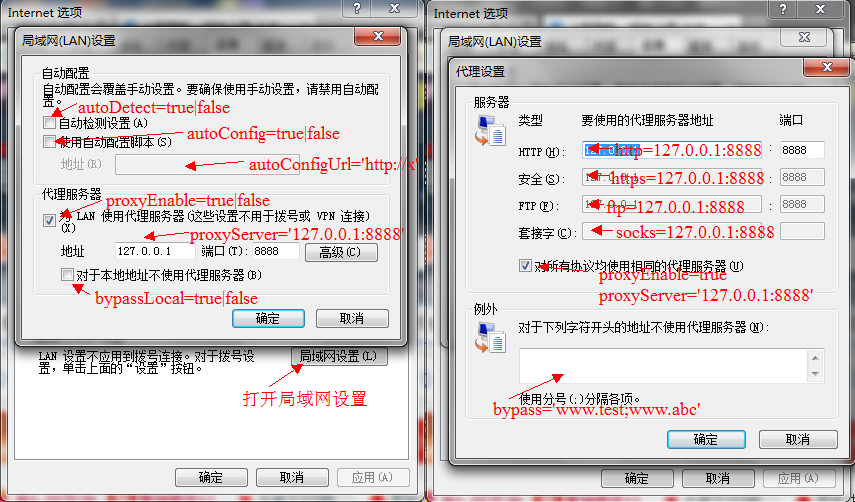
{autoDetect: true,// 是否开启自动检查设置autoConfig: true,// 是否开启pac脚本 autoConfigUrl: 'http://127.0.0.1:50011',// pac脚本的urlproxyEnable: true,// 是否开启代理设置proxyServer: '127.0.0.1:8888',// 代理服务器ip和端口,如果使用高级设置,可能返回 `htt=127.0.0.1:8888;https=127.0.0.2:8889`等bypassLocal: true,// 是否启用对本地地址不使用代理bypass: 'www.test;www.abc'// 高级设置里面的白名单信息}lan.setSettings(settings, [cb, networkservice]):
设置局域网信息
settings如上,如果为null表示清空并关闭所有局域网设置项,cb(err) 为可选回调函数,如果设置失败,则err不为空。
若不传入回调函数, 则返回 Promise 对象;
lan.reset(cb[, networkservice]):
将局域网设置重置到修改前cb(err) 为可选回调函数,如果重置失败,则err不为空。
若不传入回调函数, 则返回 Promise 对象;