



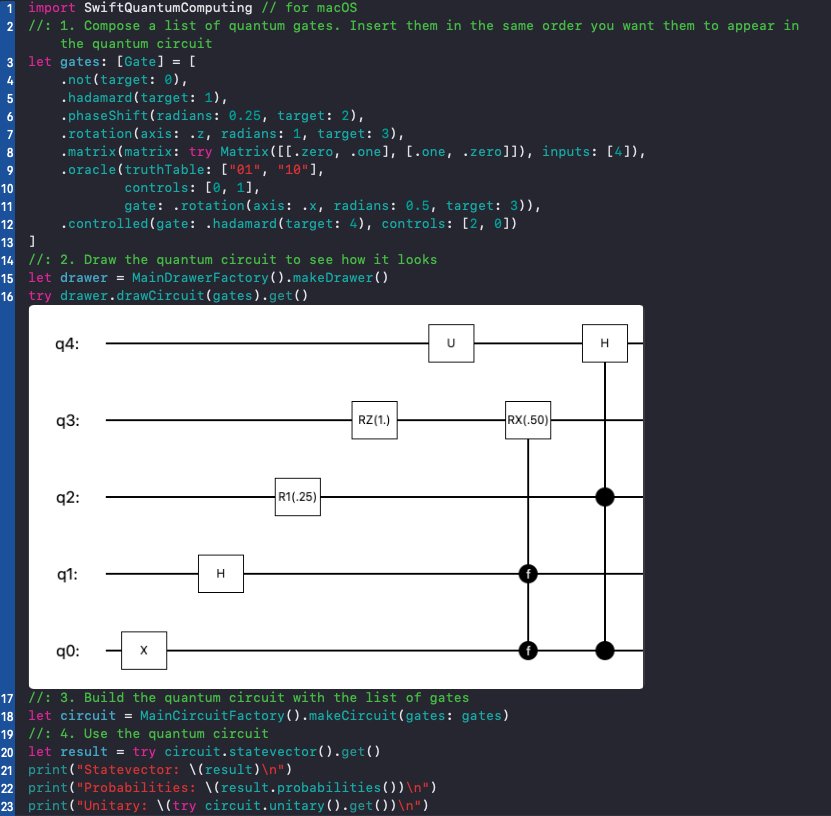
Check code in Circuit.playground.
import SwiftQuantumComputing // for macOS
//: 1. Compose a list of quantum gates & noises
letquantumOperators:[QuantumOperatorConvertible]=[Gate.hadamard(target:0),Noise.bitFlip(probability:0.35, target:0),Gate.phaseShift(radians:0.25, target:2),Noise.phaseDamping(probability:0.75, target:2),Gate.controlled(gate:.hadamard(target:1), controls:[2,0]),Noise.bitFlip(probability:0.8, target:1)]
//: 2. Build a quantum circuit with noise using the list
letcircuit=MainNoiseCircuitFactory().makeNoiseCircuit(quantumOperators: quantumOperators)
//: 3. Use the quantum circuit with noise
letresult=try circuit.densityMatrix().get()print("Density matrix: \(result)\n")print("Probabilities: \(result.probabilities())\n")
Check code in NoiseCircuit.playground.
~/SwiftQuantumComputing % swift run sqc-measure-performanceRun this application to check the performance of this simulator in your computer. Execute swift run sqc-measure-performance -h to see all available options.
Check code in SQCMeasurePerformance/main.swift.
- Use a genetic algorithm to automatically generate a quantum circuit - Check example in Genetic.playground.
- Two-level decomposition: Decompose any gate into an equivalent sequence of not gates and fully controlled phase shifts, z-rotations, y-rotations & not gates - Check example in TwoLevelDecomposition.playground.
- Euclidean Algorithm: Find greatest common divisor of two integers - Check example in EuclideanAlgorithm.playground.
- Continued Fractions: Find an approximation to a given rational number - Check example in ContinuedFractions.playground.
- Gaussian Elimination: Solve a system of XOR equations - Check example in XorGaussianElimination.playground.
- Bernstein–Vazirani algorithm - Check code in BernsteinVaziraniAlgorithm.playground.
- Deutsch's algorithm - Check code in DeutschAlgorithm.playground.
- Deutsch-Jozsa algorithm - Check code in DeutschJozsaAlgorithm.playground.
- Grover's algorithm - Check code in GroverAlgorithm.playground.
- Shor's Algorithm - Check code in ShorAlgorithm.playground.
- Simon's periodicity algorithm - Check code in SimonPeriodicityAlgorithm.playground.
Documentation for the project can be found here.
- Amazon Braket Default Simulator
- Automatic Quantum Computer Programming: A Genetic Programming Approach
- Continued Fractions and the Euclidean Algorithm
- Decomposition of unitary matrices and quantum gates
- Decomposition of unitary matrix into quantum gates
- IBM Qiskit
- qHiPSTER: The Quantum High Performance Software Testing Environment
- Quantum Computing for Computer Scientists
- Shor's Quantum Factoring Algorithm
- CBLAS-Linux (only for Linux)
- CLapacke-Linux (only for Linux)
- Swift Argument Parser
- Swift Numerics
This package depends on BLAS & LAPACK if running on Linux, more exactly, Ubuntu.
These dependencies are reflected in Package.swift with:
- CBLAS-Linux, which in turn expects to find:
/usr/include/x86_64-linux-gnu/cblas-netlib.h - CLapacke-Linux, which in turn expects to find:
/usr/include/lapacke.h
So, after installing BLAS & LAPACK (in case they are not already there):
sudo apt-get install libblas-dev liblapacke-dev
Check cblas-netlib.h & lapacke.h are in the expected locations.