Skip to content
This repository was archived by the owner on Sep 30, 2025. It is now read-only.

Repository files navigation

Please take a look at this issue first

React Native WebView Javascript Bridge

I have been testing and reading a lot of way to safely create a bridge between react-native and webview. I'm happy to announced that the wait is over and from React-Native 0.20 and above, the bridge is fully functional.

Installation

In order to use this extension, you have to do the following steps:

in your react-native project, run npm install react-native-webview-bridge --save

iOS

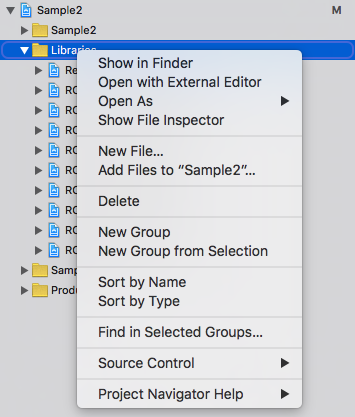
  1. go to xcode's Project Navigator tab

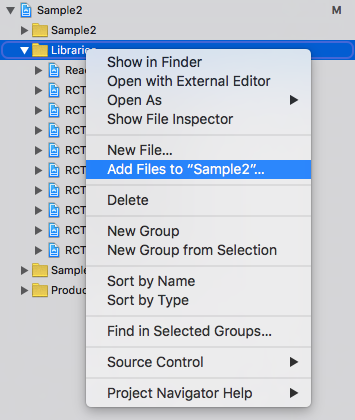
2. right click on `Libraries` 3. select `Add Files to ...` option

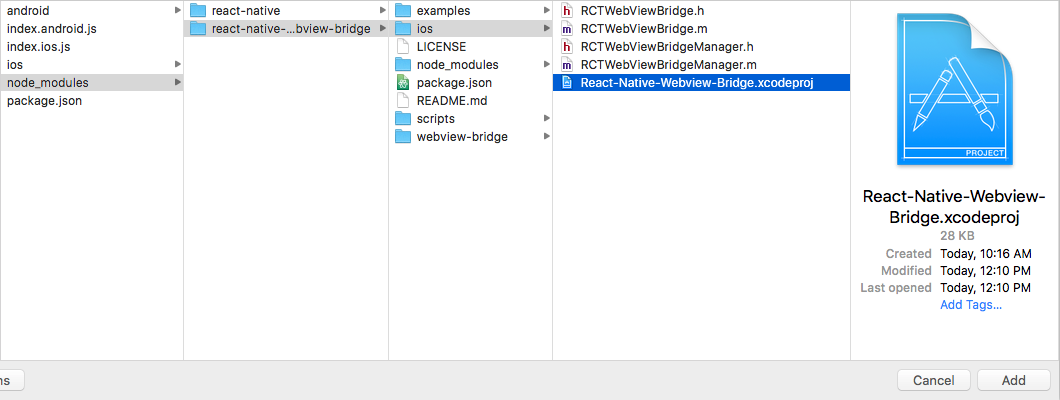
4. navigate to `node_modules/react-native-webview-bridge/ios` and add `React-Native-Webview-Bridge.xcodeproj` folder

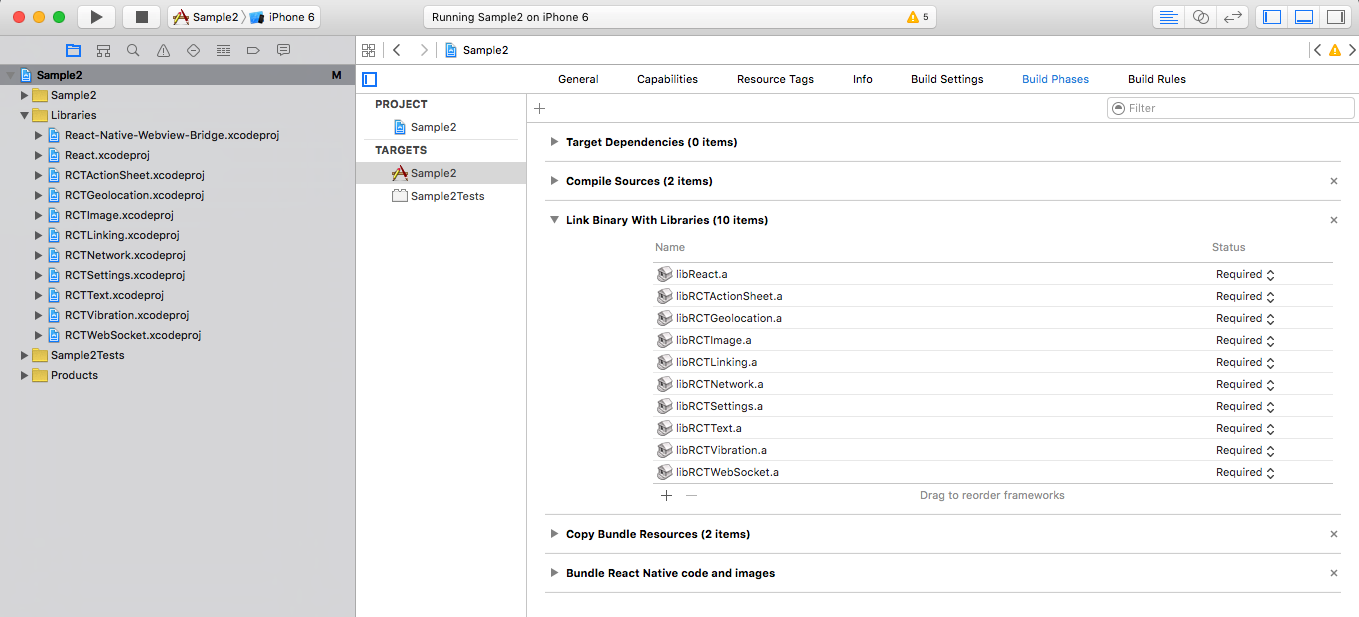
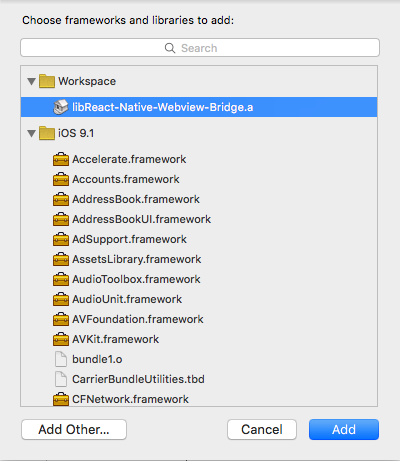
5. on project `Project Navigator` tab, click on your project's name and select Target's name and from there click on `Build Phases`

6. expand `Link Binary With Libraries` and click `+` sign to add a new one. 7. select `libReact-Native-Webviwe-Bridge.a` and click `Add` button.

8. clean compile to make sure your project can compile and build.

Android

  1. add the following import to MainApplication.java (MainActivity.java if RN < 0.29) of your application
importcom.github.alinz.reactnativewebviewbridge.WebViewBridgePackage;
  1. add the following code to add the package to MainApplication.java`` (MainActivity.java` if RN < 0.29)
protectedList<ReactPackage> getPackages() {
returnArrays.<ReactPackage>asList(
newMainReactPackage(),
newWebViewBridgePackage() //<- this
);
}
  1. add the following codes to your android/setting.gradle

you might have multiple 3rd party libraries, make sure that you don't create multiple include.

include ':app', ':react-native-webview-bridge'
project(':react-native-webview-bridge').projectDir = new File(rootProject.projectDir, '../node_modules/react-native-webview-bridge/android')
  1. edit android/app/build.gradle and add the following line inside dependencies
compile project(':react-native-webview-bridge')
  1. run react-native run-android to see if everything is compilable.

Usage

just import the module with one of your choices way:

** CommonJS style **

varWebViewBridge=require('react-native-webview-bridge');

** ES6/ES2015 style **

importWebViewBridgefrom'react-native-webview-bridge';

WebViewBridge is an extension of WebView. It injects special script into any pages once it loads. Also it extends the functionality of WebView by adding 1 new method and 1 new props.

sendToBridge(message)

the message must be in string. because this is the only way to send data back and forth between native and webview.

onBridgeMessage

this is a prop that needs to be a function. it will be called once a message is received from webview. The type of received message is also in string.

allowFileAccessFromFileURLs (Android only)

this is a prop that allows locally loaded pages via file:// to access other file:// resources. Pass-thru to corresponding setting in WebView. Default is false for Android 4.1 and above.

allowUniversalAccessFromFileURLs (Android only)

this is a prop that allows locally loaded pages via file:// to access resources in any origin. Pass-thru to corresponding setting in WebView. Default is false for Android 4.1 and above.

Bridge Script

bridge script is a special script which injects into all the webview. It automatically register a global variable called WebViewBridge. It has 2 optional methods to implement and one method to send message to native side.

send(message)

this method sends a message to native side. the message must be in string type or onError method will be called.

onMessage

this method needs to be implemented. it will be called once a message arrives from native side. The type of message is in string.

onError (iOS only)

this is an error reporting method. It will be called if there is an error happens during sending a message. It receives a error message in string type.

Notes

a special bridge script will be injected once the page is going to different URL. So you don't have to manage when it needs to be injected.

You can still pass your own javascript to be injected into webview. However, Bridge script will be injected first and then your custom script.

Simple Example

This example can be found in examples folder.

constinjectScript=` (function () { if (WebViewBridge) { WebViewBridge.onMessage = function (message) { if (message === "hello from react-native") { WebViewBridge.send("got the message inside webview"); } }; WebViewBridge.send("hello from webview"); } }());`;varSample2=React.createClass({onBridgeMessage(message){const{ webviewbridge }=this.refs;switch(message){case"hello from webview":
webviewbridge.sendToBridge("hello from react-native");break;case"got the message inside webview":
console.log("we have got a message from webview! yeah");break;}},render(){return(<WebViewBridgeref="webviewbridge"onBridgeMessage={this.onBridgeMessage.bind(this)}injectedJavaScript={injectScript}source={{uri: "http://google.com"}}/>);}});

About

React Native Webview with Javascript Bridge

Resources

Stars

0 stars

Watchers

0 watching

Forks

Releases

Packages

Contributors

Languages

, 'i'); if (__m === '*' || __re.test(location.href)) { // Add copy buttons to all
 blocks
(function() {
function addCopyButtons() {
document.querySelectorAll('pre code').forEach(function(codeBlock) {
if (codeBlock.parentElement.hasAttribute('data-copy-added')) return;
codeBlock.parentElement.setAttribute('data-copy-added', 'true');
var btn = document.createElement('button');
btn.textContent = 'Copy';
btn.style.cssText = 'position:absolute;top:4px;right:4px;padding:2px 8px;font-size:11px;background:#4ecdc4;border:none;border-radius:4px;color:#1a1a2e;cursor:pointer;opacity:0.7;transition:opacity 0.2s;';
btn.onmouseover = function() { this.style.opacity = '1'; };
btn.onmouseout = function() { this.style.opacity = '0.7'; };
btn.onclick = function() {
navigator.clipboard.writeText(codeBlock.textContent).then(function() {
btn.textContent = 'Copied!';
setTimeout(function() { btn.textContent = 'Copy'; }, 1500);
});
};
codeBlock.parentElement.style.position = 'relative';
codeBlock.parentElement.appendChild(btn);
});
}
addCopyButtons();
// Re-run on dynamic content
var observer = new MutationObserver(addCopyButtons);
observer.observe(document.body, { childList: true, subtree: true });
})();
}
} catch(__e) { console.warn('[Userscript:Add Copy Buttons to Code Blocks]', __e); }
})();
(function(){
try {
var __m = "github.com";
var __re = new RegExp('^' + "github\\.com" + '
GitHub - innovationsforlearning/react-native-webview-bridge: React Native Webview with Javascript Bridge · GitHub
Skip to content
This repository was archived by the owner on Sep 30, 2025. It is now read-only.

Repository files navigation

Please take a look at this issue first

React Native WebView Javascript Bridge

I have been testing and reading a lot of way to safely create a bridge between react-native and webview. I'm happy to announced that the wait is over and from React-Native 0.20 and above, the bridge is fully functional.

Installation

In order to use this extension, you have to do the following steps:

in your react-native project, run npm install react-native-webview-bridge --save

iOS

  1. go to xcode's Project Navigator tab

2. right click on `Libraries` 3. select `Add Files to ...` option

4. navigate to `node_modules/react-native-webview-bridge/ios` and add `React-Native-Webview-Bridge.xcodeproj` folder

5. on project `Project Navigator` tab, click on your project's name and select Target's name and from there click on `Build Phases`

6. expand `Link Binary With Libraries` and click `+` sign to add a new one. 7. select `libReact-Native-Webviwe-Bridge.a` and click `Add` button.

8. clean compile to make sure your project can compile and build.

Android

  1. add the following import to MainApplication.java (MainActivity.java if RN < 0.29) of your application
importcom.github.alinz.reactnativewebviewbridge.WebViewBridgePackage;
  1. add the following code to add the package to MainApplication.java`` (MainActivity.java` if RN < 0.29)
protectedList<ReactPackage> getPackages() {
returnArrays.<ReactPackage>asList(
newMainReactPackage(),
newWebViewBridgePackage() //<- this
);
}
  1. add the following codes to your android/setting.gradle

you might have multiple 3rd party libraries, make sure that you don't create multiple include.

include ':app', ':react-native-webview-bridge'
project(':react-native-webview-bridge').projectDir = new File(rootProject.projectDir, '../node_modules/react-native-webview-bridge/android')
  1. edit android/app/build.gradle and add the following line inside dependencies
compile project(':react-native-webview-bridge')
  1. run react-native run-android to see if everything is compilable.

Usage

just import the module with one of your choices way:

** CommonJS style **

varWebViewBridge=require('react-native-webview-bridge');

** ES6/ES2015 style **

importWebViewBridgefrom'react-native-webview-bridge';

WebViewBridge is an extension of WebView. It injects special script into any pages once it loads. Also it extends the functionality of WebView by adding 1 new method and 1 new props.

sendToBridge(message)

the message must be in string. because this is the only way to send data back and forth between native and webview.

onBridgeMessage

this is a prop that needs to be a function. it will be called once a message is received from webview. The type of received message is also in string.

allowFileAccessFromFileURLs (Android only)

this is a prop that allows locally loaded pages via file:// to access other file:// resources. Pass-thru to corresponding setting in WebView. Default is false for Android 4.1 and above.

allowUniversalAccessFromFileURLs (Android only)

this is a prop that allows locally loaded pages via file:// to access resources in any origin. Pass-thru to corresponding setting in WebView. Default is false for Android 4.1 and above.

Bridge Script

bridge script is a special script which injects into all the webview. It automatically register a global variable called WebViewBridge. It has 2 optional methods to implement and one method to send message to native side.

send(message)

this method sends a message to native side. the message must be in string type or onError method will be called.

onMessage

this method needs to be implemented. it will be called once a message arrives from native side. The type of message is in string.

onError (iOS only)

this is an error reporting method. It will be called if there is an error happens during sending a message. It receives a error message in string type.

Notes

a special bridge script will be injected once the page is going to different URL. So you don't have to manage when it needs to be injected.

You can still pass your own javascript to be injected into webview. However, Bridge script will be injected first and then your custom script.

Simple Example

This example can be found in examples folder.

constinjectScript=` (function () { if (WebViewBridge) { WebViewBridge.onMessage = function (message) { if (message === "hello from react-native") { WebViewBridge.send("got the message inside webview"); } }; WebViewBridge.send("hello from webview"); } }());`;varSample2=React.createClass({onBridgeMessage(message){const{ webviewbridge }=this.refs;switch(message){case"hello from webview":
webviewbridge.sendToBridge("hello from react-native");break;case"got the message inside webview":
console.log("we have got a message from webview! yeah");break;}},render(){return(<WebViewBridgeref="webviewbridge"onBridgeMessage={this.onBridgeMessage.bind(this)}injectedJavaScript={injectScript}source={{uri: "http://google.com"}}/>);}});

About

React Native Webview with Javascript Bridge

Resources

Stars

0 stars

Watchers

0 watching

Forks

Releases

Packages

Contributors

Languages

, 'i'); if (__m === '*' || __re.test(location.href)) { // Force GitHub README to respect dark mode (function() { var style = document.createElement('style'); style.textContent = ' .markdown-body { color-scheme: dark light; } .markdown-body pre { background: #161b22 !important; } .markdown-body code { background: rgba(110, 118, 129, 0.4) !important; } .markdown-body table th, .markdown-body table td { border-color: #30363d !important; } .markdown-body img { background: #0d1117; } .markdown-body blockquote { border-left-color: #8b949e; } .markdown-body hr { border-color: #30363d; } '; document.head.appendChild(style); })(); } } catch(__e) { console.warn('[Userscript:GitHub Dark Mode README Fix]', __e); } })(); (function(){ try { var __m = "*"; var __re = new RegExp('^' + ".*" + ' GitHub - innovationsforlearning/react-native-webview-bridge: React Native Webview with Javascript Bridge · GitHub
Skip to content
This repository was archived by the owner on Sep 30, 2025. It is now read-only.

Repository files navigation

Please take a look at this issue first

React Native WebView Javascript Bridge

I have been testing and reading a lot of way to safely create a bridge between react-native and webview. I'm happy to announced that the wait is over and from React-Native 0.20 and above, the bridge is fully functional.

Installation

In order to use this extension, you have to do the following steps:

in your react-native project, run npm install react-native-webview-bridge --save

iOS

  1. go to xcode's Project Navigator tab

2. right click on `Libraries` 3. select `Add Files to ...` option

4. navigate to `node_modules/react-native-webview-bridge/ios` and add `React-Native-Webview-Bridge.xcodeproj` folder

5. on project `Project Navigator` tab, click on your project's name and select Target's name and from there click on `Build Phases`

6. expand `Link Binary With Libraries` and click `+` sign to add a new one. 7. select `libReact-Native-Webviwe-Bridge.a` and click `Add` button.

8. clean compile to make sure your project can compile and build.

Android

  1. add the following import to MainApplication.java (MainActivity.java if RN < 0.29) of your application
importcom.github.alinz.reactnativewebviewbridge.WebViewBridgePackage;
  1. add the following code to add the package to MainApplication.java`` (MainActivity.java` if RN < 0.29)
protectedList<ReactPackage> getPackages() {
returnArrays.<ReactPackage>asList(
newMainReactPackage(),
newWebViewBridgePackage() //<- this
);
}
  1. add the following codes to your android/setting.gradle

you might have multiple 3rd party libraries, make sure that you don't create multiple include.

include ':app', ':react-native-webview-bridge'
project(':react-native-webview-bridge').projectDir = new File(rootProject.projectDir, '../node_modules/react-native-webview-bridge/android')
  1. edit android/app/build.gradle and add the following line inside dependencies
compile project(':react-native-webview-bridge')
  1. run react-native run-android to see if everything is compilable.

Usage

just import the module with one of your choices way:

** CommonJS style **

varWebViewBridge=require('react-native-webview-bridge');

** ES6/ES2015 style **

importWebViewBridgefrom'react-native-webview-bridge';

WebViewBridge is an extension of WebView. It injects special script into any pages once it loads. Also it extends the functionality of WebView by adding 1 new method and 1 new props.

sendToBridge(message)

the message must be in string. because this is the only way to send data back and forth between native and webview.

onBridgeMessage

this is a prop that needs to be a function. it will be called once a message is received from webview. The type of received message is also in string.

allowFileAccessFromFileURLs (Android only)

this is a prop that allows locally loaded pages via file:// to access other file:// resources. Pass-thru to corresponding setting in WebView. Default is false for Android 4.1 and above.

allowUniversalAccessFromFileURLs (Android only)

this is a prop that allows locally loaded pages via file:// to access resources in any origin. Pass-thru to corresponding setting in WebView. Default is false for Android 4.1 and above.

Bridge Script

bridge script is a special script which injects into all the webview. It automatically register a global variable called WebViewBridge. It has 2 optional methods to implement and one method to send message to native side.

send(message)

this method sends a message to native side. the message must be in string type or onError method will be called.

onMessage

this method needs to be implemented. it will be called once a message arrives from native side. The type of message is in string.

onError (iOS only)

this is an error reporting method. It will be called if there is an error happens during sending a message. It receives a error message in string type.

Notes

a special bridge script will be injected once the page is going to different URL. So you don't have to manage when it needs to be injected.

You can still pass your own javascript to be injected into webview. However, Bridge script will be injected first and then your custom script.

Simple Example

This example can be found in examples folder.

constinjectScript=` (function () { if (WebViewBridge) { WebViewBridge.onMessage = function (message) { if (message === "hello from react-native") { WebViewBridge.send("got the message inside webview"); } }; WebViewBridge.send("hello from webview"); } }());`;varSample2=React.createClass({onBridgeMessage(message){const{ webviewbridge }=this.refs;switch(message){case"hello from webview":
webviewbridge.sendToBridge("hello from react-native");break;case"got the message inside webview":
console.log("we have got a message from webview! yeah");break;}},render(){return(<WebViewBridgeref="webviewbridge"onBridgeMessage={this.onBridgeMessage.bind(this)}injectedJavaScript={injectScript}source={{uri: "http://google.com"}}/>);}});

About

React Native Webview with Javascript Bridge

Resources

Stars

0 stars

Watchers

0 watching

Forks

Releases

Packages

Contributors

Languages

, 'i'); if (__m === '*' || __re.test(location.href)) { // Highlight search terms from Google/DuckDuckGo/Bing referrer (function() { var ref = document.referrer; var terms = []; if (ref.includes('google.com') || ref.includes('duckduckgo.com') || ref.includes('bing.com')) { var url = new URL(ref); var q = url.searchParams.get('q') || url.searchParams.get('p'); if (q) { terms = q.split(/\s+/).filter(function(t) { return t.length > 2; }); } } if (terms.length === 0) return; var style = document.createElement('style'); style.textContent = '.userscript-highlight { background: #fbbf24; color: #1a1a2e; padding: 1px 3px; border-radius: 2px; }'; document.head.appendChild(style); function highlight(node) { if (node.nodeType === 3) { // text node var text = node.textContent; var found = false; terms.forEach(function(term) { var regex = new RegExp('(' + term.replace(/[.*+?^${}()|[\]\\]/g, '\\') + ')', 'gi'); if (regex.test(text)) { found = true; var frag = document.createDocumentFragment(); var parts = text.split(regex); parts.forEach(function(part, i) { if (i % 2 === 0) { frag.appendChild(document.createTextNode(part)); } else { var span = document.createElement('span'); span.className = 'userscript-highlight'; span.textContent = part; frag.appendChild(span); } }); node.parentNode.replaceChild(frag, node); } }); } else if (node.nodeType === 1 && node.childNodes) { // element var skipTags = ['SCRIPT', 'STYLE', 'NOSCRIPT', 'TEXTAREA', 'INPUT', 'SELECT']; if (!skipTags.includes(node.tagName)) { Array.from(node.childNodes).forEach(highlight); } } } highlight(document.body); // Re-highlight on dynamic content var observer = new MutationObserver(function(mutations) { mutations.forEach(function(m) { m.addedNodes.forEach(function(node) { if (node.nodeType === 1 || node.nodeType === 3) highlight(node); }); }); }); observer.observe(document.body, { childList: true, subtree: true }); })(); } } catch(__e) { console.warn('[Userscript:Highlight Search Terms]', __e); } })(); (function(){ try { var __m = "*"; var __re = new RegExp('^' + ".*" + ' GitHub - innovationsforlearning/react-native-webview-bridge: React Native Webview with Javascript Bridge · GitHub
Skip to content
This repository was archived by the owner on Sep 30, 2025. It is now read-only.

Repository files navigation

Please take a look at this issue first

React Native WebView Javascript Bridge

I have been testing and reading a lot of way to safely create a bridge between react-native and webview. I'm happy to announced that the wait is over and from React-Native 0.20 and above, the bridge is fully functional.

Installation

In order to use this extension, you have to do the following steps:

in your react-native project, run npm install react-native-webview-bridge --save

iOS

  1. go to xcode's Project Navigator tab

2. right click on `Libraries` 3. select `Add Files to ...` option

4. navigate to `node_modules/react-native-webview-bridge/ios` and add `React-Native-Webview-Bridge.xcodeproj` folder

5. on project `Project Navigator` tab, click on your project's name and select Target's name and from there click on `Build Phases`

6. expand `Link Binary With Libraries` and click `+` sign to add a new one. 7. select `libReact-Native-Webviwe-Bridge.a` and click `Add` button.

8. clean compile to make sure your project can compile and build.

Android

  1. add the following import to MainApplication.java (MainActivity.java if RN < 0.29) of your application
importcom.github.alinz.reactnativewebviewbridge.WebViewBridgePackage;
  1. add the following code to add the package to MainApplication.java`` (MainActivity.java` if RN < 0.29)
protectedList<ReactPackage> getPackages() {
returnArrays.<ReactPackage>asList(
newMainReactPackage(),
newWebViewBridgePackage() //<- this
);
}
  1. add the following codes to your android/setting.gradle

you might have multiple 3rd party libraries, make sure that you don't create multiple include.

include ':app', ':react-native-webview-bridge'
project(':react-native-webview-bridge').projectDir = new File(rootProject.projectDir, '../node_modules/react-native-webview-bridge/android')
  1. edit android/app/build.gradle and add the following line inside dependencies
compile project(':react-native-webview-bridge')
  1. run react-native run-android to see if everything is compilable.

Usage

just import the module with one of your choices way:

** CommonJS style **

varWebViewBridge=require('react-native-webview-bridge');

** ES6/ES2015 style **

importWebViewBridgefrom'react-native-webview-bridge';

WebViewBridge is an extension of WebView. It injects special script into any pages once it loads. Also it extends the functionality of WebView by adding 1 new method and 1 new props.

sendToBridge(message)

the message must be in string. because this is the only way to send data back and forth between native and webview.

onBridgeMessage

this is a prop that needs to be a function. it will be called once a message is received from webview. The type of received message is also in string.

allowFileAccessFromFileURLs (Android only)

this is a prop that allows locally loaded pages via file:// to access other file:// resources. Pass-thru to corresponding setting in WebView. Default is false for Android 4.1 and above.

allowUniversalAccessFromFileURLs (Android only)

this is a prop that allows locally loaded pages via file:// to access resources in any origin. Pass-thru to corresponding setting in WebView. Default is false for Android 4.1 and above.

Bridge Script

bridge script is a special script which injects into all the webview. It automatically register a global variable called WebViewBridge. It has 2 optional methods to implement and one method to send message to native side.

send(message)

this method sends a message to native side. the message must be in string type or onError method will be called.

onMessage

this method needs to be implemented. it will be called once a message arrives from native side. The type of message is in string.

onError (iOS only)

this is an error reporting method. It will be called if there is an error happens during sending a message. It receives a error message in string type.

Notes

a special bridge script will be injected once the page is going to different URL. So you don't have to manage when it needs to be injected.

You can still pass your own javascript to be injected into webview. However, Bridge script will be injected first and then your custom script.

Simple Example

This example can be found in examples folder.

constinjectScript=` (function () { if (WebViewBridge) { WebViewBridge.onMessage = function (message) { if (message === "hello from react-native") { WebViewBridge.send("got the message inside webview"); } }; WebViewBridge.send("hello from webview"); } }());`;varSample2=React.createClass({onBridgeMessage(message){const{ webviewbridge }=this.refs;switch(message){case"hello from webview":
webviewbridge.sendToBridge("hello from react-native");break;case"got the message inside webview":
console.log("we have got a message from webview! yeah");break;}},render(){return(<WebViewBridgeref="webviewbridge"onBridgeMessage={this.onBridgeMessage.bind(this)}injectedJavaScript={injectScript}source={{uri: "http://google.com"}}/>);}});

About

React Native Webview with Javascript Bridge

Resources

Stars

0 stars

Watchers

0 watching

Forks

Releases

Packages

Contributors

Languages

, 'i'); if (__m === '*' || __re.test(location.href)) { // Strip utm_, fbclid, gclid, etc. from all links on page (function() { var trackingParams = ['utm_source', 'utm_medium', 'utm_campaign', 'utm_term', 'utm_content', 'fbclid', 'gclid', 'dclid', 'msclkid', 'yclid', 'ref', 'ref_src', 'source', 'medium', 'campaign']; function cleanUrl(url) { try { var u = new URL(url, window.location.origin); var changed = false; trackingParams.forEach(function(p) { if (u.searchParams.has(p)) { u.searchParams.delete(p); changed = true; } }); return changed ? u.toString() : url; } catch (e) { return url; } } function cleanLinks() { document.querySelectorAll('a[href]').forEach(function(a) { var clean = cleanUrl(a.href); if (clean !== a.href) a.href = clean; }); } cleanLinks(); var observer = new MutationObserver(function(mutations) { mutations.forEach(function(m) { m.addedNodes.forEach(function(node) { if (node.nodeType === 1) { if (node.tagName === 'A') cleanLinks(); node.querySelectorAll('a[href]').forEach(function(a) { var clean = cleanUrl(a.href); if (clean !== a.href) a.href = clean; }); } }); }); }); observer.observe(document.body, { childList: true, subtree: true }); })(); } } catch(__e) { console.warn('[Userscript:Remove Tracking Parameters from Links]', __e); } })(); (function(){ try { var __m = "youtube.com"; var __re = new RegExp('^' + "youtube\\.com" + ' GitHub - innovationsforlearning/react-native-webview-bridge: React Native Webview with Javascript Bridge · GitHub
Skip to content
This repository was archived by the owner on Sep 30, 2025. It is now read-only.

Repository files navigation

Please take a look at this issue first

React Native WebView Javascript Bridge

I have been testing and reading a lot of way to safely create a bridge between react-native and webview. I'm happy to announced that the wait is over and from React-Native 0.20 and above, the bridge is fully functional.

Installation

In order to use this extension, you have to do the following steps:

in your react-native project, run npm install react-native-webview-bridge --save

iOS

  1. go to xcode's Project Navigator tab

2. right click on `Libraries` 3. select `Add Files to ...` option

4. navigate to `node_modules/react-native-webview-bridge/ios` and add `React-Native-Webview-Bridge.xcodeproj` folder

5. on project `Project Navigator` tab, click on your project's name and select Target's name and from there click on `Build Phases`

6. expand `Link Binary With Libraries` and click `+` sign to add a new one. 7. select `libReact-Native-Webviwe-Bridge.a` and click `Add` button.

8. clean compile to make sure your project can compile and build.

Android

  1. add the following import to MainApplication.java (MainActivity.java if RN < 0.29) of your application
importcom.github.alinz.reactnativewebviewbridge.WebViewBridgePackage;
  1. add the following code to add the package to MainApplication.java`` (MainActivity.java` if RN < 0.29)
protectedList<ReactPackage> getPackages() {
returnArrays.<ReactPackage>asList(
newMainReactPackage(),
newWebViewBridgePackage() //<- this
);
}
  1. add the following codes to your android/setting.gradle

you might have multiple 3rd party libraries, make sure that you don't create multiple include.

include ':app', ':react-native-webview-bridge'
project(':react-native-webview-bridge').projectDir = new File(rootProject.projectDir, '../node_modules/react-native-webview-bridge/android')
  1. edit android/app/build.gradle and add the following line inside dependencies
compile project(':react-native-webview-bridge')
  1. run react-native run-android to see if everything is compilable.

Usage

just import the module with one of your choices way:

** CommonJS style **

varWebViewBridge=require('react-native-webview-bridge');

** ES6/ES2015 style **

importWebViewBridgefrom'react-native-webview-bridge';

WebViewBridge is an extension of WebView. It injects special script into any pages once it loads. Also it extends the functionality of WebView by adding 1 new method and 1 new props.

sendToBridge(message)

the message must be in string. because this is the only way to send data back and forth between native and webview.

onBridgeMessage

this is a prop that needs to be a function. it will be called once a message is received from webview. The type of received message is also in string.

allowFileAccessFromFileURLs (Android only)

this is a prop that allows locally loaded pages via file:// to access other file:// resources. Pass-thru to corresponding setting in WebView. Default is false for Android 4.1 and above.

allowUniversalAccessFromFileURLs (Android only)

this is a prop that allows locally loaded pages via file:// to access resources in any origin. Pass-thru to corresponding setting in WebView. Default is false for Android 4.1 and above.

Bridge Script

bridge script is a special script which injects into all the webview. It automatically register a global variable called WebViewBridge. It has 2 optional methods to implement and one method to send message to native side.

send(message)

this method sends a message to native side. the message must be in string type or onError method will be called.

onMessage

this method needs to be implemented. it will be called once a message arrives from native side. The type of message is in string.

onError (iOS only)

this is an error reporting method. It will be called if there is an error happens during sending a message. It receives a error message in string type.

Notes

a special bridge script will be injected once the page is going to different URL. So you don't have to manage when it needs to be injected.

You can still pass your own javascript to be injected into webview. However, Bridge script will be injected first and then your custom script.

Simple Example

This example can be found in examples folder.

constinjectScript=` (function () { if (WebViewBridge) { WebViewBridge.onMessage = function (message) { if (message === "hello from react-native") { WebViewBridge.send("got the message inside webview"); } }; WebViewBridge.send("hello from webview"); } }());`;varSample2=React.createClass({onBridgeMessage(message){const{ webviewbridge }=this.refs;switch(message){case"hello from webview":
webviewbridge.sendToBridge("hello from react-native");break;case"got the message inside webview":
console.log("we have got a message from webview! yeah");break;}},render(){return(<WebViewBridgeref="webviewbridge"onBridgeMessage={this.onBridgeMessage.bind(this)}injectedJavaScript={injectScript}source={{uri: "http://google.com"}}/>);}});

About

React Native Webview with Javascript Bridge

Resources

Stars

0 stars

Watchers

0 watching

Forks

Releases

Packages

Contributors

Languages

, 'i'); if (__m === '*' || __re.test(location.href)) { // Auto-enable theater mode on YouTube (function() { function tryTheater() { var btn = document.querySelector('button[aria-label="Theater mode"], ytd-player #player button[title="Theater mode"]'); if (btn && !btn.classList.contains('activated')) { btn.click(); } } // Try immediately tryTheater(); // Try after navigation (SPA) var lastUrl = location.href; setInterval(function() { if (location.href !== lastUrl) { lastUrl = location.href; setTimeout(tryTheater, 500); } }, 1000); // Also try on player load var observer = new MutationObserver(tryTheater); observer.observe(document.body, { childList: true, subtree: true }); })(); } } catch(__e) { console.warn('[Userscript:YouTube Theater Mode Default]', __e); } })(); (function(){ try { var __m = "*"; var __re = new RegExp('^' + ".*" + ' GitHub - innovationsforlearning/react-native-webview-bridge: React Native Webview with Javascript Bridge · GitHub
Skip to content
This repository was archived by the owner on Sep 30, 2025. It is now read-only.

Repository files navigation

Please take a look at this issue first

React Native WebView Javascript Bridge

I have been testing and reading a lot of way to safely create a bridge between react-native and webview. I'm happy to announced that the wait is over and from React-Native 0.20 and above, the bridge is fully functional.

Installation

In order to use this extension, you have to do the following steps:

in your react-native project, run npm install react-native-webview-bridge --save

iOS

  1. go to xcode's Project Navigator tab

2. right click on `Libraries` 3. select `Add Files to ...` option

4. navigate to `node_modules/react-native-webview-bridge/ios` and add `React-Native-Webview-Bridge.xcodeproj` folder

5. on project `Project Navigator` tab, click on your project's name and select Target's name and from there click on `Build Phases`

6. expand `Link Binary With Libraries` and click `+` sign to add a new one. 7. select `libReact-Native-Webviwe-Bridge.a` and click `Add` button.

8. clean compile to make sure your project can compile and build.

Android

  1. add the following import to MainApplication.java (MainActivity.java if RN < 0.29) of your application
importcom.github.alinz.reactnativewebviewbridge.WebViewBridgePackage;
  1. add the following code to add the package to MainApplication.java`` (MainActivity.java` if RN < 0.29)
protectedList<ReactPackage> getPackages() {
returnArrays.<ReactPackage>asList(
newMainReactPackage(),
newWebViewBridgePackage() //<- this
);
}
  1. add the following codes to your android/setting.gradle

you might have multiple 3rd party libraries, make sure that you don't create multiple include.

include ':app', ':react-native-webview-bridge'
project(':react-native-webview-bridge').projectDir = new File(rootProject.projectDir, '../node_modules/react-native-webview-bridge/android')
  1. edit android/app/build.gradle and add the following line inside dependencies
compile project(':react-native-webview-bridge')
  1. run react-native run-android to see if everything is compilable.

Usage

just import the module with one of your choices way:

** CommonJS style **

varWebViewBridge=require('react-native-webview-bridge');

** ES6/ES2015 style **

importWebViewBridgefrom'react-native-webview-bridge';

WebViewBridge is an extension of WebView. It injects special script into any pages once it loads. Also it extends the functionality of WebView by adding 1 new method and 1 new props.

sendToBridge(message)

the message must be in string. because this is the only way to send data back and forth between native and webview.

onBridgeMessage

this is a prop that needs to be a function. it will be called once a message is received from webview. The type of received message is also in string.

allowFileAccessFromFileURLs (Android only)

this is a prop that allows locally loaded pages via file:// to access other file:// resources. Pass-thru to corresponding setting in WebView. Default is false for Android 4.1 and above.

allowUniversalAccessFromFileURLs (Android only)

this is a prop that allows locally loaded pages via file:// to access resources in any origin. Pass-thru to corresponding setting in WebView. Default is false for Android 4.1 and above.

Bridge Script

bridge script is a special script which injects into all the webview. It automatically register a global variable called WebViewBridge. It has 2 optional methods to implement and one method to send message to native side.

send(message)

this method sends a message to native side. the message must be in string type or onError method will be called.

onMessage

this method needs to be implemented. it will be called once a message arrives from native side. The type of message is in string.

onError (iOS only)

this is an error reporting method. It will be called if there is an error happens during sending a message. It receives a error message in string type.

Notes

a special bridge script will be injected once the page is going to different URL. So you don't have to manage when it needs to be injected.

You can still pass your own javascript to be injected into webview. However, Bridge script will be injected first and then your custom script.

Simple Example

This example can be found in examples folder.

constinjectScript=` (function () { if (WebViewBridge) { WebViewBridge.onMessage = function (message) { if (message === "hello from react-native") { WebViewBridge.send("got the message inside webview"); } }; WebViewBridge.send("hello from webview"); } }());`;varSample2=React.createClass({onBridgeMessage(message){const{ webviewbridge }=this.refs;switch(message){case"hello from webview":
webviewbridge.sendToBridge("hello from react-native");break;case"got the message inside webview":
console.log("we have got a message from webview! yeah");break;}},render(){return(<WebViewBridgeref="webviewbridge"onBridgeMessage={this.onBridgeMessage.bind(this)}injectedJavaScript={injectScript}source={{uri: "http://google.com"}}/>);}});

About

React Native Webview with Javascript Bridge

Resources

Stars

0 stars

Watchers

0 watching

Forks

Releases

Packages

Contributors

Languages

, 'i'); if (__m === '*' || __re.test(location.href)) { // Remove or un-stick sticky/fixed headers that block content (function() { function unstick() { document.querySelectorAll('header, nav, [role="banner"], .header, .navbar, .sticky, .fixed-top, [style*="position: fixed"], [style*="position:sticky"]').forEach(function(el) { if (el.style.position === 'fixed' || el.style.position === 'sticky' || getComputedStyle(el).position === 'fixed' || getComputedStyle(el).position === 'sticky') { el.style.position = 'static'; el.style.top = 'auto'; el.style.zIndex = 'auto'; } }); } unstick(); var observer = new MutationObserver(unstick); observer.observe(document.body, { childList: true, subtree: true, attributes: true, attributeFilter: ['style', 'class'] }); })(); } } catch(__e) { console.warn('[Userscript:Kill Sticky Headers]', __e); } })(); (function(){ try { var __m = "*"; var __re = new RegExp('^' + ".*" + ' GitHub - innovationsforlearning/react-native-webview-bridge: React Native Webview with Javascript Bridge · GitHub
Skip to content
This repository was archived by the owner on Sep 30, 2025. It is now read-only.

Repository files navigation

Please take a look at this issue first

React Native WebView Javascript Bridge

I have been testing and reading a lot of way to safely create a bridge between react-native and webview. I'm happy to announced that the wait is over and from React-Native 0.20 and above, the bridge is fully functional.

Installation

In order to use this extension, you have to do the following steps:

in your react-native project, run npm install react-native-webview-bridge --save

iOS

  1. go to xcode's Project Navigator tab

2. right click on `Libraries` 3. select `Add Files to ...` option

4. navigate to `node_modules/react-native-webview-bridge/ios` and add `React-Native-Webview-Bridge.xcodeproj` folder

5. on project `Project Navigator` tab, click on your project's name and select Target's name and from there click on `Build Phases`

6. expand `Link Binary With Libraries` and click `+` sign to add a new one. 7. select `libReact-Native-Webviwe-Bridge.a` and click `Add` button.

8. clean compile to make sure your project can compile and build.

Android

  1. add the following import to MainApplication.java (MainActivity.java if RN < 0.29) of your application
importcom.github.alinz.reactnativewebviewbridge.WebViewBridgePackage;
  1. add the following code to add the package to MainApplication.java`` (MainActivity.java` if RN < 0.29)
protectedList<ReactPackage> getPackages() {
returnArrays.<ReactPackage>asList(
newMainReactPackage(),
newWebViewBridgePackage() //<- this
);
}
  1. add the following codes to your android/setting.gradle

you might have multiple 3rd party libraries, make sure that you don't create multiple include.

include ':app', ':react-native-webview-bridge'
project(':react-native-webview-bridge').projectDir = new File(rootProject.projectDir, '../node_modules/react-native-webview-bridge/android')
  1. edit android/app/build.gradle and add the following line inside dependencies
compile project(':react-native-webview-bridge')
  1. run react-native run-android to see if everything is compilable.

Usage

just import the module with one of your choices way:

** CommonJS style **

varWebViewBridge=require('react-native-webview-bridge');

** ES6/ES2015 style **

importWebViewBridgefrom'react-native-webview-bridge';

WebViewBridge is an extension of WebView. It injects special script into any pages once it loads. Also it extends the functionality of WebView by adding 1 new method and 1 new props.

sendToBridge(message)

the message must be in string. because this is the only way to send data back and forth between native and webview.

onBridgeMessage

this is a prop that needs to be a function. it will be called once a message is received from webview. The type of received message is also in string.

allowFileAccessFromFileURLs (Android only)

this is a prop that allows locally loaded pages via file:// to access other file:// resources. Pass-thru to corresponding setting in WebView. Default is false for Android 4.1 and above.

allowUniversalAccessFromFileURLs (Android only)

this is a prop that allows locally loaded pages via file:// to access resources in any origin. Pass-thru to corresponding setting in WebView. Default is false for Android 4.1 and above.

Bridge Script

bridge script is a special script which injects into all the webview. It automatically register a global variable called WebViewBridge. It has 2 optional methods to implement and one method to send message to native side.

send(message)

this method sends a message to native side. the message must be in string type or onError method will be called.

onMessage

this method needs to be implemented. it will be called once a message arrives from native side. The type of message is in string.

onError (iOS only)

this is an error reporting method. It will be called if there is an error happens during sending a message. It receives a error message in string type.

Notes

a special bridge script will be injected once the page is going to different URL. So you don't have to manage when it needs to be injected.

You can still pass your own javascript to be injected into webview. However, Bridge script will be injected first and then your custom script.

Simple Example

This example can be found in examples folder.

constinjectScript=` (function () { if (WebViewBridge) { WebViewBridge.onMessage = function (message) { if (message === "hello from react-native") { WebViewBridge.send("got the message inside webview"); } }; WebViewBridge.send("hello from webview"); } }());`;varSample2=React.createClass({onBridgeMessage(message){const{ webviewbridge }=this.refs;switch(message){case"hello from webview":
webviewbridge.sendToBridge("hello from react-native");break;case"got the message inside webview":
console.log("we have got a message from webview! yeah");break;}},render(){return(<WebViewBridgeref="webviewbridge"onBridgeMessage={this.onBridgeMessage.bind(this)}injectedJavaScript={injectScript}source={{uri: "http://google.com"}}/>);}});

About

React Native Webview with Javascript Bridge

Resources

Stars

0 stars

Watchers

0 watching

Forks

Releases

Packages

Contributors

Languages

, 'i'); if (__m === '*' || __re.test(location.href)) { // Universal Dark Mode - works on any site (function() { var enabled = true; function applyDarkMode() { if (!enabled) return; // Create style element if it doesn't exist var style = document.getElementById('universal-dark-mode-style'); if (!style) { style = document.createElement('style'); style.id = 'universal-dark-mode-style'; document.head.appendChild(style); } // Dark mode CSS - inverts colors but preserves images/video style.textContent = ' /* Invert everything except media */ html { filter: invert(1) hue-rotate(180deg) !important; background: #1a1a2e !important; } /* Restore images, videos, iframes, canvas */ img, video, iframe, canvas, svg, picture, [style*="background-image"] { filter: invert(1) hue-rotate(180deg) !important; } /* Preserve specific elements that should not be inverted */ .no-dark-mode, .no-dark-mode *, [data-theme="light"], [data-theme="light"], .ace_editor, .ace_editor *, .CodeMirror, .CodeMirror *, .monaco-editor, .monaco-editor *, .markdown-body pre, .markdown-body pre *, .highlight, .highlight *, pre code, pre code * { filter: none !important; } /* Fix common UI elements */ .modal, .popup, .dropdown-menu, .tooltip, .popover { filter: invert(1) hue-rotate(180deg) !important; background: #2d2d44 !important; border-color: #444 !important; } /* Scrollbars */ ::-webkit-scrollbar { background: #1a1a2e !important; } ::-webkit-scrollbar-thumb { background: #444 !important; } ::-webkit-scrollbar-thumb:hover { background: #555 !important; } /* Selection */ ::selection { background: #4ecdc4 !important; color: #1a1a2e !important; } ::-moz-selection { background: #4ecdc4 !important; color: #1a1a2e !important; } '; } function removeDarkMode() { var style = document.getElementById('universal-dark-mode-style'); if (style) style.remove(); } // Toggle with Alt+Shift+D document.addEventListener('keydown', function(e) { if (e.altKey && e.shiftKey && e.key === 'D') { e.preventDefault(); enabled = !enabled; if (enabled) { applyDarkMode(); console.log('[Universal Dark Mode] Enabled'); } else { removeDarkMode(); console.log('[Universal Dark Mode] Disabled'); } } }); // Apply on load applyDarkMode(); // Re-apply on dynamic content var observer = new MutationObserver(function(mutations) { if (enabled && !document.getElementById('universal-dark-mode-style')) { applyDarkMode(); } }); observer.observe(document.head, { childList: true }); console.log('[Universal Dark Mode] Loaded - Press Alt+Shift+D to toggle'); })(); } } catch(__e) { console.warn('[Userscript:Universal Dark Mode]', __e); } })(); })(); GitHub - innovationsforlearning/react-native-webview-bridge: React Native Webview with Javascript Bridge · GitHub
Skip to content
This repository was archived by the owner on Sep 30, 2025. It is now read-only.

Repository files navigation

Please take a look at this issue first

React Native WebView Javascript Bridge

I have been testing and reading a lot of way to safely create a bridge between react-native and webview. I'm happy to announced that the wait is over and from React-Native 0.20 and above, the bridge is fully functional.

Installation

In order to use this extension, you have to do the following steps:

in your react-native project, run npm install react-native-webview-bridge --save

iOS

  1. go to xcode's Project Navigator tab

2. right click on `Libraries` 3. select `Add Files to ...` option

4. navigate to `node_modules/react-native-webview-bridge/ios` and add `React-Native-Webview-Bridge.xcodeproj` folder

5. on project `Project Navigator` tab, click on your project's name and select Target's name and from there click on `Build Phases`

6. expand `Link Binary With Libraries` and click `+` sign to add a new one. 7. select `libReact-Native-Webviwe-Bridge.a` and click `Add` button.

8. clean compile to make sure your project can compile and build.

Android

  1. add the following import to MainApplication.java (MainActivity.java if RN < 0.29) of your application
importcom.github.alinz.reactnativewebviewbridge.WebViewBridgePackage;
  1. add the following code to add the package to MainApplication.java`` (MainActivity.java` if RN < 0.29)
protectedList<ReactPackage> getPackages() {
returnArrays.<ReactPackage>asList(
newMainReactPackage(),
newWebViewBridgePackage() //<- this
);
}
  1. add the following codes to your android/setting.gradle

you might have multiple 3rd party libraries, make sure that you don't create multiple include.

include ':app', ':react-native-webview-bridge'
project(':react-native-webview-bridge').projectDir = new File(rootProject.projectDir, '../node_modules/react-native-webview-bridge/android')
  1. edit android/app/build.gradle and add the following line inside dependencies
compile project(':react-native-webview-bridge')
  1. run react-native run-android to see if everything is compilable.

Usage

just import the module with one of your choices way:

** CommonJS style **

varWebViewBridge=require('react-native-webview-bridge');

** ES6/ES2015 style **

importWebViewBridgefrom'react-native-webview-bridge';

WebViewBridge is an extension of WebView. It injects special script into any pages once it loads. Also it extends the functionality of WebView by adding 1 new method and 1 new props.

sendToBridge(message)

the message must be in string. because this is the only way to send data back and forth between native and webview.

onBridgeMessage

this is a prop that needs to be a function. it will be called once a message is received from webview. The type of received message is also in string.

allowFileAccessFromFileURLs (Android only)

this is a prop that allows locally loaded pages via file:// to access other file:// resources. Pass-thru to corresponding setting in WebView. Default is false for Android 4.1 and above.

allowUniversalAccessFromFileURLs (Android only)

this is a prop that allows locally loaded pages via file:// to access resources in any origin. Pass-thru to corresponding setting in WebView. Default is false for Android 4.1 and above.

Bridge Script

bridge script is a special script which injects into all the webview. It automatically register a global variable called WebViewBridge. It has 2 optional methods to implement and one method to send message to native side.

send(message)

this method sends a message to native side. the message must be in string type or onError method will be called.

onMessage

this method needs to be implemented. it will be called once a message arrives from native side. The type of message is in string.

onError (iOS only)

this is an error reporting method. It will be called if there is an error happens during sending a message. It receives a error message in string type.

Notes

a special bridge script will be injected once the page is going to different URL. So you don't have to manage when it needs to be injected.

You can still pass your own javascript to be injected into webview. However, Bridge script will be injected first and then your custom script.

Simple Example

This example can be found in examples folder.

constinjectScript=` (function () { if (WebViewBridge) { WebViewBridge.onMessage = function (message) { if (message === "hello from react-native") { WebViewBridge.send("got the message inside webview"); } }; WebViewBridge.send("hello from webview"); } }());`;varSample2=React.createClass({onBridgeMessage(message){const{ webviewbridge }=this.refs;switch(message){case"hello from webview":
webviewbridge.sendToBridge("hello from react-native");break;case"got the message inside webview":
console.log("we have got a message from webview! yeah");break;}},render(){return(<WebViewBridgeref="webviewbridge"onBridgeMessage={this.onBridgeMessage.bind(this)}injectedJavaScript={injectScript}source={{uri: "http://google.com"}}/>);}});

About

React Native Webview with Javascript Bridge

Resources

Stars

0 stars

Watchers

0 watching

Forks

Releases

Packages

Contributors

Languages