한국어 (korean) | English
OneDrive API for Java
purse fast, easy to use, intuitive API.
- Auto login authorization check and refresh
- Fetching metadata of folder, file (by id and path)
- Folder or file's metadata (size, name, path, children list and etc.)
- Downloading file (sync and async)
- Delete, copy, move, change metadata(name, description) of folder or file
- Creating folder
- Resources that OneDrive support like image, video..
- Inquiring shared folder
- Basic RemoteItem handling
- Inquiring Drives
- Creating file and upload it (async)
- Support Microsoft Graph 1.0
- Support OneDrive for Business (not fully tested)
- Searching file or folder (by name or content)
- Sharing folder or file
- Documentation
- Support custom redirect url when login
- REST-api response error handling
- JRE6 version
- HTTPS GZIP support for synchronized operation
- JRE7
These are already included in gradle configuration file 'build.gradle'.
jar files will be located on build/libs after build
gradlew.bat build./gradlew buildif gradle is installed in your computer
gradle buildYou can see little bit more complicated examples in TestCode.java
- All OneDrive jobs are performed via
Clientobject. - A program can contain multiple different
Clientobject. - Basically
Clientobject check expiration and refresh authorization automatically. but it can be done manually. - All parameters that pass to
Client's constructor can obtain if you fallow OneDrive app instruction of authentication.
importcom.bhyoo.onedrive.client.Client;
StringclientId = "xxxxxxxx-xxxx-xxxx-xxxx-xxxxxxxxxxxx";
String[] scope = {"files.readwrite.all", "offline_access"};
StringredirectURL = "http://localhost:8080/";
StringclientSecret = "xxxxxxxxxxxxxxxxxxxxxxx";
// with loginClientclient = newClient(clientId, scope, redirectURL, clientSecret);
// without loginClientclient = newClient(clientId, scope, redirectURL, clientSecret, false);
client.login();
// With tokens provided from outside source StringaccessToken = "<access_token>";
StringrefreshToken = "<refresh_token>"StringtokenType = "bearer";
longexpiresIn = 0;
Clientclient = newClient(clientId, scope, redirectURL, clientSecret, accessToken, refreshToken, tokenType, expiresIn);- It can conduct via either ID or path.
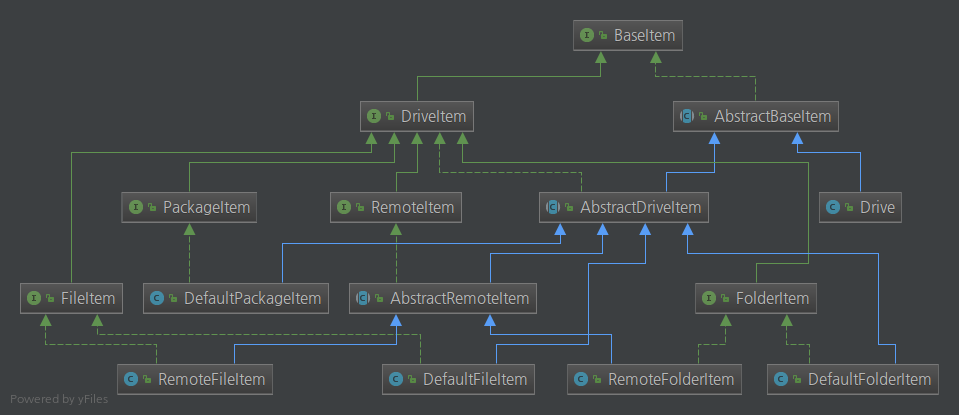
FolderItemandFileItemare represent folder and file respectively.FolderItemandFileItemare child class ofDriveItem.
importcom.bhyoo.onedrive.container.items.DriveItem;
importcom.bhyoo.onedrive.container.items.FileItem;
importcom.bhyoo.onedrive.container.items.FolderItem;
// assume that Client object is already constructed// get root directoryFolderItemroot = client.getRootDir();
// get folder by IDFolderItemfolder = client.getFolder("XXXXXXXXXXXXXXXX!XXXX");
// get folder by pathFolderItemfolder1 = client.getFolder(newPathPointer("/{item-path}"));
// get file by IDFileItemfile = client.getFile("XXXXXXXXXXXXXXXX!XXXX");
// get file by pathFileItemfile1 = client.getFile(newPathPointer("/{item-path}/{file-name}"));
// or if you don't know whether ID is file or folderDriveItemitem = client.getItem("XXXXXXXXXXXXXXXX!XXXX");
// or if you don't know whether path is file or folderDriveItemitem1 = client.getItem(newPathPointer("/{item-path}"));FolderItemareIterable. (it will returns child asDriveItem)- Basically if
FolderItemobject is fetched byClient's methodgetFolderorgetRootDir, the object automatically fetchs children too. (If children list is very long, it could take long time) - If you call
FolderItem's methodgetAllChildrenorgetFolderChildrenorgetFileChildren, you can getListof all children, only folder children, only file children respectively. - if you call above methods, it will load children data and cache it. so First call of those methods can take long time.
importcom.bhyoo.onedrive.container.items.DriveItem;
importcom.bhyoo.onedrive.container.items.FileItem;
importcom.bhyoo.onedrive.container.items.FolderItem;
// assume that Client object is already constructedFolderItemroot = client.getRootDir();
DriveItem[] children = root.allChildren();
FolderItem[] folderChildren = root.folderChildren();
FileItem[] fileChildren = root.fileChildren();- It can create via either parent's
FolderItemobject orClientobject. - It will return created folder's
FolderItemobject.
importcom.bhyoo.onedrive.container.items.FolderItem;
importcom.bhyoo.onedrive.container.items.pointer.PathPointer;
// assume that Client object is already constructedFolderItemroot = client.getRootDir();
// create folder by parent folder objectFolderItemnewFolder = root.createFolder("test");
// create folder by client with parent folder idFolderItemnewFolder1 = client.createFolder("XXXXXXXXXXXXXXXX!XXXX", "test1");
// create folder by client with parent folder pathFolderItemnewFolder2 = client.createFolder(newPathPointer("/"), "test2");- It can copy via either source item's object or
Clientobject.
importcom.bhyoo.onedrive.container.items.*;
importcom.bhyoo.onedrive.container.items.pointer.*;
// assume that Client object is already constructedFileItemitem = (FileItem) client.getItem("XXXXXXXXXXXXXXXX!XXXX");
FolderItemdestination = client.getFolder("XXXXXXXXXXXXXXXX!XXXX");
// direct copyitem.copyTo(destination);
// direct copy with new nameitem.copyTo(destination, "newName");
// copy by reference objectitem.copyTo(destination.newReference());
// copy by reference object with new nameitem.copyTo(destination.newReference(), "newName");
// copy by path stringitem.copyTo(destination.getPathPointer());
// copy by path string with new nameitem.copyTo(destination.getPathPointer(), "newName");
// copy by id stringitem.copyTo(destination.getId());
// copy by id string with new nameitem.copyTo(destination.getId(), "newName");
// using `Client`, copy by pathclient.copyItem(newPathPointer("/{item-path}"), newIdPointer("XXXXXXXXXXXXXXXX!XXXX"));importjava.nio.file.Paths;
importcom.bhyoo.onedrive.container.items.FileItem;
// assume that Client object is already constructedFileItemfile = client.getFile("XXXXXXXXXXXXXXXX!XXXX");
Stringpath = "/home/isac322/download";
// download by system path string with original file namefile.download(path);
// download by system path string with new namefile.download(path, "newName");
// download by path object with original file namefile.download(Paths.get(path));
// download by path object with new namefile.download(Paths.get(path), "newName");
client.download(newPathPointer("/{item-path}"), Paths.get(path));- all async job use Future & Promise mechanism.
- more detail of
DownloadFuturewill explain later at wiki...
importjava.nio.file.Paths;
importcom.bhyoo.container.items.FileItem;
importcom.bhyoo.network.async.DownloadFuture;
// assume that Client object is already constructedFileItemfile = client.getFile("XXXXXXXXXXXXXXXX!XXXX");
Stringpath = "/home/isac322/download";
// download by path object with original file namefile.downloadAsync(Paths.get(path));
// download by path object with new namefile.downloadAsync(Paths.get(path), "newName");
DownloadFuturefuture = client.downloadAsync("{file-id}", Paths.get(path), "newName");
// wait until download is donefuture.sync();- It can move via either source item's object or
Clientobject.
importcom.bhyoo.onedrive.container.items.FileItem;
importcom.bhyoo.onedrive.container.items.FolderItem;
importcom.bhyoo.onedrive.container.items.pointer.*;
// assume that Client object is already constructedFileItemitem = client.getFile("XXXXXXXXXXXXXXXX!XXXX");
FolderItemdestination = client.getFolder("XXXXXXXXXXXXXXXX!XXXX");
// direct moveitem.moveTo(destination);
// move by reference objectitem.moveTo(destination.newReference());
// move by path stringitem.moveTo(destination.getPathPointer());
// move by id stringitem.moveTo(destination.getId());
// using `Client` object, move by folder pathclient.moveItem(newPathPointer("/{item-path}"), newIdPointer("XXXXXXXXXXXXXXXX!XXXX"));refreshwill update all variable with fetched latest metadata.- That is, if
refreshis invoked, all variable can be changed, even if the current program did not modify the variables.
importcom.bhyoo.onedrive.container.items.DriveItem;
// assume that Client object is already constructedDriveItemitem = client.getItem("XXXXXXXXXXXXXXXX!XXXX");
// change item's name and flush to server.item.rename("new name");
// change item's description and flush to server.item.updateDescription("blah blah");
// refresh item's all variable to latest valueitem.refresh();- like asynchronous downloading, it uses Future & Promise mechanism.
- more detail of
UploadFuturewill explain later at wiki...
importjava.nio.file.Path;
importcom.bhyoo.onedrive.network.async.UploadFuture;
// assume that Client object is already constructedUploadFuturefuture;
// start to upload filefuture = client.uploadFile("{remote-folder-id}", Paths.get("local-file-path"));
// wait until uploading is donefuture.syncUninterruptibly();