



Create similarity-preserving identifiers for digital content
iscc-core is the reference implementation of the core algorithms of
ISO 24138 – ISCC (International
Standard Content Code)
- Similarity-Preserving: Detect similar content even after modifications
- Multi-Level Identification: Identify content at metadata, perceptual, and data levels
- Self-Describing: Each component contains its own type and version information
- ISO Standardized: Implements the official ISO 24138:2024 specification
- Highly Tested: 100% test coverage with conformance test vectors
The ISCC is a similarity preserving fingerprint and identifier for digital media assets.
ISCCs are generated algorithmically from digital content, just like cryptographic hashes. However, instead of using a single cryptographic hash function to identify data only, the ISCC uses various algorithms to create a composite identifier that exhibits similarity-preserving properties (soft hash).
The component-based structure of the ISCC identifies content at multiple levels of abstraction. Each component is self-describing, modular, and can be used separately or with others to aid in various content identification tasks. The algorithmic design supports content deduplication, database synchronization, indexing, integrity verification, timestamping, versioning, data provenance, similarity clustering, anomaly detection, usage tracking, allocation of royalties, fact-checking and general digital asset management use-cases.
iscc-core is the python based reference implementation of the ISCC core algorithms as defined by
ISO 24138. It is also a good reference for porting ISCC
to other programming languages.
!!! tip
This is a low level reference implementation that does not inlcude features like mediatype
detection, metadata extraction or file format specific content extraction. Please have a look at
iscc-sdk which adds those higher level features on top of the
iscc-core library.
For reproducible installation of the reference implementation we included a uv.lock file with
pinned dependencies. Install them using uv with the command uv sync
in the root folder.
iscc-core
├── docs # Markdown and other assets for mkdocs documentation
├── examples # Example scripts using the reference code
├── iscc_core # Actual source code of the reference implementation
├── tests # Tests for the reference implementation
└── tools # Development tools
The reference implementation comes with 100% test coverage. To run the conformance selftest from the
repository root use uv run python -m iscc_core. To run the complete test suite use
uv run pytest.
To build a conformant implementation work through the follwing top level entrypoint functions:
gen_meta_code_v0
gen_text_code_v0
gen_image_code_v0
gen_audio_code_v0
gen_video_code_v0
gen_mixed_code_v0
gen_data_code_v0
gen_instance_code_v0
gen_iscc_code_v0
The corresponding test vectors can be found in iscc_core/data.json.
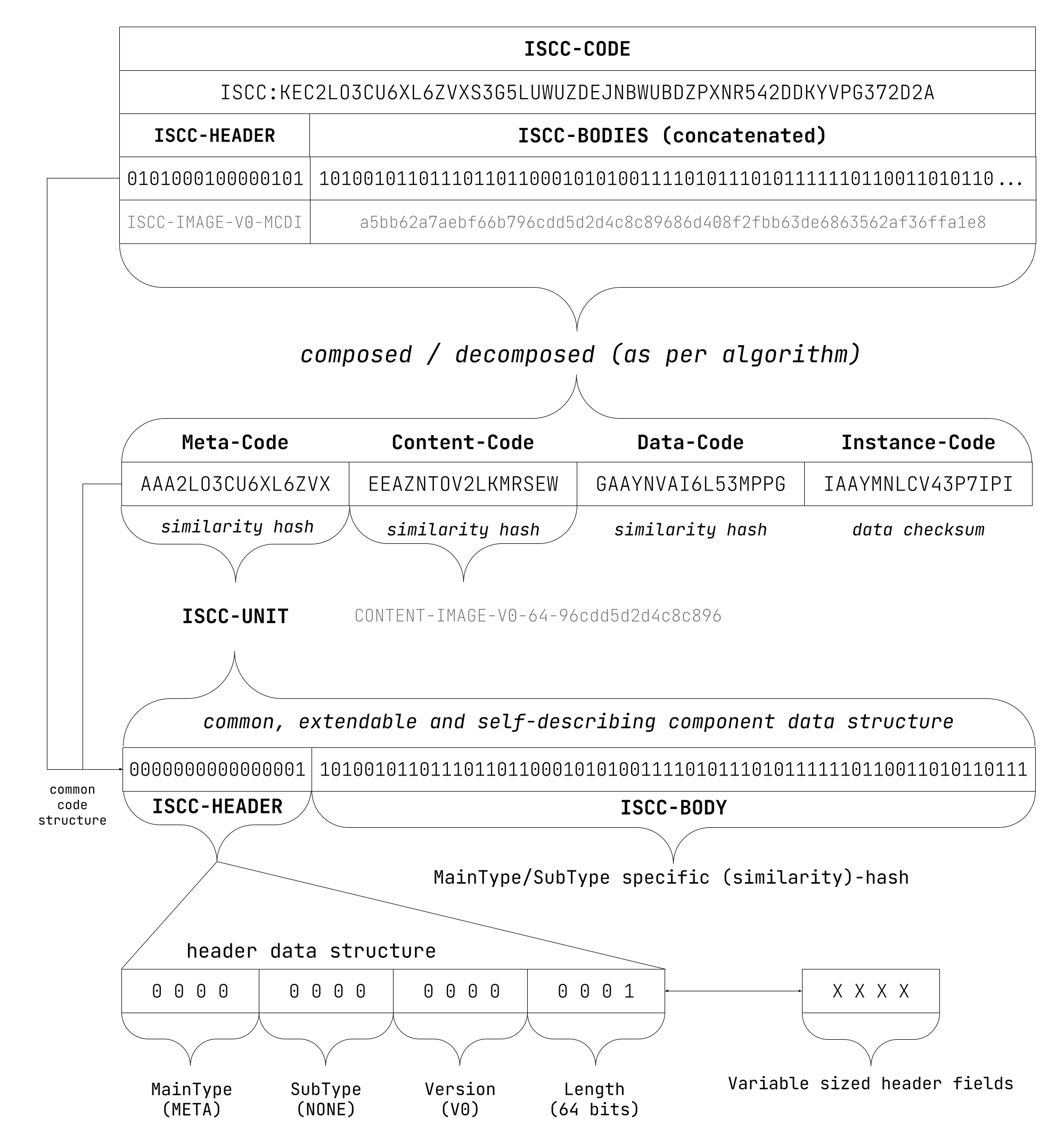
| Idx | Slug | Bits | Purpose |
|---|---|---|---|
| 0 | META | 0000 | Match on metadata similarity |
| 1 | SEMANTIC | 0001 | Match on semantic content similarity |
| 2 | CONTENT | 0010 | Match on perceptual content similarity |
| 3 | DATA | 0011 | Match on data similarity |
| 4 | INSTANCE | 0100 | Match on data identity |
| 5 | ISCC | 0101 | Composite of two or more components with common header |
Use the package manager pip to install iscc-core as a library.
pip install iscc-coreimportjsonimportiscc_coreasicmeta_code=ic.gen_meta_code(name="ISCC Test Document!")
print(f"Meta-Code: {meta_code['iscc']}")
print(f"Structure: {ic.iscc_explain(meta_code['iscc'])}\n")
# Extract text from filewithopen("demo.txt", "rt", encoding="utf-8") asstream:
text=stream.read()
text_code=ic.gen_text_code_v0(text)
print(f"Text-Code: {text_code['iscc']}")
print(f"Structure: {ic.iscc_explain(text_code['iscc'])}\n")
# Process raw bytes of textfilewithopen("demo.txt", "rb") asstream:
data_code=ic.gen_data_code(stream)
print(f"Data-Code: {data_code['iscc']}")
print(f"Structure: {ic.iscc_explain(data_code['iscc'])}\n")
stream.seek(0)
instance_code=ic.gen_instance_code(stream)
print(f"Instance-Code: {instance_code['iscc']}")
print(f"Structure: {ic.iscc_explain(instance_code['iscc'])}\n")
# Combine ISCC-UNITs into ISCC-CODEiscc_code=ic.gen_iscc_code(
(meta_code["iscc"], text_code["iscc"], data_code["iscc"], instance_code["iscc"])
)
# Create convenience `Code` object from ISCC stringiscc_obj=ic.Code(iscc_code["iscc"])
print(f"ISCC-CODE: {ic.iscc_normalize(iscc_obj.code)}")
print(f"Structure: {iscc_obj.explain}")
print(f"Multiformat: {iscc_obj.mf_base32}\n")
# Compare with changed ISCC-CODE:new_dc, new_ic=ic.Code.rnd(mt=ic.MT.DATA), ic.Code.rnd(mt=ic.MT.INSTANCE)
new_iscc=ic.gen_iscc_code((meta_code["iscc"], text_code["iscc"], new_dc.uri, new_ic.uri))
print(f"Compare ISCC-CODES:\n{iscc_obj.uri}\n{new_iscc['iscc']}")
print(json.dumps(ic.iscc_compare(iscc_obj.code, new_iscc["iscc"]), indent=2))The output of this example is as follows:
Meta-Code: ISCC:AAAT4EBWK27737D2
Structure: META-NONE-V0-64-3e103656bffdfc7a
Text-Code: ISCC:EAAQMBEYQF6457DP
Structure: CONTENT-TEXT-V0-64-060498817dcefc6f
Data-Code: ISCC:GAA7UJMLDXHPPENG
Structure: DATA-NONE-V0-64-fa258b1dcef791a6
Instance-Code: ISCC:IAA3Y7HR2FEZCU4N
Structure: INSTANCE-NONE-V0-64-bc7cf1d14991538d
ISCC-CODE: ISCC:KACT4EBWK27737D2AYCJRAL5Z36G76RFRMO4554RU26HZ4ORJGIVHDI
Structure: ISCC-TEXT-V0-MCDI-3e103656bffdfc7a060498817dcefc6ffa258b1dcef791a6bc7cf1d14991538d
Multiformat: bzqavabj6ca3fnp757r5ambeyqf6457dp7isywhoo66i2npd46hiutektru
Compare ISCC-CODES:
ISCC:KACT4EBWK27737D2AYCJRAL5Z36G76RFRMO4554RU26HZ4ORJGIVHDI
ISCC:KACT4EBWK27737D2AYCJRAL5Z36G7Y7HA2BMECKMVRBEQXR2BJOS6NA
{
"meta_dist": 0,
"content_dist": 0,
"data_dist": 33,
"instance_match": false
}
Documentation is published at https://core.iscc.codes
Requirements
- Python 3.9 or higher for code generation and static site building.
- uv for installation and dependency management.
Development Setup
git clone https://github.com/iscc/iscc-core.git
cd iscc-core
uv sync
Development Tasks
Tests, coverage, code formatting and other tasks can be run with the uv run poe command:
uv run poe
Poe the Poet - A task runner that works well with poetry.
version 0.18.1
Result: No task specified.
USAGE
poe [-h] [-v | -q] [--root PATH] [--ansi | --no-ansi] task [task arguments]
GLOBAL OPTIONS
-h, --help Show this help page and exit
--version Print the version and exit
-v, --verbose Increase command output (repeatable)
-q, --quiet Decrease command output (repeatable)
-d, --dry-run Print the task contents but don't actually run it --root PATH Specify where to find the pyproject.toml --ansi Force enable ANSI output --no-ansi Force disable ANSI outputCONFIGURED TASKS gentests Generate conformance test data format Code style formatting with black docs Copy README.md to /docs format-md Markdown formatting with mdformat lf Convert line endings to lf test Run tests with coverage sec Security check with bandit all
Use uv run poe all to run all tasks before committing any changes.
Pull requests are welcome. For significant changes, please open an issue first to discuss your plans. Please make sure to update tests as appropriate.
You may also want join our developer chat on Telegram at https://t.me/iscc_dev.