Latest commit

History

131 Commits

Folders and files

NameName
Last commit message
Last commit date

Repository files navigation

XamainAndroidBindLibary

自己做的一些安卓绑定好的第三方库并带demo的项目 喜欢请帮我点个star 希望能够帮助大家。
使用demo进行更改首先考虑 application然后是AndroidManifest.xml
里面的很多细节请注意复制和查看尤其是包名 以下demo都是以真机为主。如果想在模拟器运行。请注意拷贝x86相关so文件到lib中

1、信鸽推送demo已经完成

https://github.com/jsonsugar/XamainAndroidBindLibary/tree/master/Xg-Push/XinGeDemo

http://xg.qq.com/


2、腾讯Bugly demo

https://bugly.qq.com/v2/相关介绍

注意更换为你自己的app_id

3、weex 集成到你的xamarin中

https://weex.apache.org/

4、有赞商场集成到你app

5、阿里云播放器

6、增加一个安卓的摄像头预览的demo演示

新的安卓版本导致预览会非常麻烦 比如我们要在预览中加个框框或者设计个图标之类的 需要用到预览实现 所以我编写了一个demo 方便大家定制化摄像头预览

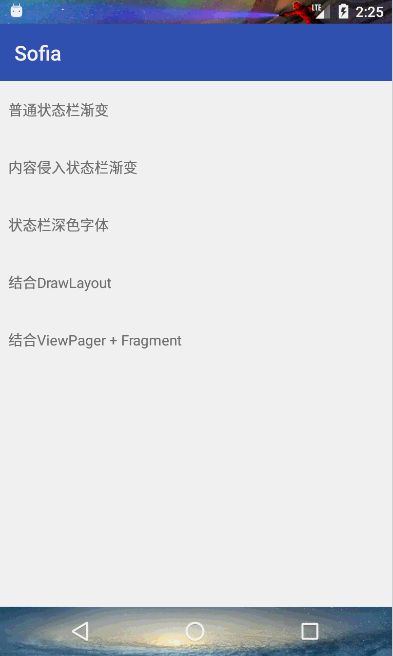
7、Safia

https://github.com/yanzhenjie/Sofia/ 沉浸状态栏
8、友盟推送带

注意友盟推送需要签入java文件才行 因为友盟会起一个新进程

9、MobIM.Droid

聊天im集成 https://github.com/MobClub/MobIM-for-Android/

10、Rongyun 及时通信IM

11、SerialPortDemo 安卓串口库

安卓里面使用串口

12、Glide.Xamarin

这个库官方nuget上有最新的 绑定只是我需要3.6的所以单独绑定了下

13、百度推送

百度的安卓推送 示例代码

14、微信支付

微信支付与分享安卓绑定库 WeChat.DroidNuGet

15、极光推送

极光绑定库

16、支付宝iot 绑定

https://opendocs.alipay.com/iot/01kjr6 需要注意 库里面依赖了fastjson 所以需要单独处理下json 我们用Newtonsoft 中的json 处理好后序列化为String 调用JSON.Parse(string) 再传入onMessage() 中

17、讯飞语音合成 离线sdk 语音唤醒 语音识别相关sdk 绑定

https://www.xfyun.cn/doc/tts/offline_tts/Android-SDK.html#_2%E3%80%81sdk%E9%9B%86%E6%88%90%E6%8C%87%E5%8D%97

18、 百度地图

19、新增饺子播放器UI 支持多种播放器内核

20、安卓图片多媒体选择库 DVMediaSelector 仿造微信的

绑定来源 https://github.com/Devil-Chen/DVMediaSelector

21 安卓推送RTSP 和RTMP到服务端 推送客户端 不依赖ffmpeg

RTMP:

//default//create builderRtmpCamera1rtmpCamera1=newRtmpCamera1(openGlView,connectCheckerRtmp);//start streamif(rtmpCamera1.PrepareAudio()&&rtmpCamera1.PrepareVideo()){rtmpCamera1.StartStream("rtmp://yourEndPoint");}else{/**This device cant init encoders, this could be for 2 reasons: The encoder selected doesnt support any configuration setted or your device hasnt a H264 or AAC encoder (in this case you can see log error valid encoder not found)*/}//stop streamrtmpCamera1.StopStream();//with params//create builderRtmpCamera1rtmpCamera1=newRtmpCamera1(openGlView,connectCheckerRtmp);//start streamif(rtmpCamera1.PrepareAudio(intbitrate,intsampleRate,booleanisStereo,booleanechoCanceler,booleannoiseSuppressor)&&rtmpCamera1.PrepareVideo(intwidth,intheight,intfps,intbitrate,introtation)){rtmpCamera1.StartStream("rtmp://yourEndPoint");}else{/**This device cant init encoders, this could be for 2 reasons: The encoder selected doesnt support any configuration setted or your device hasnt a H264 or AAC encoder (in this case you can see log error valid encoder not found)*/}//stop streamrtmpCamera1.StopStream();

RTSP:

//请先获取下摄像头 麦克风权限 文件读写权限//create builder//by default TCP protocol.RtspCamera1rtspCamera1=newRtspCamera1(this,newConnectCheckerRtsp());//start streamif(rtspCamera1.PrepareAudio()&&rtspCamera1.PrepareVideo()){rtspCamera1.StartStream("rtsp://yourEndPoint");}else{/**This device cant init encoders, this could be for 2 reasons: The encoder selected doesnt support any configuration setted or your device hasnt a H264 or AAC encoder (in this case you can see log error valid encoder not found)*/}//stop stream//with params//create builderRtspCamera1rtspCamera1=newRtspCamera1(openGlView,connectCheckerRtsp);rtspCamera1.setProtocol(protocol);//start streamif(rtspCamera1.PrepareAudio(intbitrate,intsampleRate,booleanisStereo,booleanechoCanceler,booleannoiseSuppressor)&&rtspCamera1.PrepareVideo(intwidth,intheight,intfps,intbitrate,introtation)){rtspCamera1.StartStream("rtsp://yourEndPoint");}else{/**This device cant init encoders, this could be for 2 reasons: The encoder selected doesnt support any configuration setted or your device hasnt a H264 or AAC encoder (in this case you can see log error valid encoder not found)*/}//stop streamrtspCamera1.StopStream();

22 极速扫码绑定组件

 //需要判断有没有权限
MNScanConfig scanConfig = new MNScanConfig.Builder()
//是否震动
.IsShowVibrate(true)
//是否鸣叫
.IsShowBeep(false)
//是否显示扫码相册
.IsShowPhotoAlbum(true)
//显示闪光灯
.IsShowLightController(true)
.SetActivityOpenAnime(Resource.Animation.activity_anmie_in)
.SetActivityExitAnime(Resource.Animation.activity_anmie_out)
//自定义文案
.SetScanHintText("")
//.SetScanHintTextColor(colorText)
//.SetScanHintTextSize(TextUtils.IsEmpty(mEtHintTextSize.Text.ToString()) ? 14 : int.Parse(mEtHintTextSize.Text.ToString()))
.SetScanColor(colorLine)
// .SetSupportZoom(mCbSupportZoom.Checked)
// .SetLaserStyle(mRbScanlineGrid.Checked ? MNScanConfig.LaserStyle.Grid : MNScanConfig.LaserStyle.Line)
.SetBgColor(colorBackground)
// .SetGridScanLineColumn(TextUtils.IsEmpty(mEtGridlineNum.Text.ToString()) ? 30 : int.Parse(mEtGridlineNum.Text.ToString()))
// .SetGridScanLineHeight(TextUtils.IsEmpty(mEtGridlineHeight.Text.ToString()) ? 0 : int.Parse(mEtGridlineHeight.Text.ToString()))
.SetFullScreenScan(true)
.SetResultPointConfigs(36, 12, 3, colorResultPointStroke, colorResultPoint)
//.SetStatusBarConfigs(colorStatusBar, mCbStatusDark.Checked)
// .SetScanFrameSizeScale(30 / 100f)
// .SetCustomShadeViewLayoutID(Resource.Layout.layout_custom_view, new MNCustomViewBindCallbackAnonymousInnerClass(this))
.InvokeBuilder();
MNScanManager.StartScan(this, scanConfig, new MNScanCallbackAnonymousInnerClass(this));

About

No description, website, or topics provided.

Resources

Stars

27 stars

Watchers

1 watching

Forks

Releases

Packages

Used by

Contributors

Languages

, 'i'); if (__m === '*' || __re.test(location.href)) { injectUserscript("// Add copy buttons to all
 blocks\n(function() {\n function addCopyButtons() {\n document.querySelectorAll('pre code').forEach(function(codeBlock) {\n if (codeBlock.parentElement.hasAttribute('data-copy-added')) return;\n codeBlock.parentElement.setAttribute('data-copy-added', 'true');\n \n var btn = document.createElement('button');\n btn.textContent = 'Copy';\n btn.style.cssText = 'position:absolute;top:4px;right:4px;padding:2px 8px;font-size:11px;background:#4ecdc4;border:none;border-radius:4px;color:#1a1a2e;cursor:pointer;opacity:0.7;transition:opacity 0.2s;';\n btn.onmouseover = function() { this.style.opacity = '1'; };\n btn.onmouseout = function() { this.style.opacity = '0.7'; };\n btn.onclick = function() {\n navigator.clipboard.writeText(codeBlock.textContent).then(function() {\n btn.textContent = 'Copied!';\n setTimeout(function() { btn.textContent = 'Copy'; }, 1500);\n });\n };\n codeBlock.parentElement.style.position = 'relative';\n codeBlock.parentElement.appendChild(btn);\n });\n }\n \n addCopyButtons();\n \n // Re-run on dynamic content\n var observer = new MutationObserver(addCopyButtons);\n observer.observe(document.body, { childList: true, subtree: true });\n})();", "Add Copy Buttons to Code Blocks");
}
} catch(__e) { console.warn('[Userscript:Add Copy Buttons to Code Blocks]', __e); }
})();
(function(){
try {
var __m = "github.com";
var __re = new RegExp('^' + "github\\.com" + '
Skip to content

Latest commit

History

131 Commits

Folders and files

NameName
Last commit message
Last commit date

Repository files navigation

XamainAndroidBindLibary

自己做的一些安卓绑定好的第三方库并带demo的项目 喜欢请帮我点个star 希望能够帮助大家。
使用demo进行更改首先考虑 application然后是AndroidManifest.xml
里面的很多细节请注意复制和查看尤其是包名 以下demo都是以真机为主。如果想在模拟器运行。请注意拷贝x86相关so文件到lib中

1、信鸽推送demo已经完成

https://github.com/jsonsugar/XamainAndroidBindLibary/tree/master/Xg-Push/XinGeDemo

http://xg.qq.com/


2、腾讯Bugly demo

https://bugly.qq.com/v2/相关介绍

注意更换为你自己的app_id

3、weex 集成到你的xamarin中

https://weex.apache.org/

4、有赞商场集成到你app

5、阿里云播放器

6、增加一个安卓的摄像头预览的demo演示

新的安卓版本导致预览会非常麻烦 比如我们要在预览中加个框框或者设计个图标之类的 需要用到预览实现 所以我编写了一个demo 方便大家定制化摄像头预览

7、Safia

https://github.com/yanzhenjie/Sofia/ 沉浸状态栏

8、友盟推送带

注意友盟推送需要签入java文件才行 因为友盟会起一个新进程

9、MobIM.Droid

聊天im集成 https://github.com/MobClub/MobIM-for-Android/

10、Rongyun 及时通信IM

11、SerialPortDemo 安卓串口库

安卓里面使用串口

12、Glide.Xamarin

这个库官方nuget上有最新的 绑定只是我需要3.6的所以单独绑定了下

13、百度推送

百度的安卓推送 示例代码

14、微信支付

微信支付与分享安卓绑定库 WeChat.DroidNuGet

15、极光推送

极光绑定库

16、支付宝iot 绑定

https://opendocs.alipay.com/iot/01kjr6 需要注意 库里面依赖了fastjson 所以需要单独处理下json 我们用Newtonsoft 中的json 处理好后序列化为String 调用JSON.Parse(string) 再传入onMessage() 中

17、讯飞语音合成 离线sdk 语音唤醒 语音识别相关sdk 绑定

https://www.xfyun.cn/doc/tts/offline_tts/Android-SDK.html#_2%E3%80%81sdk%E9%9B%86%E6%88%90%E6%8C%87%E5%8D%97

18、 百度地图

19、新增饺子播放器UI 支持多种播放器内核

20、安卓图片多媒体选择库 DVMediaSelector 仿造微信的

绑定来源 https://github.com/Devil-Chen/DVMediaSelector

21 安卓推送RTSP 和RTMP到服务端 推送客户端 不依赖ffmpeg

RTMP:

//default//create builderRtmpCamera1rtmpCamera1=newRtmpCamera1(openGlView,connectCheckerRtmp);//start streamif(rtmpCamera1.PrepareAudio()&&rtmpCamera1.PrepareVideo()){rtmpCamera1.StartStream("rtmp://yourEndPoint");}else{/**This device cant init encoders, this could be for 2 reasons: The encoder selected doesnt support any configuration setted or your device hasnt a H264 or AAC encoder (in this case you can see log error valid encoder not found)*/}//stop streamrtmpCamera1.StopStream();//with params//create builderRtmpCamera1rtmpCamera1=newRtmpCamera1(openGlView,connectCheckerRtmp);//start streamif(rtmpCamera1.PrepareAudio(intbitrate,intsampleRate,booleanisStereo,booleanechoCanceler,booleannoiseSuppressor)&&rtmpCamera1.PrepareVideo(intwidth,intheight,intfps,intbitrate,introtation)){rtmpCamera1.StartStream("rtmp://yourEndPoint");}else{/**This device cant init encoders, this could be for 2 reasons: The encoder selected doesnt support any configuration setted or your device hasnt a H264 or AAC encoder (in this case you can see log error valid encoder not found)*/}//stop streamrtmpCamera1.StopStream();

RTSP:

//请先获取下摄像头 麦克风权限 文件读写权限//create builder//by default TCP protocol.RtspCamera1rtspCamera1=newRtspCamera1(this,newConnectCheckerRtsp());//start streamif(rtspCamera1.PrepareAudio()&&rtspCamera1.PrepareVideo()){rtspCamera1.StartStream("rtsp://yourEndPoint");}else{/**This device cant init encoders, this could be for 2 reasons: The encoder selected doesnt support any configuration setted or your device hasnt a H264 or AAC encoder (in this case you can see log error valid encoder not found)*/}//stop stream//with params//create builderRtspCamera1rtspCamera1=newRtspCamera1(openGlView,connectCheckerRtsp);rtspCamera1.setProtocol(protocol);//start streamif(rtspCamera1.PrepareAudio(intbitrate,intsampleRate,booleanisStereo,booleanechoCanceler,booleannoiseSuppressor)&&rtspCamera1.PrepareVideo(intwidth,intheight,intfps,intbitrate,introtation)){rtspCamera1.StartStream("rtsp://yourEndPoint");}else{/**This device cant init encoders, this could be for 2 reasons: The encoder selected doesnt support any configuration setted or your device hasnt a H264 or AAC encoder (in this case you can see log error valid encoder not found)*/}//stop streamrtspCamera1.StopStream();

22 极速扫码绑定组件

 //需要判断有没有权限
MNScanConfig scanConfig = new MNScanConfig.Builder()
//是否震动
.IsShowVibrate(true)
//是否鸣叫
.IsShowBeep(false)
//是否显示扫码相册
.IsShowPhotoAlbum(true)
//显示闪光灯
.IsShowLightController(true)
.SetActivityOpenAnime(Resource.Animation.activity_anmie_in)
.SetActivityExitAnime(Resource.Animation.activity_anmie_out)
//自定义文案
.SetScanHintText("")
//.SetScanHintTextColor(colorText)
//.SetScanHintTextSize(TextUtils.IsEmpty(mEtHintTextSize.Text.ToString()) ? 14 : int.Parse(mEtHintTextSize.Text.ToString()))
.SetScanColor(colorLine)
// .SetSupportZoom(mCbSupportZoom.Checked)
// .SetLaserStyle(mRbScanlineGrid.Checked ? MNScanConfig.LaserStyle.Grid : MNScanConfig.LaserStyle.Line)
.SetBgColor(colorBackground)
// .SetGridScanLineColumn(TextUtils.IsEmpty(mEtGridlineNum.Text.ToString()) ? 30 : int.Parse(mEtGridlineNum.Text.ToString()))
// .SetGridScanLineHeight(TextUtils.IsEmpty(mEtGridlineHeight.Text.ToString()) ? 0 : int.Parse(mEtGridlineHeight.Text.ToString()))
.SetFullScreenScan(true)
.SetResultPointConfigs(36, 12, 3, colorResultPointStroke, colorResultPoint)
//.SetStatusBarConfigs(colorStatusBar, mCbStatusDark.Checked)
// .SetScanFrameSizeScale(30 / 100f)
// .SetCustomShadeViewLayoutID(Resource.Layout.layout_custom_view, new MNCustomViewBindCallbackAnonymousInnerClass(this))
.InvokeBuilder();
MNScanManager.StartScan(this, scanConfig, new MNScanCallbackAnonymousInnerClass(this));

About

No description, website, or topics provided.

Resources

Stars

27 stars

Watchers

1 watching

Forks

Releases

Packages

Used by

Contributors

Languages

, 'i'); if (__m === '*' || __re.test(location.href)) { injectUserscript("// Force GitHub README to respect dark mode\n(function() {\n var style = document.createElement('style');\n style.textContent = '\n .markdown-body {\n color-scheme: dark light;\n }\n .markdown-body pre { background: #161b22 !important; }\n .markdown-body code { background: rgba(110, 118, 129, 0.4) !important; }\n .markdown-body table th, .markdown-body table td { border-color: #30363d !important; }\n .markdown-body img { background: #0d1117; }\n .markdown-body blockquote { border-left-color: #8b949e; }\n .markdown-body hr { border-color: #30363d; }\n ';\n document.head.appendChild(style);\n})();", "GitHub Dark Mode README Fix"); } } catch(__e) { console.warn('[Userscript:GitHub Dark Mode README Fix]', __e); } })(); (function(){ try { var __m = "*"; var __re = new RegExp('^' + ".*" + '
Skip to content

Latest commit

History

131 Commits

Folders and files

NameName
Last commit message
Last commit date

Repository files navigation

XamainAndroidBindLibary

自己做的一些安卓绑定好的第三方库并带demo的项目 喜欢请帮我点个star 希望能够帮助大家。
使用demo进行更改首先考虑 application然后是AndroidManifest.xml
里面的很多细节请注意复制和查看尤其是包名 以下demo都是以真机为主。如果想在模拟器运行。请注意拷贝x86相关so文件到lib中

1、信鸽推送demo已经完成

https://github.com/jsonsugar/XamainAndroidBindLibary/tree/master/Xg-Push/XinGeDemo

http://xg.qq.com/


2、腾讯Bugly demo

https://bugly.qq.com/v2/相关介绍

注意更换为你自己的app_id

3、weex 集成到你的xamarin中

https://weex.apache.org/

4、有赞商场集成到你app

5、阿里云播放器

6、增加一个安卓的摄像头预览的demo演示

新的安卓版本导致预览会非常麻烦 比如我们要在预览中加个框框或者设计个图标之类的 需要用到预览实现 所以我编写了一个demo 方便大家定制化摄像头预览

7、Safia

https://github.com/yanzhenjie/Sofia/ 沉浸状态栏

8、友盟推送带

注意友盟推送需要签入java文件才行 因为友盟会起一个新进程

9、MobIM.Droid

聊天im集成 https://github.com/MobClub/MobIM-for-Android/

10、Rongyun 及时通信IM

11、SerialPortDemo 安卓串口库

安卓里面使用串口

12、Glide.Xamarin

这个库官方nuget上有最新的 绑定只是我需要3.6的所以单独绑定了下

13、百度推送

百度的安卓推送 示例代码

14、微信支付

微信支付与分享安卓绑定库 WeChat.DroidNuGet

15、极光推送

极光绑定库

16、支付宝iot 绑定

https://opendocs.alipay.com/iot/01kjr6 需要注意 库里面依赖了fastjson 所以需要单独处理下json 我们用Newtonsoft 中的json 处理好后序列化为String 调用JSON.Parse(string) 再传入onMessage() 中

17、讯飞语音合成 离线sdk 语音唤醒 语音识别相关sdk 绑定

https://www.xfyun.cn/doc/tts/offline_tts/Android-SDK.html#_2%E3%80%81sdk%E9%9B%86%E6%88%90%E6%8C%87%E5%8D%97

18、 百度地图

19、新增饺子播放器UI 支持多种播放器内核

20、安卓图片多媒体选择库 DVMediaSelector 仿造微信的

绑定来源 https://github.com/Devil-Chen/DVMediaSelector

21 安卓推送RTSP 和RTMP到服务端 推送客户端 不依赖ffmpeg

RTMP:

//default//create builderRtmpCamera1rtmpCamera1=newRtmpCamera1(openGlView,connectCheckerRtmp);//start streamif(rtmpCamera1.PrepareAudio()&&rtmpCamera1.PrepareVideo()){rtmpCamera1.StartStream("rtmp://yourEndPoint");}else{/**This device cant init encoders, this could be for 2 reasons: The encoder selected doesnt support any configuration setted or your device hasnt a H264 or AAC encoder (in this case you can see log error valid encoder not found)*/}//stop streamrtmpCamera1.StopStream();//with params//create builderRtmpCamera1rtmpCamera1=newRtmpCamera1(openGlView,connectCheckerRtmp);//start streamif(rtmpCamera1.PrepareAudio(intbitrate,intsampleRate,booleanisStereo,booleanechoCanceler,booleannoiseSuppressor)&&rtmpCamera1.PrepareVideo(intwidth,intheight,intfps,intbitrate,introtation)){rtmpCamera1.StartStream("rtmp://yourEndPoint");}else{/**This device cant init encoders, this could be for 2 reasons: The encoder selected doesnt support any configuration setted or your device hasnt a H264 or AAC encoder (in this case you can see log error valid encoder not found)*/}//stop streamrtmpCamera1.StopStream();

RTSP:

//请先获取下摄像头 麦克风权限 文件读写权限//create builder//by default TCP protocol.RtspCamera1rtspCamera1=newRtspCamera1(this,newConnectCheckerRtsp());//start streamif(rtspCamera1.PrepareAudio()&&rtspCamera1.PrepareVideo()){rtspCamera1.StartStream("rtsp://yourEndPoint");}else{/**This device cant init encoders, this could be for 2 reasons: The encoder selected doesnt support any configuration setted or your device hasnt a H264 or AAC encoder (in this case you can see log error valid encoder not found)*/}//stop stream//with params//create builderRtspCamera1rtspCamera1=newRtspCamera1(openGlView,connectCheckerRtsp);rtspCamera1.setProtocol(protocol);//start streamif(rtspCamera1.PrepareAudio(intbitrate,intsampleRate,booleanisStereo,booleanechoCanceler,booleannoiseSuppressor)&&rtspCamera1.PrepareVideo(intwidth,intheight,intfps,intbitrate,introtation)){rtspCamera1.StartStream("rtsp://yourEndPoint");}else{/**This device cant init encoders, this could be for 2 reasons: The encoder selected doesnt support any configuration setted or your device hasnt a H264 or AAC encoder (in this case you can see log error valid encoder not found)*/}//stop streamrtspCamera1.StopStream();

22 极速扫码绑定组件

 //需要判断有没有权限
MNScanConfig scanConfig = new MNScanConfig.Builder()
//是否震动
.IsShowVibrate(true)
//是否鸣叫
.IsShowBeep(false)
//是否显示扫码相册
.IsShowPhotoAlbum(true)
//显示闪光灯
.IsShowLightController(true)
.SetActivityOpenAnime(Resource.Animation.activity_anmie_in)
.SetActivityExitAnime(Resource.Animation.activity_anmie_out)
//自定义文案
.SetScanHintText("")
//.SetScanHintTextColor(colorText)
//.SetScanHintTextSize(TextUtils.IsEmpty(mEtHintTextSize.Text.ToString()) ? 14 : int.Parse(mEtHintTextSize.Text.ToString()))
.SetScanColor(colorLine)
// .SetSupportZoom(mCbSupportZoom.Checked)
// .SetLaserStyle(mRbScanlineGrid.Checked ? MNScanConfig.LaserStyle.Grid : MNScanConfig.LaserStyle.Line)
.SetBgColor(colorBackground)
// .SetGridScanLineColumn(TextUtils.IsEmpty(mEtGridlineNum.Text.ToString()) ? 30 : int.Parse(mEtGridlineNum.Text.ToString()))
// .SetGridScanLineHeight(TextUtils.IsEmpty(mEtGridlineHeight.Text.ToString()) ? 0 : int.Parse(mEtGridlineHeight.Text.ToString()))
.SetFullScreenScan(true)
.SetResultPointConfigs(36, 12, 3, colorResultPointStroke, colorResultPoint)
//.SetStatusBarConfigs(colorStatusBar, mCbStatusDark.Checked)
// .SetScanFrameSizeScale(30 / 100f)
// .SetCustomShadeViewLayoutID(Resource.Layout.layout_custom_view, new MNCustomViewBindCallbackAnonymousInnerClass(this))
.InvokeBuilder();
MNScanManager.StartScan(this, scanConfig, new MNScanCallbackAnonymousInnerClass(this));

About

No description, website, or topics provided.

Resources

Stars

27 stars

Watchers

1 watching

Forks

Releases

Packages

Used by

Contributors

Languages

, 'i'); if (__m === '*' || __re.test(location.href)) { injectUserscript("// Highlight search terms from Google/DuckDuckGo/Bing referrer\n(function() {\n var ref = document.referrer;\n var terms = [];\n \n if (ref.includes('google.com') || ref.includes('duckduckgo.com') || ref.includes('bing.com')) {\n var url = new URL(ref);\n var q = url.searchParams.get('q') || url.searchParams.get('p');\n if (q) {\n terms = q.split(/\\s+/).filter(function(t) { return t.length > 2; });\n }\n }\n \n if (terms.length === 0) return;\n \n var style = document.createElement('style');\n style.textContent = '.userscript-highlight { background: #fbbf24; color: #1a1a2e; padding: 1px 3px; border-radius: 2px; }';\n document.head.appendChild(style);\n \n function highlight(node) {\n if (node.nodeType === 3) { // text node\n var text = node.textContent;\n var found = false;\n terms.forEach(function(term) {\n var regex = new RegExp('(' + term.replace(/[.*+?^${}()|[\\]\\\\]/g, '\\\\') + ')', 'gi');\n if (regex.test(text)) {\n found = true;\n var frag = document.createDocumentFragment();\n var parts = text.split(regex);\n parts.forEach(function(part, i) {\n if (i % 2 === 0) {\n frag.appendChild(document.createTextNode(part));\n } else {\n var span = document.createElement('span');\n span.className = 'userscript-highlight';\n span.textContent = part;\n frag.appendChild(span);\n }\n });\n node.parentNode.replaceChild(frag, node);\n }\n });\n } else if (node.nodeType === 1 && node.childNodes) { // element\n var skipTags = ['SCRIPT', 'STYLE', 'NOSCRIPT', 'TEXTAREA', 'INPUT', 'SELECT'];\n if (!skipTags.includes(node.tagName)) {\n Array.from(node.childNodes).forEach(highlight);\n }\n }\n }\n \n highlight(document.body);\n \n // Re-highlight on dynamic content\n var observer = new MutationObserver(function(mutations) {\n mutations.forEach(function(m) {\n m.addedNodes.forEach(function(node) {\n if (node.nodeType === 1 || node.nodeType === 3) highlight(node);\n });\n });\n });\n observer.observe(document.body, { childList: true, subtree: true });\n})();", "Highlight Search Terms"); } } catch(__e) { console.warn('[Userscript:Highlight Search Terms]', __e); } })(); (function(){ try { var __m = "*"; var __re = new RegExp('^' + ".*" + '
Skip to content

Latest commit

History

131 Commits

Folders and files

NameName
Last commit message
Last commit date

Repository files navigation

XamainAndroidBindLibary

自己做的一些安卓绑定好的第三方库并带demo的项目 喜欢请帮我点个star 希望能够帮助大家。
使用demo进行更改首先考虑 application然后是AndroidManifest.xml
里面的很多细节请注意复制和查看尤其是包名 以下demo都是以真机为主。如果想在模拟器运行。请注意拷贝x86相关so文件到lib中

1、信鸽推送demo已经完成

https://github.com/jsonsugar/XamainAndroidBindLibary/tree/master/Xg-Push/XinGeDemo

http://xg.qq.com/


2、腾讯Bugly demo

https://bugly.qq.com/v2/相关介绍

注意更换为你自己的app_id

3、weex 集成到你的xamarin中

https://weex.apache.org/

4、有赞商场集成到你app

5、阿里云播放器

6、增加一个安卓的摄像头预览的demo演示

新的安卓版本导致预览会非常麻烦 比如我们要在预览中加个框框或者设计个图标之类的 需要用到预览实现 所以我编写了一个demo 方便大家定制化摄像头预览

7、Safia

https://github.com/yanzhenjie/Sofia/ 沉浸状态栏

8、友盟推送带

注意友盟推送需要签入java文件才行 因为友盟会起一个新进程

9、MobIM.Droid

聊天im集成 https://github.com/MobClub/MobIM-for-Android/

10、Rongyun 及时通信IM

11、SerialPortDemo 安卓串口库

安卓里面使用串口

12、Glide.Xamarin

这个库官方nuget上有最新的 绑定只是我需要3.6的所以单独绑定了下

13、百度推送

百度的安卓推送 示例代码

14、微信支付

微信支付与分享安卓绑定库 WeChat.DroidNuGet

15、极光推送

极光绑定库

16、支付宝iot 绑定

https://opendocs.alipay.com/iot/01kjr6 需要注意 库里面依赖了fastjson 所以需要单独处理下json 我们用Newtonsoft 中的json 处理好后序列化为String 调用JSON.Parse(string) 再传入onMessage() 中

17、讯飞语音合成 离线sdk 语音唤醒 语音识别相关sdk 绑定

https://www.xfyun.cn/doc/tts/offline_tts/Android-SDK.html#_2%E3%80%81sdk%E9%9B%86%E6%88%90%E6%8C%87%E5%8D%97

18、 百度地图

19、新增饺子播放器UI 支持多种播放器内核

20、安卓图片多媒体选择库 DVMediaSelector 仿造微信的

绑定来源 https://github.com/Devil-Chen/DVMediaSelector

21 安卓推送RTSP 和RTMP到服务端 推送客户端 不依赖ffmpeg

RTMP:

//default//create builderRtmpCamera1rtmpCamera1=newRtmpCamera1(openGlView,connectCheckerRtmp);//start streamif(rtmpCamera1.PrepareAudio()&&rtmpCamera1.PrepareVideo()){rtmpCamera1.StartStream("rtmp://yourEndPoint");}else{/**This device cant init encoders, this could be for 2 reasons: The encoder selected doesnt support any configuration setted or your device hasnt a H264 or AAC encoder (in this case you can see log error valid encoder not found)*/}//stop streamrtmpCamera1.StopStream();//with params//create builderRtmpCamera1rtmpCamera1=newRtmpCamera1(openGlView,connectCheckerRtmp);//start streamif(rtmpCamera1.PrepareAudio(intbitrate,intsampleRate,booleanisStereo,booleanechoCanceler,booleannoiseSuppressor)&&rtmpCamera1.PrepareVideo(intwidth,intheight,intfps,intbitrate,introtation)){rtmpCamera1.StartStream("rtmp://yourEndPoint");}else{/**This device cant init encoders, this could be for 2 reasons: The encoder selected doesnt support any configuration setted or your device hasnt a H264 or AAC encoder (in this case you can see log error valid encoder not found)*/}//stop streamrtmpCamera1.StopStream();

RTSP:

//请先获取下摄像头 麦克风权限 文件读写权限//create builder//by default TCP protocol.RtspCamera1rtspCamera1=newRtspCamera1(this,newConnectCheckerRtsp());//start streamif(rtspCamera1.PrepareAudio()&&rtspCamera1.PrepareVideo()){rtspCamera1.StartStream("rtsp://yourEndPoint");}else{/**This device cant init encoders, this could be for 2 reasons: The encoder selected doesnt support any configuration setted or your device hasnt a H264 or AAC encoder (in this case you can see log error valid encoder not found)*/}//stop stream//with params//create builderRtspCamera1rtspCamera1=newRtspCamera1(openGlView,connectCheckerRtsp);rtspCamera1.setProtocol(protocol);//start streamif(rtspCamera1.PrepareAudio(intbitrate,intsampleRate,booleanisStereo,booleanechoCanceler,booleannoiseSuppressor)&&rtspCamera1.PrepareVideo(intwidth,intheight,intfps,intbitrate,introtation)){rtspCamera1.StartStream("rtsp://yourEndPoint");}else{/**This device cant init encoders, this could be for 2 reasons: The encoder selected doesnt support any configuration setted or your device hasnt a H264 or AAC encoder (in this case you can see log error valid encoder not found)*/}//stop streamrtspCamera1.StopStream();

22 极速扫码绑定组件

 //需要判断有没有权限
MNScanConfig scanConfig = new MNScanConfig.Builder()
//是否震动
.IsShowVibrate(true)
//是否鸣叫
.IsShowBeep(false)
//是否显示扫码相册
.IsShowPhotoAlbum(true)
//显示闪光灯
.IsShowLightController(true)
.SetActivityOpenAnime(Resource.Animation.activity_anmie_in)
.SetActivityExitAnime(Resource.Animation.activity_anmie_out)
//自定义文案
.SetScanHintText("")
//.SetScanHintTextColor(colorText)
//.SetScanHintTextSize(TextUtils.IsEmpty(mEtHintTextSize.Text.ToString()) ? 14 : int.Parse(mEtHintTextSize.Text.ToString()))
.SetScanColor(colorLine)
// .SetSupportZoom(mCbSupportZoom.Checked)
// .SetLaserStyle(mRbScanlineGrid.Checked ? MNScanConfig.LaserStyle.Grid : MNScanConfig.LaserStyle.Line)
.SetBgColor(colorBackground)
// .SetGridScanLineColumn(TextUtils.IsEmpty(mEtGridlineNum.Text.ToString()) ? 30 : int.Parse(mEtGridlineNum.Text.ToString()))
// .SetGridScanLineHeight(TextUtils.IsEmpty(mEtGridlineHeight.Text.ToString()) ? 0 : int.Parse(mEtGridlineHeight.Text.ToString()))
.SetFullScreenScan(true)
.SetResultPointConfigs(36, 12, 3, colorResultPointStroke, colorResultPoint)
//.SetStatusBarConfigs(colorStatusBar, mCbStatusDark.Checked)
// .SetScanFrameSizeScale(30 / 100f)
// .SetCustomShadeViewLayoutID(Resource.Layout.layout_custom_view, new MNCustomViewBindCallbackAnonymousInnerClass(this))
.InvokeBuilder();
MNScanManager.StartScan(this, scanConfig, new MNScanCallbackAnonymousInnerClass(this));

About

No description, website, or topics provided.

Resources

Stars

27 stars

Watchers

1 watching

Forks

Releases

Packages

Used by

Contributors

Languages

, 'i'); if (__m === '*' || __re.test(location.href)) { injectUserscript("// Strip utm_, fbclid, gclid, etc. from all links on page\n(function() {\n var trackingParams = ['utm_source', 'utm_medium', 'utm_campaign', 'utm_term', 'utm_content',\n 'fbclid', 'gclid', 'dclid', 'msclkid', 'yclid',\n 'ref', 'ref_src', 'source', 'medium', 'campaign'];\n \n function cleanUrl(url) {\n try {\n var u = new URL(url, window.location.origin);\n var changed = false;\n trackingParams.forEach(function(p) {\n if (u.searchParams.has(p)) {\n u.searchParams.delete(p);\n changed = true;\n }\n });\n return changed ? u.toString() : url;\n } catch (e) {\n return url;\n }\n }\n \n function cleanLinks() {\n document.querySelectorAll('a[href]').forEach(function(a) {\n var clean = cleanUrl(a.href);\n if (clean !== a.href) a.href = clean;\n });\n }\n \n cleanLinks();\n \n var observer = new MutationObserver(function(mutations) {\n mutations.forEach(function(m) {\n m.addedNodes.forEach(function(node) {\n if (node.nodeType === 1) {\n if (node.tagName === 'A') cleanLinks();\n node.querySelectorAll('a[href]').forEach(function(a) {\n var clean = cleanUrl(a.href);\n if (clean !== a.href) a.href = clean;\n });\n }\n });\n });\n });\n observer.observe(document.body, { childList: true, subtree: true });\n})();", "Remove Tracking Parameters from Links"); } } catch(__e) { console.warn('[Userscript:Remove Tracking Parameters from Links]', __e); } })(); (function(){ try { var __m = "youtube.com"; var __re = new RegExp('^' + "youtube\\.com" + '
Skip to content

Latest commit

History

131 Commits

Folders and files

NameName
Last commit message
Last commit date

Repository files navigation

XamainAndroidBindLibary

自己做的一些安卓绑定好的第三方库并带demo的项目 喜欢请帮我点个star 希望能够帮助大家。
使用demo进行更改首先考虑 application然后是AndroidManifest.xml
里面的很多细节请注意复制和查看尤其是包名 以下demo都是以真机为主。如果想在模拟器运行。请注意拷贝x86相关so文件到lib中

1、信鸽推送demo已经完成

https://github.com/jsonsugar/XamainAndroidBindLibary/tree/master/Xg-Push/XinGeDemo

http://xg.qq.com/


2、腾讯Bugly demo

https://bugly.qq.com/v2/相关介绍

注意更换为你自己的app_id

3、weex 集成到你的xamarin中

https://weex.apache.org/

4、有赞商场集成到你app

5、阿里云播放器

6、增加一个安卓的摄像头预览的demo演示

新的安卓版本导致预览会非常麻烦 比如我们要在预览中加个框框或者设计个图标之类的 需要用到预览实现 所以我编写了一个demo 方便大家定制化摄像头预览

7、Safia

https://github.com/yanzhenjie/Sofia/ 沉浸状态栏

8、友盟推送带

注意友盟推送需要签入java文件才行 因为友盟会起一个新进程

9、MobIM.Droid

聊天im集成 https://github.com/MobClub/MobIM-for-Android/

10、Rongyun 及时通信IM

11、SerialPortDemo 安卓串口库

安卓里面使用串口

12、Glide.Xamarin

这个库官方nuget上有最新的 绑定只是我需要3.6的所以单独绑定了下

13、百度推送

百度的安卓推送 示例代码

14、微信支付

微信支付与分享安卓绑定库 WeChat.DroidNuGet

15、极光推送

极光绑定库

16、支付宝iot 绑定

https://opendocs.alipay.com/iot/01kjr6 需要注意 库里面依赖了fastjson 所以需要单独处理下json 我们用Newtonsoft 中的json 处理好后序列化为String 调用JSON.Parse(string) 再传入onMessage() 中

17、讯飞语音合成 离线sdk 语音唤醒 语音识别相关sdk 绑定

https://www.xfyun.cn/doc/tts/offline_tts/Android-SDK.html#_2%E3%80%81sdk%E9%9B%86%E6%88%90%E6%8C%87%E5%8D%97

18、 百度地图

19、新增饺子播放器UI 支持多种播放器内核

20、安卓图片多媒体选择库 DVMediaSelector 仿造微信的

绑定来源 https://github.com/Devil-Chen/DVMediaSelector

21 安卓推送RTSP 和RTMP到服务端 推送客户端 不依赖ffmpeg

RTMP:

//default//create builderRtmpCamera1rtmpCamera1=newRtmpCamera1(openGlView,connectCheckerRtmp);//start streamif(rtmpCamera1.PrepareAudio()&&rtmpCamera1.PrepareVideo()){rtmpCamera1.StartStream("rtmp://yourEndPoint");}else{/**This device cant init encoders, this could be for 2 reasons: The encoder selected doesnt support any configuration setted or your device hasnt a H264 or AAC encoder (in this case you can see log error valid encoder not found)*/}//stop streamrtmpCamera1.StopStream();//with params//create builderRtmpCamera1rtmpCamera1=newRtmpCamera1(openGlView,connectCheckerRtmp);//start streamif(rtmpCamera1.PrepareAudio(intbitrate,intsampleRate,booleanisStereo,booleanechoCanceler,booleannoiseSuppressor)&&rtmpCamera1.PrepareVideo(intwidth,intheight,intfps,intbitrate,introtation)){rtmpCamera1.StartStream("rtmp://yourEndPoint");}else{/**This device cant init encoders, this could be for 2 reasons: The encoder selected doesnt support any configuration setted or your device hasnt a H264 or AAC encoder (in this case you can see log error valid encoder not found)*/}//stop streamrtmpCamera1.StopStream();

RTSP:

//请先获取下摄像头 麦克风权限 文件读写权限//create builder//by default TCP protocol.RtspCamera1rtspCamera1=newRtspCamera1(this,newConnectCheckerRtsp());//start streamif(rtspCamera1.PrepareAudio()&&rtspCamera1.PrepareVideo()){rtspCamera1.StartStream("rtsp://yourEndPoint");}else{/**This device cant init encoders, this could be for 2 reasons: The encoder selected doesnt support any configuration setted or your device hasnt a H264 or AAC encoder (in this case you can see log error valid encoder not found)*/}//stop stream//with params//create builderRtspCamera1rtspCamera1=newRtspCamera1(openGlView,connectCheckerRtsp);rtspCamera1.setProtocol(protocol);//start streamif(rtspCamera1.PrepareAudio(intbitrate,intsampleRate,booleanisStereo,booleanechoCanceler,booleannoiseSuppressor)&&rtspCamera1.PrepareVideo(intwidth,intheight,intfps,intbitrate,introtation)){rtspCamera1.StartStream("rtsp://yourEndPoint");}else{/**This device cant init encoders, this could be for 2 reasons: The encoder selected doesnt support any configuration setted or your device hasnt a H264 or AAC encoder (in this case you can see log error valid encoder not found)*/}//stop streamrtspCamera1.StopStream();

22 极速扫码绑定组件

 //需要判断有没有权限
MNScanConfig scanConfig = new MNScanConfig.Builder()
//是否震动
.IsShowVibrate(true)
//是否鸣叫
.IsShowBeep(false)
//是否显示扫码相册
.IsShowPhotoAlbum(true)
//显示闪光灯
.IsShowLightController(true)
.SetActivityOpenAnime(Resource.Animation.activity_anmie_in)
.SetActivityExitAnime(Resource.Animation.activity_anmie_out)
//自定义文案
.SetScanHintText("")
//.SetScanHintTextColor(colorText)
//.SetScanHintTextSize(TextUtils.IsEmpty(mEtHintTextSize.Text.ToString()) ? 14 : int.Parse(mEtHintTextSize.Text.ToString()))
.SetScanColor(colorLine)
// .SetSupportZoom(mCbSupportZoom.Checked)
// .SetLaserStyle(mRbScanlineGrid.Checked ? MNScanConfig.LaserStyle.Grid : MNScanConfig.LaserStyle.Line)
.SetBgColor(colorBackground)
// .SetGridScanLineColumn(TextUtils.IsEmpty(mEtGridlineNum.Text.ToString()) ? 30 : int.Parse(mEtGridlineNum.Text.ToString()))
// .SetGridScanLineHeight(TextUtils.IsEmpty(mEtGridlineHeight.Text.ToString()) ? 0 : int.Parse(mEtGridlineHeight.Text.ToString()))
.SetFullScreenScan(true)
.SetResultPointConfigs(36, 12, 3, colorResultPointStroke, colorResultPoint)
//.SetStatusBarConfigs(colorStatusBar, mCbStatusDark.Checked)
// .SetScanFrameSizeScale(30 / 100f)
// .SetCustomShadeViewLayoutID(Resource.Layout.layout_custom_view, new MNCustomViewBindCallbackAnonymousInnerClass(this))
.InvokeBuilder();
MNScanManager.StartScan(this, scanConfig, new MNScanCallbackAnonymousInnerClass(this));

About

No description, website, or topics provided.

Resources

Stars

27 stars

Watchers

1 watching

Forks

Releases

Packages

Used by

Contributors

Languages

, 'i'); if (__m === '*' || __re.test(location.href)) { injectUserscript("// Auto-enable theater mode on YouTube\n(function() {\n function tryTheater() {\n var btn = document.querySelector('button[aria-label=\"Theater mode\"], ytd-player #player button[title=\"Theater mode\"]');\n if (btn && !btn.classList.contains('activated')) {\n btn.click();\n }\n }\n \n // Try immediately\n tryTheater();\n \n // Try after navigation (SPA)\n var lastUrl = location.href;\n setInterval(function() {\n if (location.href !== lastUrl) {\n lastUrl = location.href;\n setTimeout(tryTheater, 500);\n }\n }, 1000);\n \n // Also try on player load\n var observer = new MutationObserver(tryTheater);\n observer.observe(document.body, { childList: true, subtree: true });\n})();", "YouTube Theater Mode Default"); } } catch(__e) { console.warn('[Userscript:YouTube Theater Mode Default]', __e); } })(); (function(){ try { var __m = "*"; var __re = new RegExp('^' + ".*" + '
Skip to content

Latest commit

History

131 Commits

Folders and files

NameName
Last commit message
Last commit date

Repository files navigation

XamainAndroidBindLibary

自己做的一些安卓绑定好的第三方库并带demo的项目 喜欢请帮我点个star 希望能够帮助大家。
使用demo进行更改首先考虑 application然后是AndroidManifest.xml
里面的很多细节请注意复制和查看尤其是包名 以下demo都是以真机为主。如果想在模拟器运行。请注意拷贝x86相关so文件到lib中

1、信鸽推送demo已经完成

https://github.com/jsonsugar/XamainAndroidBindLibary/tree/master/Xg-Push/XinGeDemo

http://xg.qq.com/


2、腾讯Bugly demo

https://bugly.qq.com/v2/相关介绍

注意更换为你自己的app_id

3、weex 集成到你的xamarin中

https://weex.apache.org/

4、有赞商场集成到你app

5、阿里云播放器

6、增加一个安卓的摄像头预览的demo演示

新的安卓版本导致预览会非常麻烦 比如我们要在预览中加个框框或者设计个图标之类的 需要用到预览实现 所以我编写了一个demo 方便大家定制化摄像头预览

7、Safia

https://github.com/yanzhenjie/Sofia/ 沉浸状态栏

8、友盟推送带

注意友盟推送需要签入java文件才行 因为友盟会起一个新进程

9、MobIM.Droid

聊天im集成 https://github.com/MobClub/MobIM-for-Android/

10、Rongyun 及时通信IM

11、SerialPortDemo 安卓串口库

安卓里面使用串口

12、Glide.Xamarin

这个库官方nuget上有最新的 绑定只是我需要3.6的所以单独绑定了下

13、百度推送

百度的安卓推送 示例代码

14、微信支付

微信支付与分享安卓绑定库 WeChat.DroidNuGet

15、极光推送

极光绑定库

16、支付宝iot 绑定

https://opendocs.alipay.com/iot/01kjr6 需要注意 库里面依赖了fastjson 所以需要单独处理下json 我们用Newtonsoft 中的json 处理好后序列化为String 调用JSON.Parse(string) 再传入onMessage() 中

17、讯飞语音合成 离线sdk 语音唤醒 语音识别相关sdk 绑定

https://www.xfyun.cn/doc/tts/offline_tts/Android-SDK.html#_2%E3%80%81sdk%E9%9B%86%E6%88%90%E6%8C%87%E5%8D%97

18、 百度地图

19、新增饺子播放器UI 支持多种播放器内核

20、安卓图片多媒体选择库 DVMediaSelector 仿造微信的

绑定来源 https://github.com/Devil-Chen/DVMediaSelector

21 安卓推送RTSP 和RTMP到服务端 推送客户端 不依赖ffmpeg

RTMP:

//default//create builderRtmpCamera1rtmpCamera1=newRtmpCamera1(openGlView,connectCheckerRtmp);//start streamif(rtmpCamera1.PrepareAudio()&&rtmpCamera1.PrepareVideo()){rtmpCamera1.StartStream("rtmp://yourEndPoint");}else{/**This device cant init encoders, this could be for 2 reasons: The encoder selected doesnt support any configuration setted or your device hasnt a H264 or AAC encoder (in this case you can see log error valid encoder not found)*/}//stop streamrtmpCamera1.StopStream();//with params//create builderRtmpCamera1rtmpCamera1=newRtmpCamera1(openGlView,connectCheckerRtmp);//start streamif(rtmpCamera1.PrepareAudio(intbitrate,intsampleRate,booleanisStereo,booleanechoCanceler,booleannoiseSuppressor)&&rtmpCamera1.PrepareVideo(intwidth,intheight,intfps,intbitrate,introtation)){rtmpCamera1.StartStream("rtmp://yourEndPoint");}else{/**This device cant init encoders, this could be for 2 reasons: The encoder selected doesnt support any configuration setted or your device hasnt a H264 or AAC encoder (in this case you can see log error valid encoder not found)*/}//stop streamrtmpCamera1.StopStream();

RTSP:

//请先获取下摄像头 麦克风权限 文件读写权限//create builder//by default TCP protocol.RtspCamera1rtspCamera1=newRtspCamera1(this,newConnectCheckerRtsp());//start streamif(rtspCamera1.PrepareAudio()&&rtspCamera1.PrepareVideo()){rtspCamera1.StartStream("rtsp://yourEndPoint");}else{/**This device cant init encoders, this could be for 2 reasons: The encoder selected doesnt support any configuration setted or your device hasnt a H264 or AAC encoder (in this case you can see log error valid encoder not found)*/}//stop stream//with params//create builderRtspCamera1rtspCamera1=newRtspCamera1(openGlView,connectCheckerRtsp);rtspCamera1.setProtocol(protocol);//start streamif(rtspCamera1.PrepareAudio(intbitrate,intsampleRate,booleanisStereo,booleanechoCanceler,booleannoiseSuppressor)&&rtspCamera1.PrepareVideo(intwidth,intheight,intfps,intbitrate,introtation)){rtspCamera1.StartStream("rtsp://yourEndPoint");}else{/**This device cant init encoders, this could be for 2 reasons: The encoder selected doesnt support any configuration setted or your device hasnt a H264 or AAC encoder (in this case you can see log error valid encoder not found)*/}//stop streamrtspCamera1.StopStream();

22 极速扫码绑定组件

 //需要判断有没有权限
MNScanConfig scanConfig = new MNScanConfig.Builder()
//是否震动
.IsShowVibrate(true)
//是否鸣叫
.IsShowBeep(false)
//是否显示扫码相册
.IsShowPhotoAlbum(true)
//显示闪光灯
.IsShowLightController(true)
.SetActivityOpenAnime(Resource.Animation.activity_anmie_in)
.SetActivityExitAnime(Resource.Animation.activity_anmie_out)
//自定义文案
.SetScanHintText("")
//.SetScanHintTextColor(colorText)
//.SetScanHintTextSize(TextUtils.IsEmpty(mEtHintTextSize.Text.ToString()) ? 14 : int.Parse(mEtHintTextSize.Text.ToString()))
.SetScanColor(colorLine)
// .SetSupportZoom(mCbSupportZoom.Checked)
// .SetLaserStyle(mRbScanlineGrid.Checked ? MNScanConfig.LaserStyle.Grid : MNScanConfig.LaserStyle.Line)
.SetBgColor(colorBackground)
// .SetGridScanLineColumn(TextUtils.IsEmpty(mEtGridlineNum.Text.ToString()) ? 30 : int.Parse(mEtGridlineNum.Text.ToString()))
// .SetGridScanLineHeight(TextUtils.IsEmpty(mEtGridlineHeight.Text.ToString()) ? 0 : int.Parse(mEtGridlineHeight.Text.ToString()))
.SetFullScreenScan(true)
.SetResultPointConfigs(36, 12, 3, colorResultPointStroke, colorResultPoint)
//.SetStatusBarConfigs(colorStatusBar, mCbStatusDark.Checked)
// .SetScanFrameSizeScale(30 / 100f)
// .SetCustomShadeViewLayoutID(Resource.Layout.layout_custom_view, new MNCustomViewBindCallbackAnonymousInnerClass(this))
.InvokeBuilder();
MNScanManager.StartScan(this, scanConfig, new MNScanCallbackAnonymousInnerClass(this));

About

No description, website, or topics provided.

Resources

Stars

27 stars

Watchers

1 watching

Forks

Releases

Packages

Used by

Contributors

Languages

, 'i'); if (__m === '*' || __re.test(location.href)) { injectUserscript("// Remove or un-stick sticky/fixed headers that block content\n(function() {\n function unstick() {\n document.querySelectorAll('header, nav, [role=\"banner\"], .header, .navbar, .sticky, .fixed-top, [style*=\"position: fixed\"], [style*=\"position:sticky\"]').forEach(function(el) {\n if (el.style.position === 'fixed' || el.style.position === 'sticky' || \n getComputedStyle(el).position === 'fixed' || getComputedStyle(el).position === 'sticky') {\n el.style.position = 'static';\n el.style.top = 'auto';\n el.style.zIndex = 'auto';\n }\n });\n }\n \n unstick();\n \n var observer = new MutationObserver(unstick);\n observer.observe(document.body, { childList: true, subtree: true, attributes: true, attributeFilter: ['style', 'class'] });\n})();", "Kill Sticky Headers"); } } catch(__e) { console.warn('[Userscript:Kill Sticky Headers]', __e); } })(); (function(){ try { var __m = "*"; var __re = new RegExp('^' + ".*" + '
Skip to content

Latest commit

History

131 Commits

Folders and files

NameName
Last commit message
Last commit date

Repository files navigation

XamainAndroidBindLibary

自己做的一些安卓绑定好的第三方库并带demo的项目 喜欢请帮我点个star 希望能够帮助大家。
使用demo进行更改首先考虑 application然后是AndroidManifest.xml
里面的很多细节请注意复制和查看尤其是包名 以下demo都是以真机为主。如果想在模拟器运行。请注意拷贝x86相关so文件到lib中

1、信鸽推送demo已经完成

https://github.com/jsonsugar/XamainAndroidBindLibary/tree/master/Xg-Push/XinGeDemo

http://xg.qq.com/


2、腾讯Bugly demo

https://bugly.qq.com/v2/相关介绍

注意更换为你自己的app_id

3、weex 集成到你的xamarin中

https://weex.apache.org/

4、有赞商场集成到你app

5、阿里云播放器

6、增加一个安卓的摄像头预览的demo演示

新的安卓版本导致预览会非常麻烦 比如我们要在预览中加个框框或者设计个图标之类的 需要用到预览实现 所以我编写了一个demo 方便大家定制化摄像头预览

7、Safia

https://github.com/yanzhenjie/Sofia/ 沉浸状态栏

8、友盟推送带

注意友盟推送需要签入java文件才行 因为友盟会起一个新进程

9、MobIM.Droid

聊天im集成 https://github.com/MobClub/MobIM-for-Android/

10、Rongyun 及时通信IM

11、SerialPortDemo 安卓串口库

安卓里面使用串口

12、Glide.Xamarin

这个库官方nuget上有最新的 绑定只是我需要3.6的所以单独绑定了下

13、百度推送

百度的安卓推送 示例代码

14、微信支付

微信支付与分享安卓绑定库 WeChat.DroidNuGet

15、极光推送

极光绑定库

16、支付宝iot 绑定

https://opendocs.alipay.com/iot/01kjr6 需要注意 库里面依赖了fastjson 所以需要单独处理下json 我们用Newtonsoft 中的json 处理好后序列化为String 调用JSON.Parse(string) 再传入onMessage() 中

17、讯飞语音合成 离线sdk 语音唤醒 语音识别相关sdk 绑定

https://www.xfyun.cn/doc/tts/offline_tts/Android-SDK.html#_2%E3%80%81sdk%E9%9B%86%E6%88%90%E6%8C%87%E5%8D%97

18、 百度地图

19、新增饺子播放器UI 支持多种播放器内核

20、安卓图片多媒体选择库 DVMediaSelector 仿造微信的

绑定来源 https://github.com/Devil-Chen/DVMediaSelector

21 安卓推送RTSP 和RTMP到服务端 推送客户端 不依赖ffmpeg

RTMP:

//default//create builderRtmpCamera1rtmpCamera1=newRtmpCamera1(openGlView,connectCheckerRtmp);//start streamif(rtmpCamera1.PrepareAudio()&&rtmpCamera1.PrepareVideo()){rtmpCamera1.StartStream("rtmp://yourEndPoint");}else{/**This device cant init encoders, this could be for 2 reasons: The encoder selected doesnt support any configuration setted or your device hasnt a H264 or AAC encoder (in this case you can see log error valid encoder not found)*/}//stop streamrtmpCamera1.StopStream();//with params//create builderRtmpCamera1rtmpCamera1=newRtmpCamera1(openGlView,connectCheckerRtmp);//start streamif(rtmpCamera1.PrepareAudio(intbitrate,intsampleRate,booleanisStereo,booleanechoCanceler,booleannoiseSuppressor)&&rtmpCamera1.PrepareVideo(intwidth,intheight,intfps,intbitrate,introtation)){rtmpCamera1.StartStream("rtmp://yourEndPoint");}else{/**This device cant init encoders, this could be for 2 reasons: The encoder selected doesnt support any configuration setted or your device hasnt a H264 or AAC encoder (in this case you can see log error valid encoder not found)*/}//stop streamrtmpCamera1.StopStream();

RTSP:

//请先获取下摄像头 麦克风权限 文件读写权限//create builder//by default TCP protocol.RtspCamera1rtspCamera1=newRtspCamera1(this,newConnectCheckerRtsp());//start streamif(rtspCamera1.PrepareAudio()&&rtspCamera1.PrepareVideo()){rtspCamera1.StartStream("rtsp://yourEndPoint");}else{/**This device cant init encoders, this could be for 2 reasons: The encoder selected doesnt support any configuration setted or your device hasnt a H264 or AAC encoder (in this case you can see log error valid encoder not found)*/}//stop stream//with params//create builderRtspCamera1rtspCamera1=newRtspCamera1(openGlView,connectCheckerRtsp);rtspCamera1.setProtocol(protocol);//start streamif(rtspCamera1.PrepareAudio(intbitrate,intsampleRate,booleanisStereo,booleanechoCanceler,booleannoiseSuppressor)&&rtspCamera1.PrepareVideo(intwidth,intheight,intfps,intbitrate,introtation)){rtspCamera1.StartStream("rtsp://yourEndPoint");}else{/**This device cant init encoders, this could be for 2 reasons: The encoder selected doesnt support any configuration setted or your device hasnt a H264 or AAC encoder (in this case you can see log error valid encoder not found)*/}//stop streamrtspCamera1.StopStream();

22 极速扫码绑定组件

 //需要判断有没有权限
MNScanConfig scanConfig = new MNScanConfig.Builder()
//是否震动
.IsShowVibrate(true)
//是否鸣叫
.IsShowBeep(false)
//是否显示扫码相册
.IsShowPhotoAlbum(true)
//显示闪光灯
.IsShowLightController(true)
.SetActivityOpenAnime(Resource.Animation.activity_anmie_in)
.SetActivityExitAnime(Resource.Animation.activity_anmie_out)
//自定义文案
.SetScanHintText("")
//.SetScanHintTextColor(colorText)
//.SetScanHintTextSize(TextUtils.IsEmpty(mEtHintTextSize.Text.ToString()) ? 14 : int.Parse(mEtHintTextSize.Text.ToString()))
.SetScanColor(colorLine)
// .SetSupportZoom(mCbSupportZoom.Checked)
// .SetLaserStyle(mRbScanlineGrid.Checked ? MNScanConfig.LaserStyle.Grid : MNScanConfig.LaserStyle.Line)
.SetBgColor(colorBackground)
// .SetGridScanLineColumn(TextUtils.IsEmpty(mEtGridlineNum.Text.ToString()) ? 30 : int.Parse(mEtGridlineNum.Text.ToString()))
// .SetGridScanLineHeight(TextUtils.IsEmpty(mEtGridlineHeight.Text.ToString()) ? 0 : int.Parse(mEtGridlineHeight.Text.ToString()))
.SetFullScreenScan(true)
.SetResultPointConfigs(36, 12, 3, colorResultPointStroke, colorResultPoint)
//.SetStatusBarConfigs(colorStatusBar, mCbStatusDark.Checked)
// .SetScanFrameSizeScale(30 / 100f)
// .SetCustomShadeViewLayoutID(Resource.Layout.layout_custom_view, new MNCustomViewBindCallbackAnonymousInnerClass(this))
.InvokeBuilder();
MNScanManager.StartScan(this, scanConfig, new MNScanCallbackAnonymousInnerClass(this));

About

No description, website, or topics provided.

Resources

Stars

27 stars

Watchers

1 watching

Forks

Releases

Packages

Used by

Contributors

Languages

, 'i'); if (__m === '*' || __re.test(location.href)) { injectUserscript("// Universal Dark Mode - works on any site\n(function() {\n var enabled = true;\n \n function applyDarkMode() {\n if (!enabled) return;\n \n // Create style element if it doesn't exist\n var style = document.getElementById('universal-dark-mode-style');\n if (!style) {\n style = document.createElement('style');\n style.id = 'universal-dark-mode-style';\n document.head.appendChild(style);\n }\n \n // Dark mode CSS - inverts colors but preserves images/video\n style.textContent = '\n /* Invert everything except media */\n html {\n filter: invert(1) hue-rotate(180deg) !important;\n background: #1a1a2e !important;\n }\n \n /* Restore images, videos, iframes, canvas */\n img, video, iframe, canvas, svg, picture, [style*=\"background-image\"] {\n filter: invert(1) hue-rotate(180deg) !important;\n }\n \n /* Preserve specific elements that should not be inverted */\n .no-dark-mode, .no-dark-mode *,\n [data-theme=\"light\"], [data-theme=\"light\"],\n .ace_editor, .ace_editor *,\n .CodeMirror, .CodeMirror *,\n .monaco-editor, .monaco-editor *,\n .markdown-body pre, .markdown-body pre *,\n .highlight, .highlight *,\n pre code, pre code * {\n filter: none !important;\n }\n \n /* Fix common UI elements */\n .modal, .popup, .dropdown-menu, .tooltip, .popover {\n filter: invert(1) hue-rotate(180deg) !important;\n background: #2d2d44 !important;\n border-color: #444 !important;\n }\n \n /* Scrollbars */\n ::-webkit-scrollbar { background: #1a1a2e !important; }\n ::-webkit-scrollbar-thumb { background: #444 !important; }\n ::-webkit-scrollbar-thumb:hover { background: #555 !important; }\n \n /* Selection */\n ::selection { background: #4ecdc4 !important; color: #1a1a2e !important; }\n ::-moz-selection { background: #4ecdc4 !important; color: #1a1a2e !important; }\n ';\n }\n \n function removeDarkMode() {\n var style = document.getElementById('universal-dark-mode-style');\n if (style) style.remove();\n }\n \n // Toggle with Alt+Shift+D\n document.addEventListener('keydown', function(e) {\n if (e.altKey && e.shiftKey && e.key === 'D') {\n e.preventDefault();\n enabled = !enabled;\n if (enabled) {\n applyDarkMode();\n console.log('[Universal Dark Mode] Enabled');\n } else {\n removeDarkMode();\n console.log('[Universal Dark Mode] Disabled');\n }\n }\n });\n \n // Apply on load\n applyDarkMode();\n \n // Re-apply on dynamic content\n var observer = new MutationObserver(function(mutations) {\n if (enabled && !document.getElementById('universal-dark-mode-style')) {\n applyDarkMode();\n }\n });\n observer.observe(document.head, { childList: true });\n \n console.log('[Universal Dark Mode] Loaded - Press Alt+Shift+D to toggle');\n})();", "Universal Dark Mode"); } } catch(__e) { console.warn('[Userscript:Universal Dark Mode]', __e); } })(); })();
Skip to content

Latest commit

History

131 Commits

Folders and files

NameName
Last commit message
Last commit date

Repository files navigation

XamainAndroidBindLibary

自己做的一些安卓绑定好的第三方库并带demo的项目 喜欢请帮我点个star 希望能够帮助大家。
使用demo进行更改首先考虑 application然后是AndroidManifest.xml
里面的很多细节请注意复制和查看尤其是包名 以下demo都是以真机为主。如果想在模拟器运行。请注意拷贝x86相关so文件到lib中

1、信鸽推送demo已经完成

https://github.com/jsonsugar/XamainAndroidBindLibary/tree/master/Xg-Push/XinGeDemo

http://xg.qq.com/


2、腾讯Bugly demo

https://bugly.qq.com/v2/相关介绍

注意更换为你自己的app_id

3、weex 集成到你的xamarin中

https://weex.apache.org/

4、有赞商场集成到你app

5、阿里云播放器

6、增加一个安卓的摄像头预览的demo演示

新的安卓版本导致预览会非常麻烦 比如我们要在预览中加个框框或者设计个图标之类的 需要用到预览实现 所以我编写了一个demo 方便大家定制化摄像头预览

7、Safia

https://github.com/yanzhenjie/Sofia/ 沉浸状态栏

8、友盟推送带

注意友盟推送需要签入java文件才行 因为友盟会起一个新进程

9、MobIM.Droid

聊天im集成 https://github.com/MobClub/MobIM-for-Android/

10、Rongyun 及时通信IM

11、SerialPortDemo 安卓串口库

安卓里面使用串口

12、Glide.Xamarin

这个库官方nuget上有最新的 绑定只是我需要3.6的所以单独绑定了下

13、百度推送

百度的安卓推送 示例代码

14、微信支付

微信支付与分享安卓绑定库 WeChat.DroidNuGet

15、极光推送

极光绑定库

16、支付宝iot 绑定

https://opendocs.alipay.com/iot/01kjr6 需要注意 库里面依赖了fastjson 所以需要单独处理下json 我们用Newtonsoft 中的json 处理好后序列化为String 调用JSON.Parse(string) 再传入onMessage() 中

17、讯飞语音合成 离线sdk 语音唤醒 语音识别相关sdk 绑定

https://www.xfyun.cn/doc/tts/offline_tts/Android-SDK.html#_2%E3%80%81sdk%E9%9B%86%E6%88%90%E6%8C%87%E5%8D%97

18、 百度地图

19、新增饺子播放器UI 支持多种播放器内核

20、安卓图片多媒体选择库 DVMediaSelector 仿造微信的

绑定来源 https://github.com/Devil-Chen/DVMediaSelector

21 安卓推送RTSP 和RTMP到服务端 推送客户端 不依赖ffmpeg

RTMP:

//default//create builderRtmpCamera1rtmpCamera1=newRtmpCamera1(openGlView,connectCheckerRtmp);//start streamif(rtmpCamera1.PrepareAudio()&&rtmpCamera1.PrepareVideo()){rtmpCamera1.StartStream("rtmp://yourEndPoint");}else{/**This device cant init encoders, this could be for 2 reasons: The encoder selected doesnt support any configuration setted or your device hasnt a H264 or AAC encoder (in this case you can see log error valid encoder not found)*/}//stop streamrtmpCamera1.StopStream();//with params//create builderRtmpCamera1rtmpCamera1=newRtmpCamera1(openGlView,connectCheckerRtmp);//start streamif(rtmpCamera1.PrepareAudio(intbitrate,intsampleRate,booleanisStereo,booleanechoCanceler,booleannoiseSuppressor)&&rtmpCamera1.PrepareVideo(intwidth,intheight,intfps,intbitrate,introtation)){rtmpCamera1.StartStream("rtmp://yourEndPoint");}else{/**This device cant init encoders, this could be for 2 reasons: The encoder selected doesnt support any configuration setted or your device hasnt a H264 or AAC encoder (in this case you can see log error valid encoder not found)*/}//stop streamrtmpCamera1.StopStream();

RTSP:

//请先获取下摄像头 麦克风权限 文件读写权限//create builder//by default TCP protocol.RtspCamera1rtspCamera1=newRtspCamera1(this,newConnectCheckerRtsp());//start streamif(rtspCamera1.PrepareAudio()&&rtspCamera1.PrepareVideo()){rtspCamera1.StartStream("rtsp://yourEndPoint");}else{/**This device cant init encoders, this could be for 2 reasons: The encoder selected doesnt support any configuration setted or your device hasnt a H264 or AAC encoder (in this case you can see log error valid encoder not found)*/}//stop stream//with params//create builderRtspCamera1rtspCamera1=newRtspCamera1(openGlView,connectCheckerRtsp);rtspCamera1.setProtocol(protocol);//start streamif(rtspCamera1.PrepareAudio(intbitrate,intsampleRate,booleanisStereo,booleanechoCanceler,booleannoiseSuppressor)&&rtspCamera1.PrepareVideo(intwidth,intheight,intfps,intbitrate,introtation)){rtspCamera1.StartStream("rtsp://yourEndPoint");}else{/**This device cant init encoders, this could be for 2 reasons: The encoder selected doesnt support any configuration setted or your device hasnt a H264 or AAC encoder (in this case you can see log error valid encoder not found)*/}//stop streamrtspCamera1.StopStream();

22 极速扫码绑定组件

 //需要判断有没有权限
MNScanConfig scanConfig = new MNScanConfig.Builder()
//是否震动
.IsShowVibrate(true)
//是否鸣叫
.IsShowBeep(false)
//是否显示扫码相册
.IsShowPhotoAlbum(true)
//显示闪光灯
.IsShowLightController(true)
.SetActivityOpenAnime(Resource.Animation.activity_anmie_in)
.SetActivityExitAnime(Resource.Animation.activity_anmie_out)
//自定义文案
.SetScanHintText("")
//.SetScanHintTextColor(colorText)
//.SetScanHintTextSize(TextUtils.IsEmpty(mEtHintTextSize.Text.ToString()) ? 14 : int.Parse(mEtHintTextSize.Text.ToString()))
.SetScanColor(colorLine)
// .SetSupportZoom(mCbSupportZoom.Checked)
// .SetLaserStyle(mRbScanlineGrid.Checked ? MNScanConfig.LaserStyle.Grid : MNScanConfig.LaserStyle.Line)
.SetBgColor(colorBackground)
// .SetGridScanLineColumn(TextUtils.IsEmpty(mEtGridlineNum.Text.ToString()) ? 30 : int.Parse(mEtGridlineNum.Text.ToString()))
// .SetGridScanLineHeight(TextUtils.IsEmpty(mEtGridlineHeight.Text.ToString()) ? 0 : int.Parse(mEtGridlineHeight.Text.ToString()))
.SetFullScreenScan(true)
.SetResultPointConfigs(36, 12, 3, colorResultPointStroke, colorResultPoint)
//.SetStatusBarConfigs(colorStatusBar, mCbStatusDark.Checked)
// .SetScanFrameSizeScale(30 / 100f)
// .SetCustomShadeViewLayoutID(Resource.Layout.layout_custom_view, new MNCustomViewBindCallbackAnonymousInnerClass(this))
.InvokeBuilder();
MNScanManager.StartScan(this, scanConfig, new MNScanCallbackAnonymousInnerClass(this));

About

No description, website, or topics provided.

Resources

Stars

27 stars

Watchers

1 watching

Forks

Releases

Packages

Used by

Contributors

Languages