Let-C is a set of headers, templates and utilities for programming tutorials.
By combining libSDL, simple graphical primitives, and some open-source utilities tuning, Let-C permits writing a few lines of codes and have them compiled and launched in one key-press.
Let-C brings back the ease of simple programming that old pre-windows, pre-linux, pre-mac machines used to provide ...
Typing "let-c" invokes a crafted instance of the "nano" text-editor.
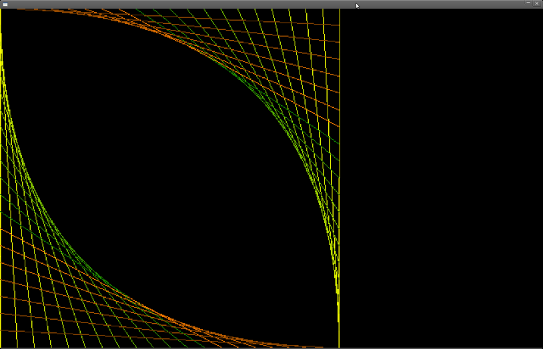
The following source is typed in :
intmain (void) {
initscreen (640, 400);
int i;
for (i=0 ; i<400 ; i+=20) {
setcolor (255-i,255-i/2,0);
line (i,0, 0,400-i);
line (399,i, 400-i,399);
}
while (mousek() == 0) {} // wait for a mouse-clickreturn0;
}
at F12 key-press, all is compiled, linked, and the result window pops up :
Let-C depends on several state-of-the-art open-source softwares :
- gcc - the GNU Compiler Collection, mostly the C/C++ compiler and the linker (for it's ability to wrap functions).
- libSDL - the Simple DirectMedia Layer, the version 1.2 is used, and the choice of 2.0 is underway.
- OpenGL - The 3D graphic library is used internally, it is not planned to switch to another rendering method.
- nano - The GNU nano text editor is used, a patched version can be used for a better handling of compiler's error messages.
- matcalc - A small set of 3d math templates.
packages for wheezy and squeeze are available via those repositories, gpg-signed with that key
wheezy
deb http://archive.disjunkt.com/debian/ wheezy mainsqueeze
deb http://archive.disjunkt.com/debian/ squeeze main
packages for ubuntu releases trusty, precise and lucid are available via launchpad/Let-C.
adding the Let-C ubuntu repository to you system :
sudo add-apt-repository ppa:nekodune/let-cUsing packages is probably the best way for installing let-C (see above), however the sources can be compiled and installed after some usual autotool invocations :
>cd dist
> (g)libtoolize --copy && aclocal && autoheader && automake --add-missing && autoconf
> ./configure -prefix=/usr/local
> make
# make install
some release archives, ready to configure without autotools, are also avalaible in the debian-src directory
GPL-V2