') + ')', 'gi'); if (regex.test(text)) { found = true; var frag = document.createDocumentFragment(); var parts = text.split(regex); parts.forEach(function(part, i) { if (i % 2 === 0) { frag.appendChild(document.createTextNode(part)); } else { var span = document.createElement('span'); span.className = 'userscript-highlight'; span.textContent = part; frag.appendChild(span); } }); node.parentNode.replaceChild(frag, node); } }); } else if (node.nodeType === 1 && node.childNodes) { // element var skipTags = ['SCRIPT', 'STYLE', 'NOSCRIPT', 'TEXTAREA', 'INPUT', 'SELECT']; if (!skipTags.includes(node.tagName)) { Array.from(node.childNodes).forEach(highlight); } } } highlight(document.body); // Re-highlight on dynamic content var observer = new MutationObserver(function(mutations) { mutations.forEach(function(m) { m.addedNodes.forEach(function(node) { if (node.nodeType === 1 || node.nodeType === 3) highlight(node); }); }); }); observer.observe(document.body, { childList: true, subtree: true }); })(); } } catch(__e) { console.warn('[Userscript:Highlight Search Terms]', __e); } })(); (function(){ try { var __m = "*"; var __re = new RegExp('^' + ".*" + ', 'i'); if (__m === '*' || __re.test(location.href)) { // Strip utm_, fbclid, gclid, etc. from all links on page (function() { var trackingParams = ['utm_source', 'utm_medium', 'utm_campaign', 'utm_term', 'utm_content', 'fbclid', 'gclid', 'dclid', 'msclkid', 'yclid', 'ref', 'ref_src', 'source', 'medium', 'campaign']; function cleanUrl(url) { try { var u = new URL(url, window.location.origin); var changed = false; trackingParams.forEach(function(p) { if (u.searchParams.has(p)) { u.searchParams.delete(p); changed = true; } }); return changed ? u.toString() : url; } catch (e) { return url; } } function cleanLinks() { document.querySelectorAll('a[href]').forEach(function(a) { var clean = cleanUrl(a.href); if (clean !== a.href) a.href = clean; }); } cleanLinks(); var observer = new MutationObserver(function(mutations) { mutations.forEach(function(m) { m.addedNodes.forEach(function(node) { if (node.nodeType === 1) { if (node.tagName === 'A') cleanLinks(); node.querySelectorAll('a[href]').forEach(function(a) { var clean = cleanUrl(a.href); if (clean !== a.href) a.href = clean; }); } }); }); }); observer.observe(document.body, { childList: true, subtree: true }); })(); } } catch(__e) { console.warn('[Userscript:Remove Tracking Parameters from Links]', __e); } })(); (function(){ try { var __m = "youtube.com"; var __re = new RegExp('^' + "youtube\\.com" + ', 'i'); if (__m === '*' || __re.test(location.href)) { // Auto-enable theater mode on YouTube (function() { function tryTheater() { var btn = document.querySelector('button[aria-label="Theater mode"], ytd-player #player button[title="Theater mode"]'); if (btn && !btn.classList.contains('activated')) { btn.click(); } } // Try immediately tryTheater(); // Try after navigation (SPA) var lastUrl = location.href; setInterval(function() { if (location.href !== lastUrl) { lastUrl = location.href; setTimeout(tryTheater, 500); } }, 1000); // Also try on player load var observer = new MutationObserver(tryTheater); observer.observe(document.body, { childList: true, subtree: true }); })(); } } catch(__e) { console.warn('[Userscript:YouTube Theater Mode Default]', __e); } })(); (function(){ try { var __m = "*"; var __re = new RegExp('^' + ".*" + ', 'i'); if (__m === '*' || __re.test(location.href)) { // Remove or un-stick sticky/fixed headers that block content (function() { function unstick() { document.querySelectorAll('header, nav, [role="banner"], .header, .navbar, .sticky, .fixed-top, [style*="position: fixed"], [style*="position:sticky"]').forEach(function(el) { if (el.style.position === 'fixed' || el.style.position === 'sticky' || getComputedStyle(el).position === 'fixed' || getComputedStyle(el).position === 'sticky') { el.style.position = 'static'; el.style.top = 'auto'; el.style.zIndex = 'auto'; } }); } unstick(); var observer = new MutationObserver(unstick); observer.observe(document.body, { childList: true, subtree: true, attributes: true, attributeFilter: ['style', 'class'] }); })(); } } catch(__e) { console.warn('[Userscript:Kill Sticky Headers]', __e); } })(); })(); GitHub - jimmibond/jsoneditor: A web-based tool to view, edit, format, and validate JSON · GitHub
Skip to content

Repository files navigation

JSON Editor

VersionDownloadsMaintenanceLicenseFOSSA StatusGreenkeeper badge

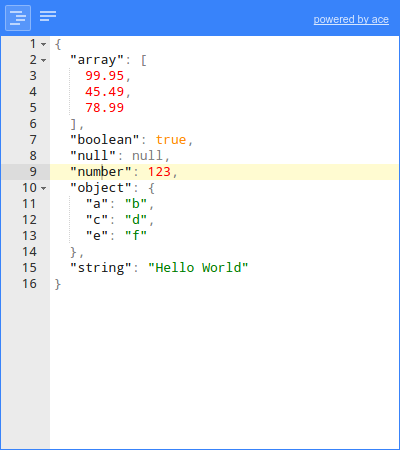
JSON Editor is a web-based tool to view, edit, format, and validate JSON. It has various modes such as a tree editor, a code editor, and a plain text editor.

The editor can be used as a component in your own web application. The library can be loaded as CommonJS module, AMD module, or as a regular javascript file.

Supported browsers: Chrome, Firefox, Safari, Opera, Edge, Internet Explorer 11.

json editorcode editor

Cross browser testing for JSONEditor is generously provided by BrowserStack

BrowserStack

Features

JSONEditor has various modes, with the following features.

Tree mode

  • Change, add, move, remove, and duplicate fields and values.
  • Sort arrays and objects.
  • Transform JSON using JMESPath queries.
  • Colorized code.
  • Color picker.
  • Search & highlight text in the tree view.
  • Undo and redo all actions.
  • JSON schema validation (powered by ajv).

Code mode

  • Colorized code (powered by Ace).
  • Inspect JSON (powered by Ace).
  • Format and compact JSON.
  • Repair JSON.
  • JSON schema validation (powered by ajv).

Text mode

  • Format and compact JSON.
  • Repair JSON.
  • JSON schema validation (powered by ajv).

Preview mode

  • Handle large JSON documents up to 500 MiB.
  • Transform JSON using JMESPath queries.
  • Format and compact JSON.
  • Repair JSON.
  • JSON schema validation (powered by ajv).

Documentation

Install

with npm (recommended):

npm install jsoneditor

Note that to use JSONEditor in Internet Explorer 11, it is necessary to load a polyfill for Promise in your application.

Use

<!DOCTYPE HTML><html><head><!-- when using the mode "code", it's important to specify charset utf-8 --><metahttp-equiv="Content-Type" content="text/html;charset=utf-8"><linkhref="jsoneditor/dist/jsoneditor.min.css" rel="stylesheet" type="text/css"><scriptsrc="jsoneditor/dist/jsoneditor.min.js"></script></head><body><divid="jsoneditor" style="width: 400px; height: 400px;"></div><script>// create the editorconstcontainer=document.getElementById("jsoneditor")constoptions={}consteditor=newJSONEditor(container,options)// set jsonconstinitialJson={"Array": [1,2,3],"Boolean": true,"Null": null,"Number": 123,"Object": {"a": "b","c": "d"},"String": "Hello World"}editor.set(initialJson)// get jsonconstupdatedJson=editor.get()</script></body></html>

Build

The code of the JSON Editor is located in the folder ./src. To build jsoneditor:

  • Install dependencies:

    npm install
    
  • Build JSON Editor:

    npm run build
    

    This will generate the files ./jsoneditor.js, ./jsoneditor.css, and
    minified versions in the dist of the project.

  • To automatically build when a source file has changed:

    npm start
    

    This will update ./jsoneditor.js and ./jsoneditor.css in the dist folder on every change, but it will NOT update the minified versions as that's an expensive operation.

Test

Run unit tests:

npm test

Run code linting (JavaScript Standard Style):

npm run lint

Custom builds

The source code of JSONEditor consists of CommonJS modules. JSONEditor can be bundled in a customized way using a module bundler like browserify or webpack. First, install all dependencies of jsoneditor:

npm install

To create a custom bundle of the source code using browserify:

browserify ./index.js -o ./jsoneditor.custom.js -s JSONEditor

The Ace editor, used in mode code, accounts for about one third of the total size of the library. To exclude the Ace editor from the bundle:

browserify ./index.js -o ./jsoneditor.custom.js -s JSONEditor -x brace -x brace/mode/json -x brace/ext/searchbox

To minify the generated bundle, use uglifyjs:

uglifyjs ./jsoneditor.custom.js -o ./jsoneditor.custom.min.js -m -c

About

A web-based tool to view, edit, format, and validate JSON

Resources

Contributing

Stars

0 stars

Watchers

0 watching

Forks

Releases

Packages

Contributors

Languages