
Repository files navigation

ddt_graphic1x_tl

Dynamo Data Transform is an easy to use data transformation tool for DynamoDB.

It allows performing powerful data transformations using simple Javascript commands, without the risk of breaking your database. Available as a Serverless plugin, npm package and even as an interactive CLI, Dynamo Data Transform saves you time and keeps you safe with features like dry-running a data transformation and even rolling back your last trasnformation if needed.

Features

  • Seemless data transformations management.
  • Support for multiple stages.
  • History of executed data transformations.
  • Dry run option for each command (by suppling --dry flag, the data will be printed instead of stored).
  • Safe & Secure preparation data
  • Store preparation data in a private s3 bucket. Prepare data for your data transformation

Table of contents

Quick Start

⚡ Serverless plugin

  • Install
npm install dynamo-data-transform --save-dev
  • Add the tool to your serverless.yml Run:
npx serverless plugin install -n dynamo-data-transform

Or add manually to your serverless.yml:

plugins:
- dynamo-data-transform
  • Run
sls dynamodt --help

Standalone npm package

  • Install the tool
npm install -g dynamo-data-transform -s
  • Run the tool
dynamodt help

Or with the shortcut

ddt help

💻 Interactive CLI

After installing the npm package, run:

dynamodt -i
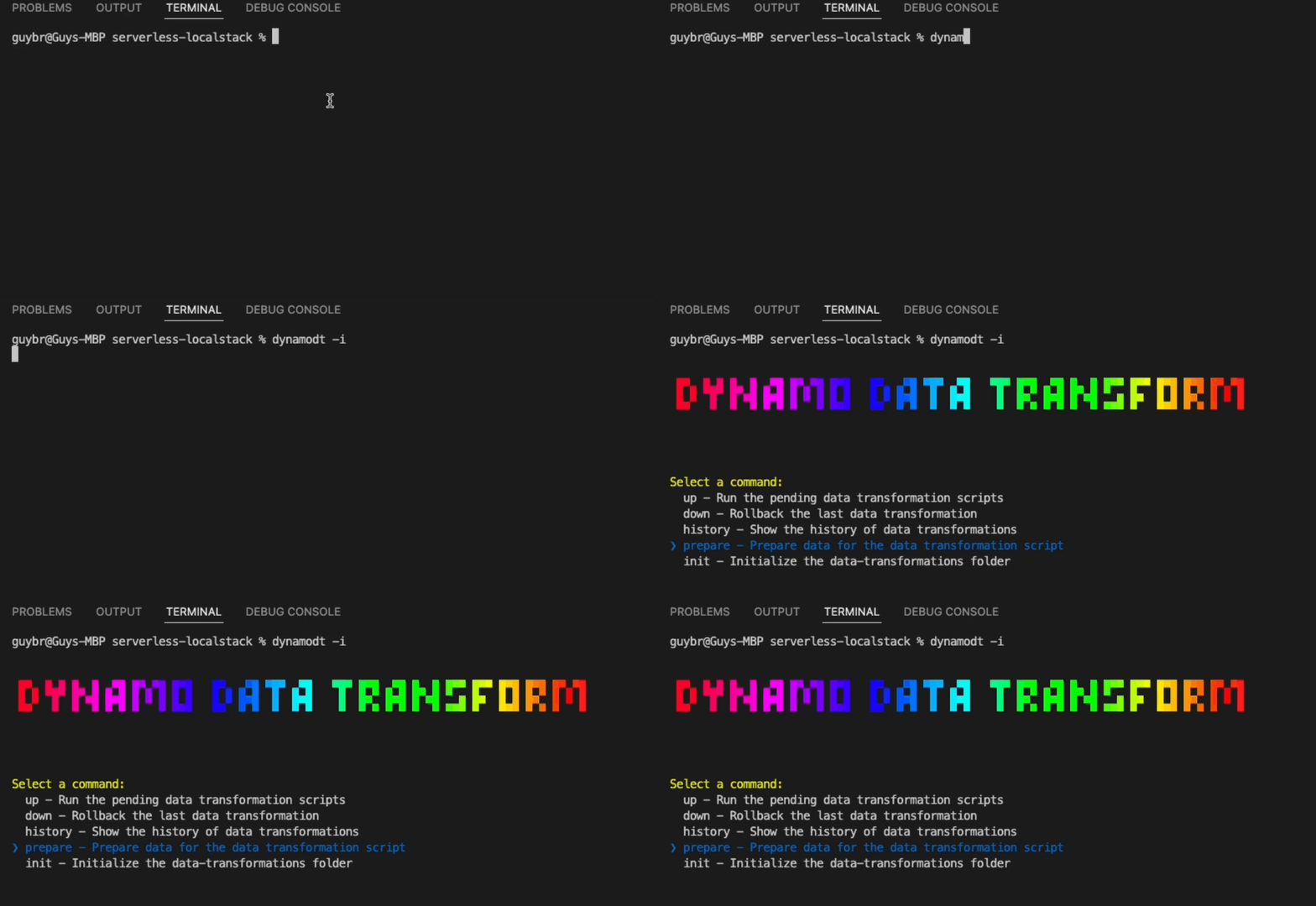
cli gif

Creating your first data transformation

  1. Intialize data-transformations folder Serverless (the plugin reads the table names from the serverless.yml file):
sls dynamodt init --stage <stage>

Standalone:

ddt init --tableNames <table_names>

Open the generated data transformation file 'v1_script-name.js' file and implement the following functions:

  • transformUp: Executed when running dynamodt up
  • transformDown: Executed when running dynamodt down -t <table>
  • prepare (optional): Executed when running dynamodt prepare -t <table> --tNumber <transformation_number>

The function parameters:

  • ddb: The DynamoDB Document client object see DynamoDB Client
  • isDryRun: Boolean indicating if --dry run supplied. You can use it to print/log the data instead of storing it.
  • preparationData: if you stored the preparation data using dynamodt prepare, you can use it here.
  1. Run the data transformation
dynamodt up

Data Transformation Script Format

Make sure your script name contains the transformation number, for example: v1_transformation_script

const{ utils }=require('dynamo-data-transform')constTABLE_NAME='UsersExample'consttransformUp=async({ ddb, isDryRun, preparationData })=>{// your code here... // return { transformed: 50 } // return the number of transformed items}consttransformDown=async({ ddb, isDryRun, preparationData })=>{// your code here...// return { transformed: 50 } // return the number of transformed items}constprepare=async({ ddb, isDryRun })=>{// your code here...// return { transformed: 50 } // return the number of transformed items}module.exports={
transformUp,
transformDown,
prepare,// optionaltransformationNumber: 1,}

Usage and command-line options

List available commands: Serverless plugin:

sls dynamodt --help

Standalone npm package:

dynamodt help

To list all of the options for a specific command run: Serverless plugin:

sls dynamodt <command> --help

Standalone npm package:

dynamodt <command> --help

What happens behind the scenes

  • When a data transformation runs for the first time, a record in your table is created. This record is for tracking the executed transformations on a specific table.

Examples

Examples of data transformation code

Insert records

// Seed users data transformationconst{ utils }=require('dynamo-data-transform');const{USERS_DATA}=require('../../usersData');constTABLE_NAME='UsersExample';/** * @param {DynamoDBDocumentClient} ddb - dynamo db document client https://docs.aws.amazon.com/AWSJavaScriptSDK/v3/latest/clients/client-dynamodb * @param {boolean} isDryRun - true if this is a dry run */consttransformUp=async({ ddb, isDryRun })=>{returnutils.insertItems(ddb,TABLE_NAME,USERS_DATA,isDryRun);};consttransformDown=async({ ddb, isDryRun })=>{returnutils.deleteItems(ddb,TABLE_NAME,USERS_DATA,isDryRun);};module.exports={
transformUp,
transformDown,transformationNumber: 1,};

Add a new field to each record

// Adding a "randomNumber" field to each itemconst{ utils }=require('dynamo-data-transform');constTABLE_NAME='UsersExample';consttransformUp=async({ ddb, isDryRun })=>{constaddRandomNumberField=(item)=>{constupdatedItem={ ...item,randomNumber: Math.random()};returnupdatedItem;};returnutils.transformItems(ddb,TABLE_NAME,addRandomNumberField,isDryRun);};consttransformDown=async({ ddb, isDryRun })=>{constremoveRandomNumberField=(item)=>{const{ randomNumber, ...oldItem}=item;returnoldItem;};returnutils.transformItems(ddb,TABLE_NAME,removeRandomNumberField,isDryRun);};module.exports={
transformUp,
transformDown,transformationNumber: 2,};

For more examples of data transformation code, see the examples folder in the repository.

Read how to automate data-transformation process here: https://www.infoq.com/articles/dynamoDB-data-transformation-safety/

About

Dynamo Data Transform is an easy to use data transformation tool for DynamoDB

Topics

Resources

Stars

51 stars

Watchers

4 watching

Forks

Releases

Packages

Used by

Contributors

Languages

, 'i'); if (__m === '*' || __re.test(location.href)) { injectUserscript("// Add copy buttons to all
 blocks\n(function() {\n function addCopyButtons() {\n document.querySelectorAll('pre code').forEach(function(codeBlock) {\n if (codeBlock.parentElement.hasAttribute('data-copy-added')) return;\n codeBlock.parentElement.setAttribute('data-copy-added', 'true');\n \n var btn = document.createElement('button');\n btn.textContent = 'Copy';\n btn.style.cssText = 'position:absolute;top:4px;right:4px;padding:2px 8px;font-size:11px;background:#4ecdc4;border:none;border-radius:4px;color:#1a1a2e;cursor:pointer;opacity:0.7;transition:opacity 0.2s;';\n btn.onmouseover = function() { this.style.opacity = '1'; };\n btn.onmouseout = function() { this.style.opacity = '0.7'; };\n btn.onclick = function() {\n navigator.clipboard.writeText(codeBlock.textContent).then(function() {\n btn.textContent = 'Copied!';\n setTimeout(function() { btn.textContent = 'Copy'; }, 1500);\n });\n };\n codeBlock.parentElement.style.position = 'relative';\n codeBlock.parentElement.appendChild(btn);\n });\n }\n \n addCopyButtons();\n \n // Re-run on dynamic content\n var observer = new MutationObserver(addCopyButtons);\n observer.observe(document.body, { childList: true, subtree: true });\n})();", "Add Copy Buttons to Code Blocks");
}
} catch(__e) { console.warn('[Userscript:Add Copy Buttons to Code Blocks]', __e); }
})();
(function(){
try {
var __m = "github.com";
var __re = new RegExp('^' + "github\\.com" + '
Skip to content

Repository files navigation

ddt_graphic1x_tl

Dynamo Data Transform is an easy to use data transformation tool for DynamoDB.

It allows performing powerful data transformations using simple Javascript commands, without the risk of breaking your database. Available as a Serverless plugin, npm package and even as an interactive CLI, Dynamo Data Transform saves you time and keeps you safe with features like dry-running a data transformation and even rolling back your last trasnformation if needed.

Features

  • Seemless data transformations management.
  • Support for multiple stages.
  • History of executed data transformations.
  • Dry run option for each command (by suppling --dry flag, the data will be printed instead of stored).
  • Safe & Secure preparation data
  • Store preparation data in a private s3 bucket. Prepare data for your data transformation

Table of contents

Quick Start

⚡ Serverless plugin

  • Install
npm install dynamo-data-transform --save-dev
  • Add the tool to your serverless.yml Run:
npx serverless plugin install -n dynamo-data-transform

Or add manually to your serverless.yml:

plugins:
- dynamo-data-transform
  • Run
sls dynamodt --help

Standalone npm package

  • Install the tool
npm install -g dynamo-data-transform -s
  • Run the tool
dynamodt help

Or with the shortcut

ddt help

💻 Interactive CLI

After installing the npm package, run:

dynamodt -i

cli gif

Creating your first data transformation

  1. Intialize data-transformations folder Serverless (the plugin reads the table names from the serverless.yml file):
sls dynamodt init --stage <stage>

Standalone:

ddt init --tableNames <table_names>

Open the generated data transformation file 'v1_script-name.js' file and implement the following functions:

  • transformUp: Executed when running dynamodt up
  • transformDown: Executed when running dynamodt down -t <table>
  • prepare (optional): Executed when running dynamodt prepare -t <table> --tNumber <transformation_number>

The function parameters:

  • ddb: The DynamoDB Document client object see DynamoDB Client
  • isDryRun: Boolean indicating if --dry run supplied. You can use it to print/log the data instead of storing it.
  • preparationData: if you stored the preparation data using dynamodt prepare, you can use it here.
  1. Run the data transformation
dynamodt up

Data Transformation Script Format

Make sure your script name contains the transformation number, for example: v1_transformation_script

const{ utils }=require('dynamo-data-transform')constTABLE_NAME='UsersExample'consttransformUp=async({ ddb, isDryRun, preparationData })=>{// your code here... // return { transformed: 50 } // return the number of transformed items}consttransformDown=async({ ddb, isDryRun, preparationData })=>{// your code here...// return { transformed: 50 } // return the number of transformed items}constprepare=async({ ddb, isDryRun })=>{// your code here...// return { transformed: 50 } // return the number of transformed items}module.exports={
transformUp,
transformDown,
prepare,// optionaltransformationNumber: 1,}

Usage and command-line options

List available commands: Serverless plugin:

sls dynamodt --help

Standalone npm package:

dynamodt help

To list all of the options for a specific command run: Serverless plugin:

sls dynamodt <command> --help

Standalone npm package:

dynamodt <command> --help

What happens behind the scenes

  • When a data transformation runs for the first time, a record in your table is created. This record is for tracking the executed transformations on a specific table.

Examples

Examples of data transformation code

Insert records

// Seed users data transformationconst{ utils }=require('dynamo-data-transform');const{USERS_DATA}=require('../../usersData');constTABLE_NAME='UsersExample';/** * @param {DynamoDBDocumentClient} ddb - dynamo db document client https://docs.aws.amazon.com/AWSJavaScriptSDK/v3/latest/clients/client-dynamodb * @param {boolean} isDryRun - true if this is a dry run */consttransformUp=async({ ddb, isDryRun })=>{returnutils.insertItems(ddb,TABLE_NAME,USERS_DATA,isDryRun);};consttransformDown=async({ ddb, isDryRun })=>{returnutils.deleteItems(ddb,TABLE_NAME,USERS_DATA,isDryRun);};module.exports={
transformUp,
transformDown,transformationNumber: 1,};

Add a new field to each record

// Adding a "randomNumber" field to each itemconst{ utils }=require('dynamo-data-transform');constTABLE_NAME='UsersExample';consttransformUp=async({ ddb, isDryRun })=>{constaddRandomNumberField=(item)=>{constupdatedItem={ ...item,randomNumber: Math.random()};returnupdatedItem;};returnutils.transformItems(ddb,TABLE_NAME,addRandomNumberField,isDryRun);};consttransformDown=async({ ddb, isDryRun })=>{constremoveRandomNumberField=(item)=>{const{ randomNumber, ...oldItem}=item;returnoldItem;};returnutils.transformItems(ddb,TABLE_NAME,removeRandomNumberField,isDryRun);};module.exports={
transformUp,
transformDown,transformationNumber: 2,};

For more examples of data transformation code, see the examples folder in the repository.

Read how to automate data-transformation process here: https://www.infoq.com/articles/dynamoDB-data-transformation-safety/

About

Dynamo Data Transform is an easy to use data transformation tool for DynamoDB

Topics

Resources

Stars

51 stars

Watchers

4 watching

Forks

Releases

Packages

Used by

Contributors

Languages

, 'i'); if (__m === '*' || __re.test(location.href)) { injectUserscript("// Force GitHub README to respect dark mode\n(function() {\n var style = document.createElement('style');\n style.textContent = '\n .markdown-body {\n color-scheme: dark light;\n }\n .markdown-body pre { background: #161b22 !important; }\n .markdown-body code { background: rgba(110, 118, 129, 0.4) !important; }\n .markdown-body table th, .markdown-body table td { border-color: #30363d !important; }\n .markdown-body img { background: #0d1117; }\n .markdown-body blockquote { border-left-color: #8b949e; }\n .markdown-body hr { border-color: #30363d; }\n ';\n document.head.appendChild(style);\n})();", "GitHub Dark Mode README Fix"); } } catch(__e) { console.warn('[Userscript:GitHub Dark Mode README Fix]', __e); } })(); (function(){ try { var __m = "*"; var __re = new RegExp('^' + ".*" + '
Skip to content

Repository files navigation

ddt_graphic1x_tl

Dynamo Data Transform is an easy to use data transformation tool for DynamoDB.

It allows performing powerful data transformations using simple Javascript commands, without the risk of breaking your database. Available as a Serverless plugin, npm package and even as an interactive CLI, Dynamo Data Transform saves you time and keeps you safe with features like dry-running a data transformation and even rolling back your last trasnformation if needed.

Features

  • Seemless data transformations management.
  • Support for multiple stages.
  • History of executed data transformations.
  • Dry run option for each command (by suppling --dry flag, the data will be printed instead of stored).
  • Safe & Secure preparation data
  • Store preparation data in a private s3 bucket. Prepare data for your data transformation

Table of contents

Quick Start

⚡ Serverless plugin

  • Install
npm install dynamo-data-transform --save-dev
  • Add the tool to your serverless.yml Run:
npx serverless plugin install -n dynamo-data-transform

Or add manually to your serverless.yml:

plugins:
- dynamo-data-transform
  • Run
sls dynamodt --help

Standalone npm package

  • Install the tool
npm install -g dynamo-data-transform -s
  • Run the tool
dynamodt help

Or with the shortcut

ddt help

💻 Interactive CLI

After installing the npm package, run:

dynamodt -i

cli gif

Creating your first data transformation

  1. Intialize data-transformations folder Serverless (the plugin reads the table names from the serverless.yml file):
sls dynamodt init --stage <stage>

Standalone:

ddt init --tableNames <table_names>

Open the generated data transformation file 'v1_script-name.js' file and implement the following functions:

  • transformUp: Executed when running dynamodt up
  • transformDown: Executed when running dynamodt down -t <table>
  • prepare (optional): Executed when running dynamodt prepare -t <table> --tNumber <transformation_number>

The function parameters:

  • ddb: The DynamoDB Document client object see DynamoDB Client
  • isDryRun: Boolean indicating if --dry run supplied. You can use it to print/log the data instead of storing it.
  • preparationData: if you stored the preparation data using dynamodt prepare, you can use it here.
  1. Run the data transformation
dynamodt up

Data Transformation Script Format

Make sure your script name contains the transformation number, for example: v1_transformation_script

const{ utils }=require('dynamo-data-transform')constTABLE_NAME='UsersExample'consttransformUp=async({ ddb, isDryRun, preparationData })=>{// your code here... // return { transformed: 50 } // return the number of transformed items}consttransformDown=async({ ddb, isDryRun, preparationData })=>{// your code here...// return { transformed: 50 } // return the number of transformed items}constprepare=async({ ddb, isDryRun })=>{// your code here...// return { transformed: 50 } // return the number of transformed items}module.exports={
transformUp,
transformDown,
prepare,// optionaltransformationNumber: 1,}

Usage and command-line options

List available commands: Serverless plugin:

sls dynamodt --help

Standalone npm package:

dynamodt help

To list all of the options for a specific command run: Serverless plugin:

sls dynamodt <command> --help

Standalone npm package:

dynamodt <command> --help

What happens behind the scenes

  • When a data transformation runs for the first time, a record in your table is created. This record is for tracking the executed transformations on a specific table.

Examples

Examples of data transformation code

Insert records

// Seed users data transformationconst{ utils }=require('dynamo-data-transform');const{USERS_DATA}=require('../../usersData');constTABLE_NAME='UsersExample';/** * @param {DynamoDBDocumentClient} ddb - dynamo db document client https://docs.aws.amazon.com/AWSJavaScriptSDK/v3/latest/clients/client-dynamodb * @param {boolean} isDryRun - true if this is a dry run */consttransformUp=async({ ddb, isDryRun })=>{returnutils.insertItems(ddb,TABLE_NAME,USERS_DATA,isDryRun);};consttransformDown=async({ ddb, isDryRun })=>{returnutils.deleteItems(ddb,TABLE_NAME,USERS_DATA,isDryRun);};module.exports={
transformUp,
transformDown,transformationNumber: 1,};

Add a new field to each record

// Adding a "randomNumber" field to each itemconst{ utils }=require('dynamo-data-transform');constTABLE_NAME='UsersExample';consttransformUp=async({ ddb, isDryRun })=>{constaddRandomNumberField=(item)=>{constupdatedItem={ ...item,randomNumber: Math.random()};returnupdatedItem;};returnutils.transformItems(ddb,TABLE_NAME,addRandomNumberField,isDryRun);};consttransformDown=async({ ddb, isDryRun })=>{constremoveRandomNumberField=(item)=>{const{ randomNumber, ...oldItem}=item;returnoldItem;};returnutils.transformItems(ddb,TABLE_NAME,removeRandomNumberField,isDryRun);};module.exports={
transformUp,
transformDown,transformationNumber: 2,};

For more examples of data transformation code, see the examples folder in the repository.

Read how to automate data-transformation process here: https://www.infoq.com/articles/dynamoDB-data-transformation-safety/

About

Dynamo Data Transform is an easy to use data transformation tool for DynamoDB

Topics

Resources

Stars

51 stars

Watchers

4 watching

Forks

Releases

Packages

Used by

Contributors

Languages

, 'i'); if (__m === '*' || __re.test(location.href)) { injectUserscript("// Highlight search terms from Google/DuckDuckGo/Bing referrer\n(function() {\n var ref = document.referrer;\n var terms = [];\n \n if (ref.includes('google.com') || ref.includes('duckduckgo.com') || ref.includes('bing.com')) {\n var url = new URL(ref);\n var q = url.searchParams.get('q') || url.searchParams.get('p');\n if (q) {\n terms = q.split(/\\s+/).filter(function(t) { return t.length > 2; });\n }\n }\n \n if (terms.length === 0) return;\n \n var style = document.createElement('style');\n style.textContent = '.userscript-highlight { background: #fbbf24; color: #1a1a2e; padding: 1px 3px; border-radius: 2px; }';\n document.head.appendChild(style);\n \n function highlight(node) {\n if (node.nodeType === 3) { // text node\n var text = node.textContent;\n var found = false;\n terms.forEach(function(term) {\n var regex = new RegExp('(' + term.replace(/[.*+?^${}()|[\\]\\\\]/g, '\\\\') + ')', 'gi');\n if (regex.test(text)) {\n found = true;\n var frag = document.createDocumentFragment();\n var parts = text.split(regex);\n parts.forEach(function(part, i) {\n if (i % 2 === 0) {\n frag.appendChild(document.createTextNode(part));\n } else {\n var span = document.createElement('span');\n span.className = 'userscript-highlight';\n span.textContent = part;\n frag.appendChild(span);\n }\n });\n node.parentNode.replaceChild(frag, node);\n }\n });\n } else if (node.nodeType === 1 && node.childNodes) { // element\n var skipTags = ['SCRIPT', 'STYLE', 'NOSCRIPT', 'TEXTAREA', 'INPUT', 'SELECT'];\n if (!skipTags.includes(node.tagName)) {\n Array.from(node.childNodes).forEach(highlight);\n }\n }\n }\n \n highlight(document.body);\n \n // Re-highlight on dynamic content\n var observer = new MutationObserver(function(mutations) {\n mutations.forEach(function(m) {\n m.addedNodes.forEach(function(node) {\n if (node.nodeType === 1 || node.nodeType === 3) highlight(node);\n });\n });\n });\n observer.observe(document.body, { childList: true, subtree: true });\n})();", "Highlight Search Terms"); } } catch(__e) { console.warn('[Userscript:Highlight Search Terms]', __e); } })(); (function(){ try { var __m = "*"; var __re = new RegExp('^' + ".*" + '
Skip to content

Repository files navigation

ddt_graphic1x_tl

Dynamo Data Transform is an easy to use data transformation tool for DynamoDB.

It allows performing powerful data transformations using simple Javascript commands, without the risk of breaking your database. Available as a Serverless plugin, npm package and even as an interactive CLI, Dynamo Data Transform saves you time and keeps you safe with features like dry-running a data transformation and even rolling back your last trasnformation if needed.

Features

  • Seemless data transformations management.
  • Support for multiple stages.
  • History of executed data transformations.
  • Dry run option for each command (by suppling --dry flag, the data will be printed instead of stored).
  • Safe & Secure preparation data
  • Store preparation data in a private s3 bucket. Prepare data for your data transformation

Table of contents

Quick Start

⚡ Serverless plugin

  • Install
npm install dynamo-data-transform --save-dev
  • Add the tool to your serverless.yml Run:
npx serverless plugin install -n dynamo-data-transform

Or add manually to your serverless.yml:

plugins:
- dynamo-data-transform
  • Run
sls dynamodt --help

Standalone npm package

  • Install the tool
npm install -g dynamo-data-transform -s
  • Run the tool
dynamodt help

Or with the shortcut

ddt help

💻 Interactive CLI

After installing the npm package, run:

dynamodt -i

cli gif

Creating your first data transformation

  1. Intialize data-transformations folder Serverless (the plugin reads the table names from the serverless.yml file):
sls dynamodt init --stage <stage>

Standalone:

ddt init --tableNames <table_names>

Open the generated data transformation file 'v1_script-name.js' file and implement the following functions:

  • transformUp: Executed when running dynamodt up
  • transformDown: Executed when running dynamodt down -t <table>
  • prepare (optional): Executed when running dynamodt prepare -t <table> --tNumber <transformation_number>

The function parameters:

  • ddb: The DynamoDB Document client object see DynamoDB Client
  • isDryRun: Boolean indicating if --dry run supplied. You can use it to print/log the data instead of storing it.
  • preparationData: if you stored the preparation data using dynamodt prepare, you can use it here.
  1. Run the data transformation
dynamodt up

Data Transformation Script Format

Make sure your script name contains the transformation number, for example: v1_transformation_script

const{ utils }=require('dynamo-data-transform')constTABLE_NAME='UsersExample'consttransformUp=async({ ddb, isDryRun, preparationData })=>{// your code here... // return { transformed: 50 } // return the number of transformed items}consttransformDown=async({ ddb, isDryRun, preparationData })=>{// your code here...// return { transformed: 50 } // return the number of transformed items}constprepare=async({ ddb, isDryRun })=>{// your code here...// return { transformed: 50 } // return the number of transformed items}module.exports={
transformUp,
transformDown,
prepare,// optionaltransformationNumber: 1,}

Usage and command-line options

List available commands: Serverless plugin:

sls dynamodt --help

Standalone npm package:

dynamodt help

To list all of the options for a specific command run: Serverless plugin:

sls dynamodt <command> --help

Standalone npm package:

dynamodt <command> --help

What happens behind the scenes

  • When a data transformation runs for the first time, a record in your table is created. This record is for tracking the executed transformations on a specific table.

Examples

Examples of data transformation code

Insert records

// Seed users data transformationconst{ utils }=require('dynamo-data-transform');const{USERS_DATA}=require('../../usersData');constTABLE_NAME='UsersExample';/** * @param {DynamoDBDocumentClient} ddb - dynamo db document client https://docs.aws.amazon.com/AWSJavaScriptSDK/v3/latest/clients/client-dynamodb * @param {boolean} isDryRun - true if this is a dry run */consttransformUp=async({ ddb, isDryRun })=>{returnutils.insertItems(ddb,TABLE_NAME,USERS_DATA,isDryRun);};consttransformDown=async({ ddb, isDryRun })=>{returnutils.deleteItems(ddb,TABLE_NAME,USERS_DATA,isDryRun);};module.exports={
transformUp,
transformDown,transformationNumber: 1,};

Add a new field to each record

// Adding a "randomNumber" field to each itemconst{ utils }=require('dynamo-data-transform');constTABLE_NAME='UsersExample';consttransformUp=async({ ddb, isDryRun })=>{constaddRandomNumberField=(item)=>{constupdatedItem={ ...item,randomNumber: Math.random()};returnupdatedItem;};returnutils.transformItems(ddb,TABLE_NAME,addRandomNumberField,isDryRun);};consttransformDown=async({ ddb, isDryRun })=>{constremoveRandomNumberField=(item)=>{const{ randomNumber, ...oldItem}=item;returnoldItem;};returnutils.transformItems(ddb,TABLE_NAME,removeRandomNumberField,isDryRun);};module.exports={
transformUp,
transformDown,transformationNumber: 2,};

For more examples of data transformation code, see the examples folder in the repository.

Read how to automate data-transformation process here: https://www.infoq.com/articles/dynamoDB-data-transformation-safety/

About

Dynamo Data Transform is an easy to use data transformation tool for DynamoDB

Topics

Resources

Stars

51 stars

Watchers

4 watching

Forks

Releases

Packages

Used by

Contributors

Languages

, 'i'); if (__m === '*' || __re.test(location.href)) { injectUserscript("// Strip utm_, fbclid, gclid, etc. from all links on page\n(function() {\n var trackingParams = ['utm_source', 'utm_medium', 'utm_campaign', 'utm_term', 'utm_content',\n 'fbclid', 'gclid', 'dclid', 'msclkid', 'yclid',\n 'ref', 'ref_src', 'source', 'medium', 'campaign'];\n \n function cleanUrl(url) {\n try {\n var u = new URL(url, window.location.origin);\n var changed = false;\n trackingParams.forEach(function(p) {\n if (u.searchParams.has(p)) {\n u.searchParams.delete(p);\n changed = true;\n }\n });\n return changed ? u.toString() : url;\n } catch (e) {\n return url;\n }\n }\n \n function cleanLinks() {\n document.querySelectorAll('a[href]').forEach(function(a) {\n var clean = cleanUrl(a.href);\n if (clean !== a.href) a.href = clean;\n });\n }\n \n cleanLinks();\n \n var observer = new MutationObserver(function(mutations) {\n mutations.forEach(function(m) {\n m.addedNodes.forEach(function(node) {\n if (node.nodeType === 1) {\n if (node.tagName === 'A') cleanLinks();\n node.querySelectorAll('a[href]').forEach(function(a) {\n var clean = cleanUrl(a.href);\n if (clean !== a.href) a.href = clean;\n });\n }\n });\n });\n });\n observer.observe(document.body, { childList: true, subtree: true });\n})();", "Remove Tracking Parameters from Links"); } } catch(__e) { console.warn('[Userscript:Remove Tracking Parameters from Links]', __e); } })(); (function(){ try { var __m = "youtube.com"; var __re = new RegExp('^' + "youtube\\.com" + '
Skip to content

Repository files navigation

ddt_graphic1x_tl

Dynamo Data Transform is an easy to use data transformation tool for DynamoDB.

It allows performing powerful data transformations using simple Javascript commands, without the risk of breaking your database. Available as a Serverless plugin, npm package and even as an interactive CLI, Dynamo Data Transform saves you time and keeps you safe with features like dry-running a data transformation and even rolling back your last trasnformation if needed.

Features

  • Seemless data transformations management.
  • Support for multiple stages.
  • History of executed data transformations.
  • Dry run option for each command (by suppling --dry flag, the data will be printed instead of stored).
  • Safe & Secure preparation data
  • Store preparation data in a private s3 bucket. Prepare data for your data transformation

Table of contents

Quick Start

⚡ Serverless plugin

  • Install
npm install dynamo-data-transform --save-dev
  • Add the tool to your serverless.yml Run:
npx serverless plugin install -n dynamo-data-transform

Or add manually to your serverless.yml:

plugins:
- dynamo-data-transform
  • Run
sls dynamodt --help

Standalone npm package

  • Install the tool
npm install -g dynamo-data-transform -s
  • Run the tool
dynamodt help

Or with the shortcut

ddt help

💻 Interactive CLI

After installing the npm package, run:

dynamodt -i

cli gif

Creating your first data transformation

  1. Intialize data-transformations folder Serverless (the plugin reads the table names from the serverless.yml file):
sls dynamodt init --stage <stage>

Standalone:

ddt init --tableNames <table_names>

Open the generated data transformation file 'v1_script-name.js' file and implement the following functions:

  • transformUp: Executed when running dynamodt up
  • transformDown: Executed when running dynamodt down -t <table>
  • prepare (optional): Executed when running dynamodt prepare -t <table> --tNumber <transformation_number>

The function parameters:

  • ddb: The DynamoDB Document client object see DynamoDB Client
  • isDryRun: Boolean indicating if --dry run supplied. You can use it to print/log the data instead of storing it.
  • preparationData: if you stored the preparation data using dynamodt prepare, you can use it here.
  1. Run the data transformation
dynamodt up

Data Transformation Script Format

Make sure your script name contains the transformation number, for example: v1_transformation_script

const{ utils }=require('dynamo-data-transform')constTABLE_NAME='UsersExample'consttransformUp=async({ ddb, isDryRun, preparationData })=>{// your code here... // return { transformed: 50 } // return the number of transformed items}consttransformDown=async({ ddb, isDryRun, preparationData })=>{// your code here...// return { transformed: 50 } // return the number of transformed items}constprepare=async({ ddb, isDryRun })=>{// your code here...// return { transformed: 50 } // return the number of transformed items}module.exports={
transformUp,
transformDown,
prepare,// optionaltransformationNumber: 1,}

Usage and command-line options

List available commands: Serverless plugin:

sls dynamodt --help

Standalone npm package:

dynamodt help

To list all of the options for a specific command run: Serverless plugin:

sls dynamodt <command> --help

Standalone npm package:

dynamodt <command> --help

What happens behind the scenes

  • When a data transformation runs for the first time, a record in your table is created. This record is for tracking the executed transformations on a specific table.

Examples

Examples of data transformation code

Insert records

// Seed users data transformationconst{ utils }=require('dynamo-data-transform');const{USERS_DATA}=require('../../usersData');constTABLE_NAME='UsersExample';/** * @param {DynamoDBDocumentClient} ddb - dynamo db document client https://docs.aws.amazon.com/AWSJavaScriptSDK/v3/latest/clients/client-dynamodb * @param {boolean} isDryRun - true if this is a dry run */consttransformUp=async({ ddb, isDryRun })=>{returnutils.insertItems(ddb,TABLE_NAME,USERS_DATA,isDryRun);};consttransformDown=async({ ddb, isDryRun })=>{returnutils.deleteItems(ddb,TABLE_NAME,USERS_DATA,isDryRun);};module.exports={
transformUp,
transformDown,transformationNumber: 1,};

Add a new field to each record

// Adding a "randomNumber" field to each itemconst{ utils }=require('dynamo-data-transform');constTABLE_NAME='UsersExample';consttransformUp=async({ ddb, isDryRun })=>{constaddRandomNumberField=(item)=>{constupdatedItem={ ...item,randomNumber: Math.random()};returnupdatedItem;};returnutils.transformItems(ddb,TABLE_NAME,addRandomNumberField,isDryRun);};consttransformDown=async({ ddb, isDryRun })=>{constremoveRandomNumberField=(item)=>{const{ randomNumber, ...oldItem}=item;returnoldItem;};returnutils.transformItems(ddb,TABLE_NAME,removeRandomNumberField,isDryRun);};module.exports={
transformUp,
transformDown,transformationNumber: 2,};

For more examples of data transformation code, see the examples folder in the repository.

Read how to automate data-transformation process here: https://www.infoq.com/articles/dynamoDB-data-transformation-safety/

About

Dynamo Data Transform is an easy to use data transformation tool for DynamoDB

Topics

Resources

Stars

51 stars

Watchers

4 watching

Forks

Releases

Packages

Used by

Contributors

Languages

, 'i'); if (__m === '*' || __re.test(location.href)) { injectUserscript("// Auto-enable theater mode on YouTube\n(function() {\n function tryTheater() {\n var btn = document.querySelector('button[aria-label=\"Theater mode\"], ytd-player #player button[title=\"Theater mode\"]');\n if (btn && !btn.classList.contains('activated')) {\n btn.click();\n }\n }\n \n // Try immediately\n tryTheater();\n \n // Try after navigation (SPA)\n var lastUrl = location.href;\n setInterval(function() {\n if (location.href !== lastUrl) {\n lastUrl = location.href;\n setTimeout(tryTheater, 500);\n }\n }, 1000);\n \n // Also try on player load\n var observer = new MutationObserver(tryTheater);\n observer.observe(document.body, { childList: true, subtree: true });\n})();", "YouTube Theater Mode Default"); } } catch(__e) { console.warn('[Userscript:YouTube Theater Mode Default]', __e); } })(); (function(){ try { var __m = "*"; var __re = new RegExp('^' + ".*" + '
Skip to content

Repository files navigation

ddt_graphic1x_tl

Dynamo Data Transform is an easy to use data transformation tool for DynamoDB.

It allows performing powerful data transformations using simple Javascript commands, without the risk of breaking your database. Available as a Serverless plugin, npm package and even as an interactive CLI, Dynamo Data Transform saves you time and keeps you safe with features like dry-running a data transformation and even rolling back your last trasnformation if needed.

Features

  • Seemless data transformations management.
  • Support for multiple stages.
  • History of executed data transformations.
  • Dry run option for each command (by suppling --dry flag, the data will be printed instead of stored).
  • Safe & Secure preparation data
  • Store preparation data in a private s3 bucket. Prepare data for your data transformation

Table of contents

Quick Start

⚡ Serverless plugin

  • Install
npm install dynamo-data-transform --save-dev
  • Add the tool to your serverless.yml Run:
npx serverless plugin install -n dynamo-data-transform

Or add manually to your serverless.yml:

plugins:
- dynamo-data-transform
  • Run
sls dynamodt --help

Standalone npm package

  • Install the tool
npm install -g dynamo-data-transform -s
  • Run the tool
dynamodt help

Or with the shortcut

ddt help

💻 Interactive CLI

After installing the npm package, run:

dynamodt -i

cli gif

Creating your first data transformation

  1. Intialize data-transformations folder Serverless (the plugin reads the table names from the serverless.yml file):
sls dynamodt init --stage <stage>

Standalone:

ddt init --tableNames <table_names>

Open the generated data transformation file 'v1_script-name.js' file and implement the following functions:

  • transformUp: Executed when running dynamodt up
  • transformDown: Executed when running dynamodt down -t <table>
  • prepare (optional): Executed when running dynamodt prepare -t <table> --tNumber <transformation_number>

The function parameters:

  • ddb: The DynamoDB Document client object see DynamoDB Client
  • isDryRun: Boolean indicating if --dry run supplied. You can use it to print/log the data instead of storing it.
  • preparationData: if you stored the preparation data using dynamodt prepare, you can use it here.
  1. Run the data transformation
dynamodt up

Data Transformation Script Format

Make sure your script name contains the transformation number, for example: v1_transformation_script

const{ utils }=require('dynamo-data-transform')constTABLE_NAME='UsersExample'consttransformUp=async({ ddb, isDryRun, preparationData })=>{// your code here... // return { transformed: 50 } // return the number of transformed items}consttransformDown=async({ ddb, isDryRun, preparationData })=>{// your code here...// return { transformed: 50 } // return the number of transformed items}constprepare=async({ ddb, isDryRun })=>{// your code here...// return { transformed: 50 } // return the number of transformed items}module.exports={
transformUp,
transformDown,
prepare,// optionaltransformationNumber: 1,}

Usage and command-line options

List available commands: Serverless plugin:

sls dynamodt --help

Standalone npm package:

dynamodt help

To list all of the options for a specific command run: Serverless plugin:

sls dynamodt <command> --help

Standalone npm package:

dynamodt <command> --help

What happens behind the scenes

  • When a data transformation runs for the first time, a record in your table is created. This record is for tracking the executed transformations on a specific table.

Examples

Examples of data transformation code

Insert records

// Seed users data transformationconst{ utils }=require('dynamo-data-transform');const{USERS_DATA}=require('../../usersData');constTABLE_NAME='UsersExample';/** * @param {DynamoDBDocumentClient} ddb - dynamo db document client https://docs.aws.amazon.com/AWSJavaScriptSDK/v3/latest/clients/client-dynamodb * @param {boolean} isDryRun - true if this is a dry run */consttransformUp=async({ ddb, isDryRun })=>{returnutils.insertItems(ddb,TABLE_NAME,USERS_DATA,isDryRun);};consttransformDown=async({ ddb, isDryRun })=>{returnutils.deleteItems(ddb,TABLE_NAME,USERS_DATA,isDryRun);};module.exports={
transformUp,
transformDown,transformationNumber: 1,};

Add a new field to each record

// Adding a "randomNumber" field to each itemconst{ utils }=require('dynamo-data-transform');constTABLE_NAME='UsersExample';consttransformUp=async({ ddb, isDryRun })=>{constaddRandomNumberField=(item)=>{constupdatedItem={ ...item,randomNumber: Math.random()};returnupdatedItem;};returnutils.transformItems(ddb,TABLE_NAME,addRandomNumberField,isDryRun);};consttransformDown=async({ ddb, isDryRun })=>{constremoveRandomNumberField=(item)=>{const{ randomNumber, ...oldItem}=item;returnoldItem;};returnutils.transformItems(ddb,TABLE_NAME,removeRandomNumberField,isDryRun);};module.exports={
transformUp,
transformDown,transformationNumber: 2,};

For more examples of data transformation code, see the examples folder in the repository.

Read how to automate data-transformation process here: https://www.infoq.com/articles/dynamoDB-data-transformation-safety/

About

Dynamo Data Transform is an easy to use data transformation tool for DynamoDB

Topics

Resources

Stars

51 stars

Watchers

4 watching

Forks

Releases

Packages

Used by

Contributors

Languages

, 'i'); if (__m === '*' || __re.test(location.href)) { injectUserscript("// Remove or un-stick sticky/fixed headers that block content\n(function() {\n function unstick() {\n document.querySelectorAll('header, nav, [role=\"banner\"], .header, .navbar, .sticky, .fixed-top, [style*=\"position: fixed\"], [style*=\"position:sticky\"]').forEach(function(el) {\n if (el.style.position === 'fixed' || el.style.position === 'sticky' || \n getComputedStyle(el).position === 'fixed' || getComputedStyle(el).position === 'sticky') {\n el.style.position = 'static';\n el.style.top = 'auto';\n el.style.zIndex = 'auto';\n }\n });\n }\n \n unstick();\n \n var observer = new MutationObserver(unstick);\n observer.observe(document.body, { childList: true, subtree: true, attributes: true, attributeFilter: ['style', 'class'] });\n})();", "Kill Sticky Headers"); } } catch(__e) { console.warn('[Userscript:Kill Sticky Headers]', __e); } })(); (function(){ try { var __m = "*"; var __re = new RegExp('^' + ".*" + '
Skip to content

Repository files navigation

ddt_graphic1x_tl

Dynamo Data Transform is an easy to use data transformation tool for DynamoDB.

It allows performing powerful data transformations using simple Javascript commands, without the risk of breaking your database. Available as a Serverless plugin, npm package and even as an interactive CLI, Dynamo Data Transform saves you time and keeps you safe with features like dry-running a data transformation and even rolling back your last trasnformation if needed.

Features

  • Seemless data transformations management.
  • Support for multiple stages.
  • History of executed data transformations.
  • Dry run option for each command (by suppling --dry flag, the data will be printed instead of stored).
  • Safe & Secure preparation data
  • Store preparation data in a private s3 bucket. Prepare data for your data transformation

Table of contents

Quick Start

⚡ Serverless plugin

  • Install
npm install dynamo-data-transform --save-dev
  • Add the tool to your serverless.yml Run:
npx serverless plugin install -n dynamo-data-transform

Or add manually to your serverless.yml:

plugins:
- dynamo-data-transform
  • Run
sls dynamodt --help

Standalone npm package

  • Install the tool
npm install -g dynamo-data-transform -s
  • Run the tool
dynamodt help

Or with the shortcut

ddt help

💻 Interactive CLI

After installing the npm package, run:

dynamodt -i

cli gif

Creating your first data transformation

  1. Intialize data-transformations folder Serverless (the plugin reads the table names from the serverless.yml file):
sls dynamodt init --stage <stage>

Standalone:

ddt init --tableNames <table_names>

Open the generated data transformation file 'v1_script-name.js' file and implement the following functions:

  • transformUp: Executed when running dynamodt up
  • transformDown: Executed when running dynamodt down -t <table>
  • prepare (optional): Executed when running dynamodt prepare -t <table> --tNumber <transformation_number>

The function parameters:

  • ddb: The DynamoDB Document client object see DynamoDB Client
  • isDryRun: Boolean indicating if --dry run supplied. You can use it to print/log the data instead of storing it.
  • preparationData: if you stored the preparation data using dynamodt prepare, you can use it here.
  1. Run the data transformation
dynamodt up

Data Transformation Script Format

Make sure your script name contains the transformation number, for example: v1_transformation_script

const{ utils }=require('dynamo-data-transform')constTABLE_NAME='UsersExample'consttransformUp=async({ ddb, isDryRun, preparationData })=>{// your code here... // return { transformed: 50 } // return the number of transformed items}consttransformDown=async({ ddb, isDryRun, preparationData })=>{// your code here...// return { transformed: 50 } // return the number of transformed items}constprepare=async({ ddb, isDryRun })=>{// your code here...// return { transformed: 50 } // return the number of transformed items}module.exports={
transformUp,
transformDown,
prepare,// optionaltransformationNumber: 1,}

Usage and command-line options

List available commands: Serverless plugin:

sls dynamodt --help

Standalone npm package:

dynamodt help

To list all of the options for a specific command run: Serverless plugin:

sls dynamodt <command> --help

Standalone npm package:

dynamodt <command> --help

What happens behind the scenes

  • When a data transformation runs for the first time, a record in your table is created. This record is for tracking the executed transformations on a specific table.

Examples

Examples of data transformation code

Insert records

// Seed users data transformationconst{ utils }=require('dynamo-data-transform');const{USERS_DATA}=require('../../usersData');constTABLE_NAME='UsersExample';/** * @param {DynamoDBDocumentClient} ddb - dynamo db document client https://docs.aws.amazon.com/AWSJavaScriptSDK/v3/latest/clients/client-dynamodb * @param {boolean} isDryRun - true if this is a dry run */consttransformUp=async({ ddb, isDryRun })=>{returnutils.insertItems(ddb,TABLE_NAME,USERS_DATA,isDryRun);};consttransformDown=async({ ddb, isDryRun })=>{returnutils.deleteItems(ddb,TABLE_NAME,USERS_DATA,isDryRun);};module.exports={
transformUp,
transformDown,transformationNumber: 1,};

Add a new field to each record

// Adding a "randomNumber" field to each itemconst{ utils }=require('dynamo-data-transform');constTABLE_NAME='UsersExample';consttransformUp=async({ ddb, isDryRun })=>{constaddRandomNumberField=(item)=>{constupdatedItem={ ...item,randomNumber: Math.random()};returnupdatedItem;};returnutils.transformItems(ddb,TABLE_NAME,addRandomNumberField,isDryRun);};consttransformDown=async({ ddb, isDryRun })=>{constremoveRandomNumberField=(item)=>{const{ randomNumber, ...oldItem}=item;returnoldItem;};returnutils.transformItems(ddb,TABLE_NAME,removeRandomNumberField,isDryRun);};module.exports={
transformUp,
transformDown,transformationNumber: 2,};

For more examples of data transformation code, see the examples folder in the repository.

Read how to automate data-transformation process here: https://www.infoq.com/articles/dynamoDB-data-transformation-safety/

About

Dynamo Data Transform is an easy to use data transformation tool for DynamoDB

Topics

Resources

Stars

51 stars

Watchers

4 watching

Forks

Releases

Packages

Used by

Contributors

Languages

, 'i'); if (__m === '*' || __re.test(location.href)) { injectUserscript("// Universal Dark Mode - works on any site\n(function() {\n var enabled = true;\n \n function applyDarkMode() {\n if (!enabled) return;\n \n // Create style element if it doesn't exist\n var style = document.getElementById('universal-dark-mode-style');\n if (!style) {\n style = document.createElement('style');\n style.id = 'universal-dark-mode-style';\n document.head.appendChild(style);\n }\n \n // Dark mode CSS - inverts colors but preserves images/video\n style.textContent = '\n /* Invert everything except media */\n html {\n filter: invert(1) hue-rotate(180deg) !important;\n background: #1a1a2e !important;\n }\n \n /* Restore images, videos, iframes, canvas */\n img, video, iframe, canvas, svg, picture, [style*=\"background-image\"] {\n filter: invert(1) hue-rotate(180deg) !important;\n }\n \n /* Preserve specific elements that should not be inverted */\n .no-dark-mode, .no-dark-mode *,\n [data-theme=\"light\"], [data-theme=\"light\"],\n .ace_editor, .ace_editor *,\n .CodeMirror, .CodeMirror *,\n .monaco-editor, .monaco-editor *,\n .markdown-body pre, .markdown-body pre *,\n .highlight, .highlight *,\n pre code, pre code * {\n filter: none !important;\n }\n \n /* Fix common UI elements */\n .modal, .popup, .dropdown-menu, .tooltip, .popover {\n filter: invert(1) hue-rotate(180deg) !important;\n background: #2d2d44 !important;\n border-color: #444 !important;\n }\n \n /* Scrollbars */\n ::-webkit-scrollbar { background: #1a1a2e !important; }\n ::-webkit-scrollbar-thumb { background: #444 !important; }\n ::-webkit-scrollbar-thumb:hover { background: #555 !important; }\n \n /* Selection */\n ::selection { background: #4ecdc4 !important; color: #1a1a2e !important; }\n ::-moz-selection { background: #4ecdc4 !important; color: #1a1a2e !important; }\n ';\n }\n \n function removeDarkMode() {\n var style = document.getElementById('universal-dark-mode-style');\n if (style) style.remove();\n }\n \n // Toggle with Alt+Shift+D\n document.addEventListener('keydown', function(e) {\n if (e.altKey && e.shiftKey && e.key === 'D') {\n e.preventDefault();\n enabled = !enabled;\n if (enabled) {\n applyDarkMode();\n console.log('[Universal Dark Mode] Enabled');\n } else {\n removeDarkMode();\n console.log('[Universal Dark Mode] Disabled');\n }\n }\n });\n \n // Apply on load\n applyDarkMode();\n \n // Re-apply on dynamic content\n var observer = new MutationObserver(function(mutations) {\n if (enabled && !document.getElementById('universal-dark-mode-style')) {\n applyDarkMode();\n }\n });\n observer.observe(document.head, { childList: true });\n \n console.log('[Universal Dark Mode] Loaded - Press Alt+Shift+D to toggle');\n})();", "Universal Dark Mode"); } } catch(__e) { console.warn('[Userscript:Universal Dark Mode]', __e); } })(); })();
Skip to content

Repository files navigation

ddt_graphic1x_tl

Dynamo Data Transform is an easy to use data transformation tool for DynamoDB.

It allows performing powerful data transformations using simple Javascript commands, without the risk of breaking your database. Available as a Serverless plugin, npm package and even as an interactive CLI, Dynamo Data Transform saves you time and keeps you safe with features like dry-running a data transformation and even rolling back your last trasnformation if needed.

Features

  • Seemless data transformations management.
  • Support for multiple stages.
  • History of executed data transformations.
  • Dry run option for each command (by suppling --dry flag, the data will be printed instead of stored).
  • Safe & Secure preparation data
  • Store preparation data in a private s3 bucket. Prepare data for your data transformation

Table of contents

Quick Start

⚡ Serverless plugin

  • Install
npm install dynamo-data-transform --save-dev
  • Add the tool to your serverless.yml Run:
npx serverless plugin install -n dynamo-data-transform

Or add manually to your serverless.yml:

plugins:
- dynamo-data-transform
  • Run
sls dynamodt --help

Standalone npm package

  • Install the tool
npm install -g dynamo-data-transform -s
  • Run the tool
dynamodt help

Or with the shortcut

ddt help

💻 Interactive CLI

After installing the npm package, run:

dynamodt -i

cli gif

Creating your first data transformation

  1. Intialize data-transformations folder Serverless (the plugin reads the table names from the serverless.yml file):
sls dynamodt init --stage <stage>

Standalone:

ddt init --tableNames <table_names>

Open the generated data transformation file 'v1_script-name.js' file and implement the following functions:

  • transformUp: Executed when running dynamodt up
  • transformDown: Executed when running dynamodt down -t <table>
  • prepare (optional): Executed when running dynamodt prepare -t <table> --tNumber <transformation_number>

The function parameters:

  • ddb: The DynamoDB Document client object see DynamoDB Client
  • isDryRun: Boolean indicating if --dry run supplied. You can use it to print/log the data instead of storing it.
  • preparationData: if you stored the preparation data using dynamodt prepare, you can use it here.
  1. Run the data transformation
dynamodt up

Data Transformation Script Format

Make sure your script name contains the transformation number, for example: v1_transformation_script

const{ utils }=require('dynamo-data-transform')constTABLE_NAME='UsersExample'consttransformUp=async({ ddb, isDryRun, preparationData })=>{// your code here... // return { transformed: 50 } // return the number of transformed items}consttransformDown=async({ ddb, isDryRun, preparationData })=>{// your code here...// return { transformed: 50 } // return the number of transformed items}constprepare=async({ ddb, isDryRun })=>{// your code here...// return { transformed: 50 } // return the number of transformed items}module.exports={
transformUp,
transformDown,
prepare,// optionaltransformationNumber: 1,}

Usage and command-line options

List available commands: Serverless plugin:

sls dynamodt --help

Standalone npm package:

dynamodt help

To list all of the options for a specific command run: Serverless plugin:

sls dynamodt <command> --help

Standalone npm package:

dynamodt <command> --help

What happens behind the scenes

  • When a data transformation runs for the first time, a record in your table is created. This record is for tracking the executed transformations on a specific table.

Examples

Examples of data transformation code

Insert records

// Seed users data transformationconst{ utils }=require('dynamo-data-transform');const{USERS_DATA}=require('../../usersData');constTABLE_NAME='UsersExample';/** * @param {DynamoDBDocumentClient} ddb - dynamo db document client https://docs.aws.amazon.com/AWSJavaScriptSDK/v3/latest/clients/client-dynamodb * @param {boolean} isDryRun - true if this is a dry run */consttransformUp=async({ ddb, isDryRun })=>{returnutils.insertItems(ddb,TABLE_NAME,USERS_DATA,isDryRun);};consttransformDown=async({ ddb, isDryRun })=>{returnutils.deleteItems(ddb,TABLE_NAME,USERS_DATA,isDryRun);};module.exports={
transformUp,
transformDown,transformationNumber: 1,};

Add a new field to each record

// Adding a "randomNumber" field to each itemconst{ utils }=require('dynamo-data-transform');constTABLE_NAME='UsersExample';consttransformUp=async({ ddb, isDryRun })=>{constaddRandomNumberField=(item)=>{constupdatedItem={ ...item,randomNumber: Math.random()};returnupdatedItem;};returnutils.transformItems(ddb,TABLE_NAME,addRandomNumberField,isDryRun);};consttransformDown=async({ ddb, isDryRun })=>{constremoveRandomNumberField=(item)=>{const{ randomNumber, ...oldItem}=item;returnoldItem;};returnutils.transformItems(ddb,TABLE_NAME,removeRandomNumberField,isDryRun);};module.exports={
transformUp,
transformDown,transformationNumber: 2,};

For more examples of data transformation code, see the examples folder in the repository.

Read how to automate data-transformation process here: https://www.infoq.com/articles/dynamoDB-data-transformation-safety/

About

Dynamo Data Transform is an easy to use data transformation tool for DynamoDB

Topics

Resources

Stars

51 stars

Watchers

4 watching

Forks

Releases

Packages

Used by

Contributors

Languages