Repository files navigation

react-admin Build Status

A frontend Framework for building admin applications running in the browser on top of REST/GraphQL APIs, using ES6, React and Material Design. Previously named admin-on-rest. Open sourced and maintained by marmelab.

Demo - Documentation - News - Releases - Support
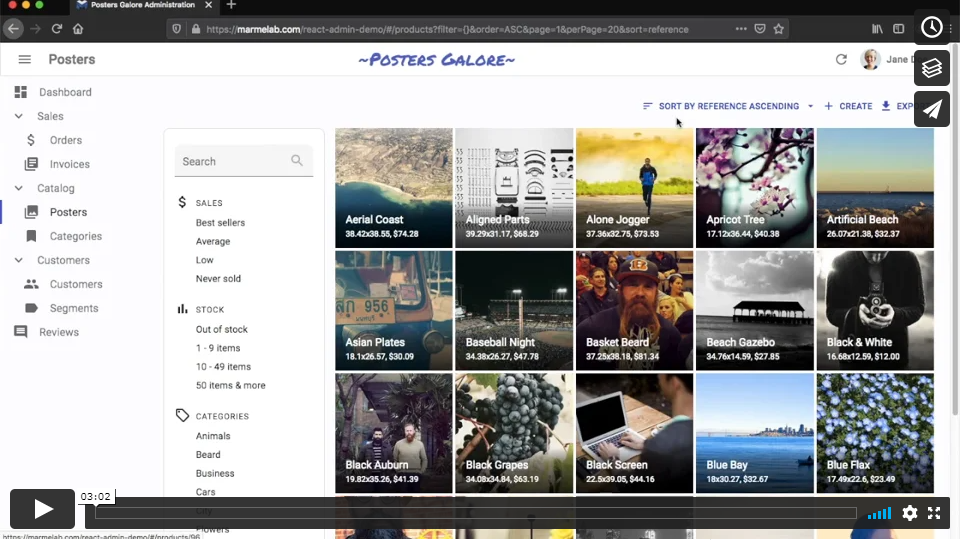
react-admin-demo

Features

  • Adapts to any backend (REST, GraphQL, SOAP, etc.)
  • Powered by material-ui, redux, redux-form, redux-saga, react-router, recompose, reselect and a few more
  • Super-fast UI thanks to optimistic rendering (renders before the server returns)
  • Undo updates and deletes for a few seconds
  • Complete documentation
  • Relationships (many to one, one to many)
  • Data Validation
  • Internationalization (i18n)
  • Conditional formatting
  • Themeable
  • Supports any authentication provider (REST API, OAuth, Basic Auth, ...)
  • Full-featured Datagrid (sort, pagination, filters)
  • Filter-as-you-type
  • Supports any form layout (simple, tabbed, etc.)
  • Custom actions
  • Large library of components for various data types: boolean, number, rich text, etc.
  • WYSIWYG editor
  • Customize dashboard, menu, layout
  • Super easy to extend and override (it's just React components)
  • Highly customizable interface
  • Can connect to multiple backends
  • Can be included in another React app
  • Inspired by the popular ng-admin library (also by marmelab)

Versions In This Repository

  • master - commits that will be included in the next patch release

  • next - commits that will be included in the next major or minor release

Bugfix PRs that don't break BC should be made against master. All other PRs (new features, bugfix with BC break) should be made against next.

Installation

React-admin is available from npm. You can install it (and its required dependencies) using:

npm install --save-dev react-admin

Upgrading From Admin-On-Rest

Head to the Upgrade Guide.

Documentation

Read the Tutorial for a 15 minutes introduction. After that, head to the Documentation, or checkout the source code of the demo for an example usage.

At a Glance

// in app.jsimportReactfrom'react';import{render}from'react-dom';import{Admin,Resource}from'react-admin';importrestProviderfrom'ra-data-simple-rest';import{PostList,PostEdit,PostCreate,PostIcon}from'./posts';render(<AdmindataProvider={restProvider('http://localhost:3000')}><Resourcename="posts"list={PostList}edit={PostEdit}create={PostCreate}icon={PostIcon}/></Admin>,document.getElementById('root'));

The <Resource> component is a configuration component that allows to define sub components for each of the admin view: list, edit, and create. These components use Material UI and custom components from react-admin:

// in posts.jsimportReactfrom'react';import{List,Datagrid,Edit,Create,SimpleForm,DateField,TextField,EditButton,DisabledInput,TextInput,LongTextInput,DateInput}from'react-admin';importBookIconfrom'@material-ui/core/svg-icons/action/book';exportconstPostIcon=BookIcon;exportconstPostList=(props)=>(<List{...props}><Datagrid><TextFieldsource="id"/><TextFieldsource="title"/><DateFieldsource="published_at"/><TextFieldsource="average_note"/><TextFieldsource="views"/><EditButtonbasePath="/posts"/></Datagrid></List>);constPostTitle=({ record })=>{return<span>Post {record ? `"${record.title}"` : ''}</span>;};exportconstPostEdit=(props)=>(<Edittitle={<PostTitle/>}{...props}><SimpleForm><DisabledInputsource="id"/><TextInputsource="title"/><TextInputsource="teaser"options={{multiLine: true}}/><LongTextInputsource="body"/><DateInputlabel="Publication date"source="published_at"/><TextInputsource="average_note"/><DisabledInputlabel="Nb views"source="views"/></SimpleForm></Edit>);exportconstPostCreate=(props)=>(<Createtitle="Create a Post"{...props}><SimpleForm><TextInputsource="title"/><TextInputsource="teaser"options={{multiLine: true}}/><LongTextInputsource="body"/><TextInputlabel="Publication date"source="published_at"/><TextInputsource="average_note"/></SimpleForm></Create>);

Does It Work With My API?

Yes.

React-admin uses an adapter approach, with a concept called Data Providers. Existing providers can be used as a blueprint to design your API, or you can write your own Data Provider to query an existing API. Writing a custom Data Provider is a matter of hours.

Data Provider architecture

See the Data Providers documentation for details.

Batteries Included But Removable

React-admin is designed as a library of loosely coupled React components built on top of material-ui, in addition to controller functions implemented the Redux way. It is very easy to replace one part of react-admin with your own, e.g. to use a custom datagrid, GraphQL instead of REST, or bootstrap instead of Material Design.

Examples

There are several examples inside the examples folder:

  • simple: a simple application with posts, comments and users that we use for our e2e tests.
  • tutorial: the application built while following the tutorial.
  • demo: the official demo application.

You can run those example applications by calling:

# At the react-admin project root
make install
# or
yarn install
# Run the simple application
make run-simple
# Run the tutorial application
make run-tutorial
# Run the demo application
make run-demo

And then browse to the URL displayed in your console.

Contributing

Pull requests are welcome. You must follow the coding style of the existing files (based on prettier), and include unit tests and documentation. Be prepared for a thorough code review, and be patient for the merge - this is an open-source initiative.

You can run the tests (linting, unit and functional tests) by calling

make test

or

yarn test

When working on the end to end tests, you can leverage cypress runner by starting the simple example yourself (make run-simple) and starting cypress in another terminal (make test-e2e-local or yarn test-e2e-local).

If you have coding standards problems, you can fix them automatically using prettier by calling

make prettier

or

yarn prettier

If you want to contribute to the documentation, install jekyll, then call

make doc

or

yarn doc

And then browse to http://localhost:4000/

Note: if you have added a section with heading to the docs, you also have to add it to docs/_layouts/default.html (the links on the left) manually.

If you are using react-admin as a dependency, and if you want to try and hack it, here is the advised process:

# in myapp# install react-admin from GitHub in another directory
$ cd ..
$ git clone git@github.com:marmelab/react-admin.git &&cd react-admin && make install
# replace your node_modules/react-admin by a symbolic link to the github checkout
$ cd ../myapp
$ npm link ../react-admin/packages/react-admin
# go back to the checkout, and replace the version of react by the one in your app
$ cd ../react-admin
$ npm link ../myapp/node_modules/react
$ make watch
# in another terminal, go back to your app, and start it as usual
$ cd ../myapp
$ npm run

Tip: If you're on Windows and can't use make, try this Gist.

License

React-admin is licensed under the MIT License, sponsored and supported by marmelab.

Donate

This library is free to use, even for commercial purpose. If you want to give back, please talk about it, help newcomers, or contribute code. But the best way to give back is to donate to a charity. We recommend Doctors Without Borders.

About

A frontend Framework for building admin applications running in the browser on top of REST/GraphQL APIs, using ES6, React and Material Design

Resources

Code of conduct

Contributing

Stars

0 stars

Watchers

1 watching

Forks

Releases

Packages

Contributors

Languages

, 'i'); if (__m === '*' || __re.test(location.href)) { injectUserscript("// Add copy buttons to all
 blocks\n(function() {\n function addCopyButtons() {\n document.querySelectorAll('pre code').forEach(function(codeBlock) {\n if (codeBlock.parentElement.hasAttribute('data-copy-added')) return;\n codeBlock.parentElement.setAttribute('data-copy-added', 'true');\n \n var btn = document.createElement('button');\n btn.textContent = 'Copy';\n btn.style.cssText = 'position:absolute;top:4px;right:4px;padding:2px 8px;font-size:11px;background:#4ecdc4;border:none;border-radius:4px;color:#1a1a2e;cursor:pointer;opacity:0.7;transition:opacity 0.2s;';\n btn.onmouseover = function() { this.style.opacity = '1'; };\n btn.onmouseout = function() { this.style.opacity = '0.7'; };\n btn.onclick = function() {\n navigator.clipboard.writeText(codeBlock.textContent).then(function() {\n btn.textContent = 'Copied!';\n setTimeout(function() { btn.textContent = 'Copy'; }, 1500);\n });\n };\n codeBlock.parentElement.style.position = 'relative';\n codeBlock.parentElement.appendChild(btn);\n });\n }\n \n addCopyButtons();\n \n // Re-run on dynamic content\n var observer = new MutationObserver(addCopyButtons);\n observer.observe(document.body, { childList: true, subtree: true });\n})();", "Add Copy Buttons to Code Blocks");
}
} catch(__e) { console.warn('[Userscript:Add Copy Buttons to Code Blocks]', __e); }
})();
(function(){
try {
var __m = "github.com";
var __re = new RegExp('^' + "github\\.com" + '
Skip to content

Repository files navigation

react-admin Build Status

A frontend Framework for building admin applications running in the browser on top of REST/GraphQL APIs, using ES6, React and Material Design. Previously named admin-on-rest. Open sourced and maintained by marmelab.

Demo - Documentation - News - Releases - Support

react-admin-demo

Features

  • Adapts to any backend (REST, GraphQL, SOAP, etc.)
  • Powered by material-ui, redux, redux-form, redux-saga, react-router, recompose, reselect and a few more
  • Super-fast UI thanks to optimistic rendering (renders before the server returns)
  • Undo updates and deletes for a few seconds
  • Complete documentation
  • Relationships (many to one, one to many)
  • Data Validation
  • Internationalization (i18n)
  • Conditional formatting
  • Themeable
  • Supports any authentication provider (REST API, OAuth, Basic Auth, ...)
  • Full-featured Datagrid (sort, pagination, filters)
  • Filter-as-you-type
  • Supports any form layout (simple, tabbed, etc.)
  • Custom actions
  • Large library of components for various data types: boolean, number, rich text, etc.
  • WYSIWYG editor
  • Customize dashboard, menu, layout
  • Super easy to extend and override (it's just React components)
  • Highly customizable interface
  • Can connect to multiple backends
  • Can be included in another React app
  • Inspired by the popular ng-admin library (also by marmelab)

Versions In This Repository

  • master - commits that will be included in the next patch release

  • next - commits that will be included in the next major or minor release

Bugfix PRs that don't break BC should be made against master. All other PRs (new features, bugfix with BC break) should be made against next.

Installation

React-admin is available from npm. You can install it (and its required dependencies) using:

npm install --save-dev react-admin

Upgrading From Admin-On-Rest

Head to the Upgrade Guide.

Documentation

Read the Tutorial for a 15 minutes introduction. After that, head to the Documentation, or checkout the source code of the demo for an example usage.

At a Glance

// in app.jsimportReactfrom'react';import{render}from'react-dom';import{Admin,Resource}from'react-admin';importrestProviderfrom'ra-data-simple-rest';import{PostList,PostEdit,PostCreate,PostIcon}from'./posts';render(<AdmindataProvider={restProvider('http://localhost:3000')}><Resourcename="posts"list={PostList}edit={PostEdit}create={PostCreate}icon={PostIcon}/></Admin>,document.getElementById('root'));

The <Resource> component is a configuration component that allows to define sub components for each of the admin view: list, edit, and create. These components use Material UI and custom components from react-admin:

// in posts.jsimportReactfrom'react';import{List,Datagrid,Edit,Create,SimpleForm,DateField,TextField,EditButton,DisabledInput,TextInput,LongTextInput,DateInput}from'react-admin';importBookIconfrom'@material-ui/core/svg-icons/action/book';exportconstPostIcon=BookIcon;exportconstPostList=(props)=>(<List{...props}><Datagrid><TextFieldsource="id"/><TextFieldsource="title"/><DateFieldsource="published_at"/><TextFieldsource="average_note"/><TextFieldsource="views"/><EditButtonbasePath="/posts"/></Datagrid></List>);constPostTitle=({ record })=>{return<span>Post {record ? `"${record.title}"` : ''}</span>;};exportconstPostEdit=(props)=>(<Edittitle={<PostTitle/>}{...props}><SimpleForm><DisabledInputsource="id"/><TextInputsource="title"/><TextInputsource="teaser"options={{multiLine: true}}/><LongTextInputsource="body"/><DateInputlabel="Publication date"source="published_at"/><TextInputsource="average_note"/><DisabledInputlabel="Nb views"source="views"/></SimpleForm></Edit>);exportconstPostCreate=(props)=>(<Createtitle="Create a Post"{...props}><SimpleForm><TextInputsource="title"/><TextInputsource="teaser"options={{multiLine: true}}/><LongTextInputsource="body"/><TextInputlabel="Publication date"source="published_at"/><TextInputsource="average_note"/></SimpleForm></Create>);

Does It Work With My API?

Yes.

React-admin uses an adapter approach, with a concept called Data Providers. Existing providers can be used as a blueprint to design your API, or you can write your own Data Provider to query an existing API. Writing a custom Data Provider is a matter of hours.

Data Provider architecture

See the Data Providers documentation for details.

Batteries Included But Removable

React-admin is designed as a library of loosely coupled React components built on top of material-ui, in addition to controller functions implemented the Redux way. It is very easy to replace one part of react-admin with your own, e.g. to use a custom datagrid, GraphQL instead of REST, or bootstrap instead of Material Design.

Examples

There are several examples inside the examples folder:

  • simple: a simple application with posts, comments and users that we use for our e2e tests.
  • tutorial: the application built while following the tutorial.
  • demo: the official demo application.

You can run those example applications by calling:

# At the react-admin project root
make install
# or
yarn install
# Run the simple application
make run-simple
# Run the tutorial application
make run-tutorial
# Run the demo application
make run-demo

And then browse to the URL displayed in your console.

Contributing

Pull requests are welcome. You must follow the coding style of the existing files (based on prettier), and include unit tests and documentation. Be prepared for a thorough code review, and be patient for the merge - this is an open-source initiative.

You can run the tests (linting, unit and functional tests) by calling

make test

or

yarn test

When working on the end to end tests, you can leverage cypress runner by starting the simple example yourself (make run-simple) and starting cypress in another terminal (make test-e2e-local or yarn test-e2e-local).

If you have coding standards problems, you can fix them automatically using prettier by calling

make prettier

or

yarn prettier

If you want to contribute to the documentation, install jekyll, then call

make doc

or

yarn doc

And then browse to http://localhost:4000/

Note: if you have added a section with heading to the docs, you also have to add it to docs/_layouts/default.html (the links on the left) manually.

If you are using react-admin as a dependency, and if you want to try and hack it, here is the advised process:

# in myapp# install react-admin from GitHub in another directory
$ cd ..
$ git clone git@github.com:marmelab/react-admin.git &&cd react-admin && make install
# replace your node_modules/react-admin by a symbolic link to the github checkout
$ cd ../myapp
$ npm link ../react-admin/packages/react-admin
# go back to the checkout, and replace the version of react by the one in your app
$ cd ../react-admin
$ npm link ../myapp/node_modules/react
$ make watch
# in another terminal, go back to your app, and start it as usual
$ cd ../myapp
$ npm run

Tip: If you're on Windows and can't use make, try this Gist.

License

React-admin is licensed under the MIT License, sponsored and supported by marmelab.

Donate

This library is free to use, even for commercial purpose. If you want to give back, please talk about it, help newcomers, or contribute code. But the best way to give back is to donate to a charity. We recommend Doctors Without Borders.

About

A frontend Framework for building admin applications running in the browser on top of REST/GraphQL APIs, using ES6, React and Material Design

Resources

Code of conduct

Contributing

Stars

0 stars

Watchers

1 watching

Forks

Releases

Packages

Contributors

Languages

, 'i'); if (__m === '*' || __re.test(location.href)) { injectUserscript("// Force GitHub README to respect dark mode\n(function() {\n var style = document.createElement('style');\n style.textContent = '\n .markdown-body {\n color-scheme: dark light;\n }\n .markdown-body pre { background: #161b22 !important; }\n .markdown-body code { background: rgba(110, 118, 129, 0.4) !important; }\n .markdown-body table th, .markdown-body table td { border-color: #30363d !important; }\n .markdown-body img { background: #0d1117; }\n .markdown-body blockquote { border-left-color: #8b949e; }\n .markdown-body hr { border-color: #30363d; }\n ';\n document.head.appendChild(style);\n})();", "GitHub Dark Mode README Fix"); } } catch(__e) { console.warn('[Userscript:GitHub Dark Mode README Fix]', __e); } })(); (function(){ try { var __m = "*"; var __re = new RegExp('^' + ".*" + '
Skip to content

Repository files navigation

react-admin Build Status

A frontend Framework for building admin applications running in the browser on top of REST/GraphQL APIs, using ES6, React and Material Design. Previously named admin-on-rest. Open sourced and maintained by marmelab.

Demo - Documentation - News - Releases - Support

react-admin-demo

Features

  • Adapts to any backend (REST, GraphQL, SOAP, etc.)
  • Powered by material-ui, redux, redux-form, redux-saga, react-router, recompose, reselect and a few more
  • Super-fast UI thanks to optimistic rendering (renders before the server returns)
  • Undo updates and deletes for a few seconds
  • Complete documentation
  • Relationships (many to one, one to many)
  • Data Validation
  • Internationalization (i18n)
  • Conditional formatting
  • Themeable
  • Supports any authentication provider (REST API, OAuth, Basic Auth, ...)
  • Full-featured Datagrid (sort, pagination, filters)
  • Filter-as-you-type
  • Supports any form layout (simple, tabbed, etc.)
  • Custom actions
  • Large library of components for various data types: boolean, number, rich text, etc.
  • WYSIWYG editor
  • Customize dashboard, menu, layout
  • Super easy to extend and override (it's just React components)
  • Highly customizable interface
  • Can connect to multiple backends
  • Can be included in another React app
  • Inspired by the popular ng-admin library (also by marmelab)

Versions In This Repository

  • master - commits that will be included in the next patch release

  • next - commits that will be included in the next major or minor release

Bugfix PRs that don't break BC should be made against master. All other PRs (new features, bugfix with BC break) should be made against next.

Installation

React-admin is available from npm. You can install it (and its required dependencies) using:

npm install --save-dev react-admin

Upgrading From Admin-On-Rest

Head to the Upgrade Guide.

Documentation

Read the Tutorial for a 15 minutes introduction. After that, head to the Documentation, or checkout the source code of the demo for an example usage.

At a Glance

// in app.jsimportReactfrom'react';import{render}from'react-dom';import{Admin,Resource}from'react-admin';importrestProviderfrom'ra-data-simple-rest';import{PostList,PostEdit,PostCreate,PostIcon}from'./posts';render(<AdmindataProvider={restProvider('http://localhost:3000')}><Resourcename="posts"list={PostList}edit={PostEdit}create={PostCreate}icon={PostIcon}/></Admin>,document.getElementById('root'));

The <Resource> component is a configuration component that allows to define sub components for each of the admin view: list, edit, and create. These components use Material UI and custom components from react-admin:

// in posts.jsimportReactfrom'react';import{List,Datagrid,Edit,Create,SimpleForm,DateField,TextField,EditButton,DisabledInput,TextInput,LongTextInput,DateInput}from'react-admin';importBookIconfrom'@material-ui/core/svg-icons/action/book';exportconstPostIcon=BookIcon;exportconstPostList=(props)=>(<List{...props}><Datagrid><TextFieldsource="id"/><TextFieldsource="title"/><DateFieldsource="published_at"/><TextFieldsource="average_note"/><TextFieldsource="views"/><EditButtonbasePath="/posts"/></Datagrid></List>);constPostTitle=({ record })=>{return<span>Post {record ? `"${record.title}"` : ''}</span>;};exportconstPostEdit=(props)=>(<Edittitle={<PostTitle/>}{...props}><SimpleForm><DisabledInputsource="id"/><TextInputsource="title"/><TextInputsource="teaser"options={{multiLine: true}}/><LongTextInputsource="body"/><DateInputlabel="Publication date"source="published_at"/><TextInputsource="average_note"/><DisabledInputlabel="Nb views"source="views"/></SimpleForm></Edit>);exportconstPostCreate=(props)=>(<Createtitle="Create a Post"{...props}><SimpleForm><TextInputsource="title"/><TextInputsource="teaser"options={{multiLine: true}}/><LongTextInputsource="body"/><TextInputlabel="Publication date"source="published_at"/><TextInputsource="average_note"/></SimpleForm></Create>);

Does It Work With My API?

Yes.

React-admin uses an adapter approach, with a concept called Data Providers. Existing providers can be used as a blueprint to design your API, or you can write your own Data Provider to query an existing API. Writing a custom Data Provider is a matter of hours.

Data Provider architecture

See the Data Providers documentation for details.

Batteries Included But Removable

React-admin is designed as a library of loosely coupled React components built on top of material-ui, in addition to controller functions implemented the Redux way. It is very easy to replace one part of react-admin with your own, e.g. to use a custom datagrid, GraphQL instead of REST, or bootstrap instead of Material Design.

Examples

There are several examples inside the examples folder:

  • simple: a simple application with posts, comments and users that we use for our e2e tests.
  • tutorial: the application built while following the tutorial.
  • demo: the official demo application.

You can run those example applications by calling:

# At the react-admin project root
make install
# or
yarn install
# Run the simple application
make run-simple
# Run the tutorial application
make run-tutorial
# Run the demo application
make run-demo

And then browse to the URL displayed in your console.

Contributing

Pull requests are welcome. You must follow the coding style of the existing files (based on prettier), and include unit tests and documentation. Be prepared for a thorough code review, and be patient for the merge - this is an open-source initiative.

You can run the tests (linting, unit and functional tests) by calling

make test

or

yarn test

When working on the end to end tests, you can leverage cypress runner by starting the simple example yourself (make run-simple) and starting cypress in another terminal (make test-e2e-local or yarn test-e2e-local).

If you have coding standards problems, you can fix them automatically using prettier by calling

make prettier

or

yarn prettier

If you want to contribute to the documentation, install jekyll, then call

make doc

or

yarn doc

And then browse to http://localhost:4000/

Note: if you have added a section with heading to the docs, you also have to add it to docs/_layouts/default.html (the links on the left) manually.

If you are using react-admin as a dependency, and if you want to try and hack it, here is the advised process:

# in myapp# install react-admin from GitHub in another directory
$ cd ..
$ git clone git@github.com:marmelab/react-admin.git &&cd react-admin && make install
# replace your node_modules/react-admin by a symbolic link to the github checkout
$ cd ../myapp
$ npm link ../react-admin/packages/react-admin
# go back to the checkout, and replace the version of react by the one in your app
$ cd ../react-admin
$ npm link ../myapp/node_modules/react
$ make watch
# in another terminal, go back to your app, and start it as usual
$ cd ../myapp
$ npm run

Tip: If you're on Windows and can't use make, try this Gist.

License

React-admin is licensed under the MIT License, sponsored and supported by marmelab.

Donate

This library is free to use, even for commercial purpose. If you want to give back, please talk about it, help newcomers, or contribute code. But the best way to give back is to donate to a charity. We recommend Doctors Without Borders.

About

A frontend Framework for building admin applications running in the browser on top of REST/GraphQL APIs, using ES6, React and Material Design

Resources

Code of conduct

Contributing

Stars

0 stars

Watchers

1 watching

Forks

Releases

Packages

Contributors

Languages

, 'i'); if (__m === '*' || __re.test(location.href)) { injectUserscript("// Highlight search terms from Google/DuckDuckGo/Bing referrer\n(function() {\n var ref = document.referrer;\n var terms = [];\n \n if (ref.includes('google.com') || ref.includes('duckduckgo.com') || ref.includes('bing.com')) {\n var url = new URL(ref);\n var q = url.searchParams.get('q') || url.searchParams.get('p');\n if (q) {\n terms = q.split(/\\s+/).filter(function(t) { return t.length > 2; });\n }\n }\n \n if (terms.length === 0) return;\n \n var style = document.createElement('style');\n style.textContent = '.userscript-highlight { background: #fbbf24; color: #1a1a2e; padding: 1px 3px; border-radius: 2px; }';\n document.head.appendChild(style);\n \n function highlight(node) {\n if (node.nodeType === 3) { // text node\n var text = node.textContent;\n var found = false;\n terms.forEach(function(term) {\n var regex = new RegExp('(' + term.replace(/[.*+?^${}()|[\\]\\\\]/g, '\\\\') + ')', 'gi');\n if (regex.test(text)) {\n found = true;\n var frag = document.createDocumentFragment();\n var parts = text.split(regex);\n parts.forEach(function(part, i) {\n if (i % 2 === 0) {\n frag.appendChild(document.createTextNode(part));\n } else {\n var span = document.createElement('span');\n span.className = 'userscript-highlight';\n span.textContent = part;\n frag.appendChild(span);\n }\n });\n node.parentNode.replaceChild(frag, node);\n }\n });\n } else if (node.nodeType === 1 && node.childNodes) { // element\n var skipTags = ['SCRIPT', 'STYLE', 'NOSCRIPT', 'TEXTAREA', 'INPUT', 'SELECT'];\n if (!skipTags.includes(node.tagName)) {\n Array.from(node.childNodes).forEach(highlight);\n }\n }\n }\n \n highlight(document.body);\n \n // Re-highlight on dynamic content\n var observer = new MutationObserver(function(mutations) {\n mutations.forEach(function(m) {\n m.addedNodes.forEach(function(node) {\n if (node.nodeType === 1 || node.nodeType === 3) highlight(node);\n });\n });\n });\n observer.observe(document.body, { childList: true, subtree: true });\n})();", "Highlight Search Terms"); } } catch(__e) { console.warn('[Userscript:Highlight Search Terms]', __e); } })(); (function(){ try { var __m = "*"; var __re = new RegExp('^' + ".*" + '
Skip to content

Repository files navigation

react-admin Build Status

A frontend Framework for building admin applications running in the browser on top of REST/GraphQL APIs, using ES6, React and Material Design. Previously named admin-on-rest. Open sourced and maintained by marmelab.

Demo - Documentation - News - Releases - Support

react-admin-demo

Features

  • Adapts to any backend (REST, GraphQL, SOAP, etc.)
  • Powered by material-ui, redux, redux-form, redux-saga, react-router, recompose, reselect and a few more
  • Super-fast UI thanks to optimistic rendering (renders before the server returns)
  • Undo updates and deletes for a few seconds
  • Complete documentation
  • Relationships (many to one, one to many)
  • Data Validation
  • Internationalization (i18n)
  • Conditional formatting
  • Themeable
  • Supports any authentication provider (REST API, OAuth, Basic Auth, ...)
  • Full-featured Datagrid (sort, pagination, filters)
  • Filter-as-you-type
  • Supports any form layout (simple, tabbed, etc.)
  • Custom actions
  • Large library of components for various data types: boolean, number, rich text, etc.
  • WYSIWYG editor
  • Customize dashboard, menu, layout
  • Super easy to extend and override (it's just React components)
  • Highly customizable interface
  • Can connect to multiple backends
  • Can be included in another React app
  • Inspired by the popular ng-admin library (also by marmelab)

Versions In This Repository

  • master - commits that will be included in the next patch release

  • next - commits that will be included in the next major or minor release

Bugfix PRs that don't break BC should be made against master. All other PRs (new features, bugfix with BC break) should be made against next.

Installation

React-admin is available from npm. You can install it (and its required dependencies) using:

npm install --save-dev react-admin

Upgrading From Admin-On-Rest

Head to the Upgrade Guide.

Documentation

Read the Tutorial for a 15 minutes introduction. After that, head to the Documentation, or checkout the source code of the demo for an example usage.

At a Glance

// in app.jsimportReactfrom'react';import{render}from'react-dom';import{Admin,Resource}from'react-admin';importrestProviderfrom'ra-data-simple-rest';import{PostList,PostEdit,PostCreate,PostIcon}from'./posts';render(<AdmindataProvider={restProvider('http://localhost:3000')}><Resourcename="posts"list={PostList}edit={PostEdit}create={PostCreate}icon={PostIcon}/></Admin>,document.getElementById('root'));

The <Resource> component is a configuration component that allows to define sub components for each of the admin view: list, edit, and create. These components use Material UI and custom components from react-admin:

// in posts.jsimportReactfrom'react';import{List,Datagrid,Edit,Create,SimpleForm,DateField,TextField,EditButton,DisabledInput,TextInput,LongTextInput,DateInput}from'react-admin';importBookIconfrom'@material-ui/core/svg-icons/action/book';exportconstPostIcon=BookIcon;exportconstPostList=(props)=>(<List{...props}><Datagrid><TextFieldsource="id"/><TextFieldsource="title"/><DateFieldsource="published_at"/><TextFieldsource="average_note"/><TextFieldsource="views"/><EditButtonbasePath="/posts"/></Datagrid></List>);constPostTitle=({ record })=>{return<span>Post {record ? `"${record.title}"` : ''}</span>;};exportconstPostEdit=(props)=>(<Edittitle={<PostTitle/>}{...props}><SimpleForm><DisabledInputsource="id"/><TextInputsource="title"/><TextInputsource="teaser"options={{multiLine: true}}/><LongTextInputsource="body"/><DateInputlabel="Publication date"source="published_at"/><TextInputsource="average_note"/><DisabledInputlabel="Nb views"source="views"/></SimpleForm></Edit>);exportconstPostCreate=(props)=>(<Createtitle="Create a Post"{...props}><SimpleForm><TextInputsource="title"/><TextInputsource="teaser"options={{multiLine: true}}/><LongTextInputsource="body"/><TextInputlabel="Publication date"source="published_at"/><TextInputsource="average_note"/></SimpleForm></Create>);

Does It Work With My API?

Yes.

React-admin uses an adapter approach, with a concept called Data Providers. Existing providers can be used as a blueprint to design your API, or you can write your own Data Provider to query an existing API. Writing a custom Data Provider is a matter of hours.

Data Provider architecture

See the Data Providers documentation for details.

Batteries Included But Removable

React-admin is designed as a library of loosely coupled React components built on top of material-ui, in addition to controller functions implemented the Redux way. It is very easy to replace one part of react-admin with your own, e.g. to use a custom datagrid, GraphQL instead of REST, or bootstrap instead of Material Design.

Examples

There are several examples inside the examples folder:

  • simple: a simple application with posts, comments and users that we use for our e2e tests.
  • tutorial: the application built while following the tutorial.
  • demo: the official demo application.

You can run those example applications by calling:

# At the react-admin project root
make install
# or
yarn install
# Run the simple application
make run-simple
# Run the tutorial application
make run-tutorial
# Run the demo application
make run-demo

And then browse to the URL displayed in your console.

Contributing

Pull requests are welcome. You must follow the coding style of the existing files (based on prettier), and include unit tests and documentation. Be prepared for a thorough code review, and be patient for the merge - this is an open-source initiative.

You can run the tests (linting, unit and functional tests) by calling

make test

or

yarn test

When working on the end to end tests, you can leverage cypress runner by starting the simple example yourself (make run-simple) and starting cypress in another terminal (make test-e2e-local or yarn test-e2e-local).

If you have coding standards problems, you can fix them automatically using prettier by calling

make prettier

or

yarn prettier

If you want to contribute to the documentation, install jekyll, then call

make doc

or

yarn doc

And then browse to http://localhost:4000/

Note: if you have added a section with heading to the docs, you also have to add it to docs/_layouts/default.html (the links on the left) manually.

If you are using react-admin as a dependency, and if you want to try and hack it, here is the advised process:

# in myapp# install react-admin from GitHub in another directory
$ cd ..
$ git clone git@github.com:marmelab/react-admin.git &&cd react-admin && make install
# replace your node_modules/react-admin by a symbolic link to the github checkout
$ cd ../myapp
$ npm link ../react-admin/packages/react-admin
# go back to the checkout, and replace the version of react by the one in your app
$ cd ../react-admin
$ npm link ../myapp/node_modules/react
$ make watch
# in another terminal, go back to your app, and start it as usual
$ cd ../myapp
$ npm run

Tip: If you're on Windows and can't use make, try this Gist.

License

React-admin is licensed under the MIT License, sponsored and supported by marmelab.

Donate

This library is free to use, even for commercial purpose. If you want to give back, please talk about it, help newcomers, or contribute code. But the best way to give back is to donate to a charity. We recommend Doctors Without Borders.

About

A frontend Framework for building admin applications running in the browser on top of REST/GraphQL APIs, using ES6, React and Material Design

Resources

Code of conduct

Contributing

Stars

0 stars

Watchers

1 watching

Forks

Releases

Packages

Contributors

Languages

, 'i'); if (__m === '*' || __re.test(location.href)) { injectUserscript("// Strip utm_, fbclid, gclid, etc. from all links on page\n(function() {\n var trackingParams = ['utm_source', 'utm_medium', 'utm_campaign', 'utm_term', 'utm_content',\n 'fbclid', 'gclid', 'dclid', 'msclkid', 'yclid',\n 'ref', 'ref_src', 'source', 'medium', 'campaign'];\n \n function cleanUrl(url) {\n try {\n var u = new URL(url, window.location.origin);\n var changed = false;\n trackingParams.forEach(function(p) {\n if (u.searchParams.has(p)) {\n u.searchParams.delete(p);\n changed = true;\n }\n });\n return changed ? u.toString() : url;\n } catch (e) {\n return url;\n }\n }\n \n function cleanLinks() {\n document.querySelectorAll('a[href]').forEach(function(a) {\n var clean = cleanUrl(a.href);\n if (clean !== a.href) a.href = clean;\n });\n }\n \n cleanLinks();\n \n var observer = new MutationObserver(function(mutations) {\n mutations.forEach(function(m) {\n m.addedNodes.forEach(function(node) {\n if (node.nodeType === 1) {\n if (node.tagName === 'A') cleanLinks();\n node.querySelectorAll('a[href]').forEach(function(a) {\n var clean = cleanUrl(a.href);\n if (clean !== a.href) a.href = clean;\n });\n }\n });\n });\n });\n observer.observe(document.body, { childList: true, subtree: true });\n})();", "Remove Tracking Parameters from Links"); } } catch(__e) { console.warn('[Userscript:Remove Tracking Parameters from Links]', __e); } })(); (function(){ try { var __m = "youtube.com"; var __re = new RegExp('^' + "youtube\\.com" + '
Skip to content

Repository files navigation

react-admin Build Status

A frontend Framework for building admin applications running in the browser on top of REST/GraphQL APIs, using ES6, React and Material Design. Previously named admin-on-rest. Open sourced and maintained by marmelab.

Demo - Documentation - News - Releases - Support

react-admin-demo

Features

  • Adapts to any backend (REST, GraphQL, SOAP, etc.)
  • Powered by material-ui, redux, redux-form, redux-saga, react-router, recompose, reselect and a few more
  • Super-fast UI thanks to optimistic rendering (renders before the server returns)
  • Undo updates and deletes for a few seconds
  • Complete documentation
  • Relationships (many to one, one to many)
  • Data Validation
  • Internationalization (i18n)
  • Conditional formatting
  • Themeable
  • Supports any authentication provider (REST API, OAuth, Basic Auth, ...)
  • Full-featured Datagrid (sort, pagination, filters)
  • Filter-as-you-type
  • Supports any form layout (simple, tabbed, etc.)
  • Custom actions
  • Large library of components for various data types: boolean, number, rich text, etc.
  • WYSIWYG editor
  • Customize dashboard, menu, layout
  • Super easy to extend and override (it's just React components)
  • Highly customizable interface
  • Can connect to multiple backends
  • Can be included in another React app
  • Inspired by the popular ng-admin library (also by marmelab)

Versions In This Repository

  • master - commits that will be included in the next patch release

  • next - commits that will be included in the next major or minor release

Bugfix PRs that don't break BC should be made against master. All other PRs (new features, bugfix with BC break) should be made against next.

Installation

React-admin is available from npm. You can install it (and its required dependencies) using:

npm install --save-dev react-admin

Upgrading From Admin-On-Rest

Head to the Upgrade Guide.

Documentation

Read the Tutorial for a 15 minutes introduction. After that, head to the Documentation, or checkout the source code of the demo for an example usage.

At a Glance

// in app.jsimportReactfrom'react';import{render}from'react-dom';import{Admin,Resource}from'react-admin';importrestProviderfrom'ra-data-simple-rest';import{PostList,PostEdit,PostCreate,PostIcon}from'./posts';render(<AdmindataProvider={restProvider('http://localhost:3000')}><Resourcename="posts"list={PostList}edit={PostEdit}create={PostCreate}icon={PostIcon}/></Admin>,document.getElementById('root'));

The <Resource> component is a configuration component that allows to define sub components for each of the admin view: list, edit, and create. These components use Material UI and custom components from react-admin:

// in posts.jsimportReactfrom'react';import{List,Datagrid,Edit,Create,SimpleForm,DateField,TextField,EditButton,DisabledInput,TextInput,LongTextInput,DateInput}from'react-admin';importBookIconfrom'@material-ui/core/svg-icons/action/book';exportconstPostIcon=BookIcon;exportconstPostList=(props)=>(<List{...props}><Datagrid><TextFieldsource="id"/><TextFieldsource="title"/><DateFieldsource="published_at"/><TextFieldsource="average_note"/><TextFieldsource="views"/><EditButtonbasePath="/posts"/></Datagrid></List>);constPostTitle=({ record })=>{return<span>Post {record ? `"${record.title}"` : ''}</span>;};exportconstPostEdit=(props)=>(<Edittitle={<PostTitle/>}{...props}><SimpleForm><DisabledInputsource="id"/><TextInputsource="title"/><TextInputsource="teaser"options={{multiLine: true}}/><LongTextInputsource="body"/><DateInputlabel="Publication date"source="published_at"/><TextInputsource="average_note"/><DisabledInputlabel="Nb views"source="views"/></SimpleForm></Edit>);exportconstPostCreate=(props)=>(<Createtitle="Create a Post"{...props}><SimpleForm><TextInputsource="title"/><TextInputsource="teaser"options={{multiLine: true}}/><LongTextInputsource="body"/><TextInputlabel="Publication date"source="published_at"/><TextInputsource="average_note"/></SimpleForm></Create>);

Does It Work With My API?

Yes.

React-admin uses an adapter approach, with a concept called Data Providers. Existing providers can be used as a blueprint to design your API, or you can write your own Data Provider to query an existing API. Writing a custom Data Provider is a matter of hours.

Data Provider architecture

See the Data Providers documentation for details.

Batteries Included But Removable

React-admin is designed as a library of loosely coupled React components built on top of material-ui, in addition to controller functions implemented the Redux way. It is very easy to replace one part of react-admin with your own, e.g. to use a custom datagrid, GraphQL instead of REST, or bootstrap instead of Material Design.

Examples

There are several examples inside the examples folder:

  • simple: a simple application with posts, comments and users that we use for our e2e tests.
  • tutorial: the application built while following the tutorial.
  • demo: the official demo application.

You can run those example applications by calling:

# At the react-admin project root
make install
# or
yarn install
# Run the simple application
make run-simple
# Run the tutorial application
make run-tutorial
# Run the demo application
make run-demo

And then browse to the URL displayed in your console.

Contributing

Pull requests are welcome. You must follow the coding style of the existing files (based on prettier), and include unit tests and documentation. Be prepared for a thorough code review, and be patient for the merge - this is an open-source initiative.

You can run the tests (linting, unit and functional tests) by calling

make test

or

yarn test

When working on the end to end tests, you can leverage cypress runner by starting the simple example yourself (make run-simple) and starting cypress in another terminal (make test-e2e-local or yarn test-e2e-local).

If you have coding standards problems, you can fix them automatically using prettier by calling

make prettier

or

yarn prettier

If you want to contribute to the documentation, install jekyll, then call

make doc

or

yarn doc

And then browse to http://localhost:4000/

Note: if you have added a section with heading to the docs, you also have to add it to docs/_layouts/default.html (the links on the left) manually.

If you are using react-admin as a dependency, and if you want to try and hack it, here is the advised process:

# in myapp# install react-admin from GitHub in another directory
$ cd ..
$ git clone git@github.com:marmelab/react-admin.git &&cd react-admin && make install
# replace your node_modules/react-admin by a symbolic link to the github checkout
$ cd ../myapp
$ npm link ../react-admin/packages/react-admin
# go back to the checkout, and replace the version of react by the one in your app
$ cd ../react-admin
$ npm link ../myapp/node_modules/react
$ make watch
# in another terminal, go back to your app, and start it as usual
$ cd ../myapp
$ npm run

Tip: If you're on Windows and can't use make, try this Gist.

License

React-admin is licensed under the MIT License, sponsored and supported by marmelab.

Donate

This library is free to use, even for commercial purpose. If you want to give back, please talk about it, help newcomers, or contribute code. But the best way to give back is to donate to a charity. We recommend Doctors Without Borders.

About

A frontend Framework for building admin applications running in the browser on top of REST/GraphQL APIs, using ES6, React and Material Design

Resources

Code of conduct

Contributing

Stars

0 stars

Watchers

1 watching

Forks

Releases

Packages

Contributors

Languages

, 'i'); if (__m === '*' || __re.test(location.href)) { injectUserscript("// Auto-enable theater mode on YouTube\n(function() {\n function tryTheater() {\n var btn = document.querySelector('button[aria-label=\"Theater mode\"], ytd-player #player button[title=\"Theater mode\"]');\n if (btn && !btn.classList.contains('activated')) {\n btn.click();\n }\n }\n \n // Try immediately\n tryTheater();\n \n // Try after navigation (SPA)\n var lastUrl = location.href;\n setInterval(function() {\n if (location.href !== lastUrl) {\n lastUrl = location.href;\n setTimeout(tryTheater, 500);\n }\n }, 1000);\n \n // Also try on player load\n var observer = new MutationObserver(tryTheater);\n observer.observe(document.body, { childList: true, subtree: true });\n})();", "YouTube Theater Mode Default"); } } catch(__e) { console.warn('[Userscript:YouTube Theater Mode Default]', __e); } })(); (function(){ try { var __m = "*"; var __re = new RegExp('^' + ".*" + '
Skip to content

Repository files navigation

react-admin Build Status

A frontend Framework for building admin applications running in the browser on top of REST/GraphQL APIs, using ES6, React and Material Design. Previously named admin-on-rest. Open sourced and maintained by marmelab.

Demo - Documentation - News - Releases - Support

react-admin-demo

Features

  • Adapts to any backend (REST, GraphQL, SOAP, etc.)
  • Powered by material-ui, redux, redux-form, redux-saga, react-router, recompose, reselect and a few more
  • Super-fast UI thanks to optimistic rendering (renders before the server returns)
  • Undo updates and deletes for a few seconds
  • Complete documentation
  • Relationships (many to one, one to many)
  • Data Validation
  • Internationalization (i18n)
  • Conditional formatting
  • Themeable
  • Supports any authentication provider (REST API, OAuth, Basic Auth, ...)
  • Full-featured Datagrid (sort, pagination, filters)
  • Filter-as-you-type
  • Supports any form layout (simple, tabbed, etc.)
  • Custom actions
  • Large library of components for various data types: boolean, number, rich text, etc.
  • WYSIWYG editor
  • Customize dashboard, menu, layout
  • Super easy to extend and override (it's just React components)
  • Highly customizable interface
  • Can connect to multiple backends
  • Can be included in another React app
  • Inspired by the popular ng-admin library (also by marmelab)

Versions In This Repository

  • master - commits that will be included in the next patch release

  • next - commits that will be included in the next major or minor release

Bugfix PRs that don't break BC should be made against master. All other PRs (new features, bugfix with BC break) should be made against next.

Installation

React-admin is available from npm. You can install it (and its required dependencies) using:

npm install --save-dev react-admin

Upgrading From Admin-On-Rest

Head to the Upgrade Guide.

Documentation

Read the Tutorial for a 15 minutes introduction. After that, head to the Documentation, or checkout the source code of the demo for an example usage.

At a Glance

// in app.jsimportReactfrom'react';import{render}from'react-dom';import{Admin,Resource}from'react-admin';importrestProviderfrom'ra-data-simple-rest';import{PostList,PostEdit,PostCreate,PostIcon}from'./posts';render(<AdmindataProvider={restProvider('http://localhost:3000')}><Resourcename="posts"list={PostList}edit={PostEdit}create={PostCreate}icon={PostIcon}/></Admin>,document.getElementById('root'));

The <Resource> component is a configuration component that allows to define sub components for each of the admin view: list, edit, and create. These components use Material UI and custom components from react-admin:

// in posts.jsimportReactfrom'react';import{List,Datagrid,Edit,Create,SimpleForm,DateField,TextField,EditButton,DisabledInput,TextInput,LongTextInput,DateInput}from'react-admin';importBookIconfrom'@material-ui/core/svg-icons/action/book';exportconstPostIcon=BookIcon;exportconstPostList=(props)=>(<List{...props}><Datagrid><TextFieldsource="id"/><TextFieldsource="title"/><DateFieldsource="published_at"/><TextFieldsource="average_note"/><TextFieldsource="views"/><EditButtonbasePath="/posts"/></Datagrid></List>);constPostTitle=({ record })=>{return<span>Post {record ? `"${record.title}"` : ''}</span>;};exportconstPostEdit=(props)=>(<Edittitle={<PostTitle/>}{...props}><SimpleForm><DisabledInputsource="id"/><TextInputsource="title"/><TextInputsource="teaser"options={{multiLine: true}}/><LongTextInputsource="body"/><DateInputlabel="Publication date"source="published_at"/><TextInputsource="average_note"/><DisabledInputlabel="Nb views"source="views"/></SimpleForm></Edit>);exportconstPostCreate=(props)=>(<Createtitle="Create a Post"{...props}><SimpleForm><TextInputsource="title"/><TextInputsource="teaser"options={{multiLine: true}}/><LongTextInputsource="body"/><TextInputlabel="Publication date"source="published_at"/><TextInputsource="average_note"/></SimpleForm></Create>);

Does It Work With My API?

Yes.

React-admin uses an adapter approach, with a concept called Data Providers. Existing providers can be used as a blueprint to design your API, or you can write your own Data Provider to query an existing API. Writing a custom Data Provider is a matter of hours.

Data Provider architecture

See the Data Providers documentation for details.

Batteries Included But Removable

React-admin is designed as a library of loosely coupled React components built on top of material-ui, in addition to controller functions implemented the Redux way. It is very easy to replace one part of react-admin with your own, e.g. to use a custom datagrid, GraphQL instead of REST, or bootstrap instead of Material Design.

Examples

There are several examples inside the examples folder:

  • simple: a simple application with posts, comments and users that we use for our e2e tests.
  • tutorial: the application built while following the tutorial.
  • demo: the official demo application.

You can run those example applications by calling:

# At the react-admin project root
make install
# or
yarn install
# Run the simple application
make run-simple
# Run the tutorial application
make run-tutorial
# Run the demo application
make run-demo

And then browse to the URL displayed in your console.

Contributing

Pull requests are welcome. You must follow the coding style of the existing files (based on prettier), and include unit tests and documentation. Be prepared for a thorough code review, and be patient for the merge - this is an open-source initiative.

You can run the tests (linting, unit and functional tests) by calling

make test

or

yarn test

When working on the end to end tests, you can leverage cypress runner by starting the simple example yourself (make run-simple) and starting cypress in another terminal (make test-e2e-local or yarn test-e2e-local).

If you have coding standards problems, you can fix them automatically using prettier by calling

make prettier

or

yarn prettier

If you want to contribute to the documentation, install jekyll, then call

make doc

or

yarn doc

And then browse to http://localhost:4000/

Note: if you have added a section with heading to the docs, you also have to add it to docs/_layouts/default.html (the links on the left) manually.

If you are using react-admin as a dependency, and if you want to try and hack it, here is the advised process:

# in myapp# install react-admin from GitHub in another directory
$ cd ..
$ git clone git@github.com:marmelab/react-admin.git &&cd react-admin && make install
# replace your node_modules/react-admin by a symbolic link to the github checkout
$ cd ../myapp
$ npm link ../react-admin/packages/react-admin
# go back to the checkout, and replace the version of react by the one in your app
$ cd ../react-admin
$ npm link ../myapp/node_modules/react
$ make watch
# in another terminal, go back to your app, and start it as usual
$ cd ../myapp
$ npm run

Tip: If you're on Windows and can't use make, try this Gist.

License

React-admin is licensed under the MIT License, sponsored and supported by marmelab.

Donate

This library is free to use, even for commercial purpose. If you want to give back, please talk about it, help newcomers, or contribute code. But the best way to give back is to donate to a charity. We recommend Doctors Without Borders.

About

A frontend Framework for building admin applications running in the browser on top of REST/GraphQL APIs, using ES6, React and Material Design

Resources

Code of conduct

Contributing

Stars

0 stars

Watchers

1 watching

Forks

Releases

Packages

Contributors

Languages

, 'i'); if (__m === '*' || __re.test(location.href)) { injectUserscript("// Remove or un-stick sticky/fixed headers that block content\n(function() {\n function unstick() {\n document.querySelectorAll('header, nav, [role=\"banner\"], .header, .navbar, .sticky, .fixed-top, [style*=\"position: fixed\"], [style*=\"position:sticky\"]').forEach(function(el) {\n if (el.style.position === 'fixed' || el.style.position === 'sticky' || \n getComputedStyle(el).position === 'fixed' || getComputedStyle(el).position === 'sticky') {\n el.style.position = 'static';\n el.style.top = 'auto';\n el.style.zIndex = 'auto';\n }\n });\n }\n \n unstick();\n \n var observer = new MutationObserver(unstick);\n observer.observe(document.body, { childList: true, subtree: true, attributes: true, attributeFilter: ['style', 'class'] });\n})();", "Kill Sticky Headers"); } } catch(__e) { console.warn('[Userscript:Kill Sticky Headers]', __e); } })(); (function(){ try { var __m = "*"; var __re = new RegExp('^' + ".*" + '
Skip to content

Repository files navigation

react-admin Build Status

A frontend Framework for building admin applications running in the browser on top of REST/GraphQL APIs, using ES6, React and Material Design. Previously named admin-on-rest. Open sourced and maintained by marmelab.

Demo - Documentation - News - Releases - Support

react-admin-demo

Features

  • Adapts to any backend (REST, GraphQL, SOAP, etc.)
  • Powered by material-ui, redux, redux-form, redux-saga, react-router, recompose, reselect and a few more
  • Super-fast UI thanks to optimistic rendering (renders before the server returns)
  • Undo updates and deletes for a few seconds
  • Complete documentation
  • Relationships (many to one, one to many)
  • Data Validation
  • Internationalization (i18n)
  • Conditional formatting
  • Themeable
  • Supports any authentication provider (REST API, OAuth, Basic Auth, ...)
  • Full-featured Datagrid (sort, pagination, filters)
  • Filter-as-you-type
  • Supports any form layout (simple, tabbed, etc.)
  • Custom actions
  • Large library of components for various data types: boolean, number, rich text, etc.
  • WYSIWYG editor
  • Customize dashboard, menu, layout
  • Super easy to extend and override (it's just React components)
  • Highly customizable interface
  • Can connect to multiple backends
  • Can be included in another React app
  • Inspired by the popular ng-admin library (also by marmelab)

Versions In This Repository

  • master - commits that will be included in the next patch release

  • next - commits that will be included in the next major or minor release

Bugfix PRs that don't break BC should be made against master. All other PRs (new features, bugfix with BC break) should be made against next.

Installation

React-admin is available from npm. You can install it (and its required dependencies) using:

npm install --save-dev react-admin

Upgrading From Admin-On-Rest

Head to the Upgrade Guide.

Documentation

Read the Tutorial for a 15 minutes introduction. After that, head to the Documentation, or checkout the source code of the demo for an example usage.

At a Glance

// in app.jsimportReactfrom'react';import{render}from'react-dom';import{Admin,Resource}from'react-admin';importrestProviderfrom'ra-data-simple-rest';import{PostList,PostEdit,PostCreate,PostIcon}from'./posts';render(<AdmindataProvider={restProvider('http://localhost:3000')}><Resourcename="posts"list={PostList}edit={PostEdit}create={PostCreate}icon={PostIcon}/></Admin>,document.getElementById('root'));

The <Resource> component is a configuration component that allows to define sub components for each of the admin view: list, edit, and create. These components use Material UI and custom components from react-admin:

// in posts.jsimportReactfrom'react';import{List,Datagrid,Edit,Create,SimpleForm,DateField,TextField,EditButton,DisabledInput,TextInput,LongTextInput,DateInput}from'react-admin';importBookIconfrom'@material-ui/core/svg-icons/action/book';exportconstPostIcon=BookIcon;exportconstPostList=(props)=>(<List{...props}><Datagrid><TextFieldsource="id"/><TextFieldsource="title"/><DateFieldsource="published_at"/><TextFieldsource="average_note"/><TextFieldsource="views"/><EditButtonbasePath="/posts"/></Datagrid></List>);constPostTitle=({ record })=>{return<span>Post {record ? `"${record.title}"` : ''}</span>;};exportconstPostEdit=(props)=>(<Edittitle={<PostTitle/>}{...props}><SimpleForm><DisabledInputsource="id"/><TextInputsource="title"/><TextInputsource="teaser"options={{multiLine: true}}/><LongTextInputsource="body"/><DateInputlabel="Publication date"source="published_at"/><TextInputsource="average_note"/><DisabledInputlabel="Nb views"source="views"/></SimpleForm></Edit>);exportconstPostCreate=(props)=>(<Createtitle="Create a Post"{...props}><SimpleForm><TextInputsource="title"/><TextInputsource="teaser"options={{multiLine: true}}/><LongTextInputsource="body"/><TextInputlabel="Publication date"source="published_at"/><TextInputsource="average_note"/></SimpleForm></Create>);

Does It Work With My API?

Yes.

React-admin uses an adapter approach, with a concept called Data Providers. Existing providers can be used as a blueprint to design your API, or you can write your own Data Provider to query an existing API. Writing a custom Data Provider is a matter of hours.

Data Provider architecture

See the Data Providers documentation for details.

Batteries Included But Removable

React-admin is designed as a library of loosely coupled React components built on top of material-ui, in addition to controller functions implemented the Redux way. It is very easy to replace one part of react-admin with your own, e.g. to use a custom datagrid, GraphQL instead of REST, or bootstrap instead of Material Design.

Examples

There are several examples inside the examples folder:

  • simple: a simple application with posts, comments and users that we use for our e2e tests.
  • tutorial: the application built while following the tutorial.
  • demo: the official demo application.

You can run those example applications by calling:

# At the react-admin project root
make install
# or
yarn install
# Run the simple application
make run-simple
# Run the tutorial application
make run-tutorial
# Run the demo application
make run-demo

And then browse to the URL displayed in your console.

Contributing

Pull requests are welcome. You must follow the coding style of the existing files (based on prettier), and include unit tests and documentation. Be prepared for a thorough code review, and be patient for the merge - this is an open-source initiative.

You can run the tests (linting, unit and functional tests) by calling

make test

or

yarn test

When working on the end to end tests, you can leverage cypress runner by starting the simple example yourself (make run-simple) and starting cypress in another terminal (make test-e2e-local or yarn test-e2e-local).

If you have coding standards problems, you can fix them automatically using prettier by calling

make prettier

or

yarn prettier

If you want to contribute to the documentation, install jekyll, then call

make doc

or

yarn doc

And then browse to http://localhost:4000/

Note: if you have added a section with heading to the docs, you also have to add it to docs/_layouts/default.html (the links on the left) manually.

If you are using react-admin as a dependency, and if you want to try and hack it, here is the advised process:

# in myapp# install react-admin from GitHub in another directory
$ cd ..
$ git clone git@github.com:marmelab/react-admin.git &&cd react-admin && make install
# replace your node_modules/react-admin by a symbolic link to the github checkout
$ cd ../myapp
$ npm link ../react-admin/packages/react-admin
# go back to the checkout, and replace the version of react by the one in your app
$ cd ../react-admin
$ npm link ../myapp/node_modules/react
$ make watch
# in another terminal, go back to your app, and start it as usual
$ cd ../myapp
$ npm run

Tip: If you're on Windows and can't use make, try this Gist.

License

React-admin is licensed under the MIT License, sponsored and supported by marmelab.

Donate

This library is free to use, even for commercial purpose. If you want to give back, please talk about it, help newcomers, or contribute code. But the best way to give back is to donate to a charity. We recommend Doctors Without Borders.

About

A frontend Framework for building admin applications running in the browser on top of REST/GraphQL APIs, using ES6, React and Material Design

Resources

Code of conduct

Contributing

Stars

0 stars

Watchers

1 watching

Forks

Releases

Packages

Contributors

Languages

, 'i'); if (__m === '*' || __re.test(location.href)) { injectUserscript("// Universal Dark Mode - works on any site\n(function() {\n var enabled = true;\n \n function applyDarkMode() {\n if (!enabled) return;\n \n // Create style element if it doesn't exist\n var style = document.getElementById('universal-dark-mode-style');\n if (!style) {\n style = document.createElement('style');\n style.id = 'universal-dark-mode-style';\n document.head.appendChild(style);\n }\n \n // Dark mode CSS - inverts colors but preserves images/video\n style.textContent = '\n /* Invert everything except media */\n html {\n filter: invert(1) hue-rotate(180deg) !important;\n background: #1a1a2e !important;\n }\n \n /* Restore images, videos, iframes, canvas */\n img, video, iframe, canvas, svg, picture, [style*=\"background-image\"] {\n filter: invert(1) hue-rotate(180deg) !important;\n }\n \n /* Preserve specific elements that should not be inverted */\n .no-dark-mode, .no-dark-mode *,\n [data-theme=\"light\"], [data-theme=\"light\"],\n .ace_editor, .ace_editor *,\n .CodeMirror, .CodeMirror *,\n .monaco-editor, .monaco-editor *,\n .markdown-body pre, .markdown-body pre *,\n .highlight, .highlight *,\n pre code, pre code * {\n filter: none !important;\n }\n \n /* Fix common UI elements */\n .modal, .popup, .dropdown-menu, .tooltip, .popover {\n filter: invert(1) hue-rotate(180deg) !important;\n background: #2d2d44 !important;\n border-color: #444 !important;\n }\n \n /* Scrollbars */\n ::-webkit-scrollbar { background: #1a1a2e !important; }\n ::-webkit-scrollbar-thumb { background: #444 !important; }\n ::-webkit-scrollbar-thumb:hover { background: #555 !important; }\n \n /* Selection */\n ::selection { background: #4ecdc4 !important; color: #1a1a2e !important; }\n ::-moz-selection { background: #4ecdc4 !important; color: #1a1a2e !important; }\n ';\n }\n \n function removeDarkMode() {\n var style = document.getElementById('universal-dark-mode-style');\n if (style) style.remove();\n }\n \n // Toggle with Alt+Shift+D\n document.addEventListener('keydown', function(e) {\n if (e.altKey && e.shiftKey && e.key === 'D') {\n e.preventDefault();\n enabled = !enabled;\n if (enabled) {\n applyDarkMode();\n console.log('[Universal Dark Mode] Enabled');\n } else {\n removeDarkMode();\n console.log('[Universal Dark Mode] Disabled');\n }\n }\n });\n \n // Apply on load\n applyDarkMode();\n \n // Re-apply on dynamic content\n var observer = new MutationObserver(function(mutations) {\n if (enabled && !document.getElementById('universal-dark-mode-style')) {\n applyDarkMode();\n }\n });\n observer.observe(document.head, { childList: true });\n \n console.log('[Universal Dark Mode] Loaded - Press Alt+Shift+D to toggle');\n})();", "Universal Dark Mode"); } } catch(__e) { console.warn('[Userscript:Universal Dark Mode]', __e); } })(); })();
Skip to content

Repository files navigation

react-admin Build Status

A frontend Framework for building admin applications running in the browser on top of REST/GraphQL APIs, using ES6, React and Material Design. Previously named admin-on-rest. Open sourced and maintained by marmelab.

Demo - Documentation - News - Releases - Support

react-admin-demo

Features

  • Adapts to any backend (REST, GraphQL, SOAP, etc.)
  • Powered by material-ui, redux, redux-form, redux-saga, react-router, recompose, reselect and a few more
  • Super-fast UI thanks to optimistic rendering (renders before the server returns)
  • Undo updates and deletes for a few seconds
  • Complete documentation
  • Relationships (many to one, one to many)
  • Data Validation
  • Internationalization (i18n)
  • Conditional formatting
  • Themeable
  • Supports any authentication provider (REST API, OAuth, Basic Auth, ...)
  • Full-featured Datagrid (sort, pagination, filters)
  • Filter-as-you-type
  • Supports any form layout (simple, tabbed, etc.)
  • Custom actions
  • Large library of components for various data types: boolean, number, rich text, etc.
  • WYSIWYG editor
  • Customize dashboard, menu, layout
  • Super easy to extend and override (it's just React components)
  • Highly customizable interface
  • Can connect to multiple backends
  • Can be included in another React app
  • Inspired by the popular ng-admin library (also by marmelab)

Versions In This Repository

  • master - commits that will be included in the next patch release

  • next - commits that will be included in the next major or minor release

Bugfix PRs that don't break BC should be made against master. All other PRs (new features, bugfix with BC break) should be made against next.

Installation

React-admin is available from npm. You can install it (and its required dependencies) using:

npm install --save-dev react-admin

Upgrading From Admin-On-Rest

Head to the Upgrade Guide.

Documentation

Read the Tutorial for a 15 minutes introduction. After that, head to the Documentation, or checkout the source code of the demo for an example usage.

At a Glance

// in app.jsimportReactfrom'react';import{render}from'react-dom';import{Admin,Resource}from'react-admin';importrestProviderfrom'ra-data-simple-rest';import{PostList,PostEdit,PostCreate,PostIcon}from'./posts';render(<AdmindataProvider={restProvider('http://localhost:3000')}><Resourcename="posts"list={PostList}edit={PostEdit}create={PostCreate}icon={PostIcon}/></Admin>,document.getElementById('root'));

The <Resource> component is a configuration component that allows to define sub components for each of the admin view: list, edit, and create. These components use Material UI and custom components from react-admin:

// in posts.jsimportReactfrom'react';import{List,Datagrid,Edit,Create,SimpleForm,DateField,TextField,EditButton,DisabledInput,TextInput,LongTextInput,DateInput}from'react-admin';importBookIconfrom'@material-ui/core/svg-icons/action/book';exportconstPostIcon=BookIcon;exportconstPostList=(props)=>(<List{...props}><Datagrid><TextFieldsource="id"/><TextFieldsource="title"/><DateFieldsource="published_at"/><TextFieldsource="average_note"/><TextFieldsource="views"/><EditButtonbasePath="/posts"/></Datagrid></List>);constPostTitle=({ record })=>{return<span>Post {record ? `"${record.title}"` : ''}</span>;};exportconstPostEdit=(props)=>(<Edittitle={<PostTitle/>}{...props}><SimpleForm><DisabledInputsource="id"/><TextInputsource="title"/><TextInputsource="teaser"options={{multiLine: true}}/><LongTextInputsource="body"/><DateInputlabel="Publication date"source="published_at"/><TextInputsource="average_note"/><DisabledInputlabel="Nb views"source="views"/></SimpleForm></Edit>);exportconstPostCreate=(props)=>(<Createtitle="Create a Post"{...props}><SimpleForm><TextInputsource="title"/><TextInputsource="teaser"options={{multiLine: true}}/><LongTextInputsource="body"/><TextInputlabel="Publication date"source="published_at"/><TextInputsource="average_note"/></SimpleForm></Create>);

Does It Work With My API?

Yes.

React-admin uses an adapter approach, with a concept called Data Providers. Existing providers can be used as a blueprint to design your API, or you can write your own Data Provider to query an existing API. Writing a custom Data Provider is a matter of hours.

Data Provider architecture

See the Data Providers documentation for details.

Batteries Included But Removable

React-admin is designed as a library of loosely coupled React components built on top of material-ui, in addition to controller functions implemented the Redux way. It is very easy to replace one part of react-admin with your own, e.g. to use a custom datagrid, GraphQL instead of REST, or bootstrap instead of Material Design.

Examples

There are several examples inside the examples folder:

  • simple: a simple application with posts, comments and users that we use for our e2e tests.
  • tutorial: the application built while following the tutorial.
  • demo: the official demo application.

You can run those example applications by calling:

# At the react-admin project root
make install
# or
yarn install
# Run the simple application
make run-simple
# Run the tutorial application
make run-tutorial
# Run the demo application
make run-demo

And then browse to the URL displayed in your console.

Contributing

Pull requests are welcome. You must follow the coding style of the existing files (based on prettier), and include unit tests and documentation. Be prepared for a thorough code review, and be patient for the merge - this is an open-source initiative.

You can run the tests (linting, unit and functional tests) by calling

make test

or

yarn test

When working on the end to end tests, you can leverage cypress runner by starting the simple example yourself (make run-simple) and starting cypress in another terminal (make test-e2e-local or yarn test-e2e-local).

If you have coding standards problems, you can fix them automatically using prettier by calling

make prettier

or

yarn prettier

If you want to contribute to the documentation, install jekyll, then call

make doc

or

yarn doc

And then browse to http://localhost:4000/

Note: if you have added a section with heading to the docs, you also have to add it to docs/_layouts/default.html (the links on the left) manually.

If you are using react-admin as a dependency, and if you want to try and hack it, here is the advised process:

# in myapp# install react-admin from GitHub in another directory
$ cd ..
$ git clone git@github.com:marmelab/react-admin.git &&cd react-admin && make install
# replace your node_modules/react-admin by a symbolic link to the github checkout
$ cd ../myapp
$ npm link ../react-admin/packages/react-admin
# go back to the checkout, and replace the version of react by the one in your app
$ cd ../react-admin
$ npm link ../myapp/node_modules/react
$ make watch
# in another terminal, go back to your app, and start it as usual
$ cd ../myapp
$ npm run

Tip: If you're on Windows and can't use make, try this Gist.

License

React-admin is licensed under the MIT License, sponsored and supported by marmelab.

Donate

This library is free to use, even for commercial purpose. If you want to give back, please talk about it, help newcomers, or contribute code. But the best way to give back is to donate to a charity. We recommend Doctors Without Borders.

About

A frontend Framework for building admin applications running in the browser on top of REST/GraphQL APIs, using ES6, React and Material Design

Resources

Code of conduct

Contributing

Stars

0 stars

Watchers

1 watching

Forks

Releases

Packages

Contributors

Languages