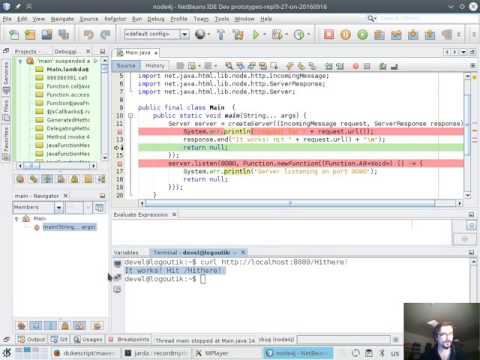
Try it Yourself!
Here is few things that you need:
- Download Graal VM from OTN (current sources were tested with GraalVM 0.19 - 0.23)
- Install Maven
- Get the sources:
git clone https://github.com/jtulach/node4j
With these components, it should be easy to execute your first node.js application from Java:
$ cd node4j
$ JAVA_HOME=/path/to/graalvm/ mvn package exec:exec
Server listening on port 8080
Now you can connect to the http://localhost:8080/someurl and verify the application works. It should.
But the best thing is that the application isn't written in JavaScript, but in Java:
packageorg.netbeans.demo.node4j;
importnet.java.html.lib.Function;
importnet.java.html.lib.node.http.Exports;
importnet.java.html.lib.node.http.IncomingMessage;
importnet.java.html.lib.node.http.ServerResponse;
importnet.java.html.lib.node.http.Server;
publicfinalclassMain {
publicstaticvoidmain(String... args) {
Serverserver = Exports.createServer((IncomingMessagerequest, ServerResponseresponse) -> {
System.err.println("request for " + request.url());
response.end("It works! Hit " + request.url());
returnnull;
});
server.listen(8080, Function.newFunction((Function.A0<Void>) () -> {
System.err.println("Server listening on port 8080");
returnnull;
}));
}
}
All the power of node.js engine accessible from regular Java virtual machine via type-safe Java APIs!
The whole node4j project is a typical Maven project and you can work with it from any IDE that speaks Maven. However, if you download NetBeans IDE with built in support for JShell, we can do even more!
- Start the NetBeans 9 IDE (preview builds available):
netbeans --jdkhome /path/to/jdk9 - Open the
node4jproject - Configure it to use GraalVM 0.23 or newer in File/Properties
- Execute the project
A JShell console opens up in the editor and you can easily start using all the node.js features interactively from Java. Type:
creand press Ctrl-Space to invoke code completion. From the list of available choices select createServer method with one requestListener parameter. Following will be generated:
[19] -> createServer(requestListener)press Ctrl-Space once again and let the IDE generate the lamda function body:
[19] -> createServer((p1, p2) -> {
returnnull;
})
optionally rename p1 to in and p2 to out as that is the meaning of the callback parameters in this context. Type in a lamda body to generate a reply:
[19] -> createServer((p1, p2) -> {
p2.end("Hello from Java!\n");
returnnull;
})
after placing the caret at the end of the code snippet and pressing Enter, the snippet is evaluated:
| Expressionvalueis: [objectObject]
| assignedtotemporaryvariable$53oftypeServer
and the value is stored in variable $53. Try to use that variable, type:
$53.and press Ctrl-Space to see methods available on this object. Choose listen method with one number parameter and bind the server to that port:
[20] -> $53.listen(2345)
| Expressionvalueis: | assignedtotemporaryvariable$64oftypeServer
Your first interactive JShell+Node.js session is done. Connect to http://localhost:2345 to verify the server works.