
Zero-dependency vanilla JS tool to pick focal points and crop zones on images. Returns pixel coordinates you can feed straight into your image pipeline.


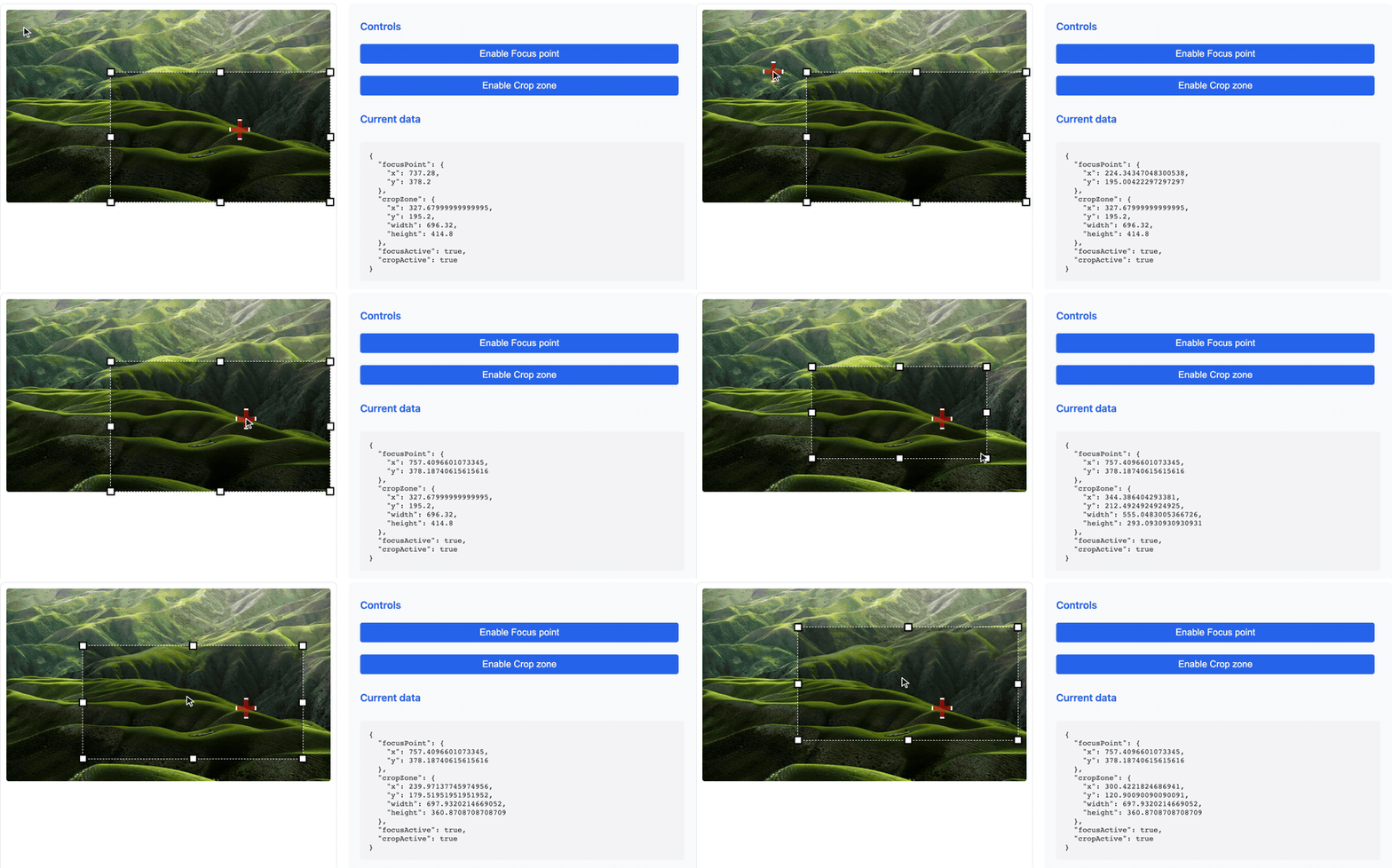
- Focus point: Set a point of interest on the image with a visual marker
- Crop zone: Define a crop zone with resize handles
- No dependencies: 3.6 kB gzipped, nothing else to install
- Typed: TypeScript declarations ship with the package
- Framework-agnostic: plain DOM, so it drops into anything
- Customizable: Flexible configuration options
- Responsive: Adapts to screen resizing
Yes, if you need a person to mark where the subject of an image is, and you want those positions back as numbers — to store on a record, or hand to an image pipeline. The coordinates are in the image's original pixels, so they stay valid at any display size:
| What you get | Where it tends to go |
|---|---|
focusPoint: {x, y} | CSS object-position, imgix fp-x/fp-y, Cloudinary gravity |
cropZone: {x, y, w, h} | a server-side crop with sharp or ImageMagick, or a stored crop rectangle |
No, if you need the browser to actually produce the cropped image — rotation, zoom, canvas export, file output. This library never touches pixels; it only reports coordinates. A full cropper such as Cropper.js is built for that job.
npm install @h4md1/visual-image-toolOr skip the install entirely and load it from a CDN — this is what the live demo does:
<scriptsrc="https://cdn.jsdelivr.net/npm/@h4md1/visual-image-tool@0.3.0/dist/visual-image-tool.umd.js"></script>Pin the exact version rather than the major in production. There is a runnable JSFiddle if you would rather poke at it first.
// ES modules import (recommended)import{VisualImageTool}from"@h4md1/visual-image-tool";// OR CommonJS importconst{ VisualImageTool }=require("@h4md1/visual-image-tool");Or load the UMD build directly with a script tag:
<scriptsrc="node_modules/@h4md1/visual-image-tool/dist/visual-image-tool.umd.js"></script>The UMD build exposes a global VisualImageTool object holding the named
export, so the class is VisualImageTool.VisualImageTool. With an import or
require you already have the class itself.
// Create an instance with an imageconstimageTool=newVisualImageTool({imageElement: document.getElementById("myImage"),debug: true,// Enable debug logs for overlay positioning (optional)onChange: (data)=>{console.log("Focus point:",data.focusPoint);console.log("Crop zone:",data.cropZone);},});Via the script tag above, the same call reads:
constimageTool=newVisualImageTool.VisualImageTool({imageElement: document.getElementById("myImage"),});// Enable the focus pointimageTool.toggleFocusPoint(true);// Enable the crop zoneimageTool.toggleCropZone(true);// Manually set a focus pointimageTool.setFocusPoint(x,y);// Manually set a crop zoneimageTool.setCropZone(x,y,width,height);// Get current valuesconstfocusPoint=imageTool.getFocusPoint();constcropZone=imageTool.getCropZone();constimageTool=newVisualImageTool({// Image element (required) - can be a CSS selector or a DOM elementimageElement: "#myImage",// Enable debug logs for overlay positioning (optional)debug: true,// Set to true to see overlay positioning logs in the console// Focus point configuration (optional)focusPoint: {enabled: true,// Enable/disable the featurestyle: {width: "30px",height: "30px",border: "3px solid white",boxShadow: "0 0 0 2px black, 0 0 5px rgba(0,0,0,0.5)",backgroundColor: "rgba(255, 0, 0, 0.5)",},},// Crop zone configuration (optional)cropZone: {enabled: true,// Enable/disable the featurestyle: {border: "1px dashed #fff",backgroundColor: "rgba(0, 0, 0, 0.4)",},handleStyle: {width: "14px",height: "14px",backgroundColor: "white",border: "2px solid black",boxShadow: "0 0 3px rgba(0,0,0,0.5)",},},// Callback called on changes (optional)onChange: function(data){// data contains focusPoint, cropZone, focusActive, cropActive},});Type declarations ship with the package — there is nothing extra to install.
import{VisualImageTool,typeChangeData,typeCropZone,typeFocusPoint,}from"@h4md1/visual-image-tool";consttool=newVisualImageTool({imageElement: document.querySelector<HTMLImageElement>("#myImage")!,onChange: (data: ChangeData)=>{const{ x, y }: FocusPoint=data.focusPoint;constcrop: CropZone=data.cropZone;},});Exported types: VisualImageToolOptions, ChangeData, FocusPoint, CropZone,
ImageDimensions, FocusPointOptions, CropZoneOptions, and the style interfaces.
Enables or disables the focus point.
active(boolean, optional): If set, forces the state to this value. If omitted, toggles the current state.- Returns: The VisualImageTool instance for chaining.
Enables or disables the crop zone.
active(boolean, optional): If set, forces the state to this value. If omitted, toggles the current state.- Returns: The VisualImageTool instance for chaining.
Sets the position of the focus point.
x(number): X coordinate in original pixels.y(number): Y coordinate in original pixels.- Returns: The VisualImageTool instance for chaining.
Sets the position and dimensions of the crop zone.
x(number): X coordinate in original pixels.y(number): Y coordinate in original pixels.width(number): Width in original pixels.height(number): Height in original pixels.- Returns: The VisualImageTool instance for chaining.
Gets the current position of the focus point.
- Returns: An object
{x, y}with coordinates in original pixels.
The focus point starts at {x: 0, y: 0}, and getFocusPoint() returns that
until the feature is first enabled. The first toggleFocusPoint(true) moves a
still-unset point to the center of the image, so read it back after enabling
the feature — or call setFocusPoint(x, y) yourself to place it explicitly.
Gets the current position and dimensions of the crop zone.
- Returns: An object
{x, y, width, height}with values in original pixels.
Gets the original dimensions of the image.
- Returns: An object
{width, height}with dimensions in original pixels.
Destroys the instance and cleans up resources.
The tool uses the onChange callback to notify about changes. This callback receives an object with the following properties:
{focusPoint: {x, y},// Position of the focus pointcropZone: {x, y, width, height},// Position and dimensions of the crop zonefocusActive: true|false,// Activation state of the focus pointcropActive: true|false// Activation state of the crop zone}importReact,{useEffect,useRef}from"react";import{VisualImageTool}from"@h4md1/visual-image-tool";functionImageEditor(){constimageRef=useRef(null);consttoolRef=useRef(null);useEffect(()=>{if(imageRef.current&&!toolRef.current){toolRef.current=newVisualImageTool({imageElement: imageRef.current,onChange: (data)=>{console.log("Updated data:",data);},});// Enable featurestoolRef.current.toggleFocusPoint(true);toolRef.current.toggleCropZone(true);}// Cleanupreturn()=>{if(toolRef.current){toolRef.current.destroy();toolRef.current=null;}};},[]);return(<div><imgref={imageRef}src="path/to/image.jpg"alt="Editable"/></div>);}<template>
<div>
<imgref="editableImage"src="path/to/image.jpg"alt="Editable" />
</div>
</template>
<script setup>import { onBeforeUnmount, onMounted, ref } from"vue";import { VisualImageTool } from"@h4md1/visual-image-tool";consteditableImage=ref(null);let imageTool =null;onMounted(() => { imageTool =newVisualImageTool({ imageElement:editableImage.value,onChange: (data) => {console.log("Updated data:", data); }, });// Enable featuresimageTool.toggleFocusPoint(true);imageTool.toggleCropZone(true);});onBeforeUnmount(() => {if (imageTool) {imageTool.destroy(); imageTool =null; }});</script>Run them with npm run demo, or browse the published copy at
h4md1.fr/visual-image-tool.
| Demo | What it shows |
|---|---|
index.html | Landing page — live tool plus the full API reference |
basic-usage.html | Smallest working setup |
custom-config.html | Custom styling with live controls |
demo-esm.html | Loading the ESM build |
demo-umd.html | Loading the UMD build from a script tag |
preact-importmap-demo.html | Preact integration, no build step |
react-importmap-demo.html | React 18 integration, no build step |
vue-importmap-demo.html | Vue 3 integration, no build step |
index-local.html | Same as the landing page, against your local dist/ |
Every demo except index-local.html loads the published package from the
jsDelivr CDN, so they exercise the released version. Use index-local.html
to check changes you have not published yet — run npm run build first. It is
local-only and is not published to the demo site, because the local dist/ it
points at does not exist there.
- Chrome (latest versions)
- Firefox (latest versions)
- Safari (latest versions)
- Edge (latest versions)
This project uses a combination of tools for code formatting and linting to ensure consistency:
- Biome: Handles formatting and linting for JavaScript (
.js,.jsx), TypeScript (.ts,.tsx), and JSON (.json) files.- Check:
npm run lint:check(biome check .) - Fix:
npm run lint:fix(biome check --write .)
- Check:
- Prettier: Handles formatting for other file types like HTML, CSS, Markdown, etc.
- Check:
npm run format:check(prettier --check --ignore-unknown .) - Fix:
npm run format:fix(prettier --write --ignore-unknown .)
- Check:
These formatting checks are automatically enforced in the CI pipeline (see .github/workflows/code-quality.yml) to maintain code quality.
This project uses Vitest and JSDOM for unit tests. They cover the main public API.
npm testWatch mode:
npm run test:watchTests also run in GitHub Actions on pushes and pull requests to main.
MIT