- NAOqi C++ SDK
- ViSP
- Whycon
- Clone the repo in your
catkin/src$ cd ~/catking_ws/src$ git clone https://github.com/lagadic/pepper_hand_pose.git - Build the package:
$ cd ~/catkin_ws$ catkin_make -DNAOqi_DIR=/path/to/naoqi-sdk-2.5.5.5-linux64 -Dvisp_naoqi_DIR=/path/to/visp_naoqi/build-toolchain_pepper/sdk/cmake/ -Dvisp_DIR=/path_to_build_visp
- Open the files in the
launchfolder
hand_pose_camera_bottom.launch
hand_pose_camera_bottom_calibration_wrist_to_target.launch
hand_pose_camera_bottom_createTargetModel.launch
- and remember to change
<paramname="outer_diameter"value="0.01273"/>
<paramname="inner_diameter"value="0.00522"/>
with the corresponding inner and outer diameter size of your whycon pattern.
TODO: Save this values in a config file and load them in each launch file.
Launch the node
$ roslaunch pepper_launch hand_pose_camera_bottom_createTargetModel.launchVisualize Whycon output image:
$ rqt_image_view
and select the topic/whycon/image_out
Remove the stiffness from Choregraphe and place the hand of Pepper at the center of the image, where the target are well visible.
Set the stiffness to 1 and stop the program hand_pose_camera_bottom_createTargetModel with
Ctrl+CYou should see in the terminal the following information:
cog 0.08539816923 -0.05145413801 0.2822599635 Torso M CameraBottom:
-0.5349975824 -0.4311263859 0.726572454 0.03161015734
-0.84485358 0.2730077803 -0.4600968957 -0.04408014193
-7.450580597e-09 -0.859998107 -0.5102971196 0.2458400279
0 0 0 1
Torso M RWristYaw:
0.9568784237 -0.283958137 0.06124651432 0.2019975185
0.1155434251 0.1786029786 -0.9771132469 -0.2725745738
0.2665204406 0.9420552254 0.2037108392 0.1178767681
0 0 0 1 cMo -0.6095449217 0.00102354395 0.7927508861 0.08539816923
-0.6101983569 -0.6389838624 -0.4683554431 -0.05145413801
0.5060757201 -0.7692189045 0.3901137474 0.2822599635
0 0 0 1
Distance 0 - 1 0.03018964353 Distance 1 - 2 0.02087700683 Distance 2 - 3 0.02053476522 Distance 3 - 0 0.03496112965 C_points 0 0.06899768114 -0.07182741165 0.2864609063 C_points 1 0.09502162784 -0.05733739585 0.2815407217 C_points 2 0.09701936692 -0.03781982139 0.2744047046 C_points 3 0.08055400103 -0.03883192316 0.2866335213 O_points 0 0.02455456749 0.00976996183 -0.001820722322 O_points 1 -0.00263996687 0.004322411236 0.01010387506 O_points 2 -0.01937863543 -0.002657799858 -0.0002374361193 O_points 3 -0.002535965192 -0.01143457321 -0.008045716616
Copy paste the last 4 lines (O_points). These are the coordinates of the center of the target wrt the center of mass of all the 4 blobs.
Open the file pepper_hand_pose.cpp and modify at line 47 the vector
m_3Dpointswith your values.Save the file and compile with
catkin_make

TODO: Save the coordinates in a file and load them.
Launch the node and place the hand in the field of view of the camera
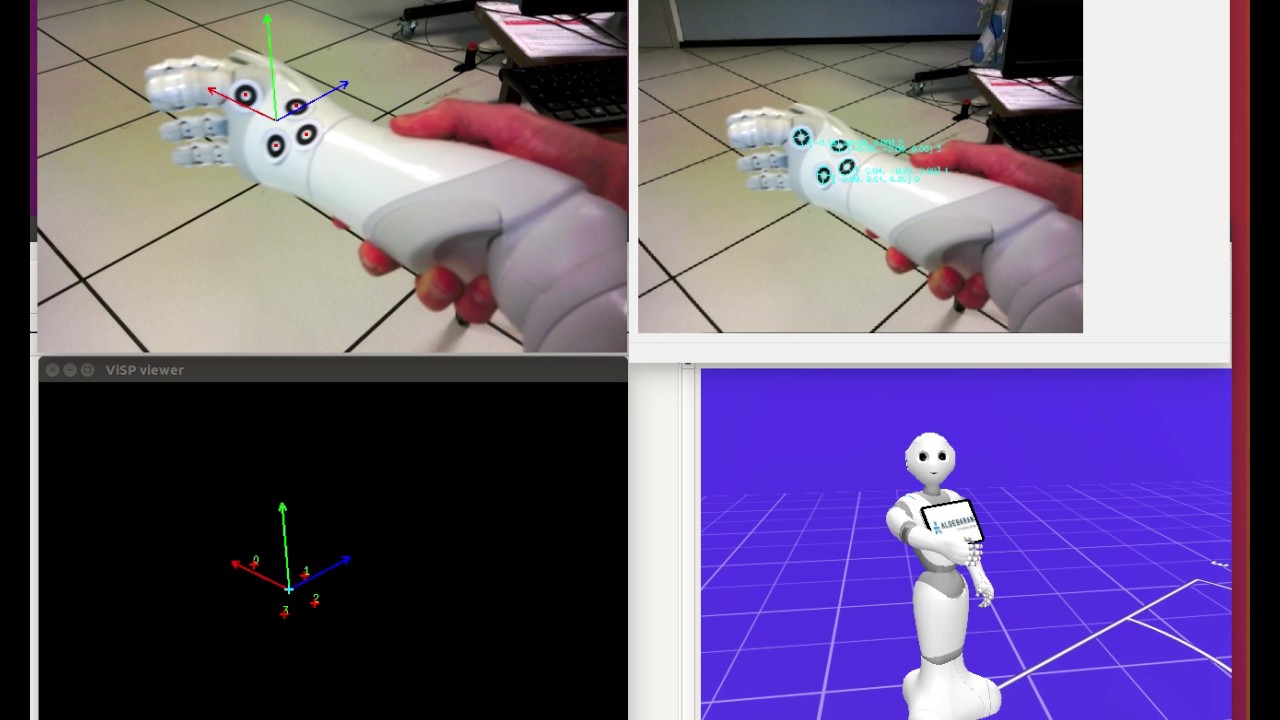
$ roslaunch pepper_launch hand_pose_camera_bottom_calibration_wrist_to_target.launchClick with the left button on the Visp viewer when you want to save the transformation matrix. A file
/tmp/eMh_pepper.xmlwill be created, that looks like this:<?xml version="1.0"?> <root> <!--This file stores homogeneous matrix used in the vpHomogeneousMatrix Class of ViSP available at http://www.irisa.fr/lagadic/visp/visp.html . It can be read with the parse method of the vpXmlParserHomogeneousMatrix class.--> <!--Homogeneous Matrix--> <homogeneous_transformation> <!--Name of the homogeneous matrix--> <name>eMh_RArm</name> <values> <!--Translation vector with values in meters--> <tx>0.018365</tx> <ty>0.027611</ty> <tz>-0.007083</tz> <!--Rotational vector expressed in angle axis representation with values in radians--> <theta_ux>0.054571</theta_ux> <theta_uy>0.030174</theta_uy> <theta_uz>0.099821</theta_uz> </values> </homogeneous_transformation> </root>Replace the file /pepper_launch/data/transformation/eMh_pepper.xml with the new one just generated.
$ roslaunch pepper_launch hand_pose_camera_bottom.launch