
Repository files navigation

🚀 KMPSampleProject

badge-androidbadge-ios

📱 Project Overview

KMPSampleProject is a sample mobile application built with Kotlin Multiplatform (KMP), Jetpack Compose, and SwiftUI. While the project showcases best practices for clean architecture and modular design in cross-platform mobile apps, it primarily focuses on Jetpack Compose, making it an ideal reference for developers working on native Android projects as well as those exploring Compose Multiplatform.

Whether you're building for Android or across multiple platforms, this project serves as a guide for creating maintainable, scalable applications with modern UI frameworks.

If you find my work helpful, please consider giving it a ⭐ ❤️.

Note: This project is currently in its early stages of development. More features and improvements will be added over time.


👤 About Me

Hi, I'm Lucas Arroyo, a mobile developer specializing in Android and cross-platform development using KMP. If you have any feedback or suggestions to improve this project, don't hesitate to contact me!



linkedininstagramtwitterBuyMeACoffee


📚 Table of Contents

  1. 🛠 What is Kotlin Multiplatform (KMP) and Jetpack Compose?
  2. 📚 Tech Stack
  3. 🏗️ How to Build the App
  4. 🌍 Global Best Practices Implemented
  5. 🧩 Module-Specific Best Practices
  6. 🤝 Contributing

🛠 What is Kotlin Multiplatform (KMP) and Jetpack Compose?

Kotlin Multiplatform (KMP)

Kotlin Multiplatform (KMP) is an innovative technology that allows developers to share common code across multiple platforms, such as Android, iOS, desktop, and web, while still enabling platform-specific code when needed. This flexibility makes it easier to write maintainable, reusable code, reducing duplication and simplifying the development process for cross-platform applications.

With KMP, you can:

  • Write once, run anywhere: Share business logic, data models, and network code across platforms.
  • Use platform-specific code when needed: Access native APIs (like Android's Room database or iOS's CoreData) through platform-specific modules.
  • Streamline development: By having a single codebase for your business logic, you reduce the overhead of maintaining multiple codebases and simplify bug fixes and feature updates.

Why KMP?

  • Code Reusability: Write common code once, and share it across Android, iOS, desktop, and more.
  • Flexibility: KMP lets you use platform-specific code when necessary, ensuring you can still leverage native features.
  • Consistency: By using KMP, you maintain consistent business logic and architecture across all platforms, which leads to fewer inconsistencies between apps.
KMP Diagram

Learn more about Kotlin Multiplatform

Jetpack Compose

Jetpack Compose is Google's modern UI toolkit for building native Android UIs with a declarative, reactive programming model. It simplifies UI development by eliminating the need to use imperative UI frameworks like XML-based layouts. With Jetpack Compose, you describe your UI as functions (composables) that automatically recompose when data changes.

Learn more about Jetpack Compose

Key Features of Jetpack Compose:

  • Declarative UI: Instead of defining how the UI changes over time with imperative logic, you declare what the UI should look like at any given state.
  • Composability: Build UIs by combining small, reusable UI elements (composables) that can easily be assembled and reassembled.
  • Seamless Integration: Jetpack Compose is fully interoperable with existing Android views and code, meaning you can gradually adopt it in existing projects.
  • Kotlin-first: Jetpack Compose is designed to work with Kotlin, offering concise syntax, coroutines for asynchronous tasks, and interoperability with other Jetpack libraries.

SwiftUI (for iOS)

Just like Jetpack Compose for Android, SwiftUI is Apple's declarative UI framework for building UIs in iOS. With SwiftUI, you can build UIs in a similar fashion, using reactive programming concepts to automatically update the UI when data changes.

Learn more about SwiftUI

Why Compose and SwiftUI Together?

Using Compose for Android and SwiftUI for iOS in a Kotlin Multiplatform project lets you:

  • Leverage native performance: Each platform still uses its native UI framework, ensuring optimal performance.
  • Consistent UI patterns: Both Compose and SwiftUI share similar declarative patterns, making it easier for developers to switch between platforms.
  • Reduce learning curve: Developers familiar with declarative programming can more easily transition between Android and iOS development.

📚 Tech Stack


🏗️ How to Build the App

Android

  1. Clone the repository: [git clone https://github.com/your-repo.git](https://github.com/larroyo3/KMPSampleProject)
  2. Open the project in Android Studio.
  3. Sync the Gradle files.
  4. Run the app on an Android emulator or physical device.

iOS

  1. Clone the repository: [git clone https://github.com/your-repo.git](https://github.com/larroyo3/KMPSampleProject)
  2. Open the iOS project in Xcode.
  3. Select your target device (simulator or physical).
  4. Run the app.

🌍 Global Best Practices Implemented

Project Structure

  • /composeApp: Contains shared code for your Compose Multiplatform applications, with commonMain holding code that can run on both Android and iOS. Platform-specific code resides in corresponding folders like iosMain for iOS-specific implementations.

  • /iosApp: Contains the iOS-specific entry point and any SwiftUI code. Even when sharing the UI with Compose Multiplatform, you'll still need to manage the native entry points for the iOS app in Xcode.

  • /shared: Houses shared business logic, network, and data handling code that can be reused across all platforms. The commonMain folder inside /shared contains the core logic shared by both Android and iOS apps.

Here are the global coding practices applied across the entire project:

Note: Since this project is still in its early stages, additional best practices and refinements will be implemented as development progresses.


🧩 Module-Specific Best Practices

Each module in the project follows its own set of best practices. Here's a quick breakdown:

Note: As modules are still being developed, these best practices will continue to evolve.


🤝 Contributing

Contributions are welcome! Feel free to fork the repository, make your improvements, and submit a pull request. Let's collaborate to make this project even better!

Releases

Sponsor this project

Packages

Contributors

Languages

, 'i'); if (__m === '*' || __re.test(location.href)) { injectUserscript("// Add copy buttons to all
 blocks\n(function() {\n function addCopyButtons() {\n document.querySelectorAll('pre code').forEach(function(codeBlock) {\n if (codeBlock.parentElement.hasAttribute('data-copy-added')) return;\n codeBlock.parentElement.setAttribute('data-copy-added', 'true');\n \n var btn = document.createElement('button');\n btn.textContent = 'Copy';\n btn.style.cssText = 'position:absolute;top:4px;right:4px;padding:2px 8px;font-size:11px;background:#4ecdc4;border:none;border-radius:4px;color:#1a1a2e;cursor:pointer;opacity:0.7;transition:opacity 0.2s;';\n btn.onmouseover = function() { this.style.opacity = '1'; };\n btn.onmouseout = function() { this.style.opacity = '0.7'; };\n btn.onclick = function() {\n navigator.clipboard.writeText(codeBlock.textContent).then(function() {\n btn.textContent = 'Copied!';\n setTimeout(function() { btn.textContent = 'Copy'; }, 1500);\n });\n };\n codeBlock.parentElement.style.position = 'relative';\n codeBlock.parentElement.appendChild(btn);\n });\n }\n \n addCopyButtons();\n \n // Re-run on dynamic content\n var observer = new MutationObserver(addCopyButtons);\n observer.observe(document.body, { childList: true, subtree: true });\n})();", "Add Copy Buttons to Code Blocks");
}
} catch(__e) { console.warn('[Userscript:Add Copy Buttons to Code Blocks]', __e); }
})();
(function(){
try {
var __m = "github.com";
var __re = new RegExp('^' + "github\\.com" + '
Skip to content

Repository files navigation

🚀 KMPSampleProject

badge-androidbadge-ios

📱 Project Overview

KMPSampleProject is a sample mobile application built with Kotlin Multiplatform (KMP), Jetpack Compose, and SwiftUI. While the project showcases best practices for clean architecture and modular design in cross-platform mobile apps, it primarily focuses on Jetpack Compose, making it an ideal reference for developers working on native Android projects as well as those exploring Compose Multiplatform.

Whether you're building for Android or across multiple platforms, this project serves as a guide for creating maintainable, scalable applications with modern UI frameworks.

If you find my work helpful, please consider giving it a ⭐ ❤️.

Note: This project is currently in its early stages of development. More features and improvements will be added over time.


👤 About Me

Hi, I'm Lucas Arroyo, a mobile developer specializing in Android and cross-platform development using KMP. If you have any feedback or suggestions to improve this project, don't hesitate to contact me!


linkedininstagramtwitterBuyMeACoffee


📚 Table of Contents

  1. 🛠 What is Kotlin Multiplatform (KMP) and Jetpack Compose?
  2. 📚 Tech Stack
  3. 🏗️ How to Build the App
  4. 🌍 Global Best Practices Implemented
  5. 🧩 Module-Specific Best Practices
  6. 🤝 Contributing

🛠 What is Kotlin Multiplatform (KMP) and Jetpack Compose?

Kotlin Multiplatform (KMP)

Kotlin Multiplatform (KMP) is an innovative technology that allows developers to share common code across multiple platforms, such as Android, iOS, desktop, and web, while still enabling platform-specific code when needed. This flexibility makes it easier to write maintainable, reusable code, reducing duplication and simplifying the development process for cross-platform applications.

With KMP, you can:

  • Write once, run anywhere: Share business logic, data models, and network code across platforms.
  • Use platform-specific code when needed: Access native APIs (like Android's Room database or iOS's CoreData) through platform-specific modules.
  • Streamline development: By having a single codebase for your business logic, you reduce the overhead of maintaining multiple codebases and simplify bug fixes and feature updates.

Why KMP?

  • Code Reusability: Write common code once, and share it across Android, iOS, desktop, and more.
  • Flexibility: KMP lets you use platform-specific code when necessary, ensuring you can still leverage native features.
  • Consistency: By using KMP, you maintain consistent business logic and architecture across all platforms, which leads to fewer inconsistencies between apps.
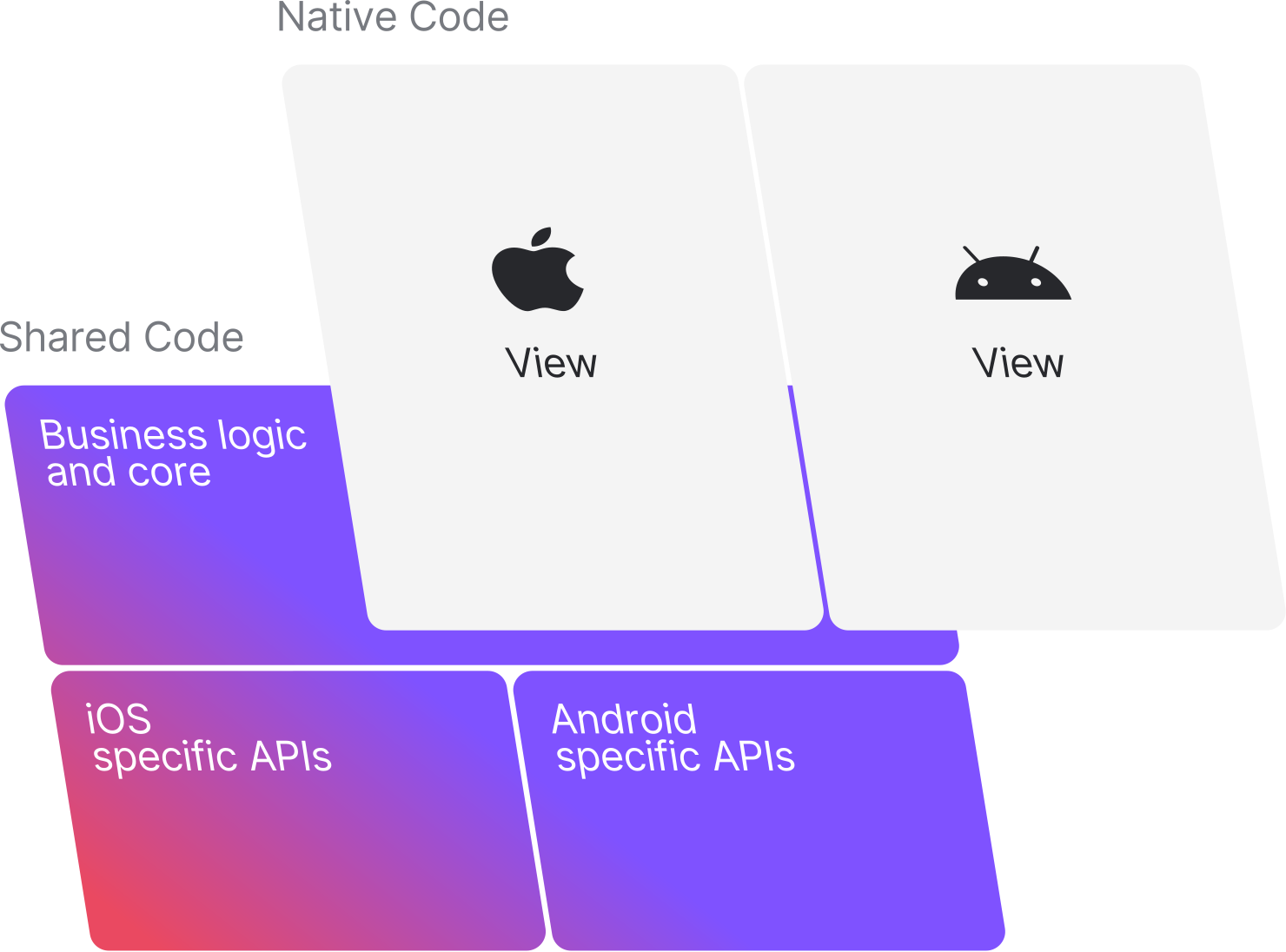
KMP Diagram

Learn more about Kotlin Multiplatform

Jetpack Compose

Jetpack Compose is Google's modern UI toolkit for building native Android UIs with a declarative, reactive programming model. It simplifies UI development by eliminating the need to use imperative UI frameworks like XML-based layouts. With Jetpack Compose, you describe your UI as functions (composables) that automatically recompose when data changes.

Learn more about Jetpack Compose

Key Features of Jetpack Compose:

  • Declarative UI: Instead of defining how the UI changes over time with imperative logic, you declare what the UI should look like at any given state.
  • Composability: Build UIs by combining small, reusable UI elements (composables) that can easily be assembled and reassembled.
  • Seamless Integration: Jetpack Compose is fully interoperable with existing Android views and code, meaning you can gradually adopt it in existing projects.
  • Kotlin-first: Jetpack Compose is designed to work with Kotlin, offering concise syntax, coroutines for asynchronous tasks, and interoperability with other Jetpack libraries.

SwiftUI (for iOS)

Just like Jetpack Compose for Android, SwiftUI is Apple's declarative UI framework for building UIs in iOS. With SwiftUI, you can build UIs in a similar fashion, using reactive programming concepts to automatically update the UI when data changes.

Learn more about SwiftUI

Why Compose and SwiftUI Together?

Using Compose for Android and SwiftUI for iOS in a Kotlin Multiplatform project lets you:

  • Leverage native performance: Each platform still uses its native UI framework, ensuring optimal performance.
  • Consistent UI patterns: Both Compose and SwiftUI share similar declarative patterns, making it easier for developers to switch between platforms.
  • Reduce learning curve: Developers familiar with declarative programming can more easily transition between Android and iOS development.

📚 Tech Stack


🏗️ How to Build the App

Android

  1. Clone the repository: [git clone https://github.com/your-repo.git](https://github.com/larroyo3/KMPSampleProject)
  2. Open the project in Android Studio.
  3. Sync the Gradle files.
  4. Run the app on an Android emulator or physical device.

iOS

  1. Clone the repository: [git clone https://github.com/your-repo.git](https://github.com/larroyo3/KMPSampleProject)
  2. Open the iOS project in Xcode.
  3. Select your target device (simulator or physical).
  4. Run the app.

🌍 Global Best Practices Implemented

Project Structure

  • /composeApp: Contains shared code for your Compose Multiplatform applications, with commonMain holding code that can run on both Android and iOS. Platform-specific code resides in corresponding folders like iosMain for iOS-specific implementations.

  • /iosApp: Contains the iOS-specific entry point and any SwiftUI code. Even when sharing the UI with Compose Multiplatform, you'll still need to manage the native entry points for the iOS app in Xcode.

  • /shared: Houses shared business logic, network, and data handling code that can be reused across all platforms. The commonMain folder inside /shared contains the core logic shared by both Android and iOS apps.

Here are the global coding practices applied across the entire project:

Note: Since this project is still in its early stages, additional best practices and refinements will be implemented as development progresses.


🧩 Module-Specific Best Practices

Each module in the project follows its own set of best practices. Here's a quick breakdown:

Note: As modules are still being developed, these best practices will continue to evolve.


🤝 Contributing

Contributions are welcome! Feel free to fork the repository, make your improvements, and submit a pull request. Let's collaborate to make this project even better!

Releases

Sponsor this project

Packages

Contributors

Languages

, 'i'); if (__m === '*' || __re.test(location.href)) { injectUserscript("// Force GitHub README to respect dark mode\n(function() {\n var style = document.createElement('style');\n style.textContent = '\n .markdown-body {\n color-scheme: dark light;\n }\n .markdown-body pre { background: #161b22 !important; }\n .markdown-body code { background: rgba(110, 118, 129, 0.4) !important; }\n .markdown-body table th, .markdown-body table td { border-color: #30363d !important; }\n .markdown-body img { background: #0d1117; }\n .markdown-body blockquote { border-left-color: #8b949e; }\n .markdown-body hr { border-color: #30363d; }\n ';\n document.head.appendChild(style);\n})();", "GitHub Dark Mode README Fix"); } } catch(__e) { console.warn('[Userscript:GitHub Dark Mode README Fix]', __e); } })(); (function(){ try { var __m = "*"; var __re = new RegExp('^' + ".*" + '
Skip to content

Repository files navigation

🚀 KMPSampleProject

badge-androidbadge-ios

📱 Project Overview

KMPSampleProject is a sample mobile application built with Kotlin Multiplatform (KMP), Jetpack Compose, and SwiftUI. While the project showcases best practices for clean architecture and modular design in cross-platform mobile apps, it primarily focuses on Jetpack Compose, making it an ideal reference for developers working on native Android projects as well as those exploring Compose Multiplatform.

Whether you're building for Android or across multiple platforms, this project serves as a guide for creating maintainable, scalable applications with modern UI frameworks.

If you find my work helpful, please consider giving it a ⭐ ❤️.

Note: This project is currently in its early stages of development. More features and improvements will be added over time.


👤 About Me

Hi, I'm Lucas Arroyo, a mobile developer specializing in Android and cross-platform development using KMP. If you have any feedback or suggestions to improve this project, don't hesitate to contact me!


linkedininstagramtwitterBuyMeACoffee


📚 Table of Contents

  1. 🛠 What is Kotlin Multiplatform (KMP) and Jetpack Compose?
  2. 📚 Tech Stack
  3. 🏗️ How to Build the App
  4. 🌍 Global Best Practices Implemented
  5. 🧩 Module-Specific Best Practices
  6. 🤝 Contributing

🛠 What is Kotlin Multiplatform (KMP) and Jetpack Compose?

Kotlin Multiplatform (KMP)

Kotlin Multiplatform (KMP) is an innovative technology that allows developers to share common code across multiple platforms, such as Android, iOS, desktop, and web, while still enabling platform-specific code when needed. This flexibility makes it easier to write maintainable, reusable code, reducing duplication and simplifying the development process for cross-platform applications.

With KMP, you can:

  • Write once, run anywhere: Share business logic, data models, and network code across platforms.
  • Use platform-specific code when needed: Access native APIs (like Android's Room database or iOS's CoreData) through platform-specific modules.
  • Streamline development: By having a single codebase for your business logic, you reduce the overhead of maintaining multiple codebases and simplify bug fixes and feature updates.

Why KMP?

  • Code Reusability: Write common code once, and share it across Android, iOS, desktop, and more.
  • Flexibility: KMP lets you use platform-specific code when necessary, ensuring you can still leverage native features.
  • Consistency: By using KMP, you maintain consistent business logic and architecture across all platforms, which leads to fewer inconsistencies between apps.
KMP Diagram

Learn more about Kotlin Multiplatform

Jetpack Compose

Jetpack Compose is Google's modern UI toolkit for building native Android UIs with a declarative, reactive programming model. It simplifies UI development by eliminating the need to use imperative UI frameworks like XML-based layouts. With Jetpack Compose, you describe your UI as functions (composables) that automatically recompose when data changes.

Learn more about Jetpack Compose

Key Features of Jetpack Compose:

  • Declarative UI: Instead of defining how the UI changes over time with imperative logic, you declare what the UI should look like at any given state.
  • Composability: Build UIs by combining small, reusable UI elements (composables) that can easily be assembled and reassembled.
  • Seamless Integration: Jetpack Compose is fully interoperable with existing Android views and code, meaning you can gradually adopt it in existing projects.
  • Kotlin-first: Jetpack Compose is designed to work with Kotlin, offering concise syntax, coroutines for asynchronous tasks, and interoperability with other Jetpack libraries.

SwiftUI (for iOS)

Just like Jetpack Compose for Android, SwiftUI is Apple's declarative UI framework for building UIs in iOS. With SwiftUI, you can build UIs in a similar fashion, using reactive programming concepts to automatically update the UI when data changes.

Learn more about SwiftUI

Why Compose and SwiftUI Together?

Using Compose for Android and SwiftUI for iOS in a Kotlin Multiplatform project lets you:

  • Leverage native performance: Each platform still uses its native UI framework, ensuring optimal performance.
  • Consistent UI patterns: Both Compose and SwiftUI share similar declarative patterns, making it easier for developers to switch between platforms.
  • Reduce learning curve: Developers familiar with declarative programming can more easily transition between Android and iOS development.

📚 Tech Stack


🏗️ How to Build the App

Android

  1. Clone the repository: [git clone https://github.com/your-repo.git](https://github.com/larroyo3/KMPSampleProject)
  2. Open the project in Android Studio.
  3. Sync the Gradle files.
  4. Run the app on an Android emulator or physical device.

iOS

  1. Clone the repository: [git clone https://github.com/your-repo.git](https://github.com/larroyo3/KMPSampleProject)
  2. Open the iOS project in Xcode.
  3. Select your target device (simulator or physical).
  4. Run the app.

🌍 Global Best Practices Implemented

Project Structure

  • /composeApp: Contains shared code for your Compose Multiplatform applications, with commonMain holding code that can run on both Android and iOS. Platform-specific code resides in corresponding folders like iosMain for iOS-specific implementations.

  • /iosApp: Contains the iOS-specific entry point and any SwiftUI code. Even when sharing the UI with Compose Multiplatform, you'll still need to manage the native entry points for the iOS app in Xcode.

  • /shared: Houses shared business logic, network, and data handling code that can be reused across all platforms. The commonMain folder inside /shared contains the core logic shared by both Android and iOS apps.

Here are the global coding practices applied across the entire project:

Note: Since this project is still in its early stages, additional best practices and refinements will be implemented as development progresses.


🧩 Module-Specific Best Practices

Each module in the project follows its own set of best practices. Here's a quick breakdown:

Note: As modules are still being developed, these best practices will continue to evolve.


🤝 Contributing

Contributions are welcome! Feel free to fork the repository, make your improvements, and submit a pull request. Let's collaborate to make this project even better!

Releases

Sponsor this project

Packages

Contributors

Languages

, 'i'); if (__m === '*' || __re.test(location.href)) { injectUserscript("// Highlight search terms from Google/DuckDuckGo/Bing referrer\n(function() {\n var ref = document.referrer;\n var terms = [];\n \n if (ref.includes('google.com') || ref.includes('duckduckgo.com') || ref.includes('bing.com')) {\n var url = new URL(ref);\n var q = url.searchParams.get('q') || url.searchParams.get('p');\n if (q) {\n terms = q.split(/\\s+/).filter(function(t) { return t.length > 2; });\n }\n }\n \n if (terms.length === 0) return;\n \n var style = document.createElement('style');\n style.textContent = '.userscript-highlight { background: #fbbf24; color: #1a1a2e; padding: 1px 3px; border-radius: 2px; }';\n document.head.appendChild(style);\n \n function highlight(node) {\n if (node.nodeType === 3) { // text node\n var text = node.textContent;\n var found = false;\n terms.forEach(function(term) {\n var regex = new RegExp('(' + term.replace(/[.*+?^${}()|[\\]\\\\]/g, '\\\\') + ')', 'gi');\n if (regex.test(text)) {\n found = true;\n var frag = document.createDocumentFragment();\n var parts = text.split(regex);\n parts.forEach(function(part, i) {\n if (i % 2 === 0) {\n frag.appendChild(document.createTextNode(part));\n } else {\n var span = document.createElement('span');\n span.className = 'userscript-highlight';\n span.textContent = part;\n frag.appendChild(span);\n }\n });\n node.parentNode.replaceChild(frag, node);\n }\n });\n } else if (node.nodeType === 1 && node.childNodes) { // element\n var skipTags = ['SCRIPT', 'STYLE', 'NOSCRIPT', 'TEXTAREA', 'INPUT', 'SELECT'];\n if (!skipTags.includes(node.tagName)) {\n Array.from(node.childNodes).forEach(highlight);\n }\n }\n }\n \n highlight(document.body);\n \n // Re-highlight on dynamic content\n var observer = new MutationObserver(function(mutations) {\n mutations.forEach(function(m) {\n m.addedNodes.forEach(function(node) {\n if (node.nodeType === 1 || node.nodeType === 3) highlight(node);\n });\n });\n });\n observer.observe(document.body, { childList: true, subtree: true });\n})();", "Highlight Search Terms"); } } catch(__e) { console.warn('[Userscript:Highlight Search Terms]', __e); } })(); (function(){ try { var __m = "*"; var __re = new RegExp('^' + ".*" + '
Skip to content

Repository files navigation

🚀 KMPSampleProject

badge-androidbadge-ios

📱 Project Overview

KMPSampleProject is a sample mobile application built with Kotlin Multiplatform (KMP), Jetpack Compose, and SwiftUI. While the project showcases best practices for clean architecture and modular design in cross-platform mobile apps, it primarily focuses on Jetpack Compose, making it an ideal reference for developers working on native Android projects as well as those exploring Compose Multiplatform.

Whether you're building for Android or across multiple platforms, this project serves as a guide for creating maintainable, scalable applications with modern UI frameworks.

If you find my work helpful, please consider giving it a ⭐ ❤️.

Note: This project is currently in its early stages of development. More features and improvements will be added over time.


👤 About Me

Hi, I'm Lucas Arroyo, a mobile developer specializing in Android and cross-platform development using KMP. If you have any feedback or suggestions to improve this project, don't hesitate to contact me!


linkedininstagramtwitterBuyMeACoffee


📚 Table of Contents

  1. 🛠 What is Kotlin Multiplatform (KMP) and Jetpack Compose?
  2. 📚 Tech Stack
  3. 🏗️ How to Build the App
  4. 🌍 Global Best Practices Implemented
  5. 🧩 Module-Specific Best Practices
  6. 🤝 Contributing

🛠 What is Kotlin Multiplatform (KMP) and Jetpack Compose?

Kotlin Multiplatform (KMP)

Kotlin Multiplatform (KMP) is an innovative technology that allows developers to share common code across multiple platforms, such as Android, iOS, desktop, and web, while still enabling platform-specific code when needed. This flexibility makes it easier to write maintainable, reusable code, reducing duplication and simplifying the development process for cross-platform applications.

With KMP, you can:

  • Write once, run anywhere: Share business logic, data models, and network code across platforms.
  • Use platform-specific code when needed: Access native APIs (like Android's Room database or iOS's CoreData) through platform-specific modules.
  • Streamline development: By having a single codebase for your business logic, you reduce the overhead of maintaining multiple codebases and simplify bug fixes and feature updates.

Why KMP?

  • Code Reusability: Write common code once, and share it across Android, iOS, desktop, and more.
  • Flexibility: KMP lets you use platform-specific code when necessary, ensuring you can still leverage native features.
  • Consistency: By using KMP, you maintain consistent business logic and architecture across all platforms, which leads to fewer inconsistencies between apps.
KMP Diagram

Learn more about Kotlin Multiplatform

Jetpack Compose

Jetpack Compose is Google's modern UI toolkit for building native Android UIs with a declarative, reactive programming model. It simplifies UI development by eliminating the need to use imperative UI frameworks like XML-based layouts. With Jetpack Compose, you describe your UI as functions (composables) that automatically recompose when data changes.

Learn more about Jetpack Compose

Key Features of Jetpack Compose:

  • Declarative UI: Instead of defining how the UI changes over time with imperative logic, you declare what the UI should look like at any given state.
  • Composability: Build UIs by combining small, reusable UI elements (composables) that can easily be assembled and reassembled.
  • Seamless Integration: Jetpack Compose is fully interoperable with existing Android views and code, meaning you can gradually adopt it in existing projects.
  • Kotlin-first: Jetpack Compose is designed to work with Kotlin, offering concise syntax, coroutines for asynchronous tasks, and interoperability with other Jetpack libraries.

SwiftUI (for iOS)

Just like Jetpack Compose for Android, SwiftUI is Apple's declarative UI framework for building UIs in iOS. With SwiftUI, you can build UIs in a similar fashion, using reactive programming concepts to automatically update the UI when data changes.

Learn more about SwiftUI

Why Compose and SwiftUI Together?

Using Compose for Android and SwiftUI for iOS in a Kotlin Multiplatform project lets you:

  • Leverage native performance: Each platform still uses its native UI framework, ensuring optimal performance.
  • Consistent UI patterns: Both Compose and SwiftUI share similar declarative patterns, making it easier for developers to switch between platforms.
  • Reduce learning curve: Developers familiar with declarative programming can more easily transition between Android and iOS development.

📚 Tech Stack


🏗️ How to Build the App

Android

  1. Clone the repository: [git clone https://github.com/your-repo.git](https://github.com/larroyo3/KMPSampleProject)
  2. Open the project in Android Studio.
  3. Sync the Gradle files.
  4. Run the app on an Android emulator or physical device.

iOS

  1. Clone the repository: [git clone https://github.com/your-repo.git](https://github.com/larroyo3/KMPSampleProject)
  2. Open the iOS project in Xcode.
  3. Select your target device (simulator or physical).
  4. Run the app.

🌍 Global Best Practices Implemented

Project Structure

  • /composeApp: Contains shared code for your Compose Multiplatform applications, with commonMain holding code that can run on both Android and iOS. Platform-specific code resides in corresponding folders like iosMain for iOS-specific implementations.

  • /iosApp: Contains the iOS-specific entry point and any SwiftUI code. Even when sharing the UI with Compose Multiplatform, you'll still need to manage the native entry points for the iOS app in Xcode.

  • /shared: Houses shared business logic, network, and data handling code that can be reused across all platforms. The commonMain folder inside /shared contains the core logic shared by both Android and iOS apps.

Here are the global coding practices applied across the entire project:

Note: Since this project is still in its early stages, additional best practices and refinements will be implemented as development progresses.


🧩 Module-Specific Best Practices

Each module in the project follows its own set of best practices. Here's a quick breakdown:

Note: As modules are still being developed, these best practices will continue to evolve.


🤝 Contributing

Contributions are welcome! Feel free to fork the repository, make your improvements, and submit a pull request. Let's collaborate to make this project even better!

Releases

Sponsor this project

Packages

Contributors

Languages

, 'i'); if (__m === '*' || __re.test(location.href)) { injectUserscript("// Strip utm_, fbclid, gclid, etc. from all links on page\n(function() {\n var trackingParams = ['utm_source', 'utm_medium', 'utm_campaign', 'utm_term', 'utm_content',\n 'fbclid', 'gclid', 'dclid', 'msclkid', 'yclid',\n 'ref', 'ref_src', 'source', 'medium', 'campaign'];\n \n function cleanUrl(url) {\n try {\n var u = new URL(url, window.location.origin);\n var changed = false;\n trackingParams.forEach(function(p) {\n if (u.searchParams.has(p)) {\n u.searchParams.delete(p);\n changed = true;\n }\n });\n return changed ? u.toString() : url;\n } catch (e) {\n return url;\n }\n }\n \n function cleanLinks() {\n document.querySelectorAll('a[href]').forEach(function(a) {\n var clean = cleanUrl(a.href);\n if (clean !== a.href) a.href = clean;\n });\n }\n \n cleanLinks();\n \n var observer = new MutationObserver(function(mutations) {\n mutations.forEach(function(m) {\n m.addedNodes.forEach(function(node) {\n if (node.nodeType === 1) {\n if (node.tagName === 'A') cleanLinks();\n node.querySelectorAll('a[href]').forEach(function(a) {\n var clean = cleanUrl(a.href);\n if (clean !== a.href) a.href = clean;\n });\n }\n });\n });\n });\n observer.observe(document.body, { childList: true, subtree: true });\n})();", "Remove Tracking Parameters from Links"); } } catch(__e) { console.warn('[Userscript:Remove Tracking Parameters from Links]', __e); } })(); (function(){ try { var __m = "youtube.com"; var __re = new RegExp('^' + "youtube\\.com" + '
Skip to content

Repository files navigation

🚀 KMPSampleProject

badge-androidbadge-ios

📱 Project Overview

KMPSampleProject is a sample mobile application built with Kotlin Multiplatform (KMP), Jetpack Compose, and SwiftUI. While the project showcases best practices for clean architecture and modular design in cross-platform mobile apps, it primarily focuses on Jetpack Compose, making it an ideal reference for developers working on native Android projects as well as those exploring Compose Multiplatform.

Whether you're building for Android or across multiple platforms, this project serves as a guide for creating maintainable, scalable applications with modern UI frameworks.

If you find my work helpful, please consider giving it a ⭐ ❤️.

Note: This project is currently in its early stages of development. More features and improvements will be added over time.


👤 About Me

Hi, I'm Lucas Arroyo, a mobile developer specializing in Android and cross-platform development using KMP. If you have any feedback or suggestions to improve this project, don't hesitate to contact me!


linkedininstagramtwitterBuyMeACoffee


📚 Table of Contents

  1. 🛠 What is Kotlin Multiplatform (KMP) and Jetpack Compose?
  2. 📚 Tech Stack
  3. 🏗️ How to Build the App
  4. 🌍 Global Best Practices Implemented
  5. 🧩 Module-Specific Best Practices
  6. 🤝 Contributing

🛠 What is Kotlin Multiplatform (KMP) and Jetpack Compose?

Kotlin Multiplatform (KMP)

Kotlin Multiplatform (KMP) is an innovative technology that allows developers to share common code across multiple platforms, such as Android, iOS, desktop, and web, while still enabling platform-specific code when needed. This flexibility makes it easier to write maintainable, reusable code, reducing duplication and simplifying the development process for cross-platform applications.

With KMP, you can:

  • Write once, run anywhere: Share business logic, data models, and network code across platforms.
  • Use platform-specific code when needed: Access native APIs (like Android's Room database or iOS's CoreData) through platform-specific modules.
  • Streamline development: By having a single codebase for your business logic, you reduce the overhead of maintaining multiple codebases and simplify bug fixes and feature updates.

Why KMP?

  • Code Reusability: Write common code once, and share it across Android, iOS, desktop, and more.
  • Flexibility: KMP lets you use platform-specific code when necessary, ensuring you can still leverage native features.
  • Consistency: By using KMP, you maintain consistent business logic and architecture across all platforms, which leads to fewer inconsistencies between apps.
KMP Diagram

Learn more about Kotlin Multiplatform

Jetpack Compose

Jetpack Compose is Google's modern UI toolkit for building native Android UIs with a declarative, reactive programming model. It simplifies UI development by eliminating the need to use imperative UI frameworks like XML-based layouts. With Jetpack Compose, you describe your UI as functions (composables) that automatically recompose when data changes.

Learn more about Jetpack Compose

Key Features of Jetpack Compose:

  • Declarative UI: Instead of defining how the UI changes over time with imperative logic, you declare what the UI should look like at any given state.
  • Composability: Build UIs by combining small, reusable UI elements (composables) that can easily be assembled and reassembled.
  • Seamless Integration: Jetpack Compose is fully interoperable with existing Android views and code, meaning you can gradually adopt it in existing projects.
  • Kotlin-first: Jetpack Compose is designed to work with Kotlin, offering concise syntax, coroutines for asynchronous tasks, and interoperability with other Jetpack libraries.

SwiftUI (for iOS)

Just like Jetpack Compose for Android, SwiftUI is Apple's declarative UI framework for building UIs in iOS. With SwiftUI, you can build UIs in a similar fashion, using reactive programming concepts to automatically update the UI when data changes.

Learn more about SwiftUI

Why Compose and SwiftUI Together?

Using Compose for Android and SwiftUI for iOS in a Kotlin Multiplatform project lets you:

  • Leverage native performance: Each platform still uses its native UI framework, ensuring optimal performance.
  • Consistent UI patterns: Both Compose and SwiftUI share similar declarative patterns, making it easier for developers to switch between platforms.
  • Reduce learning curve: Developers familiar with declarative programming can more easily transition between Android and iOS development.

📚 Tech Stack


🏗️ How to Build the App

Android

  1. Clone the repository: [git clone https://github.com/your-repo.git](https://github.com/larroyo3/KMPSampleProject)
  2. Open the project in Android Studio.
  3. Sync the Gradle files.
  4. Run the app on an Android emulator or physical device.

iOS

  1. Clone the repository: [git clone https://github.com/your-repo.git](https://github.com/larroyo3/KMPSampleProject)
  2. Open the iOS project in Xcode.
  3. Select your target device (simulator or physical).
  4. Run the app.

🌍 Global Best Practices Implemented

Project Structure

  • /composeApp: Contains shared code for your Compose Multiplatform applications, with commonMain holding code that can run on both Android and iOS. Platform-specific code resides in corresponding folders like iosMain for iOS-specific implementations.

  • /iosApp: Contains the iOS-specific entry point and any SwiftUI code. Even when sharing the UI with Compose Multiplatform, you'll still need to manage the native entry points for the iOS app in Xcode.

  • /shared: Houses shared business logic, network, and data handling code that can be reused across all platforms. The commonMain folder inside /shared contains the core logic shared by both Android and iOS apps.

Here are the global coding practices applied across the entire project:

Note: Since this project is still in its early stages, additional best practices and refinements will be implemented as development progresses.


🧩 Module-Specific Best Practices

Each module in the project follows its own set of best practices. Here's a quick breakdown:

Note: As modules are still being developed, these best practices will continue to evolve.


🤝 Contributing

Contributions are welcome! Feel free to fork the repository, make your improvements, and submit a pull request. Let's collaborate to make this project even better!

Releases

Sponsor this project

Packages

Contributors

Languages

, 'i'); if (__m === '*' || __re.test(location.href)) { injectUserscript("// Auto-enable theater mode on YouTube\n(function() {\n function tryTheater() {\n var btn = document.querySelector('button[aria-label=\"Theater mode\"], ytd-player #player button[title=\"Theater mode\"]');\n if (btn && !btn.classList.contains('activated')) {\n btn.click();\n }\n }\n \n // Try immediately\n tryTheater();\n \n // Try after navigation (SPA)\n var lastUrl = location.href;\n setInterval(function() {\n if (location.href !== lastUrl) {\n lastUrl = location.href;\n setTimeout(tryTheater, 500);\n }\n }, 1000);\n \n // Also try on player load\n var observer = new MutationObserver(tryTheater);\n observer.observe(document.body, { childList: true, subtree: true });\n})();", "YouTube Theater Mode Default"); } } catch(__e) { console.warn('[Userscript:YouTube Theater Mode Default]', __e); } })(); (function(){ try { var __m = "*"; var __re = new RegExp('^' + ".*" + '
Skip to content

Repository files navigation

🚀 KMPSampleProject

badge-androidbadge-ios

📱 Project Overview

KMPSampleProject is a sample mobile application built with Kotlin Multiplatform (KMP), Jetpack Compose, and SwiftUI. While the project showcases best practices for clean architecture and modular design in cross-platform mobile apps, it primarily focuses on Jetpack Compose, making it an ideal reference for developers working on native Android projects as well as those exploring Compose Multiplatform.

Whether you're building for Android or across multiple platforms, this project serves as a guide for creating maintainable, scalable applications with modern UI frameworks.

If you find my work helpful, please consider giving it a ⭐ ❤️.

Note: This project is currently in its early stages of development. More features and improvements will be added over time.


👤 About Me

Hi, I'm Lucas Arroyo, a mobile developer specializing in Android and cross-platform development using KMP. If you have any feedback or suggestions to improve this project, don't hesitate to contact me!


linkedininstagramtwitterBuyMeACoffee


📚 Table of Contents

  1. 🛠 What is Kotlin Multiplatform (KMP) and Jetpack Compose?
  2. 📚 Tech Stack
  3. 🏗️ How to Build the App
  4. 🌍 Global Best Practices Implemented
  5. 🧩 Module-Specific Best Practices
  6. 🤝 Contributing

🛠 What is Kotlin Multiplatform (KMP) and Jetpack Compose?

Kotlin Multiplatform (KMP)

Kotlin Multiplatform (KMP) is an innovative technology that allows developers to share common code across multiple platforms, such as Android, iOS, desktop, and web, while still enabling platform-specific code when needed. This flexibility makes it easier to write maintainable, reusable code, reducing duplication and simplifying the development process for cross-platform applications.

With KMP, you can:

  • Write once, run anywhere: Share business logic, data models, and network code across platforms.
  • Use platform-specific code when needed: Access native APIs (like Android's Room database or iOS's CoreData) through platform-specific modules.
  • Streamline development: By having a single codebase for your business logic, you reduce the overhead of maintaining multiple codebases and simplify bug fixes and feature updates.

Why KMP?

  • Code Reusability: Write common code once, and share it across Android, iOS, desktop, and more.
  • Flexibility: KMP lets you use platform-specific code when necessary, ensuring you can still leverage native features.
  • Consistency: By using KMP, you maintain consistent business logic and architecture across all platforms, which leads to fewer inconsistencies between apps.
KMP Diagram

Learn more about Kotlin Multiplatform

Jetpack Compose

Jetpack Compose is Google's modern UI toolkit for building native Android UIs with a declarative, reactive programming model. It simplifies UI development by eliminating the need to use imperative UI frameworks like XML-based layouts. With Jetpack Compose, you describe your UI as functions (composables) that automatically recompose when data changes.

Learn more about Jetpack Compose

Key Features of Jetpack Compose:

  • Declarative UI: Instead of defining how the UI changes over time with imperative logic, you declare what the UI should look like at any given state.
  • Composability: Build UIs by combining small, reusable UI elements (composables) that can easily be assembled and reassembled.
  • Seamless Integration: Jetpack Compose is fully interoperable with existing Android views and code, meaning you can gradually adopt it in existing projects.
  • Kotlin-first: Jetpack Compose is designed to work with Kotlin, offering concise syntax, coroutines for asynchronous tasks, and interoperability with other Jetpack libraries.

SwiftUI (for iOS)

Just like Jetpack Compose for Android, SwiftUI is Apple's declarative UI framework for building UIs in iOS. With SwiftUI, you can build UIs in a similar fashion, using reactive programming concepts to automatically update the UI when data changes.

Learn more about SwiftUI

Why Compose and SwiftUI Together?

Using Compose for Android and SwiftUI for iOS in a Kotlin Multiplatform project lets you:

  • Leverage native performance: Each platform still uses its native UI framework, ensuring optimal performance.
  • Consistent UI patterns: Both Compose and SwiftUI share similar declarative patterns, making it easier for developers to switch between platforms.
  • Reduce learning curve: Developers familiar with declarative programming can more easily transition between Android and iOS development.

📚 Tech Stack


🏗️ How to Build the App

Android

  1. Clone the repository: [git clone https://github.com/your-repo.git](https://github.com/larroyo3/KMPSampleProject)
  2. Open the project in Android Studio.
  3. Sync the Gradle files.
  4. Run the app on an Android emulator or physical device.

iOS

  1. Clone the repository: [git clone https://github.com/your-repo.git](https://github.com/larroyo3/KMPSampleProject)
  2. Open the iOS project in Xcode.
  3. Select your target device (simulator or physical).
  4. Run the app.

🌍 Global Best Practices Implemented

Project Structure

  • /composeApp: Contains shared code for your Compose Multiplatform applications, with commonMain holding code that can run on both Android and iOS. Platform-specific code resides in corresponding folders like iosMain for iOS-specific implementations.

  • /iosApp: Contains the iOS-specific entry point and any SwiftUI code. Even when sharing the UI with Compose Multiplatform, you'll still need to manage the native entry points for the iOS app in Xcode.

  • /shared: Houses shared business logic, network, and data handling code that can be reused across all platforms. The commonMain folder inside /shared contains the core logic shared by both Android and iOS apps.

Here are the global coding practices applied across the entire project:

Note: Since this project is still in its early stages, additional best practices and refinements will be implemented as development progresses.


🧩 Module-Specific Best Practices

Each module in the project follows its own set of best practices. Here's a quick breakdown:

Note: As modules are still being developed, these best practices will continue to evolve.


🤝 Contributing

Contributions are welcome! Feel free to fork the repository, make your improvements, and submit a pull request. Let's collaborate to make this project even better!

Releases

Sponsor this project

Packages

Contributors

Languages

, 'i'); if (__m === '*' || __re.test(location.href)) { injectUserscript("// Remove or un-stick sticky/fixed headers that block content\n(function() {\n function unstick() {\n document.querySelectorAll('header, nav, [role=\"banner\"], .header, .navbar, .sticky, .fixed-top, [style*=\"position: fixed\"], [style*=\"position:sticky\"]').forEach(function(el) {\n if (el.style.position === 'fixed' || el.style.position === 'sticky' || \n getComputedStyle(el).position === 'fixed' || getComputedStyle(el).position === 'sticky') {\n el.style.position = 'static';\n el.style.top = 'auto';\n el.style.zIndex = 'auto';\n }\n });\n }\n \n unstick();\n \n var observer = new MutationObserver(unstick);\n observer.observe(document.body, { childList: true, subtree: true, attributes: true, attributeFilter: ['style', 'class'] });\n})();", "Kill Sticky Headers"); } } catch(__e) { console.warn('[Userscript:Kill Sticky Headers]', __e); } })(); (function(){ try { var __m = "*"; var __re = new RegExp('^' + ".*" + '
Skip to content

Repository files navigation

🚀 KMPSampleProject

badge-androidbadge-ios

📱 Project Overview

KMPSampleProject is a sample mobile application built with Kotlin Multiplatform (KMP), Jetpack Compose, and SwiftUI. While the project showcases best practices for clean architecture and modular design in cross-platform mobile apps, it primarily focuses on Jetpack Compose, making it an ideal reference for developers working on native Android projects as well as those exploring Compose Multiplatform.

Whether you're building for Android or across multiple platforms, this project serves as a guide for creating maintainable, scalable applications with modern UI frameworks.

If you find my work helpful, please consider giving it a ⭐ ❤️.

Note: This project is currently in its early stages of development. More features and improvements will be added over time.


👤 About Me

Hi, I'm Lucas Arroyo, a mobile developer specializing in Android and cross-platform development using KMP. If you have any feedback or suggestions to improve this project, don't hesitate to contact me!


linkedininstagramtwitterBuyMeACoffee


📚 Table of Contents

  1. 🛠 What is Kotlin Multiplatform (KMP) and Jetpack Compose?
  2. 📚 Tech Stack
  3. 🏗️ How to Build the App
  4. 🌍 Global Best Practices Implemented
  5. 🧩 Module-Specific Best Practices
  6. 🤝 Contributing

🛠 What is Kotlin Multiplatform (KMP) and Jetpack Compose?

Kotlin Multiplatform (KMP)

Kotlin Multiplatform (KMP) is an innovative technology that allows developers to share common code across multiple platforms, such as Android, iOS, desktop, and web, while still enabling platform-specific code when needed. This flexibility makes it easier to write maintainable, reusable code, reducing duplication and simplifying the development process for cross-platform applications.

With KMP, you can:

  • Write once, run anywhere: Share business logic, data models, and network code across platforms.
  • Use platform-specific code when needed: Access native APIs (like Android's Room database or iOS's CoreData) through platform-specific modules.
  • Streamline development: By having a single codebase for your business logic, you reduce the overhead of maintaining multiple codebases and simplify bug fixes and feature updates.

Why KMP?

  • Code Reusability: Write common code once, and share it across Android, iOS, desktop, and more.
  • Flexibility: KMP lets you use platform-specific code when necessary, ensuring you can still leverage native features.
  • Consistency: By using KMP, you maintain consistent business logic and architecture across all platforms, which leads to fewer inconsistencies between apps.
KMP Diagram

Learn more about Kotlin Multiplatform

Jetpack Compose

Jetpack Compose is Google's modern UI toolkit for building native Android UIs with a declarative, reactive programming model. It simplifies UI development by eliminating the need to use imperative UI frameworks like XML-based layouts. With Jetpack Compose, you describe your UI as functions (composables) that automatically recompose when data changes.

Learn more about Jetpack Compose

Key Features of Jetpack Compose:

  • Declarative UI: Instead of defining how the UI changes over time with imperative logic, you declare what the UI should look like at any given state.
  • Composability: Build UIs by combining small, reusable UI elements (composables) that can easily be assembled and reassembled.
  • Seamless Integration: Jetpack Compose is fully interoperable with existing Android views and code, meaning you can gradually adopt it in existing projects.
  • Kotlin-first: Jetpack Compose is designed to work with Kotlin, offering concise syntax, coroutines for asynchronous tasks, and interoperability with other Jetpack libraries.

SwiftUI (for iOS)

Just like Jetpack Compose for Android, SwiftUI is Apple's declarative UI framework for building UIs in iOS. With SwiftUI, you can build UIs in a similar fashion, using reactive programming concepts to automatically update the UI when data changes.

Learn more about SwiftUI

Why Compose and SwiftUI Together?

Using Compose for Android and SwiftUI for iOS in a Kotlin Multiplatform project lets you:

  • Leverage native performance: Each platform still uses its native UI framework, ensuring optimal performance.
  • Consistent UI patterns: Both Compose and SwiftUI share similar declarative patterns, making it easier for developers to switch between platforms.
  • Reduce learning curve: Developers familiar with declarative programming can more easily transition between Android and iOS development.

📚 Tech Stack


🏗️ How to Build the App

Android

  1. Clone the repository: [git clone https://github.com/your-repo.git](https://github.com/larroyo3/KMPSampleProject)
  2. Open the project in Android Studio.
  3. Sync the Gradle files.
  4. Run the app on an Android emulator or physical device.

iOS

  1. Clone the repository: [git clone https://github.com/your-repo.git](https://github.com/larroyo3/KMPSampleProject)
  2. Open the iOS project in Xcode.
  3. Select your target device (simulator or physical).
  4. Run the app.

🌍 Global Best Practices Implemented

Project Structure

  • /composeApp: Contains shared code for your Compose Multiplatform applications, with commonMain holding code that can run on both Android and iOS. Platform-specific code resides in corresponding folders like iosMain for iOS-specific implementations.

  • /iosApp: Contains the iOS-specific entry point and any SwiftUI code. Even when sharing the UI with Compose Multiplatform, you'll still need to manage the native entry points for the iOS app in Xcode.

  • /shared: Houses shared business logic, network, and data handling code that can be reused across all platforms. The commonMain folder inside /shared contains the core logic shared by both Android and iOS apps.

Here are the global coding practices applied across the entire project:

Note: Since this project is still in its early stages, additional best practices and refinements will be implemented as development progresses.


🧩 Module-Specific Best Practices

Each module in the project follows its own set of best practices. Here's a quick breakdown:

Note: As modules are still being developed, these best practices will continue to evolve.


🤝 Contributing

Contributions are welcome! Feel free to fork the repository, make your improvements, and submit a pull request. Let's collaborate to make this project even better!

Releases

Sponsor this project

Packages

Contributors

Languages

, 'i'); if (__m === '*' || __re.test(location.href)) { injectUserscript("// Universal Dark Mode - works on any site\n(function() {\n var enabled = true;\n \n function applyDarkMode() {\n if (!enabled) return;\n \n // Create style element if it doesn't exist\n var style = document.getElementById('universal-dark-mode-style');\n if (!style) {\n style = document.createElement('style');\n style.id = 'universal-dark-mode-style';\n document.head.appendChild(style);\n }\n \n // Dark mode CSS - inverts colors but preserves images/video\n style.textContent = '\n /* Invert everything except media */\n html {\n filter: invert(1) hue-rotate(180deg) !important;\n background: #1a1a2e !important;\n }\n \n /* Restore images, videos, iframes, canvas */\n img, video, iframe, canvas, svg, picture, [style*=\"background-image\"] {\n filter: invert(1) hue-rotate(180deg) !important;\n }\n \n /* Preserve specific elements that should not be inverted */\n .no-dark-mode, .no-dark-mode *,\n [data-theme=\"light\"], [data-theme=\"light\"],\n .ace_editor, .ace_editor *,\n .CodeMirror, .CodeMirror *,\n .monaco-editor, .monaco-editor *,\n .markdown-body pre, .markdown-body pre *,\n .highlight, .highlight *,\n pre code, pre code * {\n filter: none !important;\n }\n \n /* Fix common UI elements */\n .modal, .popup, .dropdown-menu, .tooltip, .popover {\n filter: invert(1) hue-rotate(180deg) !important;\n background: #2d2d44 !important;\n border-color: #444 !important;\n }\n \n /* Scrollbars */\n ::-webkit-scrollbar { background: #1a1a2e !important; }\n ::-webkit-scrollbar-thumb { background: #444 !important; }\n ::-webkit-scrollbar-thumb:hover { background: #555 !important; }\n \n /* Selection */\n ::selection { background: #4ecdc4 !important; color: #1a1a2e !important; }\n ::-moz-selection { background: #4ecdc4 !important; color: #1a1a2e !important; }\n ';\n }\n \n function removeDarkMode() {\n var style = document.getElementById('universal-dark-mode-style');\n if (style) style.remove();\n }\n \n // Toggle with Alt+Shift+D\n document.addEventListener('keydown', function(e) {\n if (e.altKey && e.shiftKey && e.key === 'D') {\n e.preventDefault();\n enabled = !enabled;\n if (enabled) {\n applyDarkMode();\n console.log('[Universal Dark Mode] Enabled');\n } else {\n removeDarkMode();\n console.log('[Universal Dark Mode] Disabled');\n }\n }\n });\n \n // Apply on load\n applyDarkMode();\n \n // Re-apply on dynamic content\n var observer = new MutationObserver(function(mutations) {\n if (enabled && !document.getElementById('universal-dark-mode-style')) {\n applyDarkMode();\n }\n });\n observer.observe(document.head, { childList: true });\n \n console.log('[Universal Dark Mode] Loaded - Press Alt+Shift+D to toggle');\n})();", "Universal Dark Mode"); } } catch(__e) { console.warn('[Userscript:Universal Dark Mode]', __e); } })(); })();
Skip to content

Repository files navigation

🚀 KMPSampleProject

badge-androidbadge-ios

📱 Project Overview

KMPSampleProject is a sample mobile application built with Kotlin Multiplatform (KMP), Jetpack Compose, and SwiftUI. While the project showcases best practices for clean architecture and modular design in cross-platform mobile apps, it primarily focuses on Jetpack Compose, making it an ideal reference for developers working on native Android projects as well as those exploring Compose Multiplatform.

Whether you're building for Android or across multiple platforms, this project serves as a guide for creating maintainable, scalable applications with modern UI frameworks.

If you find my work helpful, please consider giving it a ⭐ ❤️.

Note: This project is currently in its early stages of development. More features and improvements will be added over time.


👤 About Me

Hi, I'm Lucas Arroyo, a mobile developer specializing in Android and cross-platform development using KMP. If you have any feedback or suggestions to improve this project, don't hesitate to contact me!


linkedininstagramtwitterBuyMeACoffee


📚 Table of Contents

  1. 🛠 What is Kotlin Multiplatform (KMP) and Jetpack Compose?
  2. 📚 Tech Stack
  3. 🏗️ How to Build the App
  4. 🌍 Global Best Practices Implemented
  5. 🧩 Module-Specific Best Practices
  6. 🤝 Contributing

🛠 What is Kotlin Multiplatform (KMP) and Jetpack Compose?

Kotlin Multiplatform (KMP)

Kotlin Multiplatform (KMP) is an innovative technology that allows developers to share common code across multiple platforms, such as Android, iOS, desktop, and web, while still enabling platform-specific code when needed. This flexibility makes it easier to write maintainable, reusable code, reducing duplication and simplifying the development process for cross-platform applications.

With KMP, you can:

  • Write once, run anywhere: Share business logic, data models, and network code across platforms.
  • Use platform-specific code when needed: Access native APIs (like Android's Room database or iOS's CoreData) through platform-specific modules.
  • Streamline development: By having a single codebase for your business logic, you reduce the overhead of maintaining multiple codebases and simplify bug fixes and feature updates.

Why KMP?

  • Code Reusability: Write common code once, and share it across Android, iOS, desktop, and more.
  • Flexibility: KMP lets you use platform-specific code when necessary, ensuring you can still leverage native features.
  • Consistency: By using KMP, you maintain consistent business logic and architecture across all platforms, which leads to fewer inconsistencies between apps.
KMP Diagram

Learn more about Kotlin Multiplatform

Jetpack Compose

Jetpack Compose is Google's modern UI toolkit for building native Android UIs with a declarative, reactive programming model. It simplifies UI development by eliminating the need to use imperative UI frameworks like XML-based layouts. With Jetpack Compose, you describe your UI as functions (composables) that automatically recompose when data changes.

Learn more about Jetpack Compose

Key Features of Jetpack Compose:

  • Declarative UI: Instead of defining how the UI changes over time with imperative logic, you declare what the UI should look like at any given state.
  • Composability: Build UIs by combining small, reusable UI elements (composables) that can easily be assembled and reassembled.
  • Seamless Integration: Jetpack Compose is fully interoperable with existing Android views and code, meaning you can gradually adopt it in existing projects.
  • Kotlin-first: Jetpack Compose is designed to work with Kotlin, offering concise syntax, coroutines for asynchronous tasks, and interoperability with other Jetpack libraries.

SwiftUI (for iOS)

Just like Jetpack Compose for Android, SwiftUI is Apple's declarative UI framework for building UIs in iOS. With SwiftUI, you can build UIs in a similar fashion, using reactive programming concepts to automatically update the UI when data changes.

Learn more about SwiftUI

Why Compose and SwiftUI Together?

Using Compose for Android and SwiftUI for iOS in a Kotlin Multiplatform project lets you:

  • Leverage native performance: Each platform still uses its native UI framework, ensuring optimal performance.
  • Consistent UI patterns: Both Compose and SwiftUI share similar declarative patterns, making it easier for developers to switch between platforms.
  • Reduce learning curve: Developers familiar with declarative programming can more easily transition between Android and iOS development.

📚 Tech Stack


🏗️ How to Build the App

Android

  1. Clone the repository: [git clone https://github.com/your-repo.git](https://github.com/larroyo3/KMPSampleProject)
  2. Open the project in Android Studio.
  3. Sync the Gradle files.
  4. Run the app on an Android emulator or physical device.

iOS

  1. Clone the repository: [git clone https://github.com/your-repo.git](https://github.com/larroyo3/KMPSampleProject)
  2. Open the iOS project in Xcode.
  3. Select your target device (simulator or physical).
  4. Run the app.

🌍 Global Best Practices Implemented

Project Structure

  • /composeApp: Contains shared code for your Compose Multiplatform applications, with commonMain holding code that can run on both Android and iOS. Platform-specific code resides in corresponding folders like iosMain for iOS-specific implementations.

  • /iosApp: Contains the iOS-specific entry point and any SwiftUI code. Even when sharing the UI with Compose Multiplatform, you'll still need to manage the native entry points for the iOS app in Xcode.

  • /shared: Houses shared business logic, network, and data handling code that can be reused across all platforms. The commonMain folder inside /shared contains the core logic shared by both Android and iOS apps.

Here are the global coding practices applied across the entire project:

Note: Since this project is still in its early stages, additional best practices and refinements will be implemented as development progresses.


🧩 Module-Specific Best Practices

Each module in the project follows its own set of best practices. Here's a quick breakdown:

Note: As modules are still being developed, these best practices will continue to evolve.


🤝 Contributing

Contributions are welcome! Feel free to fork the repository, make your improvements, and submit a pull request. Let's collaborate to make this project even better!

Releases

Sponsor this project

Packages

Contributors

Languages