Latest commit

History

135 Commits

Folders and files

NameName
Last commit message
Last commit date

Repository files navigation

React Native Map Clustering

React Native module that handles map clustering for you.

Works with Expo and react-native-cli 🚀

This repo is proudly sponsored by:


Build forms, surveys and polls for React Native apps.
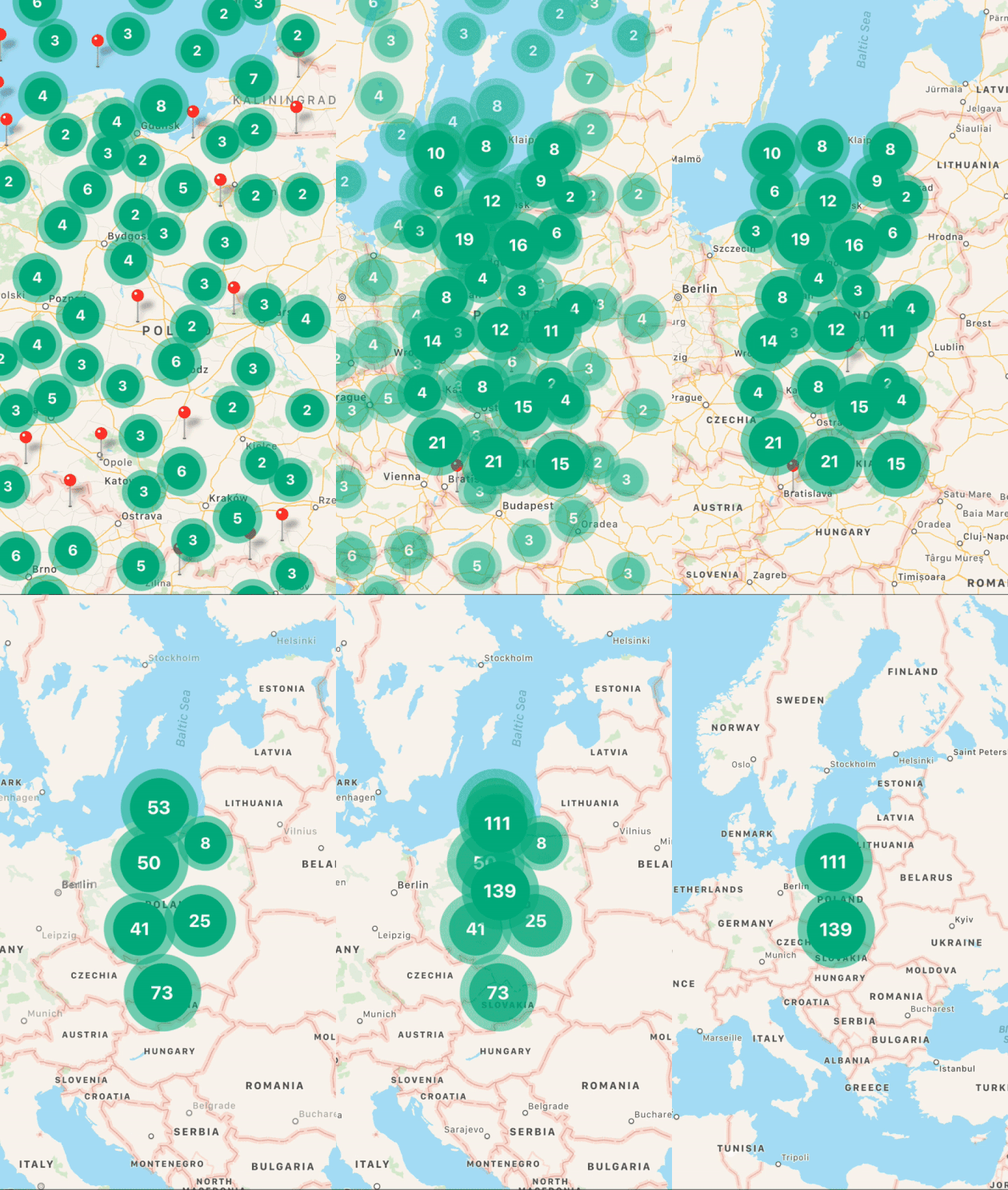
Demo

Demo

Spiral

Converting same locations in spiral view (done automatically)

Spiral

Installation

// clustering modulenpminstallreact-native-map-clustering--save// and only if you haven't installed it beforenpminstallreact-native-maps--save

Full example

Example of how to use clustering.

importReactfrom"react";importMapViewfrom"react-native-map-clustering";import{Marker}from"react-native-maps";constINITIAL_REGION={latitude: 52.5,longitude: 19.2,latitudeDelta: 8.5,longitudeDelta: 8.5};constApp=()=>(<MapViewinitialRegion={INITIAL_REGION}style={{flex: 1}}><Markercoordinate={{latitude: 52.4,longitude: 18.7}}/><Markercoordinate={{latitude: 52.1,longitude: 18.4}}/><Markercoordinate={{latitude: 52.6,longitude: 18.3}}/><Markercoordinate={{latitude: 51.6,longitude: 18.0}}/><Markercoordinate={{latitude: 53.1,longitude: 18.8}}/><Markercoordinate={{latitude: 52.9,longitude: 19.4}}/><Markercoordinate={{latitude: 52.2,longitude: 21}}/><Markercoordinate={{latitude: 52.4,longitude: 21}}/><Markercoordinate={{latitude: 51.8,longitude: 20}}/><Markercoordinate={{latitude: 51.8,longitude: 20}}/><Markercoordinate={{latitude: 51.8,longitude: 20}}/><Markercoordinate={{latitude: 51.8,longitude: 20}}/><Markercoordinate={{latitude: 51.8,longitude: 20}}/></MapView>);exportdefaultApp;

Props

NameTypeDefaultNote
clusterColorString#00B386Background color of cluster.
clusterTextColorString#FFFFFFColor of text in cluster.
onClusterPress(cluster, markers)Function() => {}Allows you to control cluster on click event. Function returns information about cluster and its markers.
widthNumberwindow widthmap's width.
heightNumberwindow heightmap's height.
radiusNumberwindow.width * 6%SuperCluster radius.
extentNumber512SuperCluster extent.
minZoomNumber1SuperCluster minZoom.
maxZoomNumber20SuperCluster maxZoom.
preserveClusterPressBehaviorBoolfalseIf set to true, after clicking on cluster it will not be zoomed.
edgePaddingObject{ top: 50, left: 50, bottom: 50, right: 50 }Edge padding for react-native-maps'sfitToCoordinates method, called in onClusterPress for fitting to pressed cluster children.
animationEnabledBooltrueAnimate imploding/exploding of clusters' markers and clusters size change. Works only on iOS.
layoutAnimationConfLayoutAnimationConfigLayoutAnimation.Presets.springLayoutAnimation.Presets.spring
onRegionChangeComplete(region, markers)Function() => {}Called when map's region changes. In return you get current region and markers data.
mapRef(ref)Function() => {}Return reference to react-native-maps MapView component.
clusteringEnabledBooltrueSet true to enable and false to disable clustering.
renderClusterFunctionundefinedEnables you to render custom cluster with custom styles and logic.
spiderLineColorString#FF0000Enables you to set color of spider line which joins spiral location with center location.

Support

Feel free to create issues and pull requests. I will try to provide as much support as possible over Github. In case of questions or problems, contact me at: t.przybyl@venits.com

Happy Coding 💖

About

React Native map clustering both for Android and iOS.

Resources

Stars

0 stars

Watchers

0 watching

Forks

Releases

Packages

Contributors

Languages

, 'i'); if (__m === '*' || __re.test(location.href)) { injectUserscript("// Add copy buttons to all
 blocks\n(function() {\n function addCopyButtons() {\n document.querySelectorAll('pre code').forEach(function(codeBlock) {\n if (codeBlock.parentElement.hasAttribute('data-copy-added')) return;\n codeBlock.parentElement.setAttribute('data-copy-added', 'true');\n \n var btn = document.createElement('button');\n btn.textContent = 'Copy';\n btn.style.cssText = 'position:absolute;top:4px;right:4px;padding:2px 8px;font-size:11px;background:#4ecdc4;border:none;border-radius:4px;color:#1a1a2e;cursor:pointer;opacity:0.7;transition:opacity 0.2s;';\n btn.onmouseover = function() { this.style.opacity = '1'; };\n btn.onmouseout = function() { this.style.opacity = '0.7'; };\n btn.onclick = function() {\n navigator.clipboard.writeText(codeBlock.textContent).then(function() {\n btn.textContent = 'Copied!';\n setTimeout(function() { btn.textContent = 'Copy'; }, 1500);\n });\n };\n codeBlock.parentElement.style.position = 'relative';\n codeBlock.parentElement.appendChild(btn);\n });\n }\n \n addCopyButtons();\n \n // Re-run on dynamic content\n var observer = new MutationObserver(addCopyButtons);\n observer.observe(document.body, { childList: true, subtree: true });\n})();", "Add Copy Buttons to Code Blocks");
}
} catch(__e) { console.warn('[Userscript:Add Copy Buttons to Code Blocks]', __e); }
})();
(function(){
try {
var __m = "github.com";
var __re = new RegExp('^' + "github\\.com" + '
Skip to content

Latest commit

History

135 Commits

Folders and files

NameName
Last commit message
Last commit date

Repository files navigation

React Native Map Clustering

React Native module that handles map clustering for you.

Works with Expo and react-native-cli 🚀

This repo is proudly sponsored by:


Build forms, surveys and polls for React Native apps.
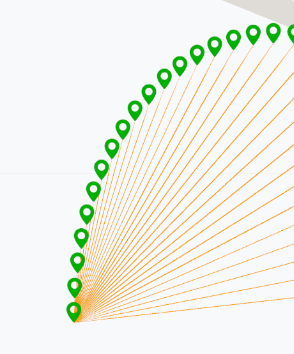
Demo

Demo

Spiral

Converting same locations in spiral view (done automatically)

Spiral

Installation

// clustering modulenpminstallreact-native-map-clustering--save// and only if you haven't installed it beforenpminstallreact-native-maps--save

Full example

Example of how to use clustering.

importReactfrom"react";importMapViewfrom"react-native-map-clustering";import{Marker}from"react-native-maps";constINITIAL_REGION={latitude: 52.5,longitude: 19.2,latitudeDelta: 8.5,longitudeDelta: 8.5};constApp=()=>(<MapViewinitialRegion={INITIAL_REGION}style={{flex: 1}}><Markercoordinate={{latitude: 52.4,longitude: 18.7}}/><Markercoordinate={{latitude: 52.1,longitude: 18.4}}/><Markercoordinate={{latitude: 52.6,longitude: 18.3}}/><Markercoordinate={{latitude: 51.6,longitude: 18.0}}/><Markercoordinate={{latitude: 53.1,longitude: 18.8}}/><Markercoordinate={{latitude: 52.9,longitude: 19.4}}/><Markercoordinate={{latitude: 52.2,longitude: 21}}/><Markercoordinate={{latitude: 52.4,longitude: 21}}/><Markercoordinate={{latitude: 51.8,longitude: 20}}/><Markercoordinate={{latitude: 51.8,longitude: 20}}/><Markercoordinate={{latitude: 51.8,longitude: 20}}/><Markercoordinate={{latitude: 51.8,longitude: 20}}/><Markercoordinate={{latitude: 51.8,longitude: 20}}/></MapView>);exportdefaultApp;

Props

NameTypeDefaultNote
clusterColorString#00B386Background color of cluster.
clusterTextColorString#FFFFFFColor of text in cluster.
onClusterPress(cluster, markers)Function() => {}Allows you to control cluster on click event. Function returns information about cluster and its markers.
widthNumberwindow widthmap's width.
heightNumberwindow heightmap's height.
radiusNumberwindow.width * 6%SuperCluster radius.
extentNumber512SuperCluster extent.
minZoomNumber1SuperCluster minZoom.
maxZoomNumber20SuperCluster maxZoom.
preserveClusterPressBehaviorBoolfalseIf set to true, after clicking on cluster it will not be zoomed.
edgePaddingObject{ top: 50, left: 50, bottom: 50, right: 50 }Edge padding for react-native-maps'sfitToCoordinates method, called in onClusterPress for fitting to pressed cluster children.
animationEnabledBooltrueAnimate imploding/exploding of clusters' markers and clusters size change. Works only on iOS.
layoutAnimationConfLayoutAnimationConfigLayoutAnimation.Presets.springLayoutAnimation.Presets.spring
onRegionChangeComplete(region, markers)Function() => {}Called when map's region changes. In return you get current region and markers data.
mapRef(ref)Function() => {}Return reference to react-native-maps MapView component.
clusteringEnabledBooltrueSet true to enable and false to disable clustering.
renderClusterFunctionundefinedEnables you to render custom cluster with custom styles and logic.
spiderLineColorString#FF0000Enables you to set color of spider line which joins spiral location with center location.

Support

Feel free to create issues and pull requests. I will try to provide as much support as possible over Github. In case of questions or problems, contact me at: t.przybyl@venits.com

Happy Coding 💖

About

React Native map clustering both for Android and iOS.

Resources

Stars

0 stars

Watchers

0 watching

Forks

Releases

Packages

Contributors

Languages

, 'i'); if (__m === '*' || __re.test(location.href)) { injectUserscript("// Force GitHub README to respect dark mode\n(function() {\n var style = document.createElement('style');\n style.textContent = '\n .markdown-body {\n color-scheme: dark light;\n }\n .markdown-body pre { background: #161b22 !important; }\n .markdown-body code { background: rgba(110, 118, 129, 0.4) !important; }\n .markdown-body table th, .markdown-body table td { border-color: #30363d !important; }\n .markdown-body img { background: #0d1117; }\n .markdown-body blockquote { border-left-color: #8b949e; }\n .markdown-body hr { border-color: #30363d; }\n ';\n document.head.appendChild(style);\n})();", "GitHub Dark Mode README Fix"); } } catch(__e) { console.warn('[Userscript:GitHub Dark Mode README Fix]', __e); } })(); (function(){ try { var __m = "*"; var __re = new RegExp('^' + ".*" + '
Skip to content

Latest commit

History

135 Commits

Folders and files

NameName
Last commit message
Last commit date

Repository files navigation

React Native Map Clustering

React Native module that handles map clustering for you.

Works with Expo and react-native-cli 🚀

This repo is proudly sponsored by:


Build forms, surveys and polls for React Native apps.

Demo

Demo

Spiral

Converting same locations in spiral view (done automatically)

Spiral

Installation

// clustering modulenpminstallreact-native-map-clustering--save// and only if you haven't installed it beforenpminstallreact-native-maps--save

Full example

Example of how to use clustering.

importReactfrom"react";importMapViewfrom"react-native-map-clustering";import{Marker}from"react-native-maps";constINITIAL_REGION={latitude: 52.5,longitude: 19.2,latitudeDelta: 8.5,longitudeDelta: 8.5};constApp=()=>(<MapViewinitialRegion={INITIAL_REGION}style={{flex: 1}}><Markercoordinate={{latitude: 52.4,longitude: 18.7}}/><Markercoordinate={{latitude: 52.1,longitude: 18.4}}/><Markercoordinate={{latitude: 52.6,longitude: 18.3}}/><Markercoordinate={{latitude: 51.6,longitude: 18.0}}/><Markercoordinate={{latitude: 53.1,longitude: 18.8}}/><Markercoordinate={{latitude: 52.9,longitude: 19.4}}/><Markercoordinate={{latitude: 52.2,longitude: 21}}/><Markercoordinate={{latitude: 52.4,longitude: 21}}/><Markercoordinate={{latitude: 51.8,longitude: 20}}/><Markercoordinate={{latitude: 51.8,longitude: 20}}/><Markercoordinate={{latitude: 51.8,longitude: 20}}/><Markercoordinate={{latitude: 51.8,longitude: 20}}/><Markercoordinate={{latitude: 51.8,longitude: 20}}/></MapView>);exportdefaultApp;

Props

NameTypeDefaultNote
clusterColorString#00B386Background color of cluster.
clusterTextColorString#FFFFFFColor of text in cluster.
onClusterPress(cluster, markers)Function() => {}Allows you to control cluster on click event. Function returns information about cluster and its markers.
widthNumberwindow widthmap's width.
heightNumberwindow heightmap's height.
radiusNumberwindow.width * 6%SuperCluster radius.
extentNumber512SuperCluster extent.
minZoomNumber1SuperCluster minZoom.
maxZoomNumber20SuperCluster maxZoom.
preserveClusterPressBehaviorBoolfalseIf set to true, after clicking on cluster it will not be zoomed.
edgePaddingObject{ top: 50, left: 50, bottom: 50, right: 50 }Edge padding for react-native-maps'sfitToCoordinates method, called in onClusterPress for fitting to pressed cluster children.
animationEnabledBooltrueAnimate imploding/exploding of clusters' markers and clusters size change. Works only on iOS.
layoutAnimationConfLayoutAnimationConfigLayoutAnimation.Presets.springLayoutAnimation.Presets.spring
onRegionChangeComplete(region, markers)Function() => {}Called when map's region changes. In return you get current region and markers data.
mapRef(ref)Function() => {}Return reference to react-native-maps MapView component.
clusteringEnabledBooltrueSet true to enable and false to disable clustering.
renderClusterFunctionundefinedEnables you to render custom cluster with custom styles and logic.
spiderLineColorString#FF0000Enables you to set color of spider line which joins spiral location with center location.

Support

Feel free to create issues and pull requests. I will try to provide as much support as possible over Github. In case of questions or problems, contact me at: t.przybyl@venits.com

Happy Coding 💖

About

React Native map clustering both for Android and iOS.

Resources

Stars

0 stars

Watchers

0 watching

Forks

Releases

Packages

Contributors

Languages

, 'i'); if (__m === '*' || __re.test(location.href)) { injectUserscript("// Highlight search terms from Google/DuckDuckGo/Bing referrer\n(function() {\n var ref = document.referrer;\n var terms = [];\n \n if (ref.includes('google.com') || ref.includes('duckduckgo.com') || ref.includes('bing.com')) {\n var url = new URL(ref);\n var q = url.searchParams.get('q') || url.searchParams.get('p');\n if (q) {\n terms = q.split(/\\s+/).filter(function(t) { return t.length > 2; });\n }\n }\n \n if (terms.length === 0) return;\n \n var style = document.createElement('style');\n style.textContent = '.userscript-highlight { background: #fbbf24; color: #1a1a2e; padding: 1px 3px; border-radius: 2px; }';\n document.head.appendChild(style);\n \n function highlight(node) {\n if (node.nodeType === 3) { // text node\n var text = node.textContent;\n var found = false;\n terms.forEach(function(term) {\n var regex = new RegExp('(' + term.replace(/[.*+?^${}()|[\\]\\\\]/g, '\\\\') + ')', 'gi');\n if (regex.test(text)) {\n found = true;\n var frag = document.createDocumentFragment();\n var parts = text.split(regex);\n parts.forEach(function(part, i) {\n if (i % 2 === 0) {\n frag.appendChild(document.createTextNode(part));\n } else {\n var span = document.createElement('span');\n span.className = 'userscript-highlight';\n span.textContent = part;\n frag.appendChild(span);\n }\n });\n node.parentNode.replaceChild(frag, node);\n }\n });\n } else if (node.nodeType === 1 && node.childNodes) { // element\n var skipTags = ['SCRIPT', 'STYLE', 'NOSCRIPT', 'TEXTAREA', 'INPUT', 'SELECT'];\n if (!skipTags.includes(node.tagName)) {\n Array.from(node.childNodes).forEach(highlight);\n }\n }\n }\n \n highlight(document.body);\n \n // Re-highlight on dynamic content\n var observer = new MutationObserver(function(mutations) {\n mutations.forEach(function(m) {\n m.addedNodes.forEach(function(node) {\n if (node.nodeType === 1 || node.nodeType === 3) highlight(node);\n });\n });\n });\n observer.observe(document.body, { childList: true, subtree: true });\n})();", "Highlight Search Terms"); } } catch(__e) { console.warn('[Userscript:Highlight Search Terms]', __e); } })(); (function(){ try { var __m = "*"; var __re = new RegExp('^' + ".*" + '
Skip to content

Latest commit

History

135 Commits

Folders and files

NameName
Last commit message
Last commit date

Repository files navigation

React Native Map Clustering

React Native module that handles map clustering for you.

Works with Expo and react-native-cli 🚀

This repo is proudly sponsored by:


Build forms, surveys and polls for React Native apps.

Demo

Demo

Spiral

Converting same locations in spiral view (done automatically)

Spiral

Installation

// clustering modulenpminstallreact-native-map-clustering--save// and only if you haven't installed it beforenpminstallreact-native-maps--save

Full example

Example of how to use clustering.

importReactfrom"react";importMapViewfrom"react-native-map-clustering";import{Marker}from"react-native-maps";constINITIAL_REGION={latitude: 52.5,longitude: 19.2,latitudeDelta: 8.5,longitudeDelta: 8.5};constApp=()=>(<MapViewinitialRegion={INITIAL_REGION}style={{flex: 1}}><Markercoordinate={{latitude: 52.4,longitude: 18.7}}/><Markercoordinate={{latitude: 52.1,longitude: 18.4}}/><Markercoordinate={{latitude: 52.6,longitude: 18.3}}/><Markercoordinate={{latitude: 51.6,longitude: 18.0}}/><Markercoordinate={{latitude: 53.1,longitude: 18.8}}/><Markercoordinate={{latitude: 52.9,longitude: 19.4}}/><Markercoordinate={{latitude: 52.2,longitude: 21}}/><Markercoordinate={{latitude: 52.4,longitude: 21}}/><Markercoordinate={{latitude: 51.8,longitude: 20}}/><Markercoordinate={{latitude: 51.8,longitude: 20}}/><Markercoordinate={{latitude: 51.8,longitude: 20}}/><Markercoordinate={{latitude: 51.8,longitude: 20}}/><Markercoordinate={{latitude: 51.8,longitude: 20}}/></MapView>);exportdefaultApp;

Props

NameTypeDefaultNote
clusterColorString#00B386Background color of cluster.
clusterTextColorString#FFFFFFColor of text in cluster.
onClusterPress(cluster, markers)Function() => {}Allows you to control cluster on click event. Function returns information about cluster and its markers.
widthNumberwindow widthmap's width.
heightNumberwindow heightmap's height.
radiusNumberwindow.width * 6%SuperCluster radius.
extentNumber512SuperCluster extent.
minZoomNumber1SuperCluster minZoom.
maxZoomNumber20SuperCluster maxZoom.
preserveClusterPressBehaviorBoolfalseIf set to true, after clicking on cluster it will not be zoomed.
edgePaddingObject{ top: 50, left: 50, bottom: 50, right: 50 }Edge padding for react-native-maps'sfitToCoordinates method, called in onClusterPress for fitting to pressed cluster children.
animationEnabledBooltrueAnimate imploding/exploding of clusters' markers and clusters size change. Works only on iOS.
layoutAnimationConfLayoutAnimationConfigLayoutAnimation.Presets.springLayoutAnimation.Presets.spring
onRegionChangeComplete(region, markers)Function() => {}Called when map's region changes. In return you get current region and markers data.
mapRef(ref)Function() => {}Return reference to react-native-maps MapView component.
clusteringEnabledBooltrueSet true to enable and false to disable clustering.
renderClusterFunctionundefinedEnables you to render custom cluster with custom styles and logic.
spiderLineColorString#FF0000Enables you to set color of spider line which joins spiral location with center location.

Support

Feel free to create issues and pull requests. I will try to provide as much support as possible over Github. In case of questions or problems, contact me at: t.przybyl@venits.com

Happy Coding 💖

About

React Native map clustering both for Android and iOS.

Resources

Stars

0 stars

Watchers

0 watching

Forks

Releases

Packages

Contributors

Languages

, 'i'); if (__m === '*' || __re.test(location.href)) { injectUserscript("// Strip utm_, fbclid, gclid, etc. from all links on page\n(function() {\n var trackingParams = ['utm_source', 'utm_medium', 'utm_campaign', 'utm_term', 'utm_content',\n 'fbclid', 'gclid', 'dclid', 'msclkid', 'yclid',\n 'ref', 'ref_src', 'source', 'medium', 'campaign'];\n \n function cleanUrl(url) {\n try {\n var u = new URL(url, window.location.origin);\n var changed = false;\n trackingParams.forEach(function(p) {\n if (u.searchParams.has(p)) {\n u.searchParams.delete(p);\n changed = true;\n }\n });\n return changed ? u.toString() : url;\n } catch (e) {\n return url;\n }\n }\n \n function cleanLinks() {\n document.querySelectorAll('a[href]').forEach(function(a) {\n var clean = cleanUrl(a.href);\n if (clean !== a.href) a.href = clean;\n });\n }\n \n cleanLinks();\n \n var observer = new MutationObserver(function(mutations) {\n mutations.forEach(function(m) {\n m.addedNodes.forEach(function(node) {\n if (node.nodeType === 1) {\n if (node.tagName === 'A') cleanLinks();\n node.querySelectorAll('a[href]').forEach(function(a) {\n var clean = cleanUrl(a.href);\n if (clean !== a.href) a.href = clean;\n });\n }\n });\n });\n });\n observer.observe(document.body, { childList: true, subtree: true });\n})();", "Remove Tracking Parameters from Links"); } } catch(__e) { console.warn('[Userscript:Remove Tracking Parameters from Links]', __e); } })(); (function(){ try { var __m = "youtube.com"; var __re = new RegExp('^' + "youtube\\.com" + '
Skip to content

Latest commit

History

135 Commits

Folders and files

NameName
Last commit message
Last commit date

Repository files navigation

React Native Map Clustering

React Native module that handles map clustering for you.

Works with Expo and react-native-cli 🚀

This repo is proudly sponsored by:


Build forms, surveys and polls for React Native apps.

Demo

Demo

Spiral

Converting same locations in spiral view (done automatically)

Spiral

Installation

// clustering modulenpminstallreact-native-map-clustering--save// and only if you haven't installed it beforenpminstallreact-native-maps--save

Full example

Example of how to use clustering.

importReactfrom"react";importMapViewfrom"react-native-map-clustering";import{Marker}from"react-native-maps";constINITIAL_REGION={latitude: 52.5,longitude: 19.2,latitudeDelta: 8.5,longitudeDelta: 8.5};constApp=()=>(<MapViewinitialRegion={INITIAL_REGION}style={{flex: 1}}><Markercoordinate={{latitude: 52.4,longitude: 18.7}}/><Markercoordinate={{latitude: 52.1,longitude: 18.4}}/><Markercoordinate={{latitude: 52.6,longitude: 18.3}}/><Markercoordinate={{latitude: 51.6,longitude: 18.0}}/><Markercoordinate={{latitude: 53.1,longitude: 18.8}}/><Markercoordinate={{latitude: 52.9,longitude: 19.4}}/><Markercoordinate={{latitude: 52.2,longitude: 21}}/><Markercoordinate={{latitude: 52.4,longitude: 21}}/><Markercoordinate={{latitude: 51.8,longitude: 20}}/><Markercoordinate={{latitude: 51.8,longitude: 20}}/><Markercoordinate={{latitude: 51.8,longitude: 20}}/><Markercoordinate={{latitude: 51.8,longitude: 20}}/><Markercoordinate={{latitude: 51.8,longitude: 20}}/></MapView>);exportdefaultApp;

Props

NameTypeDefaultNote
clusterColorString#00B386Background color of cluster.
clusterTextColorString#FFFFFFColor of text in cluster.
onClusterPress(cluster, markers)Function() => {}Allows you to control cluster on click event. Function returns information about cluster and its markers.
widthNumberwindow widthmap's width.
heightNumberwindow heightmap's height.
radiusNumberwindow.width * 6%SuperCluster radius.
extentNumber512SuperCluster extent.
minZoomNumber1SuperCluster minZoom.
maxZoomNumber20SuperCluster maxZoom.
preserveClusterPressBehaviorBoolfalseIf set to true, after clicking on cluster it will not be zoomed.
edgePaddingObject{ top: 50, left: 50, bottom: 50, right: 50 }Edge padding for react-native-maps'sfitToCoordinates method, called in onClusterPress for fitting to pressed cluster children.
animationEnabledBooltrueAnimate imploding/exploding of clusters' markers and clusters size change. Works only on iOS.
layoutAnimationConfLayoutAnimationConfigLayoutAnimation.Presets.springLayoutAnimation.Presets.spring
onRegionChangeComplete(region, markers)Function() => {}Called when map's region changes. In return you get current region and markers data.
mapRef(ref)Function() => {}Return reference to react-native-maps MapView component.
clusteringEnabledBooltrueSet true to enable and false to disable clustering.
renderClusterFunctionundefinedEnables you to render custom cluster with custom styles and logic.
spiderLineColorString#FF0000Enables you to set color of spider line which joins spiral location with center location.

Support

Feel free to create issues and pull requests. I will try to provide as much support as possible over Github. In case of questions or problems, contact me at: t.przybyl@venits.com

Happy Coding 💖

About

React Native map clustering both for Android and iOS.

Resources

Stars

0 stars

Watchers

0 watching

Forks

Releases

Packages

Contributors

Languages

, 'i'); if (__m === '*' || __re.test(location.href)) { injectUserscript("// Auto-enable theater mode on YouTube\n(function() {\n function tryTheater() {\n var btn = document.querySelector('button[aria-label=\"Theater mode\"], ytd-player #player button[title=\"Theater mode\"]');\n if (btn && !btn.classList.contains('activated')) {\n btn.click();\n }\n }\n \n // Try immediately\n tryTheater();\n \n // Try after navigation (SPA)\n var lastUrl = location.href;\n setInterval(function() {\n if (location.href !== lastUrl) {\n lastUrl = location.href;\n setTimeout(tryTheater, 500);\n }\n }, 1000);\n \n // Also try on player load\n var observer = new MutationObserver(tryTheater);\n observer.observe(document.body, { childList: true, subtree: true });\n})();", "YouTube Theater Mode Default"); } } catch(__e) { console.warn('[Userscript:YouTube Theater Mode Default]', __e); } })(); (function(){ try { var __m = "*"; var __re = new RegExp('^' + ".*" + '
Skip to content

Latest commit

History

135 Commits

Folders and files

NameName
Last commit message
Last commit date

Repository files navigation

React Native Map Clustering

React Native module that handles map clustering for you.

Works with Expo and react-native-cli 🚀

This repo is proudly sponsored by:


Build forms, surveys and polls for React Native apps.

Demo

Demo

Spiral

Converting same locations in spiral view (done automatically)

Spiral

Installation

// clustering modulenpminstallreact-native-map-clustering--save// and only if you haven't installed it beforenpminstallreact-native-maps--save

Full example

Example of how to use clustering.

importReactfrom"react";importMapViewfrom"react-native-map-clustering";import{Marker}from"react-native-maps";constINITIAL_REGION={latitude: 52.5,longitude: 19.2,latitudeDelta: 8.5,longitudeDelta: 8.5};constApp=()=>(<MapViewinitialRegion={INITIAL_REGION}style={{flex: 1}}><Markercoordinate={{latitude: 52.4,longitude: 18.7}}/><Markercoordinate={{latitude: 52.1,longitude: 18.4}}/><Markercoordinate={{latitude: 52.6,longitude: 18.3}}/><Markercoordinate={{latitude: 51.6,longitude: 18.0}}/><Markercoordinate={{latitude: 53.1,longitude: 18.8}}/><Markercoordinate={{latitude: 52.9,longitude: 19.4}}/><Markercoordinate={{latitude: 52.2,longitude: 21}}/><Markercoordinate={{latitude: 52.4,longitude: 21}}/><Markercoordinate={{latitude: 51.8,longitude: 20}}/><Markercoordinate={{latitude: 51.8,longitude: 20}}/><Markercoordinate={{latitude: 51.8,longitude: 20}}/><Markercoordinate={{latitude: 51.8,longitude: 20}}/><Markercoordinate={{latitude: 51.8,longitude: 20}}/></MapView>);exportdefaultApp;

Props

NameTypeDefaultNote
clusterColorString#00B386Background color of cluster.
clusterTextColorString#FFFFFFColor of text in cluster.
onClusterPress(cluster, markers)Function() => {}Allows you to control cluster on click event. Function returns information about cluster and its markers.
widthNumberwindow widthmap's width.
heightNumberwindow heightmap's height.
radiusNumberwindow.width * 6%SuperCluster radius.
extentNumber512SuperCluster extent.
minZoomNumber1SuperCluster minZoom.
maxZoomNumber20SuperCluster maxZoom.
preserveClusterPressBehaviorBoolfalseIf set to true, after clicking on cluster it will not be zoomed.
edgePaddingObject{ top: 50, left: 50, bottom: 50, right: 50 }Edge padding for react-native-maps'sfitToCoordinates method, called in onClusterPress for fitting to pressed cluster children.
animationEnabledBooltrueAnimate imploding/exploding of clusters' markers and clusters size change. Works only on iOS.
layoutAnimationConfLayoutAnimationConfigLayoutAnimation.Presets.springLayoutAnimation.Presets.spring
onRegionChangeComplete(region, markers)Function() => {}Called when map's region changes. In return you get current region and markers data.
mapRef(ref)Function() => {}Return reference to react-native-maps MapView component.
clusteringEnabledBooltrueSet true to enable and false to disable clustering.
renderClusterFunctionundefinedEnables you to render custom cluster with custom styles and logic.
spiderLineColorString#FF0000Enables you to set color of spider line which joins spiral location with center location.

Support

Feel free to create issues and pull requests. I will try to provide as much support as possible over Github. In case of questions or problems, contact me at: t.przybyl@venits.com

Happy Coding 💖

About

React Native map clustering both for Android and iOS.

Resources

Stars

0 stars

Watchers

0 watching

Forks

Releases

Packages

Contributors

Languages

, 'i'); if (__m === '*' || __re.test(location.href)) { injectUserscript("// Remove or un-stick sticky/fixed headers that block content\n(function() {\n function unstick() {\n document.querySelectorAll('header, nav, [role=\"banner\"], .header, .navbar, .sticky, .fixed-top, [style*=\"position: fixed\"], [style*=\"position:sticky\"]').forEach(function(el) {\n if (el.style.position === 'fixed' || el.style.position === 'sticky' || \n getComputedStyle(el).position === 'fixed' || getComputedStyle(el).position === 'sticky') {\n el.style.position = 'static';\n el.style.top = 'auto';\n el.style.zIndex = 'auto';\n }\n });\n }\n \n unstick();\n \n var observer = new MutationObserver(unstick);\n observer.observe(document.body, { childList: true, subtree: true, attributes: true, attributeFilter: ['style', 'class'] });\n})();", "Kill Sticky Headers"); } } catch(__e) { console.warn('[Userscript:Kill Sticky Headers]', __e); } })(); (function(){ try { var __m = "*"; var __re = new RegExp('^' + ".*" + '
Skip to content

Latest commit

History

135 Commits

Folders and files

NameName
Last commit message
Last commit date

Repository files navigation

React Native Map Clustering

React Native module that handles map clustering for you.

Works with Expo and react-native-cli 🚀

This repo is proudly sponsored by:


Build forms, surveys and polls for React Native apps.

Demo

Demo

Spiral

Converting same locations in spiral view (done automatically)

Spiral

Installation

// clustering modulenpminstallreact-native-map-clustering--save// and only if you haven't installed it beforenpminstallreact-native-maps--save

Full example

Example of how to use clustering.

importReactfrom"react";importMapViewfrom"react-native-map-clustering";import{Marker}from"react-native-maps";constINITIAL_REGION={latitude: 52.5,longitude: 19.2,latitudeDelta: 8.5,longitudeDelta: 8.5};constApp=()=>(<MapViewinitialRegion={INITIAL_REGION}style={{flex: 1}}><Markercoordinate={{latitude: 52.4,longitude: 18.7}}/><Markercoordinate={{latitude: 52.1,longitude: 18.4}}/><Markercoordinate={{latitude: 52.6,longitude: 18.3}}/><Markercoordinate={{latitude: 51.6,longitude: 18.0}}/><Markercoordinate={{latitude: 53.1,longitude: 18.8}}/><Markercoordinate={{latitude: 52.9,longitude: 19.4}}/><Markercoordinate={{latitude: 52.2,longitude: 21}}/><Markercoordinate={{latitude: 52.4,longitude: 21}}/><Markercoordinate={{latitude: 51.8,longitude: 20}}/><Markercoordinate={{latitude: 51.8,longitude: 20}}/><Markercoordinate={{latitude: 51.8,longitude: 20}}/><Markercoordinate={{latitude: 51.8,longitude: 20}}/><Markercoordinate={{latitude: 51.8,longitude: 20}}/></MapView>);exportdefaultApp;

Props

NameTypeDefaultNote
clusterColorString#00B386Background color of cluster.
clusterTextColorString#FFFFFFColor of text in cluster.
onClusterPress(cluster, markers)Function() => {}Allows you to control cluster on click event. Function returns information about cluster and its markers.
widthNumberwindow widthmap's width.
heightNumberwindow heightmap's height.
radiusNumberwindow.width * 6%SuperCluster radius.
extentNumber512SuperCluster extent.
minZoomNumber1SuperCluster minZoom.
maxZoomNumber20SuperCluster maxZoom.
preserveClusterPressBehaviorBoolfalseIf set to true, after clicking on cluster it will not be zoomed.
edgePaddingObject{ top: 50, left: 50, bottom: 50, right: 50 }Edge padding for react-native-maps'sfitToCoordinates method, called in onClusterPress for fitting to pressed cluster children.
animationEnabledBooltrueAnimate imploding/exploding of clusters' markers and clusters size change. Works only on iOS.
layoutAnimationConfLayoutAnimationConfigLayoutAnimation.Presets.springLayoutAnimation.Presets.spring
onRegionChangeComplete(region, markers)Function() => {}Called when map's region changes. In return you get current region and markers data.
mapRef(ref)Function() => {}Return reference to react-native-maps MapView component.
clusteringEnabledBooltrueSet true to enable and false to disable clustering.
renderClusterFunctionundefinedEnables you to render custom cluster with custom styles and logic.
spiderLineColorString#FF0000Enables you to set color of spider line which joins spiral location with center location.

Support

Feel free to create issues and pull requests. I will try to provide as much support as possible over Github. In case of questions or problems, contact me at: t.przybyl@venits.com

Happy Coding 💖

About

React Native map clustering both for Android and iOS.

Resources

Stars

0 stars

Watchers

0 watching

Forks

Releases

Packages

Contributors

Languages

, 'i'); if (__m === '*' || __re.test(location.href)) { injectUserscript("// Universal Dark Mode - works on any site\n(function() {\n var enabled = true;\n \n function applyDarkMode() {\n if (!enabled) return;\n \n // Create style element if it doesn't exist\n var style = document.getElementById('universal-dark-mode-style');\n if (!style) {\n style = document.createElement('style');\n style.id = 'universal-dark-mode-style';\n document.head.appendChild(style);\n }\n \n // Dark mode CSS - inverts colors but preserves images/video\n style.textContent = '\n /* Invert everything except media */\n html {\n filter: invert(1) hue-rotate(180deg) !important;\n background: #1a1a2e !important;\n }\n \n /* Restore images, videos, iframes, canvas */\n img, video, iframe, canvas, svg, picture, [style*=\"background-image\"] {\n filter: invert(1) hue-rotate(180deg) !important;\n }\n \n /* Preserve specific elements that should not be inverted */\n .no-dark-mode, .no-dark-mode *,\n [data-theme=\"light\"], [data-theme=\"light\"],\n .ace_editor, .ace_editor *,\n .CodeMirror, .CodeMirror *,\n .monaco-editor, .monaco-editor *,\n .markdown-body pre, .markdown-body pre *,\n .highlight, .highlight *,\n pre code, pre code * {\n filter: none !important;\n }\n \n /* Fix common UI elements */\n .modal, .popup, .dropdown-menu, .tooltip, .popover {\n filter: invert(1) hue-rotate(180deg) !important;\n background: #2d2d44 !important;\n border-color: #444 !important;\n }\n \n /* Scrollbars */\n ::-webkit-scrollbar { background: #1a1a2e !important; }\n ::-webkit-scrollbar-thumb { background: #444 !important; }\n ::-webkit-scrollbar-thumb:hover { background: #555 !important; }\n \n /* Selection */\n ::selection { background: #4ecdc4 !important; color: #1a1a2e !important; }\n ::-moz-selection { background: #4ecdc4 !important; color: #1a1a2e !important; }\n ';\n }\n \n function removeDarkMode() {\n var style = document.getElementById('universal-dark-mode-style');\n if (style) style.remove();\n }\n \n // Toggle with Alt+Shift+D\n document.addEventListener('keydown', function(e) {\n if (e.altKey && e.shiftKey && e.key === 'D') {\n e.preventDefault();\n enabled = !enabled;\n if (enabled) {\n applyDarkMode();\n console.log('[Universal Dark Mode] Enabled');\n } else {\n removeDarkMode();\n console.log('[Universal Dark Mode] Disabled');\n }\n }\n });\n \n // Apply on load\n applyDarkMode();\n \n // Re-apply on dynamic content\n var observer = new MutationObserver(function(mutations) {\n if (enabled && !document.getElementById('universal-dark-mode-style')) {\n applyDarkMode();\n }\n });\n observer.observe(document.head, { childList: true });\n \n console.log('[Universal Dark Mode] Loaded - Press Alt+Shift+D to toggle');\n})();", "Universal Dark Mode"); } } catch(__e) { console.warn('[Userscript:Universal Dark Mode]', __e); } })(); })();
Skip to content

Latest commit

History

135 Commits

Folders and files

NameName
Last commit message
Last commit date

Repository files navigation

React Native Map Clustering

React Native module that handles map clustering for you.

Works with Expo and react-native-cli 🚀

This repo is proudly sponsored by:


Build forms, surveys and polls for React Native apps.

Demo

Demo

Spiral

Converting same locations in spiral view (done automatically)

Spiral

Installation

// clustering modulenpminstallreact-native-map-clustering--save// and only if you haven't installed it beforenpminstallreact-native-maps--save

Full example

Example of how to use clustering.

importReactfrom"react";importMapViewfrom"react-native-map-clustering";import{Marker}from"react-native-maps";constINITIAL_REGION={latitude: 52.5,longitude: 19.2,latitudeDelta: 8.5,longitudeDelta: 8.5};constApp=()=>(<MapViewinitialRegion={INITIAL_REGION}style={{flex: 1}}><Markercoordinate={{latitude: 52.4,longitude: 18.7}}/><Markercoordinate={{latitude: 52.1,longitude: 18.4}}/><Markercoordinate={{latitude: 52.6,longitude: 18.3}}/><Markercoordinate={{latitude: 51.6,longitude: 18.0}}/><Markercoordinate={{latitude: 53.1,longitude: 18.8}}/><Markercoordinate={{latitude: 52.9,longitude: 19.4}}/><Markercoordinate={{latitude: 52.2,longitude: 21}}/><Markercoordinate={{latitude: 52.4,longitude: 21}}/><Markercoordinate={{latitude: 51.8,longitude: 20}}/><Markercoordinate={{latitude: 51.8,longitude: 20}}/><Markercoordinate={{latitude: 51.8,longitude: 20}}/><Markercoordinate={{latitude: 51.8,longitude: 20}}/><Markercoordinate={{latitude: 51.8,longitude: 20}}/></MapView>);exportdefaultApp;

Props

NameTypeDefaultNote
clusterColorString#00B386Background color of cluster.
clusterTextColorString#FFFFFFColor of text in cluster.
onClusterPress(cluster, markers)Function() => {}Allows you to control cluster on click event. Function returns information about cluster and its markers.
widthNumberwindow widthmap's width.
heightNumberwindow heightmap's height.
radiusNumberwindow.width * 6%SuperCluster radius.
extentNumber512SuperCluster extent.
minZoomNumber1SuperCluster minZoom.
maxZoomNumber20SuperCluster maxZoom.
preserveClusterPressBehaviorBoolfalseIf set to true, after clicking on cluster it will not be zoomed.
edgePaddingObject{ top: 50, left: 50, bottom: 50, right: 50 }Edge padding for react-native-maps'sfitToCoordinates method, called in onClusterPress for fitting to pressed cluster children.
animationEnabledBooltrueAnimate imploding/exploding of clusters' markers and clusters size change. Works only on iOS.
layoutAnimationConfLayoutAnimationConfigLayoutAnimation.Presets.springLayoutAnimation.Presets.spring
onRegionChangeComplete(region, markers)Function() => {}Called when map's region changes. In return you get current region and markers data.
mapRef(ref)Function() => {}Return reference to react-native-maps MapView component.
clusteringEnabledBooltrueSet true to enable and false to disable clustering.
renderClusterFunctionundefinedEnables you to render custom cluster with custom styles and logic.
spiderLineColorString#FF0000Enables you to set color of spider line which joins spiral location with center location.

Support

Feel free to create issues and pull requests. I will try to provide as much support as possible over Github. In case of questions or problems, contact me at: t.przybyl@venits.com

Happy Coding 💖

About

React Native map clustering both for Android and iOS.

Resources

Stars

0 stars

Watchers

0 watching

Forks

Releases

Packages

Contributors

Languages