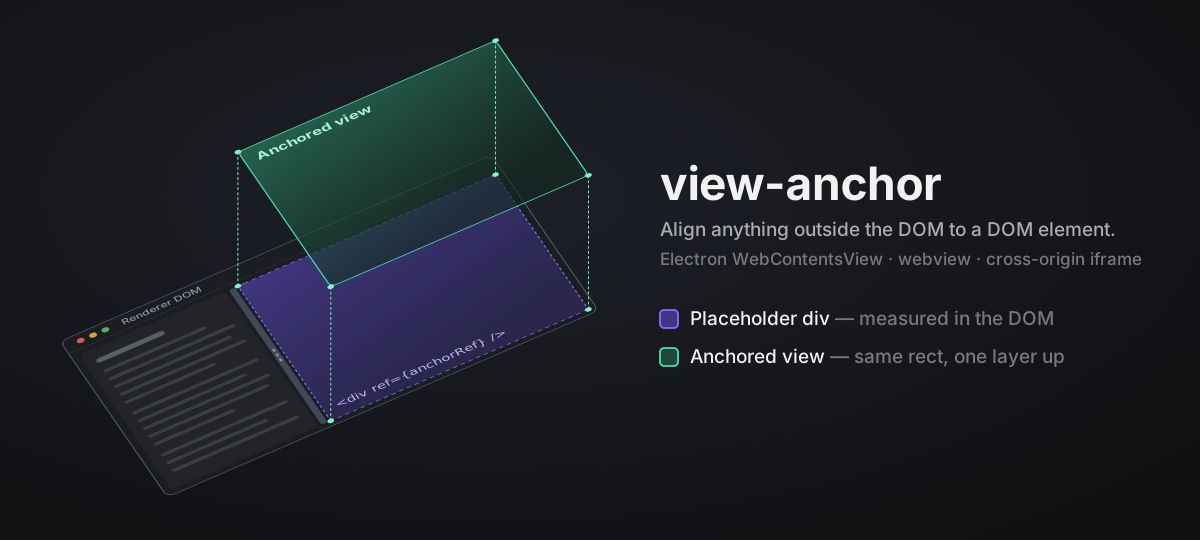
A high-performance geometry bridge that keeps anything living outside the DOM aligned to a DOM element: an Electron
WebContentsView, a native webview in another desktop shell, a cross-origin iframe, or any surface you position from a rectangle. Every move and resize is published synchronously with no duplicate frames, and the whole package is about 2.6 KB gzipped.




🎮 Live demo: the 3D interactive demo runs the real core in your browser. Drag the splitter, toggle the panel, and watch the native view follow.
Some things you want to place inside your layout are not DOM nodes. An Electron WebContentsView is positioned by the main process. A native webview in another desktop shell is positioned by host code. The document inside a cross-origin iframe only knows what you tell it over postMessage. Your layout, whether it is flexbox, dockview, or react-resizable-panels, only moves DOM nodes and has no idea that something else is supposed to sit exactly on top of one of them.
view-anchor closes that gap. You point it at a placeholder element. It measures the element and, every time the element moves or resizes, hands the new rectangle to your publish callback. What happens next is up to you: ipcRenderer.send plus view.setBounds in Electron, postMessage to an iframe, or a direct call into whatever positions the surface.
The core has no dependency on Electron, a browser shell, React, or any layout library. It only uses ResizeObserver, requestAnimationFrame, and getBoundingClientRect. React support lives in a separate view-anchor/react entry.
Geometry updates fire on every resize and, when following a drag, on every animation frame. The library is written for that path and the numbers are measured, not assumed:
- Synchronous delivery. Measurement and publish happen inside the same
ResizeObservercallback. No timers, no extra frame of lag. - Dedupe before allocate. A rectangle identical to the last accepted one is rejected by comparing four numbers, before any object is created.
- Frame following only when needed.
followGeometrypollsrequestAnimationFrameduring a scroll burst, a splitter drag, or an explicitpulse(), then closes itself once the rectangle settles. Idle cost is zero, and hidden or invalid targets are capped at 30 frames. - O(1) generation changes. In the protocol layer, moving an anchor to a new generation or clearing it does not touch other anchors.
- Latest-wins batching. Messages queued in the same task are merged in a microtask. The newest placement and size for each anchor are sent separately.
- Small, tree-shakeable output. Every function is a separate export with
sideEffects: false. If you only needcreateViewAnchor, you pay for 528 bytes gzipped.
Numbers from pnpm benchmark on Node.js 24, Apple M4, median of three fresh processes:
| Operation | Volume | Time |
|---|---|---|
measurePlacement |
1,000,000 calls | 8.9 ms |
| Publish a placement message | 1,000,000 calls | 7.3 ms |
| Decode a valid batch | 100,000 messages | 3.1 ms |
| Move all anchors to a new generation | 10,000 anchors | 1.7 ms |
| Flush one message with 100,000 anchors already tracked | 1 message | 0.008 ms |
| Entry | Gzipped |
|---|---|
view-anchor (everything) |
2.6 KB |
createViewAnchor alone |
528 B |
view-anchor/protocol |
1.4 KB |
view-anchor/react |
2.0 KB |
These are same-machine Node.js microbenchmarks. They do not include DOM layout, Electron IPC, or structured clone, so measure those in your own app. Methodology, memory figures, and V8 traces are in docs/performance-report.md.
pnpm add view-anchor
# or
npm install view-anchor
React is an optional peer dependency. Import the hooks from view-anchor/react. The root entry also re-exports useViewAnchor for compatibility with v0.1.2, so any app that imports view-anchor needs React installed. view-anchor/protocol does not.
import { createViewAnchor } from 'view-anchor'

const handle = createViewAnchor(target, {
  present: true,                 // mount the native view
  publish: (bounds) => { ... },  // receive live rectangles; wire IPC → setBounds
})

handle.update({ present, publish }) // apply new options and publish right away
handle.dispose()                    // stop observing; never publishes again
Set present: false to collapse the view. The core publishes a zero rectangle and stops observing. The host can detach the subview while keeping the WebContents alive, so re-showing it later is instant.
import { useViewAnchor } from 'view-anchor/react'

function DebugPanel({ visible }: { visible: boolean }) {
  const ref = useViewAnchor({
    present: visible,
    publish: publishPanelBounds,
  })
  // The native view follows this placeholder div. Hiding the panel
  // (visible=false or unmount) collapses it without destroying it.
  return <div ref={ref} className="h-full w-full" />
}
The hook survives React 18 and 19 StrictMode double-mounting without publishing stale frames.
A zero rectangle cannot tell a hidden view from one that is visible but currently 0×0. When that distinction matters, use the Placement API. It publishes { visible: true, bounds } or { visible: false } and adds opt-in scroll and geometry following:
import { createPlacementAnchor } from 'view-anchor'

const handle = createPlacementAnchor(target, {
  publish: (placement) => { ... },
  followScroll: true,     // re-measure when any ancestor scrolls
  followGeometry: true,   // poll animation frames during scrolls / drags, stop when steady
  guardDisplayNone: true, // zero-area or display:none target → { visible: false }
})

handle.pulse() // open a short frame-following window, e.g. during a CSS transition
The React version is usePlacementAnchor from view-anchor/react.
Sometimes the hosted surface's size should come from its own content, for example a toolbar rendered by downstream code. Run createSizeAdvertiser inside the hosted document. It reports the content size back so a DOM placeholder in the host can grow to match:
import { createSizeAdvertiser } from 'view-anchor'

const handle = createSizeAdvertiser(contentWrapper, {
  axis: 'block',                 // one axis per advertiser: block = height, inline = width
  publish: (size) => { ... },    // receives { axis, extent }; wire IPC → host
})

handle.update(publish) // swap the publish channel and report the current size again
handle.dispose()       // stop observing; never reports again
Warning: the target must shrink to fit its content on the owned axis. If the host sets that size instead, the two sides keep reacting to each other and never settle. See docs/bidirectional-design.md.
The core hands you plain Bounds, Placement, and AdvertisedSize values. Once those values cross a process or origin boundary, over IPC or postMessage, you usually want validation and ordering. The optional view-anchor/protocol entry adds versioned message envelopes, bounded decoding of untrusted input, a per-anchor sequence guard that drops stale messages, and a microtask batcher:
import {
  createGeometryBatcher,
  createPlacementMessagePublisher,
  decodeGeometryWireValue,
} from 'view-anchor/protocol'

// sending side (renderer, iframe, ...)
const batcher = createGeometryBatcher((batch) => ipc.send('geometry', batch))
const publish = createPlacementMessagePublisher(
  { anchorId: 'editor', generation: 3 },
  batcher.publish,
)

// receiving side (main process, host page, ...)
const decoded = decodeGeometryWireValue(received, { maxMessages: 100 })
if (decoded.ok) {
  /* check the sender, then apply only newer messages */
}
Two rules keep the ordering correct:
- Keep one publisher per
{ anchorId, generation }. The batcher andcreateGeometrySequenceGuardremember the highest sequence number for each message kind per anchor. A publisher rebuilt for the same address restarts at sequence 1 and its messages are dropped as stale. In React, hold it inuseMemooruseRef. Bumpgenerationwhen you really want a fresh start. - A synchronous publisher returns
falseto say "not accepted". The core then retries the same geometry on the next trigger. A batching publisher returnstrueonce queued and owns any later retries.
The full contract is in docs/protocol.md.
| Export | Kind | Purpose |
|---|---|---|
createViewAnchor(target, opts) |
function | Measure a DOM element and publish live bounds. A zero rect means collapsed. |
createPlacementAnchor(target, opts) |
function | Same core with explicit Placement visibility, opt-in followScroll / followGeometry / guardDisplayNone, and pulse(). |
measurePlacement(target) |
function | Pure measurement: wraps the target rect as { visible: true, bounds }. |
createSizeAdvertiser(target, opts) |
function | Reverse direction: report the view's own content size to the host. |
useViewAnchor(opts) from view-anchor/react |
hook | Returns a ref callback for a placeholder element. |
usePlacementAnchor(opts) from view-anchor/react |
hook | React adapter for the Placement API, including followScroll and followGeometry. |
Bounds |
type | { x, y, width, height } in CSS pixels. |
Placement |
type | { visible: true; bounds } | { visible: false }. |
ViewAnchorOptions / ViewAnchorHandle |
type | Options and handle for createViewAnchor. |
PlacementAnchorOptions / PlacementAnchorHandle |
type | Options and handle for createPlacementAnchor. |
UseViewAnchorOptions / ViewAnchorRef from view-anchor/react |
type | Options and ref shape for useViewAnchor. |
UsePlacementAnchorOptions / PlacementAnchorRef from view-anchor/react |
type | Options and ref shape for usePlacementAnchor. |
AdvertisedAxis / AdvertisedSize |
type | Axis and payload types for the reverse direction. |
SizeAdvertiserOptions / SizeAdvertiserHandle |
type | Options and handle for createSizeAdvertiser. |
view-anchor/protocol |
functions + types | Versioned messages, strict decoding, sequence guards, message publishers, and microtask batching. |
- docs/mechanism.md: how the forward direction works. Synchronous publishing, stale-frame safety, the
present/ zero-rect / unmount contract, StrictMode behaviour. Includes the interactive 3D demo at docs/index.html. - docs/bidirectional-design.md: running both directions at once. Why the forward path is synchronous while the reverse path uses animation frames, single-axis ownership, and where the trust boundary sits.
- docs/protocol.md: message envelopes, validation, ordering, batching, and what happens on failure.
- docs/performance-report.md: reproducible CPU, heap, RSS, extreme-case, V8, and export-size measurements.
Issues and pull requests are welcome. Before submitting, run pnpm lint, pnpm format:check, pnpm check-types, pnpm test, and pnpm build. pnpm benchmark regenerates the performance report.
MIT © lbb00