
A utility that brings browser-style tabbed window management to the desktop.
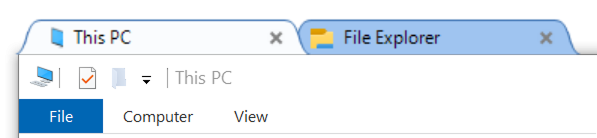
It was originally developed by Maurice Flanagan in 2009 and was provided as free and paid versions. The author who no longer has time to maintain it has open-sourced it. See the original repository: mauricef/WindowTabs.
This repository is a fork of payaneco's repository which is from redgis'. Now, it compiles and runs successfully on Win7, Win10 and Win11.

You can download my prebuilt files from the releases page. You can also compile the exe file as below.
Run
WindowTabs.exe. It will run in the background.Configure for which window group and tab are enabled, along with other settings.
- Right click on the notification icon at the bottom right corner.
- Right click on the tab title.
Any help is very welcome. Feel free to create issues or pull requests. If you'd like to fix issues, you can pick any open issue.
Tested on Win10 with Visual Studio 2019 or 2022.
Clone
git clone https://github.com/leafOfTree/WindowTabsInstall
Visual Studio 2022 community edition
.NET desktop developmentneeds to be selected in the installer.
You need to close Visual Studio first to install the extension. Visual Studio 2019 and its WiX extension also work.
Compile and Release
Launch Visual Studio, open this project by "File > Open > Project/Solution", and select "WindowTabs.sln".
If you choose the
Releaseconfiguration and clickStart, you will get a release versionWindowTabs\WtProgram\bin\Release\WindowTabs.exe.Debug
Choose the
Debugconfiguration and it will compile toWindowTabs\WtProgram\bin\Debug\WindowTabs.exe.
Tips
- In Visual Studio editor, click on the left gray column to add a breakpoint on the current line. Then start
Debugand you can see runtime details. - You can also debug using
System.Diagnostics.Debug.WriteLine("Hello, world");in code to print logs
- Entry point:
Program.fsthis.run - Tray icon (Notify icon):
NotifyIconPlugin.fsthis.icon - Settings Window:
DesktopManagerForm.fs. Its tabs are underManagerViewService/Views/ - Tree:
treeviewadv/. Probably from https://sourceforge.net/projects/treeviewadv/ - Taskbar group:
SuperBarPlugin.fs - GUI framework: WinForms
2025
Add an option to toggle whether
shift+scrollswitches tabs in BehaviorAdd text color option in Appearnce
Add buttons to use preset theme colors: dark mode and blue variant in Appearnce
Fix tabs overlap the minimize button when aligning right
Support mouse hover to activate tab
Add options to save default values of auto hide and align tabs
2024
Improve UI - layout, color, and font
Support close all tabs from taskbar button rightclick menu
Fix WindowTabs's alt+tab collapse when there is no open window
Support Visual Studio 2022
Remove task window peek (preview) to fix task switch error
Use the last file name as tab name
UI improvement on icon and task switch form border
Add option to deactivate
ctrl+1... hotkeysAdd
New windowitem to tab context menuSupport settings file at the same path of exe file
2023
- Recognize ApplicationFrameWindow based Apps like Photo and Mail.
- Fix null exception on toggling Fade out... option.
- Adjust settings font and display.
- Fix the extra empty tab for File Explorer.
- Update packages for Win10.
- Fix desktop
Programstitle missing issue.
mauricef/WindowTabs the original repository