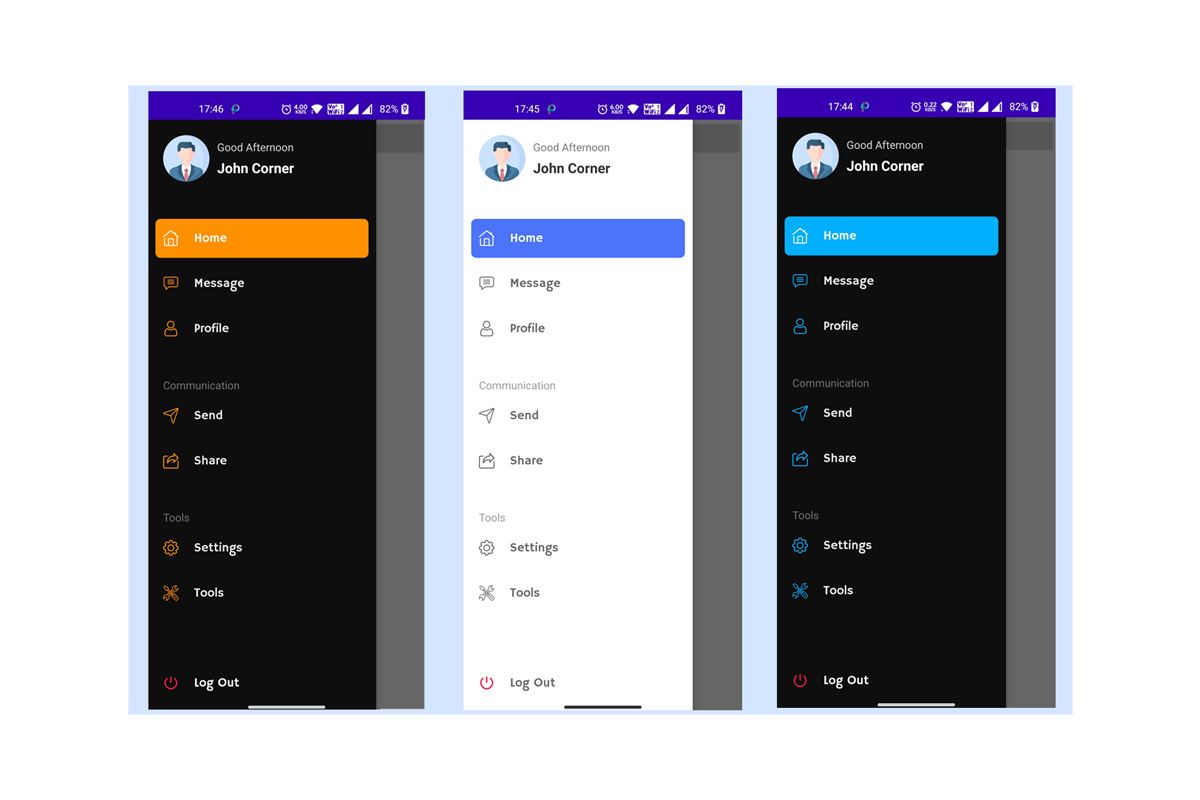
Learnoset Material UI is a powerful library for Android Studio that consist of
- Custom Navigation Drawer
- Material Bottom Bar
- Material Custom Dialogs
- Material Progress Bars
- Material Tab Layout
- Material Toast Messages
- Custom Designed Buttons
- Custom Designed EditText
- Easy to Use
- Don't need to right lengthy code
- Easy to implement
- Responsive Designs
- Modern Designs
1. Add below line in your module level build.gradle file
implementation 'com.github.learnoset:material:3.38'- Add below line in your project level build.gradle file
allprojects {
repositories {
google()
jcenter()
// add below line
maven {url 'https://jitpack.io' }
}
}- Add below code in the XML file
<?xml version="1.0" encoding="utf-8"?>
<androidx.drawerlayout.widget.DrawerLayout xmlns:android="http://schemas.android.com/apk/res/android"xmlns:tools="http://schemas.android.com/tools"android:id="@+id/drawerLayout"android:layout_width="match_parent"android:layout_height="match_parent"tools:context=".MainActivity">
<LinearLayoutandroid:layout_width="match_parent"android:layout_height="match_parent"android:gravity="center">
<androidx.appcompat.widget.AppCompatButton
android:id="@+id/openNavigation"android:layout_width="wrap_content"android:layout_height="wrap_content"android:text="Open Navigation" />
</LinearLayout>
<com.learnoset.material.ui.learnosetnavigationbar.LearnosetNavigationBar
android:id="@+id/navigatioNabr"android:layout_width="wrap_content"android:layout_height="match_parent"android:layout_gravity="start" />
</androidx.drawerlayout.widget.DrawerLayout>- Using Built-In Items in the Navigation Bar
finalDrawerLayoutdrawerLayout = findViewById(R.id.drawerLayout);
finalButtonopenNavigationBtn = findViewById(R.id.openNavigation);
finalLearnosetNavigationBarlearnosetNavigationBar = findViewById(R.id.navigatioNabr);
// You can use some Built-In Navigation ItemslearnosetNavigationBar.addNavItem(LearnosetNavItem.BuiltInItems.HOME);
learnosetNavigationBar.addNavItem(LearnosetNavItem.BuiltInItems.DASHBOARD);
learnosetNavigationBar.addNavItem(LearnosetNavItem.BuiltInItems.SETTINGS);
// setting Drawer Layout with Drawer Gravity. If LEFT then Navigation Bar opens from Left Side. If RIGHT then opens from right SidelearnosetNavigationBar.setDrawerLayout(drawerLayout, LearnosetNavigationBar.DrawerGravity.LEFT);
// open drawer on button clickopenNavigationBtn.setOnClickListener(newView.OnClickListener() {
@OverridepublicvoidonClick(Viewv) {
drawerLayout.openDrawer(GravityCompat.START);
}
});- Using your own custom Item Names and Icons
// You can use Custom ItemsLearnosetNavItemcustomItem1 = newLearnosetNavItem();
customItem1.setTitle("Custom Title");
customItem1.setIcon(R.drawable.custom_icon);
LearnosetNavItemcustomItem2 = newLearnosetNavItem("Custom Item 2", R.drawable.custom_item_2);
// adding custom items to Learnoset Navigation BarlearnosetNavigationBar.addNavItem(customItem1);
learnosetNavigationBar.addNavItem(customItem2);- Creating Group of Items
// CREATING GROUP OF ITEMSNavItemsGroupnavItemsGroup = newNavItemsGroup("Group Name");
// adding Built-In Items to the groupnavItemsGroup.addGroupItem(LearnosetNavItem.BuiltInItems.HOME);
navItemsGroup.addGroupItem(LearnosetNavItem.BuiltInItems.SEARCH);
// adding custom Items to the groupnavItemsGroup.addGroupItem(newLearnosetNavItem("Custom Group Item", R.drawable.custom_item_icon));
LearnosetNavItemcustomGroupItem2 = newLearnosetNavItem("Custom Group Item 3 ", R.drawable.custom_item_3);
navItemsGroup.addGroupItem(customGroupItem2);
// adding group to the Navigation BarlearnosetNavigationBar.addItemsGroup(navItemsGroup);- Using Navigation Themes
learnosetNavigationBar.setTheme(LearnosetNavigationBar.NavThemes.DARK);
// ORlearnosetNavigationBar.setTheme(LearnosetNavigationBar.NavThemes.LIGHT);
// OR// Setting Custom ThemeCustomNavThemecustomNavTheme = newCustomNavTheme();
customNavTheme.setIconsColor(Color.parseColor("#FF03DAC5"));
customNavTheme.setNavigationBackground(Color.BLACK);
customNavTheme.setSelectedItemBackgroundColor(Color.parseColor("#FF03DAC5"));
customNavTheme.setSelectedItemIconColor(Color.ORANGE);
customNavTheme.setSelectedItemTextColor(Color.YELLOW);
customNavTheme.setTextColor(Color.WHITE);
learnosetNavigationBar.setTheme(customNavTheme);- Add Event Listener
learnosetNavigationBar.setEventListener(newNavigationEventListener() {
@OverridepublicvoidonItemSelected(intposition, LearnosetNavItemselectedNavItem) {
// TODO Your code goes here to perform action according to the selected Item
}
});- Change Selected Item Background Color
learnosetNavigationBar.setSelectedItemBackground(LearnosetNavigationBar.NavColors.ORANGE);- Change Icons Color
learnosetNavigationBar.setIconsColor(LearnosetNavigationBar.NavColors.RED);- Setting Header Data (Profile Name & Profile Picture)
// setting header profile name and profile image (from resources)learnosetNavigationBar.setHeaderData("John Corner", R.drawable.profile_image);
// setting header profile name and profile image (from File)Filefile = newFile("You Image File Path");
try {
learnosetNavigationBar.setHeaderData("John Corner", file);
} catch (LearnosetExceptionslearnosetExceptions) {
learnosetExceptions.printStackTrace();
}
// setting header profile name and profile image (from URL)learnosetNavigationBar.setHeaderData("John Corner", "url of image");- Hide Log Out Button
learnosetNavigationBar.enableLogOutBtn(false);- Add below code in your XML file
<com.learnoset.material.ui.learnosetbottombar.LearnosetBottomBar
android:id="@+id/bottomBar"android:layout_width="match_parent"android:layout_height="70dp"android:layout_alignParentBottom="true" />- Add below code in your Activity.class file
finalLearnosetBottomBarbottomBar = findViewById(R.id.bottomBar);
// adding Items to the bottom bar (You can also use Built-In Items and Icons)bottomBar.addItem(BottomBarItem.BuiltInItems.HOME);
bottomBar.addItem(BottomBarItem.BuiltInItems.MESSAGE);
bottomBar.addItem(BottomBarItem.BuiltInItems.SETTINGS);
bottomBar.addItem(BottomBarItem.BuiltInItems.PROFILE);
// OR you can also add custom Item with your own Text and IconbottomBar.addItem(newBottomBarItem("Custom Item 1", R.drawable.custom_icon));- Using themes with Bottom Bar
bottomBar.setTheme(LearnosetBottomBar.BottomBarTheme.LIGHT);
// ORbottomBar.setTheme(LearnosetBottomBar.BottomBarTheme.DARK);
// ORCustomBottomBarThemecustomBottomBarTheme = newCustomBottomBarTheme(); // creating custom theme objectcustomBottomBarTheme.setBackgroundColor(Color.BLACK); // set background color for bottom barcustomBottomBarTheme.setSelectedItemBackgroundColor(LearnosetBottomBar.LearnosetColors.ORANGE); // setting selected item background colorcustomBottomBarTheme.setIconsColor(LearnosetBottomBar.LearnosetColors.ORANGE); // setting icons colorcustomBottomBarTheme.setSelectedItemTextColor(Color.WHITE); // setting text colorbottomBar.setTheme(customBottomBarTheme); // setting custom theme to the bottom bar// new bottom bar animations are coming soon.- Bottom Bar Animation
// enable animationbottomBar.enableAnimation(true);
// OR// disable animationbottomBar.enableAnimation(false);
// new bottom bar animations are coming soon.
You can Visit our Website to learn more about Android App Development, Java, Python, JavaScript, Artificial Intelligence
Learnoset Website
We provide source code for Login & Register pages, Custom Dialogs, Custom Navigation Bar, Custom Toolbar, Custom Bottom Bar with material UI design and complete project files