A single file implementation of key-value database for Python 3.
I use this to store millions of image metadata in many machine learning projects.
SFDB is especially useful when I want to store millions of Stable Diffusion prompts. Its effectiveness is also validated in my many other projects.
Just copy the single file "sfdb.py" to any project.
No installation. No dependencies.
The only one python file has less than 150 lines of codes and only uses Python 3 standard libraries.
importsfdb# Will create a new file or open an existing file.db=sfdb.Database(filename='test.db')
# Add or update itemsdb['hello'] =1db['123'] ='hi'db['a'] = [1, 2, 3]
db['bad'] ='garbage'# Delete itemsdeldb['bad']
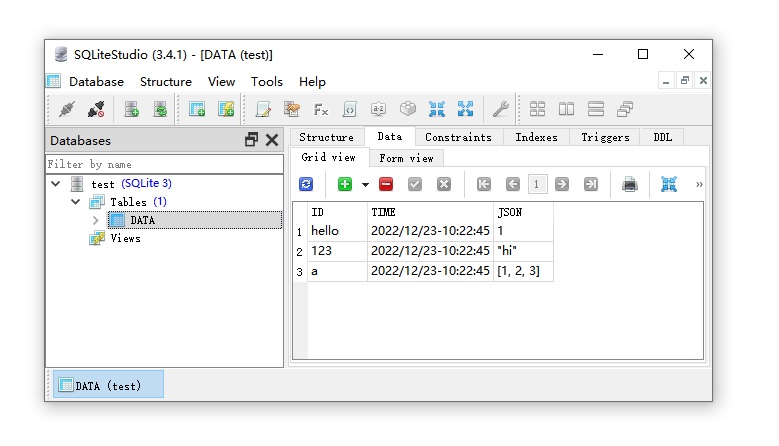
# Read itemsprint(db['123']) # Will print "hi".print(len(db)) # Will print "3".Your data is stored with sqlite format, so that you can view all your data with any sqlite viewers like SQLiteStudio or Jetbrain Datagrip.
All items are human-readable json text.
You can access all data even without using SFDB.
View (and even edit) your data anytime outside your project.
This is what you see in your file explorer:
If your database is small, you can just read everything to memory in various format with one line of code.
importsfdbdb=sfdb.Database(filename='test.db')
cache=db.tolist()
print(cache)
# [('hello', 1), ('123', 'hi'), ('a', [1, 2, 3])]cache=db.todict()
print(cache)
# {'hello': 1, '123': 'hi', 'a': [1, 2, 3]}cache=db.keys()
print(cache)
# ['123', 'a', 'hello']You can process any large data without loading everything to your memory.
importsfdb# Oh god this database has 10 TB data.db=sfdb.Database(filename='very_large_database_with_10TB.db')
# Update it without loading database to memory.db['anything'] =123456# Search item without loading database to memory.if'another_thing'indb:
print('Cool!')
# Get itemprint(db['another_thing']) # Try to get item with default value as None if item not found.print(db.get('another_thing', default=None))
forkey, valueindb:
# Read data items one-by-one.# This only requires very small memory.print(key)
print(value)Everything is thread-safe.
Do anything you want to do.
Your data are safe.
All data are valid if you only write valid data.
Quit you application with Ctrl+C does not damage the integrity of database structure.
A reference is here:
An SQLite database is highly resistant to corruption. If an application crash, or an operating-system crash, or even a power failure occurs in the middle of a transaction, the partially written transaction should be automatically rolled back the next time the database file is accessed. The recovery process is fully automatic and does not require any action on the part of the user or the application.
The hard disk writing is optimized to speed up the processing and protect your SSD/HDD drive.
All data updating are updated immediately from the perspective of your python program (i.e., your code logic), but the actual writing to the hard disk only happens when
(1) your program quit/end, OR
(2) every 16384 (16 * 1024) updates, OR
(3) every 60 seconds.
You can force the current updates to be written to the hard disk with
db.commit() # But you do not need to do it.but you do NOT need to do so, since it is slow, and we have already optimized it. Or you can use
db.close() # Close a database when you quit (but you do not need to do it).or
deldb# Dispose the instance when you quit (but you do not need to do it).If you want to look professional, you can use "with" context manager like
importsfdbwithsfdb.Database(filename='test.db') asdb:
print(db['hello'])
Or if you like "tqdm" you can use
importsfdbfromtqdmimporttqdmdb=sfdb.Database(filename='test.db')
forkey, valueintqdm(db):
# You will have a nice progress bar provided by tqdm.print(key)
print(value)CC-By 4.0 - Do whatever you want to do.