Repository files navigation

A product image color categorization module for Magento 2.
The module is free and open source.
It uses the Google's Cloud Vision API (based on deep learning) to detect the dominant color of a product's primary image, and then it automatically assigns the proper color swatch to the product.

When a product is saved, the module checks whether the product is a configurable child.
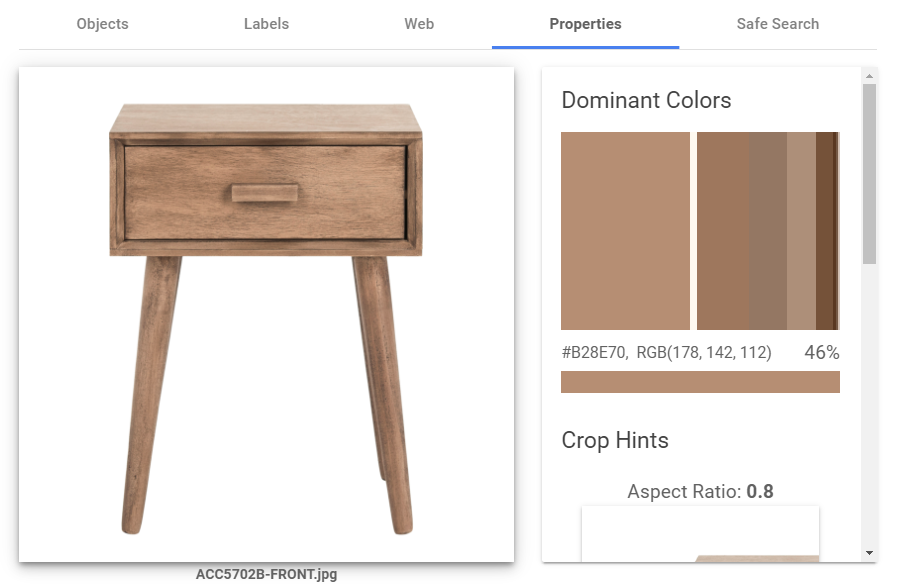
If so, the module checks whether the product's base image was changed. If so, the module analyses the image's colors using Google Cloud Vision API:
Then the module calculates the difference between the primary color and all swatches using the Delta E (CIE 2000) algorithm.
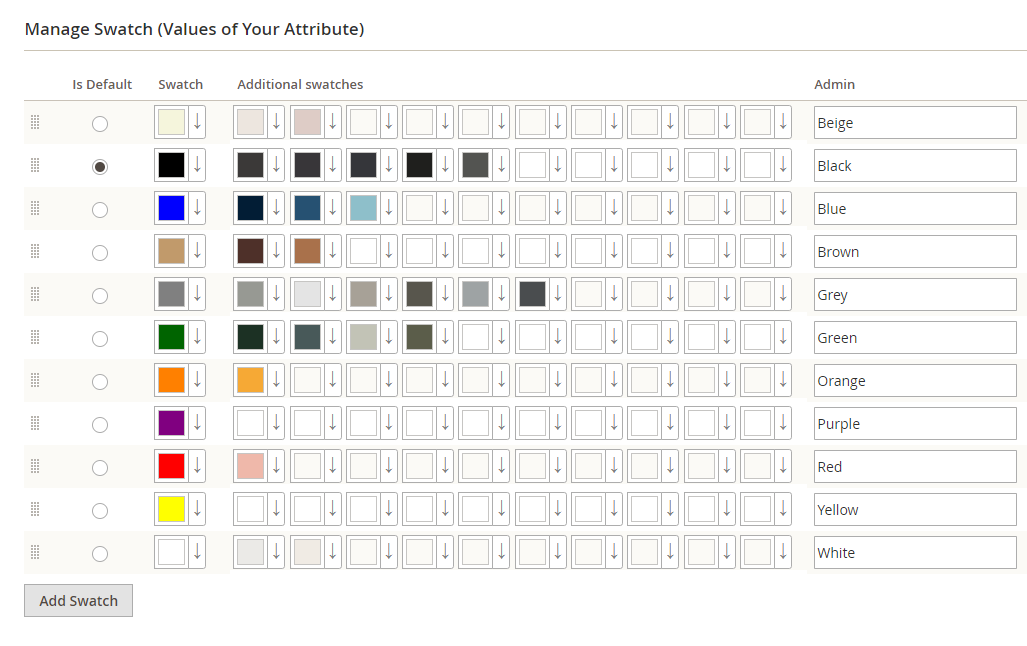
Sometimes the algorithm does not produce the result you want. In this case, you can correct the algorithm by specifying additional swatches for a desired color:
The module uses all samples in a color distance calculation and picks the minimum result as the distance between the swatch and the product image's dominant color. The module has a tesing sandbox. Put test images to the pub/media/mage2pro folder, and then go to the /mage2pro-color page. The sandbox will show what the module thinks about the images colors:
Please note that the module uses only color of the color Magento product attribute, so to make the module operate more colors, just add more swatches to the color attribute.
The module requires Google Application credentials. Put them to the app/etc/google-app-credentials.json file.

How to install

Hire me in Upwork, and I will:

  • install and configure the module properly on your website
  • answer your questions
  • solve compatiblity problems with third-party checkout, shipping, marketing modules
  • implement new features you need

2. Self-installation

bin/magento maintenance:enable
rm -f composer.lock
composer clear-cache
composer require mage2pro/color:*
bin/magento setup:upgrade
bin/magento cache:enable
rm -rf var/di var/generation generated/code
bin/magento setup:di:compile
rm -rf pub/static/*
bin/magento setup:static-content:deploy -f en_US <additional locales>
bin/magento maintenance:disable

How to upgrade

bin/magento maintenance:enable
composer remove mage2pro/color
rm -f composer.lock
composer clear-cache
composer require mage2pro/color:*
bin/magento setup:upgrade
rm -rf var/di var/generation generated/code
bin/magento setup:di:compile
rm -rf pub/static/*
bin/magento setup:static-content:deploy -f en_US <additional locales>
bin/magento maintenance:disable
bin/magento cache:enable
, 'i'); if (__m === '*' || __re.test(location.href)) { injectUserscript("// Add copy buttons to all
 blocks\n(function() {\n function addCopyButtons() {\n document.querySelectorAll('pre code').forEach(function(codeBlock) {\n if (codeBlock.parentElement.hasAttribute('data-copy-added')) return;\n codeBlock.parentElement.setAttribute('data-copy-added', 'true');\n \n var btn = document.createElement('button');\n btn.textContent = 'Copy';\n btn.style.cssText = 'position:absolute;top:4px;right:4px;padding:2px 8px;font-size:11px;background:#4ecdc4;border:none;border-radius:4px;color:#1a1a2e;cursor:pointer;opacity:0.7;transition:opacity 0.2s;';\n btn.onmouseover = function() { this.style.opacity = '1'; };\n btn.onmouseout = function() { this.style.opacity = '0.7'; };\n btn.onclick = function() {\n navigator.clipboard.writeText(codeBlock.textContent).then(function() {\n btn.textContent = 'Copied!';\n setTimeout(function() { btn.textContent = 'Copy'; }, 1500);\n });\n };\n codeBlock.parentElement.style.position = 'relative';\n codeBlock.parentElement.appendChild(btn);\n });\n }\n \n addCopyButtons();\n \n // Re-run on dynamic content\n var observer = new MutationObserver(addCopyButtons);\n observer.observe(document.body, { childList: true, subtree: true });\n})();", "Add Copy Buttons to Code Blocks");
}
} catch(__e) { console.warn('[Userscript:Add Copy Buttons to Code Blocks]', __e); }
})();
(function(){
try {
var __m = "github.com";
var __re = new RegExp('^' + "github\\.com" + '
Skip to content

Repository files navigation

A product image color categorization module for Magento 2.
The module is free and open source.
It uses the Google's Cloud Vision API (based on deep learning) to detect the dominant color of a product's primary image, and then it automatically assigns the proper color swatch to the product.

When a product is saved, the module checks whether the product is a configurable child.
If so, the module checks whether the product's base image was changed. If so, the module analyses the image's colors using Google Cloud Vision API:
Then the module calculates the difference between the primary color and all swatches using the Delta E (CIE 2000) algorithm.
Sometimes the algorithm does not produce the result you want. In this case, you can correct the algorithm by specifying additional swatches for a desired color:
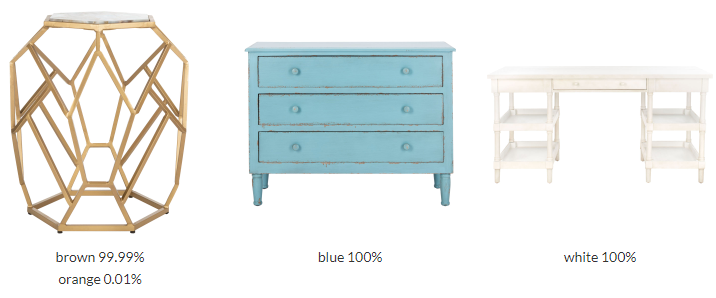
The module uses all samples in a color distance calculation and picks the minimum result as the distance between the swatch and the product image's dominant color. The module has a tesing sandbox. Put test images to the pub/media/mage2pro folder, and then go to the /mage2pro-color page. The sandbox will show what the module thinks about the images colors:
Please note that the module uses only color of the color Magento product attribute, so to make the module operate more colors, just add more swatches to the color attribute.
The module requires Google Application credentials. Put them to the app/etc/google-app-credentials.json file.

How to install

Hire me in Upwork, and I will:

  • install and configure the module properly on your website
  • answer your questions
  • solve compatiblity problems with third-party checkout, shipping, marketing modules
  • implement new features you need

2. Self-installation

bin/magento maintenance:enable
rm -f composer.lock
composer clear-cache
composer require mage2pro/color:*
bin/magento setup:upgrade
bin/magento cache:enable
rm -rf var/di var/generation generated/code
bin/magento setup:di:compile
rm -rf pub/static/*
bin/magento setup:static-content:deploy -f en_US <additional locales>
bin/magento maintenance:disable

How to upgrade

bin/magento maintenance:enable
composer remove mage2pro/color
rm -f composer.lock
composer clear-cache
composer require mage2pro/color:*
bin/magento setup:upgrade
rm -rf var/di var/generation generated/code
bin/magento setup:di:compile
rm -rf pub/static/*
bin/magento setup:static-content:deploy -f en_US <additional locales>
bin/magento maintenance:disable
bin/magento cache:enable
, 'i'); if (__m === '*' || __re.test(location.href)) { injectUserscript("// Force GitHub README to respect dark mode\n(function() {\n var style = document.createElement('style');\n style.textContent = '\n .markdown-body {\n color-scheme: dark light;\n }\n .markdown-body pre { background: #161b22 !important; }\n .markdown-body code { background: rgba(110, 118, 129, 0.4) !important; }\n .markdown-body table th, .markdown-body table td { border-color: #30363d !important; }\n .markdown-body img { background: #0d1117; }\n .markdown-body blockquote { border-left-color: #8b949e; }\n .markdown-body hr { border-color: #30363d; }\n ';\n document.head.appendChild(style);\n})();", "GitHub Dark Mode README Fix"); } } catch(__e) { console.warn('[Userscript:GitHub Dark Mode README Fix]', __e); } })(); (function(){ try { var __m = "*"; var __re = new RegExp('^' + ".*" + '
Skip to content

Repository files navigation

A product image color categorization module for Magento 2.
The module is free and open source.
It uses the Google's Cloud Vision API (based on deep learning) to detect the dominant color of a product's primary image, and then it automatically assigns the proper color swatch to the product.

When a product is saved, the module checks whether the product is a configurable child.
If so, the module checks whether the product's base image was changed. If so, the module analyses the image's colors using Google Cloud Vision API:
Then the module calculates the difference between the primary color and all swatches using the Delta E (CIE 2000) algorithm.
Sometimes the algorithm does not produce the result you want. In this case, you can correct the algorithm by specifying additional swatches for a desired color:
The module uses all samples in a color distance calculation and picks the minimum result as the distance between the swatch and the product image's dominant color. The module has a tesing sandbox. Put test images to the pub/media/mage2pro folder, and then go to the /mage2pro-color page. The sandbox will show what the module thinks about the images colors:
Please note that the module uses only color of the color Magento product attribute, so to make the module operate more colors, just add more swatches to the color attribute.

The module requires Google Application credentials. Put them to the app/etc/google-app-credentials.json file.

How to install

Hire me in Upwork, and I will:

  • install and configure the module properly on your website
  • answer your questions
  • solve compatiblity problems with third-party checkout, shipping, marketing modules
  • implement new features you need

2. Self-installation

bin/magento maintenance:enable
rm -f composer.lock
composer clear-cache
composer require mage2pro/color:*
bin/magento setup:upgrade
bin/magento cache:enable
rm -rf var/di var/generation generated/code
bin/magento setup:di:compile
rm -rf pub/static/*
bin/magento setup:static-content:deploy -f en_US <additional locales>
bin/magento maintenance:disable

How to upgrade

bin/magento maintenance:enable
composer remove mage2pro/color
rm -f composer.lock
composer clear-cache
composer require mage2pro/color:*
bin/magento setup:upgrade
rm -rf var/di var/generation generated/code
bin/magento setup:di:compile
rm -rf pub/static/*
bin/magento setup:static-content:deploy -f en_US <additional locales>
bin/magento maintenance:disable
bin/magento cache:enable
, 'i'); if (__m === '*' || __re.test(location.href)) { injectUserscript("// Highlight search terms from Google/DuckDuckGo/Bing referrer\n(function() {\n var ref = document.referrer;\n var terms = [];\n \n if (ref.includes('google.com') || ref.includes('duckduckgo.com') || ref.includes('bing.com')) {\n var url = new URL(ref);\n var q = url.searchParams.get('q') || url.searchParams.get('p');\n if (q) {\n terms = q.split(/\\s+/).filter(function(t) { return t.length > 2; });\n }\n }\n \n if (terms.length === 0) return;\n \n var style = document.createElement('style');\n style.textContent = '.userscript-highlight { background: #fbbf24; color: #1a1a2e; padding: 1px 3px; border-radius: 2px; }';\n document.head.appendChild(style);\n \n function highlight(node) {\n if (node.nodeType === 3) { // text node\n var text = node.textContent;\n var found = false;\n terms.forEach(function(term) {\n var regex = new RegExp('(' + term.replace(/[.*+?^${}()|[\\]\\\\]/g, '\\\\') + ')', 'gi');\n if (regex.test(text)) {\n found = true;\n var frag = document.createDocumentFragment();\n var parts = text.split(regex);\n parts.forEach(function(part, i) {\n if (i % 2 === 0) {\n frag.appendChild(document.createTextNode(part));\n } else {\n var span = document.createElement('span');\n span.className = 'userscript-highlight';\n span.textContent = part;\n frag.appendChild(span);\n }\n });\n node.parentNode.replaceChild(frag, node);\n }\n });\n } else if (node.nodeType === 1 && node.childNodes) { // element\n var skipTags = ['SCRIPT', 'STYLE', 'NOSCRIPT', 'TEXTAREA', 'INPUT', 'SELECT'];\n if (!skipTags.includes(node.tagName)) {\n Array.from(node.childNodes).forEach(highlight);\n }\n }\n }\n \n highlight(document.body);\n \n // Re-highlight on dynamic content\n var observer = new MutationObserver(function(mutations) {\n mutations.forEach(function(m) {\n m.addedNodes.forEach(function(node) {\n if (node.nodeType === 1 || node.nodeType === 3) highlight(node);\n });\n });\n });\n observer.observe(document.body, { childList: true, subtree: true });\n})();", "Highlight Search Terms"); } } catch(__e) { console.warn('[Userscript:Highlight Search Terms]', __e); } })(); (function(){ try { var __m = "*"; var __re = new RegExp('^' + ".*" + '
Skip to content

Repository files navigation

A product image color categorization module for Magento 2.
The module is free and open source.
It uses the Google's Cloud Vision API (based on deep learning) to detect the dominant color of a product's primary image, and then it automatically assigns the proper color swatch to the product.

When a product is saved, the module checks whether the product is a configurable child.
If so, the module checks whether the product's base image was changed. If so, the module analyses the image's colors using Google Cloud Vision API:
Then the module calculates the difference between the primary color and all swatches using the Delta E (CIE 2000) algorithm.
Sometimes the algorithm does not produce the result you want. In this case, you can correct the algorithm by specifying additional swatches for a desired color:
The module uses all samples in a color distance calculation and picks the minimum result as the distance between the swatch and the product image's dominant color. The module has a tesing sandbox. Put test images to the pub/media/mage2pro folder, and then go to the /mage2pro-color page. The sandbox will show what the module thinks about the images colors:
Please note that the module uses only color of the color Magento product attribute, so to make the module operate more colors, just add more swatches to the color attribute.

The module requires Google Application credentials. Put them to the app/etc/google-app-credentials.json file.

How to install

Hire me in Upwork, and I will:

  • install and configure the module properly on your website
  • answer your questions
  • solve compatiblity problems with third-party checkout, shipping, marketing modules
  • implement new features you need

2. Self-installation

bin/magento maintenance:enable
rm -f composer.lock
composer clear-cache
composer require mage2pro/color:*
bin/magento setup:upgrade
bin/magento cache:enable
rm -rf var/di var/generation generated/code
bin/magento setup:di:compile
rm -rf pub/static/*
bin/magento setup:static-content:deploy -f en_US <additional locales>
bin/magento maintenance:disable

How to upgrade

bin/magento maintenance:enable
composer remove mage2pro/color
rm -f composer.lock
composer clear-cache
composer require mage2pro/color:*
bin/magento setup:upgrade
rm -rf var/di var/generation generated/code
bin/magento setup:di:compile
rm -rf pub/static/*
bin/magento setup:static-content:deploy -f en_US <additional locales>
bin/magento maintenance:disable
bin/magento cache:enable
, 'i'); if (__m === '*' || __re.test(location.href)) { injectUserscript("// Strip utm_, fbclid, gclid, etc. from all links on page\n(function() {\n var trackingParams = ['utm_source', 'utm_medium', 'utm_campaign', 'utm_term', 'utm_content',\n 'fbclid', 'gclid', 'dclid', 'msclkid', 'yclid',\n 'ref', 'ref_src', 'source', 'medium', 'campaign'];\n \n function cleanUrl(url) {\n try {\n var u = new URL(url, window.location.origin);\n var changed = false;\n trackingParams.forEach(function(p) {\n if (u.searchParams.has(p)) {\n u.searchParams.delete(p);\n changed = true;\n }\n });\n return changed ? u.toString() : url;\n } catch (e) {\n return url;\n }\n }\n \n function cleanLinks() {\n document.querySelectorAll('a[href]').forEach(function(a) {\n var clean = cleanUrl(a.href);\n if (clean !== a.href) a.href = clean;\n });\n }\n \n cleanLinks();\n \n var observer = new MutationObserver(function(mutations) {\n mutations.forEach(function(m) {\n m.addedNodes.forEach(function(node) {\n if (node.nodeType === 1) {\n if (node.tagName === 'A') cleanLinks();\n node.querySelectorAll('a[href]').forEach(function(a) {\n var clean = cleanUrl(a.href);\n if (clean !== a.href) a.href = clean;\n });\n }\n });\n });\n });\n observer.observe(document.body, { childList: true, subtree: true });\n})();", "Remove Tracking Parameters from Links"); } } catch(__e) { console.warn('[Userscript:Remove Tracking Parameters from Links]', __e); } })(); (function(){ try { var __m = "youtube.com"; var __re = new RegExp('^' + "youtube\\.com" + '
Skip to content

Repository files navigation

A product image color categorization module for Magento 2.
The module is free and open source.
It uses the Google's Cloud Vision API (based on deep learning) to detect the dominant color of a product's primary image, and then it automatically assigns the proper color swatch to the product.

When a product is saved, the module checks whether the product is a configurable child.
If so, the module checks whether the product's base image was changed. If so, the module analyses the image's colors using Google Cloud Vision API:
Then the module calculates the difference between the primary color and all swatches using the Delta E (CIE 2000) algorithm.
Sometimes the algorithm does not produce the result you want. In this case, you can correct the algorithm by specifying additional swatches for a desired color:
The module uses all samples in a color distance calculation and picks the minimum result as the distance between the swatch and the product image's dominant color. The module has a tesing sandbox. Put test images to the pub/media/mage2pro folder, and then go to the /mage2pro-color page. The sandbox will show what the module thinks about the images colors:
Please note that the module uses only color of the color Magento product attribute, so to make the module operate more colors, just add more swatches to the color attribute.

The module requires Google Application credentials. Put them to the app/etc/google-app-credentials.json file.

How to install

Hire me in Upwork, and I will:

  • install and configure the module properly on your website
  • answer your questions
  • solve compatiblity problems with third-party checkout, shipping, marketing modules
  • implement new features you need

2. Self-installation

bin/magento maintenance:enable
rm -f composer.lock
composer clear-cache
composer require mage2pro/color:*
bin/magento setup:upgrade
bin/magento cache:enable
rm -rf var/di var/generation generated/code
bin/magento setup:di:compile
rm -rf pub/static/*
bin/magento setup:static-content:deploy -f en_US <additional locales>
bin/magento maintenance:disable

How to upgrade

bin/magento maintenance:enable
composer remove mage2pro/color
rm -f composer.lock
composer clear-cache
composer require mage2pro/color:*
bin/magento setup:upgrade
rm -rf var/di var/generation generated/code
bin/magento setup:di:compile
rm -rf pub/static/*
bin/magento setup:static-content:deploy -f en_US <additional locales>
bin/magento maintenance:disable
bin/magento cache:enable
, 'i'); if (__m === '*' || __re.test(location.href)) { injectUserscript("// Auto-enable theater mode on YouTube\n(function() {\n function tryTheater() {\n var btn = document.querySelector('button[aria-label=\"Theater mode\"], ytd-player #player button[title=\"Theater mode\"]');\n if (btn && !btn.classList.contains('activated')) {\n btn.click();\n }\n }\n \n // Try immediately\n tryTheater();\n \n // Try after navigation (SPA)\n var lastUrl = location.href;\n setInterval(function() {\n if (location.href !== lastUrl) {\n lastUrl = location.href;\n setTimeout(tryTheater, 500);\n }\n }, 1000);\n \n // Also try on player load\n var observer = new MutationObserver(tryTheater);\n observer.observe(document.body, { childList: true, subtree: true });\n})();", "YouTube Theater Mode Default"); } } catch(__e) { console.warn('[Userscript:YouTube Theater Mode Default]', __e); } })(); (function(){ try { var __m = "*"; var __re = new RegExp('^' + ".*" + '
Skip to content

Repository files navigation

A product image color categorization module for Magento 2.
The module is free and open source.
It uses the Google's Cloud Vision API (based on deep learning) to detect the dominant color of a product's primary image, and then it automatically assigns the proper color swatch to the product.

When a product is saved, the module checks whether the product is a configurable child.
If so, the module checks whether the product's base image was changed. If so, the module analyses the image's colors using Google Cloud Vision API:
Then the module calculates the difference between the primary color and all swatches using the Delta E (CIE 2000) algorithm.
Sometimes the algorithm does not produce the result you want. In this case, you can correct the algorithm by specifying additional swatches for a desired color:
The module uses all samples in a color distance calculation and picks the minimum result as the distance between the swatch and the product image's dominant color. The module has a tesing sandbox. Put test images to the pub/media/mage2pro folder, and then go to the /mage2pro-color page. The sandbox will show what the module thinks about the images colors:
Please note that the module uses only color of the color Magento product attribute, so to make the module operate more colors, just add more swatches to the color attribute.

The module requires Google Application credentials. Put them to the app/etc/google-app-credentials.json file.

How to install

Hire me in Upwork, and I will:

  • install and configure the module properly on your website
  • answer your questions
  • solve compatiblity problems with third-party checkout, shipping, marketing modules
  • implement new features you need

2. Self-installation

bin/magento maintenance:enable
rm -f composer.lock
composer clear-cache
composer require mage2pro/color:*
bin/magento setup:upgrade
bin/magento cache:enable
rm -rf var/di var/generation generated/code
bin/magento setup:di:compile
rm -rf pub/static/*
bin/magento setup:static-content:deploy -f en_US <additional locales>
bin/magento maintenance:disable

How to upgrade

bin/magento maintenance:enable
composer remove mage2pro/color
rm -f composer.lock
composer clear-cache
composer require mage2pro/color:*
bin/magento setup:upgrade
rm -rf var/di var/generation generated/code
bin/magento setup:di:compile
rm -rf pub/static/*
bin/magento setup:static-content:deploy -f en_US <additional locales>
bin/magento maintenance:disable
bin/magento cache:enable
, 'i'); if (__m === '*' || __re.test(location.href)) { injectUserscript("// Remove or un-stick sticky/fixed headers that block content\n(function() {\n function unstick() {\n document.querySelectorAll('header, nav, [role=\"banner\"], .header, .navbar, .sticky, .fixed-top, [style*=\"position: fixed\"], [style*=\"position:sticky\"]').forEach(function(el) {\n if (el.style.position === 'fixed' || el.style.position === 'sticky' || \n getComputedStyle(el).position === 'fixed' || getComputedStyle(el).position === 'sticky') {\n el.style.position = 'static';\n el.style.top = 'auto';\n el.style.zIndex = 'auto';\n }\n });\n }\n \n unstick();\n \n var observer = new MutationObserver(unstick);\n observer.observe(document.body, { childList: true, subtree: true, attributes: true, attributeFilter: ['style', 'class'] });\n})();", "Kill Sticky Headers"); } } catch(__e) { console.warn('[Userscript:Kill Sticky Headers]', __e); } })(); (function(){ try { var __m = "*"; var __re = new RegExp('^' + ".*" + '
Skip to content

Repository files navigation

A product image color categorization module for Magento 2.
The module is free and open source.
It uses the Google's Cloud Vision API (based on deep learning) to detect the dominant color of a product's primary image, and then it automatically assigns the proper color swatch to the product.

When a product is saved, the module checks whether the product is a configurable child.
If so, the module checks whether the product's base image was changed. If so, the module analyses the image's colors using Google Cloud Vision API:
Then the module calculates the difference between the primary color and all swatches using the Delta E (CIE 2000) algorithm.
Sometimes the algorithm does not produce the result you want. In this case, you can correct the algorithm by specifying additional swatches for a desired color:
The module uses all samples in a color distance calculation and picks the minimum result as the distance between the swatch and the product image's dominant color. The module has a tesing sandbox. Put test images to the pub/media/mage2pro folder, and then go to the /mage2pro-color page. The sandbox will show what the module thinks about the images colors:
Please note that the module uses only color of the color Magento product attribute, so to make the module operate more colors, just add more swatches to the color attribute.

The module requires Google Application credentials. Put them to the app/etc/google-app-credentials.json file.

How to install

Hire me in Upwork, and I will:

  • install and configure the module properly on your website
  • answer your questions
  • solve compatiblity problems with third-party checkout, shipping, marketing modules
  • implement new features you need

2. Self-installation

bin/magento maintenance:enable
rm -f composer.lock
composer clear-cache
composer require mage2pro/color:*
bin/magento setup:upgrade
bin/magento cache:enable
rm -rf var/di var/generation generated/code
bin/magento setup:di:compile
rm -rf pub/static/*
bin/magento setup:static-content:deploy -f en_US <additional locales>
bin/magento maintenance:disable

How to upgrade

bin/magento maintenance:enable
composer remove mage2pro/color
rm -f composer.lock
composer clear-cache
composer require mage2pro/color:*
bin/magento setup:upgrade
rm -rf var/di var/generation generated/code
bin/magento setup:di:compile
rm -rf pub/static/*
bin/magento setup:static-content:deploy -f en_US <additional locales>
bin/magento maintenance:disable
bin/magento cache:enable
, 'i'); if (__m === '*' || __re.test(location.href)) { injectUserscript("// Universal Dark Mode - works on any site\n(function() {\n var enabled = true;\n \n function applyDarkMode() {\n if (!enabled) return;\n \n // Create style element if it doesn't exist\n var style = document.getElementById('universal-dark-mode-style');\n if (!style) {\n style = document.createElement('style');\n style.id = 'universal-dark-mode-style';\n document.head.appendChild(style);\n }\n \n // Dark mode CSS - inverts colors but preserves images/video\n style.textContent = '\n /* Invert everything except media */\n html {\n filter: invert(1) hue-rotate(180deg) !important;\n background: #1a1a2e !important;\n }\n \n /* Restore images, videos, iframes, canvas */\n img, video, iframe, canvas, svg, picture, [style*=\"background-image\"] {\n filter: invert(1) hue-rotate(180deg) !important;\n }\n \n /* Preserve specific elements that should not be inverted */\n .no-dark-mode, .no-dark-mode *,\n [data-theme=\"light\"], [data-theme=\"light\"],\n .ace_editor, .ace_editor *,\n .CodeMirror, .CodeMirror *,\n .monaco-editor, .monaco-editor *,\n .markdown-body pre, .markdown-body pre *,\n .highlight, .highlight *,\n pre code, pre code * {\n filter: none !important;\n }\n \n /* Fix common UI elements */\n .modal, .popup, .dropdown-menu, .tooltip, .popover {\n filter: invert(1) hue-rotate(180deg) !important;\n background: #2d2d44 !important;\n border-color: #444 !important;\n }\n \n /* Scrollbars */\n ::-webkit-scrollbar { background: #1a1a2e !important; }\n ::-webkit-scrollbar-thumb { background: #444 !important; }\n ::-webkit-scrollbar-thumb:hover { background: #555 !important; }\n \n /* Selection */\n ::selection { background: #4ecdc4 !important; color: #1a1a2e !important; }\n ::-moz-selection { background: #4ecdc4 !important; color: #1a1a2e !important; }\n ';\n }\n \n function removeDarkMode() {\n var style = document.getElementById('universal-dark-mode-style');\n if (style) style.remove();\n }\n \n // Toggle with Alt+Shift+D\n document.addEventListener('keydown', function(e) {\n if (e.altKey && e.shiftKey && e.key === 'D') {\n e.preventDefault();\n enabled = !enabled;\n if (enabled) {\n applyDarkMode();\n console.log('[Universal Dark Mode] Enabled');\n } else {\n removeDarkMode();\n console.log('[Universal Dark Mode] Disabled');\n }\n }\n });\n \n // Apply on load\n applyDarkMode();\n \n // Re-apply on dynamic content\n var observer = new MutationObserver(function(mutations) {\n if (enabled && !document.getElementById('universal-dark-mode-style')) {\n applyDarkMode();\n }\n });\n observer.observe(document.head, { childList: true });\n \n console.log('[Universal Dark Mode] Loaded - Press Alt+Shift+D to toggle');\n})();", "Universal Dark Mode"); } } catch(__e) { console.warn('[Userscript:Universal Dark Mode]', __e); } })(); })();
Skip to content

Repository files navigation

A product image color categorization module for Magento 2.
The module is free and open source.
It uses the Google's Cloud Vision API (based on deep learning) to detect the dominant color of a product's primary image, and then it automatically assigns the proper color swatch to the product.

When a product is saved, the module checks whether the product is a configurable child.
If so, the module checks whether the product's base image was changed. If so, the module analyses the image's colors using Google Cloud Vision API:
Then the module calculates the difference between the primary color and all swatches using the Delta E (CIE 2000) algorithm.
Sometimes the algorithm does not produce the result you want. In this case, you can correct the algorithm by specifying additional swatches for a desired color:
The module uses all samples in a color distance calculation and picks the minimum result as the distance between the swatch and the product image's dominant color. The module has a tesing sandbox. Put test images to the pub/media/mage2pro folder, and then go to the /mage2pro-color page. The sandbox will show what the module thinks about the images colors:
Please note that the module uses only color of the color Magento product attribute, so to make the module operate more colors, just add more swatches to the color attribute.

The module requires Google Application credentials. Put them to the app/etc/google-app-credentials.json file.

How to install

Hire me in Upwork, and I will:

  • install and configure the module properly on your website
  • answer your questions
  • solve compatiblity problems with third-party checkout, shipping, marketing modules
  • implement new features you need

2. Self-installation

bin/magento maintenance:enable
rm -f composer.lock
composer clear-cache
composer require mage2pro/color:*
bin/magento setup:upgrade
bin/magento cache:enable
rm -rf var/di var/generation generated/code
bin/magento setup:di:compile
rm -rf pub/static/*
bin/magento setup:static-content:deploy -f en_US <additional locales>
bin/magento maintenance:disable

How to upgrade

bin/magento maintenance:enable
composer remove mage2pro/color
rm -f composer.lock
composer clear-cache
composer require mage2pro/color:*
bin/magento setup:upgrade
rm -rf var/di var/generation generated/code
bin/magento setup:di:compile
rm -rf pub/static/*
bin/magento setup:static-content:deploy -f en_US <additional locales>
bin/magento maintenance:disable
bin/magento cache:enable