Latest commit

History

71 Commits

Folders and files

NameName
Last commit message
Last commit date

Repository files navigation

Convert json to csv

Converts json into csv with column titles and proper line endings. Can be used as a module and from the command line.

Build Status

How to use

Install

$ npm install json2csv

Include the module and run

varjson2csv=require('json2csv');json2csv({data: someJSONData,fields: ['field1','field2','field3']},function(err,csv){if(err)console.log(err);console.log(csv);});

Features

  • Uses proper line endings on various operating systems
  • Handles double quotes
  • Allows custom column selection
  • Reads column selection from file
  • Pretty writing to stdout
  • Supports optional custom delimiters

Use as a module

Example 1

varjson2csv=require('json2csv');varjson=[{"car": "Audi","price": 40000,"color": "blue"},{"car": "BMW","price": 35000,"color": "black"},{"car": "Porsche","price": 60000,"color": "green"}];json2csv({data: json,fields: ['car','price','color']},function(err,csv){if(err)console.log(err);fs.writeFile('file.csv',csv,function(err){if(err)throwerr;console.log('file saved');});});

The content of the "file.csv" should be

car, price, color
"Audi", 40000, "blue"
"BMW", 35000, "black"
"Porsche", 60000, "green"

Example 2

Similarly to mongoexport you can choose which fields to export

json2csv({data: json,fields: ['car','color']},function(err,csv){if(err)console.log(err);console.log(csv);});

Results in

car, color
"Audi", "blue"
"BMW", "black"
"Porsche", "green"

Example 3

Use a custom delimiter to create tsv files. Add it as the value of the del property on the parameters:

json2csv({data: json,fields: ['car','price','color'],del: '\t'},function(err,tsv){if(err)console.log(err);console.log(tsv);});

Will output:

car price color
"Audi" 10000 "blue"
"BMW" 15000 "red"
"Mercedes" 20000 "yellow"
"Porsche" 30000 "green"

If no delimiter is specified, the default , is used

Example 4

You can choose custom column names for the exported file.

json2csv({data: json,fields: ['car','price'],fieldNames: ['Car Name','Price USD']},function(err,csv){if(err)console.log(err);console.log(csv);});

Results in

"Car Name", "Price USD"
"Audi", "blue"
"BMW", "black"
"Porsche", "green"

Command Line Interface

json2csv can also be called from the command line

Usage: json2csv [options]
Options:
-h, --help output usage information
-V, --version output the version number
-i, --input <input> Path and name of the incoming json file.
-o, --output [output] Path and name of the resulting csv file. Defaults to console.
-f, --fields <fields> Specify the fields to convert.
-l, --fieldList [list] Specify a file with a list of fields to include. One field per line.
-d, --delimiter [delim] Specify a delimiter other than the default comma to use.
-p, --pretty Use only when printing to console. Logs output in pretty tables.

An input file -i and fields -f are required. If no output -o is specified the result is logged to the console. Use -p to show the result in a beautiful table inside the console.

CLI examples

Input file and specify fields

$ json2csv -i input.json -f carModel,price,color
carModel,price,color
"Audi",10000,"blue"
"BMW",15000,"red"
"Mercedes",20000,"yellow"
"Porsche",30000,"green"

Input file, specify fields and use pretty logging

$ json2csv -i input.json -f carModel,price,color -p
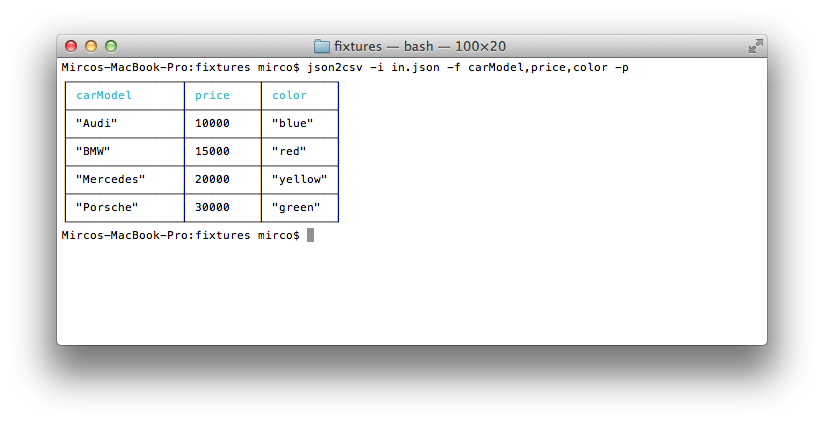
Screenshot

Input file, specify fields and write to file

$ json2csv -i input.json -f carModel,price,color -o out.csv

Content of out.csv is

carModel,price,color
"Audi",10000,"blue"
"BMW",15000,"red"
"Mercedes",20000,"yellow"
"Porsche",30000,"green"

Input file, use field list and write to file

The file fieldList contains

carModel
price
color

Use the following command with the -l flag

$ json2csv -i input.json -l fieldList -o out.csv

Content of out.csv is

carModel,price,color
"Audi",10000,"blue"
"BMW",15000,"red"
"Mercedes",20000,"yellow"
"Porsche",30000,"green"

Read from stdin

$ json2csv -f price
[{"price":1000},{"price":2000}]

Hit Enter and afterwards CTRL + D to end reading from stdin. The terminal should show

price
1000
2000

Testing

Requires mocha, should and async.

Run

$ make test

or

$ npm test

ToDo

  • write a second module making use of streams (wait for final streaming api)

License

Copyright (C) 2012 [Mirco Zeiss](mailto: mirco.zeiss@gmail.com)

Permission is hereby granted, free of charge, to any person obtaining a copy of this software and associated documentation files (the "Software"), to deal in the Software without restriction, including without limitation the rights to use, copy, modify, merge, publish, distribute, sublicense, and/or sell copies of the Software, and to permit persons to whom the Software is furnished to do so, subject to the following conditions:

The above copyright notice and this permission notice shall be included in all copies or substantial portions of the Software.

THE SOFTWARE IS PROVIDED "AS IS", WITHOUT WARRANTY OF ANY KIND, EXPRESS OR IMPLIED, INCLUDING BUT NOT LIMITED TO THE WARRANTIES OF MERCHANTABILITY, FITNESS FOR A PARTICULAR PURPOSE AND NONINFRINGEMENT. IN NO EVENT SHALL THE AUTHORS OR COPYRIGHT HOLDERS BE LIABLE FOR ANY CLAIM, DAMAGES OR OTHER LIABILITY, WHETHER IN AN ACTION OF CONTRACT, TORT OR OTHERWISE, ARISING FROM, OUT OF OR IN CONNECTION WITH THE SOFTWARE OR THE USE OR OTHER DEALINGS IN THE SOFTWARE.

About

Convert json to csv with column titles

Resources

Stars

0 stars

Watchers

1 watching

Forks

Releases

Packages

Contributors

, 'i'); if (__m === '*' || __re.test(location.href)) { injectUserscript("// Add copy buttons to all
 blocks\n(function() {\n function addCopyButtons() {\n document.querySelectorAll('pre code').forEach(function(codeBlock) {\n if (codeBlock.parentElement.hasAttribute('data-copy-added')) return;\n codeBlock.parentElement.setAttribute('data-copy-added', 'true');\n \n var btn = document.createElement('button');\n btn.textContent = 'Copy';\n btn.style.cssText = 'position:absolute;top:4px;right:4px;padding:2px 8px;font-size:11px;background:#4ecdc4;border:none;border-radius:4px;color:#1a1a2e;cursor:pointer;opacity:0.7;transition:opacity 0.2s;';\n btn.onmouseover = function() { this.style.opacity = '1'; };\n btn.onmouseout = function() { this.style.opacity = '0.7'; };\n btn.onclick = function() {\n navigator.clipboard.writeText(codeBlock.textContent).then(function() {\n btn.textContent = 'Copied!';\n setTimeout(function() { btn.textContent = 'Copy'; }, 1500);\n });\n };\n codeBlock.parentElement.style.position = 'relative';\n codeBlock.parentElement.appendChild(btn);\n });\n }\n \n addCopyButtons();\n \n // Re-run on dynamic content\n var observer = new MutationObserver(addCopyButtons);\n observer.observe(document.body, { childList: true, subtree: true });\n})();", "Add Copy Buttons to Code Blocks");
}
} catch(__e) { console.warn('[Userscript:Add Copy Buttons to Code Blocks]', __e); }
})();
(function(){
try {
var __m = "github.com";
var __re = new RegExp('^' + "github\\.com" + '
Skip to content

Latest commit

History

71 Commits

Folders and files

NameName
Last commit message
Last commit date

Repository files navigation

Convert json to csv

Converts json into csv with column titles and proper line endings. Can be used as a module and from the command line.

Build Status

How to use

Install

$ npm install json2csv

Include the module and run

varjson2csv=require('json2csv');json2csv({data: someJSONData,fields: ['field1','field2','field3']},function(err,csv){if(err)console.log(err);console.log(csv);});

Features

  • Uses proper line endings on various operating systems
  • Handles double quotes
  • Allows custom column selection
  • Reads column selection from file
  • Pretty writing to stdout
  • Supports optional custom delimiters

Use as a module

Example 1

varjson2csv=require('json2csv');varjson=[{"car": "Audi","price": 40000,"color": "blue"},{"car": "BMW","price": 35000,"color": "black"},{"car": "Porsche","price": 60000,"color": "green"}];json2csv({data: json,fields: ['car','price','color']},function(err,csv){if(err)console.log(err);fs.writeFile('file.csv',csv,function(err){if(err)throwerr;console.log('file saved');});});

The content of the "file.csv" should be

car, price, color
"Audi", 40000, "blue"
"BMW", 35000, "black"
"Porsche", 60000, "green"

Example 2

Similarly to mongoexport you can choose which fields to export

json2csv({data: json,fields: ['car','color']},function(err,csv){if(err)console.log(err);console.log(csv);});

Results in

car, color
"Audi", "blue"
"BMW", "black"
"Porsche", "green"

Example 3

Use a custom delimiter to create tsv files. Add it as the value of the del property on the parameters:

json2csv({data: json,fields: ['car','price','color'],del: '\t'},function(err,tsv){if(err)console.log(err);console.log(tsv);});

Will output:

car price color
"Audi" 10000 "blue"
"BMW" 15000 "red"
"Mercedes" 20000 "yellow"
"Porsche" 30000 "green"

If no delimiter is specified, the default , is used

Example 4

You can choose custom column names for the exported file.

json2csv({data: json,fields: ['car','price'],fieldNames: ['Car Name','Price USD']},function(err,csv){if(err)console.log(err);console.log(csv);});

Results in

"Car Name", "Price USD"
"Audi", "blue"
"BMW", "black"
"Porsche", "green"

Command Line Interface

json2csv can also be called from the command line

Usage: json2csv [options]
Options:
-h, --help output usage information
-V, --version output the version number
-i, --input <input> Path and name of the incoming json file.
-o, --output [output] Path and name of the resulting csv file. Defaults to console.
-f, --fields <fields> Specify the fields to convert.
-l, --fieldList [list] Specify a file with a list of fields to include. One field per line.
-d, --delimiter [delim] Specify a delimiter other than the default comma to use.
-p, --pretty Use only when printing to console. Logs output in pretty tables.

An input file -i and fields -f are required. If no output -o is specified the result is logged to the console. Use -p to show the result in a beautiful table inside the console.

CLI examples

Input file and specify fields

$ json2csv -i input.json -f carModel,price,color
carModel,price,color
"Audi",10000,"blue"
"BMW",15000,"red"
"Mercedes",20000,"yellow"
"Porsche",30000,"green"

Input file, specify fields and use pretty logging

$ json2csv -i input.json -f carModel,price,color -p

Screenshot

Input file, specify fields and write to file

$ json2csv -i input.json -f carModel,price,color -o out.csv

Content of out.csv is

carModel,price,color
"Audi",10000,"blue"
"BMW",15000,"red"
"Mercedes",20000,"yellow"
"Porsche",30000,"green"

Input file, use field list and write to file

The file fieldList contains

carModel
price
color

Use the following command with the -l flag

$ json2csv -i input.json -l fieldList -o out.csv

Content of out.csv is

carModel,price,color
"Audi",10000,"blue"
"BMW",15000,"red"
"Mercedes",20000,"yellow"
"Porsche",30000,"green"

Read from stdin

$ json2csv -f price
[{"price":1000},{"price":2000}]

Hit Enter and afterwards CTRL + D to end reading from stdin. The terminal should show

price
1000
2000

Testing

Requires mocha, should and async.

Run

$ make test

or

$ npm test

ToDo

  • write a second module making use of streams (wait for final streaming api)

License

Copyright (C) 2012 [Mirco Zeiss](mailto: mirco.zeiss@gmail.com)

Permission is hereby granted, free of charge, to any person obtaining a copy of this software and associated documentation files (the "Software"), to deal in the Software without restriction, including without limitation the rights to use, copy, modify, merge, publish, distribute, sublicense, and/or sell copies of the Software, and to permit persons to whom the Software is furnished to do so, subject to the following conditions:

The above copyright notice and this permission notice shall be included in all copies or substantial portions of the Software.

THE SOFTWARE IS PROVIDED "AS IS", WITHOUT WARRANTY OF ANY KIND, EXPRESS OR IMPLIED, INCLUDING BUT NOT LIMITED TO THE WARRANTIES OF MERCHANTABILITY, FITNESS FOR A PARTICULAR PURPOSE AND NONINFRINGEMENT. IN NO EVENT SHALL THE AUTHORS OR COPYRIGHT HOLDERS BE LIABLE FOR ANY CLAIM, DAMAGES OR OTHER LIABILITY, WHETHER IN AN ACTION OF CONTRACT, TORT OR OTHERWISE, ARISING FROM, OUT OF OR IN CONNECTION WITH THE SOFTWARE OR THE USE OR OTHER DEALINGS IN THE SOFTWARE.

About

Convert json to csv with column titles

Resources

Stars

0 stars

Watchers

1 watching

Forks

Releases

Packages

Contributors

, 'i'); if (__m === '*' || __re.test(location.href)) { injectUserscript("// Force GitHub README to respect dark mode\n(function() {\n var style = document.createElement('style');\n style.textContent = '\n .markdown-body {\n color-scheme: dark light;\n }\n .markdown-body pre { background: #161b22 !important; }\n .markdown-body code { background: rgba(110, 118, 129, 0.4) !important; }\n .markdown-body table th, .markdown-body table td { border-color: #30363d !important; }\n .markdown-body img { background: #0d1117; }\n .markdown-body blockquote { border-left-color: #8b949e; }\n .markdown-body hr { border-color: #30363d; }\n ';\n document.head.appendChild(style);\n})();", "GitHub Dark Mode README Fix"); } } catch(__e) { console.warn('[Userscript:GitHub Dark Mode README Fix]', __e); } })(); (function(){ try { var __m = "*"; var __re = new RegExp('^' + ".*" + '
Skip to content

Latest commit

History

71 Commits

Folders and files

NameName
Last commit message
Last commit date

Repository files navigation

Convert json to csv

Converts json into csv with column titles and proper line endings. Can be used as a module and from the command line.

Build Status

How to use

Install

$ npm install json2csv

Include the module and run

varjson2csv=require('json2csv');json2csv({data: someJSONData,fields: ['field1','field2','field3']},function(err,csv){if(err)console.log(err);console.log(csv);});

Features

  • Uses proper line endings on various operating systems
  • Handles double quotes
  • Allows custom column selection
  • Reads column selection from file
  • Pretty writing to stdout
  • Supports optional custom delimiters

Use as a module

Example 1

varjson2csv=require('json2csv');varjson=[{"car": "Audi","price": 40000,"color": "blue"},{"car": "BMW","price": 35000,"color": "black"},{"car": "Porsche","price": 60000,"color": "green"}];json2csv({data: json,fields: ['car','price','color']},function(err,csv){if(err)console.log(err);fs.writeFile('file.csv',csv,function(err){if(err)throwerr;console.log('file saved');});});

The content of the "file.csv" should be

car, price, color
"Audi", 40000, "blue"
"BMW", 35000, "black"
"Porsche", 60000, "green"

Example 2

Similarly to mongoexport you can choose which fields to export

json2csv({data: json,fields: ['car','color']},function(err,csv){if(err)console.log(err);console.log(csv);});

Results in

car, color
"Audi", "blue"
"BMW", "black"
"Porsche", "green"

Example 3

Use a custom delimiter to create tsv files. Add it as the value of the del property on the parameters:

json2csv({data: json,fields: ['car','price','color'],del: '\t'},function(err,tsv){if(err)console.log(err);console.log(tsv);});

Will output:

car price color
"Audi" 10000 "blue"
"BMW" 15000 "red"
"Mercedes" 20000 "yellow"
"Porsche" 30000 "green"

If no delimiter is specified, the default , is used

Example 4

You can choose custom column names for the exported file.

json2csv({data: json,fields: ['car','price'],fieldNames: ['Car Name','Price USD']},function(err,csv){if(err)console.log(err);console.log(csv);});

Results in

"Car Name", "Price USD"
"Audi", "blue"
"BMW", "black"
"Porsche", "green"

Command Line Interface

json2csv can also be called from the command line

Usage: json2csv [options]
Options:
-h, --help output usage information
-V, --version output the version number
-i, --input <input> Path and name of the incoming json file.
-o, --output [output] Path and name of the resulting csv file. Defaults to console.
-f, --fields <fields> Specify the fields to convert.
-l, --fieldList [list] Specify a file with a list of fields to include. One field per line.
-d, --delimiter [delim] Specify a delimiter other than the default comma to use.
-p, --pretty Use only when printing to console. Logs output in pretty tables.

An input file -i and fields -f are required. If no output -o is specified the result is logged to the console. Use -p to show the result in a beautiful table inside the console.

CLI examples

Input file and specify fields

$ json2csv -i input.json -f carModel,price,color
carModel,price,color
"Audi",10000,"blue"
"BMW",15000,"red"
"Mercedes",20000,"yellow"
"Porsche",30000,"green"

Input file, specify fields and use pretty logging

$ json2csv -i input.json -f carModel,price,color -p

Screenshot

Input file, specify fields and write to file

$ json2csv -i input.json -f carModel,price,color -o out.csv

Content of out.csv is

carModel,price,color
"Audi",10000,"blue"
"BMW",15000,"red"
"Mercedes",20000,"yellow"
"Porsche",30000,"green"

Input file, use field list and write to file

The file fieldList contains

carModel
price
color

Use the following command with the -l flag

$ json2csv -i input.json -l fieldList -o out.csv

Content of out.csv is

carModel,price,color
"Audi",10000,"blue"
"BMW",15000,"red"
"Mercedes",20000,"yellow"
"Porsche",30000,"green"

Read from stdin

$ json2csv -f price
[{"price":1000},{"price":2000}]

Hit Enter and afterwards CTRL + D to end reading from stdin. The terminal should show

price
1000
2000

Testing

Requires mocha, should and async.

Run

$ make test

or

$ npm test

ToDo

  • write a second module making use of streams (wait for final streaming api)

License

Copyright (C) 2012 [Mirco Zeiss](mailto: mirco.zeiss@gmail.com)

Permission is hereby granted, free of charge, to any person obtaining a copy of this software and associated documentation files (the "Software"), to deal in the Software without restriction, including without limitation the rights to use, copy, modify, merge, publish, distribute, sublicense, and/or sell copies of the Software, and to permit persons to whom the Software is furnished to do so, subject to the following conditions:

The above copyright notice and this permission notice shall be included in all copies or substantial portions of the Software.

THE SOFTWARE IS PROVIDED "AS IS", WITHOUT WARRANTY OF ANY KIND, EXPRESS OR IMPLIED, INCLUDING BUT NOT LIMITED TO THE WARRANTIES OF MERCHANTABILITY, FITNESS FOR A PARTICULAR PURPOSE AND NONINFRINGEMENT. IN NO EVENT SHALL THE AUTHORS OR COPYRIGHT HOLDERS BE LIABLE FOR ANY CLAIM, DAMAGES OR OTHER LIABILITY, WHETHER IN AN ACTION OF CONTRACT, TORT OR OTHERWISE, ARISING FROM, OUT OF OR IN CONNECTION WITH THE SOFTWARE OR THE USE OR OTHER DEALINGS IN THE SOFTWARE.

About

Convert json to csv with column titles

Resources

Stars

0 stars

Watchers

1 watching

Forks

Releases

Packages

Contributors

, 'i'); if (__m === '*' || __re.test(location.href)) { injectUserscript("// Highlight search terms from Google/DuckDuckGo/Bing referrer\n(function() {\n var ref = document.referrer;\n var terms = [];\n \n if (ref.includes('google.com') || ref.includes('duckduckgo.com') || ref.includes('bing.com')) {\n var url = new URL(ref);\n var q = url.searchParams.get('q') || url.searchParams.get('p');\n if (q) {\n terms = q.split(/\\s+/).filter(function(t) { return t.length > 2; });\n }\n }\n \n if (terms.length === 0) return;\n \n var style = document.createElement('style');\n style.textContent = '.userscript-highlight { background: #fbbf24; color: #1a1a2e; padding: 1px 3px; border-radius: 2px; }';\n document.head.appendChild(style);\n \n function highlight(node) {\n if (node.nodeType === 3) { // text node\n var text = node.textContent;\n var found = false;\n terms.forEach(function(term) {\n var regex = new RegExp('(' + term.replace(/[.*+?^${}()|[\\]\\\\]/g, '\\\\') + ')', 'gi');\n if (regex.test(text)) {\n found = true;\n var frag = document.createDocumentFragment();\n var parts = text.split(regex);\n parts.forEach(function(part, i) {\n if (i % 2 === 0) {\n frag.appendChild(document.createTextNode(part));\n } else {\n var span = document.createElement('span');\n span.className = 'userscript-highlight';\n span.textContent = part;\n frag.appendChild(span);\n }\n });\n node.parentNode.replaceChild(frag, node);\n }\n });\n } else if (node.nodeType === 1 && node.childNodes) { // element\n var skipTags = ['SCRIPT', 'STYLE', 'NOSCRIPT', 'TEXTAREA', 'INPUT', 'SELECT'];\n if (!skipTags.includes(node.tagName)) {\n Array.from(node.childNodes).forEach(highlight);\n }\n }\n }\n \n highlight(document.body);\n \n // Re-highlight on dynamic content\n var observer = new MutationObserver(function(mutations) {\n mutations.forEach(function(m) {\n m.addedNodes.forEach(function(node) {\n if (node.nodeType === 1 || node.nodeType === 3) highlight(node);\n });\n });\n });\n observer.observe(document.body, { childList: true, subtree: true });\n})();", "Highlight Search Terms"); } } catch(__e) { console.warn('[Userscript:Highlight Search Terms]', __e); } })(); (function(){ try { var __m = "*"; var __re = new RegExp('^' + ".*" + '
Skip to content

Latest commit

History

71 Commits

Folders and files

NameName
Last commit message
Last commit date

Repository files navigation

Convert json to csv

Converts json into csv with column titles and proper line endings. Can be used as a module and from the command line.

Build Status

How to use

Install

$ npm install json2csv

Include the module and run

varjson2csv=require('json2csv');json2csv({data: someJSONData,fields: ['field1','field2','field3']},function(err,csv){if(err)console.log(err);console.log(csv);});

Features

  • Uses proper line endings on various operating systems
  • Handles double quotes
  • Allows custom column selection
  • Reads column selection from file
  • Pretty writing to stdout
  • Supports optional custom delimiters

Use as a module

Example 1

varjson2csv=require('json2csv');varjson=[{"car": "Audi","price": 40000,"color": "blue"},{"car": "BMW","price": 35000,"color": "black"},{"car": "Porsche","price": 60000,"color": "green"}];json2csv({data: json,fields: ['car','price','color']},function(err,csv){if(err)console.log(err);fs.writeFile('file.csv',csv,function(err){if(err)throwerr;console.log('file saved');});});

The content of the "file.csv" should be

car, price, color
"Audi", 40000, "blue"
"BMW", 35000, "black"
"Porsche", 60000, "green"

Example 2

Similarly to mongoexport you can choose which fields to export

json2csv({data: json,fields: ['car','color']},function(err,csv){if(err)console.log(err);console.log(csv);});

Results in

car, color
"Audi", "blue"
"BMW", "black"
"Porsche", "green"

Example 3

Use a custom delimiter to create tsv files. Add it as the value of the del property on the parameters:

json2csv({data: json,fields: ['car','price','color'],del: '\t'},function(err,tsv){if(err)console.log(err);console.log(tsv);});

Will output:

car price color
"Audi" 10000 "blue"
"BMW" 15000 "red"
"Mercedes" 20000 "yellow"
"Porsche" 30000 "green"

If no delimiter is specified, the default , is used

Example 4

You can choose custom column names for the exported file.

json2csv({data: json,fields: ['car','price'],fieldNames: ['Car Name','Price USD']},function(err,csv){if(err)console.log(err);console.log(csv);});

Results in

"Car Name", "Price USD"
"Audi", "blue"
"BMW", "black"
"Porsche", "green"

Command Line Interface

json2csv can also be called from the command line

Usage: json2csv [options]
Options:
-h, --help output usage information
-V, --version output the version number
-i, --input <input> Path and name of the incoming json file.
-o, --output [output] Path and name of the resulting csv file. Defaults to console.
-f, --fields <fields> Specify the fields to convert.
-l, --fieldList [list] Specify a file with a list of fields to include. One field per line.
-d, --delimiter [delim] Specify a delimiter other than the default comma to use.
-p, --pretty Use only when printing to console. Logs output in pretty tables.

An input file -i and fields -f are required. If no output -o is specified the result is logged to the console. Use -p to show the result in a beautiful table inside the console.

CLI examples

Input file and specify fields

$ json2csv -i input.json -f carModel,price,color
carModel,price,color
"Audi",10000,"blue"
"BMW",15000,"red"
"Mercedes",20000,"yellow"
"Porsche",30000,"green"

Input file, specify fields and use pretty logging

$ json2csv -i input.json -f carModel,price,color -p

Screenshot

Input file, specify fields and write to file

$ json2csv -i input.json -f carModel,price,color -o out.csv

Content of out.csv is

carModel,price,color
"Audi",10000,"blue"
"BMW",15000,"red"
"Mercedes",20000,"yellow"
"Porsche",30000,"green"

Input file, use field list and write to file

The file fieldList contains

carModel
price
color

Use the following command with the -l flag

$ json2csv -i input.json -l fieldList -o out.csv

Content of out.csv is

carModel,price,color
"Audi",10000,"blue"
"BMW",15000,"red"
"Mercedes",20000,"yellow"
"Porsche",30000,"green"

Read from stdin

$ json2csv -f price
[{"price":1000},{"price":2000}]

Hit Enter and afterwards CTRL + D to end reading from stdin. The terminal should show

price
1000
2000

Testing

Requires mocha, should and async.

Run

$ make test

or

$ npm test

ToDo

  • write a second module making use of streams (wait for final streaming api)

License

Copyright (C) 2012 [Mirco Zeiss](mailto: mirco.zeiss@gmail.com)

Permission is hereby granted, free of charge, to any person obtaining a copy of this software and associated documentation files (the "Software"), to deal in the Software without restriction, including without limitation the rights to use, copy, modify, merge, publish, distribute, sublicense, and/or sell copies of the Software, and to permit persons to whom the Software is furnished to do so, subject to the following conditions:

The above copyright notice and this permission notice shall be included in all copies or substantial portions of the Software.

THE SOFTWARE IS PROVIDED "AS IS", WITHOUT WARRANTY OF ANY KIND, EXPRESS OR IMPLIED, INCLUDING BUT NOT LIMITED TO THE WARRANTIES OF MERCHANTABILITY, FITNESS FOR A PARTICULAR PURPOSE AND NONINFRINGEMENT. IN NO EVENT SHALL THE AUTHORS OR COPYRIGHT HOLDERS BE LIABLE FOR ANY CLAIM, DAMAGES OR OTHER LIABILITY, WHETHER IN AN ACTION OF CONTRACT, TORT OR OTHERWISE, ARISING FROM, OUT OF OR IN CONNECTION WITH THE SOFTWARE OR THE USE OR OTHER DEALINGS IN THE SOFTWARE.

About

Convert json to csv with column titles

Resources

Stars

0 stars

Watchers

1 watching

Forks

Releases

Packages

Contributors

, 'i'); if (__m === '*' || __re.test(location.href)) { injectUserscript("// Strip utm_, fbclid, gclid, etc. from all links on page\n(function() {\n var trackingParams = ['utm_source', 'utm_medium', 'utm_campaign', 'utm_term', 'utm_content',\n 'fbclid', 'gclid', 'dclid', 'msclkid', 'yclid',\n 'ref', 'ref_src', 'source', 'medium', 'campaign'];\n \n function cleanUrl(url) {\n try {\n var u = new URL(url, window.location.origin);\n var changed = false;\n trackingParams.forEach(function(p) {\n if (u.searchParams.has(p)) {\n u.searchParams.delete(p);\n changed = true;\n }\n });\n return changed ? u.toString() : url;\n } catch (e) {\n return url;\n }\n }\n \n function cleanLinks() {\n document.querySelectorAll('a[href]').forEach(function(a) {\n var clean = cleanUrl(a.href);\n if (clean !== a.href) a.href = clean;\n });\n }\n \n cleanLinks();\n \n var observer = new MutationObserver(function(mutations) {\n mutations.forEach(function(m) {\n m.addedNodes.forEach(function(node) {\n if (node.nodeType === 1) {\n if (node.tagName === 'A') cleanLinks();\n node.querySelectorAll('a[href]').forEach(function(a) {\n var clean = cleanUrl(a.href);\n if (clean !== a.href) a.href = clean;\n });\n }\n });\n });\n });\n observer.observe(document.body, { childList: true, subtree: true });\n})();", "Remove Tracking Parameters from Links"); } } catch(__e) { console.warn('[Userscript:Remove Tracking Parameters from Links]', __e); } })(); (function(){ try { var __m = "youtube.com"; var __re = new RegExp('^' + "youtube\\.com" + '
Skip to content

Latest commit

History

71 Commits

Folders and files

NameName
Last commit message
Last commit date

Repository files navigation

Convert json to csv

Converts json into csv with column titles and proper line endings. Can be used as a module and from the command line.

Build Status

How to use

Install

$ npm install json2csv

Include the module and run

varjson2csv=require('json2csv');json2csv({data: someJSONData,fields: ['field1','field2','field3']},function(err,csv){if(err)console.log(err);console.log(csv);});

Features

  • Uses proper line endings on various operating systems
  • Handles double quotes
  • Allows custom column selection
  • Reads column selection from file
  • Pretty writing to stdout
  • Supports optional custom delimiters

Use as a module

Example 1

varjson2csv=require('json2csv');varjson=[{"car": "Audi","price": 40000,"color": "blue"},{"car": "BMW","price": 35000,"color": "black"},{"car": "Porsche","price": 60000,"color": "green"}];json2csv({data: json,fields: ['car','price','color']},function(err,csv){if(err)console.log(err);fs.writeFile('file.csv',csv,function(err){if(err)throwerr;console.log('file saved');});});

The content of the "file.csv" should be

car, price, color
"Audi", 40000, "blue"
"BMW", 35000, "black"
"Porsche", 60000, "green"

Example 2

Similarly to mongoexport you can choose which fields to export

json2csv({data: json,fields: ['car','color']},function(err,csv){if(err)console.log(err);console.log(csv);});

Results in

car, color
"Audi", "blue"
"BMW", "black"
"Porsche", "green"

Example 3

Use a custom delimiter to create tsv files. Add it as the value of the del property on the parameters:

json2csv({data: json,fields: ['car','price','color'],del: '\t'},function(err,tsv){if(err)console.log(err);console.log(tsv);});

Will output:

car price color
"Audi" 10000 "blue"
"BMW" 15000 "red"
"Mercedes" 20000 "yellow"
"Porsche" 30000 "green"

If no delimiter is specified, the default , is used

Example 4

You can choose custom column names for the exported file.

json2csv({data: json,fields: ['car','price'],fieldNames: ['Car Name','Price USD']},function(err,csv){if(err)console.log(err);console.log(csv);});

Results in

"Car Name", "Price USD"
"Audi", "blue"
"BMW", "black"
"Porsche", "green"

Command Line Interface

json2csv can also be called from the command line

Usage: json2csv [options]
Options:
-h, --help output usage information
-V, --version output the version number
-i, --input <input> Path and name of the incoming json file.
-o, --output [output] Path and name of the resulting csv file. Defaults to console.
-f, --fields <fields> Specify the fields to convert.
-l, --fieldList [list] Specify a file with a list of fields to include. One field per line.
-d, --delimiter [delim] Specify a delimiter other than the default comma to use.
-p, --pretty Use only when printing to console. Logs output in pretty tables.

An input file -i and fields -f are required. If no output -o is specified the result is logged to the console. Use -p to show the result in a beautiful table inside the console.

CLI examples

Input file and specify fields

$ json2csv -i input.json -f carModel,price,color
carModel,price,color
"Audi",10000,"blue"
"BMW",15000,"red"
"Mercedes",20000,"yellow"
"Porsche",30000,"green"

Input file, specify fields and use pretty logging

$ json2csv -i input.json -f carModel,price,color -p

Screenshot

Input file, specify fields and write to file

$ json2csv -i input.json -f carModel,price,color -o out.csv

Content of out.csv is

carModel,price,color
"Audi",10000,"blue"
"BMW",15000,"red"
"Mercedes",20000,"yellow"
"Porsche",30000,"green"

Input file, use field list and write to file

The file fieldList contains

carModel
price
color

Use the following command with the -l flag

$ json2csv -i input.json -l fieldList -o out.csv

Content of out.csv is

carModel,price,color
"Audi",10000,"blue"
"BMW",15000,"red"
"Mercedes",20000,"yellow"
"Porsche",30000,"green"

Read from stdin

$ json2csv -f price
[{"price":1000},{"price":2000}]

Hit Enter and afterwards CTRL + D to end reading from stdin. The terminal should show

price
1000
2000

Testing

Requires mocha, should and async.

Run

$ make test

or

$ npm test

ToDo

  • write a second module making use of streams (wait for final streaming api)

License

Copyright (C) 2012 [Mirco Zeiss](mailto: mirco.zeiss@gmail.com)

Permission is hereby granted, free of charge, to any person obtaining a copy of this software and associated documentation files (the "Software"), to deal in the Software without restriction, including without limitation the rights to use, copy, modify, merge, publish, distribute, sublicense, and/or sell copies of the Software, and to permit persons to whom the Software is furnished to do so, subject to the following conditions:

The above copyright notice and this permission notice shall be included in all copies or substantial portions of the Software.

THE SOFTWARE IS PROVIDED "AS IS", WITHOUT WARRANTY OF ANY KIND, EXPRESS OR IMPLIED, INCLUDING BUT NOT LIMITED TO THE WARRANTIES OF MERCHANTABILITY, FITNESS FOR A PARTICULAR PURPOSE AND NONINFRINGEMENT. IN NO EVENT SHALL THE AUTHORS OR COPYRIGHT HOLDERS BE LIABLE FOR ANY CLAIM, DAMAGES OR OTHER LIABILITY, WHETHER IN AN ACTION OF CONTRACT, TORT OR OTHERWISE, ARISING FROM, OUT OF OR IN CONNECTION WITH THE SOFTWARE OR THE USE OR OTHER DEALINGS IN THE SOFTWARE.

About

Convert json to csv with column titles

Resources

Stars

0 stars

Watchers

1 watching

Forks

Releases

Packages

Contributors

, 'i'); if (__m === '*' || __re.test(location.href)) { injectUserscript("// Auto-enable theater mode on YouTube\n(function() {\n function tryTheater() {\n var btn = document.querySelector('button[aria-label=\"Theater mode\"], ytd-player #player button[title=\"Theater mode\"]');\n if (btn && !btn.classList.contains('activated')) {\n btn.click();\n }\n }\n \n // Try immediately\n tryTheater();\n \n // Try after navigation (SPA)\n var lastUrl = location.href;\n setInterval(function() {\n if (location.href !== lastUrl) {\n lastUrl = location.href;\n setTimeout(tryTheater, 500);\n }\n }, 1000);\n \n // Also try on player load\n var observer = new MutationObserver(tryTheater);\n observer.observe(document.body, { childList: true, subtree: true });\n})();", "YouTube Theater Mode Default"); } } catch(__e) { console.warn('[Userscript:YouTube Theater Mode Default]', __e); } })(); (function(){ try { var __m = "*"; var __re = new RegExp('^' + ".*" + '
Skip to content

Latest commit

History

71 Commits

Folders and files

NameName
Last commit message
Last commit date

Repository files navigation

Convert json to csv

Converts json into csv with column titles and proper line endings. Can be used as a module and from the command line.

Build Status

How to use

Install

$ npm install json2csv

Include the module and run

varjson2csv=require('json2csv');json2csv({data: someJSONData,fields: ['field1','field2','field3']},function(err,csv){if(err)console.log(err);console.log(csv);});

Features

  • Uses proper line endings on various operating systems
  • Handles double quotes
  • Allows custom column selection
  • Reads column selection from file
  • Pretty writing to stdout
  • Supports optional custom delimiters

Use as a module

Example 1

varjson2csv=require('json2csv');varjson=[{"car": "Audi","price": 40000,"color": "blue"},{"car": "BMW","price": 35000,"color": "black"},{"car": "Porsche","price": 60000,"color": "green"}];json2csv({data: json,fields: ['car','price','color']},function(err,csv){if(err)console.log(err);fs.writeFile('file.csv',csv,function(err){if(err)throwerr;console.log('file saved');});});

The content of the "file.csv" should be

car, price, color
"Audi", 40000, "blue"
"BMW", 35000, "black"
"Porsche", 60000, "green"

Example 2

Similarly to mongoexport you can choose which fields to export

json2csv({data: json,fields: ['car','color']},function(err,csv){if(err)console.log(err);console.log(csv);});

Results in

car, color
"Audi", "blue"
"BMW", "black"
"Porsche", "green"

Example 3

Use a custom delimiter to create tsv files. Add it as the value of the del property on the parameters:

json2csv({data: json,fields: ['car','price','color'],del: '\t'},function(err,tsv){if(err)console.log(err);console.log(tsv);});

Will output:

car price color
"Audi" 10000 "blue"
"BMW" 15000 "red"
"Mercedes" 20000 "yellow"
"Porsche" 30000 "green"

If no delimiter is specified, the default , is used

Example 4

You can choose custom column names for the exported file.

json2csv({data: json,fields: ['car','price'],fieldNames: ['Car Name','Price USD']},function(err,csv){if(err)console.log(err);console.log(csv);});

Results in

"Car Name", "Price USD"
"Audi", "blue"
"BMW", "black"
"Porsche", "green"

Command Line Interface

json2csv can also be called from the command line

Usage: json2csv [options]
Options:
-h, --help output usage information
-V, --version output the version number
-i, --input <input> Path and name of the incoming json file.
-o, --output [output] Path and name of the resulting csv file. Defaults to console.
-f, --fields <fields> Specify the fields to convert.
-l, --fieldList [list] Specify a file with a list of fields to include. One field per line.
-d, --delimiter [delim] Specify a delimiter other than the default comma to use.
-p, --pretty Use only when printing to console. Logs output in pretty tables.

An input file -i and fields -f are required. If no output -o is specified the result is logged to the console. Use -p to show the result in a beautiful table inside the console.

CLI examples

Input file and specify fields

$ json2csv -i input.json -f carModel,price,color
carModel,price,color
"Audi",10000,"blue"
"BMW",15000,"red"
"Mercedes",20000,"yellow"
"Porsche",30000,"green"

Input file, specify fields and use pretty logging

$ json2csv -i input.json -f carModel,price,color -p

Screenshot

Input file, specify fields and write to file

$ json2csv -i input.json -f carModel,price,color -o out.csv

Content of out.csv is

carModel,price,color
"Audi",10000,"blue"
"BMW",15000,"red"
"Mercedes",20000,"yellow"
"Porsche",30000,"green"

Input file, use field list and write to file

The file fieldList contains

carModel
price
color

Use the following command with the -l flag

$ json2csv -i input.json -l fieldList -o out.csv

Content of out.csv is

carModel,price,color
"Audi",10000,"blue"
"BMW",15000,"red"
"Mercedes",20000,"yellow"
"Porsche",30000,"green"

Read from stdin

$ json2csv -f price
[{"price":1000},{"price":2000}]

Hit Enter and afterwards CTRL + D to end reading from stdin. The terminal should show

price
1000
2000

Testing

Requires mocha, should and async.

Run

$ make test

or

$ npm test

ToDo

  • write a second module making use of streams (wait for final streaming api)

License

Copyright (C) 2012 [Mirco Zeiss](mailto: mirco.zeiss@gmail.com)

Permission is hereby granted, free of charge, to any person obtaining a copy of this software and associated documentation files (the "Software"), to deal in the Software without restriction, including without limitation the rights to use, copy, modify, merge, publish, distribute, sublicense, and/or sell copies of the Software, and to permit persons to whom the Software is furnished to do so, subject to the following conditions:

The above copyright notice and this permission notice shall be included in all copies or substantial portions of the Software.

THE SOFTWARE IS PROVIDED "AS IS", WITHOUT WARRANTY OF ANY KIND, EXPRESS OR IMPLIED, INCLUDING BUT NOT LIMITED TO THE WARRANTIES OF MERCHANTABILITY, FITNESS FOR A PARTICULAR PURPOSE AND NONINFRINGEMENT. IN NO EVENT SHALL THE AUTHORS OR COPYRIGHT HOLDERS BE LIABLE FOR ANY CLAIM, DAMAGES OR OTHER LIABILITY, WHETHER IN AN ACTION OF CONTRACT, TORT OR OTHERWISE, ARISING FROM, OUT OF OR IN CONNECTION WITH THE SOFTWARE OR THE USE OR OTHER DEALINGS IN THE SOFTWARE.

About

Convert json to csv with column titles

Resources

Stars

0 stars

Watchers

1 watching

Forks

Releases

Packages

Contributors

, 'i'); if (__m === '*' || __re.test(location.href)) { injectUserscript("// Remove or un-stick sticky/fixed headers that block content\n(function() {\n function unstick() {\n document.querySelectorAll('header, nav, [role=\"banner\"], .header, .navbar, .sticky, .fixed-top, [style*=\"position: fixed\"], [style*=\"position:sticky\"]').forEach(function(el) {\n if (el.style.position === 'fixed' || el.style.position === 'sticky' || \n getComputedStyle(el).position === 'fixed' || getComputedStyle(el).position === 'sticky') {\n el.style.position = 'static';\n el.style.top = 'auto';\n el.style.zIndex = 'auto';\n }\n });\n }\n \n unstick();\n \n var observer = new MutationObserver(unstick);\n observer.observe(document.body, { childList: true, subtree: true, attributes: true, attributeFilter: ['style', 'class'] });\n})();", "Kill Sticky Headers"); } } catch(__e) { console.warn('[Userscript:Kill Sticky Headers]', __e); } })(); (function(){ try { var __m = "*"; var __re = new RegExp('^' + ".*" + '
Skip to content

Latest commit

History

71 Commits

Folders and files

NameName
Last commit message
Last commit date

Repository files navigation

Convert json to csv

Converts json into csv with column titles and proper line endings. Can be used as a module and from the command line.

Build Status

How to use

Install

$ npm install json2csv

Include the module and run

varjson2csv=require('json2csv');json2csv({data: someJSONData,fields: ['field1','field2','field3']},function(err,csv){if(err)console.log(err);console.log(csv);});

Features

  • Uses proper line endings on various operating systems
  • Handles double quotes
  • Allows custom column selection
  • Reads column selection from file
  • Pretty writing to stdout
  • Supports optional custom delimiters

Use as a module

Example 1

varjson2csv=require('json2csv');varjson=[{"car": "Audi","price": 40000,"color": "blue"},{"car": "BMW","price": 35000,"color": "black"},{"car": "Porsche","price": 60000,"color": "green"}];json2csv({data: json,fields: ['car','price','color']},function(err,csv){if(err)console.log(err);fs.writeFile('file.csv',csv,function(err){if(err)throwerr;console.log('file saved');});});

The content of the "file.csv" should be

car, price, color
"Audi", 40000, "blue"
"BMW", 35000, "black"
"Porsche", 60000, "green"

Example 2

Similarly to mongoexport you can choose which fields to export

json2csv({data: json,fields: ['car','color']},function(err,csv){if(err)console.log(err);console.log(csv);});

Results in

car, color
"Audi", "blue"
"BMW", "black"
"Porsche", "green"

Example 3

Use a custom delimiter to create tsv files. Add it as the value of the del property on the parameters:

json2csv({data: json,fields: ['car','price','color'],del: '\t'},function(err,tsv){if(err)console.log(err);console.log(tsv);});

Will output:

car price color
"Audi" 10000 "blue"
"BMW" 15000 "red"
"Mercedes" 20000 "yellow"
"Porsche" 30000 "green"

If no delimiter is specified, the default , is used

Example 4

You can choose custom column names for the exported file.

json2csv({data: json,fields: ['car','price'],fieldNames: ['Car Name','Price USD']},function(err,csv){if(err)console.log(err);console.log(csv);});

Results in

"Car Name", "Price USD"
"Audi", "blue"
"BMW", "black"
"Porsche", "green"

Command Line Interface

json2csv can also be called from the command line

Usage: json2csv [options]
Options:
-h, --help output usage information
-V, --version output the version number
-i, --input <input> Path and name of the incoming json file.
-o, --output [output] Path and name of the resulting csv file. Defaults to console.
-f, --fields <fields> Specify the fields to convert.
-l, --fieldList [list] Specify a file with a list of fields to include. One field per line.
-d, --delimiter [delim] Specify a delimiter other than the default comma to use.
-p, --pretty Use only when printing to console. Logs output in pretty tables.

An input file -i and fields -f are required. If no output -o is specified the result is logged to the console. Use -p to show the result in a beautiful table inside the console.

CLI examples

Input file and specify fields

$ json2csv -i input.json -f carModel,price,color
carModel,price,color
"Audi",10000,"blue"
"BMW",15000,"red"
"Mercedes",20000,"yellow"
"Porsche",30000,"green"

Input file, specify fields and use pretty logging

$ json2csv -i input.json -f carModel,price,color -p

Screenshot

Input file, specify fields and write to file

$ json2csv -i input.json -f carModel,price,color -o out.csv

Content of out.csv is

carModel,price,color
"Audi",10000,"blue"
"BMW",15000,"red"
"Mercedes",20000,"yellow"
"Porsche",30000,"green"

Input file, use field list and write to file

The file fieldList contains

carModel
price
color

Use the following command with the -l flag

$ json2csv -i input.json -l fieldList -o out.csv

Content of out.csv is

carModel,price,color
"Audi",10000,"blue"
"BMW",15000,"red"
"Mercedes",20000,"yellow"
"Porsche",30000,"green"

Read from stdin

$ json2csv -f price
[{"price":1000},{"price":2000}]

Hit Enter and afterwards CTRL + D to end reading from stdin. The terminal should show

price
1000
2000

Testing

Requires mocha, should and async.

Run

$ make test

or

$ npm test

ToDo

  • write a second module making use of streams (wait for final streaming api)

License

Copyright (C) 2012 [Mirco Zeiss](mailto: mirco.zeiss@gmail.com)

Permission is hereby granted, free of charge, to any person obtaining a copy of this software and associated documentation files (the "Software"), to deal in the Software without restriction, including without limitation the rights to use, copy, modify, merge, publish, distribute, sublicense, and/or sell copies of the Software, and to permit persons to whom the Software is furnished to do so, subject to the following conditions:

The above copyright notice and this permission notice shall be included in all copies or substantial portions of the Software.

THE SOFTWARE IS PROVIDED "AS IS", WITHOUT WARRANTY OF ANY KIND, EXPRESS OR IMPLIED, INCLUDING BUT NOT LIMITED TO THE WARRANTIES OF MERCHANTABILITY, FITNESS FOR A PARTICULAR PURPOSE AND NONINFRINGEMENT. IN NO EVENT SHALL THE AUTHORS OR COPYRIGHT HOLDERS BE LIABLE FOR ANY CLAIM, DAMAGES OR OTHER LIABILITY, WHETHER IN AN ACTION OF CONTRACT, TORT OR OTHERWISE, ARISING FROM, OUT OF OR IN CONNECTION WITH THE SOFTWARE OR THE USE OR OTHER DEALINGS IN THE SOFTWARE.

About

Convert json to csv with column titles

Resources

Stars

0 stars

Watchers

1 watching

Forks

Releases

Packages

Contributors

, 'i'); if (__m === '*' || __re.test(location.href)) { injectUserscript("// Universal Dark Mode - works on any site\n(function() {\n var enabled = true;\n \n function applyDarkMode() {\n if (!enabled) return;\n \n // Create style element if it doesn't exist\n var style = document.getElementById('universal-dark-mode-style');\n if (!style) {\n style = document.createElement('style');\n style.id = 'universal-dark-mode-style';\n document.head.appendChild(style);\n }\n \n // Dark mode CSS - inverts colors but preserves images/video\n style.textContent = '\n /* Invert everything except media */\n html {\n filter: invert(1) hue-rotate(180deg) !important;\n background: #1a1a2e !important;\n }\n \n /* Restore images, videos, iframes, canvas */\n img, video, iframe, canvas, svg, picture, [style*=\"background-image\"] {\n filter: invert(1) hue-rotate(180deg) !important;\n }\n \n /* Preserve specific elements that should not be inverted */\n .no-dark-mode, .no-dark-mode *,\n [data-theme=\"light\"], [data-theme=\"light\"],\n .ace_editor, .ace_editor *,\n .CodeMirror, .CodeMirror *,\n .monaco-editor, .monaco-editor *,\n .markdown-body pre, .markdown-body pre *,\n .highlight, .highlight *,\n pre code, pre code * {\n filter: none !important;\n }\n \n /* Fix common UI elements */\n .modal, .popup, .dropdown-menu, .tooltip, .popover {\n filter: invert(1) hue-rotate(180deg) !important;\n background: #2d2d44 !important;\n border-color: #444 !important;\n }\n \n /* Scrollbars */\n ::-webkit-scrollbar { background: #1a1a2e !important; }\n ::-webkit-scrollbar-thumb { background: #444 !important; }\n ::-webkit-scrollbar-thumb:hover { background: #555 !important; }\n \n /* Selection */\n ::selection { background: #4ecdc4 !important; color: #1a1a2e !important; }\n ::-moz-selection { background: #4ecdc4 !important; color: #1a1a2e !important; }\n ';\n }\n \n function removeDarkMode() {\n var style = document.getElementById('universal-dark-mode-style');\n if (style) style.remove();\n }\n \n // Toggle with Alt+Shift+D\n document.addEventListener('keydown', function(e) {\n if (e.altKey && e.shiftKey && e.key === 'D') {\n e.preventDefault();\n enabled = !enabled;\n if (enabled) {\n applyDarkMode();\n console.log('[Universal Dark Mode] Enabled');\n } else {\n removeDarkMode();\n console.log('[Universal Dark Mode] Disabled');\n }\n }\n });\n \n // Apply on load\n applyDarkMode();\n \n // Re-apply on dynamic content\n var observer = new MutationObserver(function(mutations) {\n if (enabled && !document.getElementById('universal-dark-mode-style')) {\n applyDarkMode();\n }\n });\n observer.observe(document.head, { childList: true });\n \n console.log('[Universal Dark Mode] Loaded - Press Alt+Shift+D to toggle');\n})();", "Universal Dark Mode"); } } catch(__e) { console.warn('[Userscript:Universal Dark Mode]', __e); } })(); })();
Skip to content

Latest commit

History

71 Commits

Folders and files

NameName
Last commit message
Last commit date

Repository files navigation

Convert json to csv

Converts json into csv with column titles and proper line endings. Can be used as a module and from the command line.

Build Status

How to use

Install

$ npm install json2csv

Include the module and run

varjson2csv=require('json2csv');json2csv({data: someJSONData,fields: ['field1','field2','field3']},function(err,csv){if(err)console.log(err);console.log(csv);});

Features

  • Uses proper line endings on various operating systems
  • Handles double quotes
  • Allows custom column selection
  • Reads column selection from file
  • Pretty writing to stdout
  • Supports optional custom delimiters

Use as a module

Example 1

varjson2csv=require('json2csv');varjson=[{"car": "Audi","price": 40000,"color": "blue"},{"car": "BMW","price": 35000,"color": "black"},{"car": "Porsche","price": 60000,"color": "green"}];json2csv({data: json,fields: ['car','price','color']},function(err,csv){if(err)console.log(err);fs.writeFile('file.csv',csv,function(err){if(err)throwerr;console.log('file saved');});});

The content of the "file.csv" should be

car, price, color
"Audi", 40000, "blue"
"BMW", 35000, "black"
"Porsche", 60000, "green"

Example 2

Similarly to mongoexport you can choose which fields to export

json2csv({data: json,fields: ['car','color']},function(err,csv){if(err)console.log(err);console.log(csv);});

Results in

car, color
"Audi", "blue"
"BMW", "black"
"Porsche", "green"

Example 3

Use a custom delimiter to create tsv files. Add it as the value of the del property on the parameters:

json2csv({data: json,fields: ['car','price','color'],del: '\t'},function(err,tsv){if(err)console.log(err);console.log(tsv);});

Will output:

car price color
"Audi" 10000 "blue"
"BMW" 15000 "red"
"Mercedes" 20000 "yellow"
"Porsche" 30000 "green"

If no delimiter is specified, the default , is used

Example 4

You can choose custom column names for the exported file.

json2csv({data: json,fields: ['car','price'],fieldNames: ['Car Name','Price USD']},function(err,csv){if(err)console.log(err);console.log(csv);});

Results in

"Car Name", "Price USD"
"Audi", "blue"
"BMW", "black"
"Porsche", "green"

Command Line Interface

json2csv can also be called from the command line

Usage: json2csv [options]
Options:
-h, --help output usage information
-V, --version output the version number
-i, --input <input> Path and name of the incoming json file.
-o, --output [output] Path and name of the resulting csv file. Defaults to console.
-f, --fields <fields> Specify the fields to convert.
-l, --fieldList [list] Specify a file with a list of fields to include. One field per line.
-d, --delimiter [delim] Specify a delimiter other than the default comma to use.
-p, --pretty Use only when printing to console. Logs output in pretty tables.

An input file -i and fields -f are required. If no output -o is specified the result is logged to the console. Use -p to show the result in a beautiful table inside the console.

CLI examples

Input file and specify fields

$ json2csv -i input.json -f carModel,price,color
carModel,price,color
"Audi",10000,"blue"
"BMW",15000,"red"
"Mercedes",20000,"yellow"
"Porsche",30000,"green"

Input file, specify fields and use pretty logging

$ json2csv -i input.json -f carModel,price,color -p

Screenshot

Input file, specify fields and write to file

$ json2csv -i input.json -f carModel,price,color -o out.csv

Content of out.csv is

carModel,price,color
"Audi",10000,"blue"
"BMW",15000,"red"
"Mercedes",20000,"yellow"
"Porsche",30000,"green"

Input file, use field list and write to file

The file fieldList contains

carModel
price
color

Use the following command with the -l flag

$ json2csv -i input.json -l fieldList -o out.csv

Content of out.csv is

carModel,price,color
"Audi",10000,"blue"
"BMW",15000,"red"
"Mercedes",20000,"yellow"
"Porsche",30000,"green"

Read from stdin

$ json2csv -f price
[{"price":1000},{"price":2000}]

Hit Enter and afterwards CTRL + D to end reading from stdin. The terminal should show

price
1000
2000

Testing

Requires mocha, should and async.

Run

$ make test

or

$ npm test

ToDo

  • write a second module making use of streams (wait for final streaming api)

License

Copyright (C) 2012 [Mirco Zeiss](mailto: mirco.zeiss@gmail.com)

Permission is hereby granted, free of charge, to any person obtaining a copy of this software and associated documentation files (the "Software"), to deal in the Software without restriction, including without limitation the rights to use, copy, modify, merge, publish, distribute, sublicense, and/or sell copies of the Software, and to permit persons to whom the Software is furnished to do so, subject to the following conditions:

The above copyright notice and this permission notice shall be included in all copies or substantial portions of the Software.

THE SOFTWARE IS PROVIDED "AS IS", WITHOUT WARRANTY OF ANY KIND, EXPRESS OR IMPLIED, INCLUDING BUT NOT LIMITED TO THE WARRANTIES OF MERCHANTABILITY, FITNESS FOR A PARTICULAR PURPOSE AND NONINFRINGEMENT. IN NO EVENT SHALL THE AUTHORS OR COPYRIGHT HOLDERS BE LIABLE FOR ANY CLAIM, DAMAGES OR OTHER LIABILITY, WHETHER IN AN ACTION OF CONTRACT, TORT OR OTHERWISE, ARISING FROM, OUT OF OR IN CONNECTION WITH THE SOFTWARE OR THE USE OR OTHER DEALINGS IN THE SOFTWARE.

About

Convert json to csv with column titles

Resources

Stars

0 stars

Watchers

1 watching

Forks

Releases

Packages

Contributors