Repository files navigation

PowerShell-Influx

Build StatusTest Coverage

This is a PowerShell module for interacting with the time-series database platform Influx: https://www.influxdata.com/. At the moment the primary purpose is to enable a consistent experience for writing metrics in to Influx via the REST API, UDP or StatsD.

Purpose

This module was written to allow metrics from different sources to be written to InfluxDB, for presentation via one or more Grafana Dashboards. By utilising this module, InfluxDB and Grafana you can create and populate interactive dashboards like these (note: sensitive data has been redacted from these screenshots):
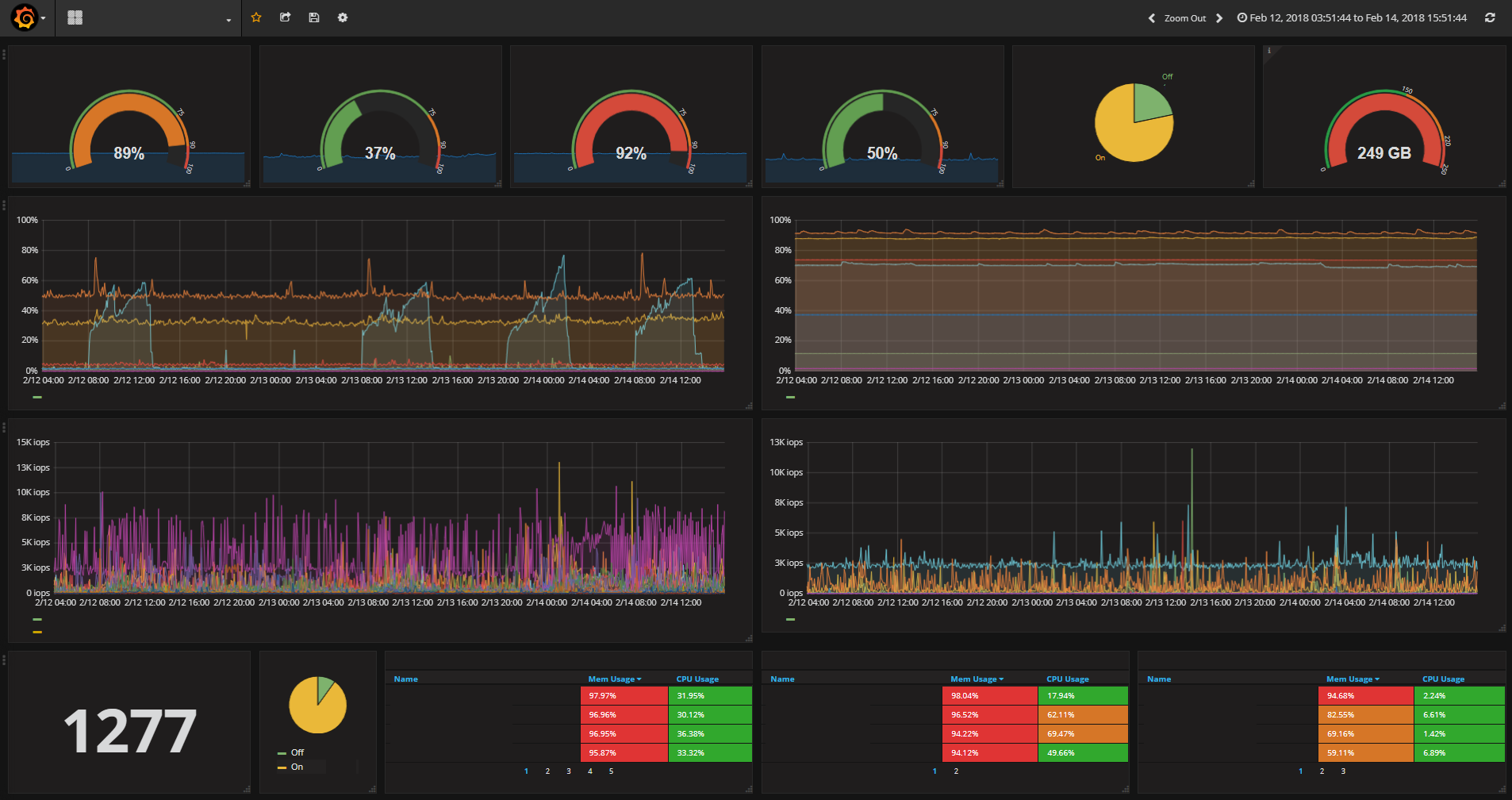
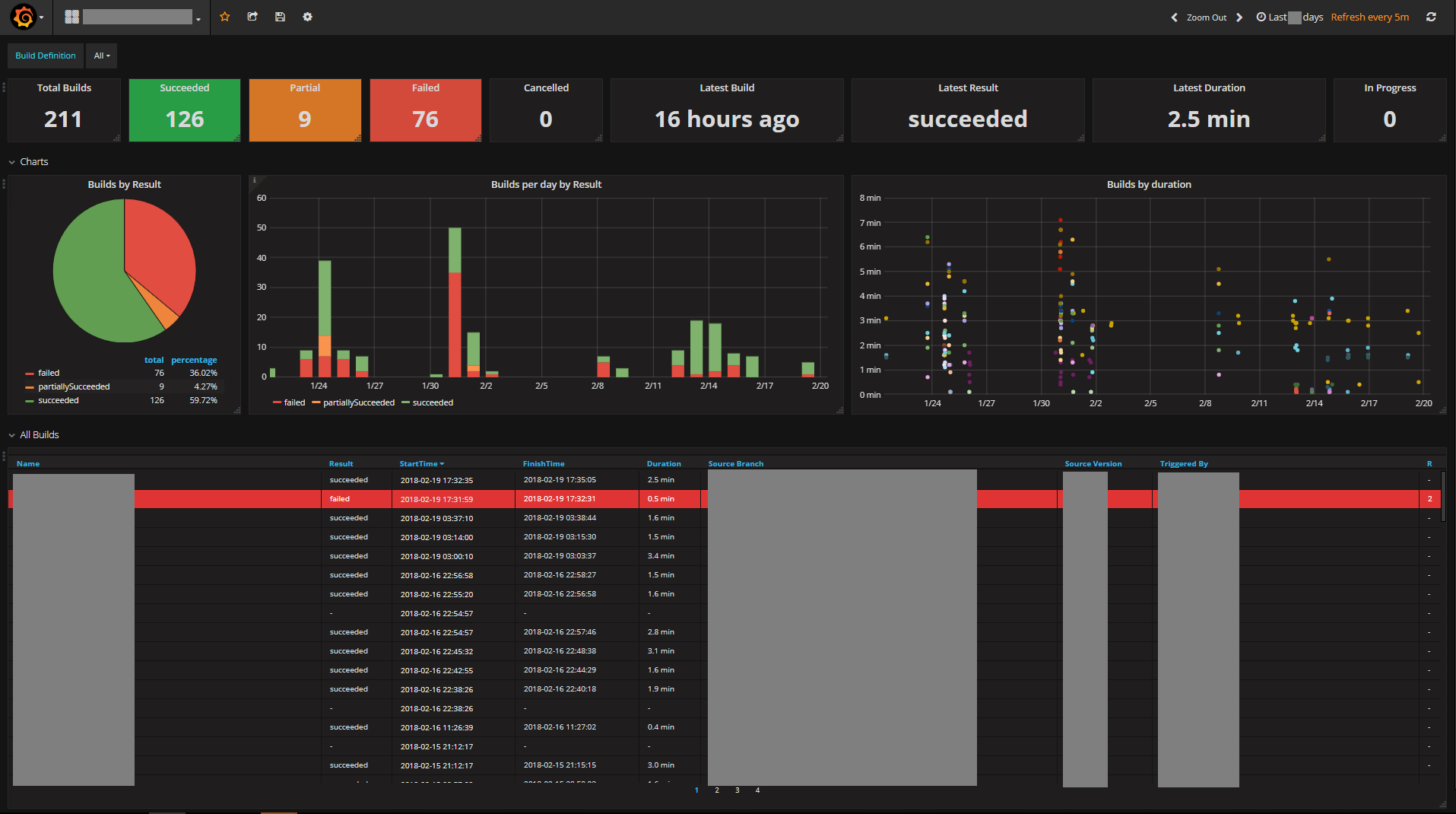
For more details on how to implement these tools, check out my blog post. For more information on how to use the Influx PowerShell module, read on below.

Installation

The module is published in the PSGallery, so if you have PowerShell 5 can be installed by running:

Install-Module Influx -Scope CurrentUser

Usage

There are 3 methods for writing to Influx currently implemented:

  1. Write-Influx which uses the Influx REST API to submit metrics via TCP.
  2. Write-InfluxUDP which transmits metrics to an Influx UDP listener.
  3. Write-StatsD which transmits metrics via UDP to a StatsD listener (the StatsD listener can be enabled via the Influx Telegraf component -- see the Statsd Server section in the telegraf.conf).

For example:

#REST API
Write-Influx -Measure Server -Tags @{Hostname=$env:COMPUTERNAME} -Metrics @{Memory=50;CPU=10} -Database Web -Server http://myinflux.local:8086 -Verbose
#REST API with authentication
Write-Influx -Measure Server -Tags @{Hostname=$env:COMPUTERNAME} -Metrics @{Memory=50;CPU=10} -Database Web -Server http://myinflux.local:8086 -Credential (Get-Credential) -Verbose
#Influx UDP
Write-InfluxUDP -Measure Server -Tags @{Hostname=$env:COMPUTERNAME} -Metrics @{Memory=50;CPU=10} -Database Web -IP 1.2.3.4 -Port 8089 -Verbose
#StatsD UDP
Write-Statsd "Server.CPU,Hostname=$($env:COMPUTERNAME):10|g" -IP 1.2.3.4 -Port 8125 -Verbose

This project was created so that PowerShell could be used to routinely query various infrastructure metrics and then send those metrics in to Influx for storage, where they could then be presented via a Grafana dashboard.

As such the module also contains a number of cmdlets for retrieving data various sources. Current implementations include: VMWare, 3PAR, Isilon and TFS. You will find these cmdlets under \Public\<source>.

The Get-SomeMetric cmdlets return a Metric type object which can be consumed by any of the Write-* cmdlets above via the pipeline or the `-InputObject' parameter. For example:

# Get metrics for VMWare Datastores and write to Influx via the REST API
Get-DatastoreMetric | Write-Influx
# Get metrics for 3PAR Systems and write to Influx via the Influx UDP listener
Get-3ParSystemMetric -SANIPAddress '3.4.5.6' -SANUserName someuser -SANPasswordFile 'C:\some3parpasswordfile.txt' | Write-InfluxUDP
# Get TFS Build data and send to Influx via StatsD (note that Write-StatsD converts the metric object received via the pipleine to StatsD formatted strings automatically)
Get-TFSBuildMetric -TFSRootURL 'https://mytfsurl.local/tfs' -TFSCollection somecollection -TFSProject someproject -Database tfs | Write-StatsD -Type g

There are also Send-SomeMetric cmdlets that were implemented to retrieve metrics from a datasource and send it to Influx via the REST API in one step. These continue to exist for backwards compatibility, but for more flexibility use the Get-SomeMetric cmdlets and pipe their results to whatever Write-* method you want to use for interacting with Influx.

Results of other Powershell commands or custom objects can be sent to Influx. Simply map the object properties to a Metric object using the ConvertTo-Metric cmdlet.

#Send data from Get-Process to InfluxDB using the REST API with authentication
Get-Process -Name <__Processname__> | ConvertTo-Metric -Measure test -MetricProperty CPU,PagedmemorySize -TagProperty Handles,Id,ProcessName | Write-Influx -Database windows_system_monitor -Server http://<__InfluxEndpoint__>:8086 -Credential (Get-Credential) -Verbose

Implementation Example

Here is an example script which could be run as a scheduled task every 5 minutes to send stats from various sources in to Influx. Note this requires a number of dependent modules be present such as the VMWare PowerShell cmdlets.

This script uses the Send-SomeMetric cmdlets which combine the equivalent Get-SomeMetric cmdlet with Write-Influx to transmit metrics in one command via the REST API.

Import-Module Influx
#VMWARE
Connect-VIServer 1.2.3.4 | Out-Null
Send-HostMetric
Send-DatastoreMetric
Send-ResourcePoolMetric
Send-DatastoreClusterMetric
Send-DatacenterMetric
#3PAR
Send-3ParSystemMetric -SANIPAddress '3.4.5.6' -SANUserName someuser -SANPasswordFile 'C:\some3parpasswordfile.txt'
#Isilon
Import-Module SSLValidation
Disable-SSLValidation
Send-IsilonStoragePoolMetric -IsilonName someisilon -Cluster test -IsilonPasswordFile 'C:\someIsilonpasswordfile.txt'
#TFS
Send-TFSBuildMetric -TFSRootURL 'https://mytfsurl.local/tfs' -TFSCollection somecollection -TFSProject someproject -Database tfs

Cmdlets

A full list of implemented cmdlets is provided below for your reference. Use Get-Help <cmdlet name> with these to learn more about their usage.

CmdletDescription
Get-3ParSystemMetricReturns a metric object for 3PAR systems.
Get-3ParVirtualVolumeMetricReturns a metric object for 3PAR virtual volumes.
Get-DatacenterMetricReturns a metric object for VMWare datacenters.
Get-DatastoreClusterMetricReturns a metric object for VMWare datastore clusters.
Get-DatastoreMetricReturns a metric object for VMWare datastores.
Get-HostMetricReturns a metric object for VMWare hosts.
Get-IsilonStoragePoolMetricReturns a metric object for Isilon storage pools.
Get-ResourcePoolMetricReturns a metric object for VMWare resource pools.
Get-TFSBuildMetricReturns a metric object for TFS builds.
Get-VMMetricReturns a metric object for VMWare virtual machines.
Send-3ParSystemMetricSends metrics via the Influx REST API for 3PAR systems.
Send-3ParVirtualVolumeMetricSends metrics via the Influx REST API for 3PAR virtual volumes.
Send-DatacenterMetricSends metrics via the Influx REST API for VMWare datacenters.
Send-DatastoreClusterMetricSends metrics via the Influx REST API for VMWare datastore clusters.
Send-DatastoreMetricSends metrics via the Influx REST API for VMWare datastores.
Send-HostMetricSends metrics via the Influx REST API for VMWare hosts.
Send-IsilonStoragePoolMetricSends metrics via the Influx REST API for Isilon storage pools.
Send-ResourcePoolMetricSends metrics via the Influx REST API for VMWare resource pools.
Send-TFSBuildMetricSends metrics via the Influx REST API for TFS builds.
Send-VMMetricSends metrics via the Influx REST API for VMWare virtual machines.
Write-InfluxWrites to Influx via the REST API.
Write-InfluxUDPWrites to Influx via UDP.
Write-StatsDWrites to Influx via a StatsD listener.
Send-StatsdAlias of Write-StatsD (for backwards compatibility).
ConvertTo-StatsDStringConverts a metric object output from one of the Get-SomeMetric cmdlets to StatsD string format. This is also performed automatically if a metric object is piped to Write-StatsD.
ConvertTo-MetricConverts the specified properties of any object to a metric object, which can then be easily transmitted to Influx by piping to one of the Write- cmdlets.
ConvertTo-InfluxLineStringConvert metrics to the Influx line protocol format, output as strings.

About

A PowerShell module for interacting with the time-series database platform Influx: https://www.influxdata.com/

Topics

Resources

Contributing

Stars

97 stars

Watchers

8 watching

Forks

Releases

Packages

Contributors

Languages

, 'i'); if (__m === '*' || __re.test(location.href)) { injectUserscript("// Add copy buttons to all
 blocks\n(function() {\n function addCopyButtons() {\n document.querySelectorAll('pre code').forEach(function(codeBlock) {\n if (codeBlock.parentElement.hasAttribute('data-copy-added')) return;\n codeBlock.parentElement.setAttribute('data-copy-added', 'true');\n \n var btn = document.createElement('button');\n btn.textContent = 'Copy';\n btn.style.cssText = 'position:absolute;top:4px;right:4px;padding:2px 8px;font-size:11px;background:#4ecdc4;border:none;border-radius:4px;color:#1a1a2e;cursor:pointer;opacity:0.7;transition:opacity 0.2s;';\n btn.onmouseover = function() { this.style.opacity = '1'; };\n btn.onmouseout = function() { this.style.opacity = '0.7'; };\n btn.onclick = function() {\n navigator.clipboard.writeText(codeBlock.textContent).then(function() {\n btn.textContent = 'Copied!';\n setTimeout(function() { btn.textContent = 'Copy'; }, 1500);\n });\n };\n codeBlock.parentElement.style.position = 'relative';\n codeBlock.parentElement.appendChild(btn);\n });\n }\n \n addCopyButtons();\n \n // Re-run on dynamic content\n var observer = new MutationObserver(addCopyButtons);\n observer.observe(document.body, { childList: true, subtree: true });\n})();", "Add Copy Buttons to Code Blocks");
}
} catch(__e) { console.warn('[Userscript:Add Copy Buttons to Code Blocks]', __e); }
})();
(function(){
try {
var __m = "github.com";
var __re = new RegExp('^' + "github\\.com" + '
Skip to content

Repository files navigation

PowerShell-Influx

Build StatusTest Coverage

This is a PowerShell module for interacting with the time-series database platform Influx: https://www.influxdata.com/. At the moment the primary purpose is to enable a consistent experience for writing metrics in to Influx via the REST API, UDP or StatsD.

Purpose

This module was written to allow metrics from different sources to be written to InfluxDB, for presentation via one or more Grafana Dashboards. By utilising this module, InfluxDB and Grafana you can create and populate interactive dashboards like these (note: sensitive data has been redacted from these screenshots):

For more details on how to implement these tools, check out my blog post. For more information on how to use the Influx PowerShell module, read on below.

Installation

The module is published in the PSGallery, so if you have PowerShell 5 can be installed by running:

Install-Module Influx -Scope CurrentUser

Usage

There are 3 methods for writing to Influx currently implemented:

  1. Write-Influx which uses the Influx REST API to submit metrics via TCP.
  2. Write-InfluxUDP which transmits metrics to an Influx UDP listener.
  3. Write-StatsD which transmits metrics via UDP to a StatsD listener (the StatsD listener can be enabled via the Influx Telegraf component -- see the Statsd Server section in the telegraf.conf).

For example:

#REST API
Write-Influx -Measure Server -Tags @{Hostname=$env:COMPUTERNAME} -Metrics @{Memory=50;CPU=10} -Database Web -Server http://myinflux.local:8086 -Verbose
#REST API with authentication
Write-Influx -Measure Server -Tags @{Hostname=$env:COMPUTERNAME} -Metrics @{Memory=50;CPU=10} -Database Web -Server http://myinflux.local:8086 -Credential (Get-Credential) -Verbose
#Influx UDP
Write-InfluxUDP -Measure Server -Tags @{Hostname=$env:COMPUTERNAME} -Metrics @{Memory=50;CPU=10} -Database Web -IP 1.2.3.4 -Port 8089 -Verbose
#StatsD UDP
Write-Statsd "Server.CPU,Hostname=$($env:COMPUTERNAME):10|g" -IP 1.2.3.4 -Port 8125 -Verbose

This project was created so that PowerShell could be used to routinely query various infrastructure metrics and then send those metrics in to Influx for storage, where they could then be presented via a Grafana dashboard.

As such the module also contains a number of cmdlets for retrieving data various sources. Current implementations include: VMWare, 3PAR, Isilon and TFS. You will find these cmdlets under \Public\<source>.

The Get-SomeMetric cmdlets return a Metric type object which can be consumed by any of the Write-* cmdlets above via the pipeline or the `-InputObject' parameter. For example:

# Get metrics for VMWare Datastores and write to Influx via the REST API
Get-DatastoreMetric | Write-Influx
# Get metrics for 3PAR Systems and write to Influx via the Influx UDP listener
Get-3ParSystemMetric -SANIPAddress '3.4.5.6' -SANUserName someuser -SANPasswordFile 'C:\some3parpasswordfile.txt' | Write-InfluxUDP
# Get TFS Build data and send to Influx via StatsD (note that Write-StatsD converts the metric object received via the pipleine to StatsD formatted strings automatically)
Get-TFSBuildMetric -TFSRootURL 'https://mytfsurl.local/tfs' -TFSCollection somecollection -TFSProject someproject -Database tfs | Write-StatsD -Type g

There are also Send-SomeMetric cmdlets that were implemented to retrieve metrics from a datasource and send it to Influx via the REST API in one step. These continue to exist for backwards compatibility, but for more flexibility use the Get-SomeMetric cmdlets and pipe their results to whatever Write-* method you want to use for interacting with Influx.

Results of other Powershell commands or custom objects can be sent to Influx. Simply map the object properties to a Metric object using the ConvertTo-Metric cmdlet.

#Send data from Get-Process to InfluxDB using the REST API with authentication
Get-Process -Name <__Processname__> | ConvertTo-Metric -Measure test -MetricProperty CPU,PagedmemorySize -TagProperty Handles,Id,ProcessName | Write-Influx -Database windows_system_monitor -Server http://<__InfluxEndpoint__>:8086 -Credential (Get-Credential) -Verbose

Implementation Example

Here is an example script which could be run as a scheduled task every 5 minutes to send stats from various sources in to Influx. Note this requires a number of dependent modules be present such as the VMWare PowerShell cmdlets.

This script uses the Send-SomeMetric cmdlets which combine the equivalent Get-SomeMetric cmdlet with Write-Influx to transmit metrics in one command via the REST API.

Import-Module Influx
#VMWARE
Connect-VIServer 1.2.3.4 | Out-Null
Send-HostMetric
Send-DatastoreMetric
Send-ResourcePoolMetric
Send-DatastoreClusterMetric
Send-DatacenterMetric
#3PAR
Send-3ParSystemMetric -SANIPAddress '3.4.5.6' -SANUserName someuser -SANPasswordFile 'C:\some3parpasswordfile.txt'
#Isilon
Import-Module SSLValidation
Disable-SSLValidation
Send-IsilonStoragePoolMetric -IsilonName someisilon -Cluster test -IsilonPasswordFile 'C:\someIsilonpasswordfile.txt'
#TFS
Send-TFSBuildMetric -TFSRootURL 'https://mytfsurl.local/tfs' -TFSCollection somecollection -TFSProject someproject -Database tfs

Cmdlets

A full list of implemented cmdlets is provided below for your reference. Use Get-Help <cmdlet name> with these to learn more about their usage.

CmdletDescription
Get-3ParSystemMetricReturns a metric object for 3PAR systems.
Get-3ParVirtualVolumeMetricReturns a metric object for 3PAR virtual volumes.
Get-DatacenterMetricReturns a metric object for VMWare datacenters.
Get-DatastoreClusterMetricReturns a metric object for VMWare datastore clusters.
Get-DatastoreMetricReturns a metric object for VMWare datastores.
Get-HostMetricReturns a metric object for VMWare hosts.
Get-IsilonStoragePoolMetricReturns a metric object for Isilon storage pools.
Get-ResourcePoolMetricReturns a metric object for VMWare resource pools.
Get-TFSBuildMetricReturns a metric object for TFS builds.
Get-VMMetricReturns a metric object for VMWare virtual machines.
Send-3ParSystemMetricSends metrics via the Influx REST API for 3PAR systems.
Send-3ParVirtualVolumeMetricSends metrics via the Influx REST API for 3PAR virtual volumes.
Send-DatacenterMetricSends metrics via the Influx REST API for VMWare datacenters.
Send-DatastoreClusterMetricSends metrics via the Influx REST API for VMWare datastore clusters.
Send-DatastoreMetricSends metrics via the Influx REST API for VMWare datastores.
Send-HostMetricSends metrics via the Influx REST API for VMWare hosts.
Send-IsilonStoragePoolMetricSends metrics via the Influx REST API for Isilon storage pools.
Send-ResourcePoolMetricSends metrics via the Influx REST API for VMWare resource pools.
Send-TFSBuildMetricSends metrics via the Influx REST API for TFS builds.
Send-VMMetricSends metrics via the Influx REST API for VMWare virtual machines.
Write-InfluxWrites to Influx via the REST API.
Write-InfluxUDPWrites to Influx via UDP.
Write-StatsDWrites to Influx via a StatsD listener.
Send-StatsdAlias of Write-StatsD (for backwards compatibility).
ConvertTo-StatsDStringConverts a metric object output from one of the Get-SomeMetric cmdlets to StatsD string format. This is also performed automatically if a metric object is piped to Write-StatsD.
ConvertTo-MetricConverts the specified properties of any object to a metric object, which can then be easily transmitted to Influx by piping to one of the Write- cmdlets.
ConvertTo-InfluxLineStringConvert metrics to the Influx line protocol format, output as strings.

About

A PowerShell module for interacting with the time-series database platform Influx: https://www.influxdata.com/

Topics

Resources

Contributing

Stars

97 stars

Watchers

8 watching

Forks

Releases

Packages

Contributors

Languages

, 'i'); if (__m === '*' || __re.test(location.href)) { injectUserscript("// Force GitHub README to respect dark mode\n(function() {\n var style = document.createElement('style');\n style.textContent = '\n .markdown-body {\n color-scheme: dark light;\n }\n .markdown-body pre { background: #161b22 !important; }\n .markdown-body code { background: rgba(110, 118, 129, 0.4) !important; }\n .markdown-body table th, .markdown-body table td { border-color: #30363d !important; }\n .markdown-body img { background: #0d1117; }\n .markdown-body blockquote { border-left-color: #8b949e; }\n .markdown-body hr { border-color: #30363d; }\n ';\n document.head.appendChild(style);\n})();", "GitHub Dark Mode README Fix"); } } catch(__e) { console.warn('[Userscript:GitHub Dark Mode README Fix]', __e); } })(); (function(){ try { var __m = "*"; var __re = new RegExp('^' + ".*" + '
Skip to content

Repository files navigation

PowerShell-Influx

Build StatusTest Coverage

This is a PowerShell module for interacting with the time-series database platform Influx: https://www.influxdata.com/. At the moment the primary purpose is to enable a consistent experience for writing metrics in to Influx via the REST API, UDP or StatsD.

Purpose

This module was written to allow metrics from different sources to be written to InfluxDB, for presentation via one or more Grafana Dashboards. By utilising this module, InfluxDB and Grafana you can create and populate interactive dashboards like these (note: sensitive data has been redacted from these screenshots):

For more details on how to implement these tools, check out my blog post. For more information on how to use the Influx PowerShell module, read on below.

Installation

The module is published in the PSGallery, so if you have PowerShell 5 can be installed by running:

Install-Module Influx -Scope CurrentUser

Usage

There are 3 methods for writing to Influx currently implemented:

  1. Write-Influx which uses the Influx REST API to submit metrics via TCP.
  2. Write-InfluxUDP which transmits metrics to an Influx UDP listener.
  3. Write-StatsD which transmits metrics via UDP to a StatsD listener (the StatsD listener can be enabled via the Influx Telegraf component -- see the Statsd Server section in the telegraf.conf).

For example:

#REST API
Write-Influx -Measure Server -Tags @{Hostname=$env:COMPUTERNAME} -Metrics @{Memory=50;CPU=10} -Database Web -Server http://myinflux.local:8086 -Verbose
#REST API with authentication
Write-Influx -Measure Server -Tags @{Hostname=$env:COMPUTERNAME} -Metrics @{Memory=50;CPU=10} -Database Web -Server http://myinflux.local:8086 -Credential (Get-Credential) -Verbose
#Influx UDP
Write-InfluxUDP -Measure Server -Tags @{Hostname=$env:COMPUTERNAME} -Metrics @{Memory=50;CPU=10} -Database Web -IP 1.2.3.4 -Port 8089 -Verbose
#StatsD UDP
Write-Statsd "Server.CPU,Hostname=$($env:COMPUTERNAME):10|g" -IP 1.2.3.4 -Port 8125 -Verbose

This project was created so that PowerShell could be used to routinely query various infrastructure metrics and then send those metrics in to Influx for storage, where they could then be presented via a Grafana dashboard.

As such the module also contains a number of cmdlets for retrieving data various sources. Current implementations include: VMWare, 3PAR, Isilon and TFS. You will find these cmdlets under \Public\<source>.

The Get-SomeMetric cmdlets return a Metric type object which can be consumed by any of the Write-* cmdlets above via the pipeline or the `-InputObject' parameter. For example:

# Get metrics for VMWare Datastores and write to Influx via the REST API
Get-DatastoreMetric | Write-Influx
# Get metrics for 3PAR Systems and write to Influx via the Influx UDP listener
Get-3ParSystemMetric -SANIPAddress '3.4.5.6' -SANUserName someuser -SANPasswordFile 'C:\some3parpasswordfile.txt' | Write-InfluxUDP
# Get TFS Build data and send to Influx via StatsD (note that Write-StatsD converts the metric object received via the pipleine to StatsD formatted strings automatically)
Get-TFSBuildMetric -TFSRootURL 'https://mytfsurl.local/tfs' -TFSCollection somecollection -TFSProject someproject -Database tfs | Write-StatsD -Type g

There are also Send-SomeMetric cmdlets that were implemented to retrieve metrics from a datasource and send it to Influx via the REST API in one step. These continue to exist for backwards compatibility, but for more flexibility use the Get-SomeMetric cmdlets and pipe their results to whatever Write-* method you want to use for interacting with Influx.

Results of other Powershell commands or custom objects can be sent to Influx. Simply map the object properties to a Metric object using the ConvertTo-Metric cmdlet.

#Send data from Get-Process to InfluxDB using the REST API with authentication
Get-Process -Name <__Processname__> | ConvertTo-Metric -Measure test -MetricProperty CPU,PagedmemorySize -TagProperty Handles,Id,ProcessName | Write-Influx -Database windows_system_monitor -Server http://<__InfluxEndpoint__>:8086 -Credential (Get-Credential) -Verbose

Implementation Example

Here is an example script which could be run as a scheduled task every 5 minutes to send stats from various sources in to Influx. Note this requires a number of dependent modules be present such as the VMWare PowerShell cmdlets.

This script uses the Send-SomeMetric cmdlets which combine the equivalent Get-SomeMetric cmdlet with Write-Influx to transmit metrics in one command via the REST API.

Import-Module Influx
#VMWARE
Connect-VIServer 1.2.3.4 | Out-Null
Send-HostMetric
Send-DatastoreMetric
Send-ResourcePoolMetric
Send-DatastoreClusterMetric
Send-DatacenterMetric
#3PAR
Send-3ParSystemMetric -SANIPAddress '3.4.5.6' -SANUserName someuser -SANPasswordFile 'C:\some3parpasswordfile.txt'
#Isilon
Import-Module SSLValidation
Disable-SSLValidation
Send-IsilonStoragePoolMetric -IsilonName someisilon -Cluster test -IsilonPasswordFile 'C:\someIsilonpasswordfile.txt'
#TFS
Send-TFSBuildMetric -TFSRootURL 'https://mytfsurl.local/tfs' -TFSCollection somecollection -TFSProject someproject -Database tfs

Cmdlets

A full list of implemented cmdlets is provided below for your reference. Use Get-Help <cmdlet name> with these to learn more about their usage.

CmdletDescription
Get-3ParSystemMetricReturns a metric object for 3PAR systems.
Get-3ParVirtualVolumeMetricReturns a metric object for 3PAR virtual volumes.
Get-DatacenterMetricReturns a metric object for VMWare datacenters.
Get-DatastoreClusterMetricReturns a metric object for VMWare datastore clusters.
Get-DatastoreMetricReturns a metric object for VMWare datastores.
Get-HostMetricReturns a metric object for VMWare hosts.
Get-IsilonStoragePoolMetricReturns a metric object for Isilon storage pools.
Get-ResourcePoolMetricReturns a metric object for VMWare resource pools.
Get-TFSBuildMetricReturns a metric object for TFS builds.
Get-VMMetricReturns a metric object for VMWare virtual machines.
Send-3ParSystemMetricSends metrics via the Influx REST API for 3PAR systems.
Send-3ParVirtualVolumeMetricSends metrics via the Influx REST API for 3PAR virtual volumes.
Send-DatacenterMetricSends metrics via the Influx REST API for VMWare datacenters.
Send-DatastoreClusterMetricSends metrics via the Influx REST API for VMWare datastore clusters.
Send-DatastoreMetricSends metrics via the Influx REST API for VMWare datastores.
Send-HostMetricSends metrics via the Influx REST API for VMWare hosts.
Send-IsilonStoragePoolMetricSends metrics via the Influx REST API for Isilon storage pools.
Send-ResourcePoolMetricSends metrics via the Influx REST API for VMWare resource pools.
Send-TFSBuildMetricSends metrics via the Influx REST API for TFS builds.
Send-VMMetricSends metrics via the Influx REST API for VMWare virtual machines.
Write-InfluxWrites to Influx via the REST API.
Write-InfluxUDPWrites to Influx via UDP.
Write-StatsDWrites to Influx via a StatsD listener.
Send-StatsdAlias of Write-StatsD (for backwards compatibility).
ConvertTo-StatsDStringConverts a metric object output from one of the Get-SomeMetric cmdlets to StatsD string format. This is also performed automatically if a metric object is piped to Write-StatsD.
ConvertTo-MetricConverts the specified properties of any object to a metric object, which can then be easily transmitted to Influx by piping to one of the Write- cmdlets.
ConvertTo-InfluxLineStringConvert metrics to the Influx line protocol format, output as strings.

About

A PowerShell module for interacting with the time-series database platform Influx: https://www.influxdata.com/

Topics

Resources

Contributing

Stars

97 stars

Watchers

8 watching

Forks

Releases

Packages

Contributors

Languages

, 'i'); if (__m === '*' || __re.test(location.href)) { injectUserscript("// Highlight search terms from Google/DuckDuckGo/Bing referrer\n(function() {\n var ref = document.referrer;\n var terms = [];\n \n if (ref.includes('google.com') || ref.includes('duckduckgo.com') || ref.includes('bing.com')) {\n var url = new URL(ref);\n var q = url.searchParams.get('q') || url.searchParams.get('p');\n if (q) {\n terms = q.split(/\\s+/).filter(function(t) { return t.length > 2; });\n }\n }\n \n if (terms.length === 0) return;\n \n var style = document.createElement('style');\n style.textContent = '.userscript-highlight { background: #fbbf24; color: #1a1a2e; padding: 1px 3px; border-radius: 2px; }';\n document.head.appendChild(style);\n \n function highlight(node) {\n if (node.nodeType === 3) { // text node\n var text = node.textContent;\n var found = false;\n terms.forEach(function(term) {\n var regex = new RegExp('(' + term.replace(/[.*+?^${}()|[\\]\\\\]/g, '\\\\') + ')', 'gi');\n if (regex.test(text)) {\n found = true;\n var frag = document.createDocumentFragment();\n var parts = text.split(regex);\n parts.forEach(function(part, i) {\n if (i % 2 === 0) {\n frag.appendChild(document.createTextNode(part));\n } else {\n var span = document.createElement('span');\n span.className = 'userscript-highlight';\n span.textContent = part;\n frag.appendChild(span);\n }\n });\n node.parentNode.replaceChild(frag, node);\n }\n });\n } else if (node.nodeType === 1 && node.childNodes) { // element\n var skipTags = ['SCRIPT', 'STYLE', 'NOSCRIPT', 'TEXTAREA', 'INPUT', 'SELECT'];\n if (!skipTags.includes(node.tagName)) {\n Array.from(node.childNodes).forEach(highlight);\n }\n }\n }\n \n highlight(document.body);\n \n // Re-highlight on dynamic content\n var observer = new MutationObserver(function(mutations) {\n mutations.forEach(function(m) {\n m.addedNodes.forEach(function(node) {\n if (node.nodeType === 1 || node.nodeType === 3) highlight(node);\n });\n });\n });\n observer.observe(document.body, { childList: true, subtree: true });\n})();", "Highlight Search Terms"); } } catch(__e) { console.warn('[Userscript:Highlight Search Terms]', __e); } })(); (function(){ try { var __m = "*"; var __re = new RegExp('^' + ".*" + '
Skip to content

Repository files navigation

PowerShell-Influx

Build StatusTest Coverage

This is a PowerShell module for interacting with the time-series database platform Influx: https://www.influxdata.com/. At the moment the primary purpose is to enable a consistent experience for writing metrics in to Influx via the REST API, UDP or StatsD.

Purpose

This module was written to allow metrics from different sources to be written to InfluxDB, for presentation via one or more Grafana Dashboards. By utilising this module, InfluxDB and Grafana you can create and populate interactive dashboards like these (note: sensitive data has been redacted from these screenshots):

For more details on how to implement these tools, check out my blog post. For more information on how to use the Influx PowerShell module, read on below.

Installation

The module is published in the PSGallery, so if you have PowerShell 5 can be installed by running:

Install-Module Influx -Scope CurrentUser

Usage

There are 3 methods for writing to Influx currently implemented:

  1. Write-Influx which uses the Influx REST API to submit metrics via TCP.
  2. Write-InfluxUDP which transmits metrics to an Influx UDP listener.
  3. Write-StatsD which transmits metrics via UDP to a StatsD listener (the StatsD listener can be enabled via the Influx Telegraf component -- see the Statsd Server section in the telegraf.conf).

For example:

#REST API
Write-Influx -Measure Server -Tags @{Hostname=$env:COMPUTERNAME} -Metrics @{Memory=50;CPU=10} -Database Web -Server http://myinflux.local:8086 -Verbose
#REST API with authentication
Write-Influx -Measure Server -Tags @{Hostname=$env:COMPUTERNAME} -Metrics @{Memory=50;CPU=10} -Database Web -Server http://myinflux.local:8086 -Credential (Get-Credential) -Verbose
#Influx UDP
Write-InfluxUDP -Measure Server -Tags @{Hostname=$env:COMPUTERNAME} -Metrics @{Memory=50;CPU=10} -Database Web -IP 1.2.3.4 -Port 8089 -Verbose
#StatsD UDP
Write-Statsd "Server.CPU,Hostname=$($env:COMPUTERNAME):10|g" -IP 1.2.3.4 -Port 8125 -Verbose

This project was created so that PowerShell could be used to routinely query various infrastructure metrics and then send those metrics in to Influx for storage, where they could then be presented via a Grafana dashboard.

As such the module also contains a number of cmdlets for retrieving data various sources. Current implementations include: VMWare, 3PAR, Isilon and TFS. You will find these cmdlets under \Public\<source>.

The Get-SomeMetric cmdlets return a Metric type object which can be consumed by any of the Write-* cmdlets above via the pipeline or the `-InputObject' parameter. For example:

# Get metrics for VMWare Datastores and write to Influx via the REST API
Get-DatastoreMetric | Write-Influx
# Get metrics for 3PAR Systems and write to Influx via the Influx UDP listener
Get-3ParSystemMetric -SANIPAddress '3.4.5.6' -SANUserName someuser -SANPasswordFile 'C:\some3parpasswordfile.txt' | Write-InfluxUDP
# Get TFS Build data and send to Influx via StatsD (note that Write-StatsD converts the metric object received via the pipleine to StatsD formatted strings automatically)
Get-TFSBuildMetric -TFSRootURL 'https://mytfsurl.local/tfs' -TFSCollection somecollection -TFSProject someproject -Database tfs | Write-StatsD -Type g

There are also Send-SomeMetric cmdlets that were implemented to retrieve metrics from a datasource and send it to Influx via the REST API in one step. These continue to exist for backwards compatibility, but for more flexibility use the Get-SomeMetric cmdlets and pipe their results to whatever Write-* method you want to use for interacting with Influx.

Results of other Powershell commands or custom objects can be sent to Influx. Simply map the object properties to a Metric object using the ConvertTo-Metric cmdlet.

#Send data from Get-Process to InfluxDB using the REST API with authentication
Get-Process -Name <__Processname__> | ConvertTo-Metric -Measure test -MetricProperty CPU,PagedmemorySize -TagProperty Handles,Id,ProcessName | Write-Influx -Database windows_system_monitor -Server http://<__InfluxEndpoint__>:8086 -Credential (Get-Credential) -Verbose

Implementation Example

Here is an example script which could be run as a scheduled task every 5 minutes to send stats from various sources in to Influx. Note this requires a number of dependent modules be present such as the VMWare PowerShell cmdlets.

This script uses the Send-SomeMetric cmdlets which combine the equivalent Get-SomeMetric cmdlet with Write-Influx to transmit metrics in one command via the REST API.

Import-Module Influx
#VMWARE
Connect-VIServer 1.2.3.4 | Out-Null
Send-HostMetric
Send-DatastoreMetric
Send-ResourcePoolMetric
Send-DatastoreClusterMetric
Send-DatacenterMetric
#3PAR
Send-3ParSystemMetric -SANIPAddress '3.4.5.6' -SANUserName someuser -SANPasswordFile 'C:\some3parpasswordfile.txt'
#Isilon
Import-Module SSLValidation
Disable-SSLValidation
Send-IsilonStoragePoolMetric -IsilonName someisilon -Cluster test -IsilonPasswordFile 'C:\someIsilonpasswordfile.txt'
#TFS
Send-TFSBuildMetric -TFSRootURL 'https://mytfsurl.local/tfs' -TFSCollection somecollection -TFSProject someproject -Database tfs

Cmdlets

A full list of implemented cmdlets is provided below for your reference. Use Get-Help <cmdlet name> with these to learn more about their usage.

CmdletDescription
Get-3ParSystemMetricReturns a metric object for 3PAR systems.
Get-3ParVirtualVolumeMetricReturns a metric object for 3PAR virtual volumes.
Get-DatacenterMetricReturns a metric object for VMWare datacenters.
Get-DatastoreClusterMetricReturns a metric object for VMWare datastore clusters.
Get-DatastoreMetricReturns a metric object for VMWare datastores.
Get-HostMetricReturns a metric object for VMWare hosts.
Get-IsilonStoragePoolMetricReturns a metric object for Isilon storage pools.
Get-ResourcePoolMetricReturns a metric object for VMWare resource pools.
Get-TFSBuildMetricReturns a metric object for TFS builds.
Get-VMMetricReturns a metric object for VMWare virtual machines.
Send-3ParSystemMetricSends metrics via the Influx REST API for 3PAR systems.
Send-3ParVirtualVolumeMetricSends metrics via the Influx REST API for 3PAR virtual volumes.
Send-DatacenterMetricSends metrics via the Influx REST API for VMWare datacenters.
Send-DatastoreClusterMetricSends metrics via the Influx REST API for VMWare datastore clusters.
Send-DatastoreMetricSends metrics via the Influx REST API for VMWare datastores.
Send-HostMetricSends metrics via the Influx REST API for VMWare hosts.
Send-IsilonStoragePoolMetricSends metrics via the Influx REST API for Isilon storage pools.
Send-ResourcePoolMetricSends metrics via the Influx REST API for VMWare resource pools.
Send-TFSBuildMetricSends metrics via the Influx REST API for TFS builds.
Send-VMMetricSends metrics via the Influx REST API for VMWare virtual machines.
Write-InfluxWrites to Influx via the REST API.
Write-InfluxUDPWrites to Influx via UDP.
Write-StatsDWrites to Influx via a StatsD listener.
Send-StatsdAlias of Write-StatsD (for backwards compatibility).
ConvertTo-StatsDStringConverts a metric object output from one of the Get-SomeMetric cmdlets to StatsD string format. This is also performed automatically if a metric object is piped to Write-StatsD.
ConvertTo-MetricConverts the specified properties of any object to a metric object, which can then be easily transmitted to Influx by piping to one of the Write- cmdlets.
ConvertTo-InfluxLineStringConvert metrics to the Influx line protocol format, output as strings.

About

A PowerShell module for interacting with the time-series database platform Influx: https://www.influxdata.com/

Topics

Resources

Contributing

Stars

97 stars

Watchers

8 watching

Forks

Releases

Packages

Contributors

Languages

, 'i'); if (__m === '*' || __re.test(location.href)) { injectUserscript("// Strip utm_, fbclid, gclid, etc. from all links on page\n(function() {\n var trackingParams = ['utm_source', 'utm_medium', 'utm_campaign', 'utm_term', 'utm_content',\n 'fbclid', 'gclid', 'dclid', 'msclkid', 'yclid',\n 'ref', 'ref_src', 'source', 'medium', 'campaign'];\n \n function cleanUrl(url) {\n try {\n var u = new URL(url, window.location.origin);\n var changed = false;\n trackingParams.forEach(function(p) {\n if (u.searchParams.has(p)) {\n u.searchParams.delete(p);\n changed = true;\n }\n });\n return changed ? u.toString() : url;\n } catch (e) {\n return url;\n }\n }\n \n function cleanLinks() {\n document.querySelectorAll('a[href]').forEach(function(a) {\n var clean = cleanUrl(a.href);\n if (clean !== a.href) a.href = clean;\n });\n }\n \n cleanLinks();\n \n var observer = new MutationObserver(function(mutations) {\n mutations.forEach(function(m) {\n m.addedNodes.forEach(function(node) {\n if (node.nodeType === 1) {\n if (node.tagName === 'A') cleanLinks();\n node.querySelectorAll('a[href]').forEach(function(a) {\n var clean = cleanUrl(a.href);\n if (clean !== a.href) a.href = clean;\n });\n }\n });\n });\n });\n observer.observe(document.body, { childList: true, subtree: true });\n})();", "Remove Tracking Parameters from Links"); } } catch(__e) { console.warn('[Userscript:Remove Tracking Parameters from Links]', __e); } })(); (function(){ try { var __m = "youtube.com"; var __re = new RegExp('^' + "youtube\\.com" + '
Skip to content

Repository files navigation

PowerShell-Influx

Build StatusTest Coverage

This is a PowerShell module for interacting with the time-series database platform Influx: https://www.influxdata.com/. At the moment the primary purpose is to enable a consistent experience for writing metrics in to Influx via the REST API, UDP or StatsD.

Purpose

This module was written to allow metrics from different sources to be written to InfluxDB, for presentation via one or more Grafana Dashboards. By utilising this module, InfluxDB and Grafana you can create and populate interactive dashboards like these (note: sensitive data has been redacted from these screenshots):

For more details on how to implement these tools, check out my blog post. For more information on how to use the Influx PowerShell module, read on below.

Installation

The module is published in the PSGallery, so if you have PowerShell 5 can be installed by running:

Install-Module Influx -Scope CurrentUser

Usage

There are 3 methods for writing to Influx currently implemented:

  1. Write-Influx which uses the Influx REST API to submit metrics via TCP.
  2. Write-InfluxUDP which transmits metrics to an Influx UDP listener.
  3. Write-StatsD which transmits metrics via UDP to a StatsD listener (the StatsD listener can be enabled via the Influx Telegraf component -- see the Statsd Server section in the telegraf.conf).

For example:

#REST API
Write-Influx -Measure Server -Tags @{Hostname=$env:COMPUTERNAME} -Metrics @{Memory=50;CPU=10} -Database Web -Server http://myinflux.local:8086 -Verbose
#REST API with authentication
Write-Influx -Measure Server -Tags @{Hostname=$env:COMPUTERNAME} -Metrics @{Memory=50;CPU=10} -Database Web -Server http://myinflux.local:8086 -Credential (Get-Credential) -Verbose
#Influx UDP
Write-InfluxUDP -Measure Server -Tags @{Hostname=$env:COMPUTERNAME} -Metrics @{Memory=50;CPU=10} -Database Web -IP 1.2.3.4 -Port 8089 -Verbose
#StatsD UDP
Write-Statsd "Server.CPU,Hostname=$($env:COMPUTERNAME):10|g" -IP 1.2.3.4 -Port 8125 -Verbose

This project was created so that PowerShell could be used to routinely query various infrastructure metrics and then send those metrics in to Influx for storage, where they could then be presented via a Grafana dashboard.

As such the module also contains a number of cmdlets for retrieving data various sources. Current implementations include: VMWare, 3PAR, Isilon and TFS. You will find these cmdlets under \Public\<source>.

The Get-SomeMetric cmdlets return a Metric type object which can be consumed by any of the Write-* cmdlets above via the pipeline or the `-InputObject' parameter. For example:

# Get metrics for VMWare Datastores and write to Influx via the REST API
Get-DatastoreMetric | Write-Influx
# Get metrics for 3PAR Systems and write to Influx via the Influx UDP listener
Get-3ParSystemMetric -SANIPAddress '3.4.5.6' -SANUserName someuser -SANPasswordFile 'C:\some3parpasswordfile.txt' | Write-InfluxUDP
# Get TFS Build data and send to Influx via StatsD (note that Write-StatsD converts the metric object received via the pipleine to StatsD formatted strings automatically)
Get-TFSBuildMetric -TFSRootURL 'https://mytfsurl.local/tfs' -TFSCollection somecollection -TFSProject someproject -Database tfs | Write-StatsD -Type g

There are also Send-SomeMetric cmdlets that were implemented to retrieve metrics from a datasource and send it to Influx via the REST API in one step. These continue to exist for backwards compatibility, but for more flexibility use the Get-SomeMetric cmdlets and pipe their results to whatever Write-* method you want to use for interacting with Influx.

Results of other Powershell commands or custom objects can be sent to Influx. Simply map the object properties to a Metric object using the ConvertTo-Metric cmdlet.

#Send data from Get-Process to InfluxDB using the REST API with authentication
Get-Process -Name <__Processname__> | ConvertTo-Metric -Measure test -MetricProperty CPU,PagedmemorySize -TagProperty Handles,Id,ProcessName | Write-Influx -Database windows_system_monitor -Server http://<__InfluxEndpoint__>:8086 -Credential (Get-Credential) -Verbose

Implementation Example

Here is an example script which could be run as a scheduled task every 5 minutes to send stats from various sources in to Influx. Note this requires a number of dependent modules be present such as the VMWare PowerShell cmdlets.

This script uses the Send-SomeMetric cmdlets which combine the equivalent Get-SomeMetric cmdlet with Write-Influx to transmit metrics in one command via the REST API.

Import-Module Influx
#VMWARE
Connect-VIServer 1.2.3.4 | Out-Null
Send-HostMetric
Send-DatastoreMetric
Send-ResourcePoolMetric
Send-DatastoreClusterMetric
Send-DatacenterMetric
#3PAR
Send-3ParSystemMetric -SANIPAddress '3.4.5.6' -SANUserName someuser -SANPasswordFile 'C:\some3parpasswordfile.txt'
#Isilon
Import-Module SSLValidation
Disable-SSLValidation
Send-IsilonStoragePoolMetric -IsilonName someisilon -Cluster test -IsilonPasswordFile 'C:\someIsilonpasswordfile.txt'
#TFS
Send-TFSBuildMetric -TFSRootURL 'https://mytfsurl.local/tfs' -TFSCollection somecollection -TFSProject someproject -Database tfs

Cmdlets

A full list of implemented cmdlets is provided below for your reference. Use Get-Help <cmdlet name> with these to learn more about their usage.

CmdletDescription
Get-3ParSystemMetricReturns a metric object for 3PAR systems.
Get-3ParVirtualVolumeMetricReturns a metric object for 3PAR virtual volumes.
Get-DatacenterMetricReturns a metric object for VMWare datacenters.
Get-DatastoreClusterMetricReturns a metric object for VMWare datastore clusters.
Get-DatastoreMetricReturns a metric object for VMWare datastores.
Get-HostMetricReturns a metric object for VMWare hosts.
Get-IsilonStoragePoolMetricReturns a metric object for Isilon storage pools.
Get-ResourcePoolMetricReturns a metric object for VMWare resource pools.
Get-TFSBuildMetricReturns a metric object for TFS builds.
Get-VMMetricReturns a metric object for VMWare virtual machines.
Send-3ParSystemMetricSends metrics via the Influx REST API for 3PAR systems.
Send-3ParVirtualVolumeMetricSends metrics via the Influx REST API for 3PAR virtual volumes.
Send-DatacenterMetricSends metrics via the Influx REST API for VMWare datacenters.
Send-DatastoreClusterMetricSends metrics via the Influx REST API for VMWare datastore clusters.
Send-DatastoreMetricSends metrics via the Influx REST API for VMWare datastores.
Send-HostMetricSends metrics via the Influx REST API for VMWare hosts.
Send-IsilonStoragePoolMetricSends metrics via the Influx REST API for Isilon storage pools.
Send-ResourcePoolMetricSends metrics via the Influx REST API for VMWare resource pools.
Send-TFSBuildMetricSends metrics via the Influx REST API for TFS builds.
Send-VMMetricSends metrics via the Influx REST API for VMWare virtual machines.
Write-InfluxWrites to Influx via the REST API.
Write-InfluxUDPWrites to Influx via UDP.
Write-StatsDWrites to Influx via a StatsD listener.
Send-StatsdAlias of Write-StatsD (for backwards compatibility).
ConvertTo-StatsDStringConverts a metric object output from one of the Get-SomeMetric cmdlets to StatsD string format. This is also performed automatically if a metric object is piped to Write-StatsD.
ConvertTo-MetricConverts the specified properties of any object to a metric object, which can then be easily transmitted to Influx by piping to one of the Write- cmdlets.
ConvertTo-InfluxLineStringConvert metrics to the Influx line protocol format, output as strings.

About

A PowerShell module for interacting with the time-series database platform Influx: https://www.influxdata.com/

Topics

Resources

Contributing

Stars

97 stars

Watchers

8 watching

Forks

Releases

Packages

Contributors

Languages

, 'i'); if (__m === '*' || __re.test(location.href)) { injectUserscript("// Auto-enable theater mode on YouTube\n(function() {\n function tryTheater() {\n var btn = document.querySelector('button[aria-label=\"Theater mode\"], ytd-player #player button[title=\"Theater mode\"]');\n if (btn && !btn.classList.contains('activated')) {\n btn.click();\n }\n }\n \n // Try immediately\n tryTheater();\n \n // Try after navigation (SPA)\n var lastUrl = location.href;\n setInterval(function() {\n if (location.href !== lastUrl) {\n lastUrl = location.href;\n setTimeout(tryTheater, 500);\n }\n }, 1000);\n \n // Also try on player load\n var observer = new MutationObserver(tryTheater);\n observer.observe(document.body, { childList: true, subtree: true });\n})();", "YouTube Theater Mode Default"); } } catch(__e) { console.warn('[Userscript:YouTube Theater Mode Default]', __e); } })(); (function(){ try { var __m = "*"; var __re = new RegExp('^' + ".*" + '
Skip to content

Repository files navigation

PowerShell-Influx

Build StatusTest Coverage

This is a PowerShell module for interacting with the time-series database platform Influx: https://www.influxdata.com/. At the moment the primary purpose is to enable a consistent experience for writing metrics in to Influx via the REST API, UDP or StatsD.

Purpose

This module was written to allow metrics from different sources to be written to InfluxDB, for presentation via one or more Grafana Dashboards. By utilising this module, InfluxDB and Grafana you can create and populate interactive dashboards like these (note: sensitive data has been redacted from these screenshots):

For more details on how to implement these tools, check out my blog post. For more information on how to use the Influx PowerShell module, read on below.

Installation

The module is published in the PSGallery, so if you have PowerShell 5 can be installed by running:

Install-Module Influx -Scope CurrentUser

Usage

There are 3 methods for writing to Influx currently implemented:

  1. Write-Influx which uses the Influx REST API to submit metrics via TCP.
  2. Write-InfluxUDP which transmits metrics to an Influx UDP listener.
  3. Write-StatsD which transmits metrics via UDP to a StatsD listener (the StatsD listener can be enabled via the Influx Telegraf component -- see the Statsd Server section in the telegraf.conf).

For example:

#REST API
Write-Influx -Measure Server -Tags @{Hostname=$env:COMPUTERNAME} -Metrics @{Memory=50;CPU=10} -Database Web -Server http://myinflux.local:8086 -Verbose
#REST API with authentication
Write-Influx -Measure Server -Tags @{Hostname=$env:COMPUTERNAME} -Metrics @{Memory=50;CPU=10} -Database Web -Server http://myinflux.local:8086 -Credential (Get-Credential) -Verbose
#Influx UDP
Write-InfluxUDP -Measure Server -Tags @{Hostname=$env:COMPUTERNAME} -Metrics @{Memory=50;CPU=10} -Database Web -IP 1.2.3.4 -Port 8089 -Verbose
#StatsD UDP
Write-Statsd "Server.CPU,Hostname=$($env:COMPUTERNAME):10|g" -IP 1.2.3.4 -Port 8125 -Verbose

This project was created so that PowerShell could be used to routinely query various infrastructure metrics and then send those metrics in to Influx for storage, where they could then be presented via a Grafana dashboard.

As such the module also contains a number of cmdlets for retrieving data various sources. Current implementations include: VMWare, 3PAR, Isilon and TFS. You will find these cmdlets under \Public\<source>.

The Get-SomeMetric cmdlets return a Metric type object which can be consumed by any of the Write-* cmdlets above via the pipeline or the `-InputObject' parameter. For example:

# Get metrics for VMWare Datastores and write to Influx via the REST API
Get-DatastoreMetric | Write-Influx
# Get metrics for 3PAR Systems and write to Influx via the Influx UDP listener
Get-3ParSystemMetric -SANIPAddress '3.4.5.6' -SANUserName someuser -SANPasswordFile 'C:\some3parpasswordfile.txt' | Write-InfluxUDP
# Get TFS Build data and send to Influx via StatsD (note that Write-StatsD converts the metric object received via the pipleine to StatsD formatted strings automatically)
Get-TFSBuildMetric -TFSRootURL 'https://mytfsurl.local/tfs' -TFSCollection somecollection -TFSProject someproject -Database tfs | Write-StatsD -Type g

There are also Send-SomeMetric cmdlets that were implemented to retrieve metrics from a datasource and send it to Influx via the REST API in one step. These continue to exist for backwards compatibility, but for more flexibility use the Get-SomeMetric cmdlets and pipe their results to whatever Write-* method you want to use for interacting with Influx.

Results of other Powershell commands or custom objects can be sent to Influx. Simply map the object properties to a Metric object using the ConvertTo-Metric cmdlet.

#Send data from Get-Process to InfluxDB using the REST API with authentication
Get-Process -Name <__Processname__> | ConvertTo-Metric -Measure test -MetricProperty CPU,PagedmemorySize -TagProperty Handles,Id,ProcessName | Write-Influx -Database windows_system_monitor -Server http://<__InfluxEndpoint__>:8086 -Credential (Get-Credential) -Verbose

Implementation Example

Here is an example script which could be run as a scheduled task every 5 minutes to send stats from various sources in to Influx. Note this requires a number of dependent modules be present such as the VMWare PowerShell cmdlets.

This script uses the Send-SomeMetric cmdlets which combine the equivalent Get-SomeMetric cmdlet with Write-Influx to transmit metrics in one command via the REST API.

Import-Module Influx
#VMWARE
Connect-VIServer 1.2.3.4 | Out-Null
Send-HostMetric
Send-DatastoreMetric
Send-ResourcePoolMetric
Send-DatastoreClusterMetric
Send-DatacenterMetric
#3PAR
Send-3ParSystemMetric -SANIPAddress '3.4.5.6' -SANUserName someuser -SANPasswordFile 'C:\some3parpasswordfile.txt'
#Isilon
Import-Module SSLValidation
Disable-SSLValidation
Send-IsilonStoragePoolMetric -IsilonName someisilon -Cluster test -IsilonPasswordFile 'C:\someIsilonpasswordfile.txt'
#TFS
Send-TFSBuildMetric -TFSRootURL 'https://mytfsurl.local/tfs' -TFSCollection somecollection -TFSProject someproject -Database tfs

Cmdlets

A full list of implemented cmdlets is provided below for your reference. Use Get-Help <cmdlet name> with these to learn more about their usage.

CmdletDescription
Get-3ParSystemMetricReturns a metric object for 3PAR systems.
Get-3ParVirtualVolumeMetricReturns a metric object for 3PAR virtual volumes.
Get-DatacenterMetricReturns a metric object for VMWare datacenters.
Get-DatastoreClusterMetricReturns a metric object for VMWare datastore clusters.
Get-DatastoreMetricReturns a metric object for VMWare datastores.
Get-HostMetricReturns a metric object for VMWare hosts.
Get-IsilonStoragePoolMetricReturns a metric object for Isilon storage pools.
Get-ResourcePoolMetricReturns a metric object for VMWare resource pools.
Get-TFSBuildMetricReturns a metric object for TFS builds.
Get-VMMetricReturns a metric object for VMWare virtual machines.
Send-3ParSystemMetricSends metrics via the Influx REST API for 3PAR systems.
Send-3ParVirtualVolumeMetricSends metrics via the Influx REST API for 3PAR virtual volumes.
Send-DatacenterMetricSends metrics via the Influx REST API for VMWare datacenters.
Send-DatastoreClusterMetricSends metrics via the Influx REST API for VMWare datastore clusters.
Send-DatastoreMetricSends metrics via the Influx REST API for VMWare datastores.
Send-HostMetricSends metrics via the Influx REST API for VMWare hosts.
Send-IsilonStoragePoolMetricSends metrics via the Influx REST API for Isilon storage pools.
Send-ResourcePoolMetricSends metrics via the Influx REST API for VMWare resource pools.
Send-TFSBuildMetricSends metrics via the Influx REST API for TFS builds.
Send-VMMetricSends metrics via the Influx REST API for VMWare virtual machines.
Write-InfluxWrites to Influx via the REST API.
Write-InfluxUDPWrites to Influx via UDP.
Write-StatsDWrites to Influx via a StatsD listener.
Send-StatsdAlias of Write-StatsD (for backwards compatibility).
ConvertTo-StatsDStringConverts a metric object output from one of the Get-SomeMetric cmdlets to StatsD string format. This is also performed automatically if a metric object is piped to Write-StatsD.
ConvertTo-MetricConverts the specified properties of any object to a metric object, which can then be easily transmitted to Influx by piping to one of the Write- cmdlets.
ConvertTo-InfluxLineStringConvert metrics to the Influx line protocol format, output as strings.

About

A PowerShell module for interacting with the time-series database platform Influx: https://www.influxdata.com/

Topics

Resources

Contributing

Stars

97 stars

Watchers

8 watching

Forks

Releases

Packages

Contributors

Languages

, 'i'); if (__m === '*' || __re.test(location.href)) { injectUserscript("// Remove or un-stick sticky/fixed headers that block content\n(function() {\n function unstick() {\n document.querySelectorAll('header, nav, [role=\"banner\"], .header, .navbar, .sticky, .fixed-top, [style*=\"position: fixed\"], [style*=\"position:sticky\"]').forEach(function(el) {\n if (el.style.position === 'fixed' || el.style.position === 'sticky' || \n getComputedStyle(el).position === 'fixed' || getComputedStyle(el).position === 'sticky') {\n el.style.position = 'static';\n el.style.top = 'auto';\n el.style.zIndex = 'auto';\n }\n });\n }\n \n unstick();\n \n var observer = new MutationObserver(unstick);\n observer.observe(document.body, { childList: true, subtree: true, attributes: true, attributeFilter: ['style', 'class'] });\n})();", "Kill Sticky Headers"); } } catch(__e) { console.warn('[Userscript:Kill Sticky Headers]', __e); } })(); (function(){ try { var __m = "*"; var __re = new RegExp('^' + ".*" + '
Skip to content

Repository files navigation

PowerShell-Influx

Build StatusTest Coverage

This is a PowerShell module for interacting with the time-series database platform Influx: https://www.influxdata.com/. At the moment the primary purpose is to enable a consistent experience for writing metrics in to Influx via the REST API, UDP or StatsD.

Purpose

This module was written to allow metrics from different sources to be written to InfluxDB, for presentation via one or more Grafana Dashboards. By utilising this module, InfluxDB and Grafana you can create and populate interactive dashboards like these (note: sensitive data has been redacted from these screenshots):

For more details on how to implement these tools, check out my blog post. For more information on how to use the Influx PowerShell module, read on below.

Installation

The module is published in the PSGallery, so if you have PowerShell 5 can be installed by running:

Install-Module Influx -Scope CurrentUser

Usage

There are 3 methods for writing to Influx currently implemented:

  1. Write-Influx which uses the Influx REST API to submit metrics via TCP.
  2. Write-InfluxUDP which transmits metrics to an Influx UDP listener.
  3. Write-StatsD which transmits metrics via UDP to a StatsD listener (the StatsD listener can be enabled via the Influx Telegraf component -- see the Statsd Server section in the telegraf.conf).

For example:

#REST API
Write-Influx -Measure Server -Tags @{Hostname=$env:COMPUTERNAME} -Metrics @{Memory=50;CPU=10} -Database Web -Server http://myinflux.local:8086 -Verbose
#REST API with authentication
Write-Influx -Measure Server -Tags @{Hostname=$env:COMPUTERNAME} -Metrics @{Memory=50;CPU=10} -Database Web -Server http://myinflux.local:8086 -Credential (Get-Credential) -Verbose
#Influx UDP
Write-InfluxUDP -Measure Server -Tags @{Hostname=$env:COMPUTERNAME} -Metrics @{Memory=50;CPU=10} -Database Web -IP 1.2.3.4 -Port 8089 -Verbose
#StatsD UDP
Write-Statsd "Server.CPU,Hostname=$($env:COMPUTERNAME):10|g" -IP 1.2.3.4 -Port 8125 -Verbose

This project was created so that PowerShell could be used to routinely query various infrastructure metrics and then send those metrics in to Influx for storage, where they could then be presented via a Grafana dashboard.

As such the module also contains a number of cmdlets for retrieving data various sources. Current implementations include: VMWare, 3PAR, Isilon and TFS. You will find these cmdlets under \Public\<source>.

The Get-SomeMetric cmdlets return a Metric type object which can be consumed by any of the Write-* cmdlets above via the pipeline or the `-InputObject' parameter. For example:

# Get metrics for VMWare Datastores and write to Influx via the REST API
Get-DatastoreMetric | Write-Influx
# Get metrics for 3PAR Systems and write to Influx via the Influx UDP listener
Get-3ParSystemMetric -SANIPAddress '3.4.5.6' -SANUserName someuser -SANPasswordFile 'C:\some3parpasswordfile.txt' | Write-InfluxUDP
# Get TFS Build data and send to Influx via StatsD (note that Write-StatsD converts the metric object received via the pipleine to StatsD formatted strings automatically)
Get-TFSBuildMetric -TFSRootURL 'https://mytfsurl.local/tfs' -TFSCollection somecollection -TFSProject someproject -Database tfs | Write-StatsD -Type g

There are also Send-SomeMetric cmdlets that were implemented to retrieve metrics from a datasource and send it to Influx via the REST API in one step. These continue to exist for backwards compatibility, but for more flexibility use the Get-SomeMetric cmdlets and pipe their results to whatever Write-* method you want to use for interacting with Influx.

Results of other Powershell commands or custom objects can be sent to Influx. Simply map the object properties to a Metric object using the ConvertTo-Metric cmdlet.

#Send data from Get-Process to InfluxDB using the REST API with authentication
Get-Process -Name <__Processname__> | ConvertTo-Metric -Measure test -MetricProperty CPU,PagedmemorySize -TagProperty Handles,Id,ProcessName | Write-Influx -Database windows_system_monitor -Server http://<__InfluxEndpoint__>:8086 -Credential (Get-Credential) -Verbose

Implementation Example

Here is an example script which could be run as a scheduled task every 5 minutes to send stats from various sources in to Influx. Note this requires a number of dependent modules be present such as the VMWare PowerShell cmdlets.

This script uses the Send-SomeMetric cmdlets which combine the equivalent Get-SomeMetric cmdlet with Write-Influx to transmit metrics in one command via the REST API.

Import-Module Influx
#VMWARE
Connect-VIServer 1.2.3.4 | Out-Null
Send-HostMetric
Send-DatastoreMetric
Send-ResourcePoolMetric
Send-DatastoreClusterMetric
Send-DatacenterMetric
#3PAR
Send-3ParSystemMetric -SANIPAddress '3.4.5.6' -SANUserName someuser -SANPasswordFile 'C:\some3parpasswordfile.txt'
#Isilon
Import-Module SSLValidation
Disable-SSLValidation
Send-IsilonStoragePoolMetric -IsilonName someisilon -Cluster test -IsilonPasswordFile 'C:\someIsilonpasswordfile.txt'
#TFS
Send-TFSBuildMetric -TFSRootURL 'https://mytfsurl.local/tfs' -TFSCollection somecollection -TFSProject someproject -Database tfs

Cmdlets

A full list of implemented cmdlets is provided below for your reference. Use Get-Help <cmdlet name> with these to learn more about their usage.

CmdletDescription
Get-3ParSystemMetricReturns a metric object for 3PAR systems.
Get-3ParVirtualVolumeMetricReturns a metric object for 3PAR virtual volumes.
Get-DatacenterMetricReturns a metric object for VMWare datacenters.
Get-DatastoreClusterMetricReturns a metric object for VMWare datastore clusters.
Get-DatastoreMetricReturns a metric object for VMWare datastores.
Get-HostMetricReturns a metric object for VMWare hosts.
Get-IsilonStoragePoolMetricReturns a metric object for Isilon storage pools.
Get-ResourcePoolMetricReturns a metric object for VMWare resource pools.
Get-TFSBuildMetricReturns a metric object for TFS builds.
Get-VMMetricReturns a metric object for VMWare virtual machines.
Send-3ParSystemMetricSends metrics via the Influx REST API for 3PAR systems.
Send-3ParVirtualVolumeMetricSends metrics via the Influx REST API for 3PAR virtual volumes.
Send-DatacenterMetricSends metrics via the Influx REST API for VMWare datacenters.
Send-DatastoreClusterMetricSends metrics via the Influx REST API for VMWare datastore clusters.
Send-DatastoreMetricSends metrics via the Influx REST API for VMWare datastores.
Send-HostMetricSends metrics via the Influx REST API for VMWare hosts.
Send-IsilonStoragePoolMetricSends metrics via the Influx REST API for Isilon storage pools.
Send-ResourcePoolMetricSends metrics via the Influx REST API for VMWare resource pools.
Send-TFSBuildMetricSends metrics via the Influx REST API for TFS builds.
Send-VMMetricSends metrics via the Influx REST API for VMWare virtual machines.
Write-InfluxWrites to Influx via the REST API.
Write-InfluxUDPWrites to Influx via UDP.
Write-StatsDWrites to Influx via a StatsD listener.
Send-StatsdAlias of Write-StatsD (for backwards compatibility).
ConvertTo-StatsDStringConverts a metric object output from one of the Get-SomeMetric cmdlets to StatsD string format. This is also performed automatically if a metric object is piped to Write-StatsD.
ConvertTo-MetricConverts the specified properties of any object to a metric object, which can then be easily transmitted to Influx by piping to one of the Write- cmdlets.
ConvertTo-InfluxLineStringConvert metrics to the Influx line protocol format, output as strings.

About

A PowerShell module for interacting with the time-series database platform Influx: https://www.influxdata.com/

Topics

Resources

Contributing

Stars

97 stars

Watchers

8 watching

Forks

Releases

Packages

Contributors

Languages

, 'i'); if (__m === '*' || __re.test(location.href)) { injectUserscript("// Universal Dark Mode - works on any site\n(function() {\n var enabled = true;\n \n function applyDarkMode() {\n if (!enabled) return;\n \n // Create style element if it doesn't exist\n var style = document.getElementById('universal-dark-mode-style');\n if (!style) {\n style = document.createElement('style');\n style.id = 'universal-dark-mode-style';\n document.head.appendChild(style);\n }\n \n // Dark mode CSS - inverts colors but preserves images/video\n style.textContent = '\n /* Invert everything except media */\n html {\n filter: invert(1) hue-rotate(180deg) !important;\n background: #1a1a2e !important;\n }\n \n /* Restore images, videos, iframes, canvas */\n img, video, iframe, canvas, svg, picture, [style*=\"background-image\"] {\n filter: invert(1) hue-rotate(180deg) !important;\n }\n \n /* Preserve specific elements that should not be inverted */\n .no-dark-mode, .no-dark-mode *,\n [data-theme=\"light\"], [data-theme=\"light\"],\n .ace_editor, .ace_editor *,\n .CodeMirror, .CodeMirror *,\n .monaco-editor, .monaco-editor *,\n .markdown-body pre, .markdown-body pre *,\n .highlight, .highlight *,\n pre code, pre code * {\n filter: none !important;\n }\n \n /* Fix common UI elements */\n .modal, .popup, .dropdown-menu, .tooltip, .popover {\n filter: invert(1) hue-rotate(180deg) !important;\n background: #2d2d44 !important;\n border-color: #444 !important;\n }\n \n /* Scrollbars */\n ::-webkit-scrollbar { background: #1a1a2e !important; }\n ::-webkit-scrollbar-thumb { background: #444 !important; }\n ::-webkit-scrollbar-thumb:hover { background: #555 !important; }\n \n /* Selection */\n ::selection { background: #4ecdc4 !important; color: #1a1a2e !important; }\n ::-moz-selection { background: #4ecdc4 !important; color: #1a1a2e !important; }\n ';\n }\n \n function removeDarkMode() {\n var style = document.getElementById('universal-dark-mode-style');\n if (style) style.remove();\n }\n \n // Toggle with Alt+Shift+D\n document.addEventListener('keydown', function(e) {\n if (e.altKey && e.shiftKey && e.key === 'D') {\n e.preventDefault();\n enabled = !enabled;\n if (enabled) {\n applyDarkMode();\n console.log('[Universal Dark Mode] Enabled');\n } else {\n removeDarkMode();\n console.log('[Universal Dark Mode] Disabled');\n }\n }\n });\n \n // Apply on load\n applyDarkMode();\n \n // Re-apply on dynamic content\n var observer = new MutationObserver(function(mutations) {\n if (enabled && !document.getElementById('universal-dark-mode-style')) {\n applyDarkMode();\n }\n });\n observer.observe(document.head, { childList: true });\n \n console.log('[Universal Dark Mode] Loaded - Press Alt+Shift+D to toggle');\n})();", "Universal Dark Mode"); } } catch(__e) { console.warn('[Userscript:Universal Dark Mode]', __e); } })(); })();
Skip to content

Repository files navigation

PowerShell-Influx

Build StatusTest Coverage

This is a PowerShell module for interacting with the time-series database platform Influx: https://www.influxdata.com/. At the moment the primary purpose is to enable a consistent experience for writing metrics in to Influx via the REST API, UDP or StatsD.

Purpose

This module was written to allow metrics from different sources to be written to InfluxDB, for presentation via one or more Grafana Dashboards. By utilising this module, InfluxDB and Grafana you can create and populate interactive dashboards like these (note: sensitive data has been redacted from these screenshots):

For more details on how to implement these tools, check out my blog post. For more information on how to use the Influx PowerShell module, read on below.

Installation

The module is published in the PSGallery, so if you have PowerShell 5 can be installed by running:

Install-Module Influx -Scope CurrentUser

Usage

There are 3 methods for writing to Influx currently implemented:

  1. Write-Influx which uses the Influx REST API to submit metrics via TCP.
  2. Write-InfluxUDP which transmits metrics to an Influx UDP listener.
  3. Write-StatsD which transmits metrics via UDP to a StatsD listener (the StatsD listener can be enabled via the Influx Telegraf component -- see the Statsd Server section in the telegraf.conf).

For example:

#REST API
Write-Influx -Measure Server -Tags @{Hostname=$env:COMPUTERNAME} -Metrics @{Memory=50;CPU=10} -Database Web -Server http://myinflux.local:8086 -Verbose
#REST API with authentication
Write-Influx -Measure Server -Tags @{Hostname=$env:COMPUTERNAME} -Metrics @{Memory=50;CPU=10} -Database Web -Server http://myinflux.local:8086 -Credential (Get-Credential) -Verbose
#Influx UDP
Write-InfluxUDP -Measure Server -Tags @{Hostname=$env:COMPUTERNAME} -Metrics @{Memory=50;CPU=10} -Database Web -IP 1.2.3.4 -Port 8089 -Verbose
#StatsD UDP
Write-Statsd "Server.CPU,Hostname=$($env:COMPUTERNAME):10|g" -IP 1.2.3.4 -Port 8125 -Verbose

This project was created so that PowerShell could be used to routinely query various infrastructure metrics and then send those metrics in to Influx for storage, where they could then be presented via a Grafana dashboard.

As such the module also contains a number of cmdlets for retrieving data various sources. Current implementations include: VMWare, 3PAR, Isilon and TFS. You will find these cmdlets under \Public\<source>.

The Get-SomeMetric cmdlets return a Metric type object which can be consumed by any of the Write-* cmdlets above via the pipeline or the `-InputObject' parameter. For example:

# Get metrics for VMWare Datastores and write to Influx via the REST API
Get-DatastoreMetric | Write-Influx
# Get metrics for 3PAR Systems and write to Influx via the Influx UDP listener
Get-3ParSystemMetric -SANIPAddress '3.4.5.6' -SANUserName someuser -SANPasswordFile 'C:\some3parpasswordfile.txt' | Write-InfluxUDP
# Get TFS Build data and send to Influx via StatsD (note that Write-StatsD converts the metric object received via the pipleine to StatsD formatted strings automatically)
Get-TFSBuildMetric -TFSRootURL 'https://mytfsurl.local/tfs' -TFSCollection somecollection -TFSProject someproject -Database tfs | Write-StatsD -Type g

There are also Send-SomeMetric cmdlets that were implemented to retrieve metrics from a datasource and send it to Influx via the REST API in one step. These continue to exist for backwards compatibility, but for more flexibility use the Get-SomeMetric cmdlets and pipe their results to whatever Write-* method you want to use for interacting with Influx.

Results of other Powershell commands or custom objects can be sent to Influx. Simply map the object properties to a Metric object using the ConvertTo-Metric cmdlet.

#Send data from Get-Process to InfluxDB using the REST API with authentication
Get-Process -Name <__Processname__> | ConvertTo-Metric -Measure test -MetricProperty CPU,PagedmemorySize -TagProperty Handles,Id,ProcessName | Write-Influx -Database windows_system_monitor -Server http://<__InfluxEndpoint__>:8086 -Credential (Get-Credential) -Verbose

Implementation Example

Here is an example script which could be run as a scheduled task every 5 minutes to send stats from various sources in to Influx. Note this requires a number of dependent modules be present such as the VMWare PowerShell cmdlets.

This script uses the Send-SomeMetric cmdlets which combine the equivalent Get-SomeMetric cmdlet with Write-Influx to transmit metrics in one command via the REST API.

Import-Module Influx
#VMWARE
Connect-VIServer 1.2.3.4 | Out-Null
Send-HostMetric
Send-DatastoreMetric
Send-ResourcePoolMetric
Send-DatastoreClusterMetric
Send-DatacenterMetric
#3PAR
Send-3ParSystemMetric -SANIPAddress '3.4.5.6' -SANUserName someuser -SANPasswordFile 'C:\some3parpasswordfile.txt'
#Isilon
Import-Module SSLValidation
Disable-SSLValidation
Send-IsilonStoragePoolMetric -IsilonName someisilon -Cluster test -IsilonPasswordFile 'C:\someIsilonpasswordfile.txt'
#TFS
Send-TFSBuildMetric -TFSRootURL 'https://mytfsurl.local/tfs' -TFSCollection somecollection -TFSProject someproject -Database tfs

Cmdlets

A full list of implemented cmdlets is provided below for your reference. Use Get-Help <cmdlet name> with these to learn more about their usage.

CmdletDescription
Get-3ParSystemMetricReturns a metric object for 3PAR systems.
Get-3ParVirtualVolumeMetricReturns a metric object for 3PAR virtual volumes.
Get-DatacenterMetricReturns a metric object for VMWare datacenters.
Get-DatastoreClusterMetricReturns a metric object for VMWare datastore clusters.
Get-DatastoreMetricReturns a metric object for VMWare datastores.
Get-HostMetricReturns a metric object for VMWare hosts.
Get-IsilonStoragePoolMetricReturns a metric object for Isilon storage pools.
Get-ResourcePoolMetricReturns a metric object for VMWare resource pools.
Get-TFSBuildMetricReturns a metric object for TFS builds.
Get-VMMetricReturns a metric object for VMWare virtual machines.
Send-3ParSystemMetricSends metrics via the Influx REST API for 3PAR systems.
Send-3ParVirtualVolumeMetricSends metrics via the Influx REST API for 3PAR virtual volumes.
Send-DatacenterMetricSends metrics via the Influx REST API for VMWare datacenters.
Send-DatastoreClusterMetricSends metrics via the Influx REST API for VMWare datastore clusters.
Send-DatastoreMetricSends metrics via the Influx REST API for VMWare datastores.
Send-HostMetricSends metrics via the Influx REST API for VMWare hosts.
Send-IsilonStoragePoolMetricSends metrics via the Influx REST API for Isilon storage pools.
Send-ResourcePoolMetricSends metrics via the Influx REST API for VMWare resource pools.
Send-TFSBuildMetricSends metrics via the Influx REST API for TFS builds.
Send-VMMetricSends metrics via the Influx REST API for VMWare virtual machines.
Write-InfluxWrites to Influx via the REST API.
Write-InfluxUDPWrites to Influx via UDP.
Write-StatsDWrites to Influx via a StatsD listener.
Send-StatsdAlias of Write-StatsD (for backwards compatibility).
ConvertTo-StatsDStringConverts a metric object output from one of the Get-SomeMetric cmdlets to StatsD string format. This is also performed automatically if a metric object is piped to Write-StatsD.
ConvertTo-MetricConverts the specified properties of any object to a metric object, which can then be easily transmitted to Influx by piping to one of the Write- cmdlets.
ConvertTo-InfluxLineStringConvert metrics to the Influx line protocol format, output as strings.

About

A PowerShell module for interacting with the time-series database platform Influx: https://www.influxdata.com/

Topics

Resources

Contributing

Stars

97 stars

Watchers

8 watching

Forks

Releases

Packages

Contributors

Languages