




Autolayout and View Animation Helper for Swift 3.0. Mimimum requirements: Swift 3 and IOS 9 Supported: IOS and Apple TV
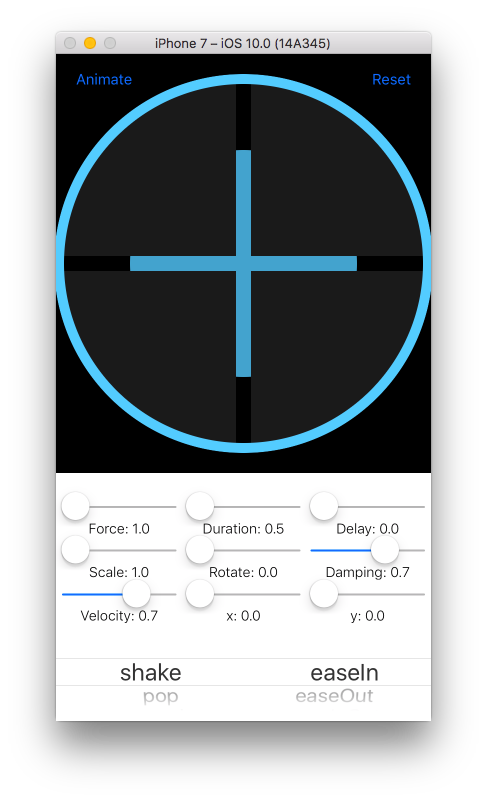
// Required
view.animate(.Shake, curve:.EaseInOutBack)
// With optionals
view.animate(.Shake, curve:.EaseInOutBack, duration:0.8, delay:0, force:1, damping:0.7,velocity:1, fromRotation:0, fromScale:1.5, fromX:0, fromY:0)letbox=UIView(autoLayout:true)
view.addSubview(box)
box.backgroundColor =UIColor.redColor()
box.width(100)
box.height(100)
box.center(to: view)
view.layoutIfNeeded()100 pixel view pinned to the center of another view
view.width(100).height(100).center(to: view)view.horizontalCompressionPriority(UILayoutPriorityDefaultHigh)
view.horizontalHuggingPriority(UILayoutPriorityDefaultLow)You can have access to the NSLayoutConstraints by using pin() or applyAttribute.
// Pinning to an item
letwidthConstraint= view.pin(.Width, to: view, attribute:.Height, constant:0, multiplier:0.5, relation:.LessThanOrEqual)
// Applying an attribute
letwidthConstraint= view.applyAttribute(.Width, constant:100, multiplier:0.5, relation:.Equal)If a view is already in place with frames, prepForAutoLayout() will remove it from view, enable Auto Layout and place back in view.
view.prepForAutoLayout()If a view uses auto layout but you need to animate it using frames, prepForAnimation() will remove from view, disable auto layout and place back in view.
view.prepForAnimation()Instantiates a new UIView with Auto Layout
convenienceinit(autoLayout:Bool=true)Returns the frame's origin
origin()-> CGPointPins the frame's top and left sides using Auto Layout or frames
origin(constant: CGPoint)-> UIViewPins left and top sides to another view using Auto Layout
origin(to to:AnyObject, constant: CGPoint =CGPoint(x:0, y:0), multiplier:CGFloat =1)-> UIViewReturns the min x point
left()-> CGFloatPins the left side using Auto Layout or frames
left(constant: CGFloat)-> UIViewPins left side to another view using Auto Layout
left(to to:AnyObject, attribute: NSLayoutAttribute =.Left, constant: CGFloat =0, multiplier:CGFloat =1)-> UIViewReturns the leading side value
leading()-> CGFloatPins the leading side using Auto Layout or frames
leading(constant: CGFloat)-> UIViewPins the leading side to another view using Auto Layout
leading(to to:AnyObject, attribute: NSLayoutAttribute =.Leading, constant: CGFloat =0, multiplier:CGFloat =1)-> UIViewReturns the max x point
right()-> CGFloatPins the right side using Auto Layout or frames
right(constant: CGFloat)-> UIViewPins the right side to another view using Auto Layout
right(to to:AnyObject, attribute: NSLayoutAttribute =.Right, constant: CGFloat =0, multiplier:CGFloat =1)-> UIViewReturns the trailing side value
trailing()-> CGFloatPins the trailing side using Auto Layout or frames
trailing(constant: CGFloat)-> UIViewPins the trailing side to another view using Auto Layout
trailing(to to:AnyObject, attribute: NSLayoutAttribute =.Trailing, constant: CGFloat =0, multiplier:CGFloat =1)-> UIViewReturns the top side value
top()-> CGFloatPins the top side using Auto Layout or frames
top(constant: CGFloat)-> UIViewPins the trailing side to another view using Auto Layout
top(to to:AnyObject, attribute: NSLayoutAttribute =.Top, constant: CGFloat =0, multiplier:CGFloat =1)-> UIViewReturns the bottom side value
bottom()-> CGFloatPins the bottom side using Auto Layout or frames
bottom(constant: CGFloat)-> UIViewPins the bottom side to another view using Auto Layout
bottom(to to:AnyObject, attribute: NSLayoutAttribute =.Bottom, constant: CGFloat =0, multiplier:CGFloat =1)-> UIViewPins the center to it's superview using Auto Layout or frames
center(constant: CGPoint =CGPoint(x:0, y:0))-> UIViewPins the center point to another view using Auto Layout
center(to to:AnyObject, constant:CGSize =CGSize(width:0, height:0), multiplier:CGFloat =1)-> UIViewReturns the center X
centerX()-> CGFloatPins the center X using Auto Layout or frames
centerX(constant: CGFloat =0)-> UIViewPins the center X to another view using Auto Layout
centerX(to to:AnyObject, attribute: NSLayoutAttribute =.CenterX, constant: CGFloat =0, multiplier:CGFloat =1)-> UIViewReturns the center Y
centerY()-> CGFloatPins the center Y using Auto Layout or frames
centerY(constant: CGFloat =0)-> UIViewPins the center Y to another view using Auto Layout
centerY(to to:AnyObject, attribute: NSLayoutAttribute =.CenterY, constant: CGFloat =0, multiplier:CGFloat =1)-> UIViewReturns the Compression Resistance Priority for Horizontal Axis using Auto Layout
horizontalCompressionPriority()-> UILayoutPrioritySets the Compression Resistance Priority for Horizontal Axis using Auto Layout
horizontalCompressionPriority(priority: UILayoutPriority)-> UIViewReturns the Compression Resistance Priority for Vertical Axis using Auto Layout
verticalCompressionPriority()-> UILayoutPrioritySets the Compression Resistance Priority for Vertical Axis using Auto Layout
verticalCompressionPriority(priority: UILayoutPriority)-> UIViewReturns the Content Hugging Priority for Horizontal Axis using Auto Layout
func horizontalHuggingPriority()->UILayoutPrioritySets the Content Hugging Priority for Horizontal Axis using Auto Layout
horizontalHuggingPriority(priority: UILayoutPriority)-> UIViewReturns the Content Hugging Priority for Vertical Axis using Auto Layout
verticalHuggingPriority()-> UILayoutPrioritySets the Content Hugging Priority for Vertical Axis using Auto Layout
verticalHuggingPriority(priority: UILayoutPriority)-> UIViewReturns the frame size
size()-> CGSizeSets the frame size using Auto Layout or frames
size(constant: CGSize)-> UIViewPins the size to another view using Auto Layout
size(to to:AnyObject, constant: CGSize =CGSize(width:0, height:0), multiplier:CGFloat =1)-> UIViewReturns the frame width
width()-> CGFloatSets the frame width using Auto Layout or frames
width(constant: CGFloat)-> UIViewPins the width to another view using Auto Layout
width(to to:AnyObject, attribute: NSLayoutAttribute =.Width, constant: CGFloat =0, multiplier:CGFloat =1)-> UIViewReturns the frame height
height()-> CGFloatSets the frame height using Auto Layout or frames
eight(constant: CGFloat)-> UIViewPins the height to another view using Auto Layout
height(to to:AnyObject, attribute: NSLayoutAttribute =.Height, constant: CGFloat =0, multiplier:CGFloat =1)-> UIViewReturns the minimum size using Auto Layout
minSize()-> CGSize?Sets the minimum size using Auto Layout
minSize(constant:CGSize)-> UIViewPins the minimum size to another view using Auto Layout
minSize(to to:AnyObject, constant:CGSize =CGSize(width:0, height:0), multiplier:CGFloat =1)Returns the minimum width using Auto Layout
minWidth()-> CGFloat?Sets the minimum width using Auto Layout
minWidth(constant:CGFloat)-> UIViewPins the minimum width to another view using Auto Layout
minWidth(to to:AnyObject, attribute: NSLayoutAttribute =.Width, constant:CGFloat =0, multiplier:CGFloat =1)-> UIViewReturns the minimum height using Auto Layout
minHeight()-> CGFloat?Sets the minimum height using Auto Layout
minHeight(constant:CGFloat)-> UIViewPins the minimum height to another view using Auto Layout
minHeight(to to:AnyObject, attribute: NSLayoutAttribute =.Height, constant:CGFloat =0, multiplier:CGFloat =1)-> UIViewReturns the maximun size using Auto Layout
maxSize()-> CGSize?Sets the maximun size using Auto Layout
maxSize(constant:CGSize)-> UIViewPins the maximun size to another view using Auto Layout
maxSize(to to:AnyObject, constant:CGSize =CGSize(width:0, height:0), multiplier:CGFloat =1)-> UIViewReturns the maximun width using Auto Layout
maxWidth()-> CGFloat?Sets the maximun width using Auto Layout
maxWidth(constant:CGFloat)-> UIViewPins the maximun width to another view using Auto Layout
maxWidth(to to:AnyObject, attribute: NSLayoutAttribute =.Width, constant:CGFloat =0, multiplier:CGFloat =1)-> UIViewReturns the maximun height using Auto Layout
maxHeight()-> CGFloat?Sets the maximun height using Auto Layout
maxHeight(constant:CGFloat)-> UIViewPins the maximun height to another view using Auto Layout
maxHeight(to to:AnyObject, attribute: NSLayoutAttribute =.Height, constant:CGFloat =0, multiplier:CGFloat =1)-> UIViewReturns the length of the smallest side
smallestSideLength()-> CGFloatReturns the length of the largest side
largestSideLength()-> CGFloatPrepares the view for a frame based animation by removing the view, enabling translatesAutoresizingMaskIntoConstraints and re-adding the view to it's superview
prepForAnimation()Prepares the view for Auto Layout by removing the view, disabling translatesAutoresizingMaskIntoConstraints and re-adding the view to it's superview
prepForAutoLayout()Pins an attribute to another view
pin(pinAttribute:NSLayoutAttribute, to:AnyObject?=nil, attribute:NSLayoutAttribute, constant:CGFloat =0, multiplier:CGFloat =1, relation:NSLayoutRelation =.Equal)-> NSLayoutConstraint?Applies an attribute to the view
applyAttribute(attribute:NSLayoutAttribute, constant:CGFloat =0, multiplier: CGFloat =1, relation:NSLayoutRelation =.Equal)-> NSLayoutConstraintRemoves all attached constraints recursevely
removeAttachedConstraintsRecursevely()-> UIViewRemoves a constraint recursevely
removeConstraintRecursevely(constraint:NSLayoutConstraint)-> UIViewReturns true if layout direction is left to right
layoutDirectionIsLeftToRight()-> BoolThe layer border color
varborderColor:UIColorThe layer border width
varborderWidth:CGFloatSets layer border with a dash pattern
borderWithDashPattern(lineDashPattern:[Int], borderWidth: CGFloat, borderColor: UIColor, cornerRadius: CGFloat?)-> UIViewThe layer corner radius
varcornerRadius:CGFloatCreates a circle by rounding the corners to half the size of the width, sets border color and width
roundCornersToCircle(borderColor: UIColor?, borderWidth: CGFloat?)-> UIViewCreates a circle by rounding the corners to hald the size of the width
roundCorners(cornerRadius: CGFloat, borderColor: UIColor?, borderWidth: CGFloat?)-> UIViewThe shadow color of the layer
varshadowColor:UIColorThe shadow offset of the layer
varshadowOffset:CGSizeThe shadow opacity of the layer
varshadowOpacity:FloatThe shadow radius of the layer
varshadowRadius:CGFloatSets shadow of the layer including the color, offset, radius, opacity and mask.
shadow(color: UIColor =UIColor.blackColor(), offset: CGSize =CGSize(width:0, height:0), radius: CGFloat =6, opacity: Float =1, isMasked: Bool =false)-> UIViewSets a gradient color layer
setGradient(colors:[UIColor], isHorizontal:Bool =false)-> UIViewAnimates colors of a gradient layer
animateGradientToColors(colors:[UIColor], duration: CFTimeInterval =3)-> UIViewSets a gradient layer mask
setGradientMask(alphas:[CGFloat], isHorizontal:Bool =false)-> UIViewReturns true if layout direction is left to right
layoutDirectionIsLeftToRight()-> BoolReturns true if horizontal size class is compact
horizontalSizeClassIsCompact()-> BoolReturns true if vertical size class is compact
verticalSizeClassIsCompact()-> Bool