Robust and effective logging for Python 2 and 3.
- Documentation: https://logzero.readthedocs.io
- GitHub: https://github.com/metachris/logzero
- Easy logging to console and/or (rotating) file.
- Provides a fully configured standard Python logger object.
- JSON logging (with integrated python-json-logger)
- Pretty formatting, including level-specific colors in the console.
- No dependencies
- Windows color output supported by colorama
- Robust against str/bytes encoding problems, works with all kinds of character encodings and special characters.
- Multiple loggers can write to the same logfile (also across multiple Python files and processes).
- Global default logger with logzero.logger and custom loggers with logzero.setup_logger(..).
- Compatible with Python 2 and 3.
- All contained in a single file.
- Licensed under the MIT license.
- Heavily inspired by the Tornado web framework.
Installation:
python -m pip install logzerofromlogzeroimportloggerlogger.debug("hello")
logger.info("info")
logger.warning("warn")
logger.error("error")
# This is how you'd log an exceptiontry:
raiseException("this is a demo exception")
exceptExceptionase:
logger.exception(e)
# JSON loggingimportlogzerologzero.json()
logger.info("JSON test")
# Start writing into a logfilelogzero.logfile("/tmp/logzero-demo.log")
# Set a minimum loglevellogzero.loglevel(logzero.WARNING)This is the output:
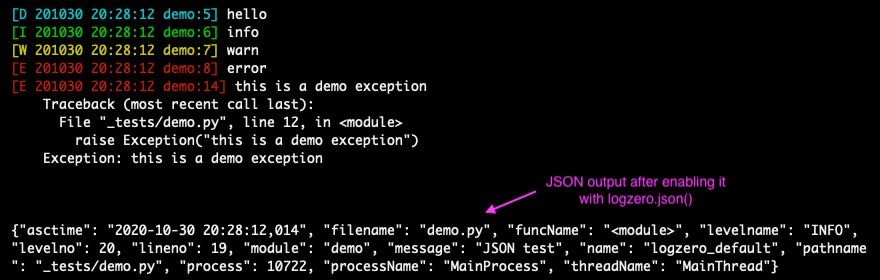
Note: You can find more examples in the documentation: https://logzero.readthedocs.io
JSON logging can be enabled for the default logger with logzero.json(), or with setup_logger(json=True) for custom loggers:
>>>logzero.json()
>>>logger.info("test")
{"asctime": "2020-10-21 10:42:45,808", "filename": "<stdin>", "funcName": "<module>", "levelname": "INFO", "levelno": 20, "lineno": 1, "module": "<stdin>", "message": "test", "name": "logzero_default", "pathname": "<stdin>", "process": 76179, "processName": "MainProcess", "threadName": "MainThread"}
>>>my_logger=setup_logger(json=True)
>>>my_logger.info("test")
{"asctime": "2020-10-21 10:42:45,808", "filename": "<stdin>", "funcName": "<module>", "levelname": "INFO", "levelno": 20, "lineno": 1, "module": "<stdin>", "message": "test", "name": "logzero_default", "pathname": "<stdin>", "process": 76179, "processName": "MainProcess", "threadName": "MainThread"}
The logged JSON object has these fields:
{
"asctime": "2020-10-21 10:43:40,765",
"filename": "test.py",
"funcName": "test_this",
"levelname": "INFO",
"levelno": 20,
"lineno": 9,
"module": "test",
"message": "info",
"name": "logzero",
"pathname": "_tests/test.py",
"process": 76204,
"processName": "MainProcess",
"threadName": "MainThread"
}
Exceptions logged with logger.exception(e) have these additional JSON fields:
{
"levelname": "ERROR",
"levelno": 40,
"message": "this is a demo exception",
"exc_info": "Traceback (most recent call last):\n File \"_tests/test.py\", line 15, in test_this\n raise Exception(\"this is a demo exception\")\nException: this is a demo exception"
}
Take a look at the documentation for more information and examples:
- Documentation: https://logzero.readthedocs.io.
Install logzero with pip:
python -m pip install logzeroHere's how you setup a virtualenv and download and run the demo:
# Create and activate a virtualenv in ./venv/
python3 -m venv venv
. venv/bin/activate
# Install logzero
python -m pip install logzero
# Download and run demo.py
wget https://raw.githubusercontent.com/metachris/logzero/master/examples/demo.py
python demo.py
If you don't have pip installed, this Python installation guide can guide you through the process.
Alternatively, if you use the Anaconda distribution:
$ conda config --add channels conda-forge
$ conda install logzero
You can also install logzero from the public Github repo:
$ git clone https://github.com/metachris/logzero.git
$ cd logzero
$ python setup.py installGetting started
$ git clone https://github.com/metachris/logzero.git
$ cd logzero
# Activate virtualenv
$ python3 -m venv venv
$ . venv/bin/activate
# Install main and dev dependencies
$ pip install -e .
$ pip install -r requirements_dev.txt
# Run the tests
$ make test# Run the linter
$ make lint
# Generate the docs (will auto-open in Chrome)
$ make docs
# You can enable watching mode to automatically rebuild on changes:
$ make servedocs
To test with Python 2.7, you can use Docker:
docker run --rm -it -v /Users/chris/stream/logzero:/mnt python:2.7 /bin/bashNow you have a shell with the current directory mounted into /mnt/ inside the container.
Notes
- pytest is the test runner
- CI is run with Github actions.
- Download stats: https://pepy.tech/project/logzero
See the changelog here: https://github.com/metachris/logzero/blob/master/HISTORY.md
All kinds of feedback and contributions are welcome.
- Create an issue
- Create a pull request
- @metachris