The Code Highlighter React package provides an effortless way to implement syntax highlighting for your React applications. Built with TypeScript and Styled Components, it offers a customizable and flexible solution for displaying code with a polished look.
Core functionality leverages the popular react-syntax-highlighter package, ensuring robust and reliable code rendering.
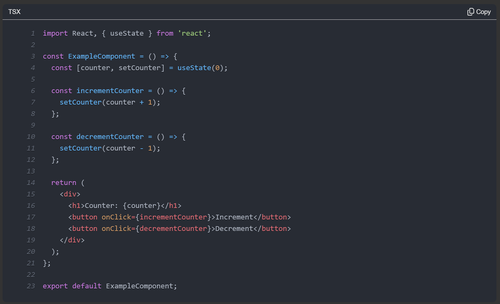
- Switch Themes: Toggle between a dark and a light theme.
- Highlight Lines: Easily highlight specific lines, including added, removed, and marked lines.
- Language-Specific Formatting: Automatically formats the following languages using Prettier:
- JSX
- TSX
- TypeScript
- JavaScript
- CSS
- HTML
- Markdown
- YAML
- GraphQL
- Copy Code Button: Quickly copy the displayed code with a dedicated button.
To install the package, run the following command:
npm install code-highlighter-reactHighlight code with minimal configuration:
importReactfrom'react';import{CodeHighlighter,CodeHighlighterTheme}from'code-highlighter-react';constcode=`const greeting = 'Hello, World!';`;constMyComponent=()=>{return(<CodeHighlightercode={code}language="tsx"shouldShowLineNumberstheme={CodeHighlighterTheme.Dark}/>);};exportdefaultMyComponent;Customize line highlighting to emphasize changes or important sections:
importReactfrom'react';import{CodeHighlighter,CodeHighlighterTheme}from'code-highlighter-react';constcode=`const greeting = 'Hello, World!';`;consthighlightedLines={added: [2,3,4],removed: [5,6],marked: [10]};constMyComponent=()=>{return(<CodeHighlightercode={code}highlightedLines={highlightedLines}language="tsx"shouldShowLineNumberstheme={CodeHighlighterTheme.Dark}/>);};exportdefaultMyComponent;Below is a list of supported props:
| Prop | Type | Description | Default Value |
|---|---|---|---|
code | string | The code to be displayed. | - |
copyButtonText | string | Text shown after clicking the copy button. | - |
highlightedLines | HighlightedLines | Specifies which lines should be highlighted. | - |
language | CodeHighlighterLanguage | Language of the code snippet. | - |
onFormatError | (error: unknown) => void | Callback for handling formatting errors. | - |
shouldFormatCode | boolean | Indicates whether the code should be formatted. | false |
shouldShowLineNumbers | boolean | Toggles the display of line numbers. | false |
shouldWrapLines | boolean | Enables line wrapping for long lines. | - |
theme | CodeHighlighterTheme | Defines the theme (dark or light) for the code block. | CodeHighlighterTheme.Dark |
This package is built on top of react-syntax-highlighter, with additional styling and functionality enhancements tailored for React developers.