
Command Line Interface for Zilliqa Blockchain




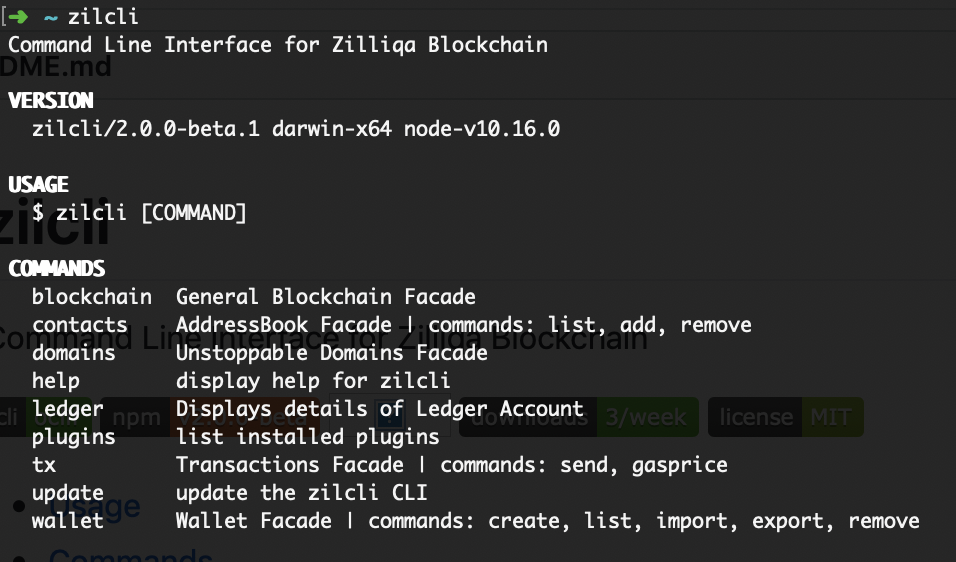
If you have nodejs > v8.4.0 installed on your system you can install the CLI globally using
$ npm install -g zilcliOr you can install the binary packaged versions for multiple Operating Systems. Check the Releases page.
zilcli blockchain:balance [ADDRESS]zilcli blockchain:infozilcli blockchain:txblock [BLOCK_NUMBER]zilcli contacts:add [ADDRESS] [NAME]zilcli contacts:listzilcli contacts:remove [NAME]zilcli domains:resolve [DOMAIN]zilcli help [COMMAND]zilcli ledger:accountzilcli ledger:sendzilcli ledger:sign INIT OUTPUT [CONTRACT]zilcli pluginszilcli plugins:install PLUGIN...zilcli plugins:link PLUGINzilcli plugins:uninstall PLUGIN...zilcli plugins:updatezilcli tx:batchzilcli tx:details [HASH]zilcli tx:recent [LIMIT]zilcli tx:sendzilcli tx:sign INIT OUTPUT [CONTRACT]zilcli update [CHANNEL]zilcli wallet:createzilcli wallet:details [NAME]zilcli wallet:export [NAME]zilcli wallet:import [NAME] [PRIVATEKEY]zilcli wallet:listzilcli wallet:remove [NAME]
Returns balance for an address or from a batch of addreses.
USAGE
$ zilcli blockchain:balance [ADDRESS]
ARGUMENTS
ADDRESS Address you want to get the balance for (could be domain name or contact name)
OPTIONS
--batch=batch
DESCRIPTION
...
Use batch flag to check balance for multiple addresses. You have to enter the full path to file (eg zilcli blockchain:balance --batch=/home/user/addresses.txt)
$ zilcli blockchain:balance --batch=/home/user/addresses.txt
See code: src/commands/blockchain/balance.ts
Retrieves generally blockchain information
USAGE
$ zilcli blockchain:info
DESCRIPTION
...
such as the number of nodes per shard.
See code: src/commands/blockchain/info.ts
Retrieves a TxBlock data.
USAGE
$ zilcli blockchain:txblock [BLOCK_NUMBER]
ARGUMENTS
BLOCK_NUMBER Block number
DESCRIPTION
...
By passing no argument it will retrieve the latest tx block.
See code: src/commands/blockchain/txblock.ts
Describe the command here
USAGE
$ zilcli contacts:add [ADDRESS] [NAME]
ARGUMENTS
ADDRESS Contact address
NAME Contact name
DESCRIPTION
...
Extra documentation goes here
See code: src/commands/contacts/add.ts
Lists all contacts from Address Book
USAGE
$ zilcli contacts:list
DESCRIPTION
Prints a table with all the saved accounts.
Name, Address, Old Address format
See code: src/commands/contacts/list.ts
Remove existing Contact from Address Book
USAGE
$ zilcli contacts:remove [NAME]
ARGUMENTS
NAME contact name you want to remove
DESCRIPTION
...
See code: src/commands/contacts/remove.ts
Returns the details of a specified domain name.
USAGE
$ zilcli domains:resolve [DOMAIN]
ARGUMENTS
DOMAIN Domain name eg: zilcli.zil
DESCRIPTION
...
See code: src/commands/domains/resolve.ts
display help for zilcli
USAGE
$ zilcli help [COMMAND]
ARGUMENTS
COMMAND command to show help for
OPTIONS
--all see all commands in CLI
See code: @oclif/plugin-help
Displays details of Ledger Account
USAGE
$ zilcli ledger:account
See code: src/commands/ledger/account.ts
Create and send a transaction using the Ledger Device
USAGE
$ zilcli ledger:send
OPTIONS
-a, --amount=amount amount in ZIL
-g, --gas=gas gas to use (defined in Li)
-t, --to=to destination address
DESCRIPTION
See code: src/commands/ledger/send.ts
Sign a tx json file with Ledger Device
USAGE
$ zilcli ledger:sign INIT OUTPUT [CONTRACT]
ARGUMENTS
INIT Absolute file path for init.json
OUTPUT Absolute file path for output.json
CONTRACT Absolute file path for contract.scilla
See code: src/commands/ledger/sign.ts
list installed plugins
USAGE
$ zilcli plugins
OPTIONS
--core show core plugins
EXAMPLE
$ zilcli plugins
See code: @oclif/plugin-plugins
installs a plugin into the CLI
USAGE
$ zilcli plugins:install PLUGIN...
ARGUMENTS
PLUGIN plugin to install
OPTIONS
-f, --force yarn install with force flag
-h, --help show CLI help
-v, --verbose
DESCRIPTION
Can be installed from npm or a git url.
Installation of a user-installed plugin will override a core plugin.
e.g. If you have a core plugin that has a 'hello' command, installing a user-installed plugin with a 'hello' command will override the core plugin implementation. This is useful if a user needs to update core plugin functionality in the CLI without the need to patch and update the whole CLI.
ALIASES
$ zilcli plugins:add
EXAMPLES
$ zilcli plugins:install myplugin $ zilcli plugins:install https://github.com/someuser/someplugin
$ zilcli plugins:install someuser/someplugin
See code: @oclif/plugin-plugins
links a plugin into the CLI for development
USAGE
$ zilcli plugins:link PLUGIN
ARGUMENTS
PATH [default: .] path to plugin
OPTIONS
-h, --help show CLI help
-v, --verbose
DESCRIPTION
Installation of a linked plugin will override a user-installed or core plugin.
e.g. If you have a user-installed or core plugin that has a 'hello' command, installing a linked plugin with a 'hello' command will override the user-installed or core plugin implementation. This is useful for development work.
EXAMPLE
$ zilcli plugins:link myplugin
See code: @oclif/plugin-plugins
removes a plugin from the CLI
USAGE
$ zilcli plugins:uninstall PLUGIN...
ARGUMENTS
PLUGIN plugin to uninstall
OPTIONS
-h, --help show CLI help
-v, --verbose
ALIASES
$ zilcli plugins:unlink
$ zilcli plugins:remove
See code: @oclif/plugin-plugins
update installed plugins
USAGE
$ zilcli plugins:update
OPTIONS
-h, --help show CLI help
-v, --verbose
See code: @oclif/plugin-plugins
Create and send batch transactions
USAGE
$ zilcli tx:batch
OPTIONS
-f, --file=file (required) transactions file path
--gasprice=gasprice gas price (in Qa)
DESCRIPTION
Batch file format should contain private key, destination and amount used to send.
File format example:
privatekey destination 10
privatekey destination all
privatekey destination 0.5
See code: src/commands/tx/batch.ts
Returns the details of a specified Transaction.
USAGE
$ zilcli tx:details [HASH]
ARGUMENTS
HASH Transaction hash you want to get details for
DESCRIPTION
...
See code: src/commands/tx/details.ts
Retrieve a list with recent 100 transactions
USAGE
$ zilcli tx:recent [LIMIT]
ARGUMENTS
LIMIT Limit
DESCRIPTION
...
See code: src/commands/tx/recent.ts
Create and send a transaction
USAGE
$ zilcli tx:send
OPTIONS
-a, --amount=amount amount in ZIL
-f, --from=from account name or privateKey
-g, --gas=gas gas to use (defined in Li)
-p, --usePrivateKey Private Key
-t, --to=to destination address
DESCRIPTION
See code: src/commands/tx/send.ts
Sign a transaction
USAGE
$ zilcli tx:sign INIT OUTPUT [CONTRACT]
ARGUMENTS
INIT Absolute file path for init.json
OUTPUT Absolute file path for output.json
CONTRACT Absolute file path for contract.scilla
OPTIONS
-f, --from=from account name or privateKey
-p, --usePrivateKey Private Key
See code: src/commands/tx/sign.ts
update the zilcli CLI
USAGE
$ zilcli update [CHANNEL]
See code: @oclif/plugin-update
USAGE
$ zilcli wallet:create
See code: src/commands/wallet/create.ts
Prints out details about Wallet
USAGE
$ zilcli wallet:details [NAME]
ARGUMENTS
NAME Wallet name to get details for
DESCRIPTION
Returned data: Name, ID, Address, Balance privateKey, publicKey, Network details
See code: src/commands/wallet/details.ts
Export account to keystore file
USAGE
$ zilcli wallet:export [NAME]
ARGUMENTS
NAME account name you want to export
DESCRIPTION
Export wallet account to keystore file encoded with passphrase.
See code: src/commands/wallet/export.ts
Import wallet
USAGE
$ zilcli wallet:import [NAME] [PRIVATEKEY]
ARGUMENTS
NAME [default: default] Account name
PRIVATEKEY File path / Private Key / Mnemonic phrase
OPTIONS
--type=keystore|privateKey [default: privateKey] import type
DESCRIPTION
You can import wallet accounts from keystore file or by Private Key
Keystore file must be located in $HOME/.zilcli/ directory.
See code: src/commands/wallet/import.ts
Lists all configured Zilliqa Wallets
USAGE
$ zilcli wallet:list
DESCRIPTION
Prints a table with all the configured Wallet Accounts.
ID, Name, Address, Balance
See code: src/commands/wallet/list.ts
Remove existing wallet from Zilcli Manager
USAGE
$ zilcli wallet:remove [NAME]
ARGUMENTS
NAME account name you want to remove
DESCRIPTION
...
See code: src/commands/wallet/remove.ts