A professional-grade BPM clock generator library for Arduino and PlatformIO, designed for musicians, artists, and engineers creating sequencers, sync boxes, and real-time musical devices. It is built to be multi-architecture, portable, and easy to use within the open-source ecosystem.
uClock delivers precise, hardware-interrupt-driven clock timing for music and media applications. Whether you're building a MIDI sequencer, modular synthesizer clock, or synchronizing multiple devices, uClock provides the rock-solid timing foundation your project needs.
The library leverages hardware timer interrupts to ensure accurate BPM generation and synchronization, making it suitable for professional music production, live performance, and creative installations.
The absence of real-time features necessary for creating professional-level embedded devices for music and video on open-source community-based platforms like Arduino led to the development of uClock. By leveraging timer hardware interrupts, the library can schedule and manage real-time processing with safe shared resource access through its API.
- AVR: ATmega168/328, ATmega16u4/32u4, ATmega2560
- ARM: Teensy (all versions), STM32XX, Seeed Studio XIAO M0
- ESP32: All ESP32 family boards
- RP2040: Raspberry Pi Pico and compatible boards
Open-source platforms like Arduino and PlatformIO traditionally lack the real-time capabilities required for professional music and video applications. uClock bridges this gap by providing:
- Precise timing through hardware interrupts
- Flexible clock resolutions from 1 to 960 PPQN
- External sync support for external sync configurations
- Shuffle and groove capabilities for humanized timing
- Multi-track sequencing with independent shuffle per track
- Multiple sync outputs for different device standards
- Open platformio.ini, a project configuration file located in the root of PlatformIO project.
- Add the following line to the lib_deps option of [env:] section: midilab/uClock@^2.3.0
[env:...]lib_deps =
midilab/uClock@^2.3.0- Build a project, PlatformIO will automatically install dependencies.
- Open your Arduino IDE
- Select the Library Manager Tab on left side
- Type "uclock" at the search box
- Click Install for latest version
PPQN (Pulses Per Quarter Note) determines the timing resolution of your clock:
- PPQN_1, 2, 4, 8, 12: Modular synthesis sync standards
- PPQN_24: Standard MIDI sync (24 pulses per beat)
- PPQN_48: Common in vintage drum machines
- PPQN_96: High-resolution internal clock (default)
- PPQN_384, 480, 960: Ultra-high resolution for modern sequencing and DAWs
uClock operates through a callback system that triggers your code at precise intervals:
| Callback | Purpose | Use Case |
|---|---|---|
setOnOutputPPQN() | Main clock pulse | Drive sequencers, process MIDI |
setOnStep() | 16th note intervals | Step sequencers, drum patterns |
setOnSync() | Custom sync outputs | Multiple device sync, modular CV |
setOnClockStart() | Clock start event | Initialize sequences, send MIDI start |
setOnClockStop() | Clock stop event | Reset states, send MIDI stop |
setOnClockPause() | Clock pause event | Pause handling |
setOnClockContinue() | Clock continue event | Resume from pause |
#include<uClock.h>voidonPPQNCallback(uint32_t tick) {
// Called at each clock pulse (default 96 PPQN)// Drive your sequencer logic here
}
voidsetup() {
// set main clock rate for output(sequencer resolution)
uClock.setOutputPPQN(uClock.PPQN_96);
// Configure callbacks
uClock.setOnOutputPPQN(onPPQNCallback);
// Set tempo
uClock.setTempo(120.0);
// Initialize and start
uClock.init();
uClock.start();
}
voidloop() {
// Your main code here
}Send clock message and sync to external midi clock.
#include<uClock.h>// MIDI clock, start and stop byte definitions - based on MIDI 1.0 Standards.
#defineMIDI_CLOCK0xF8
#defineMIDI_START0xFA
#defineMIDI_STOP0xFC// The callback function called by Clock each Pulse of 24PPQN clock resolution.voidonSync24Callback(uint32_t tick) {
// Send MIDI_CLOCK to external gears
Serial.write(MIDI_CLOCK);
}
// The callback function called when clock starts by using Clock.start() method.voidonClockStart() {
Serial.write(MIDI_START);
}
// The callback function called when clock stops by using Clock.stop() method.voidonClockStop() {
Serial.write(MIDI_STOP);
}
voidsetup() {
// Initialize serial communication at 31250 bits per second, the default MIDI serial speed communication:
Serial.begin(31250);
// set main clock rate for output(sequencer resolution)
uClock.setOutputPPQN(uClock.PPQN_96);
// set main clock rate for input(expected sync signal rate)
uClock.setInputPPQN(uClock.PPQN_24);
// Set the callback function for the clock output to send MIDI Sync message based on 24PPQN
uClock.setOnSync(uClock.PPQN_24, onSync24Callback);
// Set the callback function for MIDI Start and Stop messages.
uClock.setOnClockStart(onClockStart);
uClock.setOnClockStop(onClockStop);
// Inits the clock
uClock.init();
// set external clock mode
uClock.setClockMode(uClock.EXTERNAL_CLOCK);
// Set the clock BPM to 126 BPM//uClock.setTempo(126);//uClock.start();
}
voidloop() {
// call clockMe() each time you receive an external clock pulse// in this example we set inputPPQN to 24 PPQN// wich expects a signal clock rate comming from MIDI device// PS: Idealy you should do midi sync with another interruption schema// the more code on loop() the less accuracy the MIDI_CLOCK signal readsif (Serial.available() > 0) {
uint8_t midi_byte = Serial.read();
switch (midi_byte) {
caseMIDI_CLOCK:
uClock.clockMe();
break;
caseMIDI_START:
uClock.start(); break;
caseMIDI_STOP:
uClock.stop();
break;
}
}
}Generate different clock resolutions simultaneously for various devices:
#include<uClock.h>
#defineSYNC_OUT_PIN8
#defineMIDI_CLOCK_BYTE0xF8voidonSync1(uint32_t tick) {
// Send modular sync (1 pulse per quarter note)triggerModularPulse();
}
voidonSync2(uint32_t tick) {
// Send Pocket Operators sync (2 pulse per quarter note)triggerPocketOperatorsPulse();
}
voidonSync24(uint32_t tick) {
// Send MIDI clock (24 PPQN)
Serial.write(MIDI_CLOCK_BYTE);
}
voidonSync48(uint32_t tick) {
// Send 48 PPQN for vintage gear like Korg DIN Sync 48digitalWrite(SYNC_OUT_PIN, !digitalRead(SYNC_OUT_PIN));
}
voidsetup() { // set main clock rate for output(sequencer resolution)
uClock.setOutputPPQN(uClock.PPQN_96);
// set sync callbacks
uClock.setOnSync(uClock.PPQN_1, onSync1);
uClock.setOnSync(uClock.PPQN_2, onSync2);
uClock.setOnSync(uClock.PPQN_24, onSync24);
uClock.setOnSync(uClock.PPQN_48, onSync48);
// do only init after all setup is done
uClock.init();
// Set the clock BPM to 126 BPM
uClock.setTempo(126);
uClock.start();
}
voidloop() {
// Your main code here
}
Available Sync Resolutions: All possible Clock Resolutions (PPQN) where setOnSync(resolution) <= setOutputPPQN(resolution)
uClock includes a built-in extension specifically designed for creating step sequencers for synthesizers and drum machines. The extension provides multi-track support with independent per-track control, making it ideal for building complete rhythm machines and melodic sequencers.
Current Features:
- ✅ 16th note orientation: Natural step sequencer workflow
- ✅ Multi-track support: Independent sequences with individual callbacks
- ✅ Per-track shuffle: Each track can have its own groove templatexs
Roadmap:
- 🔄 Per-track shift: Offset patterns in time (coming soon)
- 🔄 Per-track direction: Forward, reverse, ping-pong playback (coming soon)
#include<uClock.h>
#defineMAX_STEPS16//#define TRACK_NUMBER 8// a pattern example for drums mainlyuint8_t pattern[MAX_STEPS] = {1,0,0,0, 1,0,0,0, 1,0,0,0, 1,0,0,0};
// Called every 16th note// not dependent on internal or external clock resolution// single track callback(doesn't mean you can't code a multirack sequencer here)voidonStepCallback(uint32_t step) {
if (pattern[step % MAX_STEPS])
playNote();
}
// the multirack callback //void onStepCallback(uint32_t step, uint8_t track) {//}voidsetup() {
// Configure callbacks
uClock.setOnStep(onStepCallback);
// with multitrack support?//uClock.setOnStep(onStepCallback, TRACK_NUMBER);
uClock.init();
// Set the clock BPM to 126 BPM
uClock.setTempo(126);
uClock.start();
}
voidloop() {
// Your main code here
}Add humanization and swing to your sequences with shuffle support. Re-create timeless groove signatures of legends like MPC60 or TR-909, or experiment with your own custom groove templates.
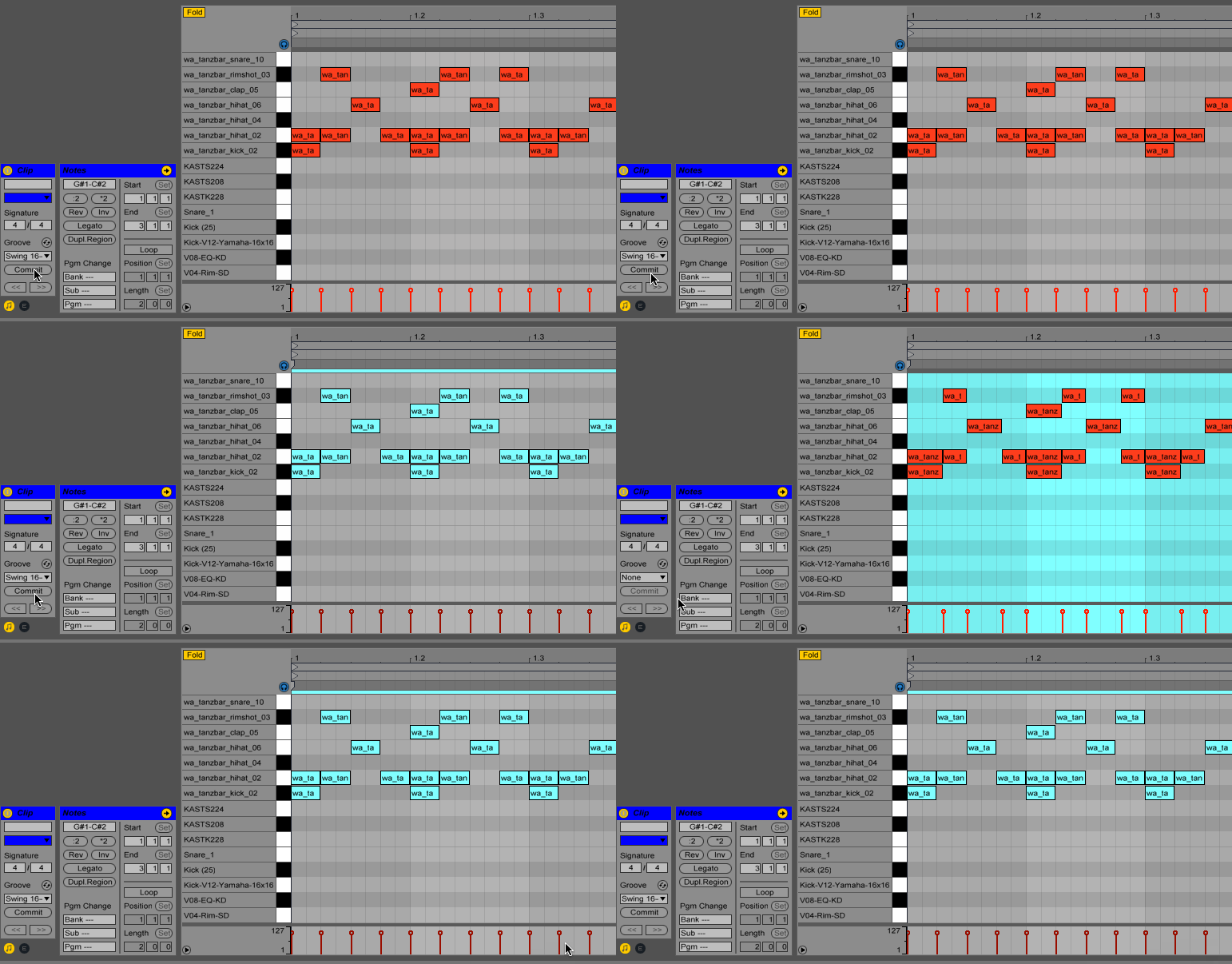
Shuffle operates by shifting individual steps earlier or later in time, along with adjusting note lengths to maintain musical coherence. As shown in the Ableton example above:
- Positive shuffle values: Delay the note trigger and shorten note length (to avoid overlapping with the next note)
- Negative shuffle values: Trigger the note earlier and extend note length (filling the time gap)
- Zero values: Play straight with no shuffle effect
This is the fundamental principle behind groove templating in step sequencers. Each 16th note step can be individually time-shifted to create swing, shuffle, or completely custom rhythmic feels.
Shuffle templates are PPQN-dependent: The range of shuffle values depends on your output resolution:
// Shuffle range calculation - in ticks
min_shuffle = -(output_ppqn/4) - 1
max_shuffle = +(output_ppqn/4) - 1// Example with PPQN_96 (default)// Range: -23 to +23 ticks per step
Template Size Configuration: Adjust in uClock.h if needed:
#defineMAX_SHUFFLE_TEMPLATE_SIZE16Modify this value to support longer patterns (memory permitting) or reduce it to save memory if you only need simpler grooves.
MPC60 Groove implmentation example based on Roger Linn Groove Magic Interview
#include<uClock.h>
#defineTRACKS_SIZE8// The shuffle effect is applied transparently for shuffled stepsvoidonStepCallback(uint32_t step, uint8_t track) {
// get the length diff to apply to current shuffled step length// if the step is not shuffled, then shuffle_len == 0int8_t shuffle_len = uClock.getShuffleLength(track);
// sequencer procesing...// ...uint8_t step_len = getNoteLength(step, track);
step_len += shuffle_len;
// use step_len as the new length of note for this step// ...
}
// no multirack support gives you a global shuffle flavor//void onStepCallback(uint32_t step) {//}voidsetup() {
// MPC60 groove signature (Same used for TR909)// Based on Roger Linn Groove Magic Interview// Internal clock: 96 PPQN// Each step is 24 ticks longuint8_t current_shuffle = 0;
int8_t shuffle_50[2] = {0, 0};
int8_t shuffle_54[2] = {0, 2};
int8_t shuffle_58[2] = {0, 4};
int8_t shuffle_62[2] = {0, 6};
int8_t shuffle_66[2] = {0, 8};
int8_t shuffle_71[2] = {0, 10};
int8_t shuffle_75[2] = {0, 12};
String shuffle_name[7] = {"50%", "54%", "58%", "62%", "66%", "71%", "75%"};
int8_t* shuffle_templates[7] = {shuffle_50, shuffle_54, shuffle_58, shuffle_62, shuffle_66, shuffle_71, shuffle_75};
// set main clock rate for output(sequencer resolution) and input(expected sync signal)
uClock.setOutputPPQN(uClock.PPQN_96);
// the second argument of setOnStep is used to request multitrack support// multitrack individual shuffle support for this example
uClock.setOnStep(onStepCallback, TRACKS_SIZE);
// global shuffle? no need to multitrack handle of step sequencer extension// set the callback without second param//uClock.setOnStep(onStepCallback);
uClock.init();
// set a template for shuffle for specific tracks
uClock.setShuffleTemplate(shuffle_templates[current_shuffle], 0);
uClock.setShuffleTemplate(shuffle_templates[current_shuffle], 1);
uClock.setShuffleTemplate(shuffle_templates[current_shuffle], 2);
uClock.setShuffleTemplate(shuffle_templates[current_shuffle], 3);
// if no multirack support set on setOnStep() then the suffle is global//uClock.setShuffleTemplate(shuffle_templates[current_shuffle]);// enable/disable shuffle for specific tracks
uClock.setShuffle(true, 0);
uClock.setShuffle(true, 1);
uClock.setShuffle(true, 2);
uClock.setShuffle(true, 3);
uClock.start();
}// Enable/disable shuffle for a trackvoidsetShuffle(bool active, uint8_t track = 0);
// Check if shuffle is activeboolisShuffled(uint8_t track = 0);
// Set shuffle pattern size (max 16 steps)voidsetShuffleSize(uint8_t size, uint8_t track = 0);
// Set individual shuffle valuesvoidsetShuffleData(uint8_t step, int8_t tick, uint8_t track = 0);
// Set complete shuffle templatevoidsetShuffleTemplate(int8_t* shuff, uint8_t size, uint8_t track = 0);
// Get shuffle offset for note length compensationint8_tgetShuffleLength(uint8_t track = 0);Shuffle Values:
- Range:
-(output_ppqn/4)-1to+(output_ppqn/4)-1ticks - Negative values = play earlier
- Positive values = delay
- Zero = no shuffle (straight timing)
Fine-tune synchronization with external clocks:
voidsetup() {
// sets external clock
uClock.setClockMode(uClock.EXTERNAL_CLOCK);
// get back to internal clock//uClock.setClockMode(uClock.INTERNAL_CLOCK);// Lock phase every N quarters (default: 1)// Higher values = looser sync but more stable// Lower values = tighter sync but may jitter
uClock.setPhaseLockQuartersCount(1);
// Smooth tempo reading for uClock.getTempo()// Buffer size: 1-254 (larger = smoother but slower lock time response)// The higher the value the longer it takes to sync getTempo() value to actual tempo// PS: the tempo taken to bpm sync here it is for getTempo() value only// it does not affect the main clock.
uClock.setExtIntervalBuffer(64);
}// Set internal tempo (1-500 BPM)voidsetTempo(float bpm);
// Get current tempo (works with external sync too)floatgetTempo();
// Clock transport controlvoidstart(); // Start clockvoidstop(); // Stop clockvoidpause(); // Toggle pause/continue// Clock modevoidsetClockMode(ClockMode mode);
ClockMode getClockMode();
// Modes: INTERNAL_CLOCK, EXTERNAL_CLOCK// Set main output resolutionvoidsetOutputPPQN(PPQNResolution resolution);
// Set expected input resolution (external sync)voidsetInputPPQN(PPQNResolution resolution);
// Available resolutions:// PPQN_1, PPQN_2, PPQN_4, PPQN_8, PPQN_12, PPQN_24// PPQN_48, PPQN_96, PPQN_384, PPQN_480, PPQN_960Important: inputPPQN must be ≤ outputPPQN
// Convert BPM to microsecondsuint32_tbpmToMicroSeconds(float bpm);
// Elapsed time functionsuint8_tgetNumberOfSeconds(uint32_t time);
uint8_tgetNumberOfMinutes(uint32_t time);
uint8_tgetNumberOfHours(uint32_t time);
uint8_tgetNumberOfDays(uint32_t time);
// Timersuint32_tgetNowTimer();
uint32_tgetPlayTime();For unsupported boards or to avoid interrupt conflicts, uClock can run in software mode:
Automatic Fallback: Activates automatically on unsupported boards
Manual Activation: Define USE_UCLOCK_SOFTWARE_TIMER build flag
voidloop() {
// REQUIRED in software timer mode
uClock.run();
// Part of your code here// ...// Call run() frequently for best accuracy
uClock.run();
// Other parts of your code here// ...
uClock.run();
}| Old API (v1.x) | New API (v2.3+) |
|---|---|
setClock96PPQNOutput() | setOnOutputPPQN() |
setClock16PPQNOutput() | setOnStep() |
setOnClockStartOutput() | setOnClockStart() |
setOnClockStopOutput() | setOnClockStop() |
setOnSync24() | setOnSync(uClock.PPQN_24, onSync24) |
setOnSync48() | setOnSync(uClock.PPQN_48, onSync48) |
setOnSyncXX() | setOnSync(uClock.PPQN_XX, onSyncXX) |
v2.0 introduces flexible PPQN configuration. If you relied on the old 96 PPQN default:
// Old (implicit 96 PPQN)
uClock.setClock96PPQNOutput(callback);
// New (explicit configuration)
uClock.setOutputPPQN(uClock.PPQN_96);
uClock.setOnOutputPPQN(callback);If you used setClock16PPQNOutput() (16th notes), simply replace with setOnStep() - no other changes needed.
If you relied on specific tick values from setClock96PPQNOutput(), verify your timing calculations match your chosen PPQN resolution.
Complete examples are available in the examples/ directory:
- BasicClock: Simple internal clock setup
- ExternalSync: Slave to external clock
- MidiClockSync: Full MIDI sync box implementation
- AcidStepSequencer: TB-303 style sequencer engine
- MultiTrackSequencer: Independent track sequencing with shuffle
uClock operates at interruption or thread(when avaliable) level, wich means your microcontroller will be executing uClock callbacks processing detached from your main loop() code, that creates a concurrency programming context where you need to properly protect read and write access to any shared resource between uClock callback code and loop() code.
All clock operations that involve shared variables or resources use atomic operations to ensure concurrency-safe access between interrupt/threads contexts and your main loop() code.
- interruption/thread: Depending on micrcontroller platform we levarage a FreeRTOS implementation when multi core avaliable. In this scenario, a threaded context will be used for callbacks instead of interruption.
What are shared variables or resources?
Any data that is accessed both inside uClock callbacks (which run in interrupt/thread context) and inside your loop() function (which runs in the main program context) is considered a shared resource.
Examples of shared resources:
- Pattern data arrays modified in
loop()and read inonStepCallback() - Sequencer state variables (mute, arp, etc.) modified in
loop()and read inonStepCallback() - MIDI buffers or output queues used in
loop()andonStepCallback()
When modifying shared variables from your main code, always use the ATOMIC() macro:
voidonStepCallback(uint32_t step) {
// Read pattern state in interrupt contextif (!sequencer.mute) {
playNote();
}
}
// Example: Safely updating sequencer state from user inputvoidloop() {
if (buttonPressed()) {
uint8_t mute = readButton();
ATOMIC(
sequencer.mute = mute;
)
}
}
// Example: Safely modifying pattern datauint8_t pattern[16] = {1,0,0,0, 1,0,0,0, 1,0,0,0, 1,0,0,0};
voidonStepCallback(uint32_t step) {
// Read pattern in interrupt contextif (pattern[step % 16]) {
playNote();
}
}
voidloop() {
if (userEditedPattern()) {
// Safely modify from main loopATOMIC(
pattern[4] = 1;
pattern[8] = 0;
)
}
}You MUST use ATOMIC when:
- Modifying variables at
loop()that are readed inside uClock callbacks - Updating multiple related variables that must change together atomically at
loop() - Writing or Reading variables that are
volatile(often used with interrupts/threads) atloop()
You DON'T need ATOMIC when:
- Coding inside any uClock callback
- Using uClock's built-in methods like
setTempo(),start(),stop()(all uClock public API are already protected)
uClock's API methods are already interrupt/thread-safe and handle atomic operations internally:
// These are SAFE to call from loop() without ATOMIC
uClock.setTempo(120.0);
uClock.start();
uClock.stop();
uClock.pause();
uClock.setShuffle(true, 0);
uClock.setShuffleTemplate(template, 16, 0);❌ Wrong - Race condition:
uint8_t stepCount = 0;
voidonStepCallback(uint32_t step) {
stepCount++; // Modified in interrupt/thread context
}
voidloop() {
if (stepCount >= 16) { // Read in main loop - NOT ATOMIC!
stepCount = 0; // Modified in main loop - DANGER!doSomething();
}
}
✅ Correct - Atomic access:
volatileuint8_t stepCount = 0;
voidonStepCallback(uint32_t step) {
stepCount++; // Modified in interrupt/thread context
}
voidloop() {
uint8_t currentCount;
ATOMIC(
currentCount = stepCount; // Atomic read
)
if (currentCount >= 16) {
ATOMIC(
stepCount = 0; // Atomic write
)
doSomething();
}
}For AVR platforms, ATOMIC() is defined as:
#defineATOMIC(X) noInterrupts(); X; interrupts();For some ARM's and other platforms with multi-core architecture, uClock uses platform-appropriate atomic mechanisms.
From user perspective the ATOMIC() macro is transparent and safe to use when you need, independently from you micro-controller architecture.
Note: Keep atomic sections as short as possible to minimize interrupt latency. Only include the actual shared variable access inside the ATOMIC() block:
// Good - minimal atomic sectionATOMIC(pattern = newPattern;)
updateDisplay(pattern); // Outside atomic section// Less ideal - unnecessary code in atomic sectionATOMIC(
pattern = newPattern;
updateDisplay(pattern); // This doesn't need to be atomic!
)MIT License - Copyright (c) 2025 Romulo Silva
- Documentation: GitHub Repository
- Issues: Report bugs via GitHub Issues
- Contact: contact@midilab.co
uClock - Precision timing for creative minds.