Latest commit

History

1,710 Commits

Folders and files

NameName
Last commit message
Last commit date

Repository files navigation

OldCord 🏳️‍🌈🏳️‍⚧️

A Discord theme that tries to restore its 2020 UI, while preserving most features.

By default, it removes profile effects (like banners) and clan tags. See addons below to get them back!
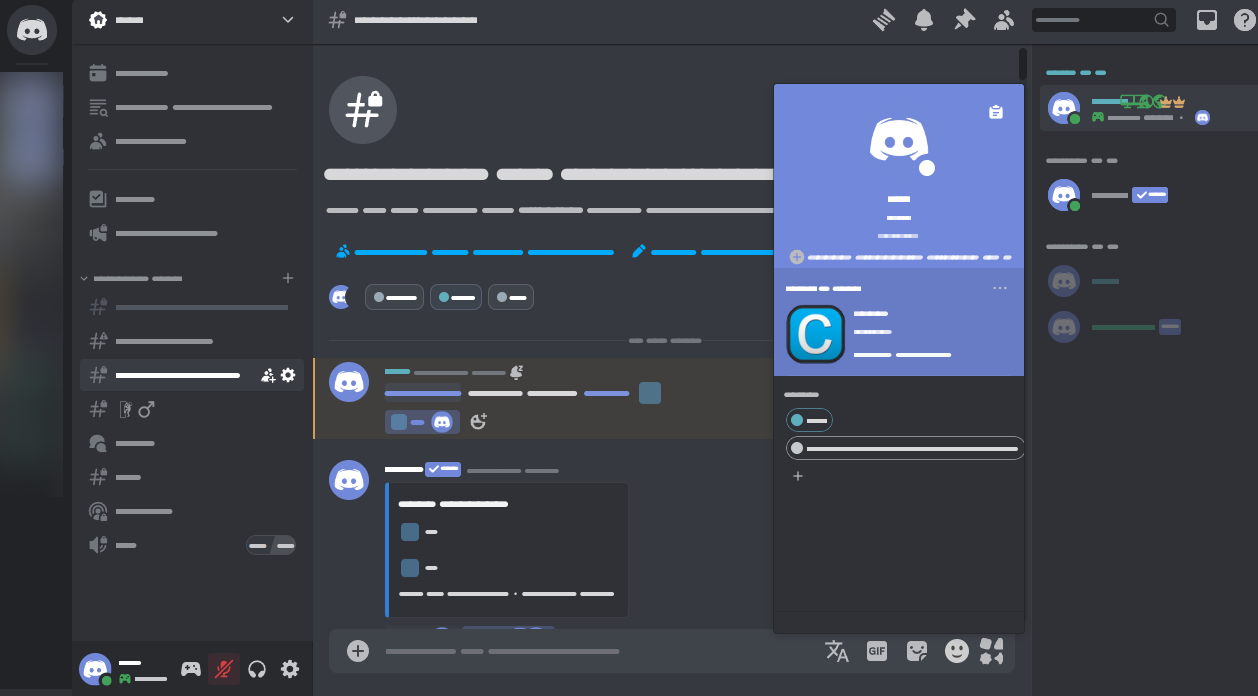
Preview

Important

  • Enable "Apply theme on other users' profiles" in Settings > Appearence to fix broken profile colors
  • For the old gray colors, use the "Ash" theme in Settings > Appearance
    • Don't use vencord's "Client Theme" plugin, use Discord's own theme picker (with fakenitro if needed)
  • Disable "display name style" in Settings > Accessibility if you don't want the flashy names
  • UI Density should be on default, i won't support the other 2 options (they still kinda work, though)
  • If you use BetterFolders, expect half your screen to turn blank every few months

Light mode

Light mode is CUSTOM, it has higher contrast and slightly darker colors with adjustable tint, keeping it bright while not burning your retinas

It is currently not compatible with ShowEffects, sorry
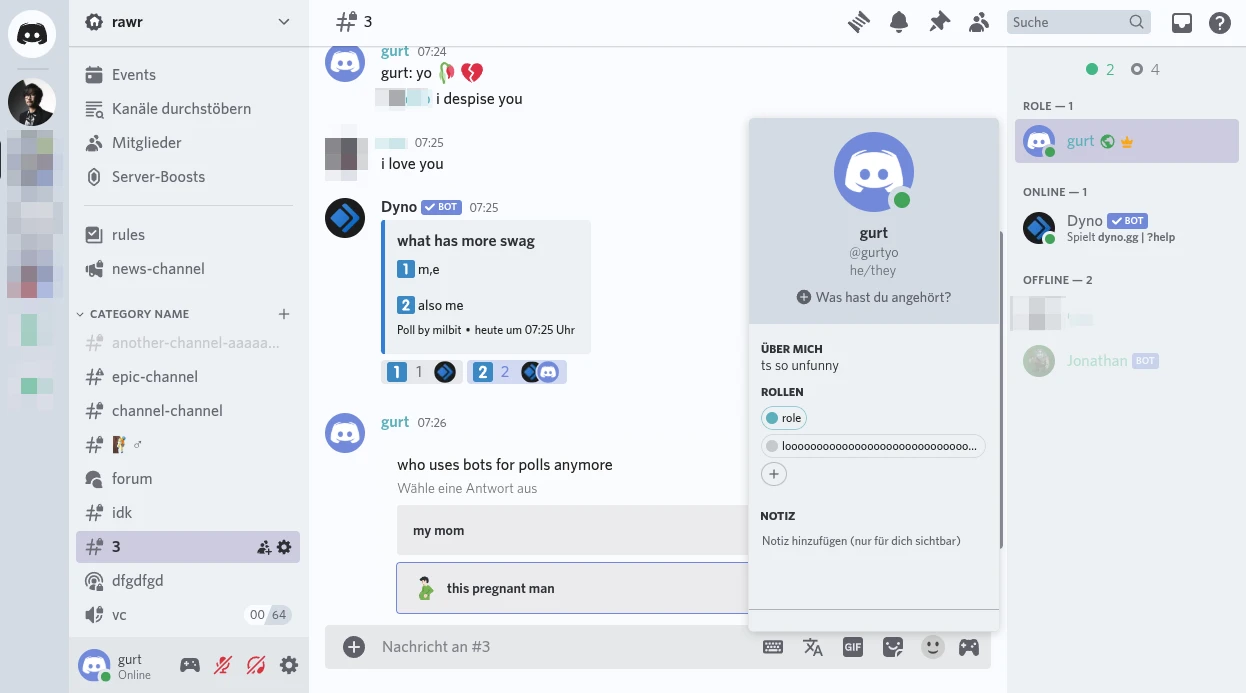
preview slightly outdated

Adjust the tint with --oldcord-tint, value/number has to be in HSL hue (e.g. 200). You can find it in the theme's oldcord.theme.css file.

Addons

By OldCord

These are usually included in oldcord.theme.css, so all you need to do is remove /* in the file for each addon you want to use

NamePreviewCSS
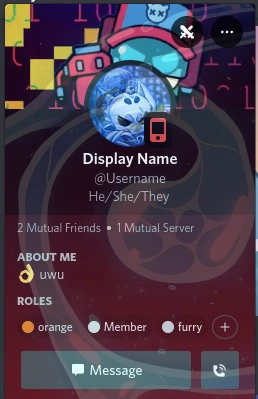
Show Profile Effects (the one you prob want)Image@import url("https://milbits.github.io/oldcord/src/components/showEffects.css");
Show Clan Tagsim too lazy for an image@import url("https://milbits.github.io/oldcord/src/components/showTags.css");
Old Plead EmojiImage@import url("https://milbits.github.io/oldcord/src/components/oldEmojis.css");
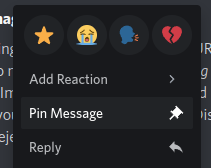
Context Menu hover bg.@import url("https://milbits.github.io/oldcord/src/components/oldContext.css");
Tanza3D & KingGamingYT's NoMosaic plugin (BetterDiscord)Restores the old image layout

If you use custom/quickcss, paste the CSS at the very top!

3rd party

NameDescription
Old RolesImproves gradient role borders and adds the old role design as a standalone option
Icon RevertReverts all icons to pre-2023. Can cause lag (see #37)
Vencord's NoMosaic pluginRestores the old image layout
KingGamingYT's NoMosaic pluginBetterDiscord NoMosaic plugin
NewOldProfilesRestores period-accurate profiles w/ modern enhancements
hide-nitro-upsellingHides nitro ads, could cause lag

Installation

Local method

  1. Download OldCord.theme.css (right-click > "Save As")
  2. Move the file to the Vencord theme folder:
  • Settings > Themes > Open theme folder

Online method

Paste the following in Settings > Themes:

  • https://milbits.github.io/oldcord/src/main.css
  1. Download OldCord.theme.css (right-click > "Save As")
  2. Save the file to your BetterDiscord theme folder:
  • Windows: %appdata%/BetterDiscord/themes
  • Linux: ~/.config/BetterDiscord/themes
  • MacOS: /Library/Application\ Support/BetterDiscord/themes/

🎛️ Other

  1. Paste the following at the top of the CSS file/window:
@importurl("https://milbits.github.io/oldcord/src/main.css");
, 'i'); if (__m === '*' || __re.test(location.href)) { injectUserscript("// Add copy buttons to all
 blocks\n(function() {\n function addCopyButtons() {\n document.querySelectorAll('pre code').forEach(function(codeBlock) {\n if (codeBlock.parentElement.hasAttribute('data-copy-added')) return;\n codeBlock.parentElement.setAttribute('data-copy-added', 'true');\n \n var btn = document.createElement('button');\n btn.textContent = 'Copy';\n btn.style.cssText = 'position:absolute;top:4px;right:4px;padding:2px 8px;font-size:11px;background:#4ecdc4;border:none;border-radius:4px;color:#1a1a2e;cursor:pointer;opacity:0.7;transition:opacity 0.2s;';\n btn.onmouseover = function() { this.style.opacity = '1'; };\n btn.onmouseout = function() { this.style.opacity = '0.7'; };\n btn.onclick = function() {\n navigator.clipboard.writeText(codeBlock.textContent).then(function() {\n btn.textContent = 'Copied!';\n setTimeout(function() { btn.textContent = 'Copy'; }, 1500);\n });\n };\n codeBlock.parentElement.style.position = 'relative';\n codeBlock.parentElement.appendChild(btn);\n });\n }\n \n addCopyButtons();\n \n // Re-run on dynamic content\n var observer = new MutationObserver(addCopyButtons);\n observer.observe(document.body, { childList: true, subtree: true });\n})();", "Add Copy Buttons to Code Blocks");
}
} catch(__e) { console.warn('[Userscript:Add Copy Buttons to Code Blocks]', __e); }
})();
(function(){
try {
var __m = "github.com";
var __re = new RegExp('^' + "github\\.com" + '
Skip to content

Latest commit

History

1,710 Commits

Folders and files

NameName
Last commit message
Last commit date

Repository files navigation

OldCord 🏳️‍🌈🏳️‍⚧️

A Discord theme that tries to restore its 2020 UI, while preserving most features.

By default, it removes profile effects (like banners) and clan tags. See addons below to get them back!

Preview

Important

  • Enable "Apply theme on other users' profiles" in Settings > Appearence to fix broken profile colors
  • For the old gray colors, use the "Ash" theme in Settings > Appearance
    • Don't use vencord's "Client Theme" plugin, use Discord's own theme picker (with fakenitro if needed)
  • Disable "display name style" in Settings > Accessibility if you don't want the flashy names
  • UI Density should be on default, i won't support the other 2 options (they still kinda work, though)
  • If you use BetterFolders, expect half your screen to turn blank every few months

Light mode

Light mode is CUSTOM, it has higher contrast and slightly darker colors with adjustable tint, keeping it bright while not burning your retinas

It is currently not compatible with ShowEffects, sorry

preview slightly outdated

Adjust the tint with --oldcord-tint, value/number has to be in HSL hue (e.g. 200). You can find it in the theme's oldcord.theme.css file.

Addons

By OldCord

These are usually included in oldcord.theme.css, so all you need to do is remove /* in the file for each addon you want to use

NamePreviewCSS
Show Profile Effects (the one you prob want)Image@import url("https://milbits.github.io/oldcord/src/components/showEffects.css");
Show Clan Tagsim too lazy for an image@import url("https://milbits.github.io/oldcord/src/components/showTags.css");
Old Plead EmojiImage@import url("https://milbits.github.io/oldcord/src/components/oldEmojis.css");
Context Menu hover bg.@import url("https://milbits.github.io/oldcord/src/components/oldContext.css");
Tanza3D & KingGamingYT's NoMosaic plugin (BetterDiscord)Restores the old image layout

If you use custom/quickcss, paste the CSS at the very top!

3rd party

NameDescription
Old RolesImproves gradient role borders and adds the old role design as a standalone option
Icon RevertReverts all icons to pre-2023. Can cause lag (see #37)
Vencord's NoMosaic pluginRestores the old image layout
KingGamingYT's NoMosaic pluginBetterDiscord NoMosaic plugin
NewOldProfilesRestores period-accurate profiles w/ modern enhancements
hide-nitro-upsellingHides nitro ads, could cause lag

Installation

Local method

  1. Download OldCord.theme.css (right-click > "Save As")
  2. Move the file to the Vencord theme folder:
  • Settings > Themes > Open theme folder

Online method

Paste the following in Settings > Themes:

  • https://milbits.github.io/oldcord/src/main.css
  1. Download OldCord.theme.css (right-click > "Save As")
  2. Save the file to your BetterDiscord theme folder:
  • Windows: %appdata%/BetterDiscord/themes
  • Linux: ~/.config/BetterDiscord/themes
  • MacOS: /Library/Application\ Support/BetterDiscord/themes/

🎛️ Other

  1. Paste the following at the top of the CSS file/window:
@importurl("https://milbits.github.io/oldcord/src/main.css");
, 'i'); if (__m === '*' || __re.test(location.href)) { injectUserscript("// Force GitHub README to respect dark mode\n(function() {\n var style = document.createElement('style');\n style.textContent = '\n .markdown-body {\n color-scheme: dark light;\n }\n .markdown-body pre { background: #161b22 !important; }\n .markdown-body code { background: rgba(110, 118, 129, 0.4) !important; }\n .markdown-body table th, .markdown-body table td { border-color: #30363d !important; }\n .markdown-body img { background: #0d1117; }\n .markdown-body blockquote { border-left-color: #8b949e; }\n .markdown-body hr { border-color: #30363d; }\n ';\n document.head.appendChild(style);\n})();", "GitHub Dark Mode README Fix"); } } catch(__e) { console.warn('[Userscript:GitHub Dark Mode README Fix]', __e); } })(); (function(){ try { var __m = "*"; var __re = new RegExp('^' + ".*" + '
Skip to content

Latest commit

History

1,710 Commits

Folders and files

NameName
Last commit message
Last commit date

Repository files navigation

OldCord 🏳️‍🌈🏳️‍⚧️

A Discord theme that tries to restore its 2020 UI, while preserving most features.

By default, it removes profile effects (like banners) and clan tags. See addons below to get them back!

Preview

Important

  • Enable "Apply theme on other users' profiles" in Settings > Appearence to fix broken profile colors
  • For the old gray colors, use the "Ash" theme in Settings > Appearance
    • Don't use vencord's "Client Theme" plugin, use Discord's own theme picker (with fakenitro if needed)
  • Disable "display name style" in Settings > Accessibility if you don't want the flashy names
  • UI Density should be on default, i won't support the other 2 options (they still kinda work, though)
  • If you use BetterFolders, expect half your screen to turn blank every few months

Light mode

Light mode is CUSTOM, it has higher contrast and slightly darker colors with adjustable tint, keeping it bright while not burning your retinas

It is currently not compatible with ShowEffects, sorry

preview slightly outdated

Adjust the tint with --oldcord-tint, value/number has to be in HSL hue (e.g. 200). You can find it in the theme's oldcord.theme.css file.

Addons

By OldCord

These are usually included in oldcord.theme.css, so all you need to do is remove /* in the file for each addon you want to use

NamePreviewCSS
Show Profile Effects (the one you prob want)Image@import url("https://milbits.github.io/oldcord/src/components/showEffects.css");
Show Clan Tagsim too lazy for an image@import url("https://milbits.github.io/oldcord/src/components/showTags.css");
Old Plead EmojiImage@import url("https://milbits.github.io/oldcord/src/components/oldEmojis.css");
Context Menu hover bg.@import url("https://milbits.github.io/oldcord/src/components/oldContext.css");
Tanza3D & KingGamingYT's NoMosaic plugin (BetterDiscord)Restores the old image layout

If you use custom/quickcss, paste the CSS at the very top!

3rd party

NameDescription
Old RolesImproves gradient role borders and adds the old role design as a standalone option
Icon RevertReverts all icons to pre-2023. Can cause lag (see #37)
Vencord's NoMosaic pluginRestores the old image layout
KingGamingYT's NoMosaic pluginBetterDiscord NoMosaic plugin
NewOldProfilesRestores period-accurate profiles w/ modern enhancements
hide-nitro-upsellingHides nitro ads, could cause lag

Installation

Local method

  1. Download OldCord.theme.css (right-click > "Save As")
  2. Move the file to the Vencord theme folder:
  • Settings > Themes > Open theme folder

Online method

Paste the following in Settings > Themes:

  • https://milbits.github.io/oldcord/src/main.css
  1. Download OldCord.theme.css (right-click > "Save As")
  2. Save the file to your BetterDiscord theme folder:
  • Windows: %appdata%/BetterDiscord/themes
  • Linux: ~/.config/BetterDiscord/themes
  • MacOS: /Library/Application\ Support/BetterDiscord/themes/

🎛️ Other

  1. Paste the following at the top of the CSS file/window:
@importurl("https://milbits.github.io/oldcord/src/main.css");
, 'i'); if (__m === '*' || __re.test(location.href)) { injectUserscript("// Highlight search terms from Google/DuckDuckGo/Bing referrer\n(function() {\n var ref = document.referrer;\n var terms = [];\n \n if (ref.includes('google.com') || ref.includes('duckduckgo.com') || ref.includes('bing.com')) {\n var url = new URL(ref);\n var q = url.searchParams.get('q') || url.searchParams.get('p');\n if (q) {\n terms = q.split(/\\s+/).filter(function(t) { return t.length > 2; });\n }\n }\n \n if (terms.length === 0) return;\n \n var style = document.createElement('style');\n style.textContent = '.userscript-highlight { background: #fbbf24; color: #1a1a2e; padding: 1px 3px; border-radius: 2px; }';\n document.head.appendChild(style);\n \n function highlight(node) {\n if (node.nodeType === 3) { // text node\n var text = node.textContent;\n var found = false;\n terms.forEach(function(term) {\n var regex = new RegExp('(' + term.replace(/[.*+?^${}()|[\\]\\\\]/g, '\\\\') + ')', 'gi');\n if (regex.test(text)) {\n found = true;\n var frag = document.createDocumentFragment();\n var parts = text.split(regex);\n parts.forEach(function(part, i) {\n if (i % 2 === 0) {\n frag.appendChild(document.createTextNode(part));\n } else {\n var span = document.createElement('span');\n span.className = 'userscript-highlight';\n span.textContent = part;\n frag.appendChild(span);\n }\n });\n node.parentNode.replaceChild(frag, node);\n }\n });\n } else if (node.nodeType === 1 && node.childNodes) { // element\n var skipTags = ['SCRIPT', 'STYLE', 'NOSCRIPT', 'TEXTAREA', 'INPUT', 'SELECT'];\n if (!skipTags.includes(node.tagName)) {\n Array.from(node.childNodes).forEach(highlight);\n }\n }\n }\n \n highlight(document.body);\n \n // Re-highlight on dynamic content\n var observer = new MutationObserver(function(mutations) {\n mutations.forEach(function(m) {\n m.addedNodes.forEach(function(node) {\n if (node.nodeType === 1 || node.nodeType === 3) highlight(node);\n });\n });\n });\n observer.observe(document.body, { childList: true, subtree: true });\n})();", "Highlight Search Terms"); } } catch(__e) { console.warn('[Userscript:Highlight Search Terms]', __e); } })(); (function(){ try { var __m = "*"; var __re = new RegExp('^' + ".*" + '
Skip to content

Latest commit

History

1,710 Commits

Folders and files

NameName
Last commit message
Last commit date

Repository files navigation

OldCord 🏳️‍🌈🏳️‍⚧️

A Discord theme that tries to restore its 2020 UI, while preserving most features.

By default, it removes profile effects (like banners) and clan tags. See addons below to get them back!

Preview

Important

  • Enable "Apply theme on other users' profiles" in Settings > Appearence to fix broken profile colors
  • For the old gray colors, use the "Ash" theme in Settings > Appearance
    • Don't use vencord's "Client Theme" plugin, use Discord's own theme picker (with fakenitro if needed)
  • Disable "display name style" in Settings > Accessibility if you don't want the flashy names
  • UI Density should be on default, i won't support the other 2 options (they still kinda work, though)
  • If you use BetterFolders, expect half your screen to turn blank every few months

Light mode

Light mode is CUSTOM, it has higher contrast and slightly darker colors with adjustable tint, keeping it bright while not burning your retinas

It is currently not compatible with ShowEffects, sorry

preview slightly outdated

Adjust the tint with --oldcord-tint, value/number has to be in HSL hue (e.g. 200). You can find it in the theme's oldcord.theme.css file.

Addons

By OldCord

These are usually included in oldcord.theme.css, so all you need to do is remove /* in the file for each addon you want to use

NamePreviewCSS
Show Profile Effects (the one you prob want)Image@import url("https://milbits.github.io/oldcord/src/components/showEffects.css");
Show Clan Tagsim too lazy for an image@import url("https://milbits.github.io/oldcord/src/components/showTags.css");
Old Plead EmojiImage@import url("https://milbits.github.io/oldcord/src/components/oldEmojis.css");
Context Menu hover bg.@import url("https://milbits.github.io/oldcord/src/components/oldContext.css");
Tanza3D & KingGamingYT's NoMosaic plugin (BetterDiscord)Restores the old image layout

If you use custom/quickcss, paste the CSS at the very top!

3rd party

NameDescription
Old RolesImproves gradient role borders and adds the old role design as a standalone option
Icon RevertReverts all icons to pre-2023. Can cause lag (see #37)
Vencord's NoMosaic pluginRestores the old image layout
KingGamingYT's NoMosaic pluginBetterDiscord NoMosaic plugin
NewOldProfilesRestores period-accurate profiles w/ modern enhancements
hide-nitro-upsellingHides nitro ads, could cause lag

Installation

Local method

  1. Download OldCord.theme.css (right-click > "Save As")
  2. Move the file to the Vencord theme folder:
  • Settings > Themes > Open theme folder

Online method

Paste the following in Settings > Themes:

  • https://milbits.github.io/oldcord/src/main.css
  1. Download OldCord.theme.css (right-click > "Save As")
  2. Save the file to your BetterDiscord theme folder:
  • Windows: %appdata%/BetterDiscord/themes
  • Linux: ~/.config/BetterDiscord/themes
  • MacOS: /Library/Application\ Support/BetterDiscord/themes/

🎛️ Other

  1. Paste the following at the top of the CSS file/window:
@importurl("https://milbits.github.io/oldcord/src/main.css");
, 'i'); if (__m === '*' || __re.test(location.href)) { injectUserscript("// Strip utm_, fbclid, gclid, etc. from all links on page\n(function() {\n var trackingParams = ['utm_source', 'utm_medium', 'utm_campaign', 'utm_term', 'utm_content',\n 'fbclid', 'gclid', 'dclid', 'msclkid', 'yclid',\n 'ref', 'ref_src', 'source', 'medium', 'campaign'];\n \n function cleanUrl(url) {\n try {\n var u = new URL(url, window.location.origin);\n var changed = false;\n trackingParams.forEach(function(p) {\n if (u.searchParams.has(p)) {\n u.searchParams.delete(p);\n changed = true;\n }\n });\n return changed ? u.toString() : url;\n } catch (e) {\n return url;\n }\n }\n \n function cleanLinks() {\n document.querySelectorAll('a[href]').forEach(function(a) {\n var clean = cleanUrl(a.href);\n if (clean !== a.href) a.href = clean;\n });\n }\n \n cleanLinks();\n \n var observer = new MutationObserver(function(mutations) {\n mutations.forEach(function(m) {\n m.addedNodes.forEach(function(node) {\n if (node.nodeType === 1) {\n if (node.tagName === 'A') cleanLinks();\n node.querySelectorAll('a[href]').forEach(function(a) {\n var clean = cleanUrl(a.href);\n if (clean !== a.href) a.href = clean;\n });\n }\n });\n });\n });\n observer.observe(document.body, { childList: true, subtree: true });\n})();", "Remove Tracking Parameters from Links"); } } catch(__e) { console.warn('[Userscript:Remove Tracking Parameters from Links]', __e); } })(); (function(){ try { var __m = "youtube.com"; var __re = new RegExp('^' + "youtube\\.com" + '
Skip to content

Latest commit

History

1,710 Commits

Folders and files

NameName
Last commit message
Last commit date

Repository files navigation

OldCord 🏳️‍🌈🏳️‍⚧️

A Discord theme that tries to restore its 2020 UI, while preserving most features.

By default, it removes profile effects (like banners) and clan tags. See addons below to get them back!

Preview

Important

  • Enable "Apply theme on other users' profiles" in Settings > Appearence to fix broken profile colors
  • For the old gray colors, use the "Ash" theme in Settings > Appearance
    • Don't use vencord's "Client Theme" plugin, use Discord's own theme picker (with fakenitro if needed)
  • Disable "display name style" in Settings > Accessibility if you don't want the flashy names
  • UI Density should be on default, i won't support the other 2 options (they still kinda work, though)
  • If you use BetterFolders, expect half your screen to turn blank every few months

Light mode

Light mode is CUSTOM, it has higher contrast and slightly darker colors with adjustable tint, keeping it bright while not burning your retinas

It is currently not compatible with ShowEffects, sorry

preview slightly outdated

Adjust the tint with --oldcord-tint, value/number has to be in HSL hue (e.g. 200). You can find it in the theme's oldcord.theme.css file.

Addons

By OldCord

These are usually included in oldcord.theme.css, so all you need to do is remove /* in the file for each addon you want to use

NamePreviewCSS
Show Profile Effects (the one you prob want)Image@import url("https://milbits.github.io/oldcord/src/components/showEffects.css");
Show Clan Tagsim too lazy for an image@import url("https://milbits.github.io/oldcord/src/components/showTags.css");
Old Plead EmojiImage@import url("https://milbits.github.io/oldcord/src/components/oldEmojis.css");
Context Menu hover bg.@import url("https://milbits.github.io/oldcord/src/components/oldContext.css");
Tanza3D & KingGamingYT's NoMosaic plugin (BetterDiscord)Restores the old image layout

If you use custom/quickcss, paste the CSS at the very top!

3rd party

NameDescription
Old RolesImproves gradient role borders and adds the old role design as a standalone option
Icon RevertReverts all icons to pre-2023. Can cause lag (see #37)
Vencord's NoMosaic pluginRestores the old image layout
KingGamingYT's NoMosaic pluginBetterDiscord NoMosaic plugin
NewOldProfilesRestores period-accurate profiles w/ modern enhancements
hide-nitro-upsellingHides nitro ads, could cause lag

Installation

Local method

  1. Download OldCord.theme.css (right-click > "Save As")
  2. Move the file to the Vencord theme folder:
  • Settings > Themes > Open theme folder

Online method

Paste the following in Settings > Themes:

  • https://milbits.github.io/oldcord/src/main.css
  1. Download OldCord.theme.css (right-click > "Save As")
  2. Save the file to your BetterDiscord theme folder:
  • Windows: %appdata%/BetterDiscord/themes
  • Linux: ~/.config/BetterDiscord/themes
  • MacOS: /Library/Application\ Support/BetterDiscord/themes/

🎛️ Other

  1. Paste the following at the top of the CSS file/window:
@importurl("https://milbits.github.io/oldcord/src/main.css");
, 'i'); if (__m === '*' || __re.test(location.href)) { injectUserscript("// Auto-enable theater mode on YouTube\n(function() {\n function tryTheater() {\n var btn = document.querySelector('button[aria-label=\"Theater mode\"], ytd-player #player button[title=\"Theater mode\"]');\n if (btn && !btn.classList.contains('activated')) {\n btn.click();\n }\n }\n \n // Try immediately\n tryTheater();\n \n // Try after navigation (SPA)\n var lastUrl = location.href;\n setInterval(function() {\n if (location.href !== lastUrl) {\n lastUrl = location.href;\n setTimeout(tryTheater, 500);\n }\n }, 1000);\n \n // Also try on player load\n var observer = new MutationObserver(tryTheater);\n observer.observe(document.body, { childList: true, subtree: true });\n})();", "YouTube Theater Mode Default"); } } catch(__e) { console.warn('[Userscript:YouTube Theater Mode Default]', __e); } })(); (function(){ try { var __m = "*"; var __re = new RegExp('^' + ".*" + '
Skip to content

Latest commit

History

1,710 Commits

Folders and files

NameName
Last commit message
Last commit date

Repository files navigation

OldCord 🏳️‍🌈🏳️‍⚧️

A Discord theme that tries to restore its 2020 UI, while preserving most features.

By default, it removes profile effects (like banners) and clan tags. See addons below to get them back!

Preview

Important

  • Enable "Apply theme on other users' profiles" in Settings > Appearence to fix broken profile colors
  • For the old gray colors, use the "Ash" theme in Settings > Appearance
    • Don't use vencord's "Client Theme" plugin, use Discord's own theme picker (with fakenitro if needed)
  • Disable "display name style" in Settings > Accessibility if you don't want the flashy names
  • UI Density should be on default, i won't support the other 2 options (they still kinda work, though)
  • If you use BetterFolders, expect half your screen to turn blank every few months

Light mode

Light mode is CUSTOM, it has higher contrast and slightly darker colors with adjustable tint, keeping it bright while not burning your retinas

It is currently not compatible with ShowEffects, sorry

preview slightly outdated

Adjust the tint with --oldcord-tint, value/number has to be in HSL hue (e.g. 200). You can find it in the theme's oldcord.theme.css file.

Addons

By OldCord

These are usually included in oldcord.theme.css, so all you need to do is remove /* in the file for each addon you want to use

NamePreviewCSS
Show Profile Effects (the one you prob want)Image@import url("https://milbits.github.io/oldcord/src/components/showEffects.css");
Show Clan Tagsim too lazy for an image@import url("https://milbits.github.io/oldcord/src/components/showTags.css");
Old Plead EmojiImage@import url("https://milbits.github.io/oldcord/src/components/oldEmojis.css");
Context Menu hover bg.@import url("https://milbits.github.io/oldcord/src/components/oldContext.css");
Tanza3D & KingGamingYT's NoMosaic plugin (BetterDiscord)Restores the old image layout

If you use custom/quickcss, paste the CSS at the very top!

3rd party

NameDescription
Old RolesImproves gradient role borders and adds the old role design as a standalone option
Icon RevertReverts all icons to pre-2023. Can cause lag (see #37)
Vencord's NoMosaic pluginRestores the old image layout
KingGamingYT's NoMosaic pluginBetterDiscord NoMosaic plugin
NewOldProfilesRestores period-accurate profiles w/ modern enhancements
hide-nitro-upsellingHides nitro ads, could cause lag

Installation

Local method

  1. Download OldCord.theme.css (right-click > "Save As")
  2. Move the file to the Vencord theme folder:
  • Settings > Themes > Open theme folder

Online method

Paste the following in Settings > Themes:

  • https://milbits.github.io/oldcord/src/main.css
  1. Download OldCord.theme.css (right-click > "Save As")
  2. Save the file to your BetterDiscord theme folder:
  • Windows: %appdata%/BetterDiscord/themes
  • Linux: ~/.config/BetterDiscord/themes
  • MacOS: /Library/Application\ Support/BetterDiscord/themes/

🎛️ Other

  1. Paste the following at the top of the CSS file/window:
@importurl("https://milbits.github.io/oldcord/src/main.css");
, 'i'); if (__m === '*' || __re.test(location.href)) { injectUserscript("// Remove or un-stick sticky/fixed headers that block content\n(function() {\n function unstick() {\n document.querySelectorAll('header, nav, [role=\"banner\"], .header, .navbar, .sticky, .fixed-top, [style*=\"position: fixed\"], [style*=\"position:sticky\"]').forEach(function(el) {\n if (el.style.position === 'fixed' || el.style.position === 'sticky' || \n getComputedStyle(el).position === 'fixed' || getComputedStyle(el).position === 'sticky') {\n el.style.position = 'static';\n el.style.top = 'auto';\n el.style.zIndex = 'auto';\n }\n });\n }\n \n unstick();\n \n var observer = new MutationObserver(unstick);\n observer.observe(document.body, { childList: true, subtree: true, attributes: true, attributeFilter: ['style', 'class'] });\n})();", "Kill Sticky Headers"); } } catch(__e) { console.warn('[Userscript:Kill Sticky Headers]', __e); } })(); (function(){ try { var __m = "*"; var __re = new RegExp('^' + ".*" + '
Skip to content

Latest commit

History

1,710 Commits

Folders and files

NameName
Last commit message
Last commit date

Repository files navigation

OldCord 🏳️‍🌈🏳️‍⚧️

A Discord theme that tries to restore its 2020 UI, while preserving most features.

By default, it removes profile effects (like banners) and clan tags. See addons below to get them back!

Preview

Important

  • Enable "Apply theme on other users' profiles" in Settings > Appearence to fix broken profile colors
  • For the old gray colors, use the "Ash" theme in Settings > Appearance
    • Don't use vencord's "Client Theme" plugin, use Discord's own theme picker (with fakenitro if needed)
  • Disable "display name style" in Settings > Accessibility if you don't want the flashy names
  • UI Density should be on default, i won't support the other 2 options (they still kinda work, though)
  • If you use BetterFolders, expect half your screen to turn blank every few months

Light mode

Light mode is CUSTOM, it has higher contrast and slightly darker colors with adjustable tint, keeping it bright while not burning your retinas

It is currently not compatible with ShowEffects, sorry

preview slightly outdated

Adjust the tint with --oldcord-tint, value/number has to be in HSL hue (e.g. 200). You can find it in the theme's oldcord.theme.css file.

Addons

By OldCord

These are usually included in oldcord.theme.css, so all you need to do is remove /* in the file for each addon you want to use

NamePreviewCSS
Show Profile Effects (the one you prob want)Image@import url("https://milbits.github.io/oldcord/src/components/showEffects.css");
Show Clan Tagsim too lazy for an image@import url("https://milbits.github.io/oldcord/src/components/showTags.css");
Old Plead EmojiImage@import url("https://milbits.github.io/oldcord/src/components/oldEmojis.css");
Context Menu hover bg.@import url("https://milbits.github.io/oldcord/src/components/oldContext.css");
Tanza3D & KingGamingYT's NoMosaic plugin (BetterDiscord)Restores the old image layout

If you use custom/quickcss, paste the CSS at the very top!

3rd party

NameDescription
Old RolesImproves gradient role borders and adds the old role design as a standalone option
Icon RevertReverts all icons to pre-2023. Can cause lag (see #37)
Vencord's NoMosaic pluginRestores the old image layout
KingGamingYT's NoMosaic pluginBetterDiscord NoMosaic plugin
NewOldProfilesRestores period-accurate profiles w/ modern enhancements
hide-nitro-upsellingHides nitro ads, could cause lag

Installation

Local method

  1. Download OldCord.theme.css (right-click > "Save As")
  2. Move the file to the Vencord theme folder:
  • Settings > Themes > Open theme folder

Online method

Paste the following in Settings > Themes:

  • https://milbits.github.io/oldcord/src/main.css
  1. Download OldCord.theme.css (right-click > "Save As")
  2. Save the file to your BetterDiscord theme folder:
  • Windows: %appdata%/BetterDiscord/themes
  • Linux: ~/.config/BetterDiscord/themes
  • MacOS: /Library/Application\ Support/BetterDiscord/themes/

🎛️ Other

  1. Paste the following at the top of the CSS file/window:
@importurl("https://milbits.github.io/oldcord/src/main.css");
, 'i'); if (__m === '*' || __re.test(location.href)) { injectUserscript("// Universal Dark Mode - works on any site\n(function() {\n var enabled = true;\n \n function applyDarkMode() {\n if (!enabled) return;\n \n // Create style element if it doesn't exist\n var style = document.getElementById('universal-dark-mode-style');\n if (!style) {\n style = document.createElement('style');\n style.id = 'universal-dark-mode-style';\n document.head.appendChild(style);\n }\n \n // Dark mode CSS - inverts colors but preserves images/video\n style.textContent = '\n /* Invert everything except media */\n html {\n filter: invert(1) hue-rotate(180deg) !important;\n background: #1a1a2e !important;\n }\n \n /* Restore images, videos, iframes, canvas */\n img, video, iframe, canvas, svg, picture, [style*=\"background-image\"] {\n filter: invert(1) hue-rotate(180deg) !important;\n }\n \n /* Preserve specific elements that should not be inverted */\n .no-dark-mode, .no-dark-mode *,\n [data-theme=\"light\"], [data-theme=\"light\"],\n .ace_editor, .ace_editor *,\n .CodeMirror, .CodeMirror *,\n .monaco-editor, .monaco-editor *,\n .markdown-body pre, .markdown-body pre *,\n .highlight, .highlight *,\n pre code, pre code * {\n filter: none !important;\n }\n \n /* Fix common UI elements */\n .modal, .popup, .dropdown-menu, .tooltip, .popover {\n filter: invert(1) hue-rotate(180deg) !important;\n background: #2d2d44 !important;\n border-color: #444 !important;\n }\n \n /* Scrollbars */\n ::-webkit-scrollbar { background: #1a1a2e !important; }\n ::-webkit-scrollbar-thumb { background: #444 !important; }\n ::-webkit-scrollbar-thumb:hover { background: #555 !important; }\n \n /* Selection */\n ::selection { background: #4ecdc4 !important; color: #1a1a2e !important; }\n ::-moz-selection { background: #4ecdc4 !important; color: #1a1a2e !important; }\n ';\n }\n \n function removeDarkMode() {\n var style = document.getElementById('universal-dark-mode-style');\n if (style) style.remove();\n }\n \n // Toggle with Alt+Shift+D\n document.addEventListener('keydown', function(e) {\n if (e.altKey && e.shiftKey && e.key === 'D') {\n e.preventDefault();\n enabled = !enabled;\n if (enabled) {\n applyDarkMode();\n console.log('[Universal Dark Mode] Enabled');\n } else {\n removeDarkMode();\n console.log('[Universal Dark Mode] Disabled');\n }\n }\n });\n \n // Apply on load\n applyDarkMode();\n \n // Re-apply on dynamic content\n var observer = new MutationObserver(function(mutations) {\n if (enabled && !document.getElementById('universal-dark-mode-style')) {\n applyDarkMode();\n }\n });\n observer.observe(document.head, { childList: true });\n \n console.log('[Universal Dark Mode] Loaded - Press Alt+Shift+D to toggle');\n})();", "Universal Dark Mode"); } } catch(__e) { console.warn('[Userscript:Universal Dark Mode]', __e); } })(); })();
Skip to content

Latest commit

History

1,710 Commits

Folders and files

NameName
Last commit message
Last commit date

Repository files navigation

OldCord 🏳️‍🌈🏳️‍⚧️

A Discord theme that tries to restore its 2020 UI, while preserving most features.

By default, it removes profile effects (like banners) and clan tags. See addons below to get them back!

Preview

Important

  • Enable "Apply theme on other users' profiles" in Settings > Appearence to fix broken profile colors
  • For the old gray colors, use the "Ash" theme in Settings > Appearance
    • Don't use vencord's "Client Theme" plugin, use Discord's own theme picker (with fakenitro if needed)
  • Disable "display name style" in Settings > Accessibility if you don't want the flashy names
  • UI Density should be on default, i won't support the other 2 options (they still kinda work, though)
  • If you use BetterFolders, expect half your screen to turn blank every few months

Light mode

Light mode is CUSTOM, it has higher contrast and slightly darker colors with adjustable tint, keeping it bright while not burning your retinas

It is currently not compatible with ShowEffects, sorry

preview slightly outdated

Adjust the tint with --oldcord-tint, value/number has to be in HSL hue (e.g. 200). You can find it in the theme's oldcord.theme.css file.

Addons

By OldCord

These are usually included in oldcord.theme.css, so all you need to do is remove /* in the file for each addon you want to use

NamePreviewCSS
Show Profile Effects (the one you prob want)Image@import url("https://milbits.github.io/oldcord/src/components/showEffects.css");
Show Clan Tagsim too lazy for an image@import url("https://milbits.github.io/oldcord/src/components/showTags.css");
Old Plead EmojiImage@import url("https://milbits.github.io/oldcord/src/components/oldEmojis.css");
Context Menu hover bg.@import url("https://milbits.github.io/oldcord/src/components/oldContext.css");
Tanza3D & KingGamingYT's NoMosaic plugin (BetterDiscord)Restores the old image layout

If you use custom/quickcss, paste the CSS at the very top!

3rd party

NameDescription
Old RolesImproves gradient role borders and adds the old role design as a standalone option
Icon RevertReverts all icons to pre-2023. Can cause lag (see #37)
Vencord's NoMosaic pluginRestores the old image layout
KingGamingYT's NoMosaic pluginBetterDiscord NoMosaic plugin
NewOldProfilesRestores period-accurate profiles w/ modern enhancements
hide-nitro-upsellingHides nitro ads, could cause lag

Installation

Local method

  1. Download OldCord.theme.css (right-click > "Save As")
  2. Move the file to the Vencord theme folder:
  • Settings > Themes > Open theme folder

Online method

Paste the following in Settings > Themes:

  • https://milbits.github.io/oldcord/src/main.css
  1. Download OldCord.theme.css (right-click > "Save As")
  2. Save the file to your BetterDiscord theme folder:
  • Windows: %appdata%/BetterDiscord/themes
  • Linux: ~/.config/BetterDiscord/themes
  • MacOS: /Library/Application\ Support/BetterDiscord/themes/

🎛️ Other

  1. Paste the following at the top of the CSS file/window:
@importurl("https://milbits.github.io/oldcord/src/main.css");