

"I want to take his face... off." — Castor Troy, Face/Off (1997)
Quick Start • Installation • Samples • API • CLI • Configuration
FaceOFFx is a specialized, high-performance facial processing library for .NET, focused on PIV (Personal Identity Verification) compatibility for issuing credentials that follow government standards (FIPS 201). Derived from the excellent * FaceONNX* library, FaceOFFx extends its capabilities with PIV-specific transformations, FIPS 201-3 compatibility features, and advanced JPEG 2000 ROI encoding.
- PIV/TWIC Compatibility - FIPS 201-3 compatible 420×560 output
- JPEG 2000 ROI Encoding - Smart compression with exact target size limits
- 68-Point Landmark Detection - Precise facial feature mapping
- High Performance - Direct ONNX Runtime integration
- Cross-Platform - Windows, Linux, macOS via .NET 8
- Self-Contained - Embedded models, no external dependencies
The new v2.0 API provides automatic service management with standard .NET error handling:
usingFaceOFFx.Infrastructure.Services;// Simplest: Default PIV processing (20KB target)byte[]imageData=File.ReadAllBytes("photo.jpg");varresult=awaitFacialImageEncoder.ProcessAsync(imageData);File.WriteAllBytes("output.png",result.ImageData);Console.WriteLine($"Size: {result.Metadata.FileSize:N0} bytes");// TWIC processing (14KB maximum for card compatibility)vartwicResult=awaitFacialImageEncoder.ProcessForTwicAsync(imageData);// Custom target sizevarcustomResult=awaitFacialImageEncoder.ProcessToSizeAsync(imageData,25000);// Fixed compression ratevarrateResult=awaitFacialImageEncoder.ProcessWithRateAsync(imageData,1.5f);// Try pattern for error handlingvar(success,result,error)=awaitFacialImageEncoder.TryProcessAsync(imageData);if(success){Console.WriteLine($"Processed to {result!.Metadata.FileSize} bytes");}else{Console.WriteLine($"Processing failed: {error}");}| Preset | Target Size | Use Case |
|---|---|---|
ProcessingOptions.TwicMax | 14KB | TWIC cards maximum size |
ProcessingOptions.PivMin | 12KB | PIV minimum size |
ProcessingOptions.PivBalanced | 22KB | Standard PIV compatibility |
ProcessingOptions.PivHigh | 30KB | Enhanced PIV quality |
ProcessingOptions.PivVeryHigh | 50KB | Premium quality |
ProcessingOptions.Archival | 4.0 bpp | Long-term preservation |
ProcessingOptions.Fast | 0.5 bpp | Minimal file size |
For 420×560 images:
| Rate (bpp) | Approx. Size | Quality Level |
|---|---|---|
| 0.40 | 12KB | PIV minimum |
| 0.48 | 14KB | TWIC maximum |
| 0.70 | 20KB | PIV standard |
| 1.00 | 29KB | Enhanced |
| 1.50 | 45KB | High quality |
| 2.00 | 60KB | Premium |
| 4.00 | 118KB | Archival |
# Install from NuGet
dotnet tool install --global FaceOFFx.Cli
# Update to latest version
dotnet tool update --global FaceOFFx.Cli# Package Manager
dotnet add package FaceOFFx
# Package Manager Console
Install-Package FaceOFFx- .NET 8.0 or later
- Windows, Linux, or macOS
- No GPU required (CPU inference supported)
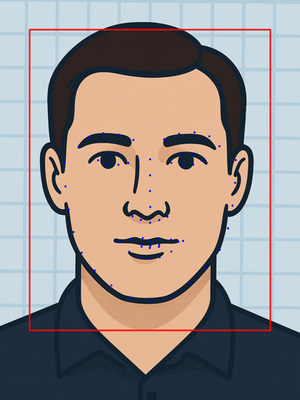
See the power of FaceOFFx with these real-world examples demonstrating our four quality presets. Additional samples for all images and presets are available in the docs/samples/ directory.
| Quality Preset | Original | PIV Processed | ROI Visualization |
|---|---|---|---|
| PIV High (28.8KB) |  |  | 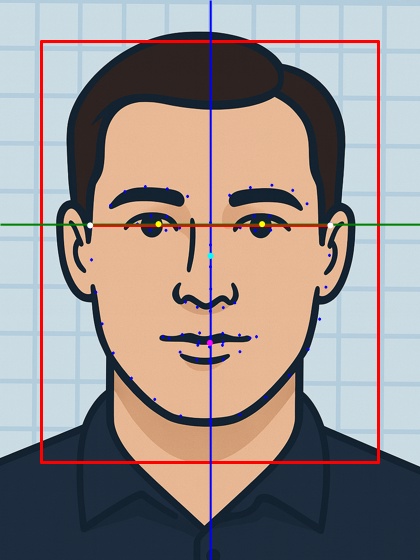 |
| PIV Balanced (20.6KB) | 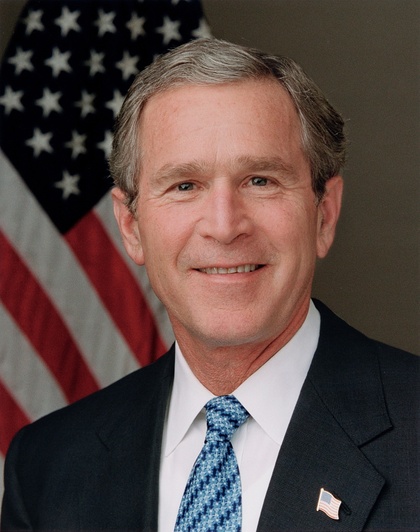 | 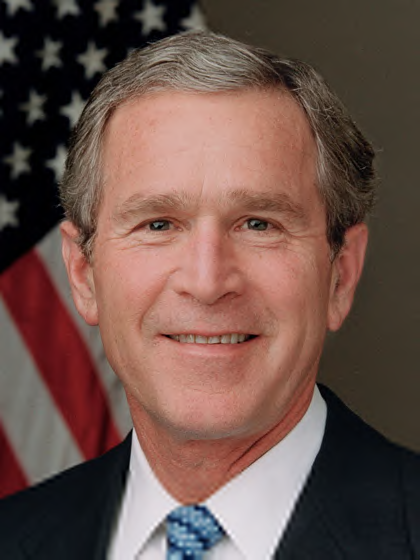 | 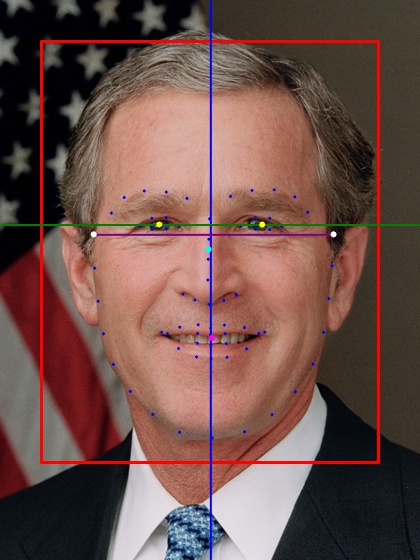 |
| PIV Minimum (11.8KB) | 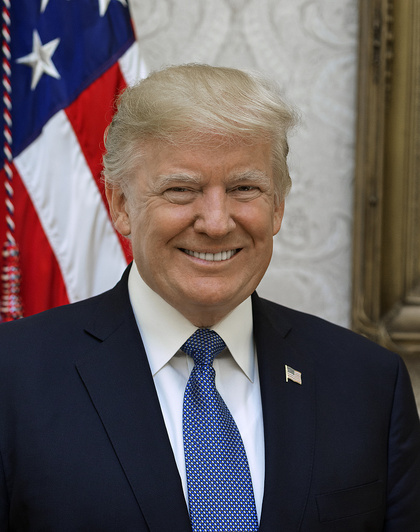 | 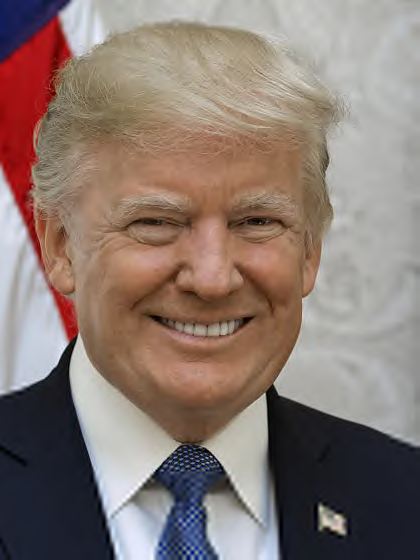 | 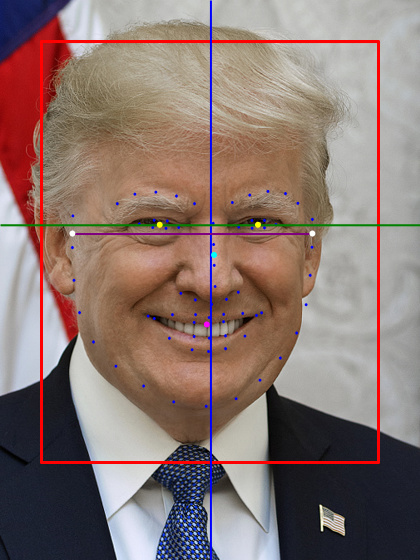 |
| Minimum (8.8KB) | 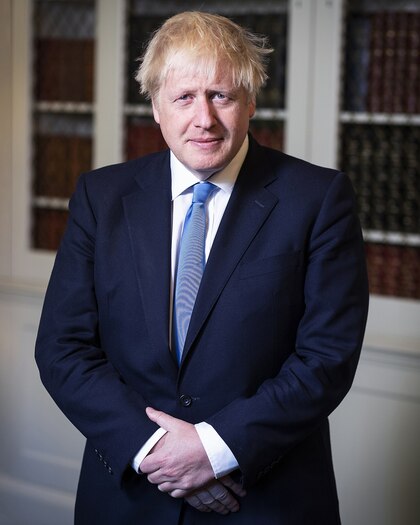 |  | 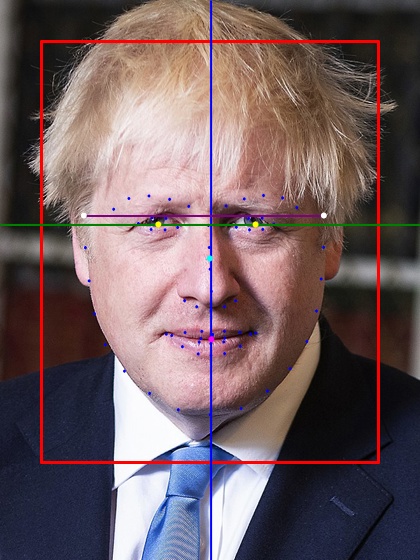 |
See how JPEG 2000 compression quality affects the final image, from lowest to highest quality:
| Minimum (8.8KB) | PIV Minimum (11.8KB) | PIV Balanced (20.7KB) |
|---|---|---|
 |  |  |
| Size: 8,845 bytes | Size: 11,789 bytes | Size: 17,723 bytes |
| Rate: 0.35 bpp | Rate: 0.36 bpp | Rate: 0.55 bpp |
| Bare minimum quality | PIV/TWIC compliant | Standard PIV quality |
| PIV High (28.8KB) | PIV Very High (48.6KB) | PIV Archival (80.2KB) |
|---|---|---|
 |  |  |
| Size: 29,485 bytes | Size: 49,732 bytes | Size: 82,127 bytes |
| Rate: 0.96 bpp | Rate: 1.70 bpp | Rate: 4.00 bpp |
| Enhanced PIV quality | High quality | Long-term preservation |
- Red Box: ROI region with highest quality preservation
- Blue Line (AA): Vertical center alignment
- Green Line (BB): Horizontal eye line (should be 55-60% from bottom)
- Purple Line (CC): Head width measurement (minimum 240px)
The head width measurement is crucial for PIV compatibility but presents challenges with 68-point facial landmarks:
What we measure: The widest points of the face contour (landmarks 0-16), which represent the jawline from ear to ear. We then create a level line at the average Y-position of these widest points.
Why this approach:
- The 68-point landmark model doesn't include true ear positions
- Using the widest jaw points provides a consistent measurement
- Leveling the line improves visual aesthetics while maintaining accurate width
Limitations:
- The measurement is typically lower than actual ear level
- True head width at the temples/ears may be wider
- This is a fundamental limitation of the 68-point model
PIV Compatibility: The key requirement is that Line CC width ≥ 240 pixels. The exact vertical position is less critical than ensuring the face is large enough in the frame.
For advanced scenarios where you need direct control over the services:
// Initialize services (typically done via DI)varfaceDetector=newRetinaFaceDetector(modelPath);varlandmarkExtractor=newOnnxLandmarkExtractor(modelPath);varjpeg2000Encoder=newJpeg2000EncoderService();// Load source imageusingvarsourceImage=awaitImage.LoadAsync<Rgba32>("photo.jpg");// Process with default settingsvarresult=awaitPivProcessor.ProcessAsync(sourceImage,faceDetector,landmarkExtractor,jpeg2000Encoder);if(result.IsSuccess){// Save the processed imageawaitFile.WriteAllBytesAsync("output.png",result.Value.ImageData);Console.WriteLine($"Processing succeeded: {result.Value.ProcessingSummary}");}else{Console.WriteLine($"Processing failed: {result.Error}");}// Configure processing optionsvaroptions=newPivProcessingOptions{BaseRate=0.8f,// 24KB targetRoiStartLevel=2,// Conservative ROIMinFaceConfidence=0.9f};// Process with custom settingsvarresult=awaitPivProcessor.ProcessAsync(sourceImage,faceDetector,landmarkExtractor,jpeg2000Encoder,options,logger);// ROI enabled by default, no alignment by default// Handle resultif(result.IsSuccess){varpivResult=result.Value;// Transformation detailsConsole.WriteLine($"Rotation: {pivResult.AppliedTransform.RotationDegrees}°");Console.WriteLine($"Scale: {pivResult.AppliedTransform.ScaleFactor}x");// Compliance validationvarvalidation=pivResult.Metadata["ComplianceValidation"]asPivComplianceValidation;Console.WriteLine($"Head width: {validation?.HeadWidthPixels}px");Console.WriteLine($"Eye position: {validation?.BBFromBottom:P0} from bottom");}else{Console.WriteLine($"Processing failed: {result.Error}");}| Option | Type | Default | Description |
|---|---|---|---|
BaseRate | float | 0.7 | Compression rate in bits/pixel (0.6-1.0) |
RoiStartLevel | int | 3 | ROI quality level (0=aggressive, 3=smoothest) |
MinFaceConfidence | float | 0.8 | Minimum face detection confidence (0-1) |
RequireSingleFace | bool | true | Fail if multiple faces detected |
PreserveExifMetadata | bool | false | Keep EXIF data in output |
// Optimized for ~20KB files with smooth quality transitionsvardefaultOptions=PivProcessingOptions.Default;// Maximum quality for archival (larger files)varhighQualityOptions=PivProcessingOptions.HighQuality;// Fast processing with smaller filesvarfastOptions=PivProcessingOptions.Fast;| Preset | Target Size | Actual Size | Compression Rate | Use Case |
|---|---|---|---|---|
| PIV Archival | - | ~82KB | 4.00 bpp | Long-term preservation and archival storage |
| PIV Very High | 50KB | ~49.7KB | 1.70 bpp | Premium quality with excellent detail preservation |
| PIV High | 30KB | ~29.4KB | 0.96 bpp | Enhanced quality for applications requiring superior detail |
| PIV Balanced | 22KB | ~20.6KB | 0.68 bpp | Default - Optimal quality/size balance for ID cards |
| PIV Minimum | 12KB | ~11.8KB | 0.36 bpp | Minimum acceptable quality, works for both PIV and TWIC (14KB max) |
| Minimum | 10KB | ~8.8KB | 0.35 bpp | Smallest possible file size |
# Process image with default settings (20KB, ROI enabled)
faceoffx process photo.jpg
# Specify output file
faceoffx process photo.jpg --output id_photo.png
# Generate ROI visualization
faceoffx roi photo.jpg --show-piv-lines# Custom file size target (24KB)
faceoffx process photo.jpg --rate 0.8
# Disable ROI for uniform quality
faceoffx process photo.jpg --no-roi
# Different ROI quality levels
faceoffx process photo.jpg --roi-level 0 # Aggressive
faceoffx process photo.jpg --roi-level 2 # Conservative# Enable ROI alignment (may create harsh boundaries)
faceoffx process photo.jpg --align
# Verbose output with debugging
faceoffx process photo.jpg --verbose --debug| Option | Description | Default |
|---|---|---|
--output <PATH> | Output file path | input.png |
--rate <RATE> | Compression rate (0.6-1.0) | 0.7 |
--roi-level <LEVEL> | ROI priority (0-3) | 3 |
--no-roi | Disable ROI encoding | ROI enabled |
--align | Enable ROI block alignment | Disabled |
--verbose | Show detailed information | Off |
--debug | Enable debug logging | Off |
// Standard try-catch patterntry{varresult=awaitFacialImageEncoder.ProcessAsync(imageData);Console.WriteLine($"Processed size: {result.Metadata.FileSize} bytes");// Check optional valuesif(result.Metadata.TargetSize.HasValue){Console.WriteLine($"Target size was: {result.Metadata.TargetSize.Value}");}}catch(ArgumentNullExceptionex){Console.WriteLine($"Invalid input: {ex.Message}");}catch(InvalidOperationExceptionex){Console.WriteLine($"Processing failed: {ex.Message}");}// Or use the Try patternvar(success,result,error)=awaitFacialImageEncoder.TryProcessAsync(imageData);if(!success){Console.WriteLine($"Failed: {error}");return;}// Additional processing based on file sizeif(result!.Metadata.FileSize>25000){// Try with higher compressionresult=awaitFacialImageEncoder.ProcessWithRateAsync(imageData,0.5f);}# Clone the repository
git clone https://github.com/mistial-dev/FaceOFFx.git
cd FaceOFFx
# Build the solution
dotnet build
# Run tests
dotnet test# Create NuGet package
dotnet pack --configuration ReleaseFaceOFFx/
├── src/
│ ├── FaceOFFx/ # Domain models and interfaces
│ ├── FaceOFFx.Infrastructure/ # ONNX implementations
│ ├── FaceOFFx.Models/ # Embedded ONNX models
│ └── FaceOFFx.Cli/ # Command-line interface
├── tests/ # Unit and integration tests
└── docs/ # Documentation and samples
FaceOFFx ensures compatibility with government standards:
- Output: 420×560 pixels (3:4 aspect ratio)
- Face Width: Minimum 240 pixels
- Eye Position: 55-60% from bottom of image
- Rotation: Maximum ±5° correction
- Centering: Face properly centered with margins
The library uses advanced ROI (Region of Interest) encoding to optimize quality:
- Single Facial Region - Highest quality preservation for the complete facial area
- Background - Lower quality for non-facial areas
- Smooth Transitions - Level 3 default prevents harsh boundaries
FaceOFFx uses two specialized ONNX models for facial processing, each optimized for specific tasks in the PIV compatibility pipeline.
File: FaceDetector.onnx (104MB, stored with Git LFS)
Architecture: RetinaFace single-stage face detector
Input: 640×640×3 RGB image, normalized to [0,1]
Output: Face bounding boxes with confidence scores and 5 key facial points
The RetinaFace model performs initial face detection and provides coarse facial landmarks:
- Bounding boxes: Precise face region coordinates
- Confidence scores: Detection confidence (typically >0.8 for processing)
- 5-point landmarks: Eyes (2), nose tip (1), mouth corners (2)
- Frontal face filtering: Optimized for government ID photo orientations
Pre-processing: Images are resized to 640×640 with letterboxing to maintain aspect ratio, then normalized to floating-point values between 0 and 1.
Post-processing: Non-maximum suppression filters overlapping detections, retaining only the highest confidence frontal face for PIV processing.
File: landmarks_68_pfld.onnx (2.8MB)
Architecture: PFLD (Practical Facial Landmark Detector)
Input: 112×112×3 RGB face crop, normalized to [0,1]
Output: 136 floats (68 landmarks × 2 coordinates)
The PFLD model extracts precise 68-point facial landmarks using the standard iBUG annotation scheme:
- Face outline (0-16): Jawline from ear to ear
- Right eyebrow (17-21): Outer to inner points
- Left eyebrow (22-26): Inner to outer points
- Nose bridge (27-30): Top to bottom
- Lower nose (31-35): Nostrils and tip
- Right eye (36-41): Clockwise from outer corner
- Left eye (42-47): Clockwise from outer corner
- Outer mouth (48-59): Clockwise from left corner
- Inner mouth (60-67): Clockwise from left corner
Coordinate System: All landmarks are normalized to [0,1] relative to the 112×112 input crop and must be transformed back to full image coordinates for PIV processing.
Precision: The PFLD model achieves sub-pixel accuracy for facial feature localization, essential for precise PIV alignment and ROI calculation.
| Model | Inference Time* | Memory Usage | Accuracy |
|---|---|---|---|
| RetinaFace | ~50ms | ~200MB | >95% face detection |
| PFLD | ~15ms | ~50MB | <2px landmark error |
*CPU inference on modern Intel/AMD processors
| Model | Purpose | Input Size | Framework |
|---|---|---|---|
FaceDetector.onnx | Face detection | 640×640 | RetinaFace |
landmarks_68_pfld.onnx | Landmark detection | 112×112 | PFLD |
FaceOFFx follows a carefully orchestrated pipeline to transform input images into PIV-compatible JPEG 2000 files:
Input Image (any format) → ImageSharp Image<Rgba32>
- Supports JPEG, PNG, BMP, TIFF, and other common formats
- Converts to consistent RGBA32 format for processing
- Validates image dimensions and format compatibility
Image<Rgba32> → RetinaFace Model → DetectedFace[]
- Resize image to 640×640 with letterboxing
- Normalize pixel values to [0,1] range
- Run ONNX inference to detect faces
- Filter for frontal faces with confidence >0.8
- Select single best face for PIV processing
DetectedFace → Face Region Crop (Variable Size)
- Extract face region with padding based on detection box
- Maintain original image resolution for landmark precision
- Preserve aspect ratio of detected face region
Face Crop → Resize to 112×112 → PFLD Model → 68 Landmarks
- Resize face crop to exactly 112×112 pixels
- Normalize to [0,1] for ONNX inference
- Extract 68-point facial landmarks
- Transform coordinates back to full image space
68 Landmarks → Geometric Analysis → PivTransform
- Eye angle calculation: Compute rotation needed to level eyes horizontally
- Face centering: Calculate optimal crop region for PIV compatibility
- Scale factor: Determine resize ratio for 420×560 output
- Validation: Ensure rotation is within ±5° PIV limits
Original Image → Rotate → Crop → Resize → PIV Image (420×560)
Critical Order: Rotation is applied to the full original image first to avoid black borders, then cropping and resizing follow.
- Rotate entire source image by calculated angle
- Use high-quality bicubic interpolation
- Maintain full image dimensions during rotation
- Calculate face position in rotated image
- Apply PIV-compatible crop with proper margins
- Ensure face occupies 57% of final image width
- Scale cropped region to exactly 420×560 pixels
- Use bicubic resampling for optimal quality
- Maintain aspect ratio through padding if needed
Original Landmarks → Transform Matrix → PIV Space Landmarks
- Apply same rotation, crop, and scale transforms to landmarks
- Ensure landmarks align with transformed face position
- Validate eye positions are within PIV compatibility zones
PIV Landmarks → Facial Region Analysis → ROI Bounds
- Calculate inner facial region encompassing key features
- Include eyes, eyebrows, nose, mouth, and surrounding area
- Apply 1% padding around detected facial features
- Generate rectangular ROI bounds for JPEG 2000 encoding
PIV Image + ROI → CoreJ2K → PIV-Compatible JP2 File
- Single tile encoding: Use one 420×560 tile for optimal compression
- ROI priority: Encode facial region at higher quality (levels 0-3)
- Background compression: Apply base compression rate to non-ROI areas
- Target file size: Precise file size control using TargetSize strategy
Input Image
↓
Face Detection (RetinaFace 640×640)
↓
Face Crop Extraction
↓
Landmark Detection (PFLD 112×112)
↓
Geometric Analysis (Eye angle, face bounds)
↓
Image Transformation (Rotate → Crop → Resize)
↓
Landmark Transformation (Match image transforms)
↓
ROI Calculation (Facial region bounds)
↓
JPEG 2000 Encoding (Single tile + ROI)
↓
PIV-Compatible JP2 Output (420×560, exact target size)
The pipeline involves multiple coordinate space transformations:
- Original Image Space: Source image dimensions (e.g., 1920×1080)
- Detection Space: 640×640 normalized coordinates
- Landmark Space: 112×112 normalized coordinates [0,1]
- Rotated Image Space: Original dimensions after rotation
- PIV Space: Final 420×560 dimensions
Each transformation maintains mathematical precision to ensure accurate facial feature alignment throughout the process.
- .NET 8.0 or later
- Dependencies:
- Microsoft.ML.OnnxRuntime (CPU inference)
- SixLabors.ImageSharp (Image processing)
- CoreJ2K (JPEG 2000 encoding)
- CSharpFunctionalExtensions (Error handling)
Contributions are welcome! Please read our Contributing Guide for details on our code of conduct and the process for submitting pull requests.
A complete Software Bill of Materials is available in sbom/faceoffx-sbom.json in CycloneDX format. This includes:
- All direct and transitive dependencies
- License information for each component
- Version information and checksums
For security vulnerabilities, please see our Security Policy.
This project is licensed under the MIT License - see the LICENSE file for details.
| Component | Description | License | Source/Credit |
|---|---|---|---|
| FaceONNX | Base facial processing library this project is derived from | MIT | FaceONNX/FaceONNX |
| RetinaFace | Face detection model (FaceDetector.onnx) | MIT | discipleofhamilton/RetinaFace |
| PFLD | 68-point facial landmark detection (landmarks_68_pfld.onnx) | MIT | FaceONNX/FaceONNX.Models |
| ONNX Runtime | High-performance inference engine | MIT | Microsoft/onnxruntime |
| ImageSharp | Cross-platform 2D graphics library | Apache-2.0 | SixLabors/ImageSharp |
| CoreJ2K | JPEG 2000 encoding with ROI support | BSD-2-Clause | cinderblocks/CoreJ2K |
| CSharpFunctionalExtensions | Functional programming extensions | MIT | vkhorikov/CSharpFunctionalExtensions |
| Spectre.Console | Beautiful console applications | MIT | spectreconsole/spectre.console |
| Standard | Description | Organization |
|---|---|---|
| FIPS 201-3 | Personal Identity Verification (PIV) Requirements | NIST |
| INCITS 385-2004 | Face Recognition Format for Data Interchange | ANSI/INCITS |
| SP 800-76-2 | Biometric Specifications for Personal Identity Verification | NIST |
- FaceONNX - This project is derived from FaceONNX, which provides the foundational facial processing capabilities and model infrastructure
- The 68-point facial landmark annotation scheme was originally developed by the iBUG group at Imperial College London
"Face... off... No more drugs for that man!" - Watch Scene