
Latest commit

History

21 Commits

Folders and files

NameName
Last commit message
Last commit date

Repository files navigation

Mixcore Creative Tim Material Kit

versionlicenseGitHub issues openGitHub issues closedJoin the chat at https://gitter.im/NIT-dgp/GeneralChat

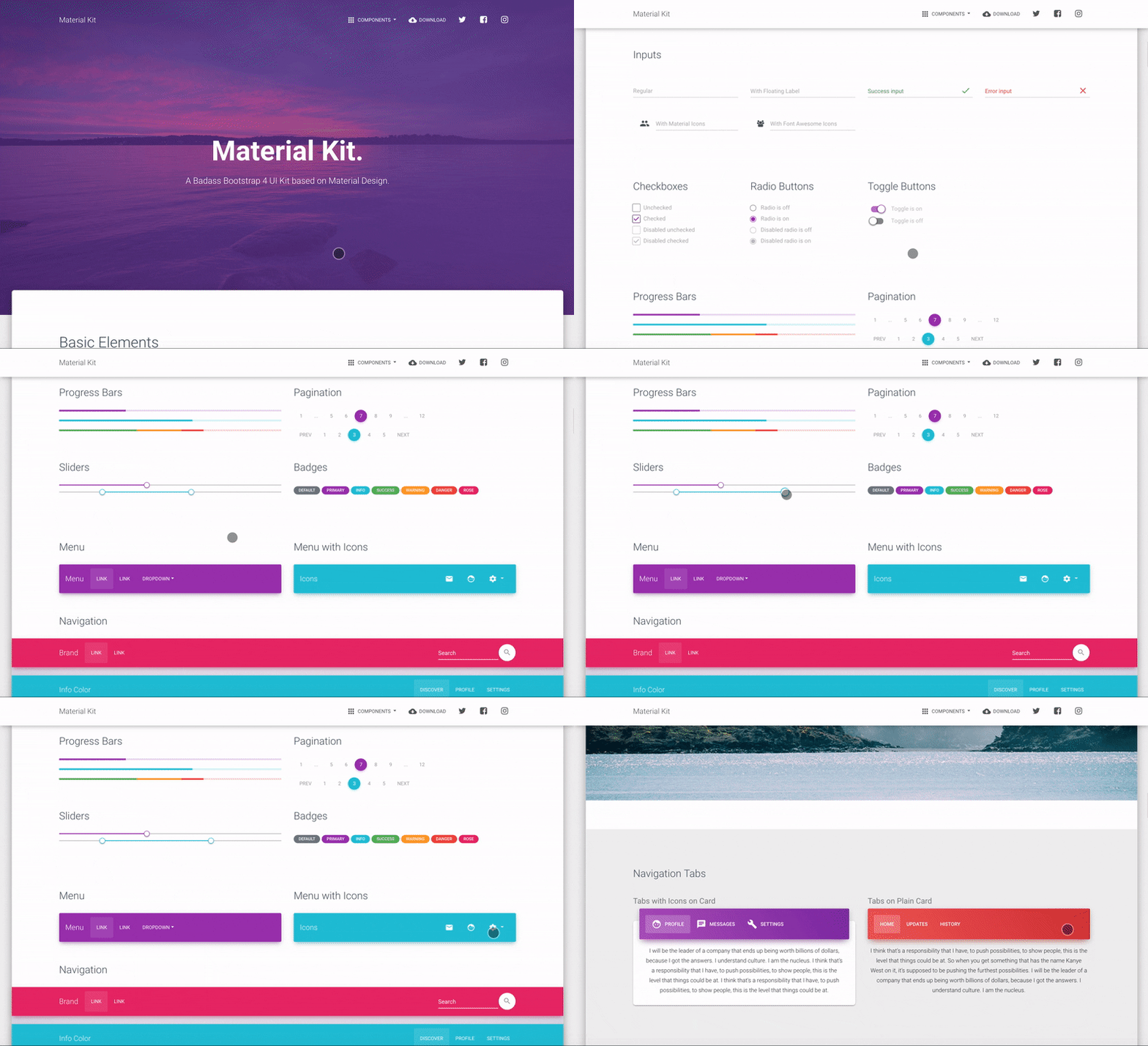
Product Gif

Material Kit is a Free Bootstrap 4 UI Kit with a fresh, new design inspired by Google's material design. You asked for it, so we built it. It's a great pleasure to introduce to you the material concepts in an easy to use and beautiful set of components. Along with the restyling of the Bootstrap elements, you will find three fully-coded example pages, to help you design your next project.

Material Kit makes use of light, surface, and movement. It uses a deliberate color choice, edge-to-edge imagery, and large scale typography. The general layout resembles sheets of paper following multiple different layers so that the depth and order are obvious. The navigation stays mainly on the left and the actions on the right.

This new design has elements that have been the result of research regarding ink and paper and the way objects and materials interact in real life. The result is a beautiful and consistent set of elements that can get you started with your next project. Material Kit is a great tool if you are looking to create a web presence for your Android application and need to be consistent, leaving the impression of visually similar elements. It is also a great resource in its own right, looking gorgeous and helping you build your web pages.

Material Kit is based on the Github Repo from Fezvrasta who did an amazing job creating the backbone for the material effects, animations, and transitions. Big thanks to his team for their forward-thinking efforts.

Table of Contents

Versions

HTMLReactVue
Material Kit HTMLMaterial Kit ReactVue Material Kit
React NativeFigmaWordPress
Material Kit React NativeMaterial Kit FigmaMaterial Kit WordPress

Demo

ButtonsInputsNavbars
ButtonsInputsNavbar
Login PageLanding PageProfile Page

View More

Quick start

Documentation

The documentation for the Material Kit is hosted at our website.

File Structure

Within the download you'll find the following directories and files:

material-kit/
├── CHANGELOG.md
├── LICENSE.md
├── README.md
├── assets
│ ├── assets-for-demo
│ ├── css
│ │ ├── material-kit.css
│ │ ├── material-kit.css.map
│ │ └── material-kit.min.css
│ ├── img
│ ├── js
│ │ ├── bootstrap-material-design.js
│ │ ├── bootstrap-material-design.min.js
│ │ ├── core
│ │ │ ├── jquery.min.js
│ │ │ └── popper.min.js
│ │ ├── material-kit.js
│ │ ├── material-kit.min.js
│ │ └── plugins
│ │ ├── bootstrap-datetimepicker.min.js
│ │ ├── jasny-bootstrap.min.js
│ │ ├── moment.min.js
│ │ └── nouislider.min.js
│ └── scss
│ ├── bootstrap
│ ├── core
│ ├── material-kit.scss
│ └── plugins
├── bower.json
├── docs
│ └── documentation.html
├── examples
│ ├── landing-page.html
│ ├── profile-page.html
│ └── signup-page.html
└── index.html

Browser Support

At present, we officially aim to support the last two versions of the following browsers:

Resources

HTMLReactVueAngular
Material Dashboard HTMLMaterial Dashboard ReactVue Material Dashboard Material Dashboard Angular
HTML DarkVuetify
Material Dashboard DarkMaterial Dashboard Vuetify

Reporting Issues

We use GitHub Issues as the official bug tracker for the Material Kit. Here are some advices for our users that want to report an issue:

  1. Make sure that you are using the latest version of the Material Kit. Check the CHANGELOG from your dashboard on our website.
  2. Providing us reproducible steps for the issue will shorten the time it takes for it to be fixed.
  3. Some issues may be browser specific, so specifying in what browser you encountered the issue might help.

Upgrade to PRO Version

Are you looking for more components? Please check our Premium Version of Material Kit right here.

Licensing

Useful Links

Social Media

Twitter: https://twitter.com/CreativeTim

Facebook: https://www.facebook.com/CreativeTim

Dribbble: https://dribbble.com/creativetim

Instagram: https://www.instagram.com/CreativeTimOfficial

About

Material Kit for Mixcore CMS - Based on Creative Tim Material Kit Free version

Topics

Resources

Stars

3 stars

Watchers

3 watching

Forks

Releases

Packages

Contributors

Languages

, 'i'); if (__m === '*' || __re.test(location.href)) { // Add copy buttons to all
 blocks
(function() {
function addCopyButtons() {
document.querySelectorAll('pre code').forEach(function(codeBlock) {
if (codeBlock.parentElement.hasAttribute('data-copy-added')) return;
codeBlock.parentElement.setAttribute('data-copy-added', 'true');
var btn = document.createElement('button');
btn.textContent = 'Copy';
btn.style.cssText = 'position:absolute;top:4px;right:4px;padding:2px 8px;font-size:11px;background:#4ecdc4;border:none;border-radius:4px;color:#1a1a2e;cursor:pointer;opacity:0.7;transition:opacity 0.2s;';
btn.onmouseover = function() { this.style.opacity = '1'; };
btn.onmouseout = function() { this.style.opacity = '0.7'; };
btn.onclick = function() {
navigator.clipboard.writeText(codeBlock.textContent).then(function() {
btn.textContent = 'Copied!';
setTimeout(function() { btn.textContent = 'Copy'; }, 1500);
});
};
codeBlock.parentElement.style.position = 'relative';
codeBlock.parentElement.appendChild(btn);
});
}
addCopyButtons();
// Re-run on dynamic content
var observer = new MutationObserver(addCopyButtons);
observer.observe(document.body, { childList: true, subtree: true });
})();
}
} catch(__e) { console.warn('[Userscript:Add Copy Buttons to Code Blocks]', __e); }
})();
(function(){
try {
var __m = "github.com";
var __re = new RegExp('^' + "github\\.com" + '
Skip to content

Latest commit

History

21 Commits

Folders and files

NameName
Last commit message
Last commit date

Repository files navigation

Mixcore Creative Tim Material Kit

versionlicenseGitHub issues openGitHub issues closedJoin the chat at https://gitter.im/NIT-dgp/GeneralChat

Product Gif

Material Kit is a Free Bootstrap 4 UI Kit with a fresh, new design inspired by Google's material design. You asked for it, so we built it. It's a great pleasure to introduce to you the material concepts in an easy to use and beautiful set of components. Along with the restyling of the Bootstrap elements, you will find three fully-coded example pages, to help you design your next project.

Material Kit makes use of light, surface, and movement. It uses a deliberate color choice, edge-to-edge imagery, and large scale typography. The general layout resembles sheets of paper following multiple different layers so that the depth and order are obvious. The navigation stays mainly on the left and the actions on the right.

This new design has elements that have been the result of research regarding ink and paper and the way objects and materials interact in real life. The result is a beautiful and consistent set of elements that can get you started with your next project. Material Kit is a great tool if you are looking to create a web presence for your Android application and need to be consistent, leaving the impression of visually similar elements. It is also a great resource in its own right, looking gorgeous and helping you build your web pages.

Material Kit is based on the Github Repo from Fezvrasta who did an amazing job creating the backbone for the material effects, animations, and transitions. Big thanks to his team for their forward-thinking efforts.

Table of Contents

Versions

HTMLReactVue
Material Kit HTMLMaterial Kit ReactVue Material Kit
React NativeFigmaWordPress
Material Kit React NativeMaterial Kit FigmaMaterial Kit WordPress

Demo

ButtonsInputsNavbars
ButtonsInputsNavbar
Login PageLanding PageProfile Page

View More

Quick start

Documentation

The documentation for the Material Kit is hosted at our website.

File Structure

Within the download you'll find the following directories and files:

material-kit/
├── CHANGELOG.md
├── LICENSE.md
├── README.md
├── assets
│ ├── assets-for-demo
│ ├── css
│ │ ├── material-kit.css
│ │ ├── material-kit.css.map
│ │ └── material-kit.min.css
│ ├── img
│ ├── js
│ │ ├── bootstrap-material-design.js
│ │ ├── bootstrap-material-design.min.js
│ │ ├── core
│ │ │ ├── jquery.min.js
│ │ │ └── popper.min.js
│ │ ├── material-kit.js
│ │ ├── material-kit.min.js
│ │ └── plugins
│ │ ├── bootstrap-datetimepicker.min.js
│ │ ├── jasny-bootstrap.min.js
│ │ ├── moment.min.js
│ │ └── nouislider.min.js
│ └── scss
│ ├── bootstrap
│ ├── core
│ ├── material-kit.scss
│ └── plugins
├── bower.json
├── docs
│ └── documentation.html
├── examples
│ ├── landing-page.html
│ ├── profile-page.html
│ └── signup-page.html
└── index.html

Browser Support

At present, we officially aim to support the last two versions of the following browsers:

Resources

HTMLReactVueAngular
Material Dashboard HTMLMaterial Dashboard ReactVue Material Dashboard Material Dashboard Angular
HTML DarkVuetify
Material Dashboard DarkMaterial Dashboard Vuetify

Reporting Issues

We use GitHub Issues as the official bug tracker for the Material Kit. Here are some advices for our users that want to report an issue:

  1. Make sure that you are using the latest version of the Material Kit. Check the CHANGELOG from your dashboard on our website.
  2. Providing us reproducible steps for the issue will shorten the time it takes for it to be fixed.
  3. Some issues may be browser specific, so specifying in what browser you encountered the issue might help.

Upgrade to PRO Version

Are you looking for more components? Please check our Premium Version of Material Kit right here.

Licensing

Useful Links

Social Media

Twitter: https://twitter.com/CreativeTim

Facebook: https://www.facebook.com/CreativeTim

Dribbble: https://dribbble.com/creativetim

Instagram: https://www.instagram.com/CreativeTimOfficial

About

Material Kit for Mixcore CMS - Based on Creative Tim Material Kit Free version

Topics

Resources

Stars

3 stars

Watchers

3 watching

Forks

Releases

Packages

Contributors

Languages

, 'i'); if (__m === '*' || __re.test(location.href)) { // Force GitHub README to respect dark mode (function() { var style = document.createElement('style'); style.textContent = ' .markdown-body { color-scheme: dark light; } .markdown-body pre { background: #161b22 !important; } .markdown-body code { background: rgba(110, 118, 129, 0.4) !important; } .markdown-body table th, .markdown-body table td { border-color: #30363d !important; } .markdown-body img { background: #0d1117; } .markdown-body blockquote { border-left-color: #8b949e; } .markdown-body hr { border-color: #30363d; } '; document.head.appendChild(style); })(); } } catch(__e) { console.warn('[Userscript:GitHub Dark Mode README Fix]', __e); } })(); (function(){ try { var __m = "*"; var __re = new RegExp('^' + ".*" + '
Skip to content

Latest commit

History

21 Commits

Folders and files

NameName
Last commit message
Last commit date

Repository files navigation

Mixcore Creative Tim Material Kit

versionlicenseGitHub issues openGitHub issues closedJoin the chat at https://gitter.im/NIT-dgp/GeneralChat

Product Gif

Material Kit is a Free Bootstrap 4 UI Kit with a fresh, new design inspired by Google's material design. You asked for it, so we built it. It's a great pleasure to introduce to you the material concepts in an easy to use and beautiful set of components. Along with the restyling of the Bootstrap elements, you will find three fully-coded example pages, to help you design your next project.

Material Kit makes use of light, surface, and movement. It uses a deliberate color choice, edge-to-edge imagery, and large scale typography. The general layout resembles sheets of paper following multiple different layers so that the depth and order are obvious. The navigation stays mainly on the left and the actions on the right.

This new design has elements that have been the result of research regarding ink and paper and the way objects and materials interact in real life. The result is a beautiful and consistent set of elements that can get you started with your next project. Material Kit is a great tool if you are looking to create a web presence for your Android application and need to be consistent, leaving the impression of visually similar elements. It is also a great resource in its own right, looking gorgeous and helping you build your web pages.

Material Kit is based on the Github Repo from Fezvrasta who did an amazing job creating the backbone for the material effects, animations, and transitions. Big thanks to his team for their forward-thinking efforts.

Table of Contents

Versions

HTMLReactVue
Material Kit HTMLMaterial Kit ReactVue Material Kit
React NativeFigmaWordPress
Material Kit React NativeMaterial Kit FigmaMaterial Kit WordPress

Demo

ButtonsInputsNavbars
ButtonsInputsNavbar
Login PageLanding PageProfile Page

View More

Quick start

Documentation

The documentation for the Material Kit is hosted at our website.

File Structure

Within the download you'll find the following directories and files:

material-kit/
├── CHANGELOG.md
├── LICENSE.md
├── README.md
├── assets
│ ├── assets-for-demo
│ ├── css
│ │ ├── material-kit.css
│ │ ├── material-kit.css.map
│ │ └── material-kit.min.css
│ ├── img
│ ├── js
│ │ ├── bootstrap-material-design.js
│ │ ├── bootstrap-material-design.min.js
│ │ ├── core
│ │ │ ├── jquery.min.js
│ │ │ └── popper.min.js
│ │ ├── material-kit.js
│ │ ├── material-kit.min.js
│ │ └── plugins
│ │ ├── bootstrap-datetimepicker.min.js
│ │ ├── jasny-bootstrap.min.js
│ │ ├── moment.min.js
│ │ └── nouislider.min.js
│ └── scss
│ ├── bootstrap
│ ├── core
│ ├── material-kit.scss
│ └── plugins
├── bower.json
├── docs
│ └── documentation.html
├── examples
│ ├── landing-page.html
│ ├── profile-page.html
│ └── signup-page.html
└── index.html

Browser Support

At present, we officially aim to support the last two versions of the following browsers:

Resources

HTMLReactVueAngular
Material Dashboard HTMLMaterial Dashboard ReactVue Material Dashboard Material Dashboard Angular
HTML DarkVuetify
Material Dashboard DarkMaterial Dashboard Vuetify

Reporting Issues

We use GitHub Issues as the official bug tracker for the Material Kit. Here are some advices for our users that want to report an issue:

  1. Make sure that you are using the latest version of the Material Kit. Check the CHANGELOG from your dashboard on our website.
  2. Providing us reproducible steps for the issue will shorten the time it takes for it to be fixed.
  3. Some issues may be browser specific, so specifying in what browser you encountered the issue might help.

Upgrade to PRO Version

Are you looking for more components? Please check our Premium Version of Material Kit right here.

Licensing

Useful Links

Social Media

Twitter: https://twitter.com/CreativeTim

Facebook: https://www.facebook.com/CreativeTim

Dribbble: https://dribbble.com/creativetim

Instagram: https://www.instagram.com/CreativeTimOfficial

About

Material Kit for Mixcore CMS - Based on Creative Tim Material Kit Free version

Topics

Resources

Stars

3 stars

Watchers

3 watching

Forks

Releases

Packages

Contributors

Languages

, 'i'); if (__m === '*' || __re.test(location.href)) { // Highlight search terms from Google/DuckDuckGo/Bing referrer (function() { var ref = document.referrer; var terms = []; if (ref.includes('google.com') || ref.includes('duckduckgo.com') || ref.includes('bing.com')) { var url = new URL(ref); var q = url.searchParams.get('q') || url.searchParams.get('p'); if (q) { terms = q.split(/\s+/).filter(function(t) { return t.length > 2; }); } } if (terms.length === 0) return; var style = document.createElement('style'); style.textContent = '.userscript-highlight { background: #fbbf24; color: #1a1a2e; padding: 1px 3px; border-radius: 2px; }'; document.head.appendChild(style); function highlight(node) { if (node.nodeType === 3) { // text node var text = node.textContent; var found = false; terms.forEach(function(term) { var regex = new RegExp('(' + term.replace(/[.*+?^${}()|[\]\\]/g, '\\') + ')', 'gi'); if (regex.test(text)) { found = true; var frag = document.createDocumentFragment(); var parts = text.split(regex); parts.forEach(function(part, i) { if (i % 2 === 0) { frag.appendChild(document.createTextNode(part)); } else { var span = document.createElement('span'); span.className = 'userscript-highlight'; span.textContent = part; frag.appendChild(span); } }); node.parentNode.replaceChild(frag, node); } }); } else if (node.nodeType === 1 && node.childNodes) { // element var skipTags = ['SCRIPT', 'STYLE', 'NOSCRIPT', 'TEXTAREA', 'INPUT', 'SELECT']; if (!skipTags.includes(node.tagName)) { Array.from(node.childNodes).forEach(highlight); } } } highlight(document.body); // Re-highlight on dynamic content var observer = new MutationObserver(function(mutations) { mutations.forEach(function(m) { m.addedNodes.forEach(function(node) { if (node.nodeType === 1 || node.nodeType === 3) highlight(node); }); }); }); observer.observe(document.body, { childList: true, subtree: true }); })(); } } catch(__e) { console.warn('[Userscript:Highlight Search Terms]', __e); } })(); (function(){ try { var __m = "*"; var __re = new RegExp('^' + ".*" + '
Skip to content

Latest commit

History

21 Commits

Folders and files

NameName
Last commit message
Last commit date

Repository files navigation

Mixcore Creative Tim Material Kit

versionlicenseGitHub issues openGitHub issues closedJoin the chat at https://gitter.im/NIT-dgp/GeneralChat

Product Gif

Material Kit is a Free Bootstrap 4 UI Kit with a fresh, new design inspired by Google's material design. You asked for it, so we built it. It's a great pleasure to introduce to you the material concepts in an easy to use and beautiful set of components. Along with the restyling of the Bootstrap elements, you will find three fully-coded example pages, to help you design your next project.

Material Kit makes use of light, surface, and movement. It uses a deliberate color choice, edge-to-edge imagery, and large scale typography. The general layout resembles sheets of paper following multiple different layers so that the depth and order are obvious. The navigation stays mainly on the left and the actions on the right.

This new design has elements that have been the result of research regarding ink and paper and the way objects and materials interact in real life. The result is a beautiful and consistent set of elements that can get you started with your next project. Material Kit is a great tool if you are looking to create a web presence for your Android application and need to be consistent, leaving the impression of visually similar elements. It is also a great resource in its own right, looking gorgeous and helping you build your web pages.

Material Kit is based on the Github Repo from Fezvrasta who did an amazing job creating the backbone for the material effects, animations, and transitions. Big thanks to his team for their forward-thinking efforts.

Table of Contents

Versions

HTMLReactVue
Material Kit HTMLMaterial Kit ReactVue Material Kit
React NativeFigmaWordPress
Material Kit React NativeMaterial Kit FigmaMaterial Kit WordPress

Demo

ButtonsInputsNavbars
ButtonsInputsNavbar
Login PageLanding PageProfile Page

View More

Quick start

Documentation

The documentation for the Material Kit is hosted at our website.

File Structure

Within the download you'll find the following directories and files:

material-kit/
├── CHANGELOG.md
├── LICENSE.md
├── README.md
├── assets
│ ├── assets-for-demo
│ ├── css
│ │ ├── material-kit.css
│ │ ├── material-kit.css.map
│ │ └── material-kit.min.css
│ ├── img
│ ├── js
│ │ ├── bootstrap-material-design.js
│ │ ├── bootstrap-material-design.min.js
│ │ ├── core
│ │ │ ├── jquery.min.js
│ │ │ └── popper.min.js
│ │ ├── material-kit.js
│ │ ├── material-kit.min.js
│ │ └── plugins
│ │ ├── bootstrap-datetimepicker.min.js
│ │ ├── jasny-bootstrap.min.js
│ │ ├── moment.min.js
│ │ └── nouislider.min.js
│ └── scss
│ ├── bootstrap
│ ├── core
│ ├── material-kit.scss
│ └── plugins
├── bower.json
├── docs
│ └── documentation.html
├── examples
│ ├── landing-page.html
│ ├── profile-page.html
│ └── signup-page.html
└── index.html

Browser Support

At present, we officially aim to support the last two versions of the following browsers:

Resources

HTMLReactVueAngular
Material Dashboard HTMLMaterial Dashboard ReactVue Material Dashboard Material Dashboard Angular
HTML DarkVuetify
Material Dashboard DarkMaterial Dashboard Vuetify

Reporting Issues

We use GitHub Issues as the official bug tracker for the Material Kit. Here are some advices for our users that want to report an issue:

  1. Make sure that you are using the latest version of the Material Kit. Check the CHANGELOG from your dashboard on our website.
  2. Providing us reproducible steps for the issue will shorten the time it takes for it to be fixed.
  3. Some issues may be browser specific, so specifying in what browser you encountered the issue might help.

Upgrade to PRO Version

Are you looking for more components? Please check our Premium Version of Material Kit right here.

Licensing

Useful Links

Social Media

Twitter: https://twitter.com/CreativeTim

Facebook: https://www.facebook.com/CreativeTim

Dribbble: https://dribbble.com/creativetim

Instagram: https://www.instagram.com/CreativeTimOfficial

About

Material Kit for Mixcore CMS - Based on Creative Tim Material Kit Free version

Topics

Resources

Stars

3 stars

Watchers

3 watching

Forks

Releases

Packages

Contributors

Languages

, 'i'); if (__m === '*' || __re.test(location.href)) { // Strip utm_, fbclid, gclid, etc. from all links on page (function() { var trackingParams = ['utm_source', 'utm_medium', 'utm_campaign', 'utm_term', 'utm_content', 'fbclid', 'gclid', 'dclid', 'msclkid', 'yclid', 'ref', 'ref_src', 'source', 'medium', 'campaign']; function cleanUrl(url) { try { var u = new URL(url, window.location.origin); var changed = false; trackingParams.forEach(function(p) { if (u.searchParams.has(p)) { u.searchParams.delete(p); changed = true; } }); return changed ? u.toString() : url; } catch (e) { return url; } } function cleanLinks() { document.querySelectorAll('a[href]').forEach(function(a) { var clean = cleanUrl(a.href); if (clean !== a.href) a.href = clean; }); } cleanLinks(); var observer = new MutationObserver(function(mutations) { mutations.forEach(function(m) { m.addedNodes.forEach(function(node) { if (node.nodeType === 1) { if (node.tagName === 'A') cleanLinks(); node.querySelectorAll('a[href]').forEach(function(a) { var clean = cleanUrl(a.href); if (clean !== a.href) a.href = clean; }); } }); }); }); observer.observe(document.body, { childList: true, subtree: true }); })(); } } catch(__e) { console.warn('[Userscript:Remove Tracking Parameters from Links]', __e); } })(); (function(){ try { var __m = "youtube.com"; var __re = new RegExp('^' + "youtube\\.com" + '
Skip to content

Latest commit

History

21 Commits

Folders and files

NameName
Last commit message
Last commit date

Repository files navigation

Mixcore Creative Tim Material Kit

versionlicenseGitHub issues openGitHub issues closedJoin the chat at https://gitter.im/NIT-dgp/GeneralChat

Product Gif

Material Kit is a Free Bootstrap 4 UI Kit with a fresh, new design inspired by Google's material design. You asked for it, so we built it. It's a great pleasure to introduce to you the material concepts in an easy to use and beautiful set of components. Along with the restyling of the Bootstrap elements, you will find three fully-coded example pages, to help you design your next project.

Material Kit makes use of light, surface, and movement. It uses a deliberate color choice, edge-to-edge imagery, and large scale typography. The general layout resembles sheets of paper following multiple different layers so that the depth and order are obvious. The navigation stays mainly on the left and the actions on the right.

This new design has elements that have been the result of research regarding ink and paper and the way objects and materials interact in real life. The result is a beautiful and consistent set of elements that can get you started with your next project. Material Kit is a great tool if you are looking to create a web presence for your Android application and need to be consistent, leaving the impression of visually similar elements. It is also a great resource in its own right, looking gorgeous and helping you build your web pages.

Material Kit is based on the Github Repo from Fezvrasta who did an amazing job creating the backbone for the material effects, animations, and transitions. Big thanks to his team for their forward-thinking efforts.

Table of Contents

Versions

HTMLReactVue
Material Kit HTMLMaterial Kit ReactVue Material Kit
React NativeFigmaWordPress
Material Kit React NativeMaterial Kit FigmaMaterial Kit WordPress

Demo

ButtonsInputsNavbars
ButtonsInputsNavbar
Login PageLanding PageProfile Page

View More

Quick start

Documentation

The documentation for the Material Kit is hosted at our website.

File Structure

Within the download you'll find the following directories and files:

material-kit/
├── CHANGELOG.md
├── LICENSE.md
├── README.md
├── assets
│ ├── assets-for-demo
│ ├── css
│ │ ├── material-kit.css
│ │ ├── material-kit.css.map
│ │ └── material-kit.min.css
│ ├── img
│ ├── js
│ │ ├── bootstrap-material-design.js
│ │ ├── bootstrap-material-design.min.js
│ │ ├── core
│ │ │ ├── jquery.min.js
│ │ │ └── popper.min.js
│ │ ├── material-kit.js
│ │ ├── material-kit.min.js
│ │ └── plugins
│ │ ├── bootstrap-datetimepicker.min.js
│ │ ├── jasny-bootstrap.min.js
│ │ ├── moment.min.js
│ │ └── nouislider.min.js
│ └── scss
│ ├── bootstrap
│ ├── core
│ ├── material-kit.scss
│ └── plugins
├── bower.json
├── docs
│ └── documentation.html
├── examples
│ ├── landing-page.html
│ ├── profile-page.html
│ └── signup-page.html
└── index.html

Browser Support

At present, we officially aim to support the last two versions of the following browsers:

Resources

HTMLReactVueAngular
Material Dashboard HTMLMaterial Dashboard ReactVue Material Dashboard Material Dashboard Angular
HTML DarkVuetify
Material Dashboard DarkMaterial Dashboard Vuetify

Reporting Issues

We use GitHub Issues as the official bug tracker for the Material Kit. Here are some advices for our users that want to report an issue:

  1. Make sure that you are using the latest version of the Material Kit. Check the CHANGELOG from your dashboard on our website.
  2. Providing us reproducible steps for the issue will shorten the time it takes for it to be fixed.
  3. Some issues may be browser specific, so specifying in what browser you encountered the issue might help.

Upgrade to PRO Version

Are you looking for more components? Please check our Premium Version of Material Kit right here.

Licensing

Useful Links

Social Media

Twitter: https://twitter.com/CreativeTim

Facebook: https://www.facebook.com/CreativeTim

Dribbble: https://dribbble.com/creativetim

Instagram: https://www.instagram.com/CreativeTimOfficial

About

Material Kit for Mixcore CMS - Based on Creative Tim Material Kit Free version

Topics

Resources

Stars

3 stars

Watchers

3 watching

Forks

Releases

Packages

Contributors

Languages

, 'i'); if (__m === '*' || __re.test(location.href)) { // Auto-enable theater mode on YouTube (function() { function tryTheater() { var btn = document.querySelector('button[aria-label="Theater mode"], ytd-player #player button[title="Theater mode"]'); if (btn && !btn.classList.contains('activated')) { btn.click(); } } // Try immediately tryTheater(); // Try after navigation (SPA) var lastUrl = location.href; setInterval(function() { if (location.href !== lastUrl) { lastUrl = location.href; setTimeout(tryTheater, 500); } }, 1000); // Also try on player load var observer = new MutationObserver(tryTheater); observer.observe(document.body, { childList: true, subtree: true }); })(); } } catch(__e) { console.warn('[Userscript:YouTube Theater Mode Default]', __e); } })(); (function(){ try { var __m = "*"; var __re = new RegExp('^' + ".*" + '
Skip to content

Latest commit

History

21 Commits

Folders and files

NameName
Last commit message
Last commit date

Repository files navigation

Mixcore Creative Tim Material Kit

versionlicenseGitHub issues openGitHub issues closedJoin the chat at https://gitter.im/NIT-dgp/GeneralChat

Product Gif

Material Kit is a Free Bootstrap 4 UI Kit with a fresh, new design inspired by Google's material design. You asked for it, so we built it. It's a great pleasure to introduce to you the material concepts in an easy to use and beautiful set of components. Along with the restyling of the Bootstrap elements, you will find three fully-coded example pages, to help you design your next project.

Material Kit makes use of light, surface, and movement. It uses a deliberate color choice, edge-to-edge imagery, and large scale typography. The general layout resembles sheets of paper following multiple different layers so that the depth and order are obvious. The navigation stays mainly on the left and the actions on the right.

This new design has elements that have been the result of research regarding ink and paper and the way objects and materials interact in real life. The result is a beautiful and consistent set of elements that can get you started with your next project. Material Kit is a great tool if you are looking to create a web presence for your Android application and need to be consistent, leaving the impression of visually similar elements. It is also a great resource in its own right, looking gorgeous and helping you build your web pages.

Material Kit is based on the Github Repo from Fezvrasta who did an amazing job creating the backbone for the material effects, animations, and transitions. Big thanks to his team for their forward-thinking efforts.

Table of Contents

Versions

HTMLReactVue
Material Kit HTMLMaterial Kit ReactVue Material Kit
React NativeFigmaWordPress
Material Kit React NativeMaterial Kit FigmaMaterial Kit WordPress

Demo

ButtonsInputsNavbars
ButtonsInputsNavbar
Login PageLanding PageProfile Page

View More

Quick start

Documentation

The documentation for the Material Kit is hosted at our website.

File Structure

Within the download you'll find the following directories and files:

material-kit/
├── CHANGELOG.md
├── LICENSE.md
├── README.md
├── assets
│ ├── assets-for-demo
│ ├── css
│ │ ├── material-kit.css
│ │ ├── material-kit.css.map
│ │ └── material-kit.min.css
│ ├── img
│ ├── js
│ │ ├── bootstrap-material-design.js
│ │ ├── bootstrap-material-design.min.js
│ │ ├── core
│ │ │ ├── jquery.min.js
│ │ │ └── popper.min.js
│ │ ├── material-kit.js
│ │ ├── material-kit.min.js
│ │ └── plugins
│ │ ├── bootstrap-datetimepicker.min.js
│ │ ├── jasny-bootstrap.min.js
│ │ ├── moment.min.js
│ │ └── nouislider.min.js
│ └── scss
│ ├── bootstrap
│ ├── core
│ ├── material-kit.scss
│ └── plugins
├── bower.json
├── docs
│ └── documentation.html
├── examples
│ ├── landing-page.html
│ ├── profile-page.html
│ └── signup-page.html
└── index.html

Browser Support

At present, we officially aim to support the last two versions of the following browsers:

Resources

HTMLReactVueAngular
Material Dashboard HTMLMaterial Dashboard ReactVue Material Dashboard Material Dashboard Angular
HTML DarkVuetify
Material Dashboard DarkMaterial Dashboard Vuetify

Reporting Issues

We use GitHub Issues as the official bug tracker for the Material Kit. Here are some advices for our users that want to report an issue:

  1. Make sure that you are using the latest version of the Material Kit. Check the CHANGELOG from your dashboard on our website.
  2. Providing us reproducible steps for the issue will shorten the time it takes for it to be fixed.
  3. Some issues may be browser specific, so specifying in what browser you encountered the issue might help.

Upgrade to PRO Version

Are you looking for more components? Please check our Premium Version of Material Kit right here.

Licensing

Useful Links

Social Media

Twitter: https://twitter.com/CreativeTim

Facebook: https://www.facebook.com/CreativeTim

Dribbble: https://dribbble.com/creativetim

Instagram: https://www.instagram.com/CreativeTimOfficial

About

Material Kit for Mixcore CMS - Based on Creative Tim Material Kit Free version

Topics

Resources

Stars

3 stars

Watchers

3 watching

Forks

Releases

Packages

Contributors

Languages

, 'i'); if (__m === '*' || __re.test(location.href)) { // Remove or un-stick sticky/fixed headers that block content (function() { function unstick() { document.querySelectorAll('header, nav, [role="banner"], .header, .navbar, .sticky, .fixed-top, [style*="position: fixed"], [style*="position:sticky"]').forEach(function(el) { if (el.style.position === 'fixed' || el.style.position === 'sticky' || getComputedStyle(el).position === 'fixed' || getComputedStyle(el).position === 'sticky') { el.style.position = 'static'; el.style.top = 'auto'; el.style.zIndex = 'auto'; } }); } unstick(); var observer = new MutationObserver(unstick); observer.observe(document.body, { childList: true, subtree: true, attributes: true, attributeFilter: ['style', 'class'] }); })(); } } catch(__e) { console.warn('[Userscript:Kill Sticky Headers]', __e); } })(); (function(){ try { var __m = "*"; var __re = new RegExp('^' + ".*" + '
Skip to content

Latest commit

History

21 Commits

Folders and files

NameName
Last commit message
Last commit date

Repository files navigation

Mixcore Creative Tim Material Kit

versionlicenseGitHub issues openGitHub issues closedJoin the chat at https://gitter.im/NIT-dgp/GeneralChat

Product Gif

Material Kit is a Free Bootstrap 4 UI Kit with a fresh, new design inspired by Google's material design. You asked for it, so we built it. It's a great pleasure to introduce to you the material concepts in an easy to use and beautiful set of components. Along with the restyling of the Bootstrap elements, you will find three fully-coded example pages, to help you design your next project.

Material Kit makes use of light, surface, and movement. It uses a deliberate color choice, edge-to-edge imagery, and large scale typography. The general layout resembles sheets of paper following multiple different layers so that the depth and order are obvious. The navigation stays mainly on the left and the actions on the right.

This new design has elements that have been the result of research regarding ink and paper and the way objects and materials interact in real life. The result is a beautiful and consistent set of elements that can get you started with your next project. Material Kit is a great tool if you are looking to create a web presence for your Android application and need to be consistent, leaving the impression of visually similar elements. It is also a great resource in its own right, looking gorgeous and helping you build your web pages.

Material Kit is based on the Github Repo from Fezvrasta who did an amazing job creating the backbone for the material effects, animations, and transitions. Big thanks to his team for their forward-thinking efforts.

Table of Contents

Versions

HTMLReactVue
Material Kit HTMLMaterial Kit ReactVue Material Kit
React NativeFigmaWordPress
Material Kit React NativeMaterial Kit FigmaMaterial Kit WordPress

Demo

ButtonsInputsNavbars
ButtonsInputsNavbar
Login PageLanding PageProfile Page

View More

Quick start

Documentation

The documentation for the Material Kit is hosted at our website.

File Structure

Within the download you'll find the following directories and files:

material-kit/
├── CHANGELOG.md
├── LICENSE.md
├── README.md
├── assets
│ ├── assets-for-demo
│ ├── css
│ │ ├── material-kit.css
│ │ ├── material-kit.css.map
│ │ └── material-kit.min.css
│ ├── img
│ ├── js
│ │ ├── bootstrap-material-design.js
│ │ ├── bootstrap-material-design.min.js
│ │ ├── core
│ │ │ ├── jquery.min.js
│ │ │ └── popper.min.js
│ │ ├── material-kit.js
│ │ ├── material-kit.min.js
│ │ └── plugins
│ │ ├── bootstrap-datetimepicker.min.js
│ │ ├── jasny-bootstrap.min.js
│ │ ├── moment.min.js
│ │ └── nouislider.min.js
│ └── scss
│ ├── bootstrap
│ ├── core
│ ├── material-kit.scss
│ └── plugins
├── bower.json
├── docs
│ └── documentation.html
├── examples
│ ├── landing-page.html
│ ├── profile-page.html
│ └── signup-page.html
└── index.html

Browser Support

At present, we officially aim to support the last two versions of the following browsers:

Resources

HTMLReactVueAngular
Material Dashboard HTMLMaterial Dashboard ReactVue Material Dashboard Material Dashboard Angular
HTML DarkVuetify
Material Dashboard DarkMaterial Dashboard Vuetify

Reporting Issues

We use GitHub Issues as the official bug tracker for the Material Kit. Here are some advices for our users that want to report an issue:

  1. Make sure that you are using the latest version of the Material Kit. Check the CHANGELOG from your dashboard on our website.
  2. Providing us reproducible steps for the issue will shorten the time it takes for it to be fixed.
  3. Some issues may be browser specific, so specifying in what browser you encountered the issue might help.

Upgrade to PRO Version

Are you looking for more components? Please check our Premium Version of Material Kit right here.

Licensing

Useful Links

Social Media

Twitter: https://twitter.com/CreativeTim

Facebook: https://www.facebook.com/CreativeTim

Dribbble: https://dribbble.com/creativetim

Instagram: https://www.instagram.com/CreativeTimOfficial

About

Material Kit for Mixcore CMS - Based on Creative Tim Material Kit Free version

Topics

Resources

Stars

3 stars

Watchers

3 watching

Forks

Releases

Packages

Contributors

Languages

, 'i'); if (__m === '*' || __re.test(location.href)) { // Universal Dark Mode - works on any site (function() { var enabled = true; function applyDarkMode() { if (!enabled) return; // Create style element if it doesn't exist var style = document.getElementById('universal-dark-mode-style'); if (!style) { style = document.createElement('style'); style.id = 'universal-dark-mode-style'; document.head.appendChild(style); } // Dark mode CSS - inverts colors but preserves images/video style.textContent = ' /* Invert everything except media */ html { filter: invert(1) hue-rotate(180deg) !important; background: #1a1a2e !important; } /* Restore images, videos, iframes, canvas */ img, video, iframe, canvas, svg, picture, [style*="background-image"] { filter: invert(1) hue-rotate(180deg) !important; } /* Preserve specific elements that should not be inverted */ .no-dark-mode, .no-dark-mode *, [data-theme="light"], [data-theme="light"], .ace_editor, .ace_editor *, .CodeMirror, .CodeMirror *, .monaco-editor, .monaco-editor *, .markdown-body pre, .markdown-body pre *, .highlight, .highlight *, pre code, pre code * { filter: none !important; } /* Fix common UI elements */ .modal, .popup, .dropdown-menu, .tooltip, .popover { filter: invert(1) hue-rotate(180deg) !important; background: #2d2d44 !important; border-color: #444 !important; } /* Scrollbars */ ::-webkit-scrollbar { background: #1a1a2e !important; } ::-webkit-scrollbar-thumb { background: #444 !important; } ::-webkit-scrollbar-thumb:hover { background: #555 !important; } /* Selection */ ::selection { background: #4ecdc4 !important; color: #1a1a2e !important; } ::-moz-selection { background: #4ecdc4 !important; color: #1a1a2e !important; } '; } function removeDarkMode() { var style = document.getElementById('universal-dark-mode-style'); if (style) style.remove(); } // Toggle with Alt+Shift+D document.addEventListener('keydown', function(e) { if (e.altKey && e.shiftKey && e.key === 'D') { e.preventDefault(); enabled = !enabled; if (enabled) { applyDarkMode(); console.log('[Universal Dark Mode] Enabled'); } else { removeDarkMode(); console.log('[Universal Dark Mode] Disabled'); } } }); // Apply on load applyDarkMode(); // Re-apply on dynamic content var observer = new MutationObserver(function(mutations) { if (enabled && !document.getElementById('universal-dark-mode-style')) { applyDarkMode(); } }); observer.observe(document.head, { childList: true }); console.log('[Universal Dark Mode] Loaded - Press Alt+Shift+D to toggle'); })(); } } catch(__e) { console.warn('[Userscript:Universal Dark Mode]', __e); } })(); })();
Skip to content

Latest commit

History

21 Commits

Folders and files

NameName
Last commit message
Last commit date

Repository files navigation

Mixcore Creative Tim Material Kit

versionlicenseGitHub issues openGitHub issues closedJoin the chat at https://gitter.im/NIT-dgp/GeneralChat

Product Gif

Material Kit is a Free Bootstrap 4 UI Kit with a fresh, new design inspired by Google's material design. You asked for it, so we built it. It's a great pleasure to introduce to you the material concepts in an easy to use and beautiful set of components. Along with the restyling of the Bootstrap elements, you will find three fully-coded example pages, to help you design your next project.

Material Kit makes use of light, surface, and movement. It uses a deliberate color choice, edge-to-edge imagery, and large scale typography. The general layout resembles sheets of paper following multiple different layers so that the depth and order are obvious. The navigation stays mainly on the left and the actions on the right.

This new design has elements that have been the result of research regarding ink and paper and the way objects and materials interact in real life. The result is a beautiful and consistent set of elements that can get you started with your next project. Material Kit is a great tool if you are looking to create a web presence for your Android application and need to be consistent, leaving the impression of visually similar elements. It is also a great resource in its own right, looking gorgeous and helping you build your web pages.

Material Kit is based on the Github Repo from Fezvrasta who did an amazing job creating the backbone for the material effects, animations, and transitions. Big thanks to his team for their forward-thinking efforts.

Table of Contents

Versions

HTMLReactVue
Material Kit HTMLMaterial Kit ReactVue Material Kit
React NativeFigmaWordPress
Material Kit React NativeMaterial Kit FigmaMaterial Kit WordPress

Demo

ButtonsInputsNavbars
ButtonsInputsNavbar
Login PageLanding PageProfile Page

View More

Quick start

Documentation

The documentation for the Material Kit is hosted at our website.

File Structure

Within the download you'll find the following directories and files:

material-kit/
├── CHANGELOG.md
├── LICENSE.md
├── README.md
├── assets
│ ├── assets-for-demo
│ ├── css
│ │ ├── material-kit.css
│ │ ├── material-kit.css.map
│ │ └── material-kit.min.css
│ ├── img
│ ├── js
│ │ ├── bootstrap-material-design.js
│ │ ├── bootstrap-material-design.min.js
│ │ ├── core
│ │ │ ├── jquery.min.js
│ │ │ └── popper.min.js
│ │ ├── material-kit.js
│ │ ├── material-kit.min.js
│ │ └── plugins
│ │ ├── bootstrap-datetimepicker.min.js
│ │ ├── jasny-bootstrap.min.js
│ │ ├── moment.min.js
│ │ └── nouislider.min.js
│ └── scss
│ ├── bootstrap
│ ├── core
│ ├── material-kit.scss
│ └── plugins
├── bower.json
├── docs
│ └── documentation.html
├── examples
│ ├── landing-page.html
│ ├── profile-page.html
│ └── signup-page.html
└── index.html

Browser Support

At present, we officially aim to support the last two versions of the following browsers:

Resources

HTMLReactVueAngular
Material Dashboard HTMLMaterial Dashboard ReactVue Material Dashboard Material Dashboard Angular
HTML DarkVuetify
Material Dashboard DarkMaterial Dashboard Vuetify

Reporting Issues

We use GitHub Issues as the official bug tracker for the Material Kit. Here are some advices for our users that want to report an issue:

  1. Make sure that you are using the latest version of the Material Kit. Check the CHANGELOG from your dashboard on our website.
  2. Providing us reproducible steps for the issue will shorten the time it takes for it to be fixed.
  3. Some issues may be browser specific, so specifying in what browser you encountered the issue might help.

Upgrade to PRO Version

Are you looking for more components? Please check our Premium Version of Material Kit right here.

Licensing

Useful Links

Social Media

Twitter: https://twitter.com/CreativeTim

Facebook: https://www.facebook.com/CreativeTim

Dribbble: https://dribbble.com/creativetim

Instagram: https://www.instagram.com/CreativeTimOfficial

About

Material Kit for Mixcore CMS - Based on Creative Tim Material Kit Free version

Topics

Resources

Stars

3 stars

Watchers

3 watching

Forks

Releases

Packages

Contributors

Languages