Add support for Broadlink RM4 pro (0x653C) - #472
Conversation
KTibow
commented
Nov 9, 2020
You should re-sort the list sometime. Are you sure that's the location where it goes? |
felipediel
commented
Nov 9, 2020
Yes, we are sorting by class and devtype, in this order. |
lukeclx
commented
Nov 22, 2020
Seems like it's not supported again for Broadlink RM4 pro (0x653C) |
yfands
commented
Nov 24, 2020
Hey felipediel, thanks for opening, but it says Add support for Broadlink RM4 pro (0x653C) |
Are you sure? Please double check the type. The official app says RM4 pro. |
yfands
commented
Nov 25, 2020
via email
Hey Felipe,
Yes iam absolutely sure I have a RM mini 3, a green one, the pro4 is all black.
oh I see the culprit..
The RM4 is 0x6539
and the RM mini 3 is 0x653c
I think my bad..... Sorry
Regards Frank …________________________________
Van: Felipe Martins Diel <notifications@github.com>
Verzonden: dinsdag 24 november 2020 22:07 uur
Aan: mjg59/python-broadlink <python-broadlink@noreply.github.com>
CC: yfands <yfands@live.nl>; Comment <comment@noreply.github.com>
Onderwerp: Re: [mjg59/python-broadlink] Add support for Broadlink RM4 pro (0x653C) (#472)
Are you sure? Please double check. The official app says RM4 pro.
—
You are receiving this because you commented.
Reply to this email directly, view it on GitHub<#472 (comment)>, or unsubscribe<https://github.com/notifications/unsubscribe-auth/AA4JYADW6YLMX7GZYD3V7S3SRQOCFANCNFSM4TOU7H4A>. |
yfands
commented
Nov 25, 2020
via email
Felipe,
Iam sorry I made a mess..
This is the right product and number
The RM4 is 0x6539
and the RM mini 3 is 0x6508
Sorry
Regards Frank …________________________________
Van: Frank - <yfands@live.nl>
Verzonden: woensdag 25 november 2020 22:00 uur
Aan: mjg59/python-broadlink <reply@reply.github.com>
Onderwerp: Re: [mjg59/python-broadlink] Add support for Broadlink RM4 pro (0x653C) (#472)
Hey Felipe,
Yes iam absolutely sure I have a RM mini 3, a green one, the pro4 is all black.
oh I see the culprit..
The RM4 is 0x6539
and the RM mini 3 is 0x653c
I think my bad..... Sorry
Regards Frank ________________________________
Van: Felipe Martins Diel <notifications@github.com>
Verzonden: dinsdag 24 november 2020 22:07 uur
Aan: mjg59/python-broadlink <python-broadlink@noreply.github.com>
CC: yfands <yfands@live.nl>; Comment <comment@noreply.github.com>
Onderwerp: Re: [mjg59/python-broadlink] Add support for Broadlink RM4 pro (0x653C) (#472)
Are you sure? Please double check. The official app says RM4 pro.
—
You are receiving this because you commented.
Reply to this email directly, view it on GitHub<#472 (comment)>, or unsubscribe<https://github.com/notifications/unsubscribe-auth/AA4JYADW6YLMX7GZYD3V7S3SRQOCFANCNFSM4TOU7H4A>. |
felipediel
commented
Nov 25, 2020
Thanks for reporting back! The PRs are open, now we just need to wait a bit for the next release. |
opep
commented
Dec 11, 2020
Do you expect that it is going to be merged with HA 1.0? It´s getting pretty near (13/12) and despite it has successful checks and no conflicts, it still didn't get merged. (I have no way to integrate my new broadlink). |
KTibow
commented
Dec 11, 2020
Steps for HA:
It takes a while. Hopefully the maintainers can merge soon. |
Is it possible that it is not integrated yet? I try to add my RM4 Pro+ and it says Unsupported device: 0x653c. thanks |
KTibow
commented
Dec 13, 2020
This PR is open, as you can see. That means that it's not added yet. It is definitely not integrated. |
opep
commented
Dec 14, 2020
Same here, We will have to wait a bit longer. |
xblackedemonx
commented
Dec 14, 2020
Ok thank you. |
oferbar
commented
Dec 24, 2020
Hi, Logger: homeassistant.components.broadlink.config_flow Unsupported device: 0x653c. If it worked before, please open an issue at https://github.com/home-assistant/core/issues |
xblackedemonx
commented
Dec 24, 2020
When is this patch planned to go live? |
KTibow
commented
Dec 25, 2020
When one of the maintainers is available. |
kaskagorry
commented
Jan 7, 2021
Otro por aqui con este modelo RM4 Pro '0x653c' con el mismo problema para poder integrarlo. En cuanto tengamos novedades sobre este asunto, soy el primero en probar |
felipediel
commented
Jan 7, 2021
Hi @kaskagorry. If you want to patch your installation before the release:
|
xblackedemonx
commented
Jan 9, 2021
felipediel thank you very much! |
oferbar
commented
Jan 9, 2021
Hi, in which release is this going to be included? |
WarlaxZ
commented
Jan 27, 2021
patch 23 annoyingly doesnt add the '0x6539' device (RM4 Mini) |
felipediel
commented
Mar 15, 2021
This branch has all the patches together: |
xblackedemonx
commented
Mar 15, 2021
I don't use Docker. How can I install this? |
Which installation method did you choose? If you are running HassOS or a manual installation of the Supervisor, this will set you up. |
xblackedemonx
commented
Mar 15, 2021
I installed it on the microSD using the Pi 4 image and Balena Etcher. |
felipediel
commented
Mar 15, 2021
Check if you have a Supervisor button on the sidebar. If so, click the button, go to the add-ons store and perform the first procedure. If not, do it the second way. If you don't feel safe doing this, waiting a while won't hurt. v0.17.0 is already merged into the dev branch, we're almost there. |
xblackedemonx
commented
Mar 15, 2021
via email
Thank you very much for taking the time to reply.
Have a great day! …On Mon, 15 Mar 2021 at 10:29, Felipe Martins Diel ***@***.***> wrote:
Check if you have a Supervisor button on the sidebar. If so, click the
button, go to the add-ons store and perform the first procedure. If not, do
it the second way. If you don't feel safe doing this, waiting a while won't
hurt. v0.17.0 is already merged into the dev branch, we're almost there.
—
You are receiving this because you commented.
Reply to this email directly, view it on GitHub
<#472 (comment)>,
or unsubscribe
<https://github.com/notifications/unsubscribe-auth/ARZVGAMAGNU2Q6ETMZLEEK3TDYKUFANCNFSM4TOU7H4A>
.
|
felipediel
commented
Mar 15, 2021
You're welcome! |
luigipius
commented
Mar 17, 2021
hi @felipediel, how I can do to install the 0.17.0? |
You shouldn't install v0.17.0 directly, it comes with several breaking changes. |
greghesp
commented
Mar 29, 2021
Hey @felipediel I've tried this twice now. It looks like its successfully installed:
but discover still fails
Any ideas? |

felipediel
commented
Mar 29, 2021
Those instructions are for the Broadlink Integration (Home Assistant). Looks like you are using something different. You need to find out where the library is installed and patch it correctly. |
greghesp
commented
Mar 29, 2021
Im using Home Assistant and Node-Red with |
felipediel
commented
Mar 29, 2021
node-red-contrib-broadlink-control doesnt't depend on this module. The patch will not work. |
KTibow
commented
Mar 30, 2021
Raise an issue over there, as the message says. |
dum-skywalker
commented
Apr 2, 2021
I have the supervisor version as installation mode, nevertheles I can't disable the Protection mode on the config. any advice? I have the problem with "Unsupported device: 0x653c" for a Broadlink RM4pro |
palbent
commented
Apr 7, 2021
Hi @felipediel As you can see on the picture, the terminal says it was correctly installed, but when I try to integrate again the RM4pro I'm still getting that the device isn't supported. Can you help me understanding what I'm doing wrong? Many thanks |
felipediel
commented
Apr 7, 2021
This will set you up: #472 (comment). Don't skip any step. |
Hi @felipediel , Thanks a lot for all the help you are giving in this thread. But still, I get the unknown device error. I did try to install the broadlink component including the dependencies, however, then I seem to run into an error with updating cryptography. Not sure if this is related somehow. Do you maybe have any other ideas how I could get the RM4 Pro addedto my home assistant? Cheers!! |
Hi @Heijt771. Thank you! Did you install the "SSH and Web Terminal" add-on? Did you access the container shell before installing the patch? This is important: I have nothing to add to those instructions. The only thing I can emphasize is not skipping any step. |
Madelinot
commented
Apr 7, 2021
Yes, make sure you used the right SSH client. That was my problem initially and I could not figure out why it would not work, until I read and followed the instructions EXACTLY. |
palbent
commented
Apr 7, 2021
Thanks you all.... I'm using the SSH&Webterminal. I did the procedure but it didn't work for me for any reason that I don't know.... but today I was able to manually add the line to the ini.py and probably an issue with the C instead c.... but it's working now. Thanks again for zour attention and support. |
felipediel
commented
Apr 7, 2021
Hello everybody. The update is finally released. The patch is no longer necessary, you just need to update Home Assistant. |
xblackedemonx
commented
Apr 7, 2021
via email
Amazing news! Thank you so much …On Wed, Apr 7, 2021, 5:51 PM Felipe Martins Diel ***@***.***> wrote:
Hello everybody. The update is finally released. The patch is no longer
necessary, you just need to update Home Assistant.
—
You are receiving this because you commented.
Reply to this email directly, view it on GitHub
<#472 (comment)>,
or unsubscribe
<https://github.com/notifications/unsubscribe-auth/ARZVGANS4CDXG4575XQR4GTTHTHWVANCNFSM4TOU7H4A>
.
|
felipediel
commented
Apr 7, 2021
You're welcome! |
oferbar
commented
Apr 10, 2021
Hi,
Still, when I try to add both Broadlink devices (mini, Pro) I get a failure error' like: 2021-04-11 00:55:53 ERROR (MainThread) [homeassistant.components.broadlink.config_flow] Failed to connect to the device at 192.168.X,Y: Device not found Did I miss anything? Thanks |
felipediel
commented
Apr 10, 2021
The IP addreses are wrong or you are not connected to the same network. |
mintjberry
commented
May 12, 2021
If anyone is stuck on this like I was, if you have set up the Broadlink in your phone's app, be sure to switch off 'Lock Device'. That was stopping Home Assistant from being able to connect to it via IP address. |
M2ar10
commented
Mar 16, 2022
I just have a new broadlink RM4 pro and have the latest version of ha running on my synology (docker). And i still have the issue device not suported ... Help pleas :( |
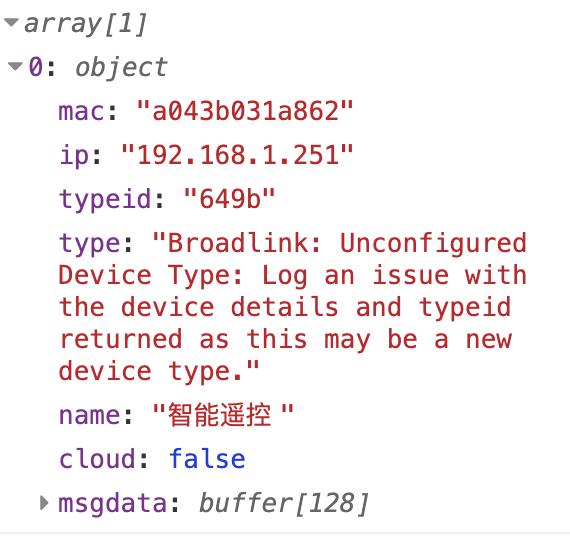
BroadLink problem, can i fix it?? |
palbent
commented
Mar 18, 2022
via email
Hi
Did you tested to introduce manually this code? It worked in previous versions
Regards
Obter Outlook para Android<https://aka.ms/AAb9ysg> …________________________________
From: sevagjb ***@***.***>
Sent: Friday, March 18, 2022 4:13:16 PM
To: mjg59/python-broadlink ***@***.***>
Cc: palbent ***@***.***>; Comment ***@***.***>
Subject: Re: [mjg59/python-broadlink] Add support for Broadlink RM4 pro (0x653C) (#472)
The problem
i bot new Broadlink RM4 pro , its not supported can you help ???
when i add the Integration i receive this message:
Aborted
Device not supported,
This is device datils:
Device info : S/N code
PID ; 00000000000000000000000013520000
DID : 00000000000000000000ecObae6edc02
loT Cloud : World
MAC: XX:XX:XX:XX:XX:XX
Firmware :
V62092
Device IP : ***@***.***
Data Cloud : European server
SDK : 2.17
Plug-in version : 1.6.7.2
Routine traits : Trigger
Connector Type: Wi-Fi, Radio Frequency
ASIN: B083LLLVPN
can i fix it??
Thanks
—
Reply to this email directly, view it on GitHub<#472 (comment)>, or unsubscribe<https://github.com/notifications/unsubscribe-auth/ASUXAH2INSJE7ERSQHGMDCLVASTRZANCNFSM4TOU7H4A>.
Triage notifications on the go with GitHub Mobile for iOS<https://apps.apple.com/app/apple-store/id1477376905?ct=notification-email&mt=8&pt=524675> or Android<https://play.google.com/store/apps/details?id=com.github.android&referrer=utm_campaign%3Dnotification-email%26utm_medium%3Demail%26utm_source%3Dgithub>.
You are receiving this because you commented.Message ID: ***@***.***> |
Add support for Broadlink RM4 pro (0x653C)
home-assistant/core#42983