






Using SideMenu in your app? Send me a link to your app in the app store!
Hi, I'm Jon Kent and I am an iOS designer, developer, and mobile strategist. I love coffee and play the drums.
- Hire me to help you make cool stuff. Note: If you're having a problem with SideMenu, please open an issue and do not email me.
- Check out my website to see some of my other projects.
- Building and maintaining this free library takes a lot of my time and saves you time. Please consider paying it forward by supporting me with a small amount to my PayPal. (only 2 people have donated since inception 😕 but thank you to those who have!)
SideMenu is a simple and versatile side menu control written in Swift.
- It can be implemented in storyboard without a single line of code.
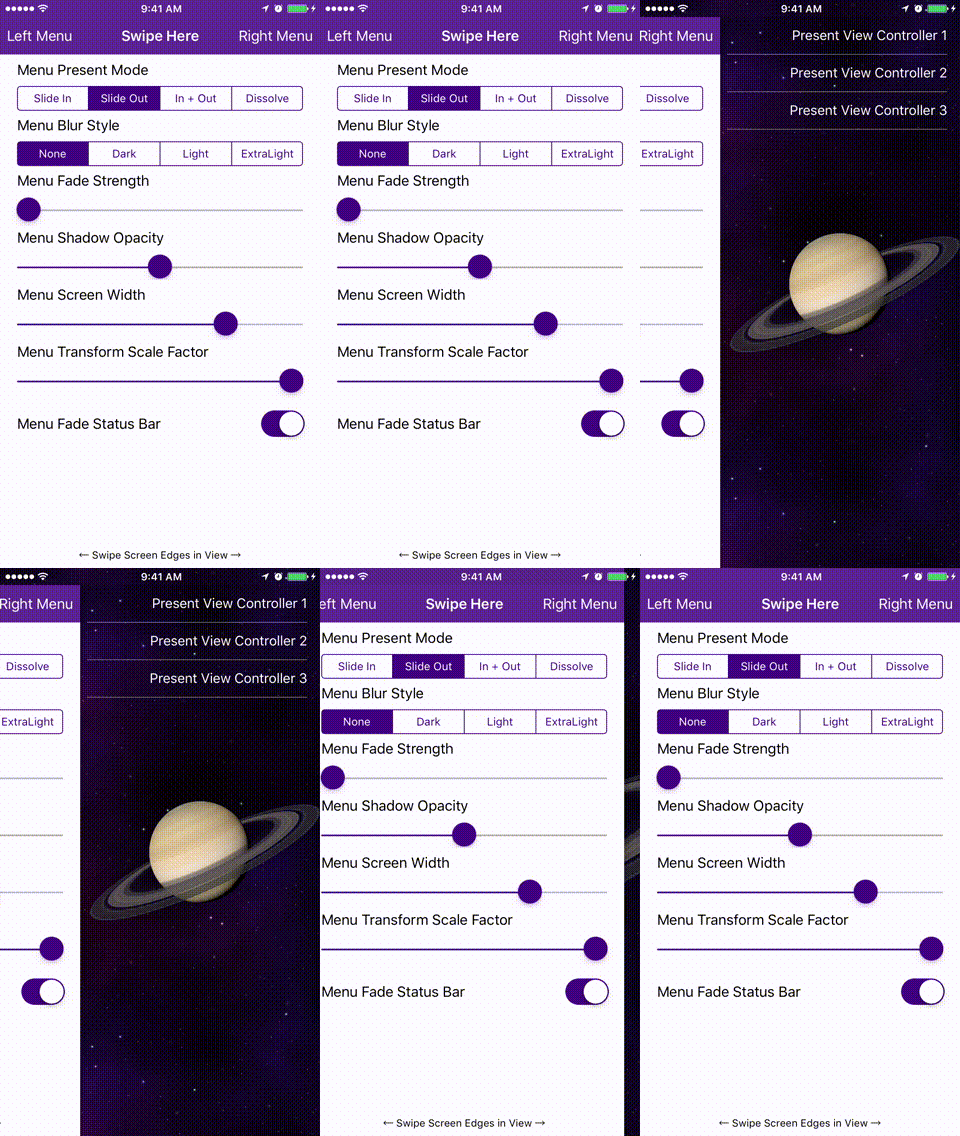
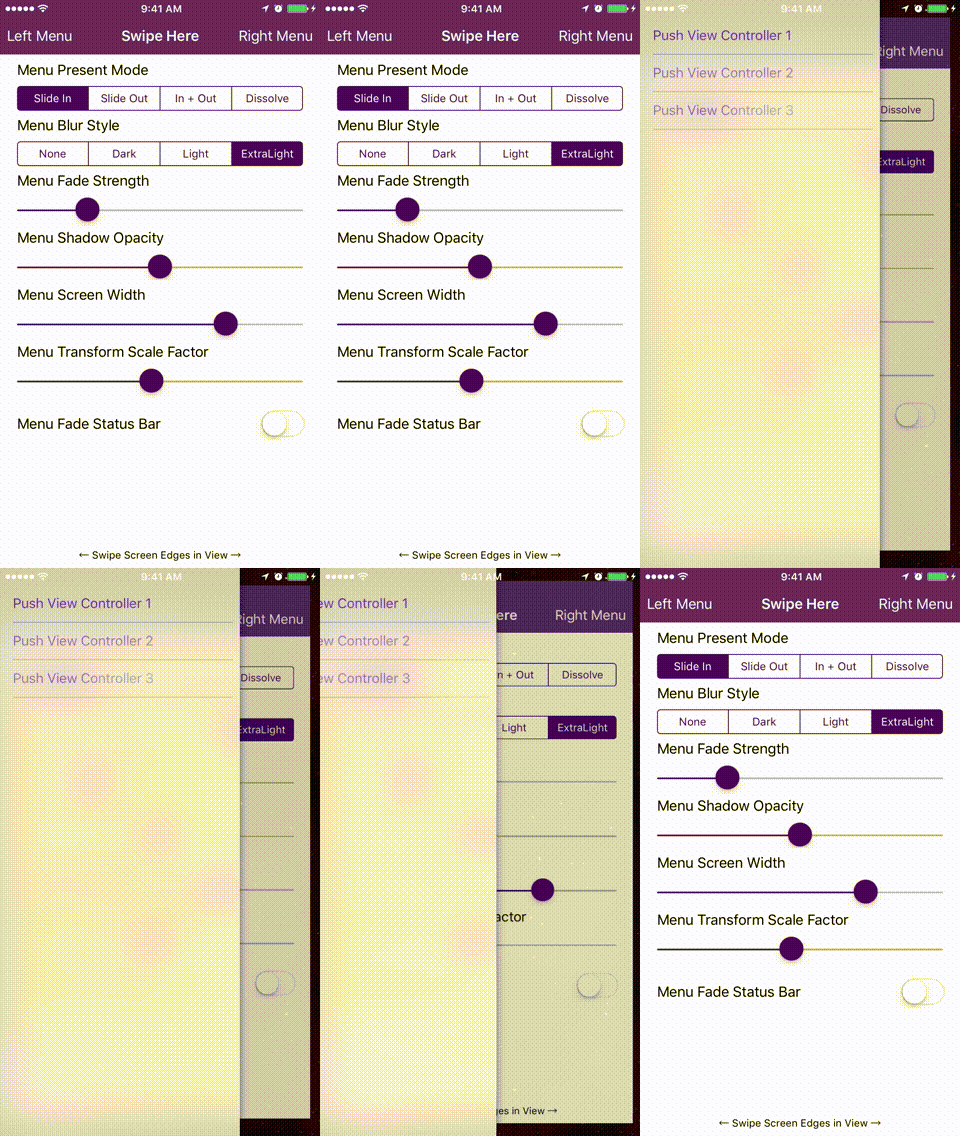
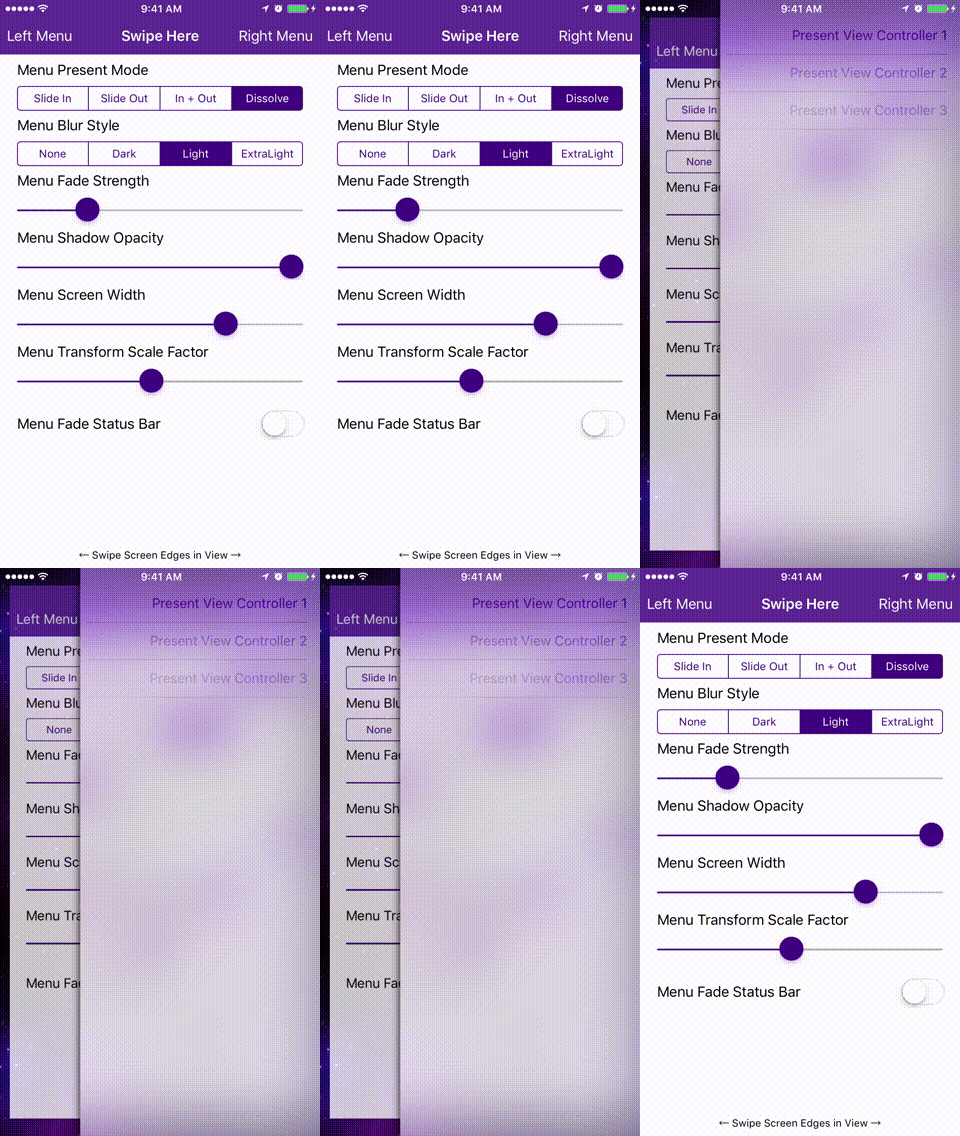
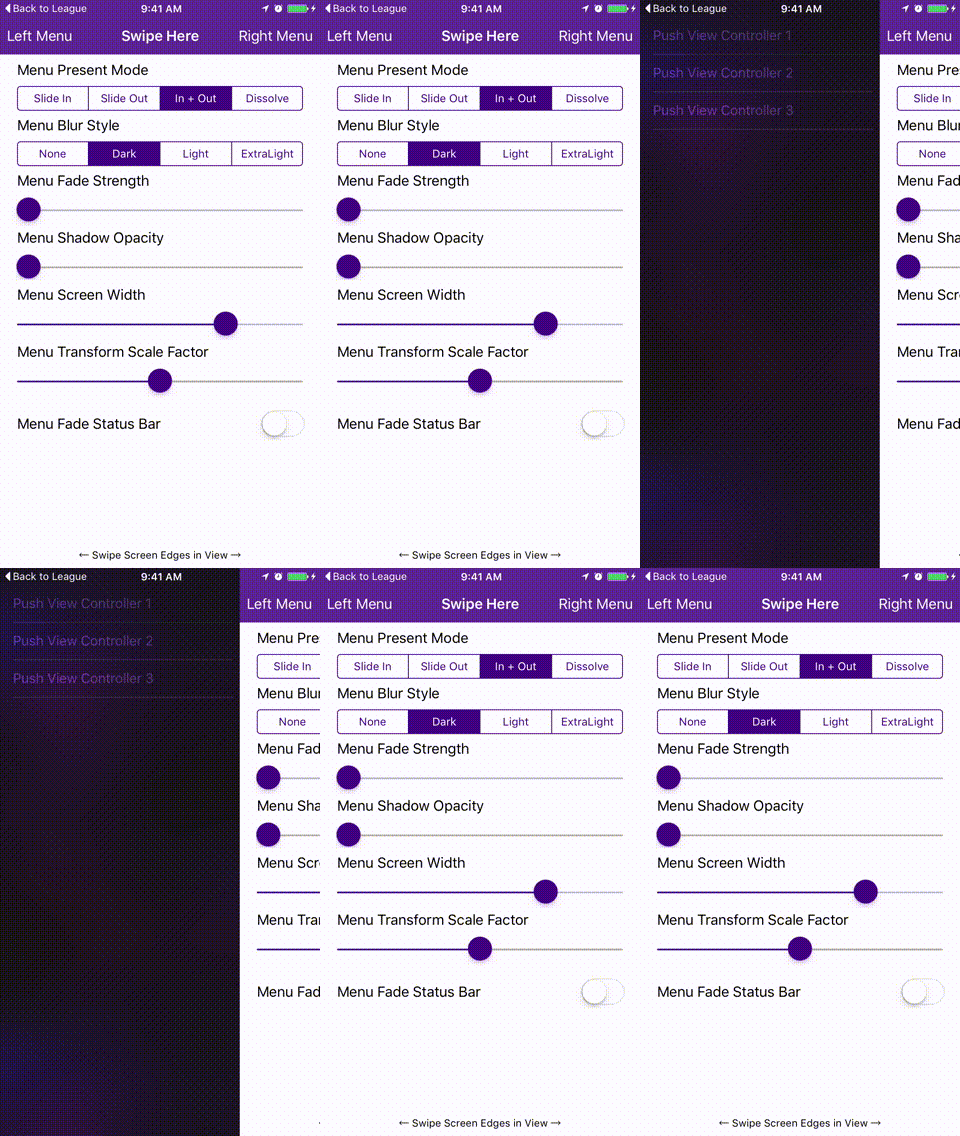
- Four standard animation styles to choose from (there's even a parallax effect if you want to get weird).
- Highly customizable without needing to write tons of custom code.
- Supports continuous swiping between side menus on boths sides in a single gesture.
- Global menu configuration. Set-up once and be done for all screens.
- Menus can be presented and dismissed the same as any other view controller since this control uses custom transitions.
- Animations use your view controllers, not snapshots.
- Properly handles screen rotation and in-call status bar height changes.
Check out the example project to see it in action!
| Slide Out | Slide In | Dissolve | Slide In + Out |
|---|---|---|---|
 |  |  |  |
- Xcode 9.
- iOS 8 or higher.
CocoaPods is a dependency manager for Cocoa projects. You can install it with the following command:
$ gem install cocoapodsTo integrate SideMenu into your Xcode project using CocoaPods, specify it in your Podfile:
source'https://github.com/CocoaPods/Specs.git'platform:ios,'8.0'use_frameworks!pod'SideMenu'# For Swift 3 (no longer maintained), use:# pod 'SideMenu', '~> 2.3.4'Then, run the following command:
$ pod installCarthage is a decentralized dependency manager that builds your dependencies and provides you with binary frameworks.
You can install Carthage with Homebrew using the following command:
$ brew update
$ brew install carthage
To integrate SideMenu into your Xcode project using Carthage, specify it in your Cartfile:
github "jonkykong/SideMenu" "master"
Create a Navigation Controller for a side menu. Set the
Custom Classof the Navigation Controller to beUISideMenuNavigationControllerin the Identity Inspector. Set theModuletoSideMenu(ignore this step if you've manually added SideMenu to your project). Create a Root View Controller for the Navigation Controller (shown as a UITableViewController below). Set up any Triggered Segues you want in that view controller.
Set the
Left Sideproperty of theUISideMenuNavigationControllerto On if you want it to appear from the left side of the screen, or Off/Default if you want it to appear from the right side.
Add a UIButton or UIBarButton to a view controller that you want to display the menu from. Set that button's Triggered Segues action to modally present the Navigation Controller from step 1.

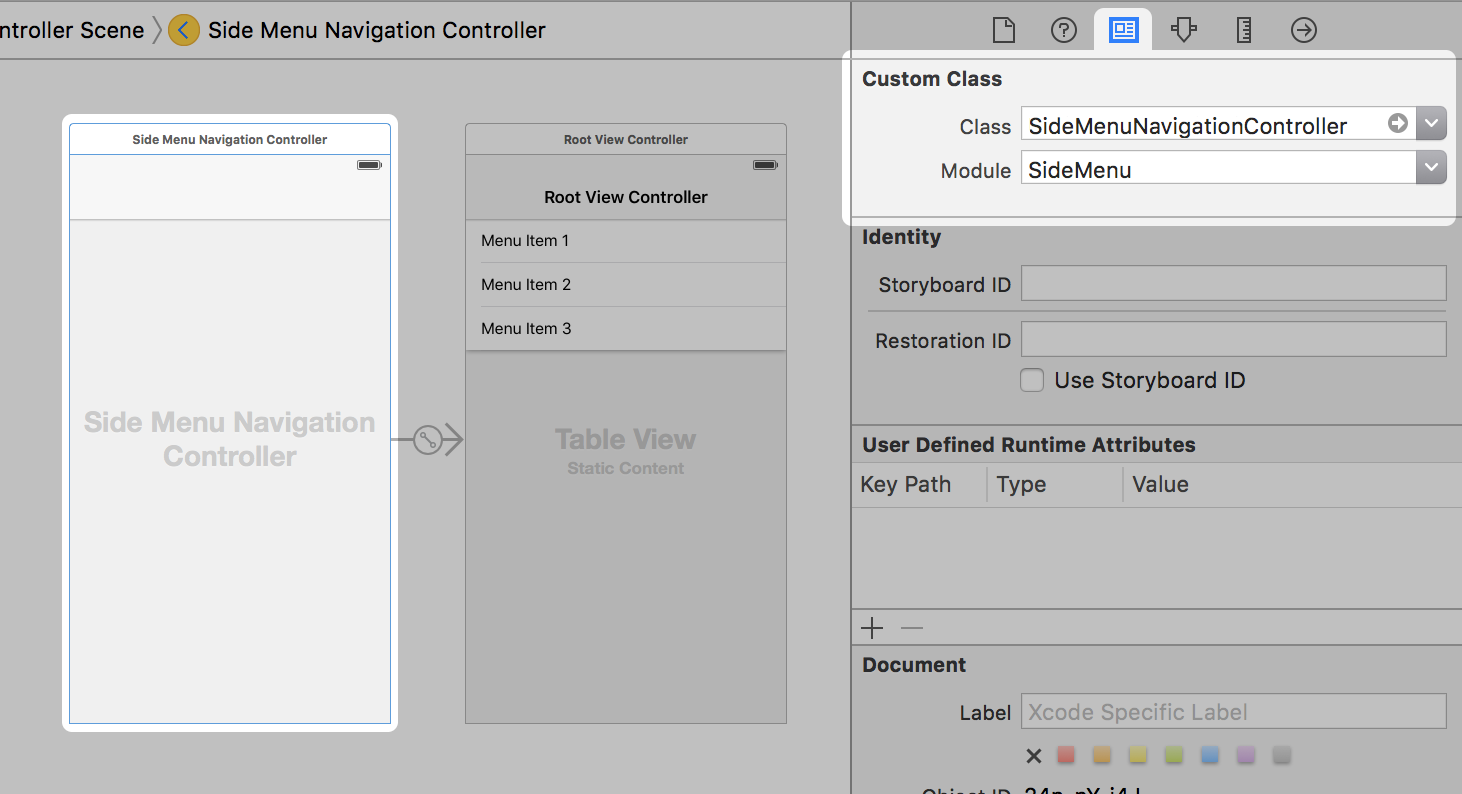
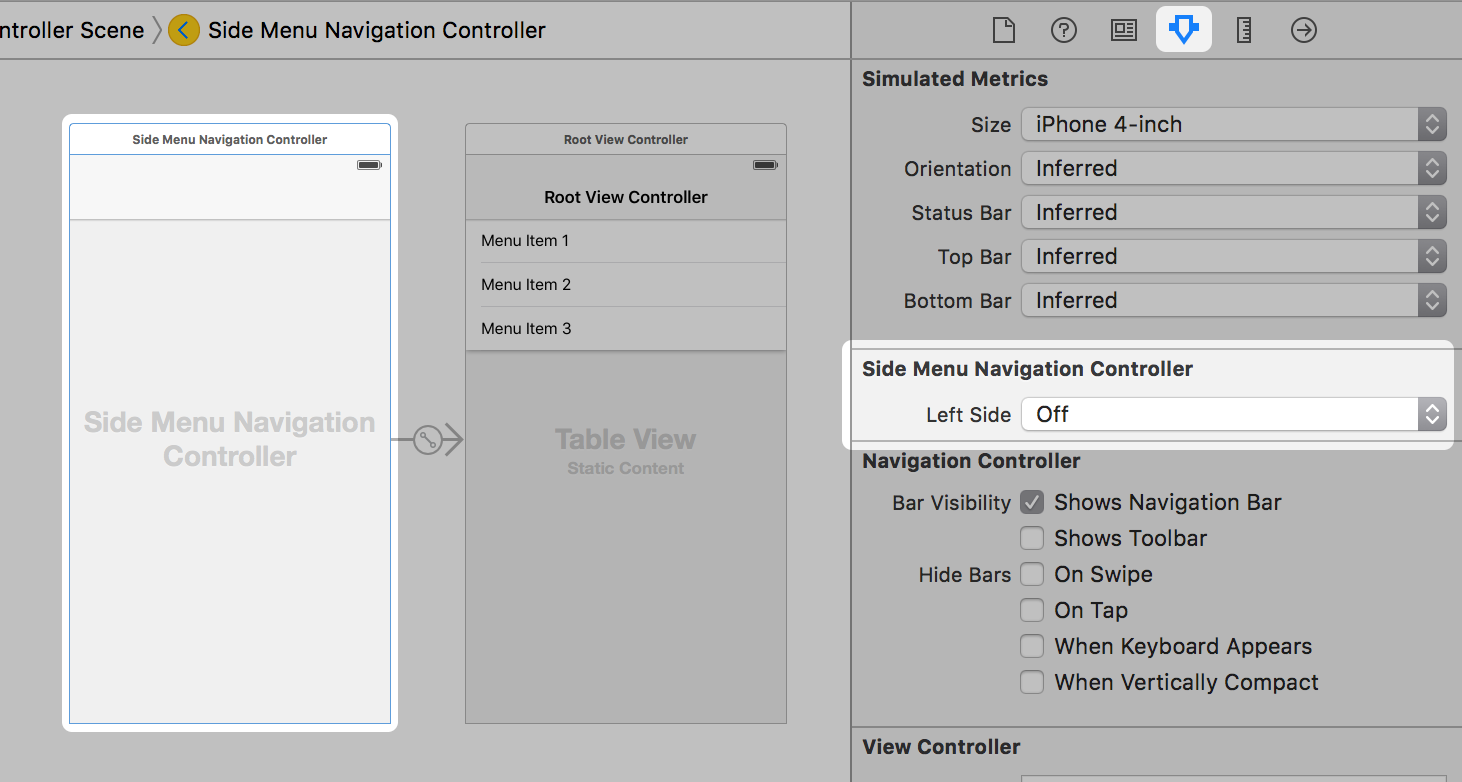
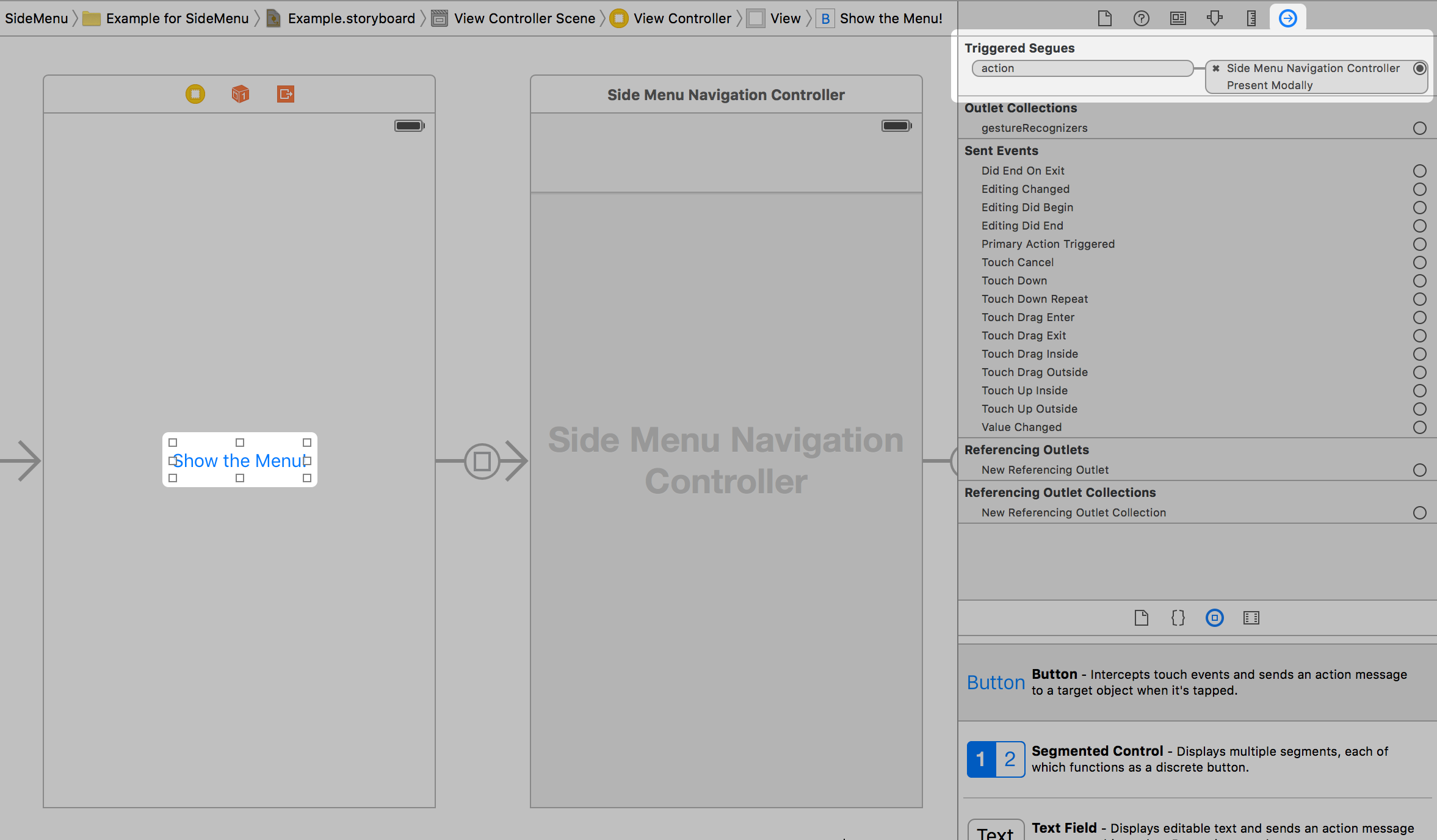
That's it. Note: you can only enable gestures in code.
First:
import SideMenuIn your view controller's viewDidLoad event, do something like this (IMPORTANT: If you're seeing a black menu when you use gestures, read this section carefully!):
// Define the menus
letmenuLeftNavigationController=UISideMenuNavigationController(rootViewController: YourViewController)
// UISideMenuNavigationController is a subclass of UINavigationController, so do any additional configuration // of it here like setting its viewControllers. If you're using storyboards, you'll want to do something like:
// let menuLeftNavigationController = storyboard!.instantiateViewController(withIdentifier: "LeftMenuNavigationController") as! UISideMenuNavigationController
SideMenuManager.default.menuLeftNavigationController = menuLeftNavigationController
letmenuRightNavigationController=UISideMenuNavigationController(rootViewController: YourViewController)
// UISideMenuNavigationController is a subclass of UINavigationController, so do any additional configuration
// of it here like setting its viewControllers. If you're using storyboards, you'll want to do something like:
// let menuRightNavigationController = storyboard!.instantiateViewController(withIdentifier: "RightMenuNavigationController") as! UISideMenuNavigationController
SideMenuManager.default.menuRightNavigationController = menuRightNavigationController
// Enable gestures. The left and/or right menus must be set up above for these to work.
// Note that these continue to work on the Navigation Controller independent of the view controller it displays!
SideMenuManager.default.menuAddPanGestureToPresent(toView:self.navigationController!.navigationBar)SideMenuManager.default.menuAddScreenEdgePanGesturesToPresent(toView:self.navigationController!.view)
Then from a button, do something like this:
present(SideMenuManager.default.menuLeftNavigationController!, animated:true, completion:nil)
// Similarly, to dismiss a menu programmatically, you would do this:
dismiss(animated:true, completion:nil)
That's it.
Just type SideMenuManager.default.menu... and code completion will show you everything you can customize (for Objective-C, use SideMenuManager.defaultManager.menu...). Defaults values are shown below for reference:
/**
The push style of the menu.
There are six modes in MenuPushStyle:
- defaultBehavior: The view controller is pushed onto the stack.
- popWhenPossible: If a view controller already in the stack is of the same class as the pushed view controller, the stack is instead popped back to the existing view controller. This behavior can help users from getting lost in a deep navigation stack.
- preserve: If a view controller already in the stack is of the same class as the pushed view controller, the existing view controller is pushed to the end of the stack. This behavior is similar to a UITabBarController.
- preserveAndHideBackButton: Same as .preserve and back buttons are automatically hidden.
- replace: Any existing view controllers are released from the stack and replaced with the pushed view controller. Back buttons are automatically hidden. This behavior is ideal if view controllers require a lot of memory or their state doesn't need to be preserved.
- subMenu: Unlike all other behaviors that push using the menu's presentingViewController, this behavior pushes view controllers within the menu. Use this behavior if you want to display a sub menu.
*/
openvarmenuPushStyle:MenuPushStyle=.defaultBehavior
/**
The presentation mode of the menu.
There are four modes in MenuPresentMode:
- menuSlideIn: Menu slides in over of the existing view.
- viewSlideOut: The existing view slides out to reveal the menu.
- viewSlideInOut: The existing view slides out while the menu slides in.
- menuDissolveIn: The menu dissolves in over the existing view controller.
*/
openvarmenuPresentMode:MenuPresentMode=.viewSlideOut
/// Prevents the same view controller (or a view controller of the same class) from being pushed more than once. Defaults to true.
openvarmenuAllowPushOfSameClassTwice=true
/**
Width of the menu when presented on screen, showing the existing view controller in the remaining space. Default is 75% of the screen width.
Note that each menu's width can be overridden using the `menuWidth` property on any `UISideMenuNavigationController` instance.
*/
openvarmenuWidth:CGFloat=max(round(min((appScreenRect.width),(appScreenRect.height))*0.75),240)
/// Duration of the animation when the menu is presented without gestures. Default is 0.35 seconds.
openvarmenuAnimationPresentDuration:Double=0.35
/// Duration of the animation when the menu is dismissed without gestures. Default is 0.35 seconds.
openvarmenuAnimationDismissDuration:Double=0.35
/// Duration of the remaining animation when the menu is partially dismissed with gestures. Default is 0.35 seconds.
openvarmenuAnimationCompleteGestureDuration:Double=0.35
/// Amount to fade the existing view controller when the menu is presented. Default is 0 for no fade. Set to 1 to fade completely.
openvarmenuAnimationFadeStrength:CGFloat=0
/// The amount to scale the existing view controller or the menu view controller depending on the `menuPresentMode`. Default is 1 for no scaling. Less than 1 will shrink, greater than 1 will grow.
openvarmenuAnimationTransformScaleFactor:CGFloat=1
/// The background color behind menu animations. Depending on the animation settings this may not be visible. If `menuFadeStatusBar` is true, this color is used to fade it. Default is black.
openvarmenuAnimationBackgroundColor:UIColor?
/// The shadow opacity around the menu view controller or existing view controller depending on the `menuPresentMode`. Default is 0.5 for 50% opacity.
openvarmenuShadowOpacity:Float=0.5
/// The shadow color around the menu view controller or existing view controller depending on the `menuPresentMode`. Default is black.
openvarmenuShadowColor=UIColor.black
/// The radius of the shadow around the menu view controller or existing view controller depending on the `menuPresentMode`. Default is 5.
openvarmenuShadowRadius:CGFloat=5
/// The left menu swipe to dismiss gesture.
open weak varmenuLeftSwipeToDismissGesture:UIPanGestureRecognizer?
/// The right menu swipe to dismiss gesture.
open weak varmenuRightSwipeToDismissGesture:UIPanGestureRecognizer?
/// Enable or disable gestures that would swipe to dismiss the menu. Default is true.
openvarmenuEnableSwipeGestures:Bool=true
/// Enable or disable interaction with the presenting view controller while the menu is displayed. Enabling may make it difficult to dismiss the menu or cause exceptions if the user tries to present and already presented menu. Default is false.
openvarmenuPresentingViewControllerUserInteractionEnabled:Bool=false
/// The strength of the parallax effect on the existing view controller. Does not apply to `menuPresentMode` when set to `ViewSlideOut`. Default is 0.
openvarmenuParallaxStrength:Int=0
/// Draws the `menuAnimationBackgroundColor` behind the status bar. Default is true.
openvarmenuFadeStatusBar=true
/// The animation options when a menu is displayed. Ignored when displayed with a gesture.
openvarmenuAnimationOptions:UIViewAnimationOptions=.curveEaseInOut
/// The animation spring damping when a menu is displayed. Ignored when displayed with a gesture.
openvarmenuAnimationUsingSpringWithDamping:CGFloat=1
/// The animation initial spring velocity when a menu is displayed. Ignored when displayed with a gesture.
openvarmenuAnimationInitialSpringVelocity:CGFloat=1
/** Automatically dismisses the menu when another view is pushed from it.
Note: to prevent the menu from dismissing when presenting, set modalPresentationStyle = .overFullScreen
of the view controller being presented in storyboard or during its initalization.
*/
openvarmenuDismissOnPush=true
/// Forces menus to always animate when appearing or disappearing, regardless of a pushed view controller's animation.
openvarmenuAlwaysAnimate=false
/**
The blur effect style of the menu if the menu's root view controller is a UITableViewController or UICollectionViewController.
- Note: If you want cells in a UITableViewController menu to show vibrancy, make them a subclass of UITableViewVibrantCell and set the `blurEffectStyle` of each cell to SideMenuManager.default.menuBlurEffectStyle.
*/
openvarmenuBlurEffectStyle:UIBlurEffectStyle?
/// The left menu.
openvarmenuLeftNavigationController:UISideMenuNavigationController?
/// The right menu.
openvarmenuRightNavigationController:UISideMenuNavigationController?
/**
Adds screen edge gestures to a view to present a menu.
- Parameter toView: The view to add gestures to.
- Parameter forMenu: The menu (left or right) you want to add a gesture for. If unspecified, gestures will be added for both sides.
- Returns: The array of screen edge gestures added to `toView`.
*/
@discardableResultopenfunc menuAddScreenEdgePanGesturesToPresent(toView:UIView, forMenu:UIRectEdge?=nil)->[UIScreenEdgePanGestureRecognizer]
/**
Adds a pan edge gesture to a view to present menus.
- Parameter toView: The view to add a pan gesture to.
- Returns: The pan gesture added to `toView`.
*/
@discardableResult open func menuAddPanGestureToPresent(toView:UIView)->UIPanGestureRecognizer
UISideMenuNavigationController supports the following customizations and properties:
/// SideMenuManager instance associated with this menu. Default is `SideMenuManager.default`. This property cannot be changed after the menu has loaded.
open weak varsideMenuManager:SideMenuManager!=SideMenuManager.default
/// Width of the menu when presented on screen, showing the existing view controller in the remaining space. Default is zero. When zero, `sideMenuManager.menuWidth` is used. This property cannot be changed while the isHidden property is false.
@IBInspectableopenvarmenuWidth:CGFloat=0
/// Whether the menu appears on the right or left side of the screen. Right is the default. This property cannot be changed after the menu has loaded.
@IBInspectableopenvarleftSide:Bool=false
/// Indicates if the menu is anywhere in the view hierarchy, even if covered by another view controller.
openvarisHidden:BoolTo receive notifications when a menu is displayed from a view controller, have it adhere to the UISideMenuNavigationControllerDelegate protocol:
extensionMyViewController:UISideMenuNavigationControllerDelegate{func sideMenuWillAppear(menu:UISideMenuNavigationController, animated:Bool){print("SideMenu Appearing! (animated: \(animated))")}func sideMenuDidAppear(menu:UISideMenuNavigationController, animated:Bool){print("SideMenu Appeared! (animated: \(animated))")}func sideMenuWillDisappear(menu:UISideMenuNavigationController, animated:Bool){print("SideMenu Disappearing! (animated: \(animated))")}func sideMenuDidDisappear(menu:UISideMenuNavigationController, animated:Bool){print("SideMenu Disappeared! (animated: \(animated))")}}Note: setting the sideMenuDelegate property on UISideMenuNavigationController is optional. If your view controller adheres to the protocol then the methods will be called automatically.
For simplicity, SideMenuManager.default serves as the primary instance as most projects will only need one menu across all screens. If you need to show a different SideMenu, such as from a modal view controller presented from a previous SideMenu, do the following:
- Declare a variable containing your custom
SideMenuManagerinstance. You may want it to define it globally and configure it in your app delegate if menus will be used on multiple screens.
letcustomSideMenuManager=SideMenuManager()- Setup and display menus with your custom instance the same as you would with the
SideMenuManager.defaultinstance. - If using Storyboards, subclass your instance of
UISideMenuNavigationControllerand set itssideMenuManagerproperty to your custom instance. This must be done beforeviewDidLoadis called:
classMySideMenuNavigationController:UISideMenuNavigationController{letcustomSideMenuManager=SideMenuManager()overridefunc awakeFromNib(){
super.awakeFromNib()
sideMenuManager = customSideMenuManager
}}
Alternatively, you can set sideMenuManager from the view controller that segues to your UISideMenuNavigationController:
overridefunc prepare(for segue:UIStoryboardSegue, sender:Any?){iflet sideMenuNavigationController = segue.destination as?UISideMenuNavigationController{
sideMenuNavigationController.sideMenuManager = customSideMenuManager
}}
Important: displaying SideMenu instances directly over each other is not supported. Use menuPushStyle = .subMenu instead.
- Issue #258.
- Don't try to change the status bar appearance when presenting a menu. When used with quick gestures/animations, it causes the presentation animation to not complete properly and locks the UI. This was fixed in iOS 9.3. See radar 21961293 for more information.
A special thank you to everyone that has contributed to this library to make it better. Your support is appreciated!
SideMenu is available under the MIT license. See the LICENSE file for more info.