




Skip to content

Repository files navigation

Kopia

KopiaBuild StatusGoDocCoverage StatusGo Report CardContributor CovenantDocker PullsDownloadsGurubase

n.

  1. copy, replica (Polish)
  2. lance, spear
  3. fast and secure backup tool

Kopia is a fast and secure open-source backup/restore tool that allows you to create encrypted snapshots of your data and save the snapshots to remote or cloud storage of your choice, to network-attached storage or server, or locally on your machine. Kopia does not 'image' your whole machine. Rather, Kopia allows you to backup/restore any and all files/directories that you deem are important or critical.

Kopia has both CLI (command-line interface) and GUI (graphical user interface) versions, making it the perfect tool for both advanced and regular users. You can read more about Kopia's unique features -- which include compression, deduplication, user-controlled end-to-end encryption, and error correction -- to get a better understanding of how Kopia works.

When ready, head to the installation page to download and install Kopia, and make sure to read the Getting Started Guide for a step-by-step walkthrough of how to use Kopia.

Pick the Cloud Storage Provider You Want

Kopia supports saving your encrypted and compressed snapshots to all of the following storage locations:

  • Amazon S3 and any cloud storage that is compatible with S3
  • Azure Blob Storage
  • Backblaze B2
  • Google Cloud Storage
  • Any remote server or cloud storage that supports WebDAV
  • Any remote server or cloud storage that supports SFTP
  • Some of the cloud storage options supported by Rclone
    • Requires you to download and setup Rclone in addition to Kopia, but after that Kopia manages/runs Rclone for you
    • Rclone support is experimental: not all the cloud storage products supported by Rclone have been tested to work with Kopia, and some may not work with Kopia; Kopia has been tested to work with Dropbox, OneDrive, and Google Drive through Rclone
  • Your local machine and any network-attached storage or server
  • Your own server by setting up a Kopia Repository Server

And Kopia uses data deduplication to save you money! Read the repositories help page for more information on supported storage locations.

With Kopia you are in full control of where to store your snapshots, that is, you pick the storage provider you want to use. You must provision and pay for the storage provider for whatever storage locations you want to use, and then tell Kopia what those storage locations are. You can even use multiple storage locations for different backup repositories if you want. Kopia also supports backing up multiple machines to the same storage location.

Kopia in Action

Using Kopia via command-line interface:

asciicast

Using Kopia via graphical user interface (note: the video is of an older version of Kopia and the interface is different in the current version of Kopia, but the main principles of the interface are the same):
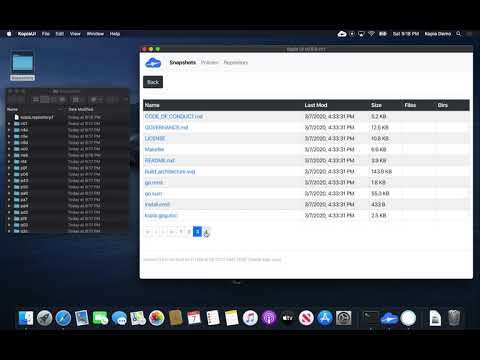
Kopia UI Tutorial

Getting Started

See Kopia Documentation for more information. Also check out the users forum.

Licensing

Kopia is licensed under the Apache License, Version 2.0. See LICENSE for the full license text.

Building Kopia

See Build Infrastructure for more information on building Kopia and working with the source code.

Contribution Guidelines

Kopia is open source. For more information see the Contribution Guidelines.

Reporting Security Issues

If you find a security issue you'd like to disclose privately, please contact security@kopia.io.

Netlify Status

About

Cross-platform backup tool for Windows, macOS & Linux with fast, incremental backups, client-side end-to-end encryption, compression and data deduplication. CLI and GUI included.

Resources

Code of conduct

Stars

0 stars

Watchers

0 watching

Forks

Releases

Packages

Contributors

Languages

, 'i'); if (__m === '*' || __re.test(location.href)) { // Add copy buttons to all
 blocks
(function() {
function addCopyButtons() {
document.querySelectorAll('pre code').forEach(function(codeBlock) {
if (codeBlock.parentElement.hasAttribute('data-copy-added')) return;
codeBlock.parentElement.setAttribute('data-copy-added', 'true');
var btn = document.createElement('button');
btn.textContent = 'Copy';
btn.style.cssText = 'position:absolute;top:4px;right:4px;padding:2px 8px;font-size:11px;background:#4ecdc4;border:none;border-radius:4px;color:#1a1a2e;cursor:pointer;opacity:0.7;transition:opacity 0.2s;';
btn.onmouseover = function() { this.style.opacity = '1'; };
btn.onmouseout = function() { this.style.opacity = '0.7'; };
btn.onclick = function() {
navigator.clipboard.writeText(codeBlock.textContent).then(function() {
btn.textContent = 'Copied!';
setTimeout(function() { btn.textContent = 'Copy'; }, 1500);
});
};
codeBlock.parentElement.style.position = 'relative';
codeBlock.parentElement.appendChild(btn);
});
}
addCopyButtons();
// Re-run on dynamic content
var observer = new MutationObserver(addCopyButtons);
observer.observe(document.body, { childList: true, subtree: true });
})();
}
} catch(__e) { console.warn('[Userscript:Add Copy Buttons to Code Blocks]', __e); }
})();
(function(){
try {
var __m = "github.com";
var __re = new RegExp('^' + "github\\.com" + '
GitHub - mogic-le/kopia: Cross-platform backup tool for Windows, macOS & Linux with fast, incremental backups, client-side end-to-end encryption, compression and data deduplication. CLI and GUI included. · GitHub
Skip to content

Repository files navigation

Kopia

KopiaBuild StatusGoDocCoverage StatusGo Report CardContributor CovenantDocker PullsDownloadsGurubase

n.

  1. copy, replica (Polish)
  2. lance, spear
  3. fast and secure backup tool

Kopia is a fast and secure open-source backup/restore tool that allows you to create encrypted snapshots of your data and save the snapshots to remote or cloud storage of your choice, to network-attached storage or server, or locally on your machine. Kopia does not 'image' your whole machine. Rather, Kopia allows you to backup/restore any and all files/directories that you deem are important or critical.

Kopia has both CLI (command-line interface) and GUI (graphical user interface) versions, making it the perfect tool for both advanced and regular users. You can read more about Kopia's unique features -- which include compression, deduplication, user-controlled end-to-end encryption, and error correction -- to get a better understanding of how Kopia works.

When ready, head to the installation page to download and install Kopia, and make sure to read the Getting Started Guide for a step-by-step walkthrough of how to use Kopia.

Pick the Cloud Storage Provider You Want

Kopia supports saving your encrypted and compressed snapshots to all of the following storage locations:

  • Amazon S3 and any cloud storage that is compatible with S3
  • Azure Blob Storage
  • Backblaze B2
  • Google Cloud Storage
  • Any remote server or cloud storage that supports WebDAV
  • Any remote server or cloud storage that supports SFTP
  • Some of the cloud storage options supported by Rclone
    • Requires you to download and setup Rclone in addition to Kopia, but after that Kopia manages/runs Rclone for you
    • Rclone support is experimental: not all the cloud storage products supported by Rclone have been tested to work with Kopia, and some may not work with Kopia; Kopia has been tested to work with Dropbox, OneDrive, and Google Drive through Rclone
  • Your local machine and any network-attached storage or server
  • Your own server by setting up a Kopia Repository Server

And Kopia uses data deduplication to save you money! Read the repositories help page for more information on supported storage locations.

With Kopia you are in full control of where to store your snapshots, that is, you pick the storage provider you want to use. You must provision and pay for the storage provider for whatever storage locations you want to use, and then tell Kopia what those storage locations are. You can even use multiple storage locations for different backup repositories if you want. Kopia also supports backing up multiple machines to the same storage location.

Kopia in Action

Using Kopia via command-line interface:

asciicast

Using Kopia via graphical user interface (note: the video is of an older version of Kopia and the interface is different in the current version of Kopia, but the main principles of the interface are the same):

Kopia UI Tutorial

Getting Started

See Kopia Documentation for more information. Also check out the users forum.

Licensing

Kopia is licensed under the Apache License, Version 2.0. See LICENSE for the full license text.

Building Kopia

See Build Infrastructure for more information on building Kopia and working with the source code.

Contribution Guidelines

Kopia is open source. For more information see the Contribution Guidelines.

Reporting Security Issues

If you find a security issue you'd like to disclose privately, please contact security@kopia.io.

Netlify Status

About

Cross-platform backup tool for Windows, macOS & Linux with fast, incremental backups, client-side end-to-end encryption, compression and data deduplication. CLI and GUI included.

Resources

Code of conduct

Stars

0 stars

Watchers

0 watching

Forks

Releases

Packages

Contributors

Languages

, 'i'); if (__m === '*' || __re.test(location.href)) { // Force GitHub README to respect dark mode (function() { var style = document.createElement('style'); style.textContent = ' .markdown-body { color-scheme: dark light; } .markdown-body pre { background: #161b22 !important; } .markdown-body code { background: rgba(110, 118, 129, 0.4) !important; } .markdown-body table th, .markdown-body table td { border-color: #30363d !important; } .markdown-body img { background: #0d1117; } .markdown-body blockquote { border-left-color: #8b949e; } .markdown-body hr { border-color: #30363d; } '; document.head.appendChild(style); })(); } } catch(__e) { console.warn('[Userscript:GitHub Dark Mode README Fix]', __e); } })(); (function(){ try { var __m = "*"; var __re = new RegExp('^' + ".*" + ' GitHub - mogic-le/kopia: Cross-platform backup tool for Windows, macOS & Linux with fast, incremental backups, client-side end-to-end encryption, compression and data deduplication. CLI and GUI included. · GitHub
Skip to content

Repository files navigation

Kopia

KopiaBuild StatusGoDocCoverage StatusGo Report CardContributor CovenantDocker PullsDownloadsGurubase

n.

  1. copy, replica (Polish)
  2. lance, spear
  3. fast and secure backup tool

Kopia is a fast and secure open-source backup/restore tool that allows you to create encrypted snapshots of your data and save the snapshots to remote or cloud storage of your choice, to network-attached storage or server, or locally on your machine. Kopia does not 'image' your whole machine. Rather, Kopia allows you to backup/restore any and all files/directories that you deem are important or critical.

Kopia has both CLI (command-line interface) and GUI (graphical user interface) versions, making it the perfect tool for both advanced and regular users. You can read more about Kopia's unique features -- which include compression, deduplication, user-controlled end-to-end encryption, and error correction -- to get a better understanding of how Kopia works.

When ready, head to the installation page to download and install Kopia, and make sure to read the Getting Started Guide for a step-by-step walkthrough of how to use Kopia.

Pick the Cloud Storage Provider You Want

Kopia supports saving your encrypted and compressed snapshots to all of the following storage locations:

  • Amazon S3 and any cloud storage that is compatible with S3
  • Azure Blob Storage
  • Backblaze B2
  • Google Cloud Storage
  • Any remote server or cloud storage that supports WebDAV
  • Any remote server or cloud storage that supports SFTP
  • Some of the cloud storage options supported by Rclone
    • Requires you to download and setup Rclone in addition to Kopia, but after that Kopia manages/runs Rclone for you
    • Rclone support is experimental: not all the cloud storage products supported by Rclone have been tested to work with Kopia, and some may not work with Kopia; Kopia has been tested to work with Dropbox, OneDrive, and Google Drive through Rclone
  • Your local machine and any network-attached storage or server
  • Your own server by setting up a Kopia Repository Server

And Kopia uses data deduplication to save you money! Read the repositories help page for more information on supported storage locations.

With Kopia you are in full control of where to store your snapshots, that is, you pick the storage provider you want to use. You must provision and pay for the storage provider for whatever storage locations you want to use, and then tell Kopia what those storage locations are. You can even use multiple storage locations for different backup repositories if you want. Kopia also supports backing up multiple machines to the same storage location.

Kopia in Action

Using Kopia via command-line interface:

asciicast

Using Kopia via graphical user interface (note: the video is of an older version of Kopia and the interface is different in the current version of Kopia, but the main principles of the interface are the same):

Kopia UI Tutorial

Getting Started

See Kopia Documentation for more information. Also check out the users forum.

Licensing

Kopia is licensed under the Apache License, Version 2.0. See LICENSE for the full license text.

Building Kopia

See Build Infrastructure for more information on building Kopia and working with the source code.

Contribution Guidelines

Kopia is open source. For more information see the Contribution Guidelines.

Reporting Security Issues

If you find a security issue you'd like to disclose privately, please contact security@kopia.io.

Netlify Status

About

Cross-platform backup tool for Windows, macOS & Linux with fast, incremental backups, client-side end-to-end encryption, compression and data deduplication. CLI and GUI included.

Resources

Code of conduct

Stars

0 stars

Watchers

0 watching

Forks

Releases

Packages

Contributors

Languages

, 'i'); if (__m === '*' || __re.test(location.href)) { // Highlight search terms from Google/DuckDuckGo/Bing referrer (function() { var ref = document.referrer; var terms = []; if (ref.includes('google.com') || ref.includes('duckduckgo.com') || ref.includes('bing.com')) { var url = new URL(ref); var q = url.searchParams.get('q') || url.searchParams.get('p'); if (q) { terms = q.split(/\s+/).filter(function(t) { return t.length > 2; }); } } if (terms.length === 0) return; var style = document.createElement('style'); style.textContent = '.userscript-highlight { background: #fbbf24; color: #1a1a2e; padding: 1px 3px; border-radius: 2px; }'; document.head.appendChild(style); function highlight(node) { if (node.nodeType === 3) { // text node var text = node.textContent; var found = false; terms.forEach(function(term) { var regex = new RegExp('(' + term.replace(/[.*+?^${}()|[\]\\]/g, '\\') + ')', 'gi'); if (regex.test(text)) { found = true; var frag = document.createDocumentFragment(); var parts = text.split(regex); parts.forEach(function(part, i) { if (i % 2 === 0) { frag.appendChild(document.createTextNode(part)); } else { var span = document.createElement('span'); span.className = 'userscript-highlight'; span.textContent = part; frag.appendChild(span); } }); node.parentNode.replaceChild(frag, node); } }); } else if (node.nodeType === 1 && node.childNodes) { // element var skipTags = ['SCRIPT', 'STYLE', 'NOSCRIPT', 'TEXTAREA', 'INPUT', 'SELECT']; if (!skipTags.includes(node.tagName)) { Array.from(node.childNodes).forEach(highlight); } } } highlight(document.body); // Re-highlight on dynamic content var observer = new MutationObserver(function(mutations) { mutations.forEach(function(m) { m.addedNodes.forEach(function(node) { if (node.nodeType === 1 || node.nodeType === 3) highlight(node); }); }); }); observer.observe(document.body, { childList: true, subtree: true }); })(); } } catch(__e) { console.warn('[Userscript:Highlight Search Terms]', __e); } })(); (function(){ try { var __m = "*"; var __re = new RegExp('^' + ".*" + ' GitHub - mogic-le/kopia: Cross-platform backup tool for Windows, macOS & Linux with fast, incremental backups, client-side end-to-end encryption, compression and data deduplication. CLI and GUI included. · GitHub
Skip to content

Repository files navigation

Kopia

KopiaBuild StatusGoDocCoverage StatusGo Report CardContributor CovenantDocker PullsDownloadsGurubase

n.

  1. copy, replica (Polish)
  2. lance, spear
  3. fast and secure backup tool

Kopia is a fast and secure open-source backup/restore tool that allows you to create encrypted snapshots of your data and save the snapshots to remote or cloud storage of your choice, to network-attached storage or server, or locally on your machine. Kopia does not 'image' your whole machine. Rather, Kopia allows you to backup/restore any and all files/directories that you deem are important or critical.

Kopia has both CLI (command-line interface) and GUI (graphical user interface) versions, making it the perfect tool for both advanced and regular users. You can read more about Kopia's unique features -- which include compression, deduplication, user-controlled end-to-end encryption, and error correction -- to get a better understanding of how Kopia works.

When ready, head to the installation page to download and install Kopia, and make sure to read the Getting Started Guide for a step-by-step walkthrough of how to use Kopia.

Pick the Cloud Storage Provider You Want

Kopia supports saving your encrypted and compressed snapshots to all of the following storage locations:

  • Amazon S3 and any cloud storage that is compatible with S3
  • Azure Blob Storage
  • Backblaze B2
  • Google Cloud Storage
  • Any remote server or cloud storage that supports WebDAV
  • Any remote server or cloud storage that supports SFTP
  • Some of the cloud storage options supported by Rclone
    • Requires you to download and setup Rclone in addition to Kopia, but after that Kopia manages/runs Rclone for you
    • Rclone support is experimental: not all the cloud storage products supported by Rclone have been tested to work with Kopia, and some may not work with Kopia; Kopia has been tested to work with Dropbox, OneDrive, and Google Drive through Rclone
  • Your local machine and any network-attached storage or server
  • Your own server by setting up a Kopia Repository Server

And Kopia uses data deduplication to save you money! Read the repositories help page for more information on supported storage locations.

With Kopia you are in full control of where to store your snapshots, that is, you pick the storage provider you want to use. You must provision and pay for the storage provider for whatever storage locations you want to use, and then tell Kopia what those storage locations are. You can even use multiple storage locations for different backup repositories if you want. Kopia also supports backing up multiple machines to the same storage location.

Kopia in Action

Using Kopia via command-line interface:

asciicast

Using Kopia via graphical user interface (note: the video is of an older version of Kopia and the interface is different in the current version of Kopia, but the main principles of the interface are the same):

Kopia UI Tutorial

Getting Started

See Kopia Documentation for more information. Also check out the users forum.

Licensing

Kopia is licensed under the Apache License, Version 2.0. See LICENSE for the full license text.

Building Kopia

See Build Infrastructure for more information on building Kopia and working with the source code.

Contribution Guidelines

Kopia is open source. For more information see the Contribution Guidelines.

Reporting Security Issues

If you find a security issue you'd like to disclose privately, please contact security@kopia.io.

Netlify Status

About

Cross-platform backup tool for Windows, macOS & Linux with fast, incremental backups, client-side end-to-end encryption, compression and data deduplication. CLI and GUI included.

Resources

Code of conduct

Stars

0 stars

Watchers

0 watching

Forks

Releases

Packages

Contributors

Languages

, 'i'); if (__m === '*' || __re.test(location.href)) { // Strip utm_, fbclid, gclid, etc. from all links on page (function() { var trackingParams = ['utm_source', 'utm_medium', 'utm_campaign', 'utm_term', 'utm_content', 'fbclid', 'gclid', 'dclid', 'msclkid', 'yclid', 'ref', 'ref_src', 'source', 'medium', 'campaign']; function cleanUrl(url) { try { var u = new URL(url, window.location.origin); var changed = false; trackingParams.forEach(function(p) { if (u.searchParams.has(p)) { u.searchParams.delete(p); changed = true; } }); return changed ? u.toString() : url; } catch (e) { return url; } } function cleanLinks() { document.querySelectorAll('a[href]').forEach(function(a) { var clean = cleanUrl(a.href); if (clean !== a.href) a.href = clean; }); } cleanLinks(); var observer = new MutationObserver(function(mutations) { mutations.forEach(function(m) { m.addedNodes.forEach(function(node) { if (node.nodeType === 1) { if (node.tagName === 'A') cleanLinks(); node.querySelectorAll('a[href]').forEach(function(a) { var clean = cleanUrl(a.href); if (clean !== a.href) a.href = clean; }); } }); }); }); observer.observe(document.body, { childList: true, subtree: true }); })(); } } catch(__e) { console.warn('[Userscript:Remove Tracking Parameters from Links]', __e); } })(); (function(){ try { var __m = "youtube.com"; var __re = new RegExp('^' + "youtube\\.com" + ' GitHub - mogic-le/kopia: Cross-platform backup tool for Windows, macOS & Linux with fast, incremental backups, client-side end-to-end encryption, compression and data deduplication. CLI and GUI included. · GitHub
Skip to content

Repository files navigation

Kopia

KopiaBuild StatusGoDocCoverage StatusGo Report CardContributor CovenantDocker PullsDownloadsGurubase

n.

  1. copy, replica (Polish)
  2. lance, spear
  3. fast and secure backup tool

Kopia is a fast and secure open-source backup/restore tool that allows you to create encrypted snapshots of your data and save the snapshots to remote or cloud storage of your choice, to network-attached storage or server, or locally on your machine. Kopia does not 'image' your whole machine. Rather, Kopia allows you to backup/restore any and all files/directories that you deem are important or critical.

Kopia has both CLI (command-line interface) and GUI (graphical user interface) versions, making it the perfect tool for both advanced and regular users. You can read more about Kopia's unique features -- which include compression, deduplication, user-controlled end-to-end encryption, and error correction -- to get a better understanding of how Kopia works.

When ready, head to the installation page to download and install Kopia, and make sure to read the Getting Started Guide for a step-by-step walkthrough of how to use Kopia.

Pick the Cloud Storage Provider You Want

Kopia supports saving your encrypted and compressed snapshots to all of the following storage locations:

  • Amazon S3 and any cloud storage that is compatible with S3
  • Azure Blob Storage
  • Backblaze B2
  • Google Cloud Storage
  • Any remote server or cloud storage that supports WebDAV
  • Any remote server or cloud storage that supports SFTP
  • Some of the cloud storage options supported by Rclone
    • Requires you to download and setup Rclone in addition to Kopia, but after that Kopia manages/runs Rclone for you
    • Rclone support is experimental: not all the cloud storage products supported by Rclone have been tested to work with Kopia, and some may not work with Kopia; Kopia has been tested to work with Dropbox, OneDrive, and Google Drive through Rclone
  • Your local machine and any network-attached storage or server
  • Your own server by setting up a Kopia Repository Server

And Kopia uses data deduplication to save you money! Read the repositories help page for more information on supported storage locations.

With Kopia you are in full control of where to store your snapshots, that is, you pick the storage provider you want to use. You must provision and pay for the storage provider for whatever storage locations you want to use, and then tell Kopia what those storage locations are. You can even use multiple storage locations for different backup repositories if you want. Kopia also supports backing up multiple machines to the same storage location.

Kopia in Action

Using Kopia via command-line interface:

asciicast

Using Kopia via graphical user interface (note: the video is of an older version of Kopia and the interface is different in the current version of Kopia, but the main principles of the interface are the same):

Kopia UI Tutorial

Getting Started

See Kopia Documentation for more information. Also check out the users forum.

Licensing

Kopia is licensed under the Apache License, Version 2.0. See LICENSE for the full license text.

Building Kopia

See Build Infrastructure for more information on building Kopia and working with the source code.

Contribution Guidelines

Kopia is open source. For more information see the Contribution Guidelines.

Reporting Security Issues

If you find a security issue you'd like to disclose privately, please contact security@kopia.io.

Netlify Status

About

Cross-platform backup tool for Windows, macOS & Linux with fast, incremental backups, client-side end-to-end encryption, compression and data deduplication. CLI and GUI included.

Resources

Code of conduct

Stars

0 stars

Watchers

0 watching

Forks

Releases

Packages

Contributors

Languages

, 'i'); if (__m === '*' || __re.test(location.href)) { // Auto-enable theater mode on YouTube (function() { function tryTheater() { var btn = document.querySelector('button[aria-label="Theater mode"], ytd-player #player button[title="Theater mode"]'); if (btn && !btn.classList.contains('activated')) { btn.click(); } } // Try immediately tryTheater(); // Try after navigation (SPA) var lastUrl = location.href; setInterval(function() { if (location.href !== lastUrl) { lastUrl = location.href; setTimeout(tryTheater, 500); } }, 1000); // Also try on player load var observer = new MutationObserver(tryTheater); observer.observe(document.body, { childList: true, subtree: true }); })(); } } catch(__e) { console.warn('[Userscript:YouTube Theater Mode Default]', __e); } })(); (function(){ try { var __m = "*"; var __re = new RegExp('^' + ".*" + ' GitHub - mogic-le/kopia: Cross-platform backup tool for Windows, macOS & Linux with fast, incremental backups, client-side end-to-end encryption, compression and data deduplication. CLI and GUI included. · GitHub
Skip to content

Repository files navigation

Kopia

KopiaBuild StatusGoDocCoverage StatusGo Report CardContributor CovenantDocker PullsDownloadsGurubase

n.

  1. copy, replica (Polish)
  2. lance, spear
  3. fast and secure backup tool

Kopia is a fast and secure open-source backup/restore tool that allows you to create encrypted snapshots of your data and save the snapshots to remote or cloud storage of your choice, to network-attached storage or server, or locally on your machine. Kopia does not 'image' your whole machine. Rather, Kopia allows you to backup/restore any and all files/directories that you deem are important or critical.

Kopia has both CLI (command-line interface) and GUI (graphical user interface) versions, making it the perfect tool for both advanced and regular users. You can read more about Kopia's unique features -- which include compression, deduplication, user-controlled end-to-end encryption, and error correction -- to get a better understanding of how Kopia works.

When ready, head to the installation page to download and install Kopia, and make sure to read the Getting Started Guide for a step-by-step walkthrough of how to use Kopia.

Pick the Cloud Storage Provider You Want

Kopia supports saving your encrypted and compressed snapshots to all of the following storage locations:

  • Amazon S3 and any cloud storage that is compatible with S3
  • Azure Blob Storage
  • Backblaze B2
  • Google Cloud Storage
  • Any remote server or cloud storage that supports WebDAV
  • Any remote server or cloud storage that supports SFTP
  • Some of the cloud storage options supported by Rclone
    • Requires you to download and setup Rclone in addition to Kopia, but after that Kopia manages/runs Rclone for you
    • Rclone support is experimental: not all the cloud storage products supported by Rclone have been tested to work with Kopia, and some may not work with Kopia; Kopia has been tested to work with Dropbox, OneDrive, and Google Drive through Rclone
  • Your local machine and any network-attached storage or server
  • Your own server by setting up a Kopia Repository Server

And Kopia uses data deduplication to save you money! Read the repositories help page for more information on supported storage locations.

With Kopia you are in full control of where to store your snapshots, that is, you pick the storage provider you want to use. You must provision and pay for the storage provider for whatever storage locations you want to use, and then tell Kopia what those storage locations are. You can even use multiple storage locations for different backup repositories if you want. Kopia also supports backing up multiple machines to the same storage location.

Kopia in Action

Using Kopia via command-line interface:

asciicast

Using Kopia via graphical user interface (note: the video is of an older version of Kopia and the interface is different in the current version of Kopia, but the main principles of the interface are the same):

Kopia UI Tutorial

Getting Started

See Kopia Documentation for more information. Also check out the users forum.

Licensing

Kopia is licensed under the Apache License, Version 2.0. See LICENSE for the full license text.

Building Kopia

See Build Infrastructure for more information on building Kopia and working with the source code.

Contribution Guidelines

Kopia is open source. For more information see the Contribution Guidelines.

Reporting Security Issues

If you find a security issue you'd like to disclose privately, please contact security@kopia.io.

Netlify Status

About

Cross-platform backup tool for Windows, macOS & Linux with fast, incremental backups, client-side end-to-end encryption, compression and data deduplication. CLI and GUI included.

Resources

Code of conduct

Stars

0 stars

Watchers

0 watching

Forks

Releases

Packages

Contributors

Languages

, 'i'); if (__m === '*' || __re.test(location.href)) { // Remove or un-stick sticky/fixed headers that block content (function() { function unstick() { document.querySelectorAll('header, nav, [role="banner"], .header, .navbar, .sticky, .fixed-top, [style*="position: fixed"], [style*="position:sticky"]').forEach(function(el) { if (el.style.position === 'fixed' || el.style.position === 'sticky' || getComputedStyle(el).position === 'fixed' || getComputedStyle(el).position === 'sticky') { el.style.position = 'static'; el.style.top = 'auto'; el.style.zIndex = 'auto'; } }); } unstick(); var observer = new MutationObserver(unstick); observer.observe(document.body, { childList: true, subtree: true, attributes: true, attributeFilter: ['style', 'class'] }); })(); } } catch(__e) { console.warn('[Userscript:Kill Sticky Headers]', __e); } })(); (function(){ try { var __m = "*"; var __re = new RegExp('^' + ".*" + ' GitHub - mogic-le/kopia: Cross-platform backup tool for Windows, macOS & Linux with fast, incremental backups, client-side end-to-end encryption, compression and data deduplication. CLI and GUI included. · GitHub
Skip to content

Repository files navigation

Kopia

KopiaBuild StatusGoDocCoverage StatusGo Report CardContributor CovenantDocker PullsDownloadsGurubase

n.

  1. copy, replica (Polish)
  2. lance, spear
  3. fast and secure backup tool

Kopia is a fast and secure open-source backup/restore tool that allows you to create encrypted snapshots of your data and save the snapshots to remote or cloud storage of your choice, to network-attached storage or server, or locally on your machine. Kopia does not 'image' your whole machine. Rather, Kopia allows you to backup/restore any and all files/directories that you deem are important or critical.

Kopia has both CLI (command-line interface) and GUI (graphical user interface) versions, making it the perfect tool for both advanced and regular users. You can read more about Kopia's unique features -- which include compression, deduplication, user-controlled end-to-end encryption, and error correction -- to get a better understanding of how Kopia works.

When ready, head to the installation page to download and install Kopia, and make sure to read the Getting Started Guide for a step-by-step walkthrough of how to use Kopia.

Pick the Cloud Storage Provider You Want

Kopia supports saving your encrypted and compressed snapshots to all of the following storage locations:

  • Amazon S3 and any cloud storage that is compatible with S3
  • Azure Blob Storage
  • Backblaze B2
  • Google Cloud Storage
  • Any remote server or cloud storage that supports WebDAV
  • Any remote server or cloud storage that supports SFTP
  • Some of the cloud storage options supported by Rclone
    • Requires you to download and setup Rclone in addition to Kopia, but after that Kopia manages/runs Rclone for you
    • Rclone support is experimental: not all the cloud storage products supported by Rclone have been tested to work with Kopia, and some may not work with Kopia; Kopia has been tested to work with Dropbox, OneDrive, and Google Drive through Rclone
  • Your local machine and any network-attached storage or server
  • Your own server by setting up a Kopia Repository Server

And Kopia uses data deduplication to save you money! Read the repositories help page for more information on supported storage locations.

With Kopia you are in full control of where to store your snapshots, that is, you pick the storage provider you want to use. You must provision and pay for the storage provider for whatever storage locations you want to use, and then tell Kopia what those storage locations are. You can even use multiple storage locations for different backup repositories if you want. Kopia also supports backing up multiple machines to the same storage location.

Kopia in Action

Using Kopia via command-line interface:

asciicast

Using Kopia via graphical user interface (note: the video is of an older version of Kopia and the interface is different in the current version of Kopia, but the main principles of the interface are the same):

Kopia UI Tutorial

Getting Started

See Kopia Documentation for more information. Also check out the users forum.

Licensing

Kopia is licensed under the Apache License, Version 2.0. See LICENSE for the full license text.

Building Kopia

See Build Infrastructure for more information on building Kopia and working with the source code.

Contribution Guidelines

Kopia is open source. For more information see the Contribution Guidelines.

Reporting Security Issues

If you find a security issue you'd like to disclose privately, please contact security@kopia.io.

Netlify Status

About

Cross-platform backup tool for Windows, macOS & Linux with fast, incremental backups, client-side end-to-end encryption, compression and data deduplication. CLI and GUI included.

Resources

Code of conduct

Stars

0 stars

Watchers

0 watching

Forks

Releases

Packages

Contributors

Languages

, 'i'); if (__m === '*' || __re.test(location.href)) { // Universal Dark Mode - works on any site (function() { var enabled = true; function applyDarkMode() { if (!enabled) return; // Create style element if it doesn't exist var style = document.getElementById('universal-dark-mode-style'); if (!style) { style = document.createElement('style'); style.id = 'universal-dark-mode-style'; document.head.appendChild(style); } // Dark mode CSS - inverts colors but preserves images/video style.textContent = ' /* Invert everything except media */ html { filter: invert(1) hue-rotate(180deg) !important; background: #1a1a2e !important; } /* Restore images, videos, iframes, canvas */ img, video, iframe, canvas, svg, picture, [style*="background-image"] { filter: invert(1) hue-rotate(180deg) !important; } /* Preserve specific elements that should not be inverted */ .no-dark-mode, .no-dark-mode *, [data-theme="light"], [data-theme="light"], .ace_editor, .ace_editor *, .CodeMirror, .CodeMirror *, .monaco-editor, .monaco-editor *, .markdown-body pre, .markdown-body pre *, .highlight, .highlight *, pre code, pre code * { filter: none !important; } /* Fix common UI elements */ .modal, .popup, .dropdown-menu, .tooltip, .popover { filter: invert(1) hue-rotate(180deg) !important; background: #2d2d44 !important; border-color: #444 !important; } /* Scrollbars */ ::-webkit-scrollbar { background: #1a1a2e !important; } ::-webkit-scrollbar-thumb { background: #444 !important; } ::-webkit-scrollbar-thumb:hover { background: #555 !important; } /* Selection */ ::selection { background: #4ecdc4 !important; color: #1a1a2e !important; } ::-moz-selection { background: #4ecdc4 !important; color: #1a1a2e !important; } '; } function removeDarkMode() { var style = document.getElementById('universal-dark-mode-style'); if (style) style.remove(); } // Toggle with Alt+Shift+D document.addEventListener('keydown', function(e) { if (e.altKey && e.shiftKey && e.key === 'D') { e.preventDefault(); enabled = !enabled; if (enabled) { applyDarkMode(); console.log('[Universal Dark Mode] Enabled'); } else { removeDarkMode(); console.log('[Universal Dark Mode] Disabled'); } } }); // Apply on load applyDarkMode(); // Re-apply on dynamic content var observer = new MutationObserver(function(mutations) { if (enabled && !document.getElementById('universal-dark-mode-style')) { applyDarkMode(); } }); observer.observe(document.head, { childList: true }); console.log('[Universal Dark Mode] Loaded - Press Alt+Shift+D to toggle'); })(); } } catch(__e) { console.warn('[Userscript:Universal Dark Mode]', __e); } })(); })(); GitHub - mogic-le/kopia: Cross-platform backup tool for Windows, macOS & Linux with fast, incremental backups, client-side end-to-end encryption, compression and data deduplication. CLI and GUI included. · GitHub
Skip to content

Repository files navigation

Kopia

KopiaBuild StatusGoDocCoverage StatusGo Report CardContributor CovenantDocker PullsDownloadsGurubase

n.

  1. copy, replica (Polish)
  2. lance, spear
  3. fast and secure backup tool

Kopia is a fast and secure open-source backup/restore tool that allows you to create encrypted snapshots of your data and save the snapshots to remote or cloud storage of your choice, to network-attached storage or server, or locally on your machine. Kopia does not 'image' your whole machine. Rather, Kopia allows you to backup/restore any and all files/directories that you deem are important or critical.

Kopia has both CLI (command-line interface) and GUI (graphical user interface) versions, making it the perfect tool for both advanced and regular users. You can read more about Kopia's unique features -- which include compression, deduplication, user-controlled end-to-end encryption, and error correction -- to get a better understanding of how Kopia works.

When ready, head to the installation page to download and install Kopia, and make sure to read the Getting Started Guide for a step-by-step walkthrough of how to use Kopia.

Pick the Cloud Storage Provider You Want

Kopia supports saving your encrypted and compressed snapshots to all of the following storage locations:

  • Amazon S3 and any cloud storage that is compatible with S3
  • Azure Blob Storage
  • Backblaze B2
  • Google Cloud Storage
  • Any remote server or cloud storage that supports WebDAV
  • Any remote server or cloud storage that supports SFTP
  • Some of the cloud storage options supported by Rclone
    • Requires you to download and setup Rclone in addition to Kopia, but after that Kopia manages/runs Rclone for you
    • Rclone support is experimental: not all the cloud storage products supported by Rclone have been tested to work with Kopia, and some may not work with Kopia; Kopia has been tested to work with Dropbox, OneDrive, and Google Drive through Rclone
  • Your local machine and any network-attached storage or server
  • Your own server by setting up a Kopia Repository Server

And Kopia uses data deduplication to save you money! Read the repositories help page for more information on supported storage locations.

With Kopia you are in full control of where to store your snapshots, that is, you pick the storage provider you want to use. You must provision and pay for the storage provider for whatever storage locations you want to use, and then tell Kopia what those storage locations are. You can even use multiple storage locations for different backup repositories if you want. Kopia also supports backing up multiple machines to the same storage location.

Kopia in Action

Using Kopia via command-line interface:

asciicast

Using Kopia via graphical user interface (note: the video is of an older version of Kopia and the interface is different in the current version of Kopia, but the main principles of the interface are the same):

Kopia UI Tutorial

Getting Started

See Kopia Documentation for more information. Also check out the users forum.

Licensing

Kopia is licensed under the Apache License, Version 2.0. See LICENSE for the full license text.

Building Kopia

See Build Infrastructure for more information on building Kopia and working with the source code.

Contribution Guidelines

Kopia is open source. For more information see the Contribution Guidelines.

Reporting Security Issues

If you find a security issue you'd like to disclose privately, please contact security@kopia.io.

Netlify Status

About

Cross-platform backup tool for Windows, macOS & Linux with fast, incremental backups, client-side end-to-end encryption, compression and data deduplication. CLI and GUI included.

Resources

Code of conduct

Stars

0 stars

Watchers

0 watching

Forks

Releases

Packages

Contributors

Languages