


High throughput data ingestion logger to Fluentd and Fluent Bit (and AWS S3 and Treasure Data.)
This document is for version 2. If you're looking for a document for version 1, see this.
- Better performance (4 times faster than fluent-logger-java)
- Asynchronous flush
- TCP / UDP heartbeat with Fluentd
- Failover with multiple Fluentds
- Enable / disable ack response mode
- TLS / SSL support for https://docs.fluentd.org/v1.0/articles/in_forward#how-to-enable-tls-encryption
PackedForwardformat- Backup of buffered data on local disk
dependencies {
compile "org.komamitsu:fluency-core:${fluency.version}"
compile "org.komamitsu:fluency-fluentd:${fluency.version}"
}<dependency>
<groupId>org.komamitsu</groupId>
<artifactId>fluency-core</artifactId>
<version>${fluency.version}</version>
</dependency>
<dependency>
<groupId>org.komamitsu</groupId>
<artifactId>fluency-fluentd</artifactId>
<version>${fluency.version}</version>
</dependency>// Single Fluentd(localhost:24224 by default)// - TCP heartbeat (by default)// - Asynchronous flush (by default)// - Without ack response (by default)// - Flush attempt interval is 600ms (by default)// - Initial chunk buffer size is 1MB (by default)// - Threshold chunk buffer size to flush is 4MB (by default)// - Threshold chunk buffer retention time to flush is 1000 ms (by default)// - Max total buffer size is 512MB (by default)// - Use off heap memory for buffer pool (by default)// - Max retries of sending events is 8 (by default)// - Max wait until all buffers are flushed is 10 seconds (by default)// - Max wait until the flusher is terminated is 10 seconds (by default)// - Socket connection timeout is 5000 ms (by default)// - Socket read timeout is 5000 ms (by default)Fluencyfluency = newFluencyBuilderForFluentd().build();// Multiple Fluentd(localhost:24224, localhost:24225)Fluencyfluency = newFluencyBuilderForFluentd().build(
Arrays.asList(
newInetSocketAddress(24224),
newInetSocketAddress(24225)));// Single Fluentd(localhost:24224)// - With ack responseFluencyBuilderForFluentdbuilder = newFluencyBuilderForFluentd();
builder.setAckResponseMode(true);
Fluencyfluency = builder.build();In this mode, Fluency takes backup of unsent memory buffers as files when closing and then resends them when restarting
// Single Fluentd(localhost:24224)// - Backup directory is the temporary directoryFluencyBuilderForFluentdbuilder = newFluencyBuilderForFluentd();
builder.setFileBackupDir(System.getProperty("java.io.tmpdir"));
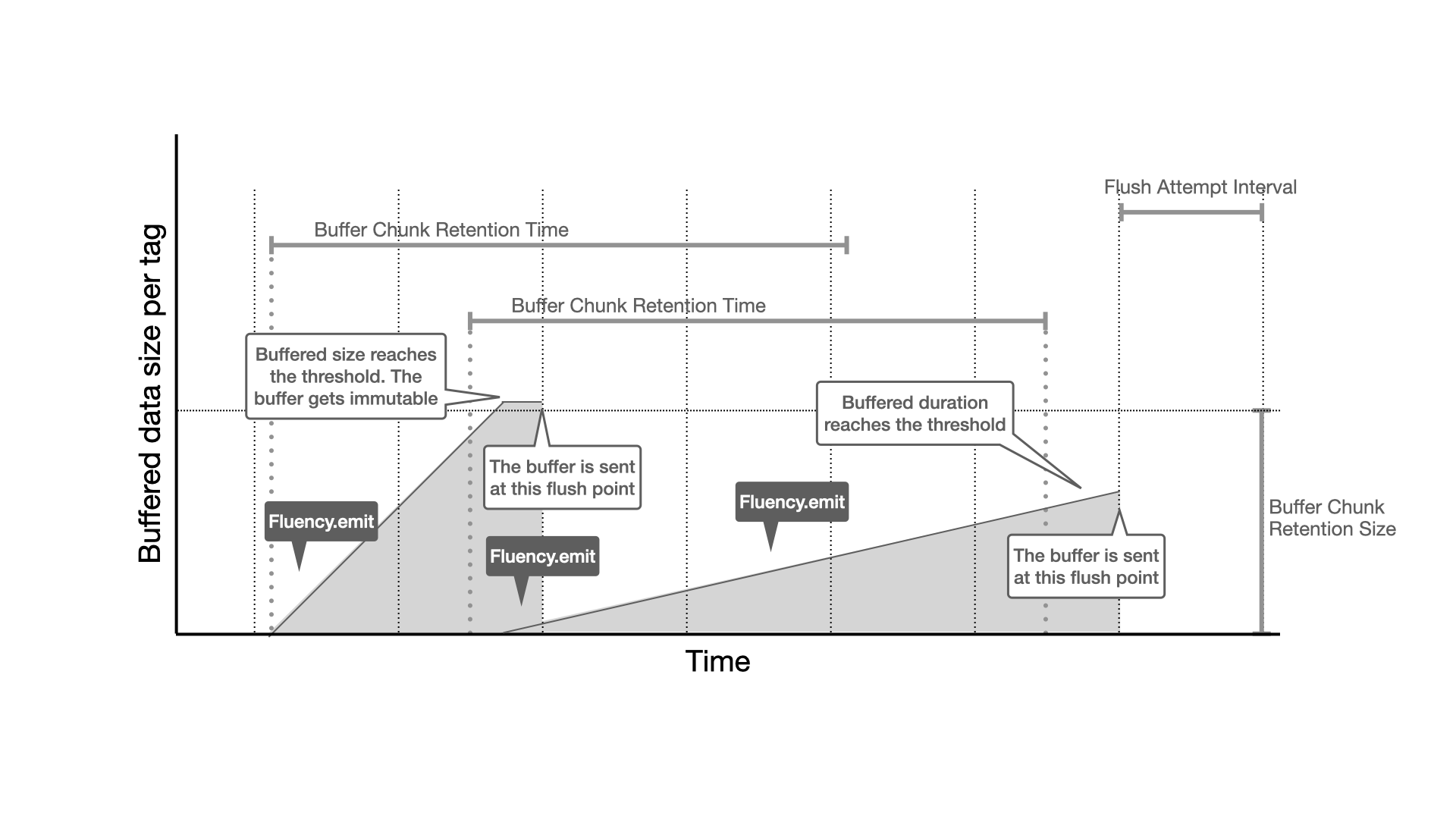
Fluencyfluency = builder.build();Fluency has some parameters to configure a flush timing of buffer. This diagram may help to understand it.
// Single Fluentd(xxx.xxx.xxx.xxx:24224)// - Initial chunk buffer size is 16MB// - Threshold chunk buffer size to flush is 64MB// Keep this value (BufferRetentionSize) between `Initial chunk buffer size` and `Max total buffer size`// - Max total buffer size = 1024MBFluencyBuilderForFluentdbuilder = newFluencyBuilderForFluentd();
builder.setBufferChunkInitialSize(16 * 1024 * 1024);
builder.setBufferChunkRetentionSize(64 * 1024 * 1024);
builder.setMaxBufferSize(1024 * 1024 * 1024L);
Fluencyfluency = builder.build("xxx.xxx.xxx.xxx", 24224);// Single Fluentd(localhost:24224)// - Socket connection timeout is 15000 ms// - Socket read timeout is 10000 msFluencyBuilderForFluentdbuilder = newFluencyBuilderForFluentd();
builder.setConnectionTimeoutMilli(15000);
builder.setReadTimeoutMilli(10000);
Fluencyfluency = builder.build();// Single Fluentd(localhost:24224)// - Max wait until all buffers are flushed is 30 seconds// - Max wait until the flusher is terminated is 40 secondsFluencyBuilderForFluentdbuilder = newFluencyBuilderForFluentd();
builder.setWaitUntilBufferFlushed(30);
builder.setWaitUntilFlusherTerminated(40);
Fluencyfluency = builder.build();// Single Fluentd(localhost:24224)// - SimpleModule that has FooSerializer is enabledSimpleModulesimpleModule = newSimpleModule();
simpleModule.addSerializer(Foo.class, newFooSerializer());
FluentdRecordFormatter.ConfigrecordFormatterConfig =
newFluentdRecordFormatter.Config();
recordFormatterConfig.setJacksonModules(
Collections.singletonList(simpleModule));
FluencyBuilderForFluentdbuilder = newFluencyBuilder();
builder.setRecordFormatter(newFluentdRecordFormatter(recordFormatterConfig));
Fluencyfluency = builder.build();FluencyBuilderForFluentdbuilder = newFluencyBuilderForFluentd();
builder.setErrorHandler(ex -> {
// Send a notification
});
Fluencyfluency = builder.build();
:
// If flushing events to Fluentd fails and retried out, the error handler is called back.fluency.emit("foo.bar", event);// Single Fluentd(localhost:24224)// - Enable SSL/TLSFluencyBuilderForFluentdbuilder = newFluencyBuilderForFluentd();
builder.setSslEnabled(true);
// Or, provide your own SSLSocketFactory at runtime (replace with your own)builder.setSslSocketFactory(SSLSocketFactory.getDefault())
Fluencyfluency = builder.build();If you want to use a custom truststore, specify the JKS file path using -Djavax.net.ssl.trustStore (and -Djavax.net.ssl.trustStorePassword if needed). You can create a custom truststore like this:
$ keytool -import -file server.crt -alias mytruststore -keystore truststore.jks
For server side configuration, see https://docs.fluentd.org/v1.0/articles/in_forward#how-to-enable-tls/ssl-encryption .
See this project.
// Multiple Fluentd(localhost:24224, localhost:24225)// - Flush attempt interval is 200ms// - Max retry of sending events is 12// - Use JVM heap memory for buffer poolFluencyBuilderForFluentdbuilder = newFluencyBuilderForFluentd();
builder.setFlushAttemptIntervalMillis(200);
builder.setSenderMaxRetryCount(12);
builder.setJvmHeapBufferMode(true);
Fluencyfluency = builder.build(
Arrays.asList(
newInetSocketAddress(24224),
newInetSocketAddress(24225));Stringtag = "foo_db.bar_tbl";
Map<String, Object> event = newHashMap<String, Object>();
event.put("name", "komamitsu");
event.put("age", 42);
event.put("rate", 3.14);
fluency.emit(tag, event);If you want to use EventTime as a timestamp, call Fluency#emit with an EventTime object in the following way
intepochSeconds;
intnanoseconds;
:
EventTimeeventTime = EventTime.fromEpoch(epochSeconds, nanoseconds);
// You can also create an EventTime object like this// EventTime eventTime = EventTime.fromEpochMilli(System.currentTimeMillis());fluency.emit(tag, eventTime, event);Fluency#emit keeps buffered data in memory even if a retriable exception happens. But in case of buffer full, the method throws org.komamitsu.fluency.BufferFullException. There are 2 options to handle the exception.
try {
fluency.emit(tag, event);
}
catch (BufferFullExceptione) {
// Just log the error and move forwardlogger.warn("Fluency's buffer is full", e);
}// Considering maximum retry count would be also goodwhile (true) {
try {
fluency.emit(tag, event);
break;
}
catch (BufferFullExceptione) {
// Log the error, sleep and retrylogger.warn("Fluency's buffer is full. Retrying", e);
TimeUnit.SECONDS.sleep(5);
}
}Which to choose depends on how important the data is and how long the application can be blocked.
fluency.close();LOG.debug("Memory size allocated by Fluency is {}", fluency.getAllocatedBufferSize());LOG.debug("Unsent data size buffered by Fluency in memory is {}", fluency.getBufferedDataSize());- UNIX domain socket support
dependencies {
compile "org.komamitsu:fluency-core:${fluency.version}"
compile "org.komamitsu:fluency-fluentd:${fluency.version}"
compile "org.komamitsu:fluency-fluentd-ext:${fluency.version}"
}<dependency>
<groupId>org.komamitsu</groupId>
<artifactId>fluency-core</artifactId>
<version>${fluency.version}</version>
</dependency>
<dependency>
<groupId>org.komamitsu</groupId>
<artifactId>fluency-fluentd</artifactId>
<version>${fluency.version}</version>
</dependency>
<dependency>
<groupId>org.komamitsu</groupId>
<artifactId>fluency-fluentd-ext</artifactId>
<version>${fluency.version}</version>
</dependency>// Single Fluentd(UNIX socket path: /tmp/fluentd/ingest.socket)// - UNIX domain socket heartbeat (by default)// - Asynchronous flush (by default)// - Without ack response (by default)// - Flush attempt interval is 600ms (by default)// - Initial chunk buffer size is 1MB (by default)// - Threshold chunk buffer size to flush is 4MB (by default)// - Threshold chunk buffer retention time to flush is 1000 ms (by default)// - Max total buffer size is 512MB (by default)// - Use off heap memory for buffer pool (by default)// - Max retries of sending events is 8 (by default)// - Max wait until all buffers are flushed is 10 seconds (by default)// - Max wait until the flusher is terminated is 10 seconds (by default)Fluencyfluency = newFluencyExtBuilderForFluentd().build(Paths.get("/tmp/fluentd/ingest.socket");- Asynchronous flush
- Backup of buffered data on local disk
- Automatic database/table creation
dependencies {
compile "org.komamitsu:fluency-core:${fluency.version}"
compile "org.komamitsu:fluency-treasuredata:${fluency.version}"
}<dependency>
<groupId>org.komamitsu</groupId>
<artifactId>fluency-core</artifactId>
<version>${fluency.version}</version>
</dependency>
<dependency>
<groupId>org.komamitsu</groupId>
<artifactId>fluency-treasuredata</artifactId>
<version>${fluency.version}</version>
</dependency>// Asynchronous flush (by default)// Flush attempt interval is 600ms (by default)// Initial chunk buffer size is 4MB (by default)// Threshold chunk buffer size to flush is 64MB (by default)// Threshold chunk buffer retention time to flush is 30000 ms (by default)// Max total buffer size is 512MB (by default)// Use off heap memory for buffer pool (by default)// Max retries of sending events is 10 (by default)// Max wait until all buffers are flushed is 10 seconds (by default)// Max wait until the flusher is terminated is 10 seconds (by default)Fluencyfluency = newFluencyBuilderForTreasureData().build(yourApiKey);// Initial chunk buffer size is 32MB// Threshold chunk buffer size to flush is 256MB// Threshold chunk buffer retention time to flush is 120 seconds// Max total buffer size is 1024MB// Sender's working buffer size 32KBFluencyBuilderForTreasureDatabuilder = newFluencyBuilderForTreasureData();
builder.setBufferChunkInitialSize(32 * 1024 * 1024);
builder.setMaxBufferSize(1024 * 1024 * 1024L);
builder.setBufferChunkRetentionSize(256 * 1024 * 1024);
builder.setBufferChunkRetentionTimeMillis(120 * 1000);
builder.setSenderWorkBufSize(32 * 1024);
Fluencyfluency = builder.build(yourApiKey);Fluencyfluency = newFluencyBuilderForTreasureData()
.build(yourApiKey, tdEndpoint);Some of other usages are same as ingestion to Fluentd. See Ingestion to Fluentd > Usage above.
- Asynchronous flush
- Backup of buffered data on local disk
- Several format supports
- CSV
- JSONL
- MessagePack
- GZIP compression
- Customizable S3 bucket/key decision rule
dependencies {
compile "org.komamitsu:fluency-core:${fluency.version}"
compile "org.komamitsu:fluency-aws-s3:${fluency.version}"
}<dependency>
<groupId>org.komamitsu</groupId>
<artifactId>fluency-core</artifactId>
<version>${fluency.version}</version>
</dependency>
<dependency>
<groupId>org.komamitsu</groupId>
<artifactId>fluency-aws-s3</artifactId>
<version>${fluency.version}</version>
</dependency>// Asynchronous flush (by default)// Flush attempt interval is 600ms (by default)// Initial chunk buffer size is 4MB (by default)// Threshold chunk buffer size to flush is 64MB (by default)// Threshold chunk buffer retention time to flush is 30000 ms (by default)// Max total buffer size is 512MB (by default)// Use off heap memory for buffer pool (by default)// Sender's working buffer size 8KB (by default)// Max retries of sending events is 10 (by default)// Initial retry interval of sending events is 1000 ms (by default)// Retry backoff factor of sending events is 2.0 (by default)// Max retry interval of sending events is 30000 ms (by default)// Max wait until all buffers are flushed is 10 seconds (by default)// Max wait until the flusher is terminated is 10 seconds (by default)// Destination S3 bucket is specified by Fluency#emit()'s "tag" parameter (by default)// Destination S3 key format is "yyyy/MM/dd/HH/mm-ss-SSSSSS" (by default)// Destination S3 key is decided as UTC (by default)// GZIP compression is enabled (by default)// File format is JSONLFluencyBuilderForAwsS3builder = newFluencyBuilderForAwsS3();
builder.setFormatType(FluencyBuilderForAwsS3.FormatType.JSONL);
Fluencyfluency = builder.build();// File format is MessagePackFluencyBuilderForAwsS3builder = newFluencyBuilderForAwsS3();
builder.setFormatType(FluencyBuilderForAwsS3.FormatType.MESSAGE_PACK);
Fluencyfluency = builder.build();// File format is CSV// Expected columns are "time", "age", "name", "comment"FluencyBuilderForAwsS3builder = newFluencyBuilderForAwsS3();
builder.setFormatType(FluencyBuilderForAwsS3.FormatType.CSV);
builder.setFormatCsvColumnNames(Arrays.asList("time", "age", "name", "comment"));
Fluencyfluency = builder.build();fluency-aws-s3 follows default credential provider chain. If you want to explicitly specify credentials, use the following APIs.
// AWS S3 region is "us-east-1"// AWS S3 endpoint is "https://another.s3.endpoi.nt"// AWS access key id is "ABCDEFGHIJKLMNOPQRST"// AWS secret access key is "ZaQ1XsW2CdE3VfR4BgT5NhY6"FluencyBuilderForAwsS3builder = newFluencyBuilderForAwsS3();
builder.setFormatType(FluencyBuilderForAwsS3.FormatType.JSONL);
builder.setAwsRegion("us-east-1");
builder.setAwsEndpoint("https://another.s3.endpoi.nt");
builder.setAwsAccessKeyId("ABCDEFGHIJKLMNOPQRST");
builder.setAwsSecretAccessKey("ZaQ1XsW2CdE3VfR4BgT5NhY6");
Fluencyfluency = builder.build();// GZIP compression is disabledFluencyBuilderForAwsS3builder = newFluencyBuilderForAwsS3();
builder.setFormatType(FluencyBuilderForAwsS3.FormatType.JSONL);
builder.setCompressionEnabled(false);
Fluencyfluency = builder.build();// Destination S3 key is decided as JSTFluencyBuilderForAwsS3builder = newFluencyBuilderForAwsS3();
builder.setFormatType(FluencyBuilderForAwsS3.FormatType.JSONL);
builder.setS3KeyTimeZoneId(ZoneId.of("JST", SHORT_IDS));
Fluencyfluency = builder.build();// Destination S3 bucket is "fixed-bucket-name"// Destination S3 key format is UNIX epoch seconds rounded to 1 hour rangeFluencyBuilderForAwsS3builder = newFluencyBuilderForAwsS3();
builder.setFormatType(FluencyBuilderForAwsS3.FormatType.JSONL);
builder.setCustomS3DestinationDecider((tag, time) ->
newS3DestinationDecider.S3Destination(
"fixed-bucket-name",
String.format("%s-%d", tag, time.getEpochSecond() / 3600)
));
Fluencyfluency = builder.build();// Initial chunk buffer size is 32MB// Threshold chunk buffer size to flush is 256MB// Threshold chunk buffer retention time to flush is 120 seconds// Max total buffer size is 1024MB// Sender's working buffer size 32KBFluencyBuilderForAwsS3builder = newFluencyBuilderForAwsS3();
builder.setFormatType(FluencyBuilderForAwsS3.FormatType.JSONL);
builder.setBufferChunkInitialSize(32 * 1024 * 1024);
builder.setMaxBufferSize(1024 * 1024 * 1024L);
builder.setBufferChunkRetentionSize(256 * 1024 * 1024);
builder.setBufferChunkRetentionTimeMillis(120 * 1000);
builder.setSenderWorkBufSize(32 * 1024);
Fluencyfluency = builder.build();// Max retries of sending events is 16// Initial retry interval of sending events is 500 ms// Retry backoff factor of sending events is 1.5// Max retry interval of sending events is 20000 msFluencyBuilderForAwsS3builder = newFluencyBuilderForAwsS3();
builder.setFormatType(FluencyBuilderForAwsS3.FormatType.JSONL);
builder.setSenderRetryMax(16);
builder.setSenderRetryIntervalMillis(500);
builder.setSenderRetryFactor(1.5f);
builder.setSenderMaxRetryIntervalMillis(20000);
Fluencyfluency = builder.build();Some of other usages are same as ingestion to Fluentd. See Ingestion to Fluentd > Usage above.
This project uses pre-commit to automate code format and so on as much as possible. If you're interested in the development of this project, please install pre-commit and the git hook script as follows.
$ ls -a .pre-commit-config.yaml
.pre-commit-config.yaml
$ pre-commit install
The code formatter is automatically executed when committing files. A commit will fail and be formatted by the formatter when any invalid code format is detected. Try to commit the change again.