






Git hooks for PHP projects.
Library based in git hook scripts for PHP projects.
You must add the following line to the composer.json file to use with Symfony 3.0:
{
"require-dev": {
"bruli/php-git-hooks": "~4.1"
}
}
You can use "~2.0" for Symfony version 2.X.
Or you can write in your console:
$ composer require bruli/php-git-hooks --devIf you don't have composer, you need download the binary file and run it:
$ wget http://getcomposer.org/composer.phar
# or
$ curl -O http://getcomposer.org/composer.phar
$ php composer.phar installFirst, you will need to add the following lines to your composer.json
"scripts": {
"post-install-cmd": [
"PhpGitHooks\\Application\\Composer\\ConfiguratorScript::buildConfig"
],
"post-update-cmd": [
"PhpGitHooks\\Application\\Composer\\ConfiguratorScript::buildConfig"
]
}
Then, launch $ composer install and composer should ask you about configuration

Important: To use 2.X version you need symfony 2.7 version.
If your project doesn't have a "bin/" directory, you can add this in your composer.json file.
"config": {
"bin-dir": "bin"
}
Note: This is not necessary for Symfony projects.
You can configure php-git-hooks, creating a php-git-hooks.yml file with...
pre-commit:
enabled: trueexecute:
php-cs-fixer:
enabled: truelevels:
psr0: truepsr1: truepsr2: truesymfony: truephpunit:
enabled: truerandom-mode: truephplint: truephpcs:
enabled: truestandard: PSR2phpmd: truecomposer: truemessage:
right-message: 'HEY, GOOD JOB!!'error-message: 'FIX YOUR CODE!!'commit-msg:
enabled: trueregular-expression: '#[0-9]{2,7}'
... or you can copy php-git-hooks.yml.sample from vendor/bruli/php-git-hooks.
Php-cs-fixer configuration in php-git-hooks.yml file, is not compatible with 2.0 version. You should remove php-cs-fixer entry and execute "composer install".
Most easy way to update is delete php-git-hooks.yml and execute "composer install". You will see all the configuration questions again.
If you want use phpunit tool, you must create a phpunit.xml.dist in your project root directory. Alternatively you can copy from vendor/bruli/php-git-hooks/phpunit.xml.dist in your project root directory.
The same case that phpunit. You must create a PmdRules.xml in your project root directory or copy from php-git-hook directory.
The most easy way to enable hook is copy hook file into your .git/hooks directory.
#For pre-commit hook:
You can enable this hooks with composer or manually executing
$ cp vendor/bruli/php-git-hooks/hooks/pre-commit .git/hooks#For commit-msg hook:
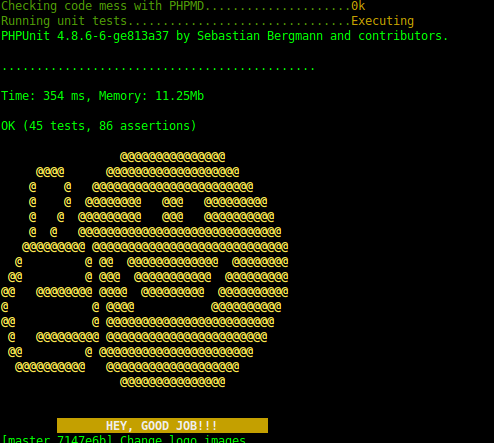
$ cp vendor/bruli/php-git-hooks/hooks/commit-msg .git/hooks####Valid pre-commit.
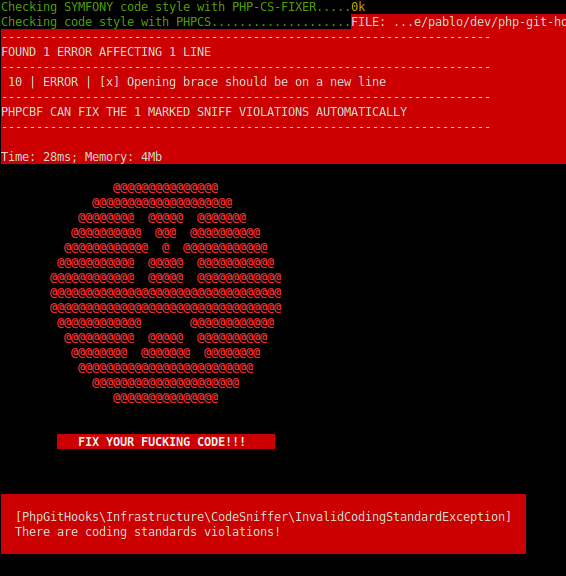
####Fail pre-commit.
- Pablo Braulio (@brulics)
- All contributors
php-git-hooks is released under the MIT License. See the bundled LICENSE file for details.