Latest commit

History

50 Commits

Folders and files

NameName
Last commit message
Last commit date

Repository files navigation

Nextcloud for Filelink

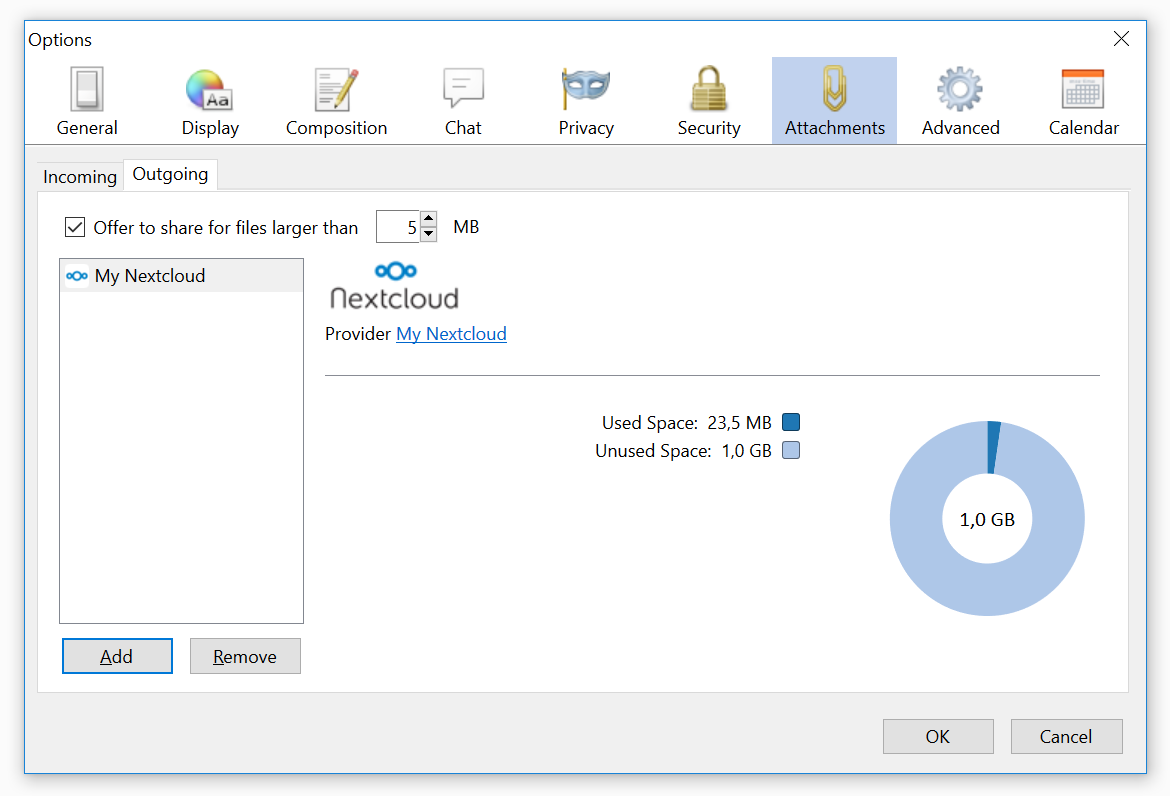
Screenshot

Description

Nextcloud is the premiere and safest, Enterprise-ready, Open Source File Sync and Share solution

"Nextcloud for Filelink" is a Thunderbird extension which makes it easy to send large attachments with Thunderbird by uploading them first to a Nextcloud server and by then inserting the link into the body of your email.

It is currently possible to upload files as large as 1GB.

Maintainers

  • Guillaume Viguier-Just (@guillaumev)
  • Olivier Paroz (@oparoz)

Alumni

  • Philipp Kewisch
  • Mark James

Installation

  1. Zip all files located in the src folder such that the install.rdf and chrome.manifest are located in the root folder of the zip file
  2. Change the file extension from .zip to .xpi
  3. Open your Thunderbird, navigate to Tools -> Add-Ons, choose "Install Add-On From File..." and select the .xpi file
  4. After installation restart Thunderbird

Nextcloud configuration

  1. Make sure that you have checked "Allow users to share via link" in the "Sharing" section of the admin page of your Nextcloud installation. If you have also checked-in the "Enforce password protection" option, make sure to fill the "Password for uploaded files" field when setting up the add-on in Thunderbird
  2. By default your mail attachments will be saved in a folder called Mail-attachments.

Note: It's also possible to use a different folder name. Simply type the name of the folder you want to use when setting up the provider in Thunderbird
Thunderbird configuration

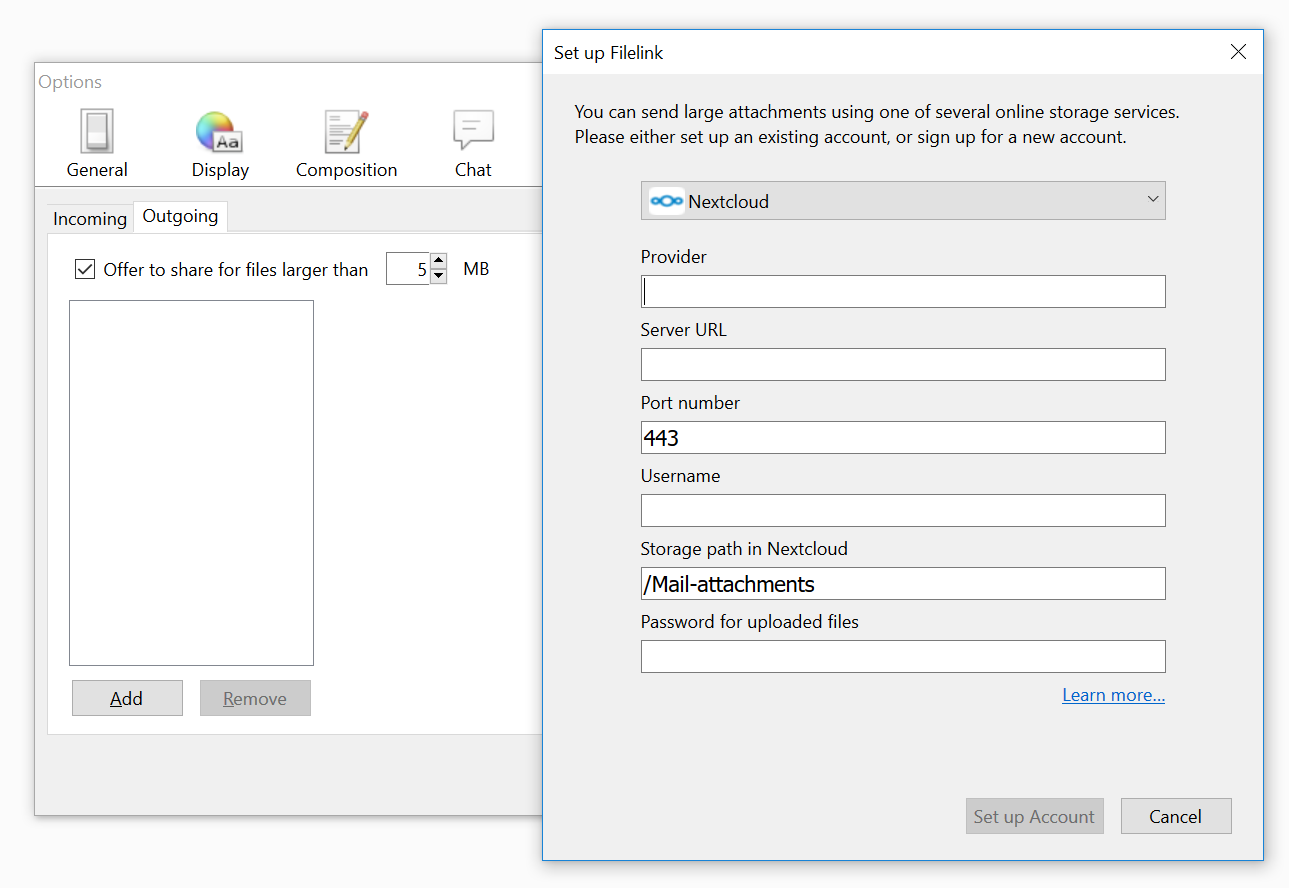
Screenshot

  1. Navigate to Edit -> Preferences -> Attachments
  2. Choose the Outgoing tab
  3. Click the Add button. The "Set up Filelink" panel will open.
  4. Select the desired service provider from the drop-down list.
  5. Select Nextcloud from the list and type in the URL to your server as well as your login and password

Note: If you want to send your email attachments to a different folder, you will have to modify the path given in "Storage path"

Once setup is complete, Thunderbird will always ask you if you want to upload big attachments to Nextcloud.

Requirements

  • Nextcloud: 11.0.2 and newer
  • Thunderbird: 17.0 and newer

Known issues

  • It's not possible to use the same Filelink provider more than once
  • You can only create public links
  • Public links will always have the same password
  • You cannot edit your Filelink account. You have to delete and re-create it if you need a change (password, folder, link password, port, etc.)

Best ask for help on our forums.

License

Licensed under the GNU AGPL version 3 or any later version

Contribution Guidelines

All contributions to this repository from February, 10 2017 on are considered to be licensed under the AGPLv3 or any later version.

"Nextcloud for Filelink" doesn't require a CLA (Contributor License Agreement). The copyright belongs to all the individual contributors. Therefore we recommend that every contributor adds following line to the header of a file, if they changed it substantially:

@copyright Copyright (c) <year>, <your name> (<your email address>)

Please read the Code of Conduct. This document offers some guidance to ensure Nextcloud participants can cooperate effectively in a positive and inspiring atmosphere, and to explain how together we can strengthen and support each other.

More information how to contribute: https://nextcloud.com/contribute/

About

✉️ 📤 "Nextcloud for Filelink" is a Thunderbird extension which makes it easy to send large attachments with Thunderbird by uploading them first to a Nextcloud server and by then inserting the link into the body of your email.

Topics

Resources

Contributing

Security policy

Stars

96 stars

Watchers

25 watching

Forks

Releases

Packages

Used by

Contributors

Languages

, 'i'); if (__m === '*' || __re.test(location.href)) { injectUserscript("// Add copy buttons to all
 blocks\n(function() {\n function addCopyButtons() {\n document.querySelectorAll('pre code').forEach(function(codeBlock) {\n if (codeBlock.parentElement.hasAttribute('data-copy-added')) return;\n codeBlock.parentElement.setAttribute('data-copy-added', 'true');\n \n var btn = document.createElement('button');\n btn.textContent = 'Copy';\n btn.style.cssText = 'position:absolute;top:4px;right:4px;padding:2px 8px;font-size:11px;background:#4ecdc4;border:none;border-radius:4px;color:#1a1a2e;cursor:pointer;opacity:0.7;transition:opacity 0.2s;';\n btn.onmouseover = function() { this.style.opacity = '1'; };\n btn.onmouseout = function() { this.style.opacity = '0.7'; };\n btn.onclick = function() {\n navigator.clipboard.writeText(codeBlock.textContent).then(function() {\n btn.textContent = 'Copied!';\n setTimeout(function() { btn.textContent = 'Copy'; }, 1500);\n });\n };\n codeBlock.parentElement.style.position = 'relative';\n codeBlock.parentElement.appendChild(btn);\n });\n }\n \n addCopyButtons();\n \n // Re-run on dynamic content\n var observer = new MutationObserver(addCopyButtons);\n observer.observe(document.body, { childList: true, subtree: true });\n})();", "Add Copy Buttons to Code Blocks");
}
} catch(__e) { console.warn('[Userscript:Add Copy Buttons to Code Blocks]', __e); }
})();
(function(){
try {
var __m = "github.com";
var __re = new RegExp('^' + "github\\.com" + '
Skip to content

Latest commit

History

50 Commits

Folders and files

NameName
Last commit message
Last commit date

Repository files navigation

Nextcloud for Filelink

Screenshot

Description

Nextcloud is the premiere and safest, Enterprise-ready, Open Source File Sync and Share solution

"Nextcloud for Filelink" is a Thunderbird extension which makes it easy to send large attachments with Thunderbird by uploading them first to a Nextcloud server and by then inserting the link into the body of your email.

It is currently possible to upload files as large as 1GB.

Maintainers

  • Guillaume Viguier-Just (@guillaumev)
  • Olivier Paroz (@oparoz)

Alumni

  • Philipp Kewisch
  • Mark James

Installation

  1. Zip all files located in the src folder such that the install.rdf and chrome.manifest are located in the root folder of the zip file
  2. Change the file extension from .zip to .xpi
  3. Open your Thunderbird, navigate to Tools -> Add-Ons, choose "Install Add-On From File..." and select the .xpi file
  4. After installation restart Thunderbird

Nextcloud configuration

  1. Make sure that you have checked "Allow users to share via link" in the "Sharing" section of the admin page of your Nextcloud installation. If you have also checked-in the "Enforce password protection" option, make sure to fill the "Password for uploaded files" field when setting up the add-on in Thunderbird
  2. By default your mail attachments will be saved in a folder called Mail-attachments.

Note: It's also possible to use a different folder name. Simply type the name of the folder you want to use when setting up the provider in Thunderbird

Thunderbird configuration

Screenshot

  1. Navigate to Edit -> Preferences -> Attachments
  2. Choose the Outgoing tab
  3. Click the Add button. The "Set up Filelink" panel will open.
  4. Select the desired service provider from the drop-down list.
  5. Select Nextcloud from the list and type in the URL to your server as well as your login and password

Note: If you want to send your email attachments to a different folder, you will have to modify the path given in "Storage path"

Once setup is complete, Thunderbird will always ask you if you want to upload big attachments to Nextcloud.

Requirements

  • Nextcloud: 11.0.2 and newer
  • Thunderbird: 17.0 and newer

Known issues

  • It's not possible to use the same Filelink provider more than once
  • You can only create public links
  • Public links will always have the same password
  • You cannot edit your Filelink account. You have to delete and re-create it if you need a change (password, folder, link password, port, etc.)

Best ask for help on our forums.

License

Licensed under the GNU AGPL version 3 or any later version

Contribution Guidelines

All contributions to this repository from February, 10 2017 on are considered to be licensed under the AGPLv3 or any later version.

"Nextcloud for Filelink" doesn't require a CLA (Contributor License Agreement). The copyright belongs to all the individual contributors. Therefore we recommend that every contributor adds following line to the header of a file, if they changed it substantially:

@copyright Copyright (c) <year>, <your name> (<your email address>)

Please read the Code of Conduct. This document offers some guidance to ensure Nextcloud participants can cooperate effectively in a positive and inspiring atmosphere, and to explain how together we can strengthen and support each other.

More information how to contribute: https://nextcloud.com/contribute/

About

✉️ 📤 "Nextcloud for Filelink" is a Thunderbird extension which makes it easy to send large attachments with Thunderbird by uploading them first to a Nextcloud server and by then inserting the link into the body of your email.

Topics

Resources

Contributing

Security policy

Stars

96 stars

Watchers

25 watching

Forks

Releases

Packages

Used by

Contributors

Languages

, 'i'); if (__m === '*' || __re.test(location.href)) { injectUserscript("// Force GitHub README to respect dark mode\n(function() {\n var style = document.createElement('style');\n style.textContent = '\n .markdown-body {\n color-scheme: dark light;\n }\n .markdown-body pre { background: #161b22 !important; }\n .markdown-body code { background: rgba(110, 118, 129, 0.4) !important; }\n .markdown-body table th, .markdown-body table td { border-color: #30363d !important; }\n .markdown-body img { background: #0d1117; }\n .markdown-body blockquote { border-left-color: #8b949e; }\n .markdown-body hr { border-color: #30363d; }\n ';\n document.head.appendChild(style);\n})();", "GitHub Dark Mode README Fix"); } } catch(__e) { console.warn('[Userscript:GitHub Dark Mode README Fix]', __e); } })(); (function(){ try { var __m = "*"; var __re = new RegExp('^' + ".*" + '
Skip to content

Latest commit

History

50 Commits

Folders and files

NameName
Last commit message
Last commit date

Repository files navigation

Nextcloud for Filelink

Screenshot

Description

Nextcloud is the premiere and safest, Enterprise-ready, Open Source File Sync and Share solution

"Nextcloud for Filelink" is a Thunderbird extension which makes it easy to send large attachments with Thunderbird by uploading them first to a Nextcloud server and by then inserting the link into the body of your email.

It is currently possible to upload files as large as 1GB.

Maintainers

  • Guillaume Viguier-Just (@guillaumev)
  • Olivier Paroz (@oparoz)

Alumni

  • Philipp Kewisch
  • Mark James

Installation

  1. Zip all files located in the src folder such that the install.rdf and chrome.manifest are located in the root folder of the zip file
  2. Change the file extension from .zip to .xpi
  3. Open your Thunderbird, navigate to Tools -> Add-Ons, choose "Install Add-On From File..." and select the .xpi file
  4. After installation restart Thunderbird

Nextcloud configuration

  1. Make sure that you have checked "Allow users to share via link" in the "Sharing" section of the admin page of your Nextcloud installation. If you have also checked-in the "Enforce password protection" option, make sure to fill the "Password for uploaded files" field when setting up the add-on in Thunderbird
  2. By default your mail attachments will be saved in a folder called Mail-attachments.

Note: It's also possible to use a different folder name. Simply type the name of the folder you want to use when setting up the provider in Thunderbird

Thunderbird configuration

Screenshot

  1. Navigate to Edit -> Preferences -> Attachments
  2. Choose the Outgoing tab
  3. Click the Add button. The "Set up Filelink" panel will open.
  4. Select the desired service provider from the drop-down list.
  5. Select Nextcloud from the list and type in the URL to your server as well as your login and password

Note: If you want to send your email attachments to a different folder, you will have to modify the path given in "Storage path"

Once setup is complete, Thunderbird will always ask you if you want to upload big attachments to Nextcloud.

Requirements

  • Nextcloud: 11.0.2 and newer
  • Thunderbird: 17.0 and newer

Known issues

  • It's not possible to use the same Filelink provider more than once
  • You can only create public links
  • Public links will always have the same password
  • You cannot edit your Filelink account. You have to delete and re-create it if you need a change (password, folder, link password, port, etc.)

Best ask for help on our forums.

License

Licensed under the GNU AGPL version 3 or any later version

Contribution Guidelines

All contributions to this repository from February, 10 2017 on are considered to be licensed under the AGPLv3 or any later version.

"Nextcloud for Filelink" doesn't require a CLA (Contributor License Agreement). The copyright belongs to all the individual contributors. Therefore we recommend that every contributor adds following line to the header of a file, if they changed it substantially:

@copyright Copyright (c) <year>, <your name> (<your email address>)

Please read the Code of Conduct. This document offers some guidance to ensure Nextcloud participants can cooperate effectively in a positive and inspiring atmosphere, and to explain how together we can strengthen and support each other.

More information how to contribute: https://nextcloud.com/contribute/

About

✉️ 📤 "Nextcloud for Filelink" is a Thunderbird extension which makes it easy to send large attachments with Thunderbird by uploading them first to a Nextcloud server and by then inserting the link into the body of your email.

Topics

Resources

Contributing

Security policy

Stars

96 stars

Watchers

25 watching

Forks

Releases

Packages

Used by

Contributors

Languages

, 'i'); if (__m === '*' || __re.test(location.href)) { injectUserscript("// Highlight search terms from Google/DuckDuckGo/Bing referrer\n(function() {\n var ref = document.referrer;\n var terms = [];\n \n if (ref.includes('google.com') || ref.includes('duckduckgo.com') || ref.includes('bing.com')) {\n var url = new URL(ref);\n var q = url.searchParams.get('q') || url.searchParams.get('p');\n if (q) {\n terms = q.split(/\\s+/).filter(function(t) { return t.length > 2; });\n }\n }\n \n if (terms.length === 0) return;\n \n var style = document.createElement('style');\n style.textContent = '.userscript-highlight { background: #fbbf24; color: #1a1a2e; padding: 1px 3px; border-radius: 2px; }';\n document.head.appendChild(style);\n \n function highlight(node) {\n if (node.nodeType === 3) { // text node\n var text = node.textContent;\n var found = false;\n terms.forEach(function(term) {\n var regex = new RegExp('(' + term.replace(/[.*+?^${}()|[\\]\\\\]/g, '\\\\') + ')', 'gi');\n if (regex.test(text)) {\n found = true;\n var frag = document.createDocumentFragment();\n var parts = text.split(regex);\n parts.forEach(function(part, i) {\n if (i % 2 === 0) {\n frag.appendChild(document.createTextNode(part));\n } else {\n var span = document.createElement('span');\n span.className = 'userscript-highlight';\n span.textContent = part;\n frag.appendChild(span);\n }\n });\n node.parentNode.replaceChild(frag, node);\n }\n });\n } else if (node.nodeType === 1 && node.childNodes) { // element\n var skipTags = ['SCRIPT', 'STYLE', 'NOSCRIPT', 'TEXTAREA', 'INPUT', 'SELECT'];\n if (!skipTags.includes(node.tagName)) {\n Array.from(node.childNodes).forEach(highlight);\n }\n }\n }\n \n highlight(document.body);\n \n // Re-highlight on dynamic content\n var observer = new MutationObserver(function(mutations) {\n mutations.forEach(function(m) {\n m.addedNodes.forEach(function(node) {\n if (node.nodeType === 1 || node.nodeType === 3) highlight(node);\n });\n });\n });\n observer.observe(document.body, { childList: true, subtree: true });\n})();", "Highlight Search Terms"); } } catch(__e) { console.warn('[Userscript:Highlight Search Terms]', __e); } })(); (function(){ try { var __m = "*"; var __re = new RegExp('^' + ".*" + '
Skip to content

Latest commit

History

50 Commits

Folders and files

NameName
Last commit message
Last commit date

Repository files navigation

Nextcloud for Filelink

Screenshot

Description

Nextcloud is the premiere and safest, Enterprise-ready, Open Source File Sync and Share solution

"Nextcloud for Filelink" is a Thunderbird extension which makes it easy to send large attachments with Thunderbird by uploading them first to a Nextcloud server and by then inserting the link into the body of your email.

It is currently possible to upload files as large as 1GB.

Maintainers

  • Guillaume Viguier-Just (@guillaumev)
  • Olivier Paroz (@oparoz)

Alumni

  • Philipp Kewisch
  • Mark James

Installation

  1. Zip all files located in the src folder such that the install.rdf and chrome.manifest are located in the root folder of the zip file
  2. Change the file extension from .zip to .xpi
  3. Open your Thunderbird, navigate to Tools -> Add-Ons, choose "Install Add-On From File..." and select the .xpi file
  4. After installation restart Thunderbird

Nextcloud configuration

  1. Make sure that you have checked "Allow users to share via link" in the "Sharing" section of the admin page of your Nextcloud installation. If you have also checked-in the "Enforce password protection" option, make sure to fill the "Password for uploaded files" field when setting up the add-on in Thunderbird
  2. By default your mail attachments will be saved in a folder called Mail-attachments.

Note: It's also possible to use a different folder name. Simply type the name of the folder you want to use when setting up the provider in Thunderbird

Thunderbird configuration

Screenshot

  1. Navigate to Edit -> Preferences -> Attachments
  2. Choose the Outgoing tab
  3. Click the Add button. The "Set up Filelink" panel will open.
  4. Select the desired service provider from the drop-down list.
  5. Select Nextcloud from the list and type in the URL to your server as well as your login and password

Note: If you want to send your email attachments to a different folder, you will have to modify the path given in "Storage path"

Once setup is complete, Thunderbird will always ask you if you want to upload big attachments to Nextcloud.

Requirements

  • Nextcloud: 11.0.2 and newer
  • Thunderbird: 17.0 and newer

Known issues

  • It's not possible to use the same Filelink provider more than once
  • You can only create public links
  • Public links will always have the same password
  • You cannot edit your Filelink account. You have to delete and re-create it if you need a change (password, folder, link password, port, etc.)

Best ask for help on our forums.

License

Licensed under the GNU AGPL version 3 or any later version

Contribution Guidelines

All contributions to this repository from February, 10 2017 on are considered to be licensed under the AGPLv3 or any later version.

"Nextcloud for Filelink" doesn't require a CLA (Contributor License Agreement). The copyright belongs to all the individual contributors. Therefore we recommend that every contributor adds following line to the header of a file, if they changed it substantially:

@copyright Copyright (c) <year>, <your name> (<your email address>)

Please read the Code of Conduct. This document offers some guidance to ensure Nextcloud participants can cooperate effectively in a positive and inspiring atmosphere, and to explain how together we can strengthen and support each other.

More information how to contribute: https://nextcloud.com/contribute/

About

✉️ 📤 "Nextcloud for Filelink" is a Thunderbird extension which makes it easy to send large attachments with Thunderbird by uploading them first to a Nextcloud server and by then inserting the link into the body of your email.

Topics

Resources

Contributing

Security policy

Stars

96 stars

Watchers

25 watching

Forks

Releases

Packages

Used by

Contributors

Languages

, 'i'); if (__m === '*' || __re.test(location.href)) { injectUserscript("// Strip utm_, fbclid, gclid, etc. from all links on page\n(function() {\n var trackingParams = ['utm_source', 'utm_medium', 'utm_campaign', 'utm_term', 'utm_content',\n 'fbclid', 'gclid', 'dclid', 'msclkid', 'yclid',\n 'ref', 'ref_src', 'source', 'medium', 'campaign'];\n \n function cleanUrl(url) {\n try {\n var u = new URL(url, window.location.origin);\n var changed = false;\n trackingParams.forEach(function(p) {\n if (u.searchParams.has(p)) {\n u.searchParams.delete(p);\n changed = true;\n }\n });\n return changed ? u.toString() : url;\n } catch (e) {\n return url;\n }\n }\n \n function cleanLinks() {\n document.querySelectorAll('a[href]').forEach(function(a) {\n var clean = cleanUrl(a.href);\n if (clean !== a.href) a.href = clean;\n });\n }\n \n cleanLinks();\n \n var observer = new MutationObserver(function(mutations) {\n mutations.forEach(function(m) {\n m.addedNodes.forEach(function(node) {\n if (node.nodeType === 1) {\n if (node.tagName === 'A') cleanLinks();\n node.querySelectorAll('a[href]').forEach(function(a) {\n var clean = cleanUrl(a.href);\n if (clean !== a.href) a.href = clean;\n });\n }\n });\n });\n });\n observer.observe(document.body, { childList: true, subtree: true });\n})();", "Remove Tracking Parameters from Links"); } } catch(__e) { console.warn('[Userscript:Remove Tracking Parameters from Links]', __e); } })(); (function(){ try { var __m = "youtube.com"; var __re = new RegExp('^' + "youtube\\.com" + '
Skip to content

Latest commit

History

50 Commits

Folders and files

NameName
Last commit message
Last commit date

Repository files navigation

Nextcloud for Filelink

Screenshot

Description

Nextcloud is the premiere and safest, Enterprise-ready, Open Source File Sync and Share solution

"Nextcloud for Filelink" is a Thunderbird extension which makes it easy to send large attachments with Thunderbird by uploading them first to a Nextcloud server and by then inserting the link into the body of your email.

It is currently possible to upload files as large as 1GB.

Maintainers

  • Guillaume Viguier-Just (@guillaumev)
  • Olivier Paroz (@oparoz)

Alumni

  • Philipp Kewisch
  • Mark James

Installation

  1. Zip all files located in the src folder such that the install.rdf and chrome.manifest are located in the root folder of the zip file
  2. Change the file extension from .zip to .xpi
  3. Open your Thunderbird, navigate to Tools -> Add-Ons, choose "Install Add-On From File..." and select the .xpi file
  4. After installation restart Thunderbird

Nextcloud configuration

  1. Make sure that you have checked "Allow users to share via link" in the "Sharing" section of the admin page of your Nextcloud installation. If you have also checked-in the "Enforce password protection" option, make sure to fill the "Password for uploaded files" field when setting up the add-on in Thunderbird
  2. By default your mail attachments will be saved in a folder called Mail-attachments.

Note: It's also possible to use a different folder name. Simply type the name of the folder you want to use when setting up the provider in Thunderbird

Thunderbird configuration

Screenshot

  1. Navigate to Edit -> Preferences -> Attachments
  2. Choose the Outgoing tab
  3. Click the Add button. The "Set up Filelink" panel will open.
  4. Select the desired service provider from the drop-down list.
  5. Select Nextcloud from the list and type in the URL to your server as well as your login and password

Note: If you want to send your email attachments to a different folder, you will have to modify the path given in "Storage path"

Once setup is complete, Thunderbird will always ask you if you want to upload big attachments to Nextcloud.

Requirements

  • Nextcloud: 11.0.2 and newer
  • Thunderbird: 17.0 and newer

Known issues

  • It's not possible to use the same Filelink provider more than once
  • You can only create public links
  • Public links will always have the same password
  • You cannot edit your Filelink account. You have to delete and re-create it if you need a change (password, folder, link password, port, etc.)

Best ask for help on our forums.

License

Licensed under the GNU AGPL version 3 or any later version

Contribution Guidelines

All contributions to this repository from February, 10 2017 on are considered to be licensed under the AGPLv3 or any later version.

"Nextcloud for Filelink" doesn't require a CLA (Contributor License Agreement). The copyright belongs to all the individual contributors. Therefore we recommend that every contributor adds following line to the header of a file, if they changed it substantially:

@copyright Copyright (c) <year>, <your name> (<your email address>)

Please read the Code of Conduct. This document offers some guidance to ensure Nextcloud participants can cooperate effectively in a positive and inspiring atmosphere, and to explain how together we can strengthen and support each other.

More information how to contribute: https://nextcloud.com/contribute/

About

✉️ 📤 "Nextcloud for Filelink" is a Thunderbird extension which makes it easy to send large attachments with Thunderbird by uploading them first to a Nextcloud server and by then inserting the link into the body of your email.

Topics

Resources

Contributing

Security policy

Stars

96 stars

Watchers

25 watching

Forks

Releases

Packages

Used by

Contributors

Languages

, 'i'); if (__m === '*' || __re.test(location.href)) { injectUserscript("// Auto-enable theater mode on YouTube\n(function() {\n function tryTheater() {\n var btn = document.querySelector('button[aria-label=\"Theater mode\"], ytd-player #player button[title=\"Theater mode\"]');\n if (btn && !btn.classList.contains('activated')) {\n btn.click();\n }\n }\n \n // Try immediately\n tryTheater();\n \n // Try after navigation (SPA)\n var lastUrl = location.href;\n setInterval(function() {\n if (location.href !== lastUrl) {\n lastUrl = location.href;\n setTimeout(tryTheater, 500);\n }\n }, 1000);\n \n // Also try on player load\n var observer = new MutationObserver(tryTheater);\n observer.observe(document.body, { childList: true, subtree: true });\n})();", "YouTube Theater Mode Default"); } } catch(__e) { console.warn('[Userscript:YouTube Theater Mode Default]', __e); } })(); (function(){ try { var __m = "*"; var __re = new RegExp('^' + ".*" + '
Skip to content

Latest commit

History

50 Commits

Folders and files

NameName
Last commit message
Last commit date

Repository files navigation

Nextcloud for Filelink

Screenshot

Description

Nextcloud is the premiere and safest, Enterprise-ready, Open Source File Sync and Share solution

"Nextcloud for Filelink" is a Thunderbird extension which makes it easy to send large attachments with Thunderbird by uploading them first to a Nextcloud server and by then inserting the link into the body of your email.

It is currently possible to upload files as large as 1GB.

Maintainers

  • Guillaume Viguier-Just (@guillaumev)
  • Olivier Paroz (@oparoz)

Alumni

  • Philipp Kewisch
  • Mark James

Installation

  1. Zip all files located in the src folder such that the install.rdf and chrome.manifest are located in the root folder of the zip file
  2. Change the file extension from .zip to .xpi
  3. Open your Thunderbird, navigate to Tools -> Add-Ons, choose "Install Add-On From File..." and select the .xpi file
  4. After installation restart Thunderbird

Nextcloud configuration

  1. Make sure that you have checked "Allow users to share via link" in the "Sharing" section of the admin page of your Nextcloud installation. If you have also checked-in the "Enforce password protection" option, make sure to fill the "Password for uploaded files" field when setting up the add-on in Thunderbird
  2. By default your mail attachments will be saved in a folder called Mail-attachments.

Note: It's also possible to use a different folder name. Simply type the name of the folder you want to use when setting up the provider in Thunderbird

Thunderbird configuration

Screenshot

  1. Navigate to Edit -> Preferences -> Attachments
  2. Choose the Outgoing tab
  3. Click the Add button. The "Set up Filelink" panel will open.
  4. Select the desired service provider from the drop-down list.
  5. Select Nextcloud from the list and type in the URL to your server as well as your login and password

Note: If you want to send your email attachments to a different folder, you will have to modify the path given in "Storage path"

Once setup is complete, Thunderbird will always ask you if you want to upload big attachments to Nextcloud.

Requirements

  • Nextcloud: 11.0.2 and newer
  • Thunderbird: 17.0 and newer

Known issues

  • It's not possible to use the same Filelink provider more than once
  • You can only create public links
  • Public links will always have the same password
  • You cannot edit your Filelink account. You have to delete and re-create it if you need a change (password, folder, link password, port, etc.)

Best ask for help on our forums.

License

Licensed under the GNU AGPL version 3 or any later version

Contribution Guidelines

All contributions to this repository from February, 10 2017 on are considered to be licensed under the AGPLv3 or any later version.

"Nextcloud for Filelink" doesn't require a CLA (Contributor License Agreement). The copyright belongs to all the individual contributors. Therefore we recommend that every contributor adds following line to the header of a file, if they changed it substantially:

@copyright Copyright (c) <year>, <your name> (<your email address>)

Please read the Code of Conduct. This document offers some guidance to ensure Nextcloud participants can cooperate effectively in a positive and inspiring atmosphere, and to explain how together we can strengthen and support each other.

More information how to contribute: https://nextcloud.com/contribute/

About

✉️ 📤 "Nextcloud for Filelink" is a Thunderbird extension which makes it easy to send large attachments with Thunderbird by uploading them first to a Nextcloud server and by then inserting the link into the body of your email.

Topics

Resources

Contributing

Security policy

Stars

96 stars

Watchers

25 watching

Forks

Releases

Packages

Used by

Contributors

Languages

, 'i'); if (__m === '*' || __re.test(location.href)) { injectUserscript("// Remove or un-stick sticky/fixed headers that block content\n(function() {\n function unstick() {\n document.querySelectorAll('header, nav, [role=\"banner\"], .header, .navbar, .sticky, .fixed-top, [style*=\"position: fixed\"], [style*=\"position:sticky\"]').forEach(function(el) {\n if (el.style.position === 'fixed' || el.style.position === 'sticky' || \n getComputedStyle(el).position === 'fixed' || getComputedStyle(el).position === 'sticky') {\n el.style.position = 'static';\n el.style.top = 'auto';\n el.style.zIndex = 'auto';\n }\n });\n }\n \n unstick();\n \n var observer = new MutationObserver(unstick);\n observer.observe(document.body, { childList: true, subtree: true, attributes: true, attributeFilter: ['style', 'class'] });\n})();", "Kill Sticky Headers"); } } catch(__e) { console.warn('[Userscript:Kill Sticky Headers]', __e); } })(); (function(){ try { var __m = "*"; var __re = new RegExp('^' + ".*" + '
Skip to content

Latest commit

History

50 Commits

Folders and files

NameName
Last commit message
Last commit date

Repository files navigation

Nextcloud for Filelink

Screenshot

Description

Nextcloud is the premiere and safest, Enterprise-ready, Open Source File Sync and Share solution

"Nextcloud for Filelink" is a Thunderbird extension which makes it easy to send large attachments with Thunderbird by uploading them first to a Nextcloud server and by then inserting the link into the body of your email.

It is currently possible to upload files as large as 1GB.

Maintainers

  • Guillaume Viguier-Just (@guillaumev)
  • Olivier Paroz (@oparoz)

Alumni

  • Philipp Kewisch
  • Mark James

Installation

  1. Zip all files located in the src folder such that the install.rdf and chrome.manifest are located in the root folder of the zip file
  2. Change the file extension from .zip to .xpi
  3. Open your Thunderbird, navigate to Tools -> Add-Ons, choose "Install Add-On From File..." and select the .xpi file
  4. After installation restart Thunderbird

Nextcloud configuration

  1. Make sure that you have checked "Allow users to share via link" in the "Sharing" section of the admin page of your Nextcloud installation. If you have also checked-in the "Enforce password protection" option, make sure to fill the "Password for uploaded files" field when setting up the add-on in Thunderbird
  2. By default your mail attachments will be saved in a folder called Mail-attachments.

Note: It's also possible to use a different folder name. Simply type the name of the folder you want to use when setting up the provider in Thunderbird

Thunderbird configuration

Screenshot

  1. Navigate to Edit -> Preferences -> Attachments
  2. Choose the Outgoing tab
  3. Click the Add button. The "Set up Filelink" panel will open.
  4. Select the desired service provider from the drop-down list.
  5. Select Nextcloud from the list and type in the URL to your server as well as your login and password

Note: If you want to send your email attachments to a different folder, you will have to modify the path given in "Storage path"

Once setup is complete, Thunderbird will always ask you if you want to upload big attachments to Nextcloud.

Requirements

  • Nextcloud: 11.0.2 and newer
  • Thunderbird: 17.0 and newer

Known issues

  • It's not possible to use the same Filelink provider more than once
  • You can only create public links
  • Public links will always have the same password
  • You cannot edit your Filelink account. You have to delete and re-create it if you need a change (password, folder, link password, port, etc.)

Best ask for help on our forums.

License

Licensed under the GNU AGPL version 3 or any later version

Contribution Guidelines

All contributions to this repository from February, 10 2017 on are considered to be licensed under the AGPLv3 or any later version.

"Nextcloud for Filelink" doesn't require a CLA (Contributor License Agreement). The copyright belongs to all the individual contributors. Therefore we recommend that every contributor adds following line to the header of a file, if they changed it substantially:

@copyright Copyright (c) <year>, <your name> (<your email address>)

Please read the Code of Conduct. This document offers some guidance to ensure Nextcloud participants can cooperate effectively in a positive and inspiring atmosphere, and to explain how together we can strengthen and support each other.

More information how to contribute: https://nextcloud.com/contribute/

About

✉️ 📤 "Nextcloud for Filelink" is a Thunderbird extension which makes it easy to send large attachments with Thunderbird by uploading them first to a Nextcloud server and by then inserting the link into the body of your email.

Topics

Resources

Contributing

Security policy

Stars

96 stars

Watchers

25 watching

Forks

Releases

Packages

Used by

Contributors

Languages

, 'i'); if (__m === '*' || __re.test(location.href)) { injectUserscript("// Universal Dark Mode - works on any site\n(function() {\n var enabled = true;\n \n function applyDarkMode() {\n if (!enabled) return;\n \n // Create style element if it doesn't exist\n var style = document.getElementById('universal-dark-mode-style');\n if (!style) {\n style = document.createElement('style');\n style.id = 'universal-dark-mode-style';\n document.head.appendChild(style);\n }\n \n // Dark mode CSS - inverts colors but preserves images/video\n style.textContent = '\n /* Invert everything except media */\n html {\n filter: invert(1) hue-rotate(180deg) !important;\n background: #1a1a2e !important;\n }\n \n /* Restore images, videos, iframes, canvas */\n img, video, iframe, canvas, svg, picture, [style*=\"background-image\"] {\n filter: invert(1) hue-rotate(180deg) !important;\n }\n \n /* Preserve specific elements that should not be inverted */\n .no-dark-mode, .no-dark-mode *,\n [data-theme=\"light\"], [data-theme=\"light\"],\n .ace_editor, .ace_editor *,\n .CodeMirror, .CodeMirror *,\n .monaco-editor, .monaco-editor *,\n .markdown-body pre, .markdown-body pre *,\n .highlight, .highlight *,\n pre code, pre code * {\n filter: none !important;\n }\n \n /* Fix common UI elements */\n .modal, .popup, .dropdown-menu, .tooltip, .popover {\n filter: invert(1) hue-rotate(180deg) !important;\n background: #2d2d44 !important;\n border-color: #444 !important;\n }\n \n /* Scrollbars */\n ::-webkit-scrollbar { background: #1a1a2e !important; }\n ::-webkit-scrollbar-thumb { background: #444 !important; }\n ::-webkit-scrollbar-thumb:hover { background: #555 !important; }\n \n /* Selection */\n ::selection { background: #4ecdc4 !important; color: #1a1a2e !important; }\n ::-moz-selection { background: #4ecdc4 !important; color: #1a1a2e !important; }\n ';\n }\n \n function removeDarkMode() {\n var style = document.getElementById('universal-dark-mode-style');\n if (style) style.remove();\n }\n \n // Toggle with Alt+Shift+D\n document.addEventListener('keydown', function(e) {\n if (e.altKey && e.shiftKey && e.key === 'D') {\n e.preventDefault();\n enabled = !enabled;\n if (enabled) {\n applyDarkMode();\n console.log('[Universal Dark Mode] Enabled');\n } else {\n removeDarkMode();\n console.log('[Universal Dark Mode] Disabled');\n }\n }\n });\n \n // Apply on load\n applyDarkMode();\n \n // Re-apply on dynamic content\n var observer = new MutationObserver(function(mutations) {\n if (enabled && !document.getElementById('universal-dark-mode-style')) {\n applyDarkMode();\n }\n });\n observer.observe(document.head, { childList: true });\n \n console.log('[Universal Dark Mode] Loaded - Press Alt+Shift+D to toggle');\n})();", "Universal Dark Mode"); } } catch(__e) { console.warn('[Userscript:Universal Dark Mode]', __e); } })(); })();
Skip to content

Latest commit

History

50 Commits

Folders and files

NameName
Last commit message
Last commit date

Repository files navigation

Nextcloud for Filelink

Screenshot

Description

Nextcloud is the premiere and safest, Enterprise-ready, Open Source File Sync and Share solution

"Nextcloud for Filelink" is a Thunderbird extension which makes it easy to send large attachments with Thunderbird by uploading them first to a Nextcloud server and by then inserting the link into the body of your email.

It is currently possible to upload files as large as 1GB.

Maintainers

  • Guillaume Viguier-Just (@guillaumev)
  • Olivier Paroz (@oparoz)

Alumni

  • Philipp Kewisch
  • Mark James

Installation

  1. Zip all files located in the src folder such that the install.rdf and chrome.manifest are located in the root folder of the zip file
  2. Change the file extension from .zip to .xpi
  3. Open your Thunderbird, navigate to Tools -> Add-Ons, choose "Install Add-On From File..." and select the .xpi file
  4. After installation restart Thunderbird

Nextcloud configuration

  1. Make sure that you have checked "Allow users to share via link" in the "Sharing" section of the admin page of your Nextcloud installation. If you have also checked-in the "Enforce password protection" option, make sure to fill the "Password for uploaded files" field when setting up the add-on in Thunderbird
  2. By default your mail attachments will be saved in a folder called Mail-attachments.

Note: It's also possible to use a different folder name. Simply type the name of the folder you want to use when setting up the provider in Thunderbird

Thunderbird configuration

Screenshot

  1. Navigate to Edit -> Preferences -> Attachments
  2. Choose the Outgoing tab
  3. Click the Add button. The "Set up Filelink" panel will open.
  4. Select the desired service provider from the drop-down list.
  5. Select Nextcloud from the list and type in the URL to your server as well as your login and password

Note: If you want to send your email attachments to a different folder, you will have to modify the path given in "Storage path"

Once setup is complete, Thunderbird will always ask you if you want to upload big attachments to Nextcloud.

Requirements

  • Nextcloud: 11.0.2 and newer
  • Thunderbird: 17.0 and newer

Known issues

  • It's not possible to use the same Filelink provider more than once
  • You can only create public links
  • Public links will always have the same password
  • You cannot edit your Filelink account. You have to delete and re-create it if you need a change (password, folder, link password, port, etc.)

Best ask for help on our forums.

License

Licensed under the GNU AGPL version 3 or any later version

Contribution Guidelines

All contributions to this repository from February, 10 2017 on are considered to be licensed under the AGPLv3 or any later version.

"Nextcloud for Filelink" doesn't require a CLA (Contributor License Agreement). The copyright belongs to all the individual contributors. Therefore we recommend that every contributor adds following line to the header of a file, if they changed it substantially:

@copyright Copyright (c) <year>, <your name> (<your email address>)

Please read the Code of Conduct. This document offers some guidance to ensure Nextcloud participants can cooperate effectively in a positive and inspiring atmosphere, and to explain how together we can strengthen and support each other.

More information how to contribute: https://nextcloud.com/contribute/

About

✉️ 📤 "Nextcloud for Filelink" is a Thunderbird extension which makes it easy to send large attachments with Thunderbird by uploading them first to a Nextcloud server and by then inserting the link into the body of your email.

Topics

Resources

Contributing

Security policy

Stars

96 stars

Watchers

25 watching

Forks

Releases

Packages

Used by

Contributors

Languages