




Android library that connects ViewPager fragments with Google Maps markers.
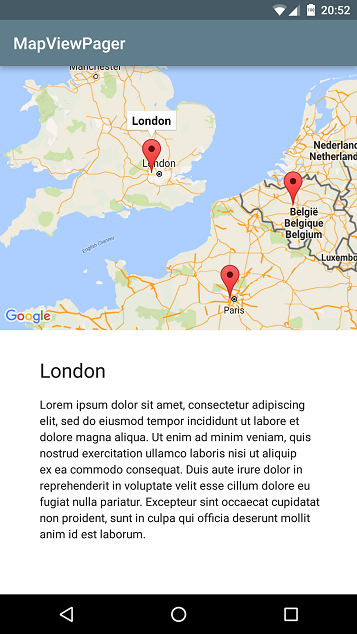
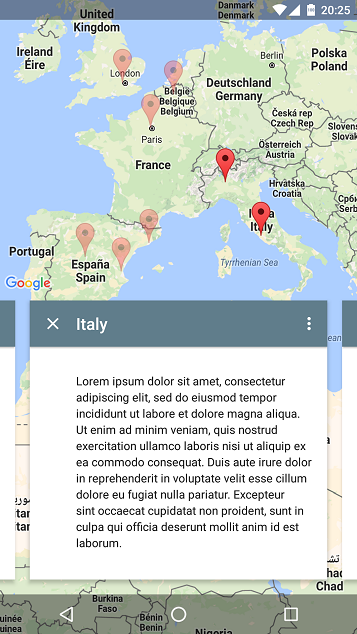
Check out the sample apk !
- Not fully tested yet, but it works perfectly on my Nexus 5 running Marshmallow.
- Only
android.support.v4.app.FragmentandSupportMapFragmentsupported right now. - It is my first Android lib. Tips, suggestions and requests are all welcome.
- Supports any amount of markers per fragment.
- Default camera position (for fragments with 0 or more than 1 markers) automatically calculated.
dependencies {
compile 'com.android.support:appcompat-v7:23.1.1'
compile 'com.google.android.gms:play-services-maps:8.4.0'
compile 'com.github.nitrico.mapviewpager:mapviewpager:1.0.0'
}Don't forget to add the right permissions and your Google Maps API key to your
AndroidManifest.xmlfile.
Create a ViewPager adapter extending from MapViewPager.Adapter or MapViewPager.MultiAdapter and override method
CameraPosition getCameraPosition(int position) or List<CameraPosition> getCameraPositions(int position) returning the markers camera position for each fragment.
To create a CameraPosition:
CameraPosition.fromLatLngZoom(new LatLng(latitude, longitude), zoom);
Include the view in your xml layout
<com.github.nitrico.mapviewpager.MapViewPager
android:id="@+id/mapViewPager"android:layout_width="match_parent"android:layout_height="match_parent"app:viewPagerWeight="1"app:mapWeight="1"app:mapGravity="1"app:mapOffset="56dp" />
Find the view in your activity and then call mapViewPager.start(this, adapter) or mapViewPager.start(this, adapter, callback) passing the AppCompatActivity (or FragmentActivity) and MapViewPager.Adapter (or MapViewPager.MultiAdapter) instances. You can also pass a MapViewPager.Callback instance to get notified when the GoogleMap object is created and working.
If you want more control on how to display the map and the ViewPager, for example to overlap each other, you can add a <android.support.v4.view.ViewPager> and a <fragment class="com.google.android.gms.maps.SupportMapFragment"> to your activity layout and then and pass them to create the MapViewPager object using the MapViewPager.Builder class:
MapViewPagermvp = newMapViewPager.Builder(this) // this is Context
.mapFragment(mapFragment) // mapFragment is SupportMapFragment
.viewPager(viewPager) // viewPager is ViewPager
.adapter(adapter) // adapter is MapViewPager.Adapter or MapViewPager.MultiAdapter
.position(initialPosition) // Optional initialPosition is int
.callback(callback) // Optional callback is MapViewPager.Callback
.markersAlpha(alpha) // Optional
.mapPadding(left, top, right, bottom) // Optional
.mapOffset(offset) // Optional
.build();
Remember that mapFragment is a Fragment, not a View! To find it:
mapFragment = (SupportMapFragment) activity.getSupportFragmentManager().findFragmentById(R.id.mapFragment);
Check the examples in the sample folder.
They are all optional.
| Attribute | Format | Default | Description |
|---|---|---|---|
| viewPagerWeight | integer | 1 | Weight of the viewpager in the layout |
| mapWeight | integer | 1 | Weight of the map in the layout |
| mapGravity | integer (0..3) | 1 | Position of the map in the layout: 0=left, 1=top, 2=right, 3=bottom |
| mapOffset | dimension | 32dp | Map padding for multiple markers on the map |
| mapPaddingLeft | dimension | 0dp | Left map padding |
| mapPaddingTop | dimension | 0dp | Top map padding |
| mapPaddingRight | dimension | 0dp | Right map padding |
| mapPaddingBottom | dimension | 0dp | Bottom map padding |
| markersAlpha | float (0..1) | 0.4 | Opacity of markers when deactivated |
voidstart(@NonNullFragmentActivityactivity,
@NonNullMapViewPager.AbsAdaptermapAdapter)
voidstart(@NonNullFragmentActivityactivity,
@NonNullMapViewPager.AbsAdaptermapAdapter,
@NullableMapViewPager.Callbackcallback)
voidstart(@NonNullFragmentActivityactivity,
@NonNullMapViewPager.AbsAdaptermapAdapter,
intinitialPosition) voidstart(@NonNullFragmentActivityactivity, @NonNullMapViewPager.AbsAdaptermapAdapter,
intinitialPosition,
@NullableMapViewPager.Callbackcallback)
GoogleMapgetMap()
SupportMapFragmentgetMapFragment()
ViewPagergetViewPager() CameraUpdategetDefaultPosition()
// when adapter extends MapViewPager.AdapterMarkergetMarker(intposition)
List<Marker> getMarkers()
// when adapter extends MapViewPager.MultiAdapterMarkergetMarker(intpage, intposition)
List<Marker> getMarkers(intpage) List<List<Marker>> getAllMarkers()
CameraUpdategetDefaultPosition(intpage) List<CameraUpdate> getDefaultPositions()
Warning! In order to avoid NullPointerExceptions when calling any of those getters before the actual GoogleMap object is created, you should use them only afteronMapViewPagerReady() method in the callback is called.
To override in MapViewPager.Callback effective classes
voidonMapViewPagerReady()To override in MapViewPager.Adapter effective classes
CameraPositiongetCameraPosition(intposition)To override in MapViewPager.MultiAdapter effective classes
List<CameraPosition> getCameraPositions(intpage)
StringgetMarkerTitle(intpage, intposition)
Both adapters extends from FragmentStatePagerAdapter, so you also need to override
CharSequencegetPageTitle(intposition) // this will be used as marker title in MapViewPager.AdapterFragmentgetItem(intposition)
intgetCount()I'm available to be hired, Contact me!
| Google+ | Linked.in |
|---|
Copyright 2016 Miguel Ángel Moreno
Licensed under the Apache License, Version 2.0 (the "License");
you may not use this file except in compliance with the License.
You may obtain a copy of the License at
http://www.apache.org/licenses/LICENSE-2.0
Unless required by applicable law or agreed to in writing, software
distributed under the License is distributed on an "AS IS" BASIS,
WITHOUT WARRANTIES OR CONDITIONS OF ANY KIND, either express or implied.
See the License for the specific language governing permissions and
limitations under the License.