A TypeScript Version of dock-spawn (see https://github.com/coderespawn/dock-spawn)
Homepage at https://node-projects.github.io/dock-spawn-ts/



Dock Spawn TS is a Typescript Docking Framework to create a Visual Studio like IDE in HTML
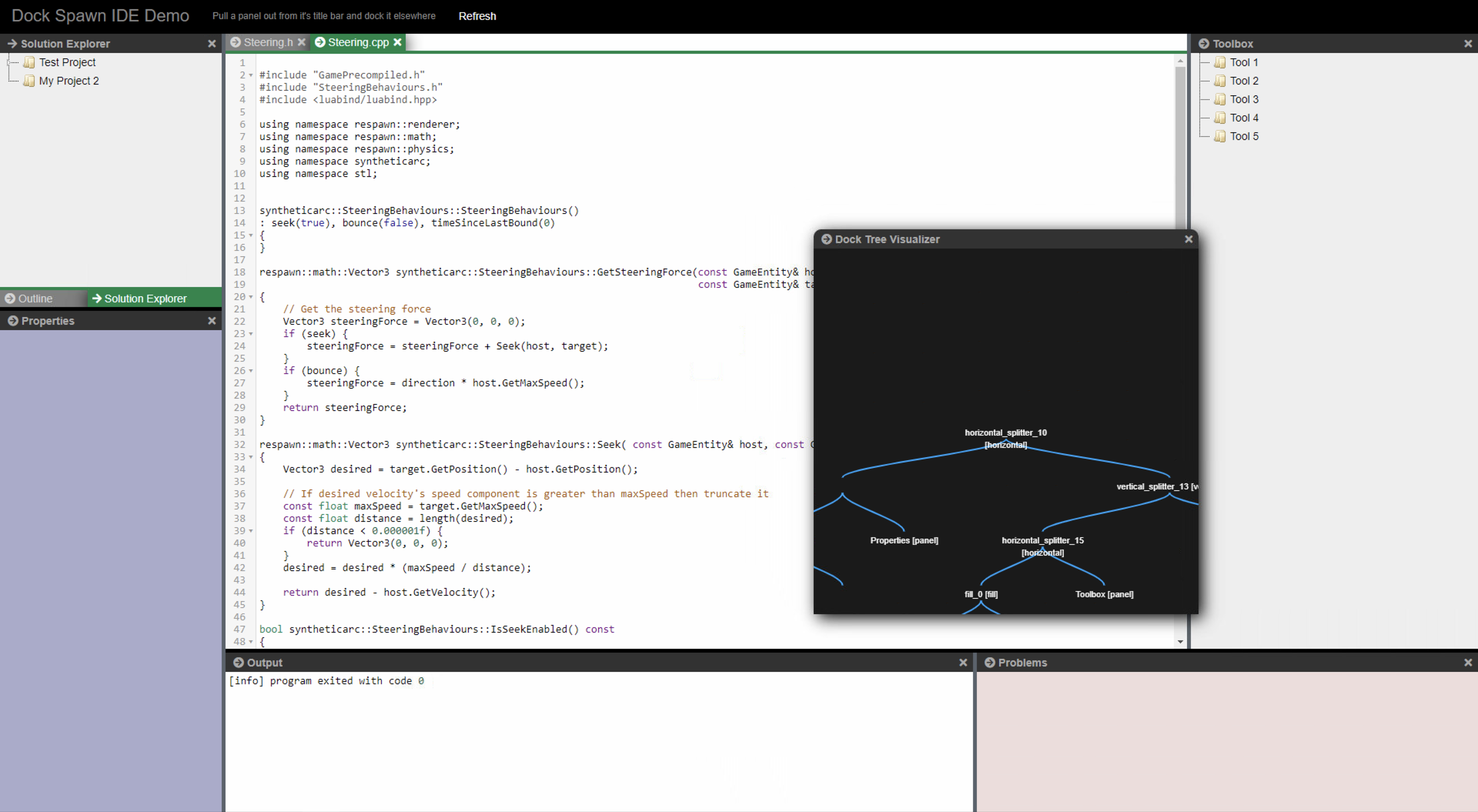
There is an ES5 Version in the lib/es5 directory Usage Example is in page/demo/demo_simple_es5.html
- typescript
- bugfixes / preformance optimations
- save/restore fixed and saveing/restoring of dialogs
- touch support (works on ipad/iphone and android devices)
- performance fixes (unnessecary removeing and adding to dom reduced, not needed elements are hidden, not removed from dom)
- multiple dockspawn's in one page
- removed font-awesome dependency
- settings (dockManger.config)
- ContextMenu to close all docks (Document Docks only)
- wip webcomponent support
- download the project
- install node packages ("npm i")
- compile typescript ("npm run tsc") (compiled version is included in repo for live demo)
- run ("npm start")
- browse to: http://127.0.0.1:8080/page/demo/ide/demo.html
dockspawn div container needs position absolute or relative <divid="dock_div" style="height: calc(100% - 45px);"><divid="my_dock_manager" class="my-dock-manager" style="position: relative;"></div><divid="solution_window" data-panel-caption="Solution Explorer" data-panel-icon="test.png" class="solution-window" hidden></div><divid="properties_window" data-panel-caption="Properties" class="properties-window" hidden></div><divid="state_window" data-panel-caption="state" class="state-window" hidden></div><divid="editor1_window" data-panel-caption="Steering.h" class="editor1-window editor-host" hidden></div><divid="editor2_window" data-panel-caption="Steering.cpp" class="editor2-window editor-host" hidden></div><divid="infovis" data-panel-caption="Dock Tree Visualizer" class="editor2-window editor-host" hidden></div><divid="output_window" data-panel-caption="Output" class="output-window editor-host" hidden></div><divid="outline_window" data-panel-caption="Outline" class="outline-window" hidden></div><divid="toolbox_window" data-panel-caption="Toolbox" class="toolbox-window" hidden></div></div>import{DockManager}from"../DockManager.js";import{PanelContainer}from"../PanelContainer.js";// Convert a div to a dock manager. Panels can then be docked on to itletdivDockManager=document.getElementById('dock_div');letdockManager=newDockManager(document.getElementById('my_dock_manager'));dockManager.initialize();// Let the dock manager element fill in the entire screenwindow.onresize=function(){dockManager.resize(window.innerWidth-(divDockManager.clientLeft+divDockManager.offsetLeft),window.innerHeight-(divDockManager.clientTop+divDockManager.offsetTop));};window.onresize(null);// Convert existing elements on the page into "Panels". // They can then be docked on to the dock manager // Panels get a titlebar and a close button, and can also be // converted to a floatingdialog box which can be dragged / resized letsolution=newPanelContainer(document.getElementById("#solution_window"),dockManager);letoutput=newPanelContainer(document.getElementById("#output_window"),dockManager);letproperties=newPanelContainer(document.getElementById("#properties_window"),dockManager);lettoolbox=newPanelContainer(document.getElementById("#toolbox_window"),dockManager);letoutline=newPanelContainer(document.getElementById("#outline_window"),dockManager);letstate=newPanelContainer(document.getElementById("#state_window"),dockManager);leteditor1=newPanelContainer(document.getElementById("#editor1_window"),dockManager);leteditor2=newPanelContainer(document.getElementById("#editor2_window"),dockManager);letinfovis=newPanelContainer(document.getElementById("infovis"),dockManager);// Dock the panels on the dock managerletdocumentNode=dockManager.context.model.documentManagerNode;letsolutionNode=dockManager.dockLeft(documentNode,solution,0.20);letoutlineNode=dockManager.dockFill(solutionNode,outline);letpropertiesNode=dockManager.dockDown(outlineNode,properties,0.6);letoutputNode=dockManager.dockDown(documentNode,output,0.4);letstateNode=dockManager.dockRight(outputNode,state,0.40);lettoolboxNode=dockManager.dockRight(documentNode,toolbox,0.20);leteditor1Node=dockManager.dockFill(documentNode,editor1);leteditor2Node=dockManager.dockFill(documentNode,editor2);dockManager.floatDialog(infovis,50,50);// You could listen to callbacks of DockManager like this, there are more event's then close available see ILayoutEventListenerdockManager.addLayoutListener({onClosePanel: (dockManager,panel)=>{console.log('onClosePanel: ',dockManager,panel);localStorage.setItem(storeKey,dockManager.saveState());}});| Url | Licence | Touch support | Dialogs | Keep Content in DOM | Autocolapsing Panels | Dialogs in new Browserwindows | Dock Back from extra Browserwindow |
|---|---|---|---|---|---|---|---|
| dock-spawn-ts | MIT | Yes | Yes | Yes | No | Yes | No |
| https://github.com/golden-layout/golden-layout | MIT | No | No | Yes | |||
| https://github.com/WebCabin/wcDocker | MIT | Yes | Yes | No | |||
| https://jspanel.de | MIT | Yes | Yes | No | |||
| http://www.htmldockfloat.com | Commerical/free | No | Yes | No | |||
| http://phosphorjs.github.io/ | BSD 3 | ? | ? | No | |||
| https://github.com/tupilabs/vue-lumino | Apache2 | ? | No | No | |||
| https://github.com/mathuo/dockview | MIT | ? | No | No |