微信公共平台自动回复消息接口服务中间件



- 自动回复(文本、图片、语音、视频、音乐、图文)
- 等待回复(用于调查问卷、问答等场景)
- 会话支持(创新功能)
详细参见API文档
- 自动回复部分的Koa/Co版本:https://github.com/node-webot/co-wechat
- 更多功能请前往:https://github.com/node-webot/wechat-api,Koa/Co版本:https://github.com/node-webot/co-wechat-api
- 企业功能请前往:https://github.com/node-webot/wechat-enterprise
- OAuth功能请前往:https://github.com/node-webot/wechat-oauth
- 微信支付功能请前往:https://github.com/supersheep/wechat-pay
$ npm install wechatvarwechat=require('wechat');varconfig={token: 'token',appid: 'appid',encodingAESKey: 'encodinAESKey',checkSignature: true// 可选,默认为true。由于微信公众平台接口调试工具在明文模式下不发送签名,所以如要使用该测试工具,请将其设置为false};app.use(express.query());app.use('/wechat',wechat(config,function(req,res,next){// 微信输入信息都在req.weixin上varmessage=req.weixin;if(message.FromUserName==='diaosi'){// 回复屌丝(普通回复)res.reply('hehe');}elseif(message.FromUserName==='text'){//你也可以这样回复text类型的信息res.reply({content: 'text object',type: 'text'});}elseif(message.FromUserName==='hehe'){// 回复一段音乐res.reply({type: "music",content: {title: "来段音乐吧",description: "一无所有",musicUrl: "http://mp3.com/xx.mp3",hqMusicUrl: "http://mp3.com/xx.mp3",thumbMediaId: "thisThumbMediaId"}});}else{// 回复高富帅(图文回复)res.reply([{title: '你来我家接我吧',description: '这是女神与高富帅之间的对话',picurl: 'http://nodeapi.cloudfoundry.com/qrcode.jpg',url: 'http://nodeapi.cloudfoundry.com/'}]);}}));备注:token在微信平台的开发者中心申请
当用户发送消息到微信公众账号,自动回复一条消息。这条消息可以是文本、图片、语音、视频、音乐、图文。详见:官方文档
res.reply('Hello world!');// 或者res.reply({type: "text",content: 'Hello world!'});res.reply({type: "image",content: {mediaId: 'mediaId'}});res.reply({type: "voice",content: {mediaId: 'mediaId'}});res.reply({type: "video",content: {title: '来段视频吧',description: '女神与高富帅',mediaId: 'mediaId'}});res.reply({title: "来段音乐吧",description: "一无所有",musicUrl: "http://mp3.com/xx.mp3",hqMusicUrl: "http://mp3.com/xx.mp3",thumbMediaId: "thisThumbMediaId"});res.reply([{title: '你来我家接我吧',description: '这是女神与高富帅之间的对话',picurl: 'http://nodeapi.cloudfoundry.com/qrcode.jpg',url: 'http://nodeapi.cloudfoundry.com/'}]);res.reply({type: 'hardware',HardWare:{MessageView: 'myrank',MessageAction: 'ranklist'}});将普通微信用户向公众号发的消息,转发到多客服系统
res.transfer2CustomerService();模块可以对类型为device_text或device_event的消息作出特定格式的响应.
varwechat=require('wechat');varconfig={token: 'token',appid: 'appid',encodingAESKey: 'encodinAESKey',checkSignature: true// 可选,默认为true。由于微信公众平台接口调试工具在明文模式下不发送签名,所以如要使用该测试工具,请将其设置为false};app.use(express.query());app.use('/wechat',wechat(config,function(req,res,next){// 微信输入信息都在req.weixin上varmessage=req.weixin;if(message.MsgType==='device_text'){// 设备文本消息res.reply('这条回复会推到设备里去.');}elseif(message.MsgType==='device_event'){if(message.Event==='subscribe_status'||message.Event==='unsubscribe_status'){//WIFI设备状态订阅,回复设备状态(1或0)res.reply(1);}else{res.reply('这条回复会推到设备里去.')}}}));OAuth功能请前往:https://github.com/node-webot/wechat-oauth
由于公共平台应用的客户端实际上是微信,所以采用传统的Cookie来实现会话并不现实,为此中间件模块在openid的基础上添加了Session支持。一旦服务端启用了connect.session中间件,在业务中就可以访问req.wxsession属性。这个属性与req.session行为类似。
app.use(connect.cookieParser());app.use(connect.session({secret: 'keyboard cat',cookie: {maxAge: 60000}}));app.use('/wechat',wechat('some token',wechat.text(function(info,req,res,next){if(info.Content==='='){varexp=req.wxsession.text.join('');req.wxsession.text='';res.reply(exp);}else{req.wxsession.text=req.wxsession.text||[];req.wxsession.text.push(info.Content);res.reply('收到'+info.Content);}})));req.wxsession与req.session采用相同的存储引擎,这意味着如果采用redis作为存储,这样wxsession可以实现跨进程共享。
等待回复,类似于电话拨号业务。该功能在WXSession的基础上提供。需要为等待回复预置操作,中间件将其抽象为List对象,在提供服务前需要添加服务。
varList=require('wechat').List;List.add('view',[['回复{a}查看我的性别',function(info,req,res){res.reply('我是个妹纸哟');}],['回复{b}查看我的年龄',function(info,req,res){res.reply('我今年18岁');}],['回复{c}查看我的性取向','这样的事情怎么好意思告诉你啦- -']]);然后在业务中触发等待回复事务,如下示例,当收到用户发送list后,调用res.wait('view')进入事务view中。
varapp=connect();app.use(connect.query());app.use(connect.cookieParser());app.use(connect.session({secret: 'keyboard cat',cookie: {maxAge: 60000}}));app.use('/wechat',wechat('some token',wechat.text(function(info,req,res,next){if(info.Content==='list'){res.wait('view');}else{res.reply('hehe');// 或者中断等待回复事务// res.nowait('hehe');}})));用户将收到如下回复:
回复a查看我的性别
回复b查看我的年龄
回复c查看我的性取向
用户回复其中的a、b、c将会由注册的方法接管回复。回复可以是一个函数,也可以是一个字符串:
List.add('view',[['回复{a}查看我的性别',function(info,req,res,next){res.reply('我是个妹纸哟');}],// 或者字符串['回复{c}查看我的性取向','这样的事情怎么好意思告诉你啦- -']]);如果用户触发等待回复事务后,没有按照{}中的进行回复,那么将会由原有的默认函数进行处理。在原有函数中,可以选择调用res.nowait()中断事务。nowait()除了能中断事务外,与reply的行为一致。

欢迎关注。
代码:https://github.com/JacksonTian/api-doc-service
你可以在CloudFoundry、appfog、BAE等搭建自己的机器人。
原始API文档请参见:消息接口指南。
目前微信公共平台能接收到7种内容:文字、图片、音频、视频、位置、链接、事件。支持6种回复:纯文本、图文、音乐、音频、图片、视频。 针对目前的业务形态,发布了0.6.x版本,该版本支持六种内容分别处理,以保持业务逻辑的简洁性。
app.use('/wechat',wechat('some token',wechat.text(function(message,req,res,next){// message为文本内容// { ToUserName: 'gh_d3e07d51b513',// FromUserName: 'oPKu7jgOibOA-De4u8J2RuNKpZRw',// CreateTime: '1359125035',// MsgType: 'text',// Content: 'http',// MsgId: '5837397576500011341' }}).image(function(message,req,res,next){// message为图片内容// { ToUserName: 'gh_d3e07d51b513',// FromUserName: 'oPKu7jgOibOA-De4u8J2RuNKpZRw',// CreateTime: '1359124971',// MsgType: 'image',// PicUrl: 'http://mmsns.qpic.cn/mmsns/bfc815ygvIWcaaZlEXJV7NzhmA3Y2fc4eBOxLjpPI60Q1Q6ibYicwg/0',// MediaId: 'media_id',// MsgId: '5837397301622104395' }}).voice(function(message,req,res,next){// message为音频内容// { ToUserName: 'gh_d3e07d51b513',// FromUserName: 'oPKu7jgOibOA-De4u8J2RuNKpZRw',// CreateTime: '1359125022',// MsgType: 'voice',// MediaId: 'OMYnpghh8fRfzHL8obuboDN9rmLig4s0xdpoNT6a5BoFZWufbE6srbCKc_bxduzS',// Format: 'amr',// MsgId: '5837397520665436492' }}).video(function(message,req,res,next){// message为视频内容// { ToUserName: 'gh_d3e07d51b513',// FromUserName: 'oPKu7jgOibOA-De4u8J2RuNKpZRw',// CreateTime: '1359125022',// MsgType: 'video',// MediaId: 'OMYnpghh8fRfzHL8obuboDN9rmLig4s0xdpoNT6a5BoFZWufbE6srbCKc_bxduzS',// ThumbMediaId: 'media_id',// MsgId: '5837397520665436492' }}).shortvideo(function(message,req,res,next){// message为短视频内容// { ToUserName: 'gh_d3e07d51b513',// FromUserName: 'oPKu7jgOibOA-De4u8J2RuNKpZRw',// CreateTime: '1359125022',// MsgType: 'shortvideo',// MediaId: 'OMYnpghh8fRfzHL8obuboDN9rmLig4s0xdpoNT6a5BoFZWufbE6srbCKc_bxduzS',// ThumbMediaId: 'media_id',// MsgId: '5837397520665436492' }}).location(function(message,req,res,next){// message为位置内容// { ToUserName: 'gh_d3e07d51b513',// FromUserName: 'oPKu7jgOibOA-De4u8J2RuNKpZRw',// CreateTime: '1359125311',// MsgType: 'location',// Location_X: '30.283950',// Location_Y: '120.063139',// Scale: '15',// Label: {},// MsgId: '5837398761910985062' }}).link(function(message,req,res,next){// message为链接内容// { ToUserName: 'gh_d3e07d51b513',// FromUserName: 'oPKu7jgOibOA-De4u8J2RuNKpZRw',// CreateTime: '1359125022',// MsgType: 'link',// Title: '公众平台官网链接',// Description: '公众平台官网链接',// Url: 'http://1024.com/',// MsgId: '5837397520665436492' }}).event(function(message,req,res,next){// message为事件内容// { ToUserName: 'gh_d3e07d51b513',// FromUserName: 'oPKu7jgOibOA-De4u8J2RuNKpZRw',// CreateTime: '1359125022',// MsgType: 'event',// Event: 'LOCATION',// Latitude: '23.137466',// Longitude: '113.352425',// Precision: '119.385040',// MsgId: '5837397520665436492' }}).device_text(function(message,req,res,next){// message为设备文本消息内容// { ToUserName: 'gh_d3e07d51b513',// FromUserName: 'oPKu7jgOibOA-De4u8J2RuNKpZRw',// CreateTime: '1359125022',// MsgType: 'device_text',// DeviceType: 'gh_d3e07d51b513'// DeviceID: 'dev1234abcd',// Content: 'd2hvc3lvdXJkYWRkeQ==',// SessionID: '9394',// MsgId: '5837397520665436492',// OpenID: 'oPKu7jgOibOA-De4u8J2RuNKpZRw' }}).device_event(function(message,req,res,next){// message为设备事件内容// { ToUserName: 'gh_d3e07d51b513',// FromUserName: 'oPKu7jgOibOA-De4u8J2RuNKpZRw',// CreateTime: '1359125022',// MsgType: 'device_event',// Event: 'bind'// DeviceType: 'gh_d3e07d51b513'// DeviceID: 'dev1234abcd',// OpType : 0, //Event为subscribe_status/unsubscribe_status时存在// Content: 'd2hvc3lvdXJkYWRkeQ==', //Event不为subscribe_status/unsubscribe_status时存在// SessionID: '9394',// MsgId: '5837397520665436492',// OpenID: 'oPKu7jgOibOA-De4u8J2RuNKpZRw' }})));注意: text, image, voice, video, location, link, event, device_text, device_event方法请至少指定一个。
这六个方法的设计适用于按内容类型区分处理的场景。如果需要更复杂的场景,请使用第一个例子中的API。
示例如下:
app.use('/wechat',wechat('some token').text(function(message,req,res,next){// TODO}).image(function(message,req,res,next){// TODO}).voice(function(message,req,res,next){// TODO}).video(function(message,req,res,next){// TODO}).location(function(message,req,res,next){// TODO}).link(function(message,req,res,next){// TODO}).event(function(message,req,res,next){// TODO}).device_text(function(message,req,res,next){// TODO}).device_event(function(message,req,res,next){// TODO}).middlewarify());该接口从0.3.x提供。
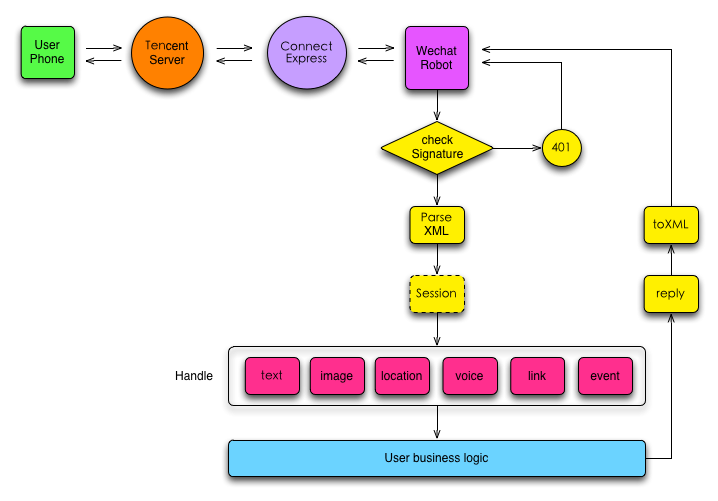
诸多细节由wechat中间件提供,用户只要关注蓝色部分的业务逻辑即可。
QQ群:157964097,使用疑问,开发,贡献代码请加群。
感谢以下贡献者:
$ git summary
project : wechat
repo age : 2 years, 5 months
active : 136 days
commits : 318
files : 32
authors :
265 Jackson Tian 83.3%
10 ifeiteng 3.1%
10 yelo 3.1%
4 realdog 1.3%
4 Bruce Lee 1.3%
3 Guo Yu 0.9%
2 zhongao 0.6%
2 Jesse Yang 0.6%
2 Lu Jun 0.6%
2 dan 0.6%
2 wxhuang 0.6%
1 Rogerz Zhang 0.3%
1 Foghost 0.3%
1 feichang.wyl 0.3%
1 feit 0.3%
1 feitian124 0.3%
1 LiSheep 0.3%
1 p13766 0.3%
1 Lance Li 0.3%
1 Chen Wei 0.3%
1 xianda 0.3%
1 Qun Lin 0.3%
1 TooBug 0.3%
如果您觉得Wechat对您有帮助,欢迎请作者一杯咖啡

或者

The MIT license.