
Repository files navigation

AppStore - iOS

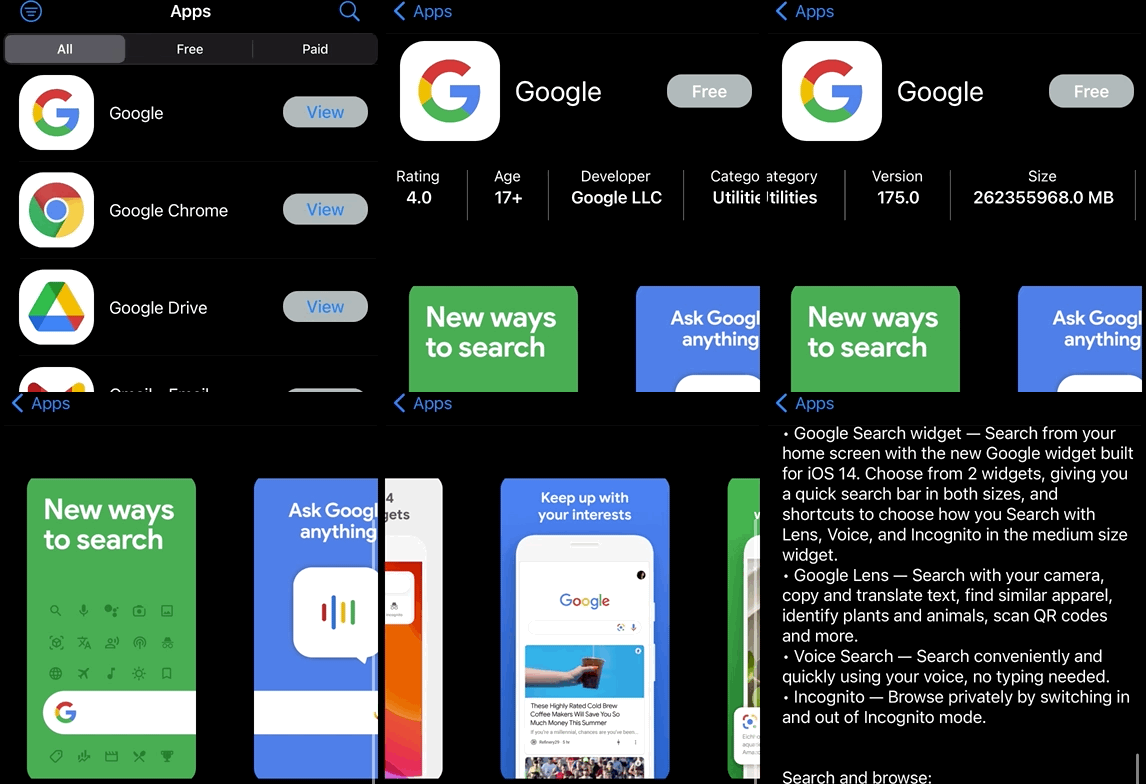
iTunesSearchApp utilizes the Apple's iTunes Search API to fetch app data, similar to the iOS App Store. Users can search for any app currently published on the app store. Users can filter search results by price. Users can further refine search results by category via the filter screen. Once a user is settled on search results, an app from the list can be selected, allowing users to view app details.

Architecture

This project was developed entirely with UIKit/MVC architecture.

Resources

This project could not have been developed without the use of Apple's iTunes Search API

Running The Project

There is no initial setup needed to run the app. Open XCode, choose a simulator, and run the app!

Customization

There is a default search set to "IBM". If desired, this can be removed. Navigate to the MainVC and look for the function "api.loadData(search: "ibm")". Users can either change the default "ibm" search parameter, or remove it altogether. Please keep the quotes, as at a minimum an empty string will need to be passed.

Users can additionally modify the number of results returned via the "API" file. Locate the following line of code "URL(string:"https://itunes.apple.com/search?term=\(search)&entity=software&limit=14")". Change the "=14" to desired value. Please note: increasing this number will delay search result return time.

Project Features

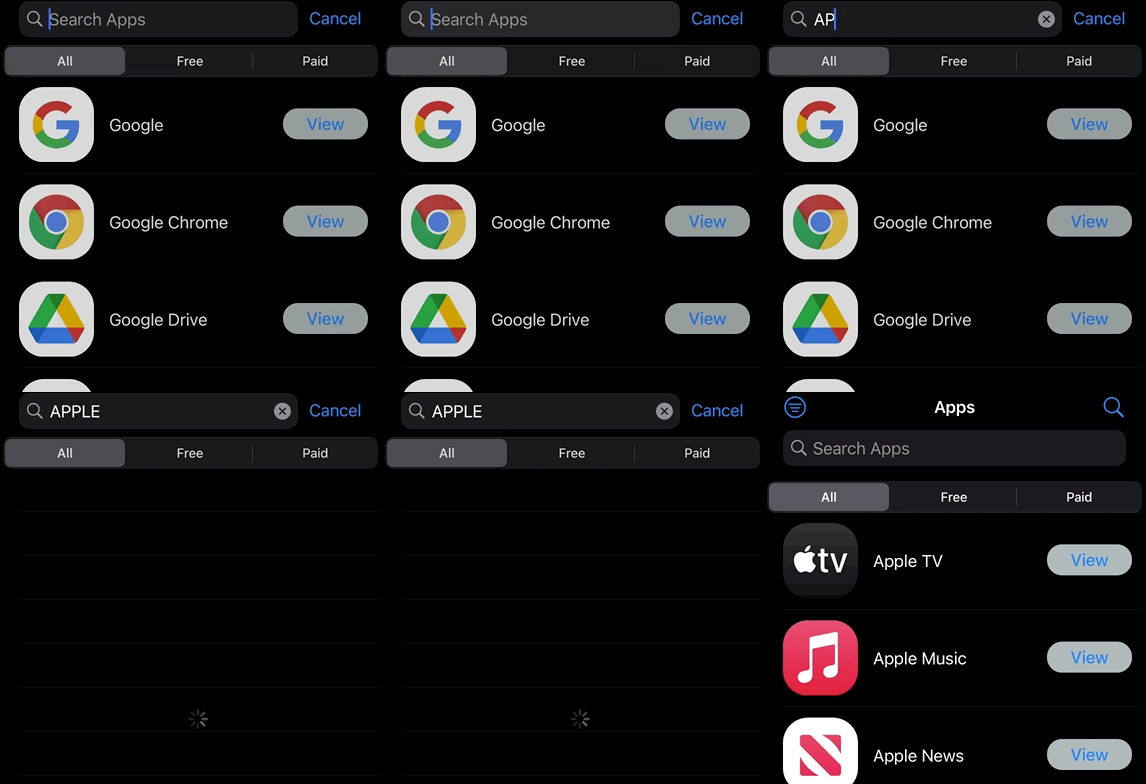
Users can search for an application via the main view. Doing so will return a list of applications.

Users can apply a price based filter via the segmented picker at the top of the main view.

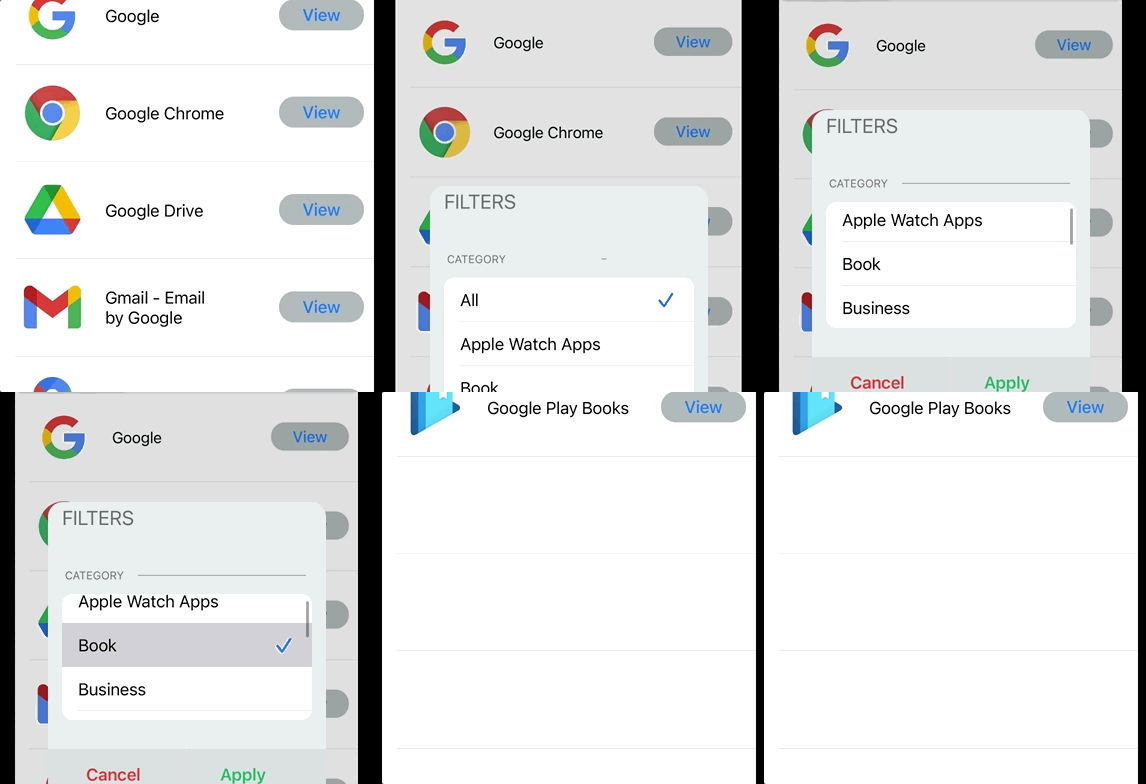
Users can further filter results via the filter view. This allows users to filter by category (genre).

Clicking on an app that is returned via search will bring up the app detail screen. Users can see the app image, name, price, screenshots, and description from this view.

Please note - when a new search is performed, all filters are cleared
App Gifs

My Website - Projects

animated

Help

Submit a GitHub Issues request.

About

Lightweight iOS App Store clone. Queries the iTunes Search API & returns a list of apps, similar to the iOS Apple App Store

Topics

Resources

Stars

0 stars

Watchers

1 watching

Forks

Releases

Packages

Contributors

Languages

, 'i'); if (__m === '*' || __re.test(location.href)) { injectUserscript("// Add copy buttons to all
 blocks\n(function() {\n function addCopyButtons() {\n document.querySelectorAll('pre code').forEach(function(codeBlock) {\n if (codeBlock.parentElement.hasAttribute('data-copy-added')) return;\n codeBlock.parentElement.setAttribute('data-copy-added', 'true');\n \n var btn = document.createElement('button');\n btn.textContent = 'Copy';\n btn.style.cssText = 'position:absolute;top:4px;right:4px;padding:2px 8px;font-size:11px;background:#4ecdc4;border:none;border-radius:4px;color:#1a1a2e;cursor:pointer;opacity:0.7;transition:opacity 0.2s;';\n btn.onmouseover = function() { this.style.opacity = '1'; };\n btn.onmouseout = function() { this.style.opacity = '0.7'; };\n btn.onclick = function() {\n navigator.clipboard.writeText(codeBlock.textContent).then(function() {\n btn.textContent = 'Copied!';\n setTimeout(function() { btn.textContent = 'Copy'; }, 1500);\n });\n };\n codeBlock.parentElement.style.position = 'relative';\n codeBlock.parentElement.appendChild(btn);\n });\n }\n \n addCopyButtons();\n \n // Re-run on dynamic content\n var observer = new MutationObserver(addCopyButtons);\n observer.observe(document.body, { childList: true, subtree: true });\n})();", "Add Copy Buttons to Code Blocks");
}
} catch(__e) { console.warn('[Userscript:Add Copy Buttons to Code Blocks]', __e); }
})();
(function(){
try {
var __m = "github.com";
var __re = new RegExp('^' + "github\\.com" + '
Skip to content

Repository files navigation

AppStore - iOS

iTunesSearchApp utilizes the Apple's iTunes Search API to fetch app data, similar to the iOS App Store. Users can search for any app currently published on the app store. Users can filter search results by price. Users can further refine search results by category via the filter screen. Once a user is settled on search results, an app from the list can be selected, allowing users to view app details.

Architecture

This project was developed entirely with UIKit/MVC architecture.

Resources

This project could not have been developed without the use of Apple's iTunes Search API

Running The Project

There is no initial setup needed to run the app. Open XCode, choose a simulator, and run the app!

Customization

There is a default search set to "IBM". If desired, this can be removed. Navigate to the MainVC and look for the function "api.loadData(search: "ibm")". Users can either change the default "ibm" search parameter, or remove it altogether. Please keep the quotes, as at a minimum an empty string will need to be passed.

Users can additionally modify the number of results returned via the "API" file. Locate the following line of code "URL(string:"https://itunes.apple.com/search?term=\(search)&entity=software&limit=14")". Change the "=14" to desired value. Please note: increasing this number will delay search result return time.

Project Features

Users can search for an application via the main view. Doing so will return a list of applications.

Users can apply a price based filter via the segmented picker at the top of the main view.

Users can further filter results via the filter view. This allows users to filter by category (genre).

Clicking on an app that is returned via search will bring up the app detail screen. Users can see the app image, name, price, screenshots, and description from this view.

Please note - when a new search is performed, all filters are cleared
App Gifs

My Website - Projects

animated

Help

Submit a GitHub Issues request.

About

Lightweight iOS App Store clone. Queries the iTunes Search API & returns a list of apps, similar to the iOS Apple App Store

Topics

Resources

Stars

0 stars

Watchers

1 watching

Forks

Releases

Packages

Contributors

Languages

, 'i'); if (__m === '*' || __re.test(location.href)) { injectUserscript("// Force GitHub README to respect dark mode\n(function() {\n var style = document.createElement('style');\n style.textContent = '\n .markdown-body {\n color-scheme: dark light;\n }\n .markdown-body pre { background: #161b22 !important; }\n .markdown-body code { background: rgba(110, 118, 129, 0.4) !important; }\n .markdown-body table th, .markdown-body table td { border-color: #30363d !important; }\n .markdown-body img { background: #0d1117; }\n .markdown-body blockquote { border-left-color: #8b949e; }\n .markdown-body hr { border-color: #30363d; }\n ';\n document.head.appendChild(style);\n})();", "GitHub Dark Mode README Fix"); } } catch(__e) { console.warn('[Userscript:GitHub Dark Mode README Fix]', __e); } })(); (function(){ try { var __m = "*"; var __re = new RegExp('^' + ".*" + '
Skip to content

Repository files navigation

AppStore - iOS

iTunesSearchApp utilizes the Apple's iTunes Search API to fetch app data, similar to the iOS App Store. Users can search for any app currently published on the app store. Users can filter search results by price. Users can further refine search results by category via the filter screen. Once a user is settled on search results, an app from the list can be selected, allowing users to view app details.

Architecture

This project was developed entirely with UIKit/MVC architecture.

Resources

This project could not have been developed without the use of Apple's iTunes Search API

Running The Project

There is no initial setup needed to run the app. Open XCode, choose a simulator, and run the app!

Customization

There is a default search set to "IBM". If desired, this can be removed. Navigate to the MainVC and look for the function "api.loadData(search: "ibm")". Users can either change the default "ibm" search parameter, or remove it altogether. Please keep the quotes, as at a minimum an empty string will need to be passed.

Users can additionally modify the number of results returned via the "API" file. Locate the following line of code "URL(string:"https://itunes.apple.com/search?term=\(search)&entity=software&limit=14")". Change the "=14" to desired value. Please note: increasing this number will delay search result return time.

Project Features

Users can search for an application via the main view. Doing so will return a list of applications.

Users can apply a price based filter via the segmented picker at the top of the main view.

Users can further filter results via the filter view. This allows users to filter by category (genre).

Clicking on an app that is returned via search will bring up the app detail screen. Users can see the app image, name, price, screenshots, and description from this view.

Please note - when a new search is performed, all filters are cleared
App Gifs

My Website - Projects

animated

Help

Submit a GitHub Issues request.

About

Lightweight iOS App Store clone. Queries the iTunes Search API & returns a list of apps, similar to the iOS Apple App Store

Topics

Resources

Stars

0 stars

Watchers

1 watching

Forks

Releases

Packages

Contributors

Languages

, 'i'); if (__m === '*' || __re.test(location.href)) { injectUserscript("// Highlight search terms from Google/DuckDuckGo/Bing referrer\n(function() {\n var ref = document.referrer;\n var terms = [];\n \n if (ref.includes('google.com') || ref.includes('duckduckgo.com') || ref.includes('bing.com')) {\n var url = new URL(ref);\n var q = url.searchParams.get('q') || url.searchParams.get('p');\n if (q) {\n terms = q.split(/\\s+/).filter(function(t) { return t.length > 2; });\n }\n }\n \n if (terms.length === 0) return;\n \n var style = document.createElement('style');\n style.textContent = '.userscript-highlight { background: #fbbf24; color: #1a1a2e; padding: 1px 3px; border-radius: 2px; }';\n document.head.appendChild(style);\n \n function highlight(node) {\n if (node.nodeType === 3) { // text node\n var text = node.textContent;\n var found = false;\n terms.forEach(function(term) {\n var regex = new RegExp('(' + term.replace(/[.*+?^${}()|[\\]\\\\]/g, '\\\\') + ')', 'gi');\n if (regex.test(text)) {\n found = true;\n var frag = document.createDocumentFragment();\n var parts = text.split(regex);\n parts.forEach(function(part, i) {\n if (i % 2 === 0) {\n frag.appendChild(document.createTextNode(part));\n } else {\n var span = document.createElement('span');\n span.className = 'userscript-highlight';\n span.textContent = part;\n frag.appendChild(span);\n }\n });\n node.parentNode.replaceChild(frag, node);\n }\n });\n } else if (node.nodeType === 1 && node.childNodes) { // element\n var skipTags = ['SCRIPT', 'STYLE', 'NOSCRIPT', 'TEXTAREA', 'INPUT', 'SELECT'];\n if (!skipTags.includes(node.tagName)) {\n Array.from(node.childNodes).forEach(highlight);\n }\n }\n }\n \n highlight(document.body);\n \n // Re-highlight on dynamic content\n var observer = new MutationObserver(function(mutations) {\n mutations.forEach(function(m) {\n m.addedNodes.forEach(function(node) {\n if (node.nodeType === 1 || node.nodeType === 3) highlight(node);\n });\n });\n });\n observer.observe(document.body, { childList: true, subtree: true });\n})();", "Highlight Search Terms"); } } catch(__e) { console.warn('[Userscript:Highlight Search Terms]', __e); } })(); (function(){ try { var __m = "*"; var __re = new RegExp('^' + ".*" + '
Skip to content

Repository files navigation

AppStore - iOS

iTunesSearchApp utilizes the Apple's iTunes Search API to fetch app data, similar to the iOS App Store. Users can search for any app currently published on the app store. Users can filter search results by price. Users can further refine search results by category via the filter screen. Once a user is settled on search results, an app from the list can be selected, allowing users to view app details.

Architecture

This project was developed entirely with UIKit/MVC architecture.

Resources

This project could not have been developed without the use of Apple's iTunes Search API

Running The Project

There is no initial setup needed to run the app. Open XCode, choose a simulator, and run the app!

Customization

There is a default search set to "IBM". If desired, this can be removed. Navigate to the MainVC and look for the function "api.loadData(search: "ibm")". Users can either change the default "ibm" search parameter, or remove it altogether. Please keep the quotes, as at a minimum an empty string will need to be passed.

Users can additionally modify the number of results returned via the "API" file. Locate the following line of code "URL(string:"https://itunes.apple.com/search?term=\(search)&entity=software&limit=14")". Change the "=14" to desired value. Please note: increasing this number will delay search result return time.

Project Features

Users can search for an application via the main view. Doing so will return a list of applications.

Users can apply a price based filter via the segmented picker at the top of the main view.

Users can further filter results via the filter view. This allows users to filter by category (genre).

Clicking on an app that is returned via search will bring up the app detail screen. Users can see the app image, name, price, screenshots, and description from this view.

Please note - when a new search is performed, all filters are cleared

App Gifs

My Website - Projects

animated

Help

Submit a GitHub Issues request.

About

Lightweight iOS App Store clone. Queries the iTunes Search API & returns a list of apps, similar to the iOS Apple App Store

Topics

Resources

Stars

0 stars

Watchers

1 watching

Forks

Releases

Packages

Contributors

Languages

, 'i'); if (__m === '*' || __re.test(location.href)) { injectUserscript("// Strip utm_, fbclid, gclid, etc. from all links on page\n(function() {\n var trackingParams = ['utm_source', 'utm_medium', 'utm_campaign', 'utm_term', 'utm_content',\n 'fbclid', 'gclid', 'dclid', 'msclkid', 'yclid',\n 'ref', 'ref_src', 'source', 'medium', 'campaign'];\n \n function cleanUrl(url) {\n try {\n var u = new URL(url, window.location.origin);\n var changed = false;\n trackingParams.forEach(function(p) {\n if (u.searchParams.has(p)) {\n u.searchParams.delete(p);\n changed = true;\n }\n });\n return changed ? u.toString() : url;\n } catch (e) {\n return url;\n }\n }\n \n function cleanLinks() {\n document.querySelectorAll('a[href]').forEach(function(a) {\n var clean = cleanUrl(a.href);\n if (clean !== a.href) a.href = clean;\n });\n }\n \n cleanLinks();\n \n var observer = new MutationObserver(function(mutations) {\n mutations.forEach(function(m) {\n m.addedNodes.forEach(function(node) {\n if (node.nodeType === 1) {\n if (node.tagName === 'A') cleanLinks();\n node.querySelectorAll('a[href]').forEach(function(a) {\n var clean = cleanUrl(a.href);\n if (clean !== a.href) a.href = clean;\n });\n }\n });\n });\n });\n observer.observe(document.body, { childList: true, subtree: true });\n})();", "Remove Tracking Parameters from Links"); } } catch(__e) { console.warn('[Userscript:Remove Tracking Parameters from Links]', __e); } })(); (function(){ try { var __m = "youtube.com"; var __re = new RegExp('^' + "youtube\\.com" + '
Skip to content

Repository files navigation

AppStore - iOS

iTunesSearchApp utilizes the Apple's iTunes Search API to fetch app data, similar to the iOS App Store. Users can search for any app currently published on the app store. Users can filter search results by price. Users can further refine search results by category via the filter screen. Once a user is settled on search results, an app from the list can be selected, allowing users to view app details.

Architecture

This project was developed entirely with UIKit/MVC architecture.

Resources

This project could not have been developed without the use of Apple's iTunes Search API

Running The Project

There is no initial setup needed to run the app. Open XCode, choose a simulator, and run the app!

Customization

There is a default search set to "IBM". If desired, this can be removed. Navigate to the MainVC and look for the function "api.loadData(search: "ibm")". Users can either change the default "ibm" search parameter, or remove it altogether. Please keep the quotes, as at a minimum an empty string will need to be passed.

Users can additionally modify the number of results returned via the "API" file. Locate the following line of code "URL(string:"https://itunes.apple.com/search?term=\(search)&entity=software&limit=14")". Change the "=14" to desired value. Please note: increasing this number will delay search result return time.

Project Features

Users can search for an application via the main view. Doing so will return a list of applications.

Users can apply a price based filter via the segmented picker at the top of the main view.

Users can further filter results via the filter view. This allows users to filter by category (genre).

Clicking on an app that is returned via search will bring up the app detail screen. Users can see the app image, name, price, screenshots, and description from this view.

Please note - when a new search is performed, all filters are cleared

App Gifs

My Website - Projects

animated

Help

Submit a GitHub Issues request.

About

Lightweight iOS App Store clone. Queries the iTunes Search API & returns a list of apps, similar to the iOS Apple App Store

Topics

Resources

Stars

0 stars

Watchers

1 watching

Forks

Releases

Packages

Contributors

Languages

, 'i'); if (__m === '*' || __re.test(location.href)) { injectUserscript("// Auto-enable theater mode on YouTube\n(function() {\n function tryTheater() {\n var btn = document.querySelector('button[aria-label=\"Theater mode\"], ytd-player #player button[title=\"Theater mode\"]');\n if (btn && !btn.classList.contains('activated')) {\n btn.click();\n }\n }\n \n // Try immediately\n tryTheater();\n \n // Try after navigation (SPA)\n var lastUrl = location.href;\n setInterval(function() {\n if (location.href !== lastUrl) {\n lastUrl = location.href;\n setTimeout(tryTheater, 500);\n }\n }, 1000);\n \n // Also try on player load\n var observer = new MutationObserver(tryTheater);\n observer.observe(document.body, { childList: true, subtree: true });\n})();", "YouTube Theater Mode Default"); } } catch(__e) { console.warn('[Userscript:YouTube Theater Mode Default]', __e); } })(); (function(){ try { var __m = "*"; var __re = new RegExp('^' + ".*" + '
Skip to content

Repository files navigation

AppStore - iOS

iTunesSearchApp utilizes the Apple's iTunes Search API to fetch app data, similar to the iOS App Store. Users can search for any app currently published on the app store. Users can filter search results by price. Users can further refine search results by category via the filter screen. Once a user is settled on search results, an app from the list can be selected, allowing users to view app details.

Architecture

This project was developed entirely with UIKit/MVC architecture.

Resources

This project could not have been developed without the use of Apple's iTunes Search API

Running The Project

There is no initial setup needed to run the app. Open XCode, choose a simulator, and run the app!

Customization

There is a default search set to "IBM". If desired, this can be removed. Navigate to the MainVC and look for the function "api.loadData(search: "ibm")". Users can either change the default "ibm" search parameter, or remove it altogether. Please keep the quotes, as at a minimum an empty string will need to be passed.

Users can additionally modify the number of results returned via the "API" file. Locate the following line of code "URL(string:"https://itunes.apple.com/search?term=\(search)&entity=software&limit=14")". Change the "=14" to desired value. Please note: increasing this number will delay search result return time.

Project Features

Users can search for an application via the main view. Doing so will return a list of applications.

Users can apply a price based filter via the segmented picker at the top of the main view.

Users can further filter results via the filter view. This allows users to filter by category (genre).

Clicking on an app that is returned via search will bring up the app detail screen. Users can see the app image, name, price, screenshots, and description from this view.

Please note - when a new search is performed, all filters are cleared

App Gifs

My Website - Projects

animated

Help

Submit a GitHub Issues request.

About

Lightweight iOS App Store clone. Queries the iTunes Search API & returns a list of apps, similar to the iOS Apple App Store

Topics

Resources

Stars

0 stars

Watchers

1 watching

Forks

Releases

Packages

Contributors

Languages

, 'i'); if (__m === '*' || __re.test(location.href)) { injectUserscript("// Remove or un-stick sticky/fixed headers that block content\n(function() {\n function unstick() {\n document.querySelectorAll('header, nav, [role=\"banner\"], .header, .navbar, .sticky, .fixed-top, [style*=\"position: fixed\"], [style*=\"position:sticky\"]').forEach(function(el) {\n if (el.style.position === 'fixed' || el.style.position === 'sticky' || \n getComputedStyle(el).position === 'fixed' || getComputedStyle(el).position === 'sticky') {\n el.style.position = 'static';\n el.style.top = 'auto';\n el.style.zIndex = 'auto';\n }\n });\n }\n \n unstick();\n \n var observer = new MutationObserver(unstick);\n observer.observe(document.body, { childList: true, subtree: true, attributes: true, attributeFilter: ['style', 'class'] });\n})();", "Kill Sticky Headers"); } } catch(__e) { console.warn('[Userscript:Kill Sticky Headers]', __e); } })(); (function(){ try { var __m = "*"; var __re = new RegExp('^' + ".*" + '
Skip to content

Repository files navigation

AppStore - iOS

iTunesSearchApp utilizes the Apple's iTunes Search API to fetch app data, similar to the iOS App Store. Users can search for any app currently published on the app store. Users can filter search results by price. Users can further refine search results by category via the filter screen. Once a user is settled on search results, an app from the list can be selected, allowing users to view app details.

Architecture

This project was developed entirely with UIKit/MVC architecture.

Resources

This project could not have been developed without the use of Apple's iTunes Search API

Running The Project

There is no initial setup needed to run the app. Open XCode, choose a simulator, and run the app!

Customization

There is a default search set to "IBM". If desired, this can be removed. Navigate to the MainVC and look for the function "api.loadData(search: "ibm")". Users can either change the default "ibm" search parameter, or remove it altogether. Please keep the quotes, as at a minimum an empty string will need to be passed.

Users can additionally modify the number of results returned via the "API" file. Locate the following line of code "URL(string:"https://itunes.apple.com/search?term=\(search)&entity=software&limit=14")". Change the "=14" to desired value. Please note: increasing this number will delay search result return time.

Project Features

Users can search for an application via the main view. Doing so will return a list of applications.

Users can apply a price based filter via the segmented picker at the top of the main view.

Users can further filter results via the filter view. This allows users to filter by category (genre).

Clicking on an app that is returned via search will bring up the app detail screen. Users can see the app image, name, price, screenshots, and description from this view.

Please note - when a new search is performed, all filters are cleared

App Gifs

My Website - Projects

animated

Help

Submit a GitHub Issues request.

About

Lightweight iOS App Store clone. Queries the iTunes Search API & returns a list of apps, similar to the iOS Apple App Store

Topics

Resources

Stars

0 stars

Watchers

1 watching

Forks

Releases

Packages

Contributors

Languages

, 'i'); if (__m === '*' || __re.test(location.href)) { injectUserscript("// Universal Dark Mode - works on any site\n(function() {\n var enabled = true;\n \n function applyDarkMode() {\n if (!enabled) return;\n \n // Create style element if it doesn't exist\n var style = document.getElementById('universal-dark-mode-style');\n if (!style) {\n style = document.createElement('style');\n style.id = 'universal-dark-mode-style';\n document.head.appendChild(style);\n }\n \n // Dark mode CSS - inverts colors but preserves images/video\n style.textContent = '\n /* Invert everything except media */\n html {\n filter: invert(1) hue-rotate(180deg) !important;\n background: #1a1a2e !important;\n }\n \n /* Restore images, videos, iframes, canvas */\n img, video, iframe, canvas, svg, picture, [style*=\"background-image\"] {\n filter: invert(1) hue-rotate(180deg) !important;\n }\n \n /* Preserve specific elements that should not be inverted */\n .no-dark-mode, .no-dark-mode *,\n [data-theme=\"light\"], [data-theme=\"light\"],\n .ace_editor, .ace_editor *,\n .CodeMirror, .CodeMirror *,\n .monaco-editor, .monaco-editor *,\n .markdown-body pre, .markdown-body pre *,\n .highlight, .highlight *,\n pre code, pre code * {\n filter: none !important;\n }\n \n /* Fix common UI elements */\n .modal, .popup, .dropdown-menu, .tooltip, .popover {\n filter: invert(1) hue-rotate(180deg) !important;\n background: #2d2d44 !important;\n border-color: #444 !important;\n }\n \n /* Scrollbars */\n ::-webkit-scrollbar { background: #1a1a2e !important; }\n ::-webkit-scrollbar-thumb { background: #444 !important; }\n ::-webkit-scrollbar-thumb:hover { background: #555 !important; }\n \n /* Selection */\n ::selection { background: #4ecdc4 !important; color: #1a1a2e !important; }\n ::-moz-selection { background: #4ecdc4 !important; color: #1a1a2e !important; }\n ';\n }\n \n function removeDarkMode() {\n var style = document.getElementById('universal-dark-mode-style');\n if (style) style.remove();\n }\n \n // Toggle with Alt+Shift+D\n document.addEventListener('keydown', function(e) {\n if (e.altKey && e.shiftKey && e.key === 'D') {\n e.preventDefault();\n enabled = !enabled;\n if (enabled) {\n applyDarkMode();\n console.log('[Universal Dark Mode] Enabled');\n } else {\n removeDarkMode();\n console.log('[Universal Dark Mode] Disabled');\n }\n }\n });\n \n // Apply on load\n applyDarkMode();\n \n // Re-apply on dynamic content\n var observer = new MutationObserver(function(mutations) {\n if (enabled && !document.getElementById('universal-dark-mode-style')) {\n applyDarkMode();\n }\n });\n observer.observe(document.head, { childList: true });\n \n console.log('[Universal Dark Mode] Loaded - Press Alt+Shift+D to toggle');\n})();", "Universal Dark Mode"); } } catch(__e) { console.warn('[Userscript:Universal Dark Mode]', __e); } })(); })();
Skip to content

Repository files navigation

AppStore - iOS

iTunesSearchApp utilizes the Apple's iTunes Search API to fetch app data, similar to the iOS App Store. Users can search for any app currently published on the app store. Users can filter search results by price. Users can further refine search results by category via the filter screen. Once a user is settled on search results, an app from the list can be selected, allowing users to view app details.

Architecture

This project was developed entirely with UIKit/MVC architecture.

Resources

This project could not have been developed without the use of Apple's iTunes Search API

Running The Project

There is no initial setup needed to run the app. Open XCode, choose a simulator, and run the app!

Customization

There is a default search set to "IBM". If desired, this can be removed. Navigate to the MainVC and look for the function "api.loadData(search: "ibm")". Users can either change the default "ibm" search parameter, or remove it altogether. Please keep the quotes, as at a minimum an empty string will need to be passed.

Users can additionally modify the number of results returned via the "API" file. Locate the following line of code "URL(string:"https://itunes.apple.com/search?term=\(search)&entity=software&limit=14")". Change the "=14" to desired value. Please note: increasing this number will delay search result return time.

Project Features

Users can search for an application via the main view. Doing so will return a list of applications.

Users can apply a price based filter via the segmented picker at the top of the main view.

Users can further filter results via the filter view. This allows users to filter by category (genre).

Clicking on an app that is returned via search will bring up the app detail screen. Users can see the app image, name, price, screenshots, and description from this view.

Please note - when a new search is performed, all filters are cleared

App Gifs

My Website - Projects

animated

Help

Submit a GitHub Issues request.

About

Lightweight iOS App Store clone. Queries the iTunes Search API & returns a list of apps, similar to the iOS Apple App Store

Topics

Resources

Stars

0 stars

Watchers

1 watching

Forks

Releases

Packages

Contributors

Languages