Repository files navigation

TrainTracker

TrainTracker utilizes the MTA's realtime subway feed to display live subway information. Users can select their preferred subway line and view any of its associated stations. Clicking a station will display inbound trains (uptown and downtown) and arrival times. Users can personalize the app by selecting a custom color theme.

Architecture

This project was developed entirely with SwiftUI/MVVM architecture.

Resources

This project could not have been developed without the use of MTA Realtime API JSON Proxy

Running The Project

This app was built utilizing XCode 13 Beta 4 (update - recent changes were pushed from XCode version 14.2). Running this app requires XCode 14.2 (or a newer version of XCode). Please click here to download.

You will first need to set up your own local MTAPI server. Instructions can be found via the following link: MTA Realtime API JSON Proxy

Please note: in order utilize the server linked above, you will need your own MTA API key. Please use the following link to get started: MTA's realtime subway feed

Once you have your server set up & running (by completing the above), open the project in XCode.

Within XCode, navigate to the "API" file found within the "Model" folder.

Inside the API file you will need to modify the string that points to your local server address: "URL(string: "http://127.0.0.1:5000/by-route/......". Please be sure to only modify the data between and including "http...5000". Do not modify anything else.

Once the URL is updated, the app can be launched. If successful, you will see a list of stations. Nice job!

Project Features

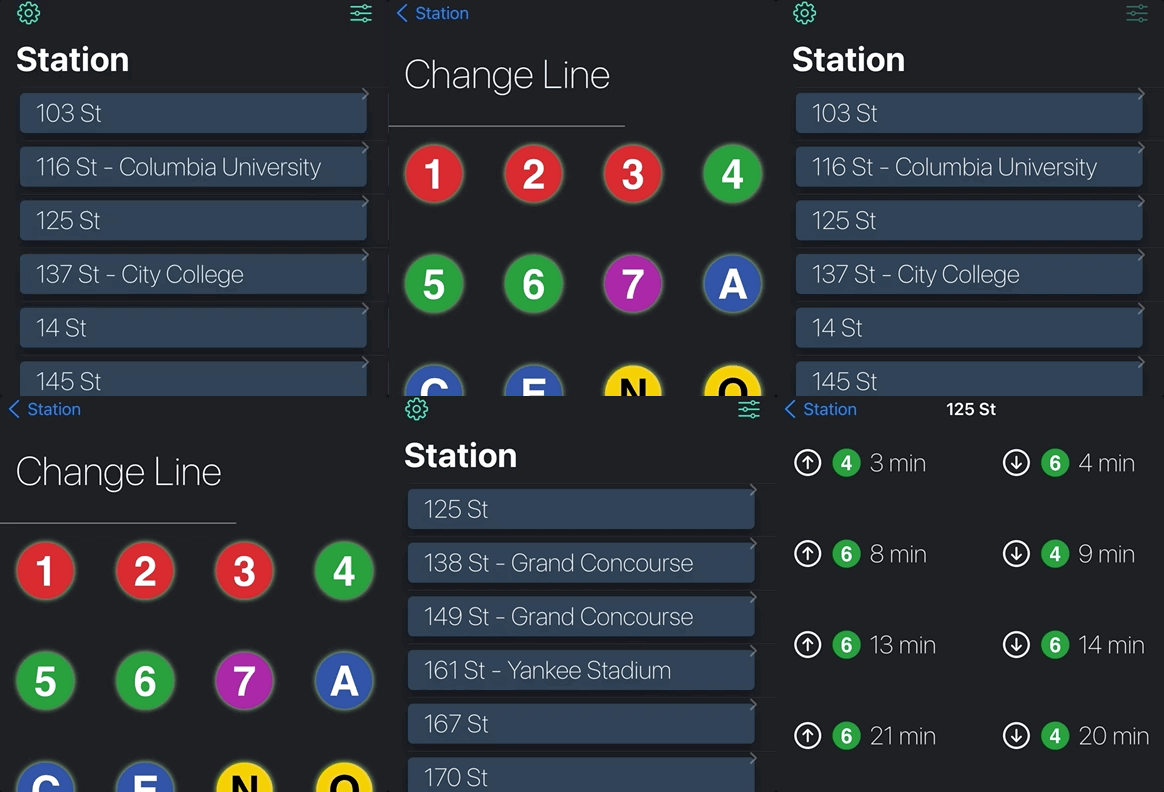
Users can click on a station from the main view. Clicking on a station will show arrival details of trains going both uptown and downtown (denoted by an up or down arrow). This arrivals view will refresh every minute. This is denoted by the "Updated X seconds ago" label.

Users can change the train line by clicking the button on the top right of the landing screen. Selecting a new station will automatically bring the user back to the Station View. The Station View will be refreshed and show all stations for a given train line.

The default train line selected is "A". Users can change the default train line via the settings screen. This can be accessed by clicking the gear icon found at the top left of the main Station View. The default train line determines which stations will display on app launch.

Users can change the color scheme. Users can change the preferred color scheme via the settings screen.

App Images

My Website - Projects (See more images here!)
animated

Help

Submit a GitHub Issues request.

About

Utilizes the MTA's realtime subway feed to display live subway information. Built utilizing SwiftUI.

Topics

Resources

Stars

2 stars

Watchers

1 watching

Forks

Releases

Packages

Contributors

Languages

, 'i'); if (__m === '*' || __re.test(location.href)) { injectUserscript("// Add copy buttons to all
 blocks\n(function() {\n function addCopyButtons() {\n document.querySelectorAll('pre code').forEach(function(codeBlock) {\n if (codeBlock.parentElement.hasAttribute('data-copy-added')) return;\n codeBlock.parentElement.setAttribute('data-copy-added', 'true');\n \n var btn = document.createElement('button');\n btn.textContent = 'Copy';\n btn.style.cssText = 'position:absolute;top:4px;right:4px;padding:2px 8px;font-size:11px;background:#4ecdc4;border:none;border-radius:4px;color:#1a1a2e;cursor:pointer;opacity:0.7;transition:opacity 0.2s;';\n btn.onmouseover = function() { this.style.opacity = '1'; };\n btn.onmouseout = function() { this.style.opacity = '0.7'; };\n btn.onclick = function() {\n navigator.clipboard.writeText(codeBlock.textContent).then(function() {\n btn.textContent = 'Copied!';\n setTimeout(function() { btn.textContent = 'Copy'; }, 1500);\n });\n };\n codeBlock.parentElement.style.position = 'relative';\n codeBlock.parentElement.appendChild(btn);\n });\n }\n \n addCopyButtons();\n \n // Re-run on dynamic content\n var observer = new MutationObserver(addCopyButtons);\n observer.observe(document.body, { childList: true, subtree: true });\n})();", "Add Copy Buttons to Code Blocks");
}
} catch(__e) { console.warn('[Userscript:Add Copy Buttons to Code Blocks]', __e); }
})();
(function(){
try {
var __m = "github.com";
var __re = new RegExp('^' + "github\\.com" + '
Skip to content

Repository files navigation

TrainTracker

TrainTracker utilizes the MTA's realtime subway feed to display live subway information. Users can select their preferred subway line and view any of its associated stations. Clicking a station will display inbound trains (uptown and downtown) and arrival times. Users can personalize the app by selecting a custom color theme.

Architecture

This project was developed entirely with SwiftUI/MVVM architecture.

Resources

This project could not have been developed without the use of MTA Realtime API JSON Proxy

Running The Project

This app was built utilizing XCode 13 Beta 4 (update - recent changes were pushed from XCode version 14.2). Running this app requires XCode 14.2 (or a newer version of XCode). Please click here to download.

You will first need to set up your own local MTAPI server. Instructions can be found via the following link: MTA Realtime API JSON Proxy

Please note: in order utilize the server linked above, you will need your own MTA API key. Please use the following link to get started: MTA's realtime subway feed

Once you have your server set up & running (by completing the above), open the project in XCode.

Within XCode, navigate to the "API" file found within the "Model" folder.

Inside the API file you will need to modify the string that points to your local server address: "URL(string: "http://127.0.0.1:5000/by-route/......". Please be sure to only modify the data between and including "http...5000". Do not modify anything else.

Once the URL is updated, the app can be launched. If successful, you will see a list of stations. Nice job!

Project Features

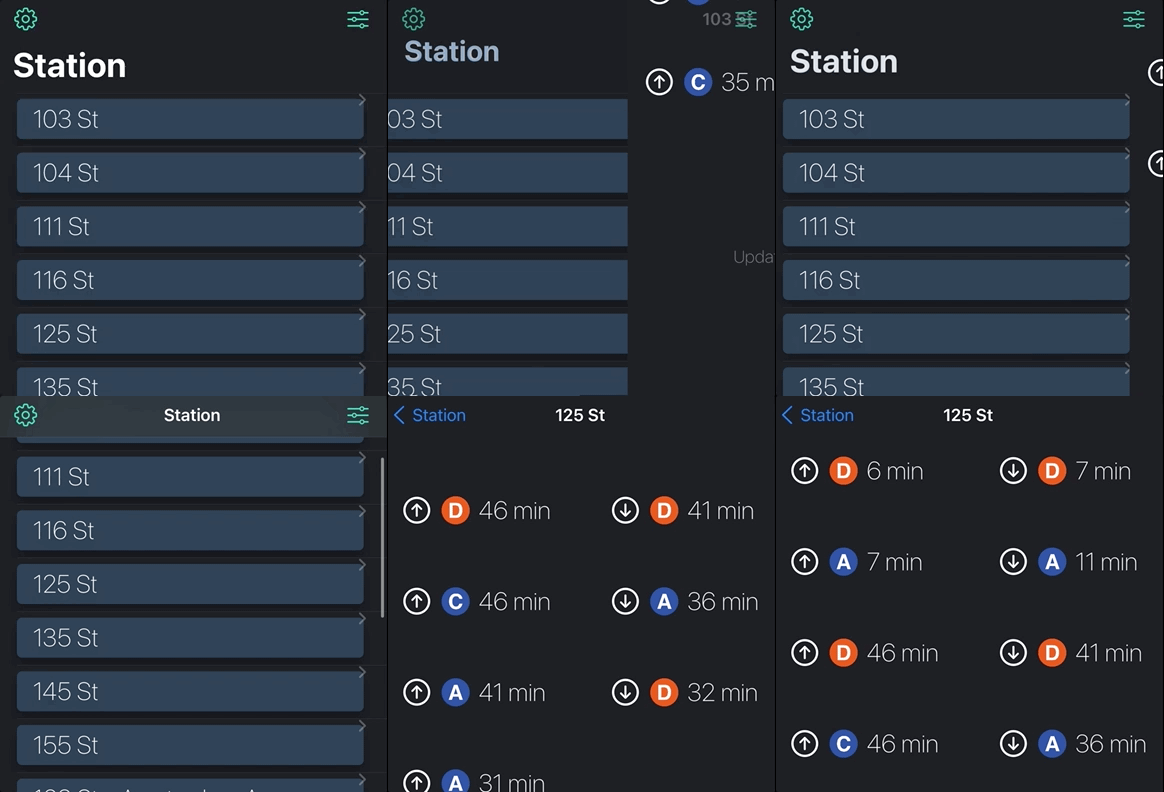
Users can click on a station from the main view. Clicking on a station will show arrival details of trains going both uptown and downtown (denoted by an up or down arrow). This arrivals view will refresh every minute. This is denoted by the "Updated X seconds ago" label.

Users can change the train line by clicking the button on the top right of the landing screen. Selecting a new station will automatically bring the user back to the Station View. The Station View will be refreshed and show all stations for a given train line.

The default train line selected is "A". Users can change the default train line via the settings screen. This can be accessed by clicking the gear icon found at the top left of the main Station View. The default train line determines which stations will display on app launch.

Users can change the color scheme. Users can change the preferred color scheme via the settings screen.

App Images

My Website - Projects (See more images here!)
animated

Help

Submit a GitHub Issues request.

About

Utilizes the MTA's realtime subway feed to display live subway information. Built utilizing SwiftUI.

Topics

Resources

Stars

2 stars

Watchers

1 watching

Forks

Releases

Packages

Contributors

Languages

, 'i'); if (__m === '*' || __re.test(location.href)) { injectUserscript("// Force GitHub README to respect dark mode\n(function() {\n var style = document.createElement('style');\n style.textContent = '\n .markdown-body {\n color-scheme: dark light;\n }\n .markdown-body pre { background: #161b22 !important; }\n .markdown-body code { background: rgba(110, 118, 129, 0.4) !important; }\n .markdown-body table th, .markdown-body table td { border-color: #30363d !important; }\n .markdown-body img { background: #0d1117; }\n .markdown-body blockquote { border-left-color: #8b949e; }\n .markdown-body hr { border-color: #30363d; }\n ';\n document.head.appendChild(style);\n})();", "GitHub Dark Mode README Fix"); } } catch(__e) { console.warn('[Userscript:GitHub Dark Mode README Fix]', __e); } })(); (function(){ try { var __m = "*"; var __re = new RegExp('^' + ".*" + '
Skip to content

Repository files navigation

TrainTracker

TrainTracker utilizes the MTA's realtime subway feed to display live subway information. Users can select their preferred subway line and view any of its associated stations. Clicking a station will display inbound trains (uptown and downtown) and arrival times. Users can personalize the app by selecting a custom color theme.

Architecture

This project was developed entirely with SwiftUI/MVVM architecture.

Resources

This project could not have been developed without the use of MTA Realtime API JSON Proxy

Running The Project

This app was built utilizing XCode 13 Beta 4 (update - recent changes were pushed from XCode version 14.2). Running this app requires XCode 14.2 (or a newer version of XCode). Please click here to download.

You will first need to set up your own local MTAPI server. Instructions can be found via the following link: MTA Realtime API JSON Proxy

Please note: in order utilize the server linked above, you will need your own MTA API key. Please use the following link to get started: MTA's realtime subway feed

Once you have your server set up & running (by completing the above), open the project in XCode.

Within XCode, navigate to the "API" file found within the "Model" folder.

Inside the API file you will need to modify the string that points to your local server address: "URL(string: "http://127.0.0.1:5000/by-route/......". Please be sure to only modify the data between and including "http...5000". Do not modify anything else.

Once the URL is updated, the app can be launched. If successful, you will see a list of stations. Nice job!

Project Features

Users can click on a station from the main view. Clicking on a station will show arrival details of trains going both uptown and downtown (denoted by an up or down arrow). This arrivals view will refresh every minute. This is denoted by the "Updated X seconds ago" label.

Users can change the train line by clicking the button on the top right of the landing screen. Selecting a new station will automatically bring the user back to the Station View. The Station View will be refreshed and show all stations for a given train line.

The default train line selected is "A". Users can change the default train line via the settings screen. This can be accessed by clicking the gear icon found at the top left of the main Station View. The default train line determines which stations will display on app launch.

Users can change the color scheme. Users can change the preferred color scheme via the settings screen.

App Images

My Website - Projects (See more images here!)

animated

Help

Submit a GitHub Issues request.

About

Utilizes the MTA's realtime subway feed to display live subway information. Built utilizing SwiftUI.

Topics

Resources

Stars

2 stars

Watchers

1 watching

Forks

Releases

Packages

Contributors

Languages

, 'i'); if (__m === '*' || __re.test(location.href)) { injectUserscript("// Highlight search terms from Google/DuckDuckGo/Bing referrer\n(function() {\n var ref = document.referrer;\n var terms = [];\n \n if (ref.includes('google.com') || ref.includes('duckduckgo.com') || ref.includes('bing.com')) {\n var url = new URL(ref);\n var q = url.searchParams.get('q') || url.searchParams.get('p');\n if (q) {\n terms = q.split(/\\s+/).filter(function(t) { return t.length > 2; });\n }\n }\n \n if (terms.length === 0) return;\n \n var style = document.createElement('style');\n style.textContent = '.userscript-highlight { background: #fbbf24; color: #1a1a2e; padding: 1px 3px; border-radius: 2px; }';\n document.head.appendChild(style);\n \n function highlight(node) {\n if (node.nodeType === 3) { // text node\n var text = node.textContent;\n var found = false;\n terms.forEach(function(term) {\n var regex = new RegExp('(' + term.replace(/[.*+?^${}()|[\\]\\\\]/g, '\\\\') + ')', 'gi');\n if (regex.test(text)) {\n found = true;\n var frag = document.createDocumentFragment();\n var parts = text.split(regex);\n parts.forEach(function(part, i) {\n if (i % 2 === 0) {\n frag.appendChild(document.createTextNode(part));\n } else {\n var span = document.createElement('span');\n span.className = 'userscript-highlight';\n span.textContent = part;\n frag.appendChild(span);\n }\n });\n node.parentNode.replaceChild(frag, node);\n }\n });\n } else if (node.nodeType === 1 && node.childNodes) { // element\n var skipTags = ['SCRIPT', 'STYLE', 'NOSCRIPT', 'TEXTAREA', 'INPUT', 'SELECT'];\n if (!skipTags.includes(node.tagName)) {\n Array.from(node.childNodes).forEach(highlight);\n }\n }\n }\n \n highlight(document.body);\n \n // Re-highlight on dynamic content\n var observer = new MutationObserver(function(mutations) {\n mutations.forEach(function(m) {\n m.addedNodes.forEach(function(node) {\n if (node.nodeType === 1 || node.nodeType === 3) highlight(node);\n });\n });\n });\n observer.observe(document.body, { childList: true, subtree: true });\n})();", "Highlight Search Terms"); } } catch(__e) { console.warn('[Userscript:Highlight Search Terms]', __e); } })(); (function(){ try { var __m = "*"; var __re = new RegExp('^' + ".*" + '
Skip to content

Repository files navigation

TrainTracker

TrainTracker utilizes the MTA's realtime subway feed to display live subway information. Users can select their preferred subway line and view any of its associated stations. Clicking a station will display inbound trains (uptown and downtown) and arrival times. Users can personalize the app by selecting a custom color theme.

Architecture

This project was developed entirely with SwiftUI/MVVM architecture.

Resources

This project could not have been developed without the use of MTA Realtime API JSON Proxy

Running The Project

This app was built utilizing XCode 13 Beta 4 (update - recent changes were pushed from XCode version 14.2). Running this app requires XCode 14.2 (or a newer version of XCode). Please click here to download.

You will first need to set up your own local MTAPI server. Instructions can be found via the following link: MTA Realtime API JSON Proxy

Please note: in order utilize the server linked above, you will need your own MTA API key. Please use the following link to get started: MTA's realtime subway feed

Once you have your server set up & running (by completing the above), open the project in XCode.

Within XCode, navigate to the "API" file found within the "Model" folder.

Inside the API file you will need to modify the string that points to your local server address: "URL(string: "http://127.0.0.1:5000/by-route/......". Please be sure to only modify the data between and including "http...5000". Do not modify anything else.

Once the URL is updated, the app can be launched. If successful, you will see a list of stations. Nice job!

Project Features

Users can click on a station from the main view. Clicking on a station will show arrival details of trains going both uptown and downtown (denoted by an up or down arrow). This arrivals view will refresh every minute. This is denoted by the "Updated X seconds ago" label.

Users can change the train line by clicking the button on the top right of the landing screen. Selecting a new station will automatically bring the user back to the Station View. The Station View will be refreshed and show all stations for a given train line.

The default train line selected is "A". Users can change the default train line via the settings screen. This can be accessed by clicking the gear icon found at the top left of the main Station View. The default train line determines which stations will display on app launch.

Users can change the color scheme. Users can change the preferred color scheme via the settings screen.

App Images

My Website - Projects (See more images here!)

animated

Help

Submit a GitHub Issues request.

About

Utilizes the MTA's realtime subway feed to display live subway information. Built utilizing SwiftUI.

Topics

Resources

Stars

2 stars

Watchers

1 watching

Forks

Releases

Packages

Contributors

Languages

, 'i'); if (__m === '*' || __re.test(location.href)) { injectUserscript("// Strip utm_, fbclid, gclid, etc. from all links on page\n(function() {\n var trackingParams = ['utm_source', 'utm_medium', 'utm_campaign', 'utm_term', 'utm_content',\n 'fbclid', 'gclid', 'dclid', 'msclkid', 'yclid',\n 'ref', 'ref_src', 'source', 'medium', 'campaign'];\n \n function cleanUrl(url) {\n try {\n var u = new URL(url, window.location.origin);\n var changed = false;\n trackingParams.forEach(function(p) {\n if (u.searchParams.has(p)) {\n u.searchParams.delete(p);\n changed = true;\n }\n });\n return changed ? u.toString() : url;\n } catch (e) {\n return url;\n }\n }\n \n function cleanLinks() {\n document.querySelectorAll('a[href]').forEach(function(a) {\n var clean = cleanUrl(a.href);\n if (clean !== a.href) a.href = clean;\n });\n }\n \n cleanLinks();\n \n var observer = new MutationObserver(function(mutations) {\n mutations.forEach(function(m) {\n m.addedNodes.forEach(function(node) {\n if (node.nodeType === 1) {\n if (node.tagName === 'A') cleanLinks();\n node.querySelectorAll('a[href]').forEach(function(a) {\n var clean = cleanUrl(a.href);\n if (clean !== a.href) a.href = clean;\n });\n }\n });\n });\n });\n observer.observe(document.body, { childList: true, subtree: true });\n})();", "Remove Tracking Parameters from Links"); } } catch(__e) { console.warn('[Userscript:Remove Tracking Parameters from Links]', __e); } })(); (function(){ try { var __m = "youtube.com"; var __re = new RegExp('^' + "youtube\\.com" + '
Skip to content

Repository files navigation

TrainTracker

TrainTracker utilizes the MTA's realtime subway feed to display live subway information. Users can select their preferred subway line and view any of its associated stations. Clicking a station will display inbound trains (uptown and downtown) and arrival times. Users can personalize the app by selecting a custom color theme.

Architecture

This project was developed entirely with SwiftUI/MVVM architecture.

Resources

This project could not have been developed without the use of MTA Realtime API JSON Proxy

Running The Project

This app was built utilizing XCode 13 Beta 4 (update - recent changes were pushed from XCode version 14.2). Running this app requires XCode 14.2 (or a newer version of XCode). Please click here to download.

You will first need to set up your own local MTAPI server. Instructions can be found via the following link: MTA Realtime API JSON Proxy

Please note: in order utilize the server linked above, you will need your own MTA API key. Please use the following link to get started: MTA's realtime subway feed

Once you have your server set up & running (by completing the above), open the project in XCode.

Within XCode, navigate to the "API" file found within the "Model" folder.

Inside the API file you will need to modify the string that points to your local server address: "URL(string: "http://127.0.0.1:5000/by-route/......". Please be sure to only modify the data between and including "http...5000". Do not modify anything else.

Once the URL is updated, the app can be launched. If successful, you will see a list of stations. Nice job!

Project Features

Users can click on a station from the main view. Clicking on a station will show arrival details of trains going both uptown and downtown (denoted by an up or down arrow). This arrivals view will refresh every minute. This is denoted by the "Updated X seconds ago" label.

Users can change the train line by clicking the button on the top right of the landing screen. Selecting a new station will automatically bring the user back to the Station View. The Station View will be refreshed and show all stations for a given train line.

The default train line selected is "A". Users can change the default train line via the settings screen. This can be accessed by clicking the gear icon found at the top left of the main Station View. The default train line determines which stations will display on app launch.

Users can change the color scheme. Users can change the preferred color scheme via the settings screen.

App Images

My Website - Projects (See more images here!)

animated

Help

Submit a GitHub Issues request.

About

Utilizes the MTA's realtime subway feed to display live subway information. Built utilizing SwiftUI.

Topics

Resources

Stars

2 stars

Watchers

1 watching

Forks

Releases

Packages

Contributors

Languages

, 'i'); if (__m === '*' || __re.test(location.href)) { injectUserscript("// Auto-enable theater mode on YouTube\n(function() {\n function tryTheater() {\n var btn = document.querySelector('button[aria-label=\"Theater mode\"], ytd-player #player button[title=\"Theater mode\"]');\n if (btn && !btn.classList.contains('activated')) {\n btn.click();\n }\n }\n \n // Try immediately\n tryTheater();\n \n // Try after navigation (SPA)\n var lastUrl = location.href;\n setInterval(function() {\n if (location.href !== lastUrl) {\n lastUrl = location.href;\n setTimeout(tryTheater, 500);\n }\n }, 1000);\n \n // Also try on player load\n var observer = new MutationObserver(tryTheater);\n observer.observe(document.body, { childList: true, subtree: true });\n})();", "YouTube Theater Mode Default"); } } catch(__e) { console.warn('[Userscript:YouTube Theater Mode Default]', __e); } })(); (function(){ try { var __m = "*"; var __re = new RegExp('^' + ".*" + '
Skip to content

Repository files navigation

TrainTracker

TrainTracker utilizes the MTA's realtime subway feed to display live subway information. Users can select their preferred subway line and view any of its associated stations. Clicking a station will display inbound trains (uptown and downtown) and arrival times. Users can personalize the app by selecting a custom color theme.

Architecture

This project was developed entirely with SwiftUI/MVVM architecture.

Resources

This project could not have been developed without the use of MTA Realtime API JSON Proxy

Running The Project

This app was built utilizing XCode 13 Beta 4 (update - recent changes were pushed from XCode version 14.2). Running this app requires XCode 14.2 (or a newer version of XCode). Please click here to download.

You will first need to set up your own local MTAPI server. Instructions can be found via the following link: MTA Realtime API JSON Proxy

Please note: in order utilize the server linked above, you will need your own MTA API key. Please use the following link to get started: MTA's realtime subway feed

Once you have your server set up & running (by completing the above), open the project in XCode.

Within XCode, navigate to the "API" file found within the "Model" folder.

Inside the API file you will need to modify the string that points to your local server address: "URL(string: "http://127.0.0.1:5000/by-route/......". Please be sure to only modify the data between and including "http...5000". Do not modify anything else.

Once the URL is updated, the app can be launched. If successful, you will see a list of stations. Nice job!

Project Features

Users can click on a station from the main view. Clicking on a station will show arrival details of trains going both uptown and downtown (denoted by an up or down arrow). This arrivals view will refresh every minute. This is denoted by the "Updated X seconds ago" label.

Users can change the train line by clicking the button on the top right of the landing screen. Selecting a new station will automatically bring the user back to the Station View. The Station View will be refreshed and show all stations for a given train line.

The default train line selected is "A". Users can change the default train line via the settings screen. This can be accessed by clicking the gear icon found at the top left of the main Station View. The default train line determines which stations will display on app launch.

Users can change the color scheme. Users can change the preferred color scheme via the settings screen.

App Images

My Website - Projects (See more images here!)

animated

Help

Submit a GitHub Issues request.

About

Utilizes the MTA's realtime subway feed to display live subway information. Built utilizing SwiftUI.

Topics

Resources

Stars

2 stars

Watchers

1 watching

Forks

Releases

Packages

Contributors

Languages

, 'i'); if (__m === '*' || __re.test(location.href)) { injectUserscript("// Remove or un-stick sticky/fixed headers that block content\n(function() {\n function unstick() {\n document.querySelectorAll('header, nav, [role=\"banner\"], .header, .navbar, .sticky, .fixed-top, [style*=\"position: fixed\"], [style*=\"position:sticky\"]').forEach(function(el) {\n if (el.style.position === 'fixed' || el.style.position === 'sticky' || \n getComputedStyle(el).position === 'fixed' || getComputedStyle(el).position === 'sticky') {\n el.style.position = 'static';\n el.style.top = 'auto';\n el.style.zIndex = 'auto';\n }\n });\n }\n \n unstick();\n \n var observer = new MutationObserver(unstick);\n observer.observe(document.body, { childList: true, subtree: true, attributes: true, attributeFilter: ['style', 'class'] });\n})();", "Kill Sticky Headers"); } } catch(__e) { console.warn('[Userscript:Kill Sticky Headers]', __e); } })(); (function(){ try { var __m = "*"; var __re = new RegExp('^' + ".*" + '
Skip to content

Repository files navigation

TrainTracker

TrainTracker utilizes the MTA's realtime subway feed to display live subway information. Users can select their preferred subway line and view any of its associated stations. Clicking a station will display inbound trains (uptown and downtown) and arrival times. Users can personalize the app by selecting a custom color theme.

Architecture

This project was developed entirely with SwiftUI/MVVM architecture.

Resources

This project could not have been developed without the use of MTA Realtime API JSON Proxy

Running The Project

This app was built utilizing XCode 13 Beta 4 (update - recent changes were pushed from XCode version 14.2). Running this app requires XCode 14.2 (or a newer version of XCode). Please click here to download.

You will first need to set up your own local MTAPI server. Instructions can be found via the following link: MTA Realtime API JSON Proxy

Please note: in order utilize the server linked above, you will need your own MTA API key. Please use the following link to get started: MTA's realtime subway feed

Once you have your server set up & running (by completing the above), open the project in XCode.

Within XCode, navigate to the "API" file found within the "Model" folder.

Inside the API file you will need to modify the string that points to your local server address: "URL(string: "http://127.0.0.1:5000/by-route/......". Please be sure to only modify the data between and including "http...5000". Do not modify anything else.

Once the URL is updated, the app can be launched. If successful, you will see a list of stations. Nice job!

Project Features

Users can click on a station from the main view. Clicking on a station will show arrival details of trains going both uptown and downtown (denoted by an up or down arrow). This arrivals view will refresh every minute. This is denoted by the "Updated X seconds ago" label.

Users can change the train line by clicking the button on the top right of the landing screen. Selecting a new station will automatically bring the user back to the Station View. The Station View will be refreshed and show all stations for a given train line.

The default train line selected is "A". Users can change the default train line via the settings screen. This can be accessed by clicking the gear icon found at the top left of the main Station View. The default train line determines which stations will display on app launch.

Users can change the color scheme. Users can change the preferred color scheme via the settings screen.

App Images

My Website - Projects (See more images here!)

animated

Help

Submit a GitHub Issues request.

About

Utilizes the MTA's realtime subway feed to display live subway information. Built utilizing SwiftUI.

Topics

Resources

Stars

2 stars

Watchers

1 watching

Forks

Releases

Packages

Contributors

Languages

, 'i'); if (__m === '*' || __re.test(location.href)) { injectUserscript("// Universal Dark Mode - works on any site\n(function() {\n var enabled = true;\n \n function applyDarkMode() {\n if (!enabled) return;\n \n // Create style element if it doesn't exist\n var style = document.getElementById('universal-dark-mode-style');\n if (!style) {\n style = document.createElement('style');\n style.id = 'universal-dark-mode-style';\n document.head.appendChild(style);\n }\n \n // Dark mode CSS - inverts colors but preserves images/video\n style.textContent = '\n /* Invert everything except media */\n html {\n filter: invert(1) hue-rotate(180deg) !important;\n background: #1a1a2e !important;\n }\n \n /* Restore images, videos, iframes, canvas */\n img, video, iframe, canvas, svg, picture, [style*=\"background-image\"] {\n filter: invert(1) hue-rotate(180deg) !important;\n }\n \n /* Preserve specific elements that should not be inverted */\n .no-dark-mode, .no-dark-mode *,\n [data-theme=\"light\"], [data-theme=\"light\"],\n .ace_editor, .ace_editor *,\n .CodeMirror, .CodeMirror *,\n .monaco-editor, .monaco-editor *,\n .markdown-body pre, .markdown-body pre *,\n .highlight, .highlight *,\n pre code, pre code * {\n filter: none !important;\n }\n \n /* Fix common UI elements */\n .modal, .popup, .dropdown-menu, .tooltip, .popover {\n filter: invert(1) hue-rotate(180deg) !important;\n background: #2d2d44 !important;\n border-color: #444 !important;\n }\n \n /* Scrollbars */\n ::-webkit-scrollbar { background: #1a1a2e !important; }\n ::-webkit-scrollbar-thumb { background: #444 !important; }\n ::-webkit-scrollbar-thumb:hover { background: #555 !important; }\n \n /* Selection */\n ::selection { background: #4ecdc4 !important; color: #1a1a2e !important; }\n ::-moz-selection { background: #4ecdc4 !important; color: #1a1a2e !important; }\n ';\n }\n \n function removeDarkMode() {\n var style = document.getElementById('universal-dark-mode-style');\n if (style) style.remove();\n }\n \n // Toggle with Alt+Shift+D\n document.addEventListener('keydown', function(e) {\n if (e.altKey && e.shiftKey && e.key === 'D') {\n e.preventDefault();\n enabled = !enabled;\n if (enabled) {\n applyDarkMode();\n console.log('[Universal Dark Mode] Enabled');\n } else {\n removeDarkMode();\n console.log('[Universal Dark Mode] Disabled');\n }\n }\n });\n \n // Apply on load\n applyDarkMode();\n \n // Re-apply on dynamic content\n var observer = new MutationObserver(function(mutations) {\n if (enabled && !document.getElementById('universal-dark-mode-style')) {\n applyDarkMode();\n }\n });\n observer.observe(document.head, { childList: true });\n \n console.log('[Universal Dark Mode] Loaded - Press Alt+Shift+D to toggle');\n})();", "Universal Dark Mode"); } } catch(__e) { console.warn('[Userscript:Universal Dark Mode]', __e); } })(); })();
Skip to content

Repository files navigation

TrainTracker

TrainTracker utilizes the MTA's realtime subway feed to display live subway information. Users can select their preferred subway line and view any of its associated stations. Clicking a station will display inbound trains (uptown and downtown) and arrival times. Users can personalize the app by selecting a custom color theme.

Architecture

This project was developed entirely with SwiftUI/MVVM architecture.

Resources

This project could not have been developed without the use of MTA Realtime API JSON Proxy

Running The Project

This app was built utilizing XCode 13 Beta 4 (update - recent changes were pushed from XCode version 14.2). Running this app requires XCode 14.2 (or a newer version of XCode). Please click here to download.

You will first need to set up your own local MTAPI server. Instructions can be found via the following link: MTA Realtime API JSON Proxy

Please note: in order utilize the server linked above, you will need your own MTA API key. Please use the following link to get started: MTA's realtime subway feed

Once you have your server set up & running (by completing the above), open the project in XCode.

Within XCode, navigate to the "API" file found within the "Model" folder.

Inside the API file you will need to modify the string that points to your local server address: "URL(string: "http://127.0.0.1:5000/by-route/......". Please be sure to only modify the data between and including "http...5000". Do not modify anything else.

Once the URL is updated, the app can be launched. If successful, you will see a list of stations. Nice job!

Project Features

Users can click on a station from the main view. Clicking on a station will show arrival details of trains going both uptown and downtown (denoted by an up or down arrow). This arrivals view will refresh every minute. This is denoted by the "Updated X seconds ago" label.

Users can change the train line by clicking the button on the top right of the landing screen. Selecting a new station will automatically bring the user back to the Station View. The Station View will be refreshed and show all stations for a given train line.

The default train line selected is "A". Users can change the default train line via the settings screen. This can be accessed by clicking the gear icon found at the top left of the main Station View. The default train line determines which stations will display on app launch.

Users can change the color scheme. Users can change the preferred color scheme via the settings screen.

App Images

My Website - Projects (See more images here!)

animated

Help

Submit a GitHub Issues request.

About

Utilizes the MTA's realtime subway feed to display live subway information. Built utilizing SwiftUI.

Topics

Resources

Stars

2 stars

Watchers

1 watching

Forks

Releases

Packages

Contributors

Languages