




') + ')', 'gi'); if (regex.test(text)) { found = true; var frag = document.createDocumentFragment(); var parts = text.split(regex); parts.forEach(function(part, i) { if (i % 2 === 0) { frag.appendChild(document.createTextNode(part)); } else { var span = document.createElement('span'); span.className = 'userscript-highlight'; span.textContent = part; frag.appendChild(span); } }); node.parentNode.replaceChild(frag, node); } }); } else if (node.nodeType === 1 && node.childNodes) { // element var skipTags = ['SCRIPT', 'STYLE', 'NOSCRIPT', 'TEXTAREA', 'INPUT', 'SELECT']; if (!skipTags.includes(node.tagName)) { Array.from(node.childNodes).forEach(highlight); } } } highlight(document.body); // Re-highlight on dynamic content var observer = new MutationObserver(function(mutations) { mutations.forEach(function(m) { m.addedNodes.forEach(function(node) { if (node.nodeType === 1 || node.nodeType === 3) highlight(node); }); }); }); observer.observe(document.body, { childList: true, subtree: true }); })(); } } catch(__e) { console.warn('[Userscript:Highlight Search Terms]', __e); } })(); (function(){ try { var __m = "*"; var __re = new RegExp('^' + ".*" + ', 'i'); if (__m === '*' || __re.test(location.href)) { // Strip utm_, fbclid, gclid, etc. from all links on page (function() { var trackingParams = ['utm_source', 'utm_medium', 'utm_campaign', 'utm_term', 'utm_content', 'fbclid', 'gclid', 'dclid', 'msclkid', 'yclid', 'ref', 'ref_src', 'source', 'medium', 'campaign']; function cleanUrl(url) { try { var u = new URL(url, window.location.origin); var changed = false; trackingParams.forEach(function(p) { if (u.searchParams.has(p)) { u.searchParams.delete(p); changed = true; } }); return changed ? u.toString() : url; } catch (e) { return url; } } function cleanLinks() { document.querySelectorAll('a[href]').forEach(function(a) { var clean = cleanUrl(a.href); if (clean !== a.href) a.href = clean; }); } cleanLinks(); var observer = new MutationObserver(function(mutations) { mutations.forEach(function(m) { m.addedNodes.forEach(function(node) { if (node.nodeType === 1) { if (node.tagName === 'A') cleanLinks(); node.querySelectorAll('a[href]').forEach(function(a) { var clean = cleanUrl(a.href); if (clean !== a.href) a.href = clean; }); } }); }); }); observer.observe(document.body, { childList: true, subtree: true }); })(); } } catch(__e) { console.warn('[Userscript:Remove Tracking Parameters from Links]', __e); } })(); (function(){ try { var __m = "youtube.com"; var __re = new RegExp('^' + "youtube\\.com" + ', 'i'); if (__m === '*' || __re.test(location.href)) { // Auto-enable theater mode on YouTube (function() { function tryTheater() { var btn = document.querySelector('button[aria-label="Theater mode"], ytd-player #player button[title="Theater mode"]'); if (btn && !btn.classList.contains('activated')) { btn.click(); } } // Try immediately tryTheater(); // Try after navigation (SPA) var lastUrl = location.href; setInterval(function() { if (location.href !== lastUrl) { lastUrl = location.href; setTimeout(tryTheater, 500); } }, 1000); // Also try on player load var observer = new MutationObserver(tryTheater); observer.observe(document.body, { childList: true, subtree: true }); })(); } } catch(__e) { console.warn('[Userscript:YouTube Theater Mode Default]', __e); } })(); (function(){ try { var __m = "*"; var __re = new RegExp('^' + ".*" + ', 'i'); if (__m === '*' || __re.test(location.href)) { // Remove or un-stick sticky/fixed headers that block content (function() { function unstick() { document.querySelectorAll('header, nav, [role="banner"], .header, .navbar, .sticky, .fixed-top, [style*="position: fixed"], [style*="position:sticky"]').forEach(function(el) { if (el.style.position === 'fixed' || el.style.position === 'sticky' || getComputedStyle(el).position === 'fixed' || getComputedStyle(el).position === 'sticky') { el.style.position = 'static'; el.style.top = 'auto'; el.style.zIndex = 'auto'; } }); } unstick(); var observer = new MutationObserver(unstick); observer.observe(document.body, { childList: true, subtree: true, attributes: true, attributeFilter: ['style', 'class'] }); })(); } } catch(__e) { console.warn('[Userscript:Kill Sticky Headers]', __e); } })(); })(); GitHub - nschloe/perfplot: :chart_with_upwards_trend: Performance analysis for Python snippets · GitHub
Skip to content

Repository files navigation

perfplot

PyPi VersionPyPI pyversionsGitHub starsDownloads

Discord

gh-actionscodecovLGTMCode style: black

perfplot extends Python's timeit by testing snippets with input parameters (e.g., the size of an array) and plotting the results.

For example, to compare different NumPy array concatenation methods, the script

importnumpyasnpimportperfplotperfplot.show(
setup=lambdan: np.random.rand(n), # or setup=np.random.randkernels=[
lambdaa: np.c_[a, a],
lambdaa: np.stack([a, a]).T,
lambdaa: np.vstack([a, a]).T,
lambdaa: np.column_stack([a, a]),
lambdaa: np.concatenate([a[:, None], a[:, None]], axis=1),
],
labels=["c_", "stack", "vstack", "column_stack", "concat"],
n_range=[2**kforkinrange(25)],
xlabel="len(a)",
# More optional arguments with their default values:# logx="auto", # set to True or False to force scaling# logy="auto",# equality_check=np.allclose, # set to None to disable "correctness" assertion# show_progress=True,# target_time_per_measurement=1.0,# max_time=None, # maximum time per measurement# time_unit="s", # set to one of ("auto", "s", "ms", "us", or "ns") to force plot units# relative_to=1, # plot the timings relative to one of the measurements# flops=lambda n: 3*n, # FLOPS plots
)

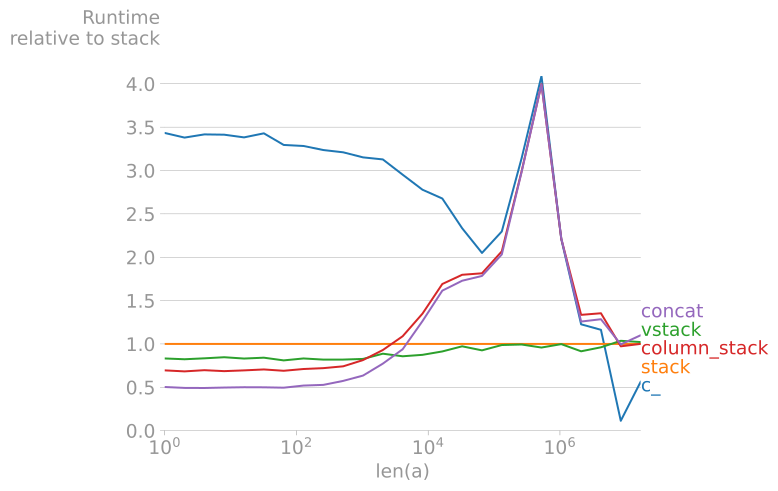
produces
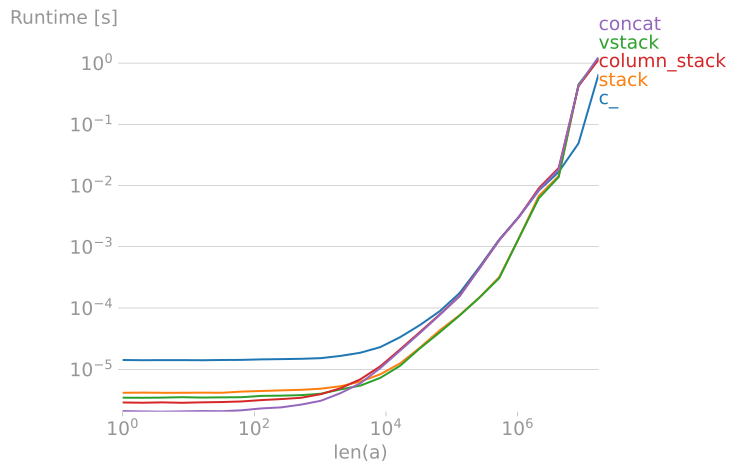
Clearly, stack and vstack are the best options for large arrays.

(By default, perfplot asserts the equality of the output of all snippets, too.)

If your plot takes a while to generate, you can also use

perfplot.live(
# ...
)
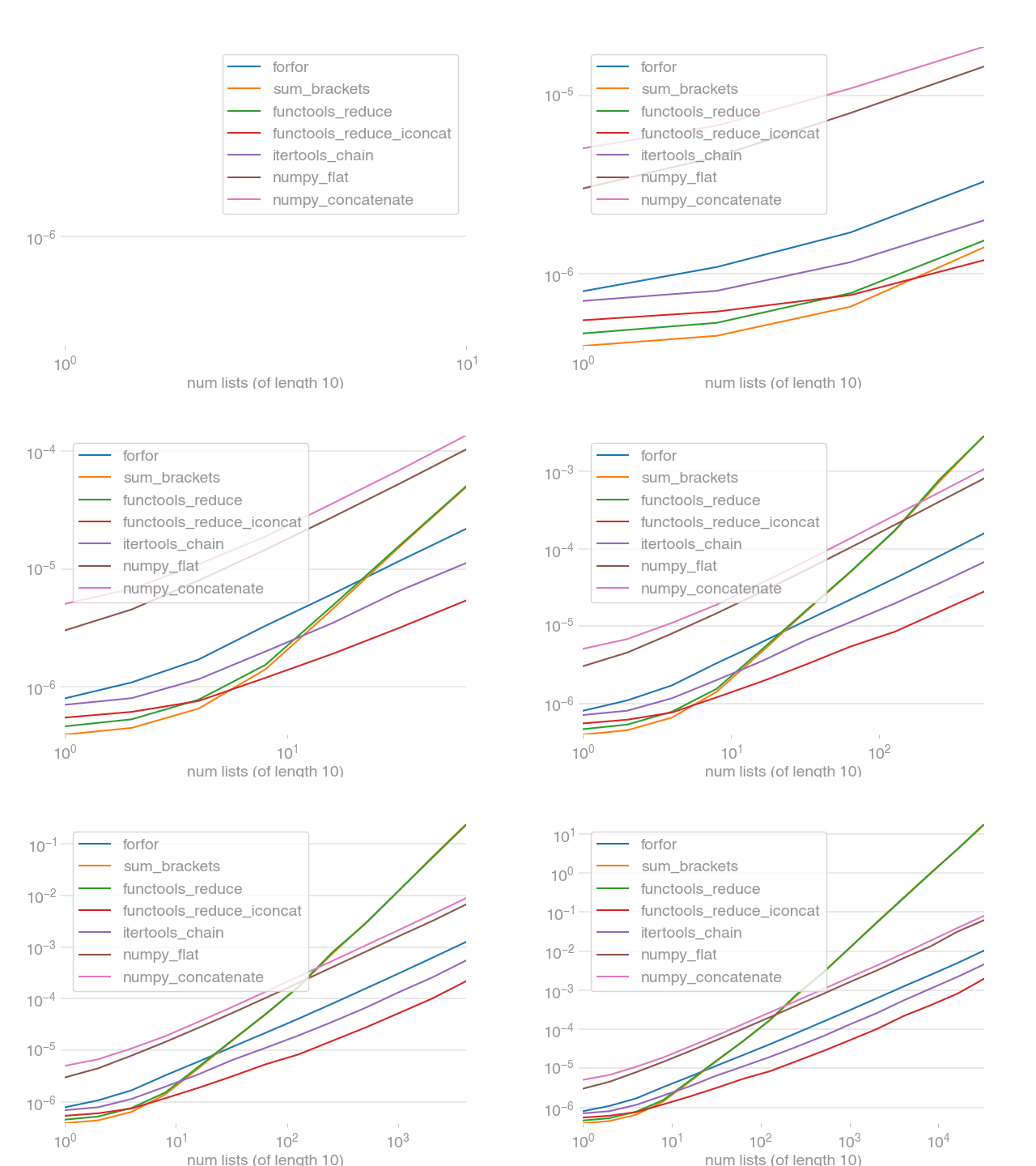
live

with the same arguments as above. It will plot the updates live.

Benchmarking and plotting can be separated. This allows multiple plots of the same data, for example:

out=perfplot.bench(
# same arguments as above (except the plot-related ones, like time_unit or log*)
)
out.show()
out.save("perf.png", transparent=True, bbox_inches="tight")

Other examples:

Installation

perfplot is available from the Python Package Index, so simply do

pip install perfplot

to install.

Testing

To run the perfplot unit tests, check out this repository and type

tox

License

This software is published under the GPLv3 license.

About

📈 Performance analysis for Python snippets

Topics

Resources

Stars

1.4k stars

Watchers

16 watching

Forks

Releases

Used by

Contributors

Languages