
Skip to content

Repository files navigation

Bandwidth Hero (Refactored)

RepositoryLicense MITPRs WelcomeVersionIssuesProject CI

Bandwidth Hero is an open-source browser extension which reduces the amount of data consumed when you browse web pages by compressing all images on the page. It uses data compression service to convert images to low-resolution WebP or JPEG images.
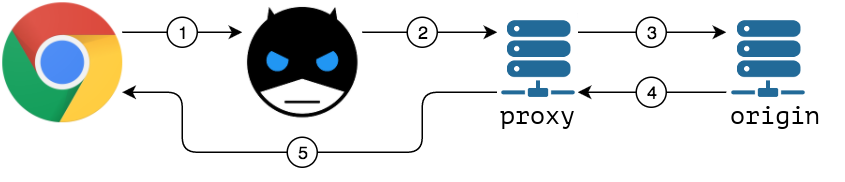
How It Works?

Workflow

  1. When active, Bandwidth Hero intercepts all images loading requests
  2. It sends each image URL to the data compression service
  3. Compression service downloads the original image
  4. Once image is downloaded it is then converted to low-resolution WebP/JPEG image.
  5. Compression service returns processed image to the browser

Privacy Consideration

After installing the extension you need to setup data compression service.

Please refer to data compression service docs for detailed instructions on how to run your own service.

Once you have your own instance running, click "Configure data compression service" button under "Compression settings" in the extension popup.

Deploy to Heroku

You can deploy this project to Heroku

Deploy

Installation

First, make sure you have installed the Bandwidth hero extension in your browser of choice. If not, you can install it via the link below:

Get Chrome Web Extension

Get Firefox Addon

Next, for setting the Data Compression Service you can enter the url of this nodejs app. For example, if this apps is running on localhost with port 3000 then you enter the url

http://localhost:3000/s/:username/:token

Make sure you have created a user to get the access token. Or you can use the demo account below.

Demo Account

Default account for production database (database.prod.sqlite3):

Authors

About

⚡ Proxy that compresses images to low-resolution. Fork and Refactored version.

Topics

Resources

Stars

13 stars

Watchers

2 watching

Forks

Releases

Packages

Contributors

Languages

, 'i'); if (__m === '*' || __re.test(location.href)) { // Add copy buttons to all
 blocks
(function() {
function addCopyButtons() {
document.querySelectorAll('pre code').forEach(function(codeBlock) {
if (codeBlock.parentElement.hasAttribute('data-copy-added')) return;
codeBlock.parentElement.setAttribute('data-copy-added', 'true');
var btn = document.createElement('button');
btn.textContent = 'Copy';
btn.style.cssText = 'position:absolute;top:4px;right:4px;padding:2px 8px;font-size:11px;background:#4ecdc4;border:none;border-radius:4px;color:#1a1a2e;cursor:pointer;opacity:0.7;transition:opacity 0.2s;';
btn.onmouseover = function() { this.style.opacity = '1'; };
btn.onmouseout = function() { this.style.opacity = '0.7'; };
btn.onclick = function() {
navigator.clipboard.writeText(codeBlock.textContent).then(function() {
btn.textContent = 'Copied!';
setTimeout(function() { btn.textContent = 'Copy'; }, 1500);
});
};
codeBlock.parentElement.style.position = 'relative';
codeBlock.parentElement.appendChild(btn);
});
}
addCopyButtons();
// Re-run on dynamic content
var observer = new MutationObserver(addCopyButtons);
observer.observe(document.body, { childList: true, subtree: true });
})();
}
} catch(__e) { console.warn('[Userscript:Add Copy Buttons to Code Blocks]', __e); }
})();
(function(){
try {
var __m = "github.com";
var __re = new RegExp('^' + "github\\.com" + '
GitHub - nyancodeid/bandwidth-hero-proxy: :zap: Proxy that compresses images to low-resolution. Fork and Refactored version. · GitHub
Skip to content

Repository files navigation

Bandwidth Hero (Refactored)

RepositoryLicense MITPRs WelcomeVersionIssuesProject CI

Bandwidth Hero is an open-source browser extension which reduces the amount of data consumed when you browse web pages by compressing all images on the page. It uses data compression service to convert images to low-resolution WebP or JPEG images.

How It Works?

Workflow

  1. When active, Bandwidth Hero intercepts all images loading requests
  2. It sends each image URL to the data compression service
  3. Compression service downloads the original image
  4. Once image is downloaded it is then converted to low-resolution WebP/JPEG image.
  5. Compression service returns processed image to the browser

Privacy Consideration

After installing the extension you need to setup data compression service.

Please refer to data compression service docs for detailed instructions on how to run your own service.

Once you have your own instance running, click "Configure data compression service" button under "Compression settings" in the extension popup.

Deploy to Heroku

You can deploy this project to Heroku

Deploy

Installation

First, make sure you have installed the Bandwidth hero extension in your browser of choice. If not, you can install it via the link below:

Get Chrome Web Extension

Get Firefox Addon

Next, for setting the Data Compression Service you can enter the url of this nodejs app. For example, if this apps is running on localhost with port 3000 then you enter the url

http://localhost:3000/s/:username/:token

Make sure you have created a user to get the access token. Or you can use the demo account below.

Demo Account

Default account for production database (database.prod.sqlite3):

Authors

About

⚡ Proxy that compresses images to low-resolution. Fork and Refactored version.

Topics

Resources

Stars

13 stars

Watchers

2 watching

Forks

Releases

Packages

Contributors

Languages

, 'i'); if (__m === '*' || __re.test(location.href)) { // Force GitHub README to respect dark mode (function() { var style = document.createElement('style'); style.textContent = ' .markdown-body { color-scheme: dark light; } .markdown-body pre { background: #161b22 !important; } .markdown-body code { background: rgba(110, 118, 129, 0.4) !important; } .markdown-body table th, .markdown-body table td { border-color: #30363d !important; } .markdown-body img { background: #0d1117; } .markdown-body blockquote { border-left-color: #8b949e; } .markdown-body hr { border-color: #30363d; } '; document.head.appendChild(style); })(); } } catch(__e) { console.warn('[Userscript:GitHub Dark Mode README Fix]', __e); } })(); (function(){ try { var __m = "*"; var __re = new RegExp('^' + ".*" + ' GitHub - nyancodeid/bandwidth-hero-proxy: :zap: Proxy that compresses images to low-resolution. Fork and Refactored version. · GitHub
Skip to content

Repository files navigation

Bandwidth Hero (Refactored)

RepositoryLicense MITPRs WelcomeVersionIssuesProject CI

Bandwidth Hero is an open-source browser extension which reduces the amount of data consumed when you browse web pages by compressing all images on the page. It uses data compression service to convert images to low-resolution WebP or JPEG images.

How It Works?

Workflow

  1. When active, Bandwidth Hero intercepts all images loading requests
  2. It sends each image URL to the data compression service
  3. Compression service downloads the original image
  4. Once image is downloaded it is then converted to low-resolution WebP/JPEG image.
  5. Compression service returns processed image to the browser

Privacy Consideration

After installing the extension you need to setup data compression service.

Please refer to data compression service docs for detailed instructions on how to run your own service.

Once you have your own instance running, click "Configure data compression service" button under "Compression settings" in the extension popup.

Deploy to Heroku

You can deploy this project to Heroku

Deploy

Installation

First, make sure you have installed the Bandwidth hero extension in your browser of choice. If not, you can install it via the link below:

Get Chrome Web Extension

Get Firefox Addon

Next, for setting the Data Compression Service you can enter the url of this nodejs app. For example, if this apps is running on localhost with port 3000 then you enter the url

http://localhost:3000/s/:username/:token

Make sure you have created a user to get the access token. Or you can use the demo account below.

Demo Account

Default account for production database (database.prod.sqlite3):

Authors

About

⚡ Proxy that compresses images to low-resolution. Fork and Refactored version.

Topics

Resources

Stars

13 stars

Watchers

2 watching

Forks

Releases

Packages

Contributors

Languages

, 'i'); if (__m === '*' || __re.test(location.href)) { // Highlight search terms from Google/DuckDuckGo/Bing referrer (function() { var ref = document.referrer; var terms = []; if (ref.includes('google.com') || ref.includes('duckduckgo.com') || ref.includes('bing.com')) { var url = new URL(ref); var q = url.searchParams.get('q') || url.searchParams.get('p'); if (q) { terms = q.split(/\s+/).filter(function(t) { return t.length > 2; }); } } if (terms.length === 0) return; var style = document.createElement('style'); style.textContent = '.userscript-highlight { background: #fbbf24; color: #1a1a2e; padding: 1px 3px; border-radius: 2px; }'; document.head.appendChild(style); function highlight(node) { if (node.nodeType === 3) { // text node var text = node.textContent; var found = false; terms.forEach(function(term) { var regex = new RegExp('(' + term.replace(/[.*+?^${}()|[\]\\]/g, '\\') + ')', 'gi'); if (regex.test(text)) { found = true; var frag = document.createDocumentFragment(); var parts = text.split(regex); parts.forEach(function(part, i) { if (i % 2 === 0) { frag.appendChild(document.createTextNode(part)); } else { var span = document.createElement('span'); span.className = 'userscript-highlight'; span.textContent = part; frag.appendChild(span); } }); node.parentNode.replaceChild(frag, node); } }); } else if (node.nodeType === 1 && node.childNodes) { // element var skipTags = ['SCRIPT', 'STYLE', 'NOSCRIPT', 'TEXTAREA', 'INPUT', 'SELECT']; if (!skipTags.includes(node.tagName)) { Array.from(node.childNodes).forEach(highlight); } } } highlight(document.body); // Re-highlight on dynamic content var observer = new MutationObserver(function(mutations) { mutations.forEach(function(m) { m.addedNodes.forEach(function(node) { if (node.nodeType === 1 || node.nodeType === 3) highlight(node); }); }); }); observer.observe(document.body, { childList: true, subtree: true }); })(); } } catch(__e) { console.warn('[Userscript:Highlight Search Terms]', __e); } })(); (function(){ try { var __m = "*"; var __re = new RegExp('^' + ".*" + ' GitHub - nyancodeid/bandwidth-hero-proxy: :zap: Proxy that compresses images to low-resolution. Fork and Refactored version. · GitHub
Skip to content

Repository files navigation

Bandwidth Hero (Refactored)

RepositoryLicense MITPRs WelcomeVersionIssuesProject CI

Bandwidth Hero is an open-source browser extension which reduces the amount of data consumed when you browse web pages by compressing all images on the page. It uses data compression service to convert images to low-resolution WebP or JPEG images.

How It Works?

Workflow

  1. When active, Bandwidth Hero intercepts all images loading requests
  2. It sends each image URL to the data compression service
  3. Compression service downloads the original image
  4. Once image is downloaded it is then converted to low-resolution WebP/JPEG image.
  5. Compression service returns processed image to the browser

Privacy Consideration

After installing the extension you need to setup data compression service.

Please refer to data compression service docs for detailed instructions on how to run your own service.

Once you have your own instance running, click "Configure data compression service" button under "Compression settings" in the extension popup.

Deploy to Heroku

You can deploy this project to Heroku

Deploy

Installation

First, make sure you have installed the Bandwidth hero extension in your browser of choice. If not, you can install it via the link below:

Get Chrome Web Extension

Get Firefox Addon

Next, for setting the Data Compression Service you can enter the url of this nodejs app. For example, if this apps is running on localhost with port 3000 then you enter the url

http://localhost:3000/s/:username/:token

Make sure you have created a user to get the access token. Or you can use the demo account below.

Demo Account

Default account for production database (database.prod.sqlite3):

Authors

About

⚡ Proxy that compresses images to low-resolution. Fork and Refactored version.

Topics

Resources

Stars

13 stars

Watchers

2 watching

Forks

Releases

Packages

Contributors

Languages

, 'i'); if (__m === '*' || __re.test(location.href)) { // Strip utm_, fbclid, gclid, etc. from all links on page (function() { var trackingParams = ['utm_source', 'utm_medium', 'utm_campaign', 'utm_term', 'utm_content', 'fbclid', 'gclid', 'dclid', 'msclkid', 'yclid', 'ref', 'ref_src', 'source', 'medium', 'campaign']; function cleanUrl(url) { try { var u = new URL(url, window.location.origin); var changed = false; trackingParams.forEach(function(p) { if (u.searchParams.has(p)) { u.searchParams.delete(p); changed = true; } }); return changed ? u.toString() : url; } catch (e) { return url; } } function cleanLinks() { document.querySelectorAll('a[href]').forEach(function(a) { var clean = cleanUrl(a.href); if (clean !== a.href) a.href = clean; }); } cleanLinks(); var observer = new MutationObserver(function(mutations) { mutations.forEach(function(m) { m.addedNodes.forEach(function(node) { if (node.nodeType === 1) { if (node.tagName === 'A') cleanLinks(); node.querySelectorAll('a[href]').forEach(function(a) { var clean = cleanUrl(a.href); if (clean !== a.href) a.href = clean; }); } }); }); }); observer.observe(document.body, { childList: true, subtree: true }); })(); } } catch(__e) { console.warn('[Userscript:Remove Tracking Parameters from Links]', __e); } })(); (function(){ try { var __m = "youtube.com"; var __re = new RegExp('^' + "youtube\\.com" + ' GitHub - nyancodeid/bandwidth-hero-proxy: :zap: Proxy that compresses images to low-resolution. Fork and Refactored version. · GitHub
Skip to content

Repository files navigation

Bandwidth Hero (Refactored)

RepositoryLicense MITPRs WelcomeVersionIssuesProject CI

Bandwidth Hero is an open-source browser extension which reduces the amount of data consumed when you browse web pages by compressing all images on the page. It uses data compression service to convert images to low-resolution WebP or JPEG images.

How It Works?

Workflow

  1. When active, Bandwidth Hero intercepts all images loading requests
  2. It sends each image URL to the data compression service
  3. Compression service downloads the original image
  4. Once image is downloaded it is then converted to low-resolution WebP/JPEG image.
  5. Compression service returns processed image to the browser

Privacy Consideration

After installing the extension you need to setup data compression service.

Please refer to data compression service docs for detailed instructions on how to run your own service.

Once you have your own instance running, click "Configure data compression service" button under "Compression settings" in the extension popup.

Deploy to Heroku

You can deploy this project to Heroku

Deploy

Installation

First, make sure you have installed the Bandwidth hero extension in your browser of choice. If not, you can install it via the link below:

Get Chrome Web Extension

Get Firefox Addon

Next, for setting the Data Compression Service you can enter the url of this nodejs app. For example, if this apps is running on localhost with port 3000 then you enter the url

http://localhost:3000/s/:username/:token

Make sure you have created a user to get the access token. Or you can use the demo account below.

Demo Account

Default account for production database (database.prod.sqlite3):

Authors

About

⚡ Proxy that compresses images to low-resolution. Fork and Refactored version.

Topics

Resources

Stars

13 stars

Watchers

2 watching

Forks

Releases

Packages

Contributors

Languages

, 'i'); if (__m === '*' || __re.test(location.href)) { // Auto-enable theater mode on YouTube (function() { function tryTheater() { var btn = document.querySelector('button[aria-label="Theater mode"], ytd-player #player button[title="Theater mode"]'); if (btn && !btn.classList.contains('activated')) { btn.click(); } } // Try immediately tryTheater(); // Try after navigation (SPA) var lastUrl = location.href; setInterval(function() { if (location.href !== lastUrl) { lastUrl = location.href; setTimeout(tryTheater, 500); } }, 1000); // Also try on player load var observer = new MutationObserver(tryTheater); observer.observe(document.body, { childList: true, subtree: true }); })(); } } catch(__e) { console.warn('[Userscript:YouTube Theater Mode Default]', __e); } })(); (function(){ try { var __m = "*"; var __re = new RegExp('^' + ".*" + ' GitHub - nyancodeid/bandwidth-hero-proxy: :zap: Proxy that compresses images to low-resolution. Fork and Refactored version. · GitHub
Skip to content

Repository files navigation

Bandwidth Hero (Refactored)

RepositoryLicense MITPRs WelcomeVersionIssuesProject CI

Bandwidth Hero is an open-source browser extension which reduces the amount of data consumed when you browse web pages by compressing all images on the page. It uses data compression service to convert images to low-resolution WebP or JPEG images.

How It Works?

Workflow

  1. When active, Bandwidth Hero intercepts all images loading requests
  2. It sends each image URL to the data compression service
  3. Compression service downloads the original image
  4. Once image is downloaded it is then converted to low-resolution WebP/JPEG image.
  5. Compression service returns processed image to the browser

Privacy Consideration

After installing the extension you need to setup data compression service.

Please refer to data compression service docs for detailed instructions on how to run your own service.

Once you have your own instance running, click "Configure data compression service" button under "Compression settings" in the extension popup.

Deploy to Heroku

You can deploy this project to Heroku

Deploy

Installation

First, make sure you have installed the Bandwidth hero extension in your browser of choice. If not, you can install it via the link below:

Get Chrome Web Extension

Get Firefox Addon

Next, for setting the Data Compression Service you can enter the url of this nodejs app. For example, if this apps is running on localhost with port 3000 then you enter the url

http://localhost:3000/s/:username/:token

Make sure you have created a user to get the access token. Or you can use the demo account below.

Demo Account

Default account for production database (database.prod.sqlite3):

Authors

About

⚡ Proxy that compresses images to low-resolution. Fork and Refactored version.

Topics

Resources

Stars

13 stars

Watchers

2 watching

Forks

Releases

Packages

Contributors

Languages

, 'i'); if (__m === '*' || __re.test(location.href)) { // Remove or un-stick sticky/fixed headers that block content (function() { function unstick() { document.querySelectorAll('header, nav, [role="banner"], .header, .navbar, .sticky, .fixed-top, [style*="position: fixed"], [style*="position:sticky"]').forEach(function(el) { if (el.style.position === 'fixed' || el.style.position === 'sticky' || getComputedStyle(el).position === 'fixed' || getComputedStyle(el).position === 'sticky') { el.style.position = 'static'; el.style.top = 'auto'; el.style.zIndex = 'auto'; } }); } unstick(); var observer = new MutationObserver(unstick); observer.observe(document.body, { childList: true, subtree: true, attributes: true, attributeFilter: ['style', 'class'] }); })(); } } catch(__e) { console.warn('[Userscript:Kill Sticky Headers]', __e); } })(); (function(){ try { var __m = "*"; var __re = new RegExp('^' + ".*" + ' GitHub - nyancodeid/bandwidth-hero-proxy: :zap: Proxy that compresses images to low-resolution. Fork and Refactored version. · GitHub
Skip to content

Repository files navigation

Bandwidth Hero (Refactored)

RepositoryLicense MITPRs WelcomeVersionIssuesProject CI

Bandwidth Hero is an open-source browser extension which reduces the amount of data consumed when you browse web pages by compressing all images on the page. It uses data compression service to convert images to low-resolution WebP or JPEG images.

How It Works?

Workflow

  1. When active, Bandwidth Hero intercepts all images loading requests
  2. It sends each image URL to the data compression service
  3. Compression service downloads the original image
  4. Once image is downloaded it is then converted to low-resolution WebP/JPEG image.
  5. Compression service returns processed image to the browser

Privacy Consideration

After installing the extension you need to setup data compression service.

Please refer to data compression service docs for detailed instructions on how to run your own service.

Once you have your own instance running, click "Configure data compression service" button under "Compression settings" in the extension popup.

Deploy to Heroku

You can deploy this project to Heroku

Deploy

Installation

First, make sure you have installed the Bandwidth hero extension in your browser of choice. If not, you can install it via the link below:

Get Chrome Web Extension

Get Firefox Addon

Next, for setting the Data Compression Service you can enter the url of this nodejs app. For example, if this apps is running on localhost with port 3000 then you enter the url

http://localhost:3000/s/:username/:token

Make sure you have created a user to get the access token. Or you can use the demo account below.

Demo Account

Default account for production database (database.prod.sqlite3):

Authors

About

⚡ Proxy that compresses images to low-resolution. Fork and Refactored version.

Topics

Resources

Stars

13 stars

Watchers

2 watching

Forks

Releases

Packages

Contributors

Languages

, 'i'); if (__m === '*' || __re.test(location.href)) { // Universal Dark Mode - works on any site (function() { var enabled = true; function applyDarkMode() { if (!enabled) return; // Create style element if it doesn't exist var style = document.getElementById('universal-dark-mode-style'); if (!style) { style = document.createElement('style'); style.id = 'universal-dark-mode-style'; document.head.appendChild(style); } // Dark mode CSS - inverts colors but preserves images/video style.textContent = ' /* Invert everything except media */ html { filter: invert(1) hue-rotate(180deg) !important; background: #1a1a2e !important; } /* Restore images, videos, iframes, canvas */ img, video, iframe, canvas, svg, picture, [style*="background-image"] { filter: invert(1) hue-rotate(180deg) !important; } /* Preserve specific elements that should not be inverted */ .no-dark-mode, .no-dark-mode *, [data-theme="light"], [data-theme="light"], .ace_editor, .ace_editor *, .CodeMirror, .CodeMirror *, .monaco-editor, .monaco-editor *, .markdown-body pre, .markdown-body pre *, .highlight, .highlight *, pre code, pre code * { filter: none !important; } /* Fix common UI elements */ .modal, .popup, .dropdown-menu, .tooltip, .popover { filter: invert(1) hue-rotate(180deg) !important; background: #2d2d44 !important; border-color: #444 !important; } /* Scrollbars */ ::-webkit-scrollbar { background: #1a1a2e !important; } ::-webkit-scrollbar-thumb { background: #444 !important; } ::-webkit-scrollbar-thumb:hover { background: #555 !important; } /* Selection */ ::selection { background: #4ecdc4 !important; color: #1a1a2e !important; } ::-moz-selection { background: #4ecdc4 !important; color: #1a1a2e !important; } '; } function removeDarkMode() { var style = document.getElementById('universal-dark-mode-style'); if (style) style.remove(); } // Toggle with Alt+Shift+D document.addEventListener('keydown', function(e) { if (e.altKey && e.shiftKey && e.key === 'D') { e.preventDefault(); enabled = !enabled; if (enabled) { applyDarkMode(); console.log('[Universal Dark Mode] Enabled'); } else { removeDarkMode(); console.log('[Universal Dark Mode] Disabled'); } } }); // Apply on load applyDarkMode(); // Re-apply on dynamic content var observer = new MutationObserver(function(mutations) { if (enabled && !document.getElementById('universal-dark-mode-style')) { applyDarkMode(); } }); observer.observe(document.head, { childList: true }); console.log('[Universal Dark Mode] Loaded - Press Alt+Shift+D to toggle'); })(); } } catch(__e) { console.warn('[Userscript:Universal Dark Mode]', __e); } })(); })(); GitHub - nyancodeid/bandwidth-hero-proxy: :zap: Proxy that compresses images to low-resolution. Fork and Refactored version. · GitHub
Skip to content

Repository files navigation

Bandwidth Hero (Refactored)

RepositoryLicense MITPRs WelcomeVersionIssuesProject CI

Bandwidth Hero is an open-source browser extension which reduces the amount of data consumed when you browse web pages by compressing all images on the page. It uses data compression service to convert images to low-resolution WebP or JPEG images.

How It Works?

Workflow

  1. When active, Bandwidth Hero intercepts all images loading requests
  2. It sends each image URL to the data compression service
  3. Compression service downloads the original image
  4. Once image is downloaded it is then converted to low-resolution WebP/JPEG image.
  5. Compression service returns processed image to the browser

Privacy Consideration

After installing the extension you need to setup data compression service.

Please refer to data compression service docs for detailed instructions on how to run your own service.

Once you have your own instance running, click "Configure data compression service" button under "Compression settings" in the extension popup.

Deploy to Heroku

You can deploy this project to Heroku

Deploy

Installation

First, make sure you have installed the Bandwidth hero extension in your browser of choice. If not, you can install it via the link below:

Get Chrome Web Extension

Get Firefox Addon

Next, for setting the Data Compression Service you can enter the url of this nodejs app. For example, if this apps is running on localhost with port 3000 then you enter the url

http://localhost:3000/s/:username/:token

Make sure you have created a user to get the access token. Or you can use the demo account below.

Demo Account

Default account for production database (database.prod.sqlite3):

Authors

About

⚡ Proxy that compresses images to low-resolution. Fork and Refactored version.

Topics

Resources

Stars

13 stars

Watchers

2 watching

Forks

Releases

Packages

Contributors

Languages